In today’s fast-paced work environment, maximizing your workstation’s efficiency is essential. You might not realize how much the right accessories can enhance your productivity and organization. From dual monitor stands that improve your posture to clever storage solutions that declutter your workspace, these tools can transform how you work. Let’s explore the top ten workstation storage expansion accessories that can make a tangible difference in your daily routine.
AMERIERGO Dual Monitor Stand Riser for 2 Monitors

If you’re juggling multiple monitors to boost your productivity, the AMERIERGO Dual Monitor Stand Riser is the perfect solution. This adjustable stand fits two monitors, laptops, or even printers, maximizing your desk space. It extends from 29.13 to 40.9 inches, supporting up to 55 lbs with enhanced stability. The ergonomic design elevates your screens by 3.9 inches, promoting better posture and reducing neck and back strain. With unique slots for tablets and phones, plus three underneath storage spaces, you can keep your workspace organized and clutter-free. Rated 4.5 stars by over 10,000 users, it’s a must-have for any efficient workstation.
Best For: Individuals who work with multiple monitors and seek to improve their workspace organization and ergonomics.
Pros:
- Ergonomic design promotes better posture by elevating monitors to a comfortable height.
- Adjustable length allows customization to fit various desk sizes and user preferences.
- Ample storage space underneath helps keep office supplies organized and reduces desk clutter.
Cons:
- Weight limit may not accommodate heavier monitors or equipment for some users.
- Assembly required, which could be inconvenient for those looking for a quick setup.
- Limited color options may not suit all aesthetic preferences in workspace design.
Monzlteck Adjustable Under Desk PC or NAS Mount Bracket Holder

The Monzlteck Adjustable Under Desk PC or NAS Mount Bracket Holder is the ideal solution for anyone looking to declutter their workspace while keeping essential devices like desktop NAS units and small form factor computers easily accessible. This versatile mount fits under desks, saving valuable floor space while ensuring your devices remain within reach. With an adjustable width of 4.2 to 8 inches, it accommodates various sizes and shapes. Made from durable steel, it supports up to 22 lbs, guaranteeing stability. Installation is quick and hassle-free, making it a smart choice for enhancing your workstation’s efficiency and organization.
Best For: Individuals and businesses looking to maximize their workspace efficiency by neatly mounting their NAS or small form factor computers under desks.
Pros:
- Space-saving design keeps devices out of sight while remaining easily accessible.
- Adjustable width accommodates a variety of NAS PC sizes and shapes, providing versatility.
- Sturdy steel construction ensures durability and supports devices weighing up to 22 lbs.
Cons:
- Limited weight capacity may not support larger or heavier devices.
- Installation requires some manual effort, which may not be suitable for all users.
- May not fit all desk designs, limiting compatibility with certain workstations.
Desk Extender Tray with Storage Drawer

For anyone looking to maximize their workspace, the Desk Extender Tray with Storage Drawer stands out as an ideal solution. Measuring 24″ x 12″, this clamp-on desk shelf offers a sturdy extension with a 55-pound load capacity. Its rounded-edge design enhances safety while preventing scratches. Installation is a breeze with a secure clamp that fits desks 0.6 to 2.4 inches thick, provided they’re at least 22 inches wide. Use it for office supplies, laptops, or as a keyboard tray to expand your workspace and improve comfort. With a 4.4-star rating, it’s a favorite among customers seeking efficiency.
Best For: Individuals looking to maximize their workspace and improve comfort while working at their desks.
Pros:
- Sturdy design with a load capacity of up to 55 lbs, accommodating various office supplies and equipment.
- Easy installation with a secure clamp-on feature, compatible with a wide range of desk thicknesses.
- Versatile functionality serves as a shelf, keyboard tray, and armrest, enhancing workspace organization and comfort.
Cons:
- Not compatible with raised, beveled, or irregular desktop edges, limiting usability for certain desk types.
- Weight of 9.5 pounds may be cumbersome for some users during installation or adjustments.
- Limited color options compared to other desk accessories, which may not fit all aesthetic preferences.
Clamp On Desk Shelf with Under-Desk Storage Basket

Maximizing your workspace becomes effortless with the Clamp On Desk Shelf, especially if you’re maneuvering a small desk or need extra organization for your gaming gear. This 17-inch, 2-tier desktop organizer features a convenient under-desk storage basket, keeping your essentials neatly tucked away. With a sturdy, heavy-duty steel frame, it supports up to 30 pounds and offers adjustable height for monitors or speakers. Its no-drill C-clamp installation requires just a hand-tightened setup, making it easy to customize your space. Perfect for offices or gaming stations, this shelf guarantees a cleaner, more organized workspace without sacrificing valuable surface area.
Best For: Individuals with small desks or those needing extra organization for gaming gear and office devices.
Pros:
- Space-saving design: Maximizes workspace with its compact, 2-tier construction and under-desk storage basket.
- Easy installation: No-drill C-clamp setup allows for quick and secure installation on various desk thicknesses.
- Sturdy construction: Heavy-duty steel frame supports up to 30 pounds, ensuring stability for monitors, speakers, or other items.
Cons:
- Weight limit: While it supports 30 pounds, heavier items may require additional support or different shelving solutions.
- Limited color options: Only available in black, which may not suit all decor styles.
- Adjustment required: The adjustable height feature may take some time to customize for optimal use.
3-Tier Clamp On Desk Shelf with Cup Holder and Adjustable Height

Looking to declutter your workspace? The 3-Tier Clamp On Desk Shelf with Cup Holder is your perfect solution. This heavy-duty organizer holds up to 33 lbs, making it ideal for office supplies, gaming gear, or kitchen items. With tool-free installation, you can easily clamp it on any desk up to 1.77 inches thick. Its adjustable height and 360° rotating shelves let you customize storage to fit your needs. Plus, the built-in cup holder keeps your drink close at hand. Say goodbye to clutter and hello to efficiency with this versatile and durable desk shelf!
Best For: Individuals seeking to maximize their workspace with a versatile and space-saving desk organizer.
Pros:
- Tool-free installation allows for quick setup without any drilling or damage to the desk.
- Adjustable height and 360° rotating shelves provide customizable storage solutions for various items.
- Heavy-duty design supports up to 33 lbs, making it suitable for heavy items like gaming consoles and office supplies.
Cons:
- Limited desktop thickness compatibility as it can only clamp onto surfaces up to 1.77 inches thick.
- Requires some adjustment to find the perfect height and rotation for optimal use.
- Cup holder may not accommodate larger drink containers, limiting its versatility for all types of beverages.
Yottamaster 2 Bay RAID Enclosure with SD/TF Card Reader

The Yottamaster 2 Bay RAID Enclosure with SD/TF Card Reader is an ideal solution for creative professionals and data-heavy users who demand both speed and capacity in their storage setup. With support for up to 56TB, this enclosure combines SATA HDD/SSD drives and M.2 NVMe SSDs for peak data management. Its USB 3.2 Gen 2 interface delivers lightning-fast transfers at 10Gbps. You’ll appreciate the flexible RAID configurations—RAID 0 for performance, RAID 1 for redundancy, and JBOD for spanning. Plus, the brushed aluminum chassis and active cooling keep your drives stable under load. Maximize your efficiency with this essential accessory!
Best For: Creative professionals and data-heavy users seeking high-capacity and high-speed storage solutions.
Pros:
- High Storage Capacity: Supports up to 56TB, accommodating large files and projects.
- Fast Data Transfer: USB 3.2 Gen 2 interface offers speeds up to 10Gbps for efficient file transfers.
- Flexible RAID Configurations: Options for RAID 0, RAID 1, JBOD, and individual disk operation to suit various needs.
Cons:
- Weight: Weighs 3.96 pounds, which may be less portable for some users.
- Complex Configuration: Physical RAID mode selector operates in reverse, which can lead to confusion during setup.
- Limited M.2 Compatibility: Only supports NVMe and SATA M.2 SSDs, potentially limiting options for some users.
Folding Magnetic Side Table for Milwaukee Packout Toolbox
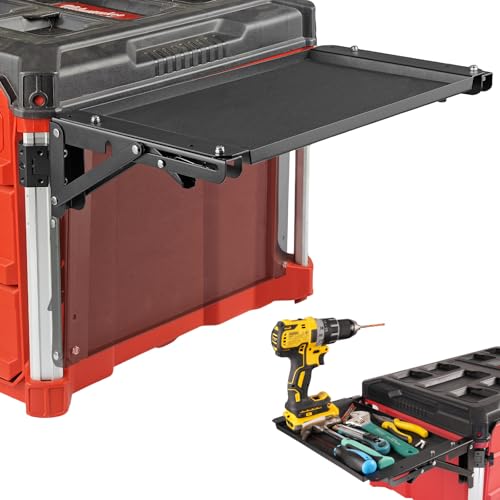
Transform your Milwaukee Packout Toolbox into a versatile mobile workstation with the Folding Magnetic Side Table. This accessory allows you to perform repairs, assembly, and maintenance with ease. Its foldable design saves space, folding down when not in use for organized transport. The impact-absorbing, rubber-coated tray protects your tools while reducing noise. Plus, the powerful magnetic tool tray securely holds your essentials, ensuring you won’t lose them during projects. Specifically designed for the Packout system, it integrates seamlessly into your workspace, enhancing efficiency and functionality for all your tasks. Upgrade your setup and work smarter today!
Best For: Professionals and DIY enthusiasts who require a portable and efficient workspace for repairs and assembly tasks using the Milwaukee Packout Toolbox.
Pros:
- Space-saving design: Folds down when not in use, making it easy to transport and store.
- Impact-absorbing: Rubber-coated tray protects tools and minimizes noise during use.
- Powerful magnetic tray: Keeps tools securely in place, reducing the risk of loss during projects.
Cons:
- Limited compatibility: Exclusively designed for Milwaukee Packout, not suitable for other toolbox brands.
- Potential bulkiness: May add extra weight to the Packout toolbox when attached.
- Price point: Depending on budget, it might be considered an additional expense for some users.
Mate Studio Stand-A SSD Expansion Dock for Mac Studio
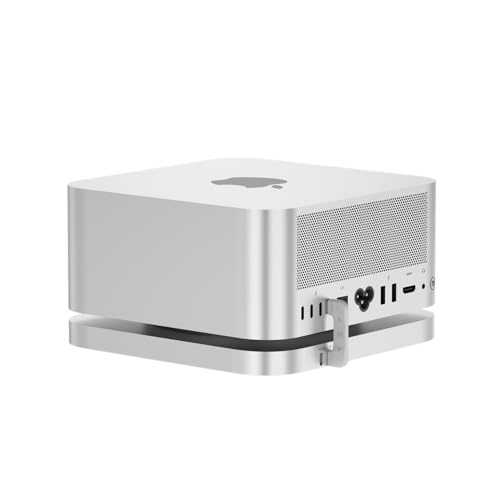
For professionals juggling massive data sets, the Mate Studio Stand-A SSD Expansion Dock for Mac Studio is a game-changer. This sleek aluminum alloy dock offers dual PCIe x2 M.2 slots, supporting up to 16TB of high-speed storage. With sequential read speeds reaching 3600MB/s via USB-C, it’s perfect for 4K/8K video, CAD, and AI datasets. The integrated PD 3.0 port guarantees efficient power delivery, making it ideal for high-demand drives. Its optimized cooling design promotes heat dissipation, guaranteeing consistent performance. This cost-effective solution is a smart alternative to internal upgrades for expanding your Mac Studio’s capabilities.
Best For: Professionals handling massive data sets such as 4K/8K video, CAD, and AI datasets who require scalable and high-speed storage solutions.
Pros:
- High-Speed Performance: Achieves sequential read speeds up to 3600MB/s with compatible SSDs, enhancing productivity.
- Dual Expansion Capability: Supports up to 16TB of storage through two M.2 slots, offering ample space for demanding applications.
- Efficient Power Delivery: Integrated PD 3.0 port ensures consistent power for high-demand drives, maintaining performance during intensive tasks.
Cons:
- Limited to M.2 NVMe SSDs: Only compatible with specific types of SSDs, which may limit expansion options for some users.
- Professional Use Focused: Best suited for professionals, which may not appeal to casual users needing simpler storage solutions.
- Initial Investment: Although cost-effective compared to internal upgrades, the initial purchase may still be significant for budget-conscious individuals.
YAODHAOD PCIe Slot SSD Mounting Bracket (Universal, 2.5″/3.5″)

Looking to maximize your desktop’s storage capacity? The YAODHAOD PCIe Slot SSD Mounting Bracket is your perfect solution. This universal bracket accommodates both 2.5-inch and 3.5-inch SSDs or HDDs, allowing you to add extra storage without sacrificing valuable drive bays. By utilizing unused PCI expansion slots, you can achieve a cleaner setup and improved cable management. Made from durable metal alloy, it guarantees heat dissipation and protects your drives effectively. Compatible with most desktop cases and motherboards, this bracket is ideal for PC enthusiasts keen to enhance their storage options and optimize internal space.
Best For: PC enthusiasts looking to maximize storage capacity while maintaining an organized setup.
Pros:
- Universal compatibility with both 2.5-inch and 3.5-inch SSDs or HDDs.
- Utilizes unused PCI expansion slots, freeing up valuable drive bays for other components.
- Durable metal alloy construction aids in heat dissipation and protects hard drives effectively.
Cons:
- May require additional tools for installation, which could be inconvenient for some users.
- Limited to desktop cases; not suitable for laptops or smaller form factor PCs.
- Does not include screws or mounting hardware, necessitating separate purchase.
meatanty Dual Monitor Stand Riser with USB Ports and Charging Pad

The Meatanty Dual Monitor Stand Riser with USB Ports and Charging Pad is perfect for busy professionals who need a functional workspace without sacrificing style. This versatile stand supports two monitors up to 27 inches and can hold up to 66 pounds. With its unique 3-in-1 design, you get two pull-out drawers for organizing office supplies, four USB ports for connecting devices, and a 15W charging pad for quick device charging. Made from high-quality metal, it promotes correct posture and keeps your workspace tidy. It’s an ideal addition to any office, home, or gaming setup, enhancing both efficiency and aesthetics.
Best For: Busy professionals, students, and gamers who need a functional and organized workspace.
Pros:
- Unique 3-in-1 design includes storage drawers, USB ports, and a charging pad for convenience.
- Supports dual monitors up to 27 inches, enhancing productivity and workspace efficiency.
- Made from high-quality metal for durability and promotes better posture while working.
Cons:
- May be too large for smaller desks or limited workspace environments.
- Limited charging capacity at 15W might not be sufficient for all devices.
- The design may not appeal to everyone’s aesthetic preferences.
Factors to Consider When Choosing Workstation Storage Expansion Accessories
When choosing workstation storage expansion accessories, you need to take into account several key factors. Think about your space availability, compatibility with your devices, and the load capacity requirements. Additionally, installation ease and the material’s durability can greatly impact your overall setup.
Space Availability Considerations
Before diving into workstation storage expansion accessories, it’s important to measure your available desk space to guarantee the accessory fits perfectly. Next, consider the weight capacity of the storage solution; some can hold up to 55 lbs while others support lighter items. This will influence your choice based on what you plan to store. Evaluate design features like clamp-on installation options that save space by utilizing areas beneath your desk. Also, check the thickness compatibility of mounting solutions, which usually ranges from 0.4 to 2.4 inches for secure attachment. Finally, assess the overall footprint of the accessory to avoid clutter and maintain an organized workspace, as some options may take up more vertical or horizontal space than you expect.
Compatibility With Devices
Choosing the right workstation storage expansion accessory involves guaranteeing compatibility with your specific devices, whether they’re desktops, laptops, or NAS systems. Start by checking the dimensions and weight capacity of the accessory to confirm it can support your devices without damage. Make sure to evaluate the types of connections available, like USB, PCIe, or SATA, as these determine how well the accessory interfaces with your hardware. Additionally, verify that the accessory accommodates the physical size of your drives—2.5-inch or 3.5-inch—avoiding any fitting issues. Don’t forget to review installation requirements, such as desk thickness or other mounted equipment, to guarantee a seamless integration into your workstation setup. This attention to detail will maximize efficiency and functionality.
Load Capacity Requirements
Understanding load capacity requirements is essential for guaranteeing your workstation storage expansion accessories can safely support your equipment. When selecting accessories, consider the weight limits; for instance, the AMERIERGO Dual Monitor Stand supports up to 55 lbs, while the Monzlteck Adjustable Under Desk Mount accommodates devices weighing up to 22 lbs. Heavy-duty options like desk extenders or shelves typically range from 30 lbs to 55 lbs, providing stability for heavier items. Before making a purchase, assess the combined weight of all items you plan to store. Always check the manufacturer’s specifications for maximum load limits to avoid potential damage to both the accessory and your devices. Prioritizing load capacity guarantees a safe and efficient workspace.
Installation Ease and Convenience
When it comes to workstation storage expansion accessories, installation ease and convenience play a significant role in your overall experience. Look for options with tool-free installation methods, allowing you to set things up quickly without extra tools or drilling. Consider accessories with adjustable components to guarantee they fit various desk thicknesses and configurations, enhancing your installation process. Opt for designs that come with all necessary hardware to minimize setup time. Evaluate products with clear, simple installation instructions, making it easier for anyone to assemble, regardless of skill level. Finally, choose accessories with versatile mounting options, like clamp-on or sliding mechanisms, to facilitate easy adjustments and repositioning whenever you need.
Material Durability and Stability
While evaluating workstation storage expansion accessories, material durability and stability are essential factors that can greatly impact your setup. High-quality materials like heavy-duty steel or metal alloys enhance stability and resist wear over time. Accessories made from these durable materials can often support heavier weights, with some designed to hold up to 55 lbs or more, ensuring functionality under load. Look for reinforced frames and rounded-edge designs that not only contribute to stability but also enhance safety, preventing scratches on your devices. Effective heat dissipation is vital as well; materials that maintain their shape protect sensitive components during prolonged use. Choosing solidly constructed products optimizes internal space and improves cable management, leading to a cleaner, more organized workspace.
Design and Aesthetics
Design and aesthetics play an essential role in how you perceive your workspace, as the right workstation storage expansion accessories can seamlessly integrate into your existing decor. With various colors, finishes, and styles available, you can choose options that enhance your space. Many accessories feature sleek designs crafted from materials like metal or wood, improving both functionality and visual appeal. When selecting, consider size and dimensions to guarantee they complement your layout without overwhelming it, promoting a clean look. Incorporating ergonomic elements not only elevates aesthetics but also boosts comfort, making storage easy to access and improving posture. Opting for customizable features like adjustable heights allows for a personalized touch while maximizing efficiency and organization.
Versatility for Multiple Uses
Choosing the right workstation storage expansion accessories is crucial for maximizing your workspace’s functionality. Look for options that can accommodate multiple device types, like CPUs and gaming consoles, to enhance versatility. Accessories with adjustable dimensions or customizable configurations can fit various desk setups, guaranteeing ideal space utilization. Multi-tiered or compartmentalized solutions effectively organize office supplies and equipment, promoting a cleaner workspace. Additionally, consider accessories that allow for dual installation modes or different mounting orientations, making them suitable for diverse tasks and environments. Finally, verify your chosen accessories have a robust weight capacity and durable construction, so they can safely hold everything from everyday essentials to heavier equipment. This versatility will keep your workspace efficient and adaptable.
Cable Management Features
When selecting workstation storage expansion accessories, effective cable management features can greatly enhance your workspace’s organization and productivity. Accessories with dedicated cable slots or compartments keep cables hidden and tangle-free, reducing clutter. Look for products that offer adjustable shelving or mounting options to route cables easily, ensuring accessibility while maintaining a neat appearance. Integrated cable management solutions not only prevent wear and tear on your cables but also extend their lifespan and performance. Additionally, a well-designed cable management system enhances safety by minimizing tripping hazards from loose cables on the floor. By prioritizing these features, you’ll create a more efficient and visually appealing workstation, allowing you to focus on your tasks without distraction.