When you’re looking to build a powerful workstation that can handle both professional tasks and gaming, choosing the right dual system PC case is essential. These cases offer advanced cooling, modular designs, and stylish aesthetics that elevate your setup. However, with so many options available, how do you know which ones truly stand out? Let’s explore the top contenders that can enhance your computing experience and cater to your specific needs.
Thermaltake Core W200 Extreme Water Cooling Super Tower Computer Case
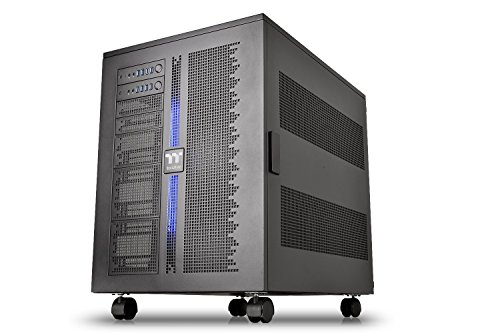
If you’re a PC enthusiast looking to build a powerful workstation, the Thermaltake Core W200 Extreme Water Cooling Super Tower Computer Case is your go-to choice. This case supports dual systems, letting you install two motherboards and power supplies in a back-to-back setup. Its fully modular design gives you the flexibility to customize your build. With extreme water cooling support for up to two 600mm radiators, you can guarantee exceptional performance. Plus, the large acrylic window and customizable LED lighting add a personal touch. With ample storage options and excellent airflow, this case truly meets your workstation needs.
Best For: PC enthusiasts seeking a powerful and customizable workstation with dual system capabilities.
Pros:
- Dual system capability allows for back-to-back installation of two motherboards and power supplies, enhancing versatility.
- Extreme water cooling support for up to two 600mm radiators ensures optimal cooling performance for high-end components.
- Fully modular design offers flexibility in configuration, making it ideal for custom liquid cooling builds and unique setups.
Cons:
- Large form factor may not fit in smaller spaces or standard desks, limiting placement options.
- Potentially complex assembly due to the dual system setup and modular components, which may be challenging for beginners.
- Price point may be higher compared to standard cases, making it less accessible for budget-conscious builders.
ASUS ProArt PA602 E-ATX PC Case

The ASUS ProArt PA602 E-ATX PC Case stands out as an exceptional choice for creators and professionals who demand both performance and aesthetics in their workstation builds. With a spacious full tower design, it supports extended ATX motherboards and features nine internal bays for ample storage. Cooling is a breeze, thanks to dual 200mm front fans and a 140mm rear exhaust, ensuring your components stay cool. The sleek ProArt aesthetic enhances any setup, while tool-less PCIe mounting and built-in wheels provide convenience. Plus, the front panel includes a 20Gbps USB-C port for quick access. Enjoy a reliable, stylish foundation for your workstation.
Best For: Creators and professionals seeking a high-performance, aesthetically pleasing PC case for their workstation builds.
Pros:
- Spacious full tower design accommodates extended ATX motherboards and offers nine internal bays for extensive storage.
- Efficient cooling system with dual 200mm front fans and a 140mm rear exhaust ensures optimal temperature control for components.
- User-friendly features such as tool-less PCIe mounting and built-in wheels enhance convenience for transport and assembly.
Cons:
- Heavy weight of 35.5 pounds may make it less portable for some users.
- Limited USB ports compared to some other cases, which may be a drawback for users with multiple peripherals.
- Higher price point may not be suitable for budget-conscious consumers.
DIY Aluminium PC Open Case Test Bench

For those who thrive on building and customizing their own setups, the DIY Aluminium PC Open Case Computer Chassis Test Bench offers an excellent solution. Weighing just 2 kilograms and made from durable aluminum, this sleek black case accommodates various motherboard types, including Extended ATX and Mini ITX. You’ll appreciate the unlimited graphics card length and four internal bays for HDDs or SSDs. Plus, it supports both water and air cooling, ensuring effective temperature management for high-performance builds. With easy installation and a 30-day return policy, you’ll find this test bench perfect for your next DIY project.
Best For: DIY enthusiasts who enjoy building and customizing their own PC setups.
Pros:
- Lightweight and durable aluminum design makes it easy to transport and set up.
- Supports a wide range of motherboard types and unlimited graphics card length for flexible customization.
- Effective cooling options for both water and air cooling, ensuring optimal performance.
Cons:
- No specific warranty information provided, which may be a concern for some buyers.
- Limited color options, as it is only available in black.
- May not offer the same level of protection as traditional closed cases, exposing components to dust and damage.
MUSETEX ATX PC Case with 7 PWM ARGB Fans

Designed for enthusiasts who demand high performance and efficient cooling, the MUSETEX K2 ATX PC Case stands out with its impressive seven PWM ARGB fans. With customizable lighting modes and exceptional airflow, this mid-tower case enhances both aesthetics and functionality. You’ll appreciate its compatibility with ATX, Micro-ATX, and Mini-ITX motherboards, plus ample space for GPUs up to 400 mm. The I/O panel features Type-C and USB 3.0 ports, while the dust filter keeps your system clean. Weighing just 15 pounds and backed by a 10-year warranty, it’s a solid choice for any workstation setup.
Best For: Gaming enthusiasts and PC builders seeking a high-performance case with exceptional cooling and customizable aesthetics.
Pros:
- High airflow and cooling efficiency with seven PWM ARGB fans, ensuring optimal performance during intense gaming sessions.
- Ample compatibility with multiple motherboard sizes (ATX, Micro-ATX, Mini-ITX) and support for large GPUs up to 400 mm.
- Built-in features such as a dust filter and customizable RGB lighting enhance both functionality and appearance.
Cons:
- Weight of 15 pounds may make it less portable for users who frequently move their setups.
- Limited CPU cooler height support at 165 mm could restrict options for larger cooling solutions.
- Potential noise level of 20.819 dB(A) might be noticeable in quiet environments, depending on the fan speeds.
darkFlash C280 E-ATX Full-Tower PC Gaming Case

If you’re looking to showcase your high-performance components while ensuring ideal cooling, the darkFlash C280 E-ATX Full-Tower PC Gaming Case stands out with its stunning 270° panoramic tempered glass design. This white beauty supports E-ATX, ATX, mATX, and ITX motherboards, offering vertical GPU mounting for a dramatic effect. With extreme cooling flexibility, you can fit up to 10 fans or a 360mm radiator, optimizing airflow effortlessly. Maintenance is a breeze, thanks to dual quick-release dust filters and tool-free access. Built from robust SPCC steel, it’s as durable as it is stylish, making it a perfect choice for your workstation setup.
Best For: Gamers and PC enthusiasts looking for a stylish and spacious case that supports high-performance components and excellent cooling options.
Pros:
- 270° panoramic tempered glass design offers an unobstructed view of RGB components and builds.
- Extreme cooling flexibility with the capacity to support multiple fans and large radiator configurations.
- Easy maintenance with tool-free access and dual quick-release dust filters.
Cons:
- Weight of 17.6 pounds may make it less portable for frequent movers.
- Limited internal bay capacity for additional storage options, which may not suit users with extensive data needs.
- Single USB 3.0 port might be insufficient for users needing multiple high-speed connections.
ASUS TUF Gaming GT502 Horizon ATX Mid-Tower PC Case

The ASUS TUF Gaming GT502 Horizon ATX Mid-Tower PC Case stands out for professionals seeking efficient cooling solutions, thanks to its dual-chamber design that separates CPU and GPU cooling zones. With a boundless panoramic design and tempered glass panels, you’ll enjoy an unobstructed view of your setup. It supports up to 13 fans and offers ample expansion with 13 slots, making it perfect for high-performance builds. The tool-free side panels and modular design simplify installation, while the USB 10 Gbps Type-C port guarantees speedy connectivity. Weighing just 13 kilograms, this case combines functionality and style seamlessly.
Best For: Professionals and gamers seeking an efficient and stylish PC case with superior cooling capabilities and a modular design.
Pros:
- Ample Cooling Support: Optimized for both air and water cooling with the capacity to support up to 13 fans.
- User-Friendly Features: Tool-free design allows for easy access and installation, while the modular components streamline hardware setup.
- High-Speed Connectivity: Front panel includes a USB 10 Gbps Type-C port for rapid data transfer.
Cons:
- Weight: At 13 kilograms, it may be heavier compared to some other mid-tower cases.
- Price Point: May be considered expensive for budget-conscious builders.
- Limited Color Options: Primarily available in a single color scheme, which might not appeal to all aesthetics.
H2 HYXN ATX PC Case with 8 PWM ARGB Fans

For those seeking a robust and visually striking workstation, the H2 HYXN ATX PC Case stands out with its impressive eight pre-installed PWM ARGB fans, ensuring ideal cooling and airflow. This mid-tower case supports a variety of motherboards, including E-ATX and Mini ITX, while accommodating GPUs up to 455mm. Its dual-chamber design enhances thermal performance and cable management, making assembly a breeze. You’ll appreciate the ample connectivity options, including a Type-C port. Weighing only 11 pounds, it’s easy to move, while the tempered glass panels showcase your setup beautifully. Overall, it’s a solid choice for any serious workstation build.
Best For: Gamers and PC builders looking for a stylish and efficient case that supports high-performance components and offers excellent cooling options.
Pros:
- Excellent Cooling: Comes with eight pre-installed PWM ARGB fans for optimal airflow and temperature management.
- Versatile Compatibility: Supports a wide range of motherboard sizes and accommodates long GPUs, making it flexible for various builds.
- User-Friendly Design: Features a dual-chamber layout for improved cable management and easy assembly.
Cons:
- Weight: At 11 pounds, it may be heavier than some other mid-tower cases, making it less portable.
- Limited PSU Space: The PSU compartment only supports power supplies up to 220mm, which may restrict options for some high-end builds.
- Average Customer Rating: With a rating of 3.8 out of 5 stars from 33 reviews, some users may have experienced issues or dissatisfaction.
MUSETEX ATX Mid Tower Computer Case with ARGB Fans

Designed for those who demand both aesthetics and functionality, the MUSETEX ATX Mid Tower Computer Case with ARGB Fans stands out as a premier choice for workstation setups. Its dual tempered glass panels provide a stunning 270° view of your hardware, while the spacious layout simplifies component installation. With six pre-installed PWM ARGB fans, you’ll enjoy excellent cooling and airflow. The case supports a variety of hardware configurations, accommodating GPUs up to 420mm and top-mounted liquid radiators. Plus, the upgraded I/O panel guarantees quick connectivity, making it an ideal fit for both gaming and office needs.
Best For: Gamers and PC enthusiasts seeking a visually appealing case with excellent cooling performance and ample space for high-end components.
Pros:
- Spacious layout allows for easy installation and organization of various hardware configurations.
- Pre-installed PWM ARGB fans provide strong cooling performance and enhanced airflow with a stylish aesthetic.
- Upgraded I/O panel offers quick connectivity options, including USB 3.0 and Type-C ports, ideal for modern devices.
Cons:
- Dual tempered glass panels may be prone to fingerprints and dust, requiring regular cleaning.
- Limited cable management options might make it challenging to achieve a tidy interior for some users.
- Potentially high price point compared to other mid-tower cases with fewer features.
H1 HYXN ATX PC Case with 7 PWM ARGB Fans

Offering a stunning panoramic view and exceptional cooling capabilities, the H1 HYXN ATX PC Case with 7 PWM ARGB Fans is perfect for gamers and workstation users who demand both performance and aesthetics. This dual cavity mid-tower case features tempered glass panels, providing durability and sound insulation. You’ll appreciate the vertical airflow design that supports up to three 360mm radiators and accommodates GPUs up to 400mm. With customizable ARGB lighting and multiple USB ports, connectivity is a breeze. Weighing in at just 11 pounds, it’s manageable, while HYXN’s 30-day return policy guarantees your satisfaction with this high-rated case.
Best For: Gamers and workstation users who prioritize performance, aesthetics, and efficient cooling in their PC builds.
Pros:
- Panoramic Design: Features tempered glass panels that offer a stunning 270° view of the interior components.
- Exceptional Cooling: Supports multiple cooling configurations, including up to three 360mm radiators and seven pre-installed ARGB PWM fans for optimal airflow.
- Spacious and Versatile: Accommodates a variety of motherboards, GPUs up to 400mm, and offers flexible storage options for HDDs and SSDs.
Cons:
- Weight: At 11 pounds, it may be heavier than some competing cases, making it less portable.
- Limited Warranty: Only a 30-day return policy, which may not be sufficient for some users who want more extended assurance.
- Cooling Limitations: While it supports large radiators, users with high-performance setups may still find the cooling options limited compared to larger cases.
NZXT H5 Flow 2024 Compact ATX Mid-Tower Gaming Case

The NZXT H5 Flow 2024 Compact ATX Mid-Tower Gaming Case stands out for its exceptional cooling capabilities, making it an ideal choice for workstation enthusiasts who demand efficient performance. With an ultra-fine mesh design and perforated PSU shroud, you’ll enjoy peak airflow and dust filtration. It includes two quiet 120mm fans and supports liquid cooling radiators up to 360mm in front. Plus, seamless cable management keeps your setup tidy. Compatible with multiple motherboard sizes and featuring ample expansion options, this case is both versatile and functional. With a 2-year warranty, you can trust its quality and durability.
Best For: The NZXT H5 Flow 2024 is best for gamers and workstation enthusiasts seeking a compact case that prioritizes cooling efficiency and cable management.
Pros:
- Exceptional Cooling: Features ultra-fine mesh panels and a perforated PSU shroud for maximum airflow and dust filtration.
- Versatile Compatibility: Supports various motherboard sizes (E-ATX, ATX, Micro-ATX, Mini-ITX) and has ample expansion options.
- Quiet Operation: Comes with two 120mm quiet airflow fans that help maintain a serene environment during intense gaming sessions.
Cons:
- Weight: At 8 kilograms, it may be heavier compared to some other mid-tower cases.
- Limited Front USB Ports: Only offers 2 x USB 2.0 and 2 x USB 3.0 ports, which may not be sufficient for users with multiple peripherals.
- No RGB Lighting: Lacks built-in RGB lighting features, which may be a drawback for users looking for aesthetic customization options.
Factors to Consider When Choosing Dual System PC Cases for Workstations
When choosing a dual system PC case for your workstation, you’ll want to contemplate several key factors. Think about cooling efficiency, motherboard compatibility, and storage capacity to guarantee peak performance. Don’t forget to assess the design aesthetics and cable management features that suit your workspace.
Cooling System Efficiency
To guarantee peak performance in your dual system PC, you’ll want to prioritize cooling system efficiency right from the start. Look for cases that support advanced cooling configurations, allowing multiple radiators—up to 600mm or more—ensuring enhanced thermal management. Opt for models that accommodate both air and liquid cooling solutions, as this flexibility can enhance airflow and heat dissipation. Modular designs are a big plus, enabling custom fan placements that boost cooling efficiency for both systems. Pay attention to features like perforated panels and dedicated airflow channels, which help maintain ideal temperatures and reduce thermal throttling. Finally, consider cases with advanced fan management systems that dynamically adjust speeds based on temperature, balancing efficient cooling with minimal noise.
Motherboard Compatibility Options
Choosing the right motherboard compatibility options is crucial for maximizing your dual system PC’s potential. Look for cases that support various motherboard sizes, including Mini ITX, Micro ATX, ATX, and E-ATX formats. This flexibility allows you to tailor your setup to your specific needs. Additionally, consider cases designed to house two separate motherboards, configured back-to-back, to optimize space. Always check the specifications to verify both systems’ I/O panels and power supplies fit without obstructing airflow. Dedicated mounting points for GPUs and other components are necessary, as these can vary between motherboard types. Finally, prioritize designs that facilitate efficient cooling solutions, especially if you’re using high-performance components that generate considerable heat.
Storage Capacity and Layout
After confirming your motherboard is compatible, it’s time to think about storage capacity and layout for your dual system PC case. You should consider the number of internal bays available, as many cases offer multiple 3.5-inch HDD and SSD slots to meet extensive data needs. A modular design can enhance storage capacity, allowing you to customize the layout for efficient use of space. Look for cases with hidden SSD/HDD back panel locations to keep things tidy while maximizing storage. Verify the dimensions and arrangement of the bays support easy access for hassle-free installation or replacement. Finally, remember that adequate airflow and cooling are essential, as a well-organized storage layout helps with heat dissipation, preventing potential thermal issues.
Design Aesthetics and Build
Designing a dual system PC case goes beyond just functionality; aesthetics play a crucial role in creating an impressive workstation. Consider cases with large acrylic windows or tempered glass panels that showcase your internal components and customizable lighting. You’ll appreciate the flexibility offered by fully modular designs, allowing various configurations to fit your unique needs. With support for motherboard sizes from Mini ITX to XL-ATX, compatibility with diverse components is seamless. Look for tool-less mounting systems and easy-access panels, which make installation and maintenance user-friendly. Additionally, prioritize airflow and cooling efficiency; many cases support multiple fan configurations and radiator placements, ensuring your high-performance build stays cool and runs smoothly while looking great.
Cable Management Features
When it comes to building a dual system workstation, effective cable management is essential for maintaining ideal airflow and reducing clutter. Look for cases that offer spacious cable routing channels and hooks, allowing you to organize and conceal cables for a cleaner aesthetic. Dedicated compartments for power supplies and cables are beneficial too, as they help separate the two systems and minimize interference between components. Tool-less access to panels and modular design elements can simplify cable adjustments during installation and maintenance. Additionally, cases with built-in Velcro straps or cable ties enhance efficiency by securely bundling cables, preventing tangling. Prioritizing these features will lead to a more organized, functional dual system build.
Airflow and Ventilation
Airflow and ventilation are critical factors to evaluate in dual system PC cases, especially since effective cooling can prevent overheating of high-performance components. Look for cases that support multiple fans or radiator configurations, as this boosts cooling efficiency for both systems. A dual-chamber design can further enhance thermal performance by separating CPU and GPU cooling zones, maximizing airflow management. Opt for cases with perforated panels and mesh designs to improve air intake and exhaust, ensuring better ventilation and dust filtration. Additionally, built-in fan hubs allow for centralized fan control, making it easier to manage airflow based on your system’s demands and thermal conditions. Prioritizing these features will help maintain peak performance in your workstation.
Warranty and Support Terms
Warranty and support terms are vital considerations when choosing a dual system PC case for your workstation. First, check the manufacturer’s warranty duration, which usually ranges from one to three years. Confirm it covers defects in materials and workmanship, along with specific terms regarding parts and labor for repairs. Also, look for return policies that allow full refunds within a set timeframe, typically around 30 days, for defective or damaged products. Review the customer support options available, as responsive support is essential for troubleshooting issues with dual setups. Finally, verify the warranty includes provisions for upgrades or modifications, since dual system cases often undergo frequent changes in components and configurations.