If you need a compact dock that can travel as easily as your laptop, the right Thunderbolt 4 mini dock travel setup can make a huge difference. It can add displays, ports, Ethernet, and charging without turning your bag into a mess.
In this roundup, we focused on portable models that balance size, speed, and real-world usefulness for work on the go.
Best 9 Thunderbolt 4 Mini Dock Travel Picks for 2026
Best for Plug-and-Play Travel

- Bus-powered design removes the need for an extra power brick
- Dual HDMI supports up to two 4K displays on compatible systems
- Integrated Thunderbolt cable makes it easy to pack and carry
Best For: Travelers and hybrid workers who want a compact dock for displays, Ethernet, and quick setup.
Best Compact Thunderbolt Dock
IOGEAR Quantum Thunderbolt 4 MINI Dock

- Mini form factor is easy to pack for travel
- Thunderbolt 4 support for modern laptops
- Works well for a clean, portable desk setup
Best For: Frequent travelers and hybrid workers who want a compact Thunderbolt 4 dock.
Best for Power Users
UGREEN Revodok Max 208 Thunderbolt 4 Dock

- 3x Thunderbolt 4 ports for 40Gbps expansion
- Dual 4K or single 8K display support on compatible systems
- 85W charging with Gigabit Ethernet and USB-A ports
Best For: Power users who want a travel-ready Thunderbolt 4 dock with strong charging and multi-display support.
Best for Triple Displays
TobenONE 14-in-1 Triple 4K Dock
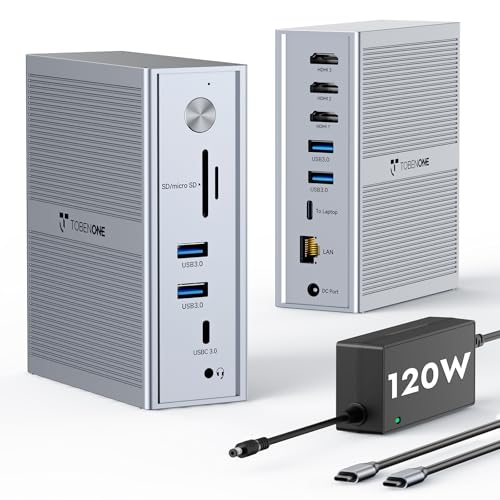
- Supports 3 external monitors via DisplayLink
- Includes 100W charging, 5 USB ports, and Ethernet
- Compatible with MacBook M1–M5, Mac mini, and Windows
Best For: Users who want a compact productivity dock with triple-monitor support and solid port expansion.
Best for Dual-Monitor Power Users

- Dual DisplayPort support for up to 2x 4K@60Hz
- 100W pass-through charging and Gigabit Ethernet
- Compact, travel-friendly design with stowable cable
Best For: Travelers who want a compact Thunderbolt 4-compatible dock for dual monitors and charging.
Best for Everyday Use
Satechi Thunderbolt 4 Dock Slim Hub Pro

- Four Thunderbolt 4 ports for fast expansion
- Single 8K or dual 4K display support
- 96W charging with 150W GaN power supply
Best For: Traveling professionals and creators who need a compact, high-performance Thunderbolt 4 dock.
Best for Dual-Display Desk-to-Go
Belkin Thunderbolt 3 Dock Mini HD

- Dual 4K@60Hz monitor support
- Compact tethered cable for easy travel
- 40Gbps Thunderbolt with Ethernet and USB-A
Best For: Travelers and hybrid workers who want a compact dual-monitor dock with wired networking.
Best for Dual 4K Desk Setups
StarTech Dual-Monitor Thunderbolt Mini Dock

- Dual 4K 60Hz HDMI outputs
- Driverless setup on Windows, Mac, and Ubuntu
- 11-inch cable reduces port strain on the road
Best For: Frequent travelers who need a compact dock for dual 4K monitors and wired Ethernet.
Best for Dual-Display Travel
Cable Matters 8-in-1 USB4 Dual HDMI Hub

- Dual HDMI with up to 2x 4K@60Hz on supported systems
- 100W Power Delivery for single-cable charging
- Compact 4 oz design with retractable cable
Best For: Traveling professionals who want a compact dock for dual monitors, charging, and Ethernet.
Best for Plug-and-Play Travel – OWC Thunderbolt mini Dock
If you want a compact thunderbolt 4 mini dock travel option that skips the wall wart, the OWC Thunderbolt mini Dock is a simple way to add HDMI, Ethernet, and extra USB ports to a USB-C/Thunderbolt laptop. Its bus-powered design and integrated Thunderbolt cable make it especially convenient for work setups where you need a fast grab-and-go dock.
Best For: Travelers and hybrid workers who want a lightweight dock for dual displays, wired networking, and quick desk setups without carrying extra power.
Pros:
- Bus-powered, so there’s no external adapter to pack
- Dual HDMI outputs support up to two 4K displays at 60Hz on compatible systems
- Built-in 7.2-inch Thunderbolt cable keeps the setup tidy and portable
- Includes Gigabit Ethernet plus USB-A ports for essential peripherals
Cons:
- Not a full Thunderbolt 4 dock in the newest-spec sense; it uses Thunderbolt 3 connectivity
- Display support depends heavily on host hardware and driver compatibility
- Only one USB 3.0 port and one USB 2.0 port, so expansion is limited
As a thunderbolt 4 mini dock travel pick, this OWC model stands out for simplicity: it powers from the laptop, travels easily, and covers the basics well. It’s best if you prioritize a compact dock for displays and networking over maximum port count or cutting-edge bandwidth.
Best Compact Thunderbolt Dock – IOGEAR Quantum Thunderbolt 4 MINI Dock
If you want a compact hub for a thunderbolt 4 mini dock travel setup, the IOGEAR Quantum Thunderbolt 4 MINI Dock is built for portability without turning your bag into a cable kit. It’s a practical choice for travelers who need a clean desktop connection for peripherals, displays, and power delivery in a small footprint.
Best For: Frequent travelers, hybrid workers, and anyone who wants a lightweight Thunderbolt 4 dock that packs easily.
Pros:
- Mini form factor is easier to pack than full-size docks
- Thunderbolt 4 support suits modern laptops and fast workflows
- Good fit for a streamlined travel desk setup
Cons:
- Smaller docks usually mean fewer ports than larger desktop models
- May be overkill if you only need basic charging and USB expansion
For a thunderbolt 4 mini dock travel kit, this model makes sense if portability matters as much as performance. It’s aimed at users who want a simple, high-speed dock they can move between home, office, and hotel rooms without carrying a bulky adapter.
Best for Power Users – UGREEN Revodok Max 208 Thunderbolt 4 Dock
If you want a thunderbolt 4 mini dock travel setup that still feels like a full desktop hub, the UGREEN Revodok Max 208 is built for serious expandability. It combines 40Gbps Thunderbolt 4 ports, 85W laptop charging, wired Ethernet, and multi-display support in a compact dock you can pack for work trips or hot-desking.
Best For: MacBook Pro/Max and Windows users who need a travel-friendly Thunderbolt 4 dock with strong charging and display support.
Pros:
- 3 Thunderbolt 4 ports plus 3 USB-A ports give you flexible high-speed connectivity.
- Supports dual 4K@60Hz or a single 8K display on compatible systems.
- 85W charging helps power your laptop from one dock instead of carrying extra adapters.
- Gigabit Ethernet adds a reliable wired connection for office or hotel setups.
Cons:
- Requires the included GaN charger to operate, so it is not truly single-cable.
- Display behavior varies by laptop, especially on base M-chip Macs and USB-C-only devices.
- It is powerful for travel, but less minimal than simpler compact mini docks.
For buyers who prioritize performance over absolute portability, this is a strong thunderbolt 4 mini dock travel option. It is especially appealing if you need fast ports, dependable charging, and multi-monitor flexibility in one compact dock.
Best for Triple Displays – TobenONE 14-in-1 Triple 4K Dock
If your thunderbolt 4 mini dock travel search is really about turning one USB-C port into a full desktop setup, this TobenONE dock is built for that job. It supports three external monitors through DisplayLink, adds plenty of USB ports and Ethernet, and includes a 120W adapter so it can power your laptop while you work.
Best For: MacBook, Mac mini, and Windows users who need a compact but powerful dock for triple-monitor productivity at a desk or in a carry-on setup.
Pros:
- Triple-display support with 3x HDMI, including 4K output on the main screen
- Works with M1–M5 MacBooks and Windows laptops via DisplayLink driver
- Includes 100W laptop charging, 5 USB ports, and Gigabit Ethernet
- Good fit for multitasking setups with code, charts, editing, or office work
Cons:
- Requires DisplayLink driver installation before use
- Not the smallest option if you want a truly travel-light dock
- Triple-monitor performance is more about productivity than gaming-grade refresh rates
For buyers who want maximum screen space from a single USB-C connection, this is a strong productivity dock. It’s less about ultra-portable minimalism and more about getting a dependable desktop-style setup from a thunderbolt 4 mini dock travel search.
Best for Dual-Monitor Power Users – Cable Matters 8-in-1 USB4 Hub
If you need a thunderbolt 4 mini dock travel companion that can still drive serious desktop-style setups, this Cable Matters USB4 hub is a strong fit. It combines dual DisplayPort video, 100W pass-through charging, Ethernet, and extra USB ports in a compact body that packs easily into a laptop bag.
Best For: Travelers and mobile professionals who want a compact Thunderbolt 4-compatible dock for dual monitors, wired networking, and one-cable charging.
Pros:
- Dual DisplayPort outputs with up to 2x 4K@60Hz on supported USB4/Thunderbolt 4 hosts
- 100W USB-C power delivery keeps your laptop charged over a single cable
- Includes Gigabit Ethernet plus extra USB-A, USB-C, and USB 2.0 ports
- Very portable at 3.9 x 2.7 x 0.6 inches and 4 oz, with stowable cable design
Cons:
- No HDMI output, so DisplayPort cables are required
- macOS and Thunderbolt 3/USB-C compatibility is more limited than on Windows USB4/TB4 systems
- Top-end 4K@240Hz or 8K@60Hz output needs the right host, cable, and display support
For buyers comparing a thunderbolt 4 mini dock travel option, this model stands out for portability and real multi-monitor capability, but only if your laptop and displays match its DisplayPort-first setup. It is best viewed as a compact productivity dock rather than a universal plug-and-play pick for every platform.
Best for Everyday Use – Satechi Thunderbolt 4 Dock Slim Hub Pro
If you want a thunderbolt 4 mini dock travel setup that still delivers serious desk-dock performance, the Satechi Thunderbolt 4 Dock Slim Hub Pro is built for exactly that balance. It keeps the footprint compact while adding four Thunderbolt 4 ports, 100W-class laptop charging, and high-end display support for Mac and Windows workflows.
Best For: Travelers and hybrid workers who need a compact Thunderbolt 4 dock with strong charging, fast data, and multi-monitor support.
Pros:
- Four Thunderbolt 4 ports plus USB 3.2 Gen 2 for flexible high-speed connectivity
- Supports up to single 8K or dual 4K displays, depending on device compatibility
- Includes a 150W GaN power supply and 96W upstream charging for laptops
- Works with macOS, Windows, USB4, and USB-C systems
Cons:
- Not a true plug-and-play solution for every multi-monitor setup
- Mac display support varies by chip model, especially on base M1/M2 systems
- More expensive than simpler travel hubs
Overall, this is a strong pick if you need a premium thunderbolt 4 mini dock travel option that can replace a larger desktop dock without giving up speed or display flexibility. It is especially compelling for users who move between home, office, and hotel setups and want one compact hub that can handle demanding peripherals.
Best for Dual-Display Desk-to-Go – Belkin Thunderbolt 3 Dock Mini HD
If you want a compact dock that can sit in a bag but still handle a real desk setup, the Belkin Thunderbolt 3 Dock Mini HD is a practical fit for a thunderbolt 4 mini dock travel workflow. It gives you dual 4K monitor support, Ethernet, and a single-cable connection, so you can move from home office to hotel desk with less unpacking.
Best For: Travelers and hybrid workers who need a small, wired dock for dual monitors, Ethernet, and fast data on macOS or Windows laptops.
Pros:
- Dual 4K@60Hz monitor support for a strong portable workstation setup
- Compact, tethered-cable design that’s easy to pack and deploy
- 40Gbps Thunderbolt performance for fast transfers and responsive peripherals
- Includes Ethernet plus USB-A ports for wired networking and accessories
Cons:
- Thunderbolt 3-era design, so it is not a newer Thunderbolt 4 dock
- Short tethered cable may limit placement flexibility on deeper desks
- M1 MacBooks won’t support dual extended displays through this dock
For users prioritizing portability over a huge port count, this is a smart middle ground: small enough for travel, but capable enough to anchor a productive desk. If your thunderbolt 4 mini dock travel search is really about reliable dual-display support in a compact body, this Belkin model still earns a close look.
Best for Dual 4K Desk Setups – StarTech Dual-Monitor Thunderbolt Mini Dock
If you want a compact dock for a thunderbolt 4 mini dock travel setup, this StarTech mini dock is a practical pick for driving dual 4K displays over a single Thunderbolt connection. It keeps the essentials—video, Ethernet, and a couple of USB ports—in a small, bus-powered design that’s easy to pack for office, studio, or hotel-desk use.
Best For: Frequent travelers and desk-based users who need dual 4K monitors, wired networking, and a simple plug-and-play dock without extra software.
Pros:
- Dual 4K 60Hz HDMI outputs for a clean two-monitor workstation
- Driverless setup works across Windows, macOS, and Ubuntu
- 11-inch attached cable adds reach and reduces strain on laptop ports
- Includes Gigabit Ethernet plus USB-A ports for core peripherals
Cons:
- Not a charging dock, so you’ll still need your laptop power adapter
- HDMI-only video may limit setups that prefer DisplayPort
- Compatibility and display support vary by Mac model and host port type
For buyers comparing a thunderbolt 4 mini dock travel option, this one stands out for reliability and simple setup rather than maximum port count. It’s a strong fit if your priority is carrying one small dock that can still handle dual 4K screens and wired networking at the destination.
Best for Dual-Display Travel – Cable Matters 8-in-1 USB4 Dual HDMI Hub
If you want a thunderbolt 4 mini dock travel option that can handle serious multitasking, this Cable Matters USB4 hub is built for the job. It combines dual HDMI output, 40Gbps bandwidth, 100W charging, and wired Ethernet into a compact package that’s easy to pack for office trips, hotel desks, or hybrid work setups.
Best For: Frequent travelers who need a compact dual-monitor dock with strong charging and enough ports for a full portable workstation.
Pros:
- Supports dual 4K@60Hz output on compatible systems, or up to 8K@30Hz / 4K@120Hz single-display setups
- 100W USB-C Power Delivery keeps a laptop charged through one cable
- Includes USB-A, USB-C, and Gigabit Ethernet for a more complete travel setup
- Compact 4 oz design with a retractable cable for easier packing
Cons:
- macOS display support is limited to one extended display
- Doesn’t replace a full desktop dock if you need lots of legacy ports
- Best performance depends on a USB4 or Thunderbolt 4-capable laptop
For road warriors who value monitor flexibility over maximum port count, this is a smart thunderbolt 4 mini dock travel pick. It’s especially appealing if you want a small dock that can still power a laptop, connect peripherals, and drive a productive dual-screen setup on the go.
How We Picked the Best Thunderbolt 4 Mini Dock Travel
We prioritized compact designs, strong port selection, reliable display support, and practical charging for everyday travel. For a Thunderbolt 4 Mini Dock Travel pick, the best options are the ones that reduce cable clutter while still handling monitors, accessories, and networking without compromise.
We also favored docks that are easy to pack, broadly compatible, and useful for hybrid work, whether you connect at a desk, in a hotel, or between meetings.
Quick Comparison
When comparing these docks, look first at display output. Some models are better for dual 4K setups, while others offer higher refresh rates or even single 8K support. Next, check power delivery, since charging wattage affects whether the dock can keep a laptop topped up during long work sessions.
Also consider port mix. USB-A, USB-C, Ethernet, and extra Thunderbolt or USB4 ports can determine whether a dock replaces several adapters at once.
Key Buying Factors for Thunderbolt 4 Mini Dock Travel
Display Needs
If you use one external monitor, many compact docks will be enough. If you need two screens, confirm whether the dock supports dual 4K at 60Hz on your operating system and laptop model. Display support can vary by host device, especially on Macs and some USB-C systems.
Charging and Power Delivery
For travel, higher wattage is usually better, especially for performance laptops. A dock with 85W to 100W power delivery is a strong target for most portable workflows, but always match the dock to your laptop’s power requirements.
Port Selection
Look for a mix that fits your routine. USB-A is still useful for drives and peripherals, Ethernet helps in hotels and offices, and extra USB-C or Thunderbolt ports improve future flexibility. A smaller port count can still be enough if your setup is simple.
Driverless Vs. DisplayLink
Driverless options are often simpler for travel because they reduce setup friction. DisplayLink-based docks can be more flexible for multi-monitor use, but they may require software and additional setup. Choose based on how much convenience matters versus display versatility.
Who Should Buy Which Thunderbolt 4 Mini Dock Travel?
Choose a compact Thunderbolt 4 dock if you want the cleanest all-around travel experience and mostly use standard office peripherals. Pick a USB4 or hybrid model if you want a wide mix of compatibility and display options. If your laptop needs serious multi-monitor support, a more feature-rich dock may be worth the extra size.
For light travelers, the best choice is usually the smallest dock that still covers your essential ports. For power users, prioritize stable display output and enough charging to keep your laptop running without a separate power brick.