If you need a MacBook Pro setup that can drive three external displays, a DisplayLink dock is often the simplest path. It can unlock the extra monitor support, add charging, and consolidate your desk into one cable.
Below, we’ve focused on options that balance display output, power delivery, port selection, and Mac compatibility so you can choose with confidence.
Best 10 Macbook Pro Docking Stations for Three Monitors Displaylink Picks for 2026
Best for Triple-Monitor MacBook Setups
WAVLINK 12-in-1 DisplayLink Dock

- Triple-display support up to 4K@60Hz
- 100W PD charging with 5Gbps USB and Ethernet
- Works with Mac and Windows via DisplayLink
Best For: MacBook users who need one dock for three external monitors and charging.
Best for Triple 4K Macs
iVANKY 20-in-1 DisplayLink Dock

- Triple 4K@60Hz display support with DisplayLink
- 20-in-1 design with 10Gbps USB and 2.5GbE
- 180W adapter delivers up to 100W laptop charging
Best For: MacBook Pro or Air users who want a triple-monitor DisplayLink dock with lots of ports.
Best for Triple-Display Mac Expansion

- Triple 4K@60Hz display support with DisplayLink
- 100W laptop charging plus Ethernet and card readers
- Works with MacBook M1/M2/M3/M4 and Windows
Best For: MacBook users who need dependable three-monitor support and a full-featured desk dock.
Best for Triple-Display Mac Flexibility
MacBook 3-Monitor DisplayLink Dock

- DisplayLink-enabled triple external display support
- 3 HDMI + 2 DisplayPort for flexible monitor setups
- 130W power supply and wide port selection
Best For: MacBook users who need a flexible triple-monitor dock with strong charging and broad connectivity.
Best for Triple-Display Mac Productivity
WAVLINK Triple Monitor DisplayLink Dock

- Triple 4K@60Hz display support
- 100W charging with 160W adapter
- 6 USB ports, Ethernet, and audio
Best For: MacBook Pro users who need a DisplayLink dock for three external monitors and desktop-style connectivity.
Best for Dual-Monitor Expansion
Plugable UD-3900 Docking Station

- 2x HDMI outputs for dual-screen setups
- 6 USB ports plus Ethernet and audio
- Mac and Windows support with DisplayLink
Best For: MacBook Pro owners who need a dependable dual-monitor dock with lots of ports.
Best for Triple/Quad Displays
TobenONE DisplayLink Docking Station

- Up to 4 external displays at 4K@60Hz
- 20 ports including HDMI, DP, USB, SD, Ethernet
- 100W laptop charging with 150W power supply
Best For: MacBook Pro and Mac mini users who need a multi-monitor DisplayLink dock with lots of expansion.
Best for Triple-Screen Mac Workstations
TobenONE 14-in-1 Triple 4K Dock
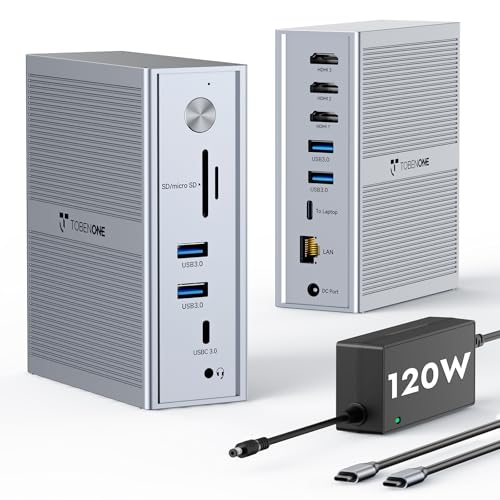
- Triple-monitor DisplayLink support for MacBook M1–M5 and Windows laptops.
- 120W power adapter provides up to 100W charging for many laptops.
- 5 USB ports and Gigabit Ethernet make it a true desk hub.
Best For: MacBook Pro users and remote workers who want a triple-monitor DisplayLink dock with strong charging and lots of ports.
Best for Triple-Monitor Mac Workflows
Plugable 13-in-1 Triple Monitor Dock

- Up to three 4K 60Hz displays
- 3 HDMI + 3 DisplayPort outputs
- 100W USB-C charging with 13-in-1 expansion
Best For: MacBook Pro users who need a DisplayLink dock for triple-monitor productivity and full workstation connectivity.
Best for Maximum Display Expansion – TobenONE DisplayLink Triple Monitor Dock
If you want one dock to handle a busy multi-screen desk, this TobenONE model is a strong fit among macbook pro docking stations for three monitors displaylink. It uses DisplayLink to power triple 4K external displays from a single USB-C connection, while also adding a large set of ports for storage, peripherals, Ethernet, and charging.
Best For: MacBook Pro or MacBook Air users who need a true triple-monitor workstation with lots of expansion ports and a single-cable setup.
Pros:
- Supports triple 4K extended displays on Mac, with up to four on compatible Windows setups
- 18 total ports, including HDMI, DisplayPort, USB-C, USB-A, SD/TF, and Ethernet
- Includes a 120W power adapter with up to 100W laptop charging
- Good fit for productivity-heavy workflows like trading, editing, and development
Cons:
- Requires DisplayLink driver installation before use
- Not compatible with Linux/Unix systems
- Streaming services like Netflix may not work due to DisplayLink limitations
For buyers comparing macbook pro docking stations for three monitors displaylink, this TobenONE dock stands out for sheer port count and flexible monitor output. It is more of a workstation hub than a minimal travel accessory, so it makes the most sense if you want maximum expansion from one dock.
Best for Triple-Monitor MacBook Setups – WAVLINK 12-in-1 DisplayLink Dock
If you need macbook pro docking stations for three monitors displaylink, this WAVLINK dock is built around that use case. It adds three external display support with up to 4K@60Hz outputs, while also giving you USB, Ethernet, audio, and 100W laptop charging in one hub. For Mac users who want a more desktop-like setup without juggling multiple adapters, it covers the essentials well.
Best For: MacBook Pro or MacBook Air users who want a single DisplayLink dock for triple-monitor productivity.
Pros:
- Supports triple-display setups with up to 4K@60Hz output
- Includes 100W PD charging plus 5Gbps USB ports and Gigabit Ethernet
- Works across macOS, Windows, Chrome OS, and more
- Good fit for turning a MacBook into a full workstation
Cons:
- Triple-monitor support depends on DisplayLink and compatible USB-C/DP Alt Mode support
- Requires installing DisplayLink software for Mac use
- Bulkier than simpler single-cable travel docks
This is a strong option if your priority is macbook pro docking stations for three monitors displaylink and you want charging, display expansion, and wired connectivity in one device. It’s especially appealing for users who need three screens more than they need a compact footprint.
Best for Triple 4K Macs – iVANKY 20-in-1 DisplayLink Dock
If you’re comparing macbook pro docking stations for three monitors displaylink, this iVANKY dock is built for exactly that workflow: a triple-display setup with DisplayLink support, plenty of high-speed ports, and enough power to handle a busy desk. It’s a strong fit for MacBook Pro/Air users who want a single hub for monitors, storage, networking, and charging.
Best For: MacBook Pro or MacBook Air users who need a DisplayLink dock for three external monitors and a full desktop-style port lineup.
Pros:
- Supports triple 4K@60Hz output with the proper DisplayLink driver installed
- 20-in-1 layout gives you fast USB, SD/TF, and 2.5GbE networking options
- 180W power adapter can deliver up to 100W laptop charging
- Works with both Mac and Windows setups for flexible desk use
Cons:
- Requires DisplayLink driver installation before the video outputs will work
- May be more dock than you need if you only use one or two displays
For users who want macbook pro docking stations for three monitors displaylink without giving up fast data, wired Ethernet, or strong charging, this iVANKY model is a practical all-in-one pick. Just be ready for the driver step, since that’s what unlocks the full multi-monitor setup.
Best for Triple-Display Mac Expansion – WAVLINK Triple 4K Dock
If you want one of the more capable macbook pro docking stations for three monitors displaylink, this WAVLINK dock is built for multi-screen productivity on MacBook M1/M2/M3/M4 and Windows laptops. It combines DisplayLink-based triple-display support with a wide port mix, 100W laptop charging, and wired networking for a cleaner desk setup.
Best For: MacBook users who need reliable three-monitor output, especially on Apple silicon models that normally limit native external displays.
Pros:
- Supports triple 4K@60Hz output with DisplayLink plus HDMI/DisplayPort options.
- Offers 100W charging, Ethernet, SD/TF slots, and multiple USB ports.
- Works across Mac, Windows, Chrome OS, and more with the DisplayLink driver.
Cons:
- Requires DisplayLink driver installation before full monitor support works.
- One of the HDMI/DP combinations must be chosen rather than using every video port at once.
- Not compatible with iPad, iOS, or Linux/Unix systems.
For buyers comparing macbook pro docking stations for three monitors displaylink, this model stands out for combining serious display flexibility with practical everyday ports. It is a strong fit if your priority is running multiple monitors from a MacBook without giving up charging or peripheral connectivity.
Best for Triple-Display Mac Flexibility – MacBook 3-Monitor DisplayLink Dock
If you need macbook pro docking stations for three monitors displaylink, this AUIMCE dock is built around that exact use case. Its DisplayLink-based design helps MacBook Pro, MacBook Air, and Windows laptops drive up to three external displays, while the mix of HDMI and DisplayPort outputs gives you more ways to match your monitor setup.
Best For: MacBook users who want a practical triple-monitor dock with flexible display outputs, solid charging, and plenty of everyday ports.
Pros:
- DisplayLink support enables triple external displays on compatible Macs, including Apple silicon models.
- Offers 3 HDMI and 2 DisplayPort connections for flexible monitor combinations.
- Includes a 130W power supply to help charge the laptop and dock together.
- Good port selection for peripherals, wired networking, and faster data transfers.
Cons:
- Triple-monitor mode depends on DisplayLink software, so setup is less plug-and-play than basic USB-C docks.
- Users connecting through a USB-A host port may be limited to two external monitors.
- Bulky power brick and full feature set may be more than casual users need.
For shoppers comparing macbook pro docking stations for three monitors displaylink, this dock stands out for its broad compatibility and unusually flexible video outputs. It is a strong fit if you want one hub that can handle a multi-monitor desk setup without giving up charging or core connectivity.
Best for Triple-Display Mac Productivity – WAVLINK Triple Monitor DisplayLink Dock
If you’re comparing macbook pro docking stations for three monitors displaylink, this WAVLINK dock stands out for its triple-4K output, broad Mac compatibility, and enough ports to replace a full desktop hub. It’s a practical fit for users who need three external screens, wired networking, and fast peripheral expansion from a single USB-C connection.
Best For: MacBook Pro users who want a DisplayLink dock for triple-monitor setups, especially for productivity-heavy workspaces.
Pros:
- Supports up to three external monitors at 4K@60Hz
- 100W laptop charging with a 160W power adapter
- Six USB Gen2 ports plus Gigabit Ethernet and audio
- Works with recent MacBook models using DisplayLink drivers
Cons:
- Requires DisplayLink driver installation before use
- Some video outputs depend on your laptop’s USB-C/Alt Mode support
- Not compatible with iPadOS or Unix/Linux systems
For buyers focused on macbook pro docking stations for three monitors displaylink, this model is a strong value if you need more display flexibility than macOS natively offers. It’s especially appealing when you want a single dock to handle monitors, charging, USB accessories, and Ethernet without juggling multiple adapters.
Best for Dual-Monitor Expansion – Plugable UD-3900 Docking Station
If you want a straightforward way to add external displays and a full desktop port set, the Plugable UD-3900 is a practical pick for macbook pro docking stations for three monitors displaylink-style setups when dual displays are enough. It uses DisplayLink, so macOS needs a driver install, but it makes it easy to connect HDMI monitors, Ethernet, audio, and multiple USB peripherals from one cable.
Best For: MacBook Pro users who need a reliable USB dock for dual-monitor productivity, lots of peripherals, and simple office workflows.
Pros:
- 2x HDMI outputs plus Gigabit Ethernet, audio, and 6 USB ports
- Works with Mac and Windows via DisplayLink driver support
- Good for productivity setups and everyday office use
- Hybrid USB-A/USB-C connection keeps it broadly compatible
Cons:
- Only supports dual displays, not a true three-monitor output
- No laptop charging support
- Not ideal for gaming or HDCP-protected video
For buyers comparing macbook pro docking stations for three monitors displaylink, this model makes the most sense if you can live with two external screens and want dependable expansion rather than maximum monitor count. It is a solid, budget-conscious workspace dock, but not the right choice for triple-display goals.
Best for Triple/Quad Displays – TobenONE DisplayLink Docking Station
If you’re comparing macbook pro docking stations for three monitors displaylink, this TobenONE dock is a strong fit for users who want plenty of display outputs and broad port expansion in one unit. It supports up to four external displays, delivers 4K@60Hz on each screen, and adds enough USB, card reader, Ethernet, and audio connections to simplify a busy desktop setup.
Best For: MacBook Pro and Mac mini users who need a DisplayLink dock for multiple 4K monitors, fast charging, and a full desk hub.
Pros:
- Supports up to 4 external displays with 4K@60Hz output
- Includes a wide 20-port layout with HDMI, DP, USB, SD/microSD, Ethernet, and audio
- Provides up to 100W laptop charging plus 18W phone charging
- Works across Windows, macOS, Chrome OS, and USB-C/Thunderbolt systems
Cons:
- DisplayLink driver installation is required before use
- HDCP is not supported
- MacBook compatibility varies by chip, with M1 models limited to 3 extended displays
For buyers specifically shopping macbook pro docking stations for three monitors displaylink, this dock stands out for its unusually broad port count and flexible multi-display support. It’s a practical choice if you want one dock to handle monitors, peripherals, storage, and charging at the same time.
Best for Triple-Screen Mac Workstations – TobenONE 14-in-1 Triple 4K Dock
If you need macbook pro docking stations for three monitors displaylink, this TobenONE dock is a practical pick for turning a single USB-C port into a full desktop-style setup. It supports three external displays through DisplayLink, adds wired networking and multiple USB ports, and includes enough power to keep a MacBook Pro charged while you work.
Best For: MacBook Pro users, remote workers, and creators who want a reliable triple-monitor DisplayLink dock with strong charging and plenty of ports.
Pros:
- Supports 3 external monitors via DisplayLink, including M1–M5 MacBooks that normally only allow one.
- Includes a 120W adapter with up to 100W laptop charging, so you may not need your Mac charger.
- Five USB ports plus Gigabit Ethernet make it useful as a full desk hub, not just a display adapter.
Cons:
- Requires DisplayLink driver installation, so setup is less plug-and-play than native docks.
- Triple-display output is best for productivity work; it is not ideal for high-refresh gaming.
This is a strong fit if your priority is macbook pro docking stations for three monitors displaylink and you want a dock that combines triple-screen support with real everyday workstation features. It’s especially compelling for users who need more than just video output and want charging, Ethernet, and USB expansion in one unit.
Best for Triple-Monitor Mac Workflows – Plugable 13-in-1 Triple Monitor Dock
If you need macbook pro docking stations for three monitors displaylink, this Plugable dock is built for that job first. It supports up to three 4K displays at 60Hz, adds 13 total ports for peripherals and networking, and can deliver up to 100W charging over USB-C for a clean single-cable setup.
Best For: MacBook Pro users who want a DisplayLink dock for triple-monitor productivity, especially office, finance, and development setups.
Pros:
- Drives up to three 4K 60Hz monitors from one USB-C connection
- Includes 3 HDMI and 3 DisplayPort outputs for flexible monitor matching
- Offers 100W Power Delivery plus wired Ethernet, audio, and SD card expansion
- Works with Mac, Windows, and ChromeOS when DisplayLink drivers are installed
Cons:
- DisplayLink drivers are required on macOS
- Not ideal for protected streaming content because HDCP is not supported
- Front USB-C port is accessory-only, not for laptop charging
This is a strong fit if your priority is macbook pro docking stations for three monitors displaylink and you want reliable expansion rather than a minimalist travel dock. It is especially compelling for users who value monitor flexibility, laptop charging, and a lot of wired ports in one workstation hub.
How We Picked the Best Macbook Pro Docking Stations for Three Monitors Displaylink
For Macbook Pro Docking Stations for Three Monitors Displaylink, the most important factors were real-world Mac support, stable triple-display output, charging wattage, and the mix of video ports. We also looked for docks that are practical for daily use, not just impressive on paper.
Because DisplayLink relies on software, we favored models with clear compatibility for MacBook Pro users, broad USB-C/Thunderbolt support, and enough bandwidth for office work, creative multitasking, and mixed peripheral setups.
Quick Comparison
Most of the best options fall into three buckets: value-focused docks with the essentials, midrange models with stronger port variety and charging, and premium stations with higher power delivery or more expansion. If you want the simplest setup, choose a dock with triple 4K support, a strong power adapter, and the fewest adapter chain requirements.
Key Buying Factors for Macbook Pro Docking Stations for Three Monitors Displaylink
DisplayLink Compatibility
Check that the dock explicitly supports DisplayLink on macOS and that you are comfortable installing the required driver. This is what enables multiple external displays on many MacBook Pro models that otherwise have limited native monitor support.
Video Outputs and Monitor Layout
Look at whether the dock uses HDMI, DisplayPort, or a mix of both. Triple 4K@60Hz support is ideal if you want smooth desktop use, but your actual setup depends on the monitors you own and the cables you prefer.
Power Delivery
Charging matters as much as video. A dock with 100W or more of power delivery is usually a better fit for a MacBook Pro, especially if you plan to keep the laptop connected to multiple peripherals all day.
Ports and Expansion
Beyond displays, consider USB-A, USB-C, Ethernet, SD or microSD, and audio. A better dock reduces hub clutter and makes the workstation more reliable.
Host Connection and Mac Model
Not every dock is ideal for every MacBook. Confirm support for your chip generation and port type, especially if you use an M-series machine and want three external displays through DisplayLink.
Who Should Buy Which Macbook Pro Docking Stations for Three Monitors Displaylink?
If you want the most straightforward triple-monitor Mac setup, choose a DisplayLink dock with strong power delivery and native-looking video output support. If you care more about peripheral variety, prioritize a dock with more USB ports, Ethernet, and card readers. If your setup needs room to grow, a higher-end station with extra display outputs and greater wattage will age better.
In short, the best Macbook Pro Docking Stations for Three Monitors Displaylink are the ones that match your monitor inputs, provide enough charging headroom, and support your exact Mac workflow without unnecessary complexity.