If your homelab is starting to feel cramped on 1GbE, a 10Gb upgrade can make backups, VM storage, and large file transfers dramatically smoother. The right adapter depends on your PC, expansion options, and how much speed you actually need.
We focused on practical choices for homelab builders, from internal PCIe cards to portable USB-C and Thunderbolt adapters, so you can match performance with your hardware instead of overbuying.
Best 10 10gb Ethernet Adapters for Homelab PCs Picks for 2026
Best Multi-Gig Bundle
8-Port 2.5GbE Switch + 10G SFP+ Adapter
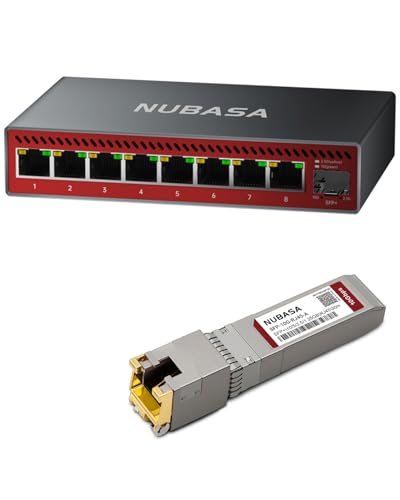
- 8-port 2.5GbE switch for multiple wired devices
- Includes 10G SFP+ to RJ45 copper transceiver
- Plug-and-play unmanaged setup for homelabs
Best For: Homelab users who want a simple multi-gig switch plus a ready-made 10G copper uplink.
Best for Thunderbolt PCs

- Bus-powered 10GbE adapter for Thunderbolt/USB4 systems
- Supports 10Gb, 5Gb, 2.5Gb, 1Gb, and 100Mb links
- Compact aluminum design with passive cooling
Best For: Homelab PCs with Thunderbolt or USB4 that need an external 10GbE connection.
Best for Windows Homelabs

- 10GbE RJ-45 with multigig fallback speeds
- Includes standard and low-profile brackets
- Supports VLAN tagging and jumbo frames
Best For: Windows desktops and servers that need a copper 10GbE upgrade.
Best Thunderbolt Pick
OWC Thunderbolt 4 10G Ethernet Adapter

- Over 900MB/s real-world transfer speeds
- 10GbE with auto-negotiation down to 100MbE
- Works with Thunderbolt Mac and Windows PCs
Best For: Thunderbolt-equipped homelab PCs and workstations that need fast external 10GbE.
Best for Broad Compatibility
TP-Link TX401 10Gb PCIe Network Card

- Up to 10 Gbps speeds for homelab transfers
- Windows, Server, and Linux support
- Includes CAT6A cable and both bracket sizes
Best For: Homelab builders who want a broadly compatible 10GbE PCIe adapter with extras included.
Best 10GbE USB-C Pick

- Realtek RTL8159 for stable 10GbE connectivity
- Fanless aluminum design for quiet cooling
- Works with Windows, Linux, macOS, and Thunderbolt devices
Best For: Homelab users who need external 10GbE on USB-C laptops or compact systems.
Best with Extra Features
5-Port 2.5GbE Switch + 10G SFP+ Adapter

- 5 x 2.5GbE RJ45 ports for fast local networking
- Includes 10G/5G/2.5G/1G auto-sensing copper transceiver
- Unmanaged, plug-and-play setup for homelabs and NAS
Best For: Homelab users who want a bundled multi-gig switch and 10G uplink path in one easy upgrade.
Best PCIe 4.0 x1 Pick
10G PCIe Network Card with Realtek RTL8127
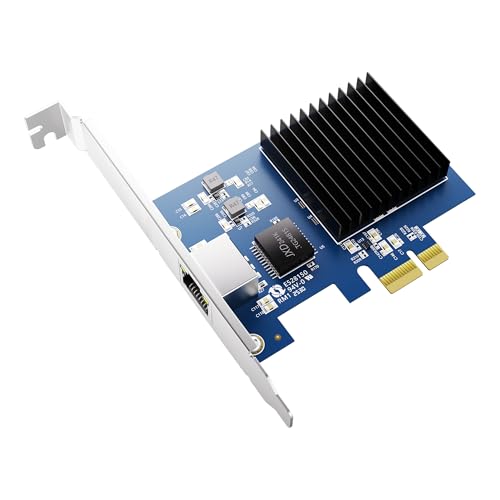
- Fits a PCIe 4.0 x1 slot for easier upgrades
- Offers 10/5/2.5/1Gbps multi-gig compatibility
- Broad support for Windows, Linux, ESXi, and TrueNAS
Best For: Homelab builders and PC owners who need 10GbE in a lane-efficient card.
Best Multi-Gig Bundle – 8-Port 2.5GbE Switch + 10G SFP+ Adapter
If you’re shopping for 10gb ethernet adapters for homelab pcs, this bundle stands out because it combines a full 8-port 2.5GbE switch with a 10G SFP+ to RJ45 transceiver in one buy. It’s a practical way to upgrade a small lab, NAS setup, or workstation cluster without piecing together separate parts.
Best For: Homelab users who want a simple multi-gig switch plus a ready-made 10G copper uplink for NAS, servers, and PCs.
Pros:
- 8x 2.5GbE ports give every wired device a meaningful speed bump
- Included 10G SFP+ to RJ45 adapter adds a flexible high-speed uplink option
- Unmanaged, plug-and-play design keeps setup fast and low effort
- Good fit for NAS transfers, gaming PCs, and media-heavy home networks
Cons:
- 2.5GbE ports are not full 10GbE for direct PC connections
- Unmanaged switch offers no VLAN or advanced traffic controls
- The bundle is more useful for shared network expansion than a single-PC 10G upgrade
For buyers comparing 10gb ethernet adapters for homelab pcs, this is a smart value pick if you need both access ports and an uplink path in one compact package. It won’t replace a true 10GbE NIC for every workstation, but it does simplify a fast, flexible homelab backbone.
Best for 5GbE Upgrades – 5Gb USB-C/USB-A to RJ45 Adapter
If you need a simple wired networking upgrade for a workstation, this 5Gb USB to Ethernet adapter is a practical pick to consider alongside 10gb ethernet adapters for homelab pcs. It won’t replace a true 10GbE card, but it can deliver a big jump over built-in gigabit or flaky Wi‑Fi when your router, cable, and host device support 5Gbps.
Best For: Laptops, mini PCs, and desktop users who want a fast plug-and-play Ethernet adapter for everyday transfers, streaming, and remote access.
Pros:
- 5Gbps networking is a strong step up from standard 1GbE.
- USB-C and USB-A support makes it easy to use with older and newer systems.
- Aluminum housing helps with heat dissipation during long sessions.
- Broad OS support, including Windows, macOS, iPadOS, Linux, and Chrome OS.
Cons:
- Not a true 10GbE adapter, so it’s not ideal for maximum-throughput homelab builds.
- Full speed depends on a 5Gbps-capable port, router, cable, and network plan.
- Some Windows setups may need a one-time driver install.
For buyers comparing 10gb ethernet adapters for homelab pcs, this model makes more sense as a fast 5GbE stopgap or a lighter-duty upgrade for devices that don’t need full 10Gb throughput. It’s a sensible choice if you want better-than-gigabit performance without moving to a more expensive NIC.
Best for Thunderbolt PCs – CalDigit Connect 10G
If your homelab PC has Thunderbolt or USB4 with PCIe support, the CalDigit Connect 10G is a fast, compact way to tap 10GbE without opening the case. Among 10gb ethernet adapters for homelab pcs, it stands out for bus-powered convenience, broad NBASE-T compatibility, and straightforward performance with 10Gb switches, NAS boxes, and other high-speed gear.
Best For: Homelab users with Thunderbolt/USB4 desktops or laptops who want an external 10GbE adapter for NAS access, backups, and fast transfers.
Pros:
- Supports 10Gb, 5Gb, 2.5Gb, 1Gb, and 100Mb links for flexible network setups
- Bus powered, so there’s no separate power brick to manage
- Compact aluminum enclosure helps with passive cooling and portability
- Good fit for fast NAS, RAID, and workstation transfer workflows
Cons:
- Requires Thunderbolt or USB4 with PCIe support; it won’t work from plain USB-C
- Not compatible with the Apple Thunderbolt 3 to Thunderbolt 2 adapter
- Usually less universal than internal PCIe 10GbE cards for fixed homelabs
For users who need an external adapter rather than an internal NIC, this is one of the cleaner 10gb ethernet adapters for homelab pcs—especially if your system already lives on Thunderbolt or USB4 and you want a simple path to 10Gb networking.
Best for Windows Homelabs – TRENDnet 10G PCIe Adapter
If you want one of the more practical 10gb ethernet adapters for homelab pcs, this TRENDnet card is a straightforward way to turn an open PCIe x4 slot into a 10GbE RJ-45 port. It supports common multigig speeds too, so it can still negotiate cleanly with 2.5GbE, 1GbE, and 100Mb networks while adding features like VLAN tagging and jumbo frames.
Best For: Windows-based homelab desktops and servers that need a simple, copper 10GbE upgrade.
Pros:
- 10GbE RJ-45 port with backward support for 5GbE, 2.5GbE, 1GbE, and 100Mb
- Includes standard and low-profile brackets for different PC builds
- VLAN tagging and jumbo frame support help in segmented lab networks
- Built for Windows and Windows Server desktop systems
Cons:
- Requires a free PCIe x4 slot, so it is not an external plug-and-play option
- Optimized for Windows ecosystems rather than mixed-OS homelabs
- RJ-45 10GbE can run hotter and draw more power than some SFP+ cards
For buyers focused on 10gb ethernet adapters for homelab pcs, this model makes sense when you want copper cabling compatibility, Windows support, and a no-nonsense internal upgrade path. It is especially appealing if your switch or existing cabling is already built around Cat6/Cat6a.
Best Thunderbolt Pick – OWC Thunderbolt 4 10G Ethernet Adapter
If your workstation or homelab box already has Thunderbolt, this is one of the fastest and simplest 10gb ethernet adapters for homelab pcs. It supports full 10Gb/s networking, auto-negotiates down to slower speeds, and is a strong fit for large file transfers, NAS access, and high-throughput lab tasks.
Best For: Thunderbolt-equipped Mac or Windows PCs that need a reliable external 10GbE connection for fast storage, streaming, or remote lab access.
Pros:
- Real-world transfer speeds over 900MB/s for large-file workflows
- Supports 10GbE, 5GbE, 2.5GbE, 1GbE, and 100MbE auto-negotiation
- Wake-on-LAN and AVB support add flexibility for remote and pro use
- Includes a Thunderbolt cable and works with Mac or Windows systems
Cons:
- Requires a Thunderbolt 4 host port, so it is not a standard USB adapter
- More expensive than basic PCIe or USB-based 10GbE options
- External design adds another cable and device to your desk setup
For users shopping 10gb ethernet adapters for homelab pcs, this OWC unit is a performance-first choice when Thunderbolt compatibility matters more than lowest cost.
Best for Broad Compatibility – TP-Link TX401 10Gb PCIe Network Card
If you need one of the more straightforward 10gb ethernet adapters for homelab pcs, the TP-Link TX401 is an easy fit: it delivers 10GbE over PCIe, includes a CAT6A cable, and supports a wide range of Windows and Linux systems. It’s a practical choice for fast NAS transfers, virtualization hosts, and general homelab upgrades without a lot of setup drama.
Best For: Homelab builders who want a widely compatible 10GbE PCIe card with a bundled cable.
Pros:
- Up to 10 Gbps throughput for fast file transfers and local networking
- Works with Windows, Windows Server, and Linux
- Includes a CAT6A cable plus full-height and low-profile brackets
- Backwards compatible with 5G/2.5G/1G links for mixed networks
Cons:
- Requires PCIe installation, so it’s not ideal for laptops
- 10GbE performance depends on proper cabling and a capable switch
For homelab users who want a reliable PCIe upgrade rather than a niche feature set, the TX401 hits a sweet spot. Among 10gb ethernet adapters for homelab pcs, it stands out for its broad OS support, included accessories, and low-friction path to 10GbE.
Best 10GbE USB-C Pick – USB C 10G Ethernet Adapter
If you need one of the more flexible 10gb ethernet adapters for homelab pcs, this USB-C 10GbE adapter is a practical way to add wired multi-gig networking to laptops, desktops, and compact workstations. The Realtek RTL8159 chipset, fanless aluminum shell, and Thunderbolt compatibility make it a solid fit for fast NAS access, transfers, and general homelab use.
Best For: Homelab users who want a USB-C 10GbE adapter for portable systems, Thunderbolt devices, or machines without a PCIe slot.
Pros:
- Realtek RTL8159 chip is designed for stable 10GbE performance
- Fanless aluminum cooling keeps operation quiet during long transfers
- Works with Windows, Linux, macOS, and Thunderbolt systems
- Good fit for NAS access and other high-bandwidth homelab tasks
Cons:
- Real-world speeds depend heavily on USB port bandwidth and drivers
- Best results require a USB 3.2 Gen 2×2 or similarly capable setup
- Not as plug-and-play for every system as a native PCIe NIC
For 10gb ethernet adapters for homelab pcs, this is a strong external option when you want 10GbE without opening the case. It is especially appealing if you move between systems or need a quiet adapter for sustained file transfers.
Best with Extra Features – 5-Port 2.5GbE Switch + 10G SFP+ Adapter
If you’re shopping for 10gb ethernet adapters for homelab pcs, this bundle stands out because it pairs a 2.5GbE unmanaged switch with a 10G SFP+ to RJ45 transceiver in one box. It’s a practical way to add faster wired networking to a small lab, NAS, or workstation setup without piecing together multiple components.
Best For: Homelab builders who want an easy multi-gig upgrade with a ready-to-use 10G copper uplink for NAS, servers, or a core switch.
Pros:
- 5 RJ45 ports at 2.5Gbps each for faster local transfers
- Includes a 10G/5G/2.5G/1G auto-sensing SFP+ to RJ45 adapter
- Unmanaged plug-and-play setup with no drivers or configuration
- Good fit for NAS, gaming PCs, and compact home lab networks
Cons:
- Not a true standalone adapter for a single PC
- Only one 10G uplink path via SFP+
- 2.5GbE on access ports may be limiting for full 10GbE endpoints
For buyers comparing 10gb ethernet adapters for homelab pcs, this is more of a network-building bundle than a bare adapter. That makes it especially appealing if you want a simple, low-maintenance way to upgrade a small lab with multi-gig access and a faster backbone link.
Best for Compact Builds – VunLink 10Gb PCIe NIC
If you want one of the most practical 10gb ethernet adapters for homelab pcs, this VunLink card stands out for fitting serious 10GbE performance into a PCIe 4.0 x1 slot. It’s a smart upgrade for mini PCs, ITX systems, NAS boxes, and compact servers where slot space is tight but fast file transfers still matter.
Best For: Homelab users who need a space-saving 10GbE adapter for small PCs, NAS builds, or servers with limited PCIe expansion.
Pros:
- PCIe 4.0 x1 design is ideal for compact systems with limited expansion slots
- Supports 10G/5G/2.5G/1G auto-negotiation for flexible network upgrades
- Includes low-profile and standard brackets for easy case compatibility
- Hardware offload helps keep CPU usage low during heavy transfers
Cons:
- Needs a compatible multi-gig switch or router to reach full 10GbE speeds
- RJ45 copper networking may run warmer than some SFP+ alternatives
- Best value depends on whether your homelab already has Cat5e/Cat6 wiring
This is a strong fit if you’re comparing 10gb ethernet adapters for homelab pcs and need a card that balances speed, compatibility, and small-form-factor convenience. It’s especially appealing for builders who want an easier drop-in upgrade without giving up a valuable PCIe slot.
Best PCIe 4.0 x1 Pick – 10G PCIe Network Card with Realtek RTL8127
If you’re comparing 10gb ethernet adapters for homelab pcs, this card stands out for fitting into a PCIe 4.0 x1 slot while still delivering 10GbE speeds. It’s a practical choice for compact builds, upgrade paths where lane count matters, and mixed environments that need broad OS support.
Best For: Homelab builders and PC owners who want 10GbE in a PCIe x1 slot with broad operating system compatibility.
Pros:
- PCIe 4.0 x1 design helps make 10GbE upgrades easier in lane-limited systems
- Supports 10/5/2.5/1Gbps for flexible multi-gig networking
- Realtek RTL8127 controller and wide OS support suit homelabs and servers
- Works with Windows, Linux, VMware ESXi, and TrueNAS/FreeNAS setups
Cons:
- Needs a compatible PCIe 4.0 x1 slot to make the most of its design
- Single-port card only, so it won’t add extra network connections
For 10gb ethernet adapters for homelab pcs, this is a smart lane-efficient option if you want fast wired networking without needing a wider PCIe slot. It’s especially appealing for NAS boxes, compact workstations, and general server upgrades.
How We Picked These 10gb Ethernet Adapters for Homelab PCs
We prioritized real-world homelab use over spec-sheet hype. That means checking interface compatibility, driver support, connector type, and whether the adapter is a sensible fit for a desktop, small-form-factor system, NAS, or laptop-based lab. We also looked for multi-gig fallback speeds, since many homelabs mix 1GbE, 2.5GbE, and 10GbE gear.
Quick Comparison: PCIe, Thunderbolt, and USB
PCIe adapters are usually the best value for desktops and servers because they offer stable 10Gb performance and low latency. Thunderbolt adapters are ideal for modern Macs and compact PCs without spare slots, while USB-C options trade some consistency for portability and easier setup. If your network side still needs to feed multiple devices, bundled switch-and-transceiver options can help bridge 10G copper and multi-gig endpoints.
Key Buying Factors for 10gb Ethernet Adapters for Homelab PCs
Host Interface
Match the adapter to your machine first. A PCIe x1 or x4 card is best for towers and servers; Thunderbolt is better for laptops and mini PCs; USB is the fallback for convenience.
Chipset and Driver Support
For homelabs, chipset maturity matters more than headline speed. Choose adapters with solid Windows and Linux support if you run Proxmox, TrueNAS, Unraid, or mixed-OS environments.
Speed Negotiation
Many 10Gb adapters also support 5Gb, 2.5Gb, and 1Gb links. That flexibility is useful when connecting to mixed-switch environments or when you need a temporary downgrade for older cabling or devices.
Thermals and Power
10Gb hardware can run hot. Fanless aluminum designs, good airflow, and bus-powered designs with proper cooling can improve stability during long transfers and backup jobs.
Who Should Buy Which 10gb Ethernet Adapters for Homelab PCs?
Choose PCIe if you want the best performance and lowest cost in a desktop or rackmount server. Choose Thunderbolt if you need 10Gb on a MacBook, laptop, or compact workstation. Choose USB-C if portability and quick deployment matter more than absolute consistency. If you are building a small mixed-speed lab, consider a switch bundle that helps connect 10G uplinks to 2.5GbE endpoints without replacing everything at once.
For most buyers, the best pick is the one that matches your chassis, operating system, and cabling—not the one with the biggest number on the box.