If you want faster transfers, smoother backups, and lower-latency direct connections to a Synology NAS, the right 10Gb adapter matters as much as the NAS itself.
Below, we focus on the best options for Synology direct connect setups, from native upgrade modules to PCIe, USB-C, and Thunderbolt adapters.
Best 10 10gb Ethernet Adapters for Synology Direct Connect Picks for 2026
Best Direct-Connect Upgrade
Synology 10GbE RJ-45 Upgrade Module

- Internal 10GbE RJ-45 upgrade for compatible Synology NAS units
- Supports 10/5/2.5/1GbE network speeds
- Ideal for fast transfers, editing, and backup workloads
Best For: Synology owners who want a clean, compatible 10GbE direct-connect upgrade.
Best Thunderbolt Direct-Connect Pick

- 10GbE over Thunderbolt 3/4/5 and USB4
- Bus-powered with compact aluminum housing
- Supports 10G, 5G, 2.5G, 1G, and 100Mb speeds
Best For: Thunderbolt-equipped Mac or PC users connecting directly to a Synology NAS.
Best for Synology Upgrades
Synology E10G22-T1-Mini 10GbE Adapter

- RJ-45 10GbE module for compatible Synology NAS units
- Supports 10Gbps down to 100Mbps for flexible links
- Good fit for direct-connect setups using standard Ethernet cabling
Best For: Synology owners upgrading to faster direct-connect networking over existing RJ-45 cabling.
Best for Cool, Quiet 10GbE
Cable Matters USB-C 10GbE Adapter

- Low-heat design with Realtek RTL8159 controller
- USB4 and Thunderbolt 5/4/3 compatible
- Strong fit for Synology direct-connect NAS use
Best For: Synology owners who want a quiet USB-C 10GbE adapter for direct-connect NAS transfers.
Best for Synology Compatibility
Synology E10G30-T1 10GbE Adapter

- Validated for Synology systems
- 10/5/2.5/1 Gbps auto-negotiation
- 5-year limited warranty
Best For: Synology owners who want a validated 10GbE adapter for direct-connect setups and bandwidth-heavy workflows.
Best for High-Speed Mac/NAS Transfers
ACASIS USB4 to 10Gb Ethernet Adapter

- Strong 10GbE throughput for large NAS transfers
- Plug-and-play on Mac with USB4/Thunderbolt support
- Aluminum housing helps with sustained cooling
Best For: Mac and USB4/Thunderbolt users moving large files to a Synology NAS.
Best Dual-Port Failover
Synology Dual-Port 10GbE Adapter

- Dual 10GbE SFP+ ports for throughput and redundancy
- Supports SR, LR, and DAC direct-connect options
- Purpose-built for compatible Synology NAS systems
Best For: Synology users who need a dual-port 10GbE adapter for direct-connect storage, failover, or link aggregation.
Best Value PCIe Adapter
TP-Link TX401 10GbE PCIe Network Card

- Up to 10 Gbps over RJ-45 Ethernet
- Includes CAT6A cable and dual brackets
- Works with Windows, Linux, and Server OS
Best For: Desktop users needing an affordable 10GbE PCIe card for direct Synology NAS connections.
Best All-in-One Storage Upgrade
Synology 10GbE M.2 Adapter Card
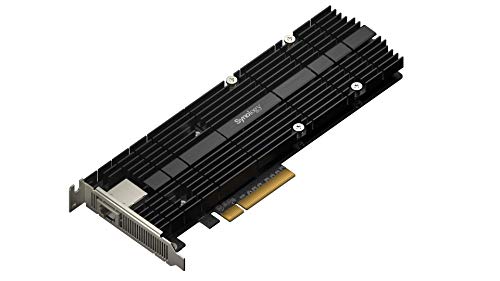
- 10GbE RJ-45 port for fast direct-connect networking
- Dual M.2 NVMe slots for cache acceleration
- Keeps main drive bays free for storage
Best For: Synology users who want networking and NVMe cache in one expansion card.
Best Dual-Port SFP+ Option

- Dual 10Gbps SFP+ ports for flexible high-speed networking
- Intel 82599 chipset for stable, widely compatible performance
- Fits PCIe x8/x16 slots and includes standard/slim brackets
Best For: Synology owners who need a dual-port SFP+ adapter for direct 10Gb networking.
Best Direct-Connect Upgrade – Synology 10GbE RJ-45 Upgrade Module
If you want one of the most straightforward 10gb ethernet adapters for synology direct connect, this Synology upgrade module keeps the setup clean by adding a single 10GbE RJ-45 port inside compatible NAS models. It’s a practical choice for fast file transfers, editing workflows, and high-speed backup jobs without adding an external adapter path.
Best For: Synology owners who want an internal 10GbE RJ-45 upgrade for direct-connect or switch-based networking.
Pros:
- Built specifically for compatible Synology systems for a clean internal install
- Supports 10/5/2.5/1GbE, so it works with a wide range of RJ-45 networks
- Good fit for video editing, backup ingestion, and other heavy transfers
- Backed by a 5-year warranty
Cons:
- Only works with select Synology models, so compatibility matters
- Provides just one 10GbE port, which may limit expansion options
For buyers comparing 10gb ethernet adapters for synology direct connect, this module stands out because it prioritizes reliability and model-specific integration over universal flexibility. If your NAS is compatible, it’s one of the cleanest ways to add 10GbE speed with minimal fuss.
Best Thunderbolt Direct-Connect Pick – CalDigit Connect 10G Adapter
If you’re comparing 10gb ethernet adapters for synology direct connect, the CalDigit Connect 10G is a strong option when your computer has a Thunderbolt 3, 4, 5, or USB4 port with PCIe support. It delivers full 10GbE performance, supports lower NBASE-T speeds too, and is a good fit for fast NAS workflows where cable-to-computer speed matters more than extra networking features.
Best For: Mac or PC users who want a bus-powered Thunderbolt adapter for direct 10GbE NAS connections.
Pros:
- Supports 10GbE plus 5Gb, 2.5Gb, 1Gb, and 100Mb speeds
- Bus-powered, compact, and easy to move between setups
- Works with Thunderbolt 3/4/5 and USB4 ports that support PCIe
- Aluminum enclosure helps with passive cooling during heavy transfers
Cons:
- Not compatible with standard USB-C 5Gb or 10Gb ports
- Requires a Thunderbolt or USB4 connection with PCIe support
- Not compatible with Apple’s Thunderbolt 3 to Thunderbolt 2 adapter
For direct-attached NAS use, this is a practical choice if you already have a Thunderbolt-capable system and want reliable 10GbE without an external power brick. It’s less of a universal plug-in solution than some Ethernet adapters, but for 10gb ethernet adapters for synology direct connect, its compatibility and bus-powered design make it especially appealing.
Best for Synology Upgrades – Synology E10G22-T1-Mini 10GbE Adapter
Synology E10G22-T1-Mini 10GbE SFP+add-in-Card 2 Port - 10GbE RJ-45 Network Upgrade Module
Check Price On AmazonIf you want a simple way to add faster wired networking to a compatible Synology setup, the E10G22-T1-Mini is a strong fit for buyers comparing 10gb ethernet adapters for synology direct connect. It supports multi-gig RJ-45 speeds, making it easier to match common home and office cabling without needing a fiber-based switch.
Best For: Synology owners who want a straightforward 10GbE upgrade that works with existing RJ-45 cabling and multi-gig networks.
Pros:
- Supports 10Gbps, 5Gbps, 2.5Gbps, 1Gbps, and 100Mbps connections
- Uses RJ-45, so it fits most existing Ethernet setups
- Designed specifically for Synology systems for reliable compatibility
Cons:
- Requires a compatible Synology NAS model
- Not the right pick if you need a universal PCIe-style adapter
For direct-connect upgrades, this module is most appealing when you want a Synology-native 10GbE path without overcomplicating the network stack. Among 10gb ethernet adapters for synology direct connect, it stands out for ease of matching to standard RJ-45 environments rather than specialized hardware.
Best for Cool, Quiet 10GbE – Cable Matters USB-C 10GbE Adapter
If you want one of the more practical 10gb ethernet adapters for synology direct connect, this Cable Matters USB-C model is a strong fit for fast NAS transfers without the usual fan noise or bulky desktop hardware. It is aimed at users who want reliable 10GbE over USB-C, with solid compatibility across modern Windows, macOS, USB4, and Thunderbolt systems.
Best For: Synology owners who want a quiet, compact USB-C 10GbE adapter for direct-connect storage access, backups, and media workflows.
Pros:
- Realtek RTL8159 controller helps keep heat and noise low.
- Works with USB4 and Thunderbolt 5/4/3 devices for broad modern compatibility.
- Good real-world throughput for NAS transfers, with strong Windows and macOS performance notes.
- Rugged aluminum body and braided cable suit travel or tight dock setups.
Cons:
- Needs a fast USB-C port to get the best 10GbE performance.
- macOS throughput may land below the theoretical 10GbE ceiling.
- May require the latest Realtek driver on some Windows or Linux setups.
For buyers comparing 10gb ethernet adapters for synology direct connect, this one stands out for its cooler operation and easy plug-and-play approach, especially if you value a compact adapter that can handle routine NAS work without much fuss.
Best for Synology Compatibility – Synology E10G30-T1 10GbE Adapter
If you want one of the most straightforward 10gb ethernet adapters for synology direct connect, the Synology E10G30-T1 is built around compatibility and dependable throughput. It’s a practical choice for owners who want to speed up backups, media workflows, and other heavy network jobs without guessing on driver support.
Best For: Synology users who want a validated, low-risk 10GbE adapter for direct-connect or small NAS network upgrades.
Pros:
- Validated for full compatibility with Synology systems
- Supports 10/5/2.5/1 Gbps and 100 Mbps auto-negotiation
- Backed by Synology’s 5-year limited warranty
- Good fit for backups, virtualization, and other bandwidth-heavy tasks
Cons:
- Single-port design only
- Best value depends on whether you specifically need Synology validation
For buyers comparing 10gb ethernet adapters for synology direct connect, this model stands out less for flashy extras and more for peace of mind. If you prioritize compatibility, warranty support, and simple deployment, it’s an easy recommendation.
Best for High-Speed Mac/NAS Transfers – ACASIS USB4 to 10Gb Ethernet Adapter
If you want one of the faster 10gb ethernet adapters for synology direct connect, this ACASIS USB4-to-Ethernet adapter is built for big file transfers, editing workflows, and other bandwidth-heavy NAS tasks. It supports USB4 and Thunderbolt 3/4/5, hits 10GbE speeds with the right network gear, and is especially appealing for Mac users who want a no-driver setup.
Best For: MacBook, Mac mini, and other USB4/Thunderbolt users connecting to a Synology NAS for fast direct transfers.
Pros:
- Real-world throughput is strong enough for large NAS transfers and editing work
- Plug-and-play on Mac, with broad USB4 and Thunderbolt compatibility
- Aluminum housing helps with heat dissipation during sustained use
- Includes a cable and 24/7 technical support
Cons:
- Windows users need to install a driver
- Full 10GbE performance depends on matching upstream/downstream network support
- Not the cheapest option if you only need occasional NAS access
For direct Synology workflows, this is a strong pick if you value speed, Mac simplicity, and a compact metal build. Among 10gb ethernet adapters for synology direct connect, it stands out most when your priority is moving large media files quickly from a USB4 or Thunderbolt laptop.
Best Dual-Port Failover – Synology Dual-Port 10GbE Adapter
If you want one of the most reliable 10gb ethernet adapters for synology direct connect, the Synology E10G30-F2 is built for high-throughput storage setups and clean integration with compatible Synology NAS models. Its dual 10GbE SFP+ ports make it a smart fit for users who need more bandwidth, redundancy, or link aggregation without guessing on compatibility.
Best For: Synology users who want a purpose-built dual-port 10GbE adapter for direct-connect storage, failover, or aggregated throughput.
Pros:
- Two 10GbE SFP+ ports for higher throughput and redundancy
- Supports SR, LR, and DAC connections for flexible direct-connect setups
- Link aggregation helps improve simultaneous performance and load balancing
- Designed specifically for compatible Synology systems
Cons:
- Requires compatible Synology hardware and SFP+ networking gear
- Not as simple as an RJ45 copper adapter for plug-and-play use
For buyers comparing 10gb ethernet adapters for synology direct connect, this model stands out because it combines dual ports, DAC support, and Synology-first design in one card. It is especially appealing if you want a cleaner upgrade path for storage performance rather than a generic adapter that may need more compatibility checking.
Best Value PCIe Adapter – TP-Link TX401 10GbE PCIe Network Card
If you want a straightforward wired upgrade for a PC that connects directly to a Synology NAS, the TX401 is a practical pick in the category of 10gb ethernet adapters for synology direct connect. It uses standard 10GBase-T, includes a CAT6A cable, and supports multi-gig fallback speeds when you need compatibility beyond 10GbE.
Best For: Desktop users and homelab builders who need a simple, affordable 10GbE PCIe adapter for direct NAS-to-PC connections.
Pros:
- Delivers up to 10 Gbps over standard RJ-45 Ethernet for easy Synology direct connect setups
- Includes a CAT6A cable and both low-profile and full-height brackets
- Supports Windows, Linux, and Windows Server systems
- Backwards compatible with 5G, 2.5G, 1G, and 100 Mbps networks
Cons:
- Requires a free PCIe slot, so it is not ideal for laptops
- Full 10GbE performance depends on proper cabling and a matching NAS port
- Basic adapter design without advanced NAS-specific features
For buyers comparing 10gb ethernet adapters for synology direct connect, the TX401 stands out as a no-fuss option that gets the essentials right: speed, cable inclusion, and broad system support. It is a strong value choice if you want to upgrade a desktop NAS link without overpaying for extras.
Best All-in-One Storage Upgrade – Synology 10GbE M.2 Adapter Card
If you want one of the most practical 10gb ethernet adapters for synology direct connect, this combo card is built for users who want faster networking and SSD cache in a single slot. It adds a 10GbE RJ-45 port plus dual M.2 NVMe slots, making it a smart way to speed up transfers and improve responsiveness without giving up main drive bays.
Best For: Synology owners who want a direct-connect 10GbE upgrade plus NVMe cache support in one expansion card.
Pros:
- Combines 10GbE networking and dual M.2 NVMe caching in one card
- Helps speed up large file transfers and random I/O performance
- Frees up primary drive bays for bulk storage
- Uses a standard RJ-45 port for straightforward cabling
Cons:
- Only compatible with select Synology models
- Overkill if you only need a simple 10GbE adapter
- Requires NVMe drives to take full advantage of the cache slots
This is a strong choice if you want a cleaner expansion path than buying separate network and cache hardware. For 10gb ethernet adapters for synology direct connect, it stands out because it solves two upgrades at once, but model compatibility should be checked carefully before buying.
Best Dual-Port SFP+ Option – VIMIN 10Gb Dual SFP+ NIC
If you’re comparing 10gb ethernet adapters for synology direct connect and your setup uses SFP+ rather than RJ45, this VIMIN card is a straightforward way to add a fast, stable 10Gb link. Its Intel 82599-based dual-port design is a solid fit for NAS-to-PC or server-to-server links, especially when you want flexibility for different PCIe slot sizes.
Best For: Synology users who need a dual-port SFP+ adapter for direct 10Gb networking with compatible switches, DACs, or transceivers.
Pros:
- Dual 10Gbps SFP+ ports for flexible high-speed networking
- Intel 82599 chipset is known for broad compatibility and stable performance
- Works with PCIe x8 and x16 slots, plus standard or slim brackets
- Supports Windows, Linux, VMware, and Windows Server
Cons:
- No RJ45 port, so it won’t connect directly with standard Ethernet cables
- Does not support 2.5GbE or 5GbE speeds
- Requires SFP+ networking gear or DACs for use with Synology
For buyers focused on 10gb ethernet adapters for synology direct connect, this is a practical SFP+ pick if you already have the right cabling or optics. It’s less convenient than an RJ45 adapter, but the dual-port layout and Intel controller make it appealing for reliable NAS networking.
How We Picked the Best 10gb Ethernet Adapters for Synology Direct Connect
We prioritized adapters that make sense for real Synology workflows: reliable 10Gbps throughput, solid chipset support, low-heat operation, and the right physical interface for the host device. For Synology NAS users, compatibility is usually the deciding factor, so we favored models that match common expansion paths and reduce setup friction.
We also considered whether the adapter suits direct-connect use cases, where a workstation links straight to the NAS for fast transfers, editing, or backup jobs without needing a 10GbE switch.
Quick Comparison
Choose native Synology upgrade modules if you want the cleanest NAS-side installation. Pick PCIe cards for desktops and servers with open slots. Use USB-C or Thunderbolt adapters if you need portable 10GbE on a Mac, laptop, or compact workstation. If your network gear is SFP+-based, an SFP+ card may fit better than RJ-45.
Key Buying Factors for 10gb Ethernet Adapters for Synology Direct Connect
Connector Type
Match the adapter to your setup: RJ-45 for standard Cat6/Cat6a cabling, or SFP+ for DAC cables and fiber-oriented environments. For direct connect, the connector choice often determines whether the link is simple and inexpensive or more specialized.
Host Compatibility
Make sure the adapter works with the computer you’ll connect to the Synology NAS. Thunderbolt and USB4 models are ideal for laptops and Macs, while PCIe cards are best for desktops and servers. Synology expansion modules are the right choice only when your NAS model supports them.
Real-World Heat and Stability
10GbE can run warm, especially in small enclosures. Look for low-heat designs, good thermal management, and proven stability under sustained transfers. This matters for backups, media libraries, and large file copies.
Cabling and Distance
For direct connection, cable type matters. RJ-45 is simplest for longer runs and familiar cabling. SFP+ DAC cables can be excellent for short direct links, while fiber is better when distance or electrical isolation is important.
Power and Noise
Bus-powered USB-C and Thunderbolt adapters are convenient and portable. PCIe and NAS-installed options are better when you want a more permanent, high-stability solution with less desktop clutter.
Who Should Buy Which 10gb Ethernet Adapters for Synology Direct Connect?
If you want the most seamless Synology-side upgrade, buy a Synology native module that matches your NAS model. If you’re building a desktop direct-connect workstation, a PCIe 10GbE card is usually the best value. If you move between workspaces or use a laptop, a USB-C or Thunderbolt adapter is the most practical option. And if your setup already uses SFP+, choose a dual-port or single-port SFP+ adapter only if it aligns with your switchless direct-connect plan and cabling.
In short, the best 10gb Ethernet Adapters for Synology Direct Connect are the ones that match your NAS, your computer, and your cable type without forcing extra complexity.