A 49-inch ultrawide can replace a dual-monitor desk setup with one seamless screen, giving you more room for windows, timelines, spreadsheets, and video calls.
Below, we focus on the best options for home-office users who want productivity first, with the right mix of resolution, USB-C convenience, and comfort.
Best 10 49 Inch Ultrawide Monitors for Work from Home Picks for 2026
Best for Power Users
INNOCN 49" OLED Ultrawide 5K2K 144Hz

- QD-OLED panel with strong contrast and color
- USB-C 90W with HDMI 2.1, DisplayPort, and USB hub
- 49-inch 32:9 screen is built for heavy multitasking
Best For: Remote workers and creators who want a premium ultrawide with docking-friendly connectivity.
Best for a Clean Single-Cable Desk
Deco Gear 49" Curved Ultrawide Monitor

- 49-inch 32:9 DQHD panel replaces a dual-monitor setup
- USB-C 65W PD and KVM reduce desk clutter
- 120Hz, Adaptive Sync, and PIP/PBP support
Best For: Remote workers and laptop users who want a wide, tidy workstation with strong multitasking features.
Best for Hybrid Desk Setups
INNOCN 49" Curved Ultrawide 49C1G

- Huge 32:9 workspace for side-by-side productivity
- USB-C 65W plus HDMI, DP, USB-A, and Ethernet
- Height, tilt, and swivel adjustments for desk comfort
Best For: Remote workers who want a super-wide screen for multitasking and laptop docking.
Best for Multitasking
49-Inch 5120x1440 Curved Ultrawide Monitor

- Huge 32:9 workspace for side-by-side apps
- 165Hz and 1ms keep scrolling and gaming smooth
- PBP, adjustable stand, and blue light filter help remote work
Best For: Remote workers and power users who want a single ultrawide display for serious multitasking.
Best for Clean Multi-Device Workspaces
Deco Gear 49" Curved 5K2K Ultrawide

- Huge 5120×1440 workspace replaces dual monitors
- USB-C 65W and KVM simplify laptop + desktop use
- PBP/PIP and 120Hz add flexibility and smoothness
Best For: Remote workers who want a single ultrawide for docking, multitasking, and switching between devices.
Best for Docked Workstations
Samsung 49" Curved Business Ultrawide Monitor

- 32:9 Dual QHD for expansive multitasking
- USB-C dock with 90W charging
- 120Hz panel with built-in speakers
Best For: Remote workers who want a single-monitor docked setup with lots of screen space.
Best for High-Refresh Multitasking
INNOCN 49Q1S 49" OLED Ultrawide

- 5120 x 1440 OLED panel with 240Hz refresh rate
- 90W USB-C, HDMI 2.1, DisplayPort, USB hub, and RJ45
- PIP/PBP support and adjustable stand for productivity
Best For: Remote workers who also want a premium gaming-ready ultrawide with strong connectivity.
Best for One-Cable Multi-Tasking
INNOCN 49" Curved Ultrawide 144Hz Monitor
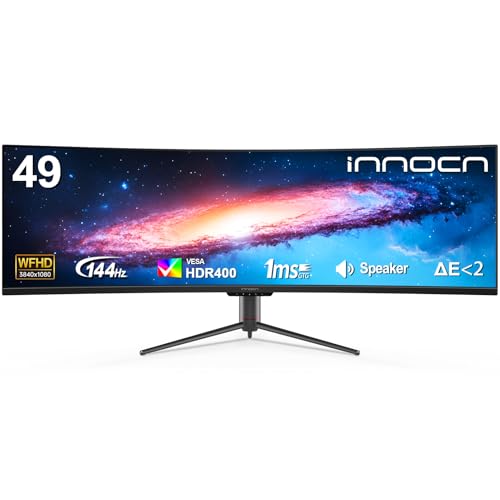
- 32:9 screen feels like two monitors in one
- USB-C reduces cable clutter for laptop users
- 144Hz and Adaptive-Sync suit work and play
Best For: Remote workers who want a spacious, easy-to-connect ultrawide for multitasking.
Best for 5K2K Productivity
INNOCN 49" 5K2K Curved Ultrawide Monitor

- 5120 x 1440 resolution on a massive 49-inch 32:9 screen
- USB-C 65W, HDMI, DP, USB-A, and Ethernet built in
- PIP/PBP support and ergonomic adjustment for home offices
Best For: Remote workers who want a single ultrawide display for multitasking and cleaner cable management.
Best for Dual-Screen Productivity
Amzfast 49 Inch Curved Ultrawide Monitor

- 5120x1440 resolution creates a roomy desktop for multitasking
- PIP/PBP makes split-screen workflows easy
- Height adjustment and VESA support improve ergonomics
Best For: Remote workers who want a huge, multitasking-friendly ultrawide with gaming extras.
Best for Power Users – INNOCN 49" OLED Ultrawide 5K2K 144Hz
If you want one of the most capable 49 inch ultrawide monitors for work from home, this INNOCN model stands out for its OLED panel, 5120 x 1440 resolution, and wide 32:9 layout. It gives you the room to keep multiple windows open side by side, while the high refresh rate and fast response time also make it a strong pick for after-hours gaming.
Best For: Remote workers, creators, and power users who want maximum screen space with OLED image quality and flexible USB-C docking.
Pros:
- QD-OLED panel with deep contrast and vivid color
- 49-inch 32:9 layout makes multitasking feel effortless
- USB-C with 90W power delivery plus HDMI 2.1, DisplayPort, USB hub, and RJ45
- Height, tilt, and swivel adjustments help it fit a home office setup
Cons:
- OLED pricing will be high for many buyers
- Its size needs a wide desk and careful setup
- May be more monitor than casual office users actually need
For buyers comparing 49 inch ultrawide monitors for work from home, this one is best when you want a true all-in-one desktop replacement with premium picture quality. It is especially compelling if your day involves spreadsheets, editing, and lots of app switching, but it still delivers the speed and responsiveness to handle gaming or media after work.
Best for a Clean Single-Cable Desk – Deco Gear 49" Curved Ultrawide Monitor
If you want one screen that can replace a dual-monitor setup, this Deco Gear model makes a strong case for 49 inch ultrawide monitors for work from home. The 5120×1440 DQHD panel gives you room for spreadsheets, video calls, reference docs, and creative apps side by side, while USB-C with 65W power delivery helps cut down on cable clutter.
Best For: Remote workers and laptop users who want a wide, tidy workstation with strong multitasking features.
Pros:
- Massive 49-inch 32:9 workspace can replace two smaller monitors
- USB-C 65W PD and built-in KVM simplify laptop-and-desktop switching
- 120Hz refresh rate with Adaptive Sync keeps motion smooth for work and play
- PIP/PBP support makes it easy to view multiple sources at once
Cons:
- Large footprint may be too much for compact desks
- VA panel is solid, but not the top choice for color-critical professionals
- No built-in speakers
For shoppers comparing 49 inch ultrawide monitors for work from home, this one stands out for its practical connectivity and all-in-one workflow features. It is especially appealing if you want a cleaner desk, easier laptop docking, and a wide screen that handles productivity first.
Best for Hybrid Desk Setups – INNOCN 49" Curved Ultrawide 49C1G
If you want one monitor to replace a dual-screen setup, the INNOCN 49C1G is a practical pick for 49 inch ultrawide monitors for work from home. Its 32:9 panel gives you a huge horizontal workspace for spreadsheets, timelines, and side-by-side windows, while USB-C with 65W power delivery helps keep a laptop connected with fewer cables.
Best For: Remote workers who want a super-wide screen for multitasking, laptop docking, and mixed work/play use.
Pros:
- 32:9 format acts like two monitors in one, making multitasking easier
- USB-C, HDMI 2.1, DisplayPort, USB-A, and Ethernet offer flexible connectivity
- Height, tilt, and swivel adjustments make it easier to dial in an office setup
- 99% sRGB and HDR400 add stronger color than a basic productivity display
Cons:
- 1080p resolution is less sharp than higher-resolution ultrawides at this size
- 49-inch width takes a large desk and some setup planning
- Curved 32:9 layouts can feel oversized for simple single-window tasks
For workers who want maximum screen real estate without adding a second monitor, this INNOCN lands in a useful middle ground. It is especially appealing if your search for 49 inch ultrawide monitors for work from home is driven by laptop docking, split-screen productivity, and a need for an all-in-one display.
Best for Multitasking – 49-Inch 5120×1440 Curved Ultrawide Monitor
If you’re comparing 49 inch ultrawide monitors for work from home, this model stands out for its massive 32:9 canvas, sharp Dual QHD resolution, and built-in picture-by-picture support. It gives you the space to keep email, spreadsheets, docs, and calls open side by side without needing a dual-monitor arm setup.
Best For: Remote workers, coders, and power users who want one extra-wide display for multitasking, with enough gaming speed to double as an after-hours screen.
Pros:
- 49-inch 32:9 screen with 5120×1440 resolution for true multi-window productivity
- 165Hz refresh rate, 1ms response, FreeSync, and G-Sync compatibility for smooth motion
- Height, tilt, and swivel adjustments plus blue light filter for longer work sessions
- PBP mode and broad HDMI/DisplayPort support make it easy to run two devices at once
Cons:
- Large footprint may be too big for compact desks
- VA panel is good for contrast, but not the widest viewing angles for color-critical work
- Gaming-focused specs may be more than some office-only buyers need
This is a strong fit if you want one screen to replace a dual-monitor setup and still keep motion smooth for entertainment. Among 49 inch ultrawide monitors for work from home, it offers one of the most convincing blends of workspace, ergonomics, and speed.
Best for Clean Multi-Device Workspaces – Deco Gear 49" Curved 5K2K Ultrawide
If you want one screen that can replace a stacked dual-monitor setup, this is a strong fit among 49 inch ultrawide monitors for work from home. The 5120×1440 panel gives you a huge amount of horizontal space for spreadsheets, timelines, coding, and side-by-side apps, while USB-C, KVM, and PBP/PIP make it easier to juggle a laptop and a second device without a messy desk.
Best For: Remote workers who want a single, high-resolution ultrawide with simple laptop docking and easy multi-device switching.
Pros:
- Massive 49-inch 5120×1440 canvas feels like two monitors in one
- USB-C 65W power delivery plus built-in KVM keeps the desk cleaner
- PBP/PIP support is handy for monitoring two sources at once
- 120Hz refresh rate adds smoothness for work and after-hours use
Cons:
- Requires plenty of desk space and a strong mount/stand setup
- VA panel won’t match IPS for viewing angles and color consistency
- Some workflows may still prefer a true dual-monitor layout for vertical space
This Deco Gear model is a practical pick if your priority is productivity first and you want fewer cables, fewer windows, and a more seamless desktop. For 49 inch ultrawide monitors for work from home, it stands out as a feature-rich option for people who live in multiple apps and devices all day.
Best for Docked Workstations – Samsung 49" Curved Business Ultrawide Monitor
If you want one screen to handle email, spreadsheets, meetings, and side-by-side multitasking, this Samsung 49-inch ultrawide is built for that workflow. It’s a strong fit for 49 inch ultrawide monitors for work from home thanks to the 32:9 Dual QHD layout, USB-C docking, and a curved panel that keeps everything in view.
Best For: Remote workers who want a single-monitor desk setup with built-in docking, easy device switching, and plenty of room for multitasking.
Pros:
- 32:9 Dual QHD screen gives you massive horizontal workspace for split-screen productivity.
- USB-C with 90W charging helps simplify laptop connections and reduce cable clutter.
- 120Hz refresh rate makes scrolling, dragging windows, and casual downtime feel smoother.
- Built-in speakers and height-adjustable stand add convenience for a cleaner desk setup.
Cons:
- The 49-inch footprint needs a wide desk and enough viewing distance.
- Not the most portable choice if you move between workspaces often.
- Premium feature set means it may cost more than simpler ultrawide options.
This is a practical pick if you want one large display to replace a dual-monitor setup and keep your desk streamlined. For 49 inch ultrawide monitors for work from home, it stands out as a true productivity hub rather than just a big screen.
Best for High-Refresh Multitasking – INNOCN 49Q1S 49" OLED Ultrawide
If you want one of the most feature-rich 49 inch ultrawide monitors for work from home, the INNOCN 49Q1S stands out with a 5120 x 1440 OLED panel, 90W USB-C, and a wide mix of ports for a cleaner desk setup. It is built for users who want a single screen for spreadsheets, video calls, creative work, and after-hours gaming.
Best For: Remote workers who also want a premium gaming-ready ultrawide with strong connectivity.
Pros:
- 5120 x 1440 OLED panel with 240Hz refresh rate for sharp, fluid visuals
- 90W USB-C plus HDMI 2.1, DisplayPort, USB hub, and RJ45 for flexible docking
- PIP/PBP support makes it easier to run two sources side by side
- Height-adjustable stand helps fine-tune ergonomics for long work sessions
Cons:
- Premium spec sheet likely puts it above the budget range
- 240Hz and OLED are more than most office-only buyers need
- Very large footprint may overwhelm smaller desks
For buyers comparing 49 inch ultrawide monitors for work from home, this model makes the most sense if you want top-tier screen real estate and versatile inputs in one package. It is less of a basic office monitor and more of a do-everything display for productivity and play.
Best for One-Cable Multi-Tasking – INNOCN 49" Curved Ultrawide 144Hz Monitor
If you want one of the more versatile 49 inch ultrawide monitors for work from home, the INNOCN 49-inch curved display is built to simplify a busy desk. Its 32:9 screen gives you the feel of two monitors in one, while USB-C, DisplayPort, and HDMI make it easy to connect a laptop or desktop without extra adapters.
Best For: Remote workers who want a wide, clean workspace for split-screen productivity, video calls, and light gaming after hours.
Pros:
- 32:9 49-inch panel replaces a dual-monitor layout in a single screen
- USB-C helps cut cable clutter for laptop-based work setups
- 144Hz refresh rate and Adaptive-Sync add smoothness for gaming and scrolling
- Height and tilt adjustment make it easier to dial in a comfortable position
Cons:
- WFHD resolution is less sharp than 5K2K alternatives at this size
- May need plenty of desk depth to sit at a comfortable viewing distance
- Built-in speakers are convenient but unlikely to satisfy audio-focused users
This is a strong pick if your priority is a simple, spacious productivity setup with enough gaming-friendly features to double as an entertainment display. Among 49 inch ultrawide monitors for work from home, it stands out for cable management and all-around flexibility more than pure text clarity.
Best for 5K2K Productivity – INNOCN 49" 5K2K Curved Ultrawide Monitor
If you want a single-screen upgrade for deep multitasking, the INNOCN 49C1R stands out among 49 inch ultrawide monitors for work from home thanks to its 5120 x 1440 resolution, 32:9 aspect ratio, and USB-C connectivity. It gives you the room to keep multiple windows, spreadsheets, chat apps, and reference docs visible at once without adding a second monitor.
Best For: Remote workers who want a giant, desktop-replacing ultrawide with strong connectivity and easy multitasking.
Pros:
- Huge 49-inch 32:9 panel with 5120 x 1440 resolution for serious screen space
- USB-C with 65W power delivery plus HDMI, DisplayPort, USB-A, and Ethernet
- PIP/PBP support makes it easy to run two sources or split work across windows
- Height, tilt, and swivel adjustment help dial in a comfortable home-office setup
Cons:
- Its size takes a wide desk and a bit of setup planning
- VA panel performance is good, but not the best choice for color-critical pro work
- Higher refresh-rate benefits are nice, but mostly matter more for gaming than office tasks
For buyers comparing 49 inch ultrawide monitors for work from home, this model is a strong pick if productivity and cable simplicity matter more than compact size. It delivers the expansive workspace many remote professionals want, while still offering the extras that make daily use easier.
Best for Dual-Screen Productivity – Amzfast 49 Inch Curved Ultrawide Monitor
If you want one massive panel to replace a messy dual-monitor setup, this Amzfast is a strong fit for 49 inch ultrawide monitors for work from home. The 5120×1440 resolution gives you the horizontal space to keep documents, spreadsheets, and video calls open at once, while PIP/PBP lets you split the screen between two inputs for easier multitasking.
Best For: Remote workers who want a wide, desk-filling display for multitasking, side-by-side apps, and occasional gaming.
Pros:
- 5120×1440 DQHD resolution gives you two 1440p-style workspaces in one screen
- PIP/PBP support makes it easy to run two sources side by side
- Height adjustment, tilt, swivel, and VESA mounting help with ergonomic setup
- 120Hz refresh rate and Adaptive Sync are a bonus for smoother gaming and scrolling
Cons:
- 120Hz is only available over DisplayPort 1.4, not all connections
- The 49-inch footprint needs a deep desk and plenty of room
- VA panel color and HDR are good for the class, but not true creator-grade reference quality
For people comparing 49 inch ultrawide monitors for work from home, this model stands out for giving you serious screen real estate without forcing you into a two-monitor stand setup. It’s especially appealing if you want a productivity-first ultrawide that can still handle after-hours gaming.
How We Picked These 49 Inch Ultrawide Monitors for Work from Home
For 49 Inch Ultrawide Monitors for Work from Home, we prioritized practical productivity features over gaming extras. That means strong resolution, reliable USB-C connectivity, picture-in-picture or split-screen tools, solid stand or VESA support, and refresh rates that feel smooth without sacrificing clarity.
We also looked for models that make everyday remote work easier: enough brightness for a home office, wide color coverage for content work, and power delivery that can reduce cable clutter.
Quick Comparison: What Matters Most
If you mainly handle documents, email, and video meetings, a Dual QHD or 5K2K panel is usually the best fit. If you want maximum desktop space, those higher resolutions keep text sharper across the full 49-inch span. If your budget is tighter, a lower-resolution ultrawide can still be useful, but it will not look as crisp for dense office apps.
Refresh rate is less important for pure productivity than it is for gaming, though 120Hz or higher can make scrolling and window movement feel noticeably smoother.
Key Buying Factors for 49 Inch Ultrawide Monitors for Work from Home
Resolution and Sharpness
For remote work, resolution is the biggest quality factor. Dual QHD (5120 x 1440) gives you the most balanced mix of screen space and clarity. 5K2K-style models are also excellent if you want a sharper image for text-heavy work, creative apps, or split-window multitasking.
USB-C and Power Delivery
USB-C with power delivery is a major convenience feature. It lets you connect a laptop with one cable for video, data, and charging. Many buyers of 49 Inch Ultrawide Monitors for Work from Home will find 65W to 90W PD especially useful for keeping a desk clean and portable.
Curvature, Panel Type, and Comfort
A gentle curve helps keep the edges of a super-ultrawide easier to view. VA panels often deliver strong contrast for office and media use, while OLED models offer exceptional blacks and responsiveness. If you work long hours, consider anti-glare coating, eye-comfort modes, and a curve that feels natural at your seating distance.
Multitasking Features
Look for picture-by-picture, picture-in-picture, and software split-screen tools. These features make one monitor feel more like two independent displays, which is ideal for comparing documents, monitoring chats, or keeping a reference window open.
Who Should Buy Which 49 Inch Ultrawide Monitors for Work from Home?
If you want the best all-around home-office setup, choose a high-resolution 49-inch model with USB-C and strong split-screen support. If you split time between work and play, a 120Hz or 144Hz panel offers a smoother experience without giving up productivity benefits. If you are a content creator or power user, prioritize the sharpest panel and the widest color coverage you can afford.
For simpler office use, a more affordable ultrawide can still be a smart upgrade, especially if it helps you replace two monitors with one cleaner, more comfortable workspace.