A good mic arm can instantly improve your desk setup by freeing up space, reducing vibration, and making your microphone easier to position for speaking, streaming, and recording.
Below, we’ve rounded up 10 of the best options for different PC desk setups, from lightweight mics to heavier broadcast models.
Best 10 Microphone Arms for PC Desk Picks for 2026
Best Budget Boom Arm
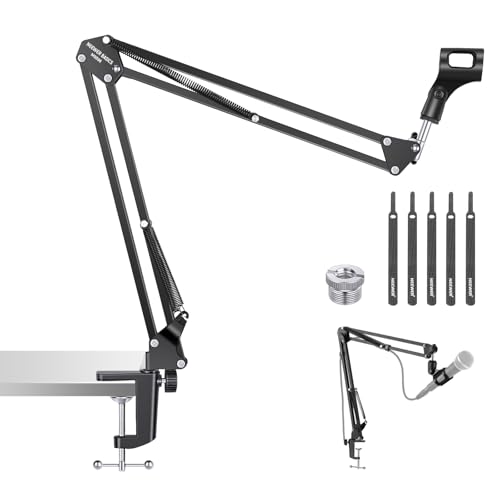
- Low-cost boom arm with the basics covered
- Flexible joints for simple mic positioning
- Metal build supports up to 3.3 lbs
Best For: Creators and home office users who want a simple, affordable desk mic arm.
Best for Portable Desktop Setups
BILIONE Portable Foldable Tripod Mic Stand

- Compact foldable tripod for easy storage and transport
- Stable desktop base with anti-slip feet
- Includes mic clip and 3/8" to 5/8" adapter
Best For: Users who need a compact, portable desk mic stand for basic recording and streaming.
Best for Heavy Mics

- 5.5 lb load capacity for heavier microphones
- Upgraded clamp improves desk stability
- 360° rotation and extension rod improve reach
Best For: Streamers, podcasters, and gamers using heavier mics on a desk.
Best for Low-Profile Setups
TODI Low-Profile Mic Arm for Lightweight Mics

- Space-saving low-profile boom arm
- Stable all-metal build for light mics
- Cable channel helps keep setups tidy
Best For: Gamers and streamers who need a compact desk mic arm for lightweight microphones.
Best for Easy Setup

- Strong 3.3 lb load capacity for heavier microphones
- Highly adjustable arm with smooth positioning
- Folds out of the way to save desk space
Best For: Streamers and home studio users who need a sturdy desk boom arm for larger microphones.
Best All-in-One Mic Arm Kit
TONOR Gaming Mic Set with RGB Boom Arm

- Includes mic, boom arm, and clamp in one box
- USB plug-and-play setup with one-tap mute
- RGB lighting adds a gaming-friendly look
Best For: Streamers and gamers who want a complete desk-mounted microphone setup.
Best for Lightweight Gear
InnoGear Studio Mic Stand for Desks

- Supports many popular mics and lighter accessories
- Desk clamp helps free up space on your workstation
- Simple choice for streams, calls, and basic recording
Best For: Users who want an affordable desk-mounted arm for lighter microphones and compact setups.
Best for Clamp-Mounted Phones
BILIONE Mic Stand Phone Holder

- Fits 0.5"-2" poles and stands
- 360° adjustable phone positioning
- Stable clamp with anti-slip padding
Best For: Users who need a secure phone holder for mic stands, boom arms, or similar pole-mounted setups.
Best for Small Desks
InnoGear 2026 Low-Profile Mic Boom Arm

- Low-profile arm keeps the desk clear
- Magnetic cable management hides wires neatly
- Fits popular mics like Blue Yeti, QuadCast, and Fifine
Best For: Compact desks and tidy streaming or podcast setups.
Best Value
InnoGear Mic Boom Arm with Cable Management

- Wide mic compatibility for popular USB and XLR models.
- Cable management keeps desk setups cleaner.
- Solid everyday option for streaming and home office use.
Best For: Budget-minded buyers who want a versatile boom arm for common microphones.
Best Budget Boom Arm – NEEWER Microphone Arm Stand
If you want one of the more affordable microphone arms for pc desk setups, this NEEWER boom arm covers the essentials without extra bulk. It offers flexible positioning, a sturdy metal build, and a simple clamp mount that works well for everyday streaming, podcasting, calls, and home recording.
Best For: Budget-conscious buyers who need a practical desk mic arm for streaming, Zoom calls, and casual studio use.
Pros:
- Affordable, no-frills design focused on core mic arm functions
- Flexible boom with multiple rotation points for easy positioning
- Metal construction and spring support handle up to 3.3 lbs
- Clamp includes rubber pads to help protect desk surfaces
Cons:
- Desk clamp works best on flat edges, not sloped or curved desks
- Not as feature-rich as higher-end arms with internal cable management
This is a solid value pick if you want microphone arms for pc desk use and care more about dependable adjustability than premium extras. It should suit most standard USB and XLR mics within the weight limit, especially in basic creator or home office setups.
Best for Portable Desktop Setups – BILIONE Portable Foldable Tripod Mic Stand
If you want a compact alternative to larger microphone arms for pc desk use, this BILIONE tripod stand is a simple, stable pick for smaller setups. It trades reach and articulation for portability, making it a practical choice when you need a lightweight desktop mount for recording, streaming, or calls.
Best For: Streamers, podcasters, and home users who need a compact desk mic stand that’s easy to move and store.
Pros:
- Foldable tripod design is easy to carry and store in tight spaces.
- Stable base helps reduce tipping on desks and other flat surfaces.
- Includes a universal mic clip with 3/8″ to 5/8″ adapter for broad compatibility.
- Works well for podcasts, live streaming, classroom use, and casual recording.
Cons:
- Limited height range compared with full-size boom arms.
- Doesn’t offer the positioning flexibility of articulated microphone arms for pc desk setups.
Overall, this is a sensible budget-friendly option if you only need a stable desktop mic mount rather than a full boom solution. For smaller work areas, it can be a cleaner fit than bulkier microphone arms for pc desk use, especially when portability matters more than reach.
Best for Heavy Mics – CACENCAN M05 360° Boom Arm
If you need one of the more stable microphone arms for pc desk setups, the CACENCAN M05 is built to handle heavier mics without feeling flimsy. Its reinforced aluminum alloy frame, 5.5 lb load rating, and upgraded desk clamp make it a practical choice for streamers, podcasters, and gamers who want a secure mount with flexible positioning.
Best For: Users who need a sturdy desk boom arm for heavier microphones like the Yeti or Shure SM7B.
Pros:
- Strong 5.5 lb capacity suits heavier USB and XLR microphones
- Upgraded clamp adds stability and protects the desk surface
- 360° rotation and extension rod help reach around monitors
- Includes 3/8″ to 5/8″ compatibility for broad mic support
Cons:
- Not ideal if you want the smallest possible arm footprint
- May require careful setup to get the best tension and balance
Overall, the M05 stands out among microphone arms for pc desk use when strength and reach matter more than ultra-compact sizing. If your priority is supporting a heavier microphone securely while keeping your workspace clear, this is an easy arm to consider.
Best for Low-Profile Setups – TODI Low-Profile Mic Arm for Lightweight Mics
If you want microphone arms for pc desk use that stay out of the way while keeping a light mic steady, the TODI mic arm is a practical pick. Its low-profile layout reaches from behind your monitor, and the fold-away design helps keep a desk clean for gaming, streaming, or calls.
Best For: Gamers, streamers, and podcasters who want a compact mic arm for lightweight microphones and tidy desk setups.
Pros:
- Low-profile boom arm helps preserve monitor visibility and desk space.
- All-metal body and reinforced screws add stability for lighter mics.
- Built-in cable channel keeps microphone wiring neater.
- Includes 3/8″ and 5/8″ threads for broad mic compatibility.
Cons:
- Not suitable for heavy studio microphones.
- Maximum reach is limited compared with larger boom arms.
- Some popular mics with 1/4″ threads won’t fit without adapters.
Overall, this is a smart option if you need microphone arms for pc desk setups that prioritize space-saving design over heavy-duty load capacity. It makes more sense for lightweight streaming and podcast mics than for bulky broadcast models.
Best for Easy Setup – InnoGear Boom Arm Mic Stand
If you want microphone arms for pc desk use that can handle a wide range of streaming and recording mics, this InnoGear boom arm is a practical pick. It offers flexible positioning, a sturdy steel build, and broad compatibility with popular USB and XLR-style microphones.
Best For: Streamers, podcasters, and home office users who need an adjustable desk boom arm for heavier mics like the Blue Yeti or Shure SM7B.
Pros:
- Fully adjustable with multiple rotation points for easy mic placement
- Strong 3.3 lb load capacity suits many popular studio and USB microphones
- Folds away neatly when you need more desk space
- Includes adapter support for a wide range of mic models
Cons:
- Clamp only works well on flat, squared desk edges
- Shock mount is not included
- Can be overkill for very light, simple microphone setups
For buyers comparing microphone arms for pc desk setups, this model stands out for strength and versatility rather than compact minimalism. It is a solid choice if you want a reliable boom arm that can support larger microphones without feeling flimsy.
Best All-in-One Mic Arm Kit – TONOR Gaming Mic Set with RGB Boom Arm
If you want a ready-to-use option among microphone arms for pc desk setups, the TONOR TC310+ bundles a condenser mic, boom arm, and clamp in one package. It adds USB convenience, RGB lighting, and quick-access controls, making it a practical pick for streaming, Discord calls, and casual gaming.
Best For: Streamers, gamers, and first-time buyers who want a complete desk-mounted mic setup without piecing components together.
Pros:
- All-in-one kit includes a boom arm, clamp, and USB microphone
- One-tap mute and gain control make live adjustments easy
- RGB lighting offers multiple modes and brightness adjustment
- Good fit for desks up to 2.36 inches thick
Cons:
- USB connection means less flexibility than XLR-based setups
- RGB styling may not suit users who want a plain, understated look
For buyers comparing microphone arms for pc desk use, this stands out because it removes the guesswork of matching a mic to an arm. It is especially appealing if you want a straightforward streaming-ready bundle with convenient controls and a desk-friendly mounting system.
Best for Lightweight Gear – InnoGear Studio Mic Stand for Desks
If you want one of the more flexible microphone arms for pc desk setups without overpaying, this InnoGear stand is built for everyday streaming, calls, and home recording. It supports a range of popular mics and even lighter webcams or compact cameras, making it a practical desk-mount option for simple creator setups.
Best For: Streamers, podcasters, and remote workers who need a budget-friendly mic arm for lighter gear and a clean desktop setup.
Pros:
- Works with many popular mics, including Blue Yeti, HyperX QuadCast, and AT2020
- Desk-mounted design helps clear space and keep the mic positioned close
- Also useful for lightweight webcams or small cameras
Cons:
- 2.64 lb max load limits heavier microphones and accessories
- Best suited to lighter, simpler desk setups rather than pro studio rigs
For shoppers comparing microphone arms for pc desk use, this model stands out as a straightforward mount for common entry-level and midrange microphones. It’s a sensible pick if you care more about compatibility and desk convenience than heavy-duty support.
Best for Clamp-Mounted Phones – BILIONE Mic Stand Phone Holder
If you need a simple way to add a phone mount to microphone arms for pc desk setups, this BILIONE holder is a practical pick. It clamps onto a wide range of poles and stands, keeps your phone accessible for streaming or lyrics, and adds 360° adjustability without a complicated setup.
Best For: Musicians, streamers, and home users who want a secure, adjustable phone holder for mic stands, boom arms, or other pole-mounted setups.
Pros:
- Fits most 0.5″-2″ stands, including mic stands, boom arms, tripods, and light stands
- 360° lockable adjustment makes it easy to switch between portrait and landscape views
- Anti-slip rubber padding and a sturdy clamp help keep phones stable during use
- Broad compatibility with most 4.7″-7″ smartphones
Cons:
- Thick phone cases may need to be removed for the best fit
- It is a phone holder only, so it does not include an arm or full desk-mounted boom setup
For buyers comparing microphone arms for pc desk use, this accessory is a useful add-on rather than a full arm solution. It works well if you already have a stand or boom and just need a stable, adjustable phone mount.
Best for Small Desks – InnoGear 2026 Low-Profile Mic Boom Arm
If you want microphone arms for pc desk setups that stay out of the way, this InnoGear boom arm is built for tight spaces and clean cable routing. Its low-profile design keeps the arm close to the desk, while the magnetic cable channel helps reduce clutter for streamers, podcasters, and home office users.
Best For: Compact desks, minimalist streaming setups, and anyone who wants a sturdy arm with hidden cable management.
Pros:
- Very low-profile arm design helps free up desk space
- Magnetic cable management keeps wires neat and hidden
- Wide adjustability with 360° rotation, swivel, and tilt
- Solid alloy steel build with a secure padded clamp
Cons:
- Clamp only fits desks up to 2.36 inches thick
- Best for mics within the 1.5 kg weight limit
For buyers comparing microphone arms for pc desk use, this model stands out most for keeping a setup compact and polished without giving up positioning flexibility. It’s a strong fit if you care more about space-saving practicality than flashy extras.
Best Value – InnoGear Mic Boom Arm with Cable Management
If you want a no-fuss upgrade for microphone arms for pc desk setups, the InnoGear Mic Boom Arm covers the basics well: stable positioning, tidy cable routing, and broad mic compatibility without pushing the price up too far. It’s a practical pick for streamers, podcasters, and home office users who need more desk space and easier mic placement.
Best For: Budget-conscious buyers who want a versatile boom arm for common USB and XLR microphones.
Pros:
- Compatible with a wide range of popular microphones, including Blue Yeti, HyperX QuadCast, and Shure SM7B.
- Built-in cable management helps keep a pc desk setup cleaner and less cluttered.
- Good fit for everyday streaming, recording, and work-from-home use.
Cons:
- May not feel as refined or rigid as higher-end arms.
- Best suited to lighter-to-medium desk setups rather than very heavy accessories.
Overall, this is a sensible choice if you’re shopping microphone arms for pc desk use and want solid functionality without overpaying. It won’t be the flashiest option, but it gives you the essentials that matter most in a tidy, flexible mic setup.
How We Picked the Best Microphone Arms for PC Desk Use
We focused on practical features that matter at a real workstation: weight support, desk clamp stability, rotation range, reach, and how well the arm handles common USB and XLR microphones. We also considered setup convenience, foldability, and whether the design helps keep a crowded desk tidy.
Quick Comparison
In this roundup, some models are better suited for lightweight desktop mics and compact spaces, while others are built for larger microphones and more frequent repositioning. If you want a simple, low-fuss setup, look for an arm with an included adapter and strong clamp. If you need a cleaner look for streaming or content creation, cable management and smoother articulation become more important.
Key Buying Factors for Microphone Arms for PC Desk
Weight Capacity
Always check the maximum supported load. Lightweight arms are fine for compact USB mics, but heavier broadcast mics need a sturdier boom arm to avoid sagging and constant readjustment.
Desk Clamp and Stability
A secure clamp matters as much as the arm itself. Thicker desktops, rounded edges, and desks with limited lip space may require a mount with better grip or wider adjustment range.
Reach and Positioning
Think about where the mic will sit relative to your monitor, keyboard, and face. Longer arms are useful for flexible positioning, while shorter or low-profile designs can work better in small rooms.
Compatibility and Mounting Adapters
Many Microphone Arms for PC Desk setups use 3/8-inch and 5/8-inch threading, so adapter support is important. Check compatibility with your exact mic before buying, especially if you use popular models from Blue Yeti, HyperX, FIFINE, or Shure.
Cable Management and Desk Layout
Built-in cable routing can make a setup look much cleaner and reduce snags when you move the arm. This is especially helpful for streamers and gamers who want a neat, professional desk.
Who Should Buy Which Microphone Arms for PC Desk?
If you want the most versatile option, choose a full-size boom arm with broad compatibility and solid load support. If your microphone is lightweight or your desk is small, a simpler foldable or compact arm may be the better fit. For creators who care about appearance and cable control, prioritize low-profile designs and integrated cable management. For casual users, a basic, stable arm is often enough to improve comfort and save desk space.
In short, the best Microphone Arms for PC Desk use are the ones that match your mic weight, desk size, and workflow—not just the one with the longest feature list.