Choosing the right surge protector for a PC and monitor is about more than adding extra outlets. You want stable protection, enough spacing for bulky plugs, and a layout that fits your desk.
This roundup focuses on practical options for home offices, gaming setups, and standing desks, with attention to build quality, charging ports, and everyday convenience.
Best 10 Surge Protectors for PC and Monitor Picks for 2026
Best for High-Outlet Setups
Belkin 12-Outlet Surge Protector

- 12 AC outlets for complete desk setups
- 3,780 joules of surge protection
- 8-foot flat plug cord for flexible placement
Best For: Desktop users who need many protected outlets for a PC, monitor, and accessories.
Best for Desk-Mounted Power
CCCEI USB-C Clamp Surge Protector

- 12 outlets plus USB-C and USB-A charging
- 4800J surge protection for desktop gear
- Clamp or screw mount for cleaner cable management
Best For: Home office and standing desk users who want a mounted power hub for PCs, monitors, and accessories.
Best for Heavy-Duty Desk Setups
Addtam 10-Outlet Surge Strip with USB-C

- 10 AC outlets plus 4 USB ports, including USB-C
- 2700J surge protection with overload defense
- Wide spacing fits bulky adapters and monitor plugs
Best For: Desktop and home office users who need lots of outlets for a PC, monitor, and accessories.
Best for Desk Clamps
CCCEI 15-Outlet Desk Clamp Power Strip

- 15 outlets plus USB-A and USB-C charging
- Clamp-on design keeps power at desk level
- 1200J surge protection for everyday setups
Best For: Standing desks and desktop setups that need lots of outlets within easy reach.
Best for Lots of Gear
SUPERDANNY Surge Protector Power Strip

- 22 AC outlets + 6 USB ports for high-device setups
- 2100J surge protection with multi-layer safety features
- Flat plug and wall-mount design help with tight spaces
Best For: People who need a high-capacity surge protector for a PC, monitor, and lots of accessories.
Best for Small Desks
CCCEI Desk Clamp Surge Protector with USB-C

- Clamp-on mount keeps power close and off the floor
- 9 AC outlets plus USB-A and USB-C charging
- 1200J surge protection with safety features
Best For: Compact desk and monitor setups that need accessible, space-saving power.
Best for Outlet-Dense Desktops
TROND 13-Outlet Surge Protector

- 13 widely spaced outlets reduce plug crowding.
- 4000J surge protection helps protect PC gear.
- Includes USB-C, USB ports, and a flat plug.
Best For: Desktop setups with a PC, monitor, and multiple peripherals that need one high-capacity power strip.
Best for Multi-Device Desktops
ALESTOR 12-Outlet Surge Protector

- 12 AC outlets for full PC-and-monitor setups
- 2,700 joules of surge protection
- 4 USB ports, including USB-C
Best For: Desktop users who need lots of outlets and built-in USB charging.
Best Heavy-Duty Pick
18-Outlets Surge Protector with 4 USB
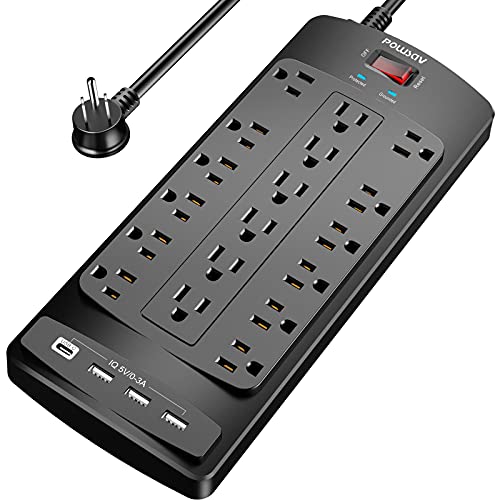
- 18 AC outlets for large desk setups
- 2100 joules of surge protection
- 6-foot flat plug cord with 4 USB ports
Best For: Large PC and monitor workstations with lots of peripherals.
Best for Lots of Devices

- 8 AC outlets plus 4 USB ports
- 2700 joules of surge protection
- Flat plug with 6-foot cord
Best For: Desktop setups that need to power a PC, monitor, and several accessories from one strip.
Best for High-Outlet Setups – Belkin 12-Outlet Surge Protector
If you need one strip to handle a busy desk or home office, this Belkin option is a strong pick among surge protectors for pc and monitor. With 12 AC outlets, an 8-foot flat plug cord, and 3,780 joules of protection, it gives you room for a full computer setup plus extra accessories without crowding your wall outlet.
Best For: Desktop users, home offices, and anyone who needs plenty of protected outlets for a PC, monitor, and peripherals.
Pros:
- 12 outlets make it easy to power a complete workstation
- 3,780 joules offers strong protection for expensive electronics
- Flat plug and 8-foot cord help with tight or awkward spaces
- UL-listed build adds peace of mind for everyday use
Cons:
- Large size may be more than basic setups need
- No USB charging ports for phones or accessories
Overall, this is a practical choice if you want lots of outlets and solid surge coverage in one strip. For users comparing surge protectors for pc and monitor, it stands out as a flexible, high-capacity option that works well for cluttered desks and multi-device setups.
Best for Desk-Mounted Power – CCCEI USB-C Clamp Surge Protector
If you want one compact hub that can power a PC setup and keep your monitor, accessories, and charging gear close at hand, this desk-mounted option is a smart pick among surge protectors for pc and monitor. The clamp or screw mount keeps it off the floor, while the 4800J rating and multiple AC plus USB ports make it practical for busy home offices and standing desks.
Best For: Home office users who want a mounted surge protector with lots of outlets, built-in USB charging, and cleaner cable management.
Pros:
- 12 AC outlets plus 4 USB-C and 4 USB-A ports for multi-device setups
- 4800J surge protection helps safeguard PCs, monitors, and accessories
- Clamp or screw mounting options keep power within easy reach
- 6 ft 14AWG cord and flat plug suit tight desk and wall spaces
Cons:
- Bulky for minimal setups that only need a few outlets
- USB output is useful, but not as fast as dedicated high-watt charging bricks
This is a strong fit if you need one of the more organized surge protectors for pc and monitor setups, especially when desk space is limited and you want charging ports built in. It’s less about portability and more about turning a workstation into a cleaner, easier-to-use power hub.
Best for Heavy-Duty Desk Setups – Addtam 10-Outlet Surge Strip with USB-C
If you want one of the more capable surge protectors for pc and monitor setups, this Addtam strip is built for busy desks that need plenty of outlets, USB charging, and stronger surge absorption. The 6-foot cord, flat plug, and extra-wide spacing make it easier to power bulky adapters without crowding nearby ports.
Best For: Desktop users, home offices, and monitor-heavy workstations that need lots of plug room plus USB-C charging.
Pros:
- 10 AC outlets plus 4 USB ports, including 2 USB-C ports
- 2700J surge rating with multi-stage protection for added device safety
- Wide-spaced outlets help fit larger power bricks and adapters
- Flat plug and 6-foot cord make placement easier behind desks
Cons:
- Bulkier than a basic power strip
- USB output is useful, but not a replacement for a dedicated charger
For a workstation that powers a PC, monitor, and several peripherals, this is a practical all-in-one choice. It stands out among surge protectors for pc and monitor because it combines generous spacing, USB-C convenience, and solid surge protection in one affordable strip.
Best for Desk Clamps – CCCEI 15-Outlet Desk Clamp Power Strip
If you want one of the more space-efficient surge protectors for pc and monitor setups, this clamp-on strip keeps outlets, USB charging, and surge protection right at the edge of your desk. The 15 outlets and widely spaced design make it easier to power a monitor, PC accessories, chargers, and other gear without crawling under the table.
Best For: Standing desks, shared workstations, and anyone who wants a surge protector mounted on the desktop instead of sitting on the floor.
Pros:
- 15 outlets plus USB-A and USB-C ports for a flexible desktop setup
- Clamp mount saves floor space and helps keep cables within reach
- 1200J surge protection adds a basic layer of safety for electronics
- Flat right-angle plug and compact body help in tight spaces
Cons:
- Clamp fit is limited to desk edges up to about 1.6 inches
- 12A / 1500W limit may not suit higher-draw equipment
- USB charging is useful, but not especially fast for every device at once
This is a smart pick if you want surge protectors for pc and monitor setups that also clean up the desktop and reduce cable clutter. It is especially appealing for standing desks where easy access matters more than a traditional power strip on the floor.
Best for Lots of Gear – SUPERDANNY Surge Protector Power Strip
If you need surge protectors for pc and monitor setups that also handle a full desk or gaming station, this SUPERDANNY power strip is built for high-capacity expansion. With 22 AC outlets, 6 USB charging ports, and 2100 joules of surge protection, it can replace a tangle of adapters while keeping a workstation organized.
Best For: Busy desks, gaming rooms, or home office setups where a PC, monitor, and several accessories all need power in one place.
Pros:
- 22 outlets plus 6 USB ports make it easy to power a full multi-device setup
- 2100J surge protection and multiple safety protections add peace of mind
- Widely spaced outlets help bulky plugs fit without blocking neighbors
- Flat plug, wall-mount options, and a 6.5 ft cord improve placement flexibility
Cons:
- Large footprint may be more than some simple desk setups need
- Side outlets are fixed and cannot be rotated
- Not a compact choice if you only need protection for a basic PC-and-monitor pair
For shoppers comparing surge protectors for pc and monitor use, this one stands out more for capacity than compactness. It is a strong pick if you want to power a monitor, tower, peripherals, and charging devices from one surge-protected hub.
Best for Small Desks – CCCEI Desk Clamp Surge Protector with USB-C
If you want surge protectors for pc and monitor that save desk space while adding plenty of outlets, this clamp-on CCCEI strip is a smart fit. It mounts to the edge of a desk or shelf, keeps plugs off the floor, and adds USB-A/USB-C charging for a cleaner workstation.
Best For: Compact desks, home office setups, and monitor-plus-PC workstations that need accessible power without drilling into the desk.
Pros:
- Clamp-on design helps keep the outlet strip within easy reach and off the floor
- 9 AC outlets plus USB-A and USB-C ports support a multi-device PC setup
- 1200J surge protection with overload, short-circuit, and over-voltage safety features
- Widely spaced outlet layout works better with bulkier plugs and adapters
Cons:
- Desk clamp only fits tabletops up to about 1.6 inches thick
- USB charging output is useful, but not as fast as dedicated high-wattage chargers
For buyers comparing surge protectors for pc and monitor, this model stands out for its space-saving mounting style and easy access to power. It is especially appealing if your desk is crowded and you want a tidy, no-drill solution with enough outlets for a full setup.
Best for Outlet-Dense Desktops – TROND 13-Outlet Surge Protector
If you need surge protectors for pc and monitor setups with lots of gear, this TROND power strip is built for expansion. It combines 13 widely spaced AC outlets, USB charging, and 4000 joules of surge protection in a wall-mountable design that fits desks, entertainment centers, and home offices.
Best For: Desktop users who want to power a PC, monitor, printer, and accessories from one heavy-duty strip.
Pros:
- 13 widely spaced outlets make it easier to plug in bulky adapters.
- 4000J surge protection helps guard computers and office equipment.
- Flat 45° plug and 5-foot 14AWG cord work well in tight spaces.
- USB-C and USB ports add convenient charging for small devices.
Cons:
- USB output is modest for fast charging larger devices.
- 5-foot cord may be short for larger desk or entertainment setups.
For buyers comparing surge protectors for pc and monitor use, this model stands out for sheer outlet count and spacing rather than compact size. It’s a strong fit when you have multiple peripherals and want a safer, cleaner power hub on or under the desk.
Best for Multi-Device Desktops – ALESTOR 12-Outlet Surge Protector
If you need one strip to cover a full desktop setup, this ALESTOR unit is a practical choice among surge protectors for pc and monitor. It combines 12 AC outlets, 4 USB ports, and 2,700 joules of surge protection, so it can handle a PC, monitor, speakers, router, and a few accessories without immediately running out of space.
Best For: Users building a busy home office or gaming desk who want lots of outlets plus USB charging in one ETL-listed strip.
Pros:
- 12 AC outlets make it easy to power a PC, monitor, and peripherals from one strip
- 2,700 joules of surge protection adds solid coverage for everyday desktop electronics
- 4 USB ports, including USB-C, reduce the need for separate charging bricks
- Widely spaced outlets help fit bulky adapters and plugs
Cons:
- Large footprint may be more strip than a simple dual-device setup needs
- USB output is convenient, but not as fast as a dedicated wall charger for some devices
For buyers comparing surge protectors for pc and monitor, this model stands out more for capacity than compactness. It is a strong fit when you want dependable surge protection and plenty of plug room at a single workstation.
Best Heavy-Duty Pick – 18-Outlets Surge Protector with 4 USB
If you need one of the most expandable surge protectors for pc and monitor setups, this model stands out for sheer outlet count. It gives you 18 AC outlets plus 4 USB ports, a 6-foot flat plug cord, and 2100 joules of surge protection, making it a practical pick for desks with a monitor, PC, speakers, chargers, and accessories.
Best For: Multi-device workstations and gaming desks that need lots of plug space in one strip.
Pros:
- 18 AC outlets make it easy to connect a full desktop setup and peripherals.
- 2100 joules of surge protection adds solid everyday defense for electronics.
- Flat plug and 6-foot cord help with tighter desk and wall layouts.
- 4 USB ports reduce the need for extra wall adapters.
Cons:
- Bulky size may be more than you need for a simple PC-and-monitor setup.
- USB output is modest compared with dedicated fast chargers.
For buyers comparing surge protectors for pc and monitor use, this is a strong choice when outlet capacity matters more than compactness. It is especially useful if your desk setup keeps growing and you want fewer daisy-chained power strips.
Best for Lots of Devices – Nuetsa 8-Outlet Surge Strip
If you need one strip to handle a PC setup plus extra gear, this Nuetsa model is a practical pick among surge protectors for pc and monitor. It combines 8 AC outlets, 4 USB ports, and 2700 joules of protection in a flat-plug, 6-foot design that fits behind desks and entertainment centers.
Best For: Desktop users who want to power a PC, monitor, accessories, and a few USB devices from one surge-protected strip.
Pros:
- 8 AC outlets give you room for a computer, monitor, speakers, and peripherals
- 2700-joule surge rating adds solid protection for everyday home office setups
- 4 USB ports, including USB-C, reduce the need for extra chargers
- Flat plug and 6-foot cord make it easier to route behind furniture
Cons:
- USB-C output is limited and not meant for higher-voltage fast-charge devices
- Bulkier than a basic 2- or 3-outlet surge strip
This is a strong value choice if you want more outlet capacity than a standard desk strip. For buyers comparing surge protectors for pc and monitor, it stands out for its mix of capacity, USB charging, and decent protection level rather than a minimalist footprint.
How We Picked the Best Surge Protectors for PC and Monitor
We focused on Surge Protectors for PC and Monitor setups that balance protection, outlet capacity, and real-world desk use. Priority went to models with clear surge ratings, UL or ETL safety listings, and designs that reduce blocked outlets from oversized adapters.
We also looked at cord length, plug shape, mount or clamp options, and whether USB ports add useful charging without taking away AC access.
Quick Comparison
If you need a simple desktop power hub, a compact strip with fewer outlets may be enough. For multi-device workstations, wider outlet spacing and more total AC ports matter more than USB count. Standing desks and shared office stations benefit most from clamp-mounted or edge-mounted designs that keep cables organized and easy to reach.
Key Buying Factors for Surge Protectors for PC and Monitor
Surge Protection Rating
Look for a joule rating that matches how much you want to protect. Higher ratings generally offer more energy absorption, which is useful for expensive computers, monitors, and peripherals.
Outlet Spacing
Wide spacing is important if you use large power bricks, display adapters, or multiple chargers. Crowded outlets can make a high-capacity strip less useful than a smaller but better-spaced one.
Cord Length and Plug Profile
A flat plug and a longer cord can make routing behind desks easier, especially when your outlet is far from the workstation. This helps reduce strain on cables and keeps the setup cleaner.
Mounting and Desk Fit
Clamp-on and edge-mount designs are ideal for standing desks or tight workspaces. Traditional strips work well under desks, in floor-level setups, or where portability matters more than built-in organization.
USB Ports and Charging
USB-A and USB-C ports can be convenient for phones, headphones, and accessories, but they should supplement, not replace, enough AC outlets for your main gear.
Who Should Buy Which Surge Protectors for PC and Monitor?
Choose a high-outlet strip if you run a PC, monitor, speakers, printer, and chargers from one location. Pick a desk-clamp model if you want power within arm’s reach on a standing desk. Go with a compact, lower-profile option if your workspace is small and you mainly need dependable protection for a computer and one or two accessories.
For most buyers, the best Surge Protectors for PC and Monitor are the ones that combine strong surge protection, practical spacing, and a layout that actually fits the desk you use every day.