Building a reliable PC setup takes more than just extra outlets. You need surge protection, enough spacing for bulky adapters, and USB-C charging that keeps accessories within reach.
These picks focus on practical surge protectors with USB-C for PC setup use, from compact desk-mounted options to high-capacity power strips for full workstations.
Best 10 Surge Protectors with USB C for PC Setup Picks for 2026
Best for High-Outlet Desk Power
Anker 12-Outlet Surge Protector with USB-C

- 12 AC outlets for a full PC desk setup
- Built-in USB-C port for light device charging
- 2100J surge protection with a 5ft cord
Best For: Home office or dorm users who want lots of outlets and a USB-C charging option.
Best for High-Load Desk Setups
Addtam 10-Outlet Surge Protector

- 10 AC outlets with wide spacing for bulky plugs
- 2 USB-C ports and 2 USB-A ports built in
- 2700J surge protection with ETL certification
Best For: Desktop setups that need many outlets, USB-C charging, and dependable surge protection.
Best for USB-C Charging
ALESTOR 12-Outlet Surge Protector

- 12 AC outlets with wide spacing for large plugs
- 4 USB ports including 1 USB-C charging port
- 2700J surge protection with ETL-listed safety
Best For: PC desks and home offices that need many outlets plus basic USB-C charging.
Best for Heavy-Duty Desk Charging
10 ft Surge Protector with 2 USB-C

- 6 AC outlets plus 4 USB ports, including USB-C
- 10 ft braided cord with flat plug for tight spaces
- 1080J surge protection with overload and safety features
Best For: Desktop users who want extra outlets, USB-C charging, and a long cord in one strip.
Best for High-Outlet PC Desks
Nuetsa 8-Outlet USB-C Surge Strip

- 8 AC outlets for complete PC setups
- USB-C plus 4 total USB ports
- 2700J protection with ETL listing
Best For: Desktop setups that need lots of outlets and built-in USB-C charging.
Best for High-Density Desk Setups
SUPERDANNY 22-Outlet Surge Protector

- 22 AC outlets plus 6 USB ports for crowded setups
- 1 USB-C port with smart charging up to 5V/3A
- Flat plug, 6.5-foot cord, and wall-mount keyholes
Best For: PC users who need maximum outlets, built-in USB charging, and a tidy cable layout.
Best for Maximum Outlet Count
18-Outlet Surge Protector with 4 USB Ports
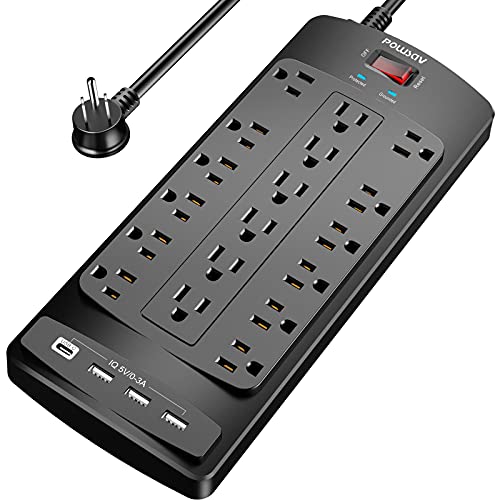
- 18 AC outlets for dense PC and gaming setups
- 4 USB ports for charging extras alongside your desk gear
- 2100-joule surge protection with a flat 6-foot cord
Best For: Busy desks and gaming stations that need maximum outlet expansion in one strip.
Best for Clamp-On Desks
CCCEI 20W Clamp USB-C Surge Strip

- 12 AC outlets plus 4 USB-C and 4 USB-A ports
- Clamp or screw mount options for desk edges
- 4800J surge protection with a 6 ft 14AWG cord
Best For: Standing desks and PC setups that need a mountable surge strip with USB-C charging.
Best for Small Desks
CCCEI Desk Clamp Surge Protector with USB-C

- Desk-clamp mount keeps power close and off the floor
- 9 AC outlets plus USB-C and USB-A charging
- 1200J surge protection for everyday PC gear
Best For: Compact PC desks and standing setups that need mounted power, USB-C charging, and cleaner cable management.
Best for High-Outlet Desk Power – Anker 12-Outlet Surge Protector with USB-C
If you need surge protectors with usb c for pc setup, this Anker power strip is a practical pick thanks to its 12 AC outlets, 5ft cord, and built-in USB-C charging for everyday desk gear. It works well when you want one strip to handle a monitor, PC accessories, speakers, and a phone or tablet without adding extra adapters.
Best For: Busy home office or dorm setups that need a lot of AC outlets plus a convenient USB-C port for light charging.
Pros:
- 12 AC outlets provide plenty of room for a full desk setup
- USB-C port adds easy charging for phones, earbuds, or accessories
- 2100J surge protection offers solid everyday protection for electronics
- 5ft extension cord helps reach awkward wall outlets
Cons:
- USB-C output is only 20W, so it is not ideal for fast laptop charging
- Large outlet count can make it bulky in tighter spaces
For buyers comparing surge protectors with usb c for pc setup, this model stands out for sheer outlet capacity and a simple all-in-one layout. It is a strong fit if your main goal is to power multiple peripherals cleanly rather than rely on a high-wattage USB-C charger.
Best for High-Load Desk Setups – Addtam 10-Outlet Surge Protector
If you need one strip to handle a busy workstation, this Addtam model is a strong fit for surge protectors with usb c for pc setup. It combines 10 AC outlets, 4 USB ports, and a 6-foot cord, so you can power a monitor, PC tower, dock, printer, and charging accessories from one spot.
Best For: Desktop users who want lots of outlet spacing, USB-C charging, and solid surge protection in a single power strip.
Pros:
- 10 AC outlets with wider spacing for bulky adapters and power bricks
- 2 USB-C ports plus 2 USB-A ports for mixed device charging
- 2700J surge protection with ETL safety certification
- Flat plug and 6-foot cord make it easier to route behind a desk
Cons:
- Not a wall-mount or clamp-style solution for ultra-clean cable management
- USB charging is useful, but not as fast as a dedicated USB-C charger
This is a practical pick if your desk setup needs both extra outlets and built-in charging. For shoppers comparing surge protectors with usb c for pc setup, the wide spacing and higher outlet count make it especially useful for crowded home office or gaming rigs.
Best for USB-C Charging – ALESTOR 12-Outlet Surge Protector
If you want one of the more practical surge protectors with usb c for pc setup, this ALESTOR power strip gives you plenty of AC outlets plus a built-in USB-C port for charging accessories, phones, or a dock-friendly add-on device. The 6-foot cord and 12-outlet layout make it easy to tidy a desk, gaming station, or home office without sacrificing surge protection.
Best For: PC setups that need lots of outlets, a USB-C charging port, and straightforward surge protection in one strip.
Pros:
- 12 AC outlets with extra-wide spacing for bulky adapters
- Includes 4 USB ports, including 1 USB-C port up to 3A
- 2700 joules of surge protection with ETL-listed safety features
- 6-foot cord works well for desks and floor-mounted power access
Cons:
- USB-C output is useful for charging, but not a high-wattage PD port
- Bulky if you only need a compact strip for a minimal setup
For buyers comparing surge protectors with usb c for pc setup, this is a strong utility-first option: lots of outlets, added USB charging, and enough joule protection for everyday desktop gear without pushing into premium pricing.
Best for Heavy-Duty Desk Charging – 10 ft Surge Protector with 2 USB-C
If you want one of the more practical surge protectors with usb c for pc setup, this 10-outlet strip is built to handle a monitor, PC accessories, and several chargers from one clean run. The 10 ft braided cord, flat plug, and wall-mountable design make it easier to place behind a desk or along a workstation without wasting outlet space.
Best For: Desktop setups that need plenty of AC outlets plus built-in USB-C charging for phones, earbuds, and other small devices.
Pros:
- 6 AC outlets plus 4 USB ports, including 2 USB-C ports
- 10 ft cord and ultra-flat plug work well behind desks and furniture
- 1080J surge protection with overload, short-circuit, and overheat safeguards
- Wall-mountable design helps keep a PC setup organized
Cons:
- USB-C output is limited to 5V/3A, so it is not for fast laptop charging
- Bulky compared with a basic low-outlet power strip
- May be more ports than needed for very minimal setups
For buyers comparing surge protectors with usb c for pc setup, this one stands out for convenience rather than raw power delivery. It is a smart fit if you want surge protection, cord length, and built-in charging in a single desk-friendly strip.
Best for High-Outlet PC Desks – Nuetsa 8-Outlet USB-C Surge Strip
If you need one strip to handle a monitor, PC, accessories, and phone charging, this is a practical pick among surge protectors with usb c for pc setup. It combines 8 AC outlets, 4 USB ports, a flat plug, and 2700 joules of surge protection in a compact, desk-friendly layout.
Best For: Desktop users who want plenty of outlets plus USB-C charging without adding a separate wall adapter.
Pros:
- 8 AC outlets give you room for a full PC workstation
- Includes a USB-C port with 3A output for everyday device charging
- 2700 joules of surge protection and ETL listing add peace of mind
- Flat plug and 6-foot cord help with tight spaces behind desks
Cons:
- USB-C port is not meant for higher-voltage fast-charging devices
- 6-foot cord may be short for larger desk layouts
For a simple, all-in-one desktop power hub, this Nuetsa strip covers the essentials well. It’s especially appealing if you’re shopping for surge protectors with usb c for pc setup and want extra AC capacity alongside basic USB charging.
Best for High-Density Desk Setups – SUPERDANNY 22-Outlet Surge Protector
If you need one hub that can power a crowded desk, this SUPERDANNY strip is a strong fit for surge protectors with usb c for pc setup. It combines 22 AC outlets, 6 USB ports, a flat plug, and 2100J of surge protection, so it works well for gaming stations, work-from-home desks, and media centers that need lots of plugged-in gear without a mess of adapters.
Best For: PC users who want maximum outlet count, built-in USB charging, and a mountable strip for a cluttered setup.
Pros:
- 22 AC outlets plus 6 USB ports handle a very large number of devices at once
- Includes one USB-C port with smart charging for modern accessories and phones
- Flat plug, 6.5-foot cord, and wall-mount keyholes make placement easier
- 2100J surge protection and multiple safety features add peace of mind
Cons:
- Large footprint may be overkill for simple desk setups
- USB-C output is useful, but not a high-wattage PD charger for laptops
- Side outlets are fixed, so some bulky adapters may still interfere
This is a practical pick if your priority is quantity and convenience over compact size. For surge protectors with usb c for pc setup, it stands out as a high-capacity all-in-one strip that can simplify a busy workstation.
Best for Maximum Outlet Count – 18-Outlet Surge Protector with 4 USB Ports
If you need one of the most practical surge protectors with usb c for pc setup alternatives for a crowded desk, this 18-outlet strip gives you serious expansion without taking over your workspace. The 6-foot flat plug makes it easier to route behind furniture, and the 2100-joule rating adds a solid layer of protection for a PC, monitor, accessories, and chargers.
Best For: Busy gaming or home office setups that need a ton of AC outlets plus a few USB charging ports in one strip.
Pros:
- 18 AC outlets handle multi-device PC and gaming setups well
- 4 USB ports add convenient charging for accessories and phones
- 2100 joules of surge protection with overload safety features
- Flat plug and 6-foot cord help with tight wall and desk placements
Cons:
- USB ports are standard USB-A, not USB-C
- Large strip size may be more than small desks need
- No individual outlet switching or smart features
For buyers comparing surge protectors with usb c for pc setup, this model stands out more for sheer outlet capacity than modern charging ports, so it makes the most sense when you need to power lots of gear from a single, protected strip.
Best for Heavy-Duty Desk Power – SUPERDANNY 22-Outlet Surge Protector
If you need surge protectors with usb c for pc setup and also want room for a full desktop rig, this SUPERDANNY power strip is built for sheer expansion. With 22 AC outlets, 6 USB charging ports, a 6.5-foot flat plug cord, and 2100 joules of protection, it works well when a single wall outlet has to support monitors, peripherals, chargers, and other desk gear.
Best For: Busy PC desks, gaming rooms, or office setups that need lots of AC outlets and built-in USB charging in one strip.
Pros:
- Massive 22-outlet layout helps power crowded PC setups
- 6 USB ports reduce the need for extra phone and accessory chargers
- 2100 joules adds solid surge protection for everyday electronics
- Flat plug and 6.5-foot cord make placement easier behind desks
Cons:
- No USB-C port listed, so USB-C users may still need an adapter
- Large footprint may be more than small desks need
- Bulky outlet count can limit how neatly some plugs fit
This is a strong pick if your priority is outlet count and desk-side convenience rather than a compact form factor. For buyers comparing surge protectors with usb c for pc setup, it stands out more for its many AC outlets and integrated USB charging than for native USB-C support.
Best for Clamp-On Desks – CCCEI 20W Clamp USB-C Surge Strip
If you want surge protectors with usb c for pc setup that keep your power and charging on the desktop instead of under it, this CCCEI outlet station is a practical pick. It combines 12 AC outlets, USB-C and USB-A charging, and a 4800J surge rating in a clamp-on design that helps free up floor space and tidy a standing desk or home office.
Best For: Standing desks, shared workstations, and PC setups that need lots of outlets plus USB-C charging in a compact mountable strip.
Pros:
- 12 AC outlets plus 4 USB-C and 4 USB-A ports for multi-device setups
- Clamp or screw mounting options make it easier to fit different desks
- 4800J surge protection adds solid coverage for PC and desk accessories
- 6 ft 14AWG cord and flat plug help with cleaner cable routing
Cons:
- USB-C output is only 20W per side, so it is not a high-watt charging hub
- The clamp design may not suit every desk edge or layout
- Large number of outlets can still feel crowded with bulky adapters
For buyers comparing surge protectors with usb c for pc setup, this model stands out more for convenience and desk organization than raw charging speed. It is a strong fit if you want one mounted strip to power monitors, peripherals, and a few USB devices without crawling under the desk.
Best for Small Desks – CCCEI Desk Clamp Surge Protector with USB-C
If you want surge protectors with usb c for pc setup that keep cords off the floor, this desk-clamp strip is built for tight workspaces. It adds 9 AC outlets plus USB-A and USB-C charging, so you can power a monitor, laptop, accessories, and small desk gear from one mounted hub.
Best For: Compact PC desks, standing desks, and edge-mounted setups where you want easy reach, cleaner cable management, and USB-C charging without drilling into the desk.
Pros:
- Desk-clamp design saves space and keeps outlets within arm’s reach
- Includes USB-C PD and QC USB-A charging alongside 9 AC outlets
- 6 ft flat plug helps reach awkward wall outlets more easily
- 1200J surge protection adds a useful layer of device safety
Cons:
- Clamp fit is limited to desks up to about 1.6 inches thick
- USB-C charging is solid but not as fast as higher-wattage GaN chargers
This is a smart pick if your priority is desk-mounted convenience rather than a traditional power strip. For surge protectors with usb c for pc setup, it stands out as an easy-install option that combines charging, outlet access, and better desktop organization in one compact unit.
How We Picked the Best Surge Protectors with USB C for PC Setup
We focused on surge protectors with USB-C for PC setup use that balance protection, port variety, and layout. The best options offer solid joule ratings, multiple AC outlets, at least one USB-C port, and plug spacing that works for real desktop gear.
We also looked for useful extras such as flat plugs, long cords, clamp or desk-mount designs, ETL listing, and higher USB output for phones, earbuds, and small peripherals.
Quick Comparison: What Matters Most
If your desk is tight, a clamp-style or desktop outlet station can save space and keep charging ports close. If you run a full tower, monitors, speakers, and a laptop dock, a wide strip with more outlets and a longer cord is usually the better fit.
USB-C output matters most when you want to charge modern devices without adding another adapter. For fastest results, check the USB-C wattage rather than assuming all ports perform the same.
Key Buying Factors for Surge Protectors with USB-C for PC Setup
Surge Protection Rating
Higher joule ratings generally offer more headroom for sensitive electronics, especially in a home office or gaming setup. For a PC station, choose a model with enough protection to match the value of the devices plugged into it.
Outlet Spacing and Form Factor
Widely spaced outlets are important if you use oversized power bricks. Flat plugs help furniture sit closer to the wall, while wall-mount and clamp designs can reduce clutter on standing desks and shared workstations.
USB-C Power Output
Not every USB-C port is equally useful. Some are best for low-power accessories, while others can handle faster charging for tablets or phones. If you want a true charging station, look for clear wattage or amperage details.
Cord Length and Placement
A 5- to 10-foot cord gives you more flexibility for desk placement, especially if the nearest wall outlet is inconvenient. Longer cords are helpful, but only if the strip stays easy to access.
Who Should Buy Which Surge Protectors with USB C for PC Setup?
If you want a simple desktop solution for a monitor, laptop, and accessories, choose a compact surge protector with USB-C and several AC outlets. If you run multiple monitors, a PC tower, and lots of peripherals, pick a higher-capacity strip with more outlets and a stronger joule rating.
For standing desks or tidy cable management, clamp and edge-mount models are the smartest choice. If you mainly want to charge phones and small devices while protecting a PC setup, a USB-C-equipped power strip with balanced outlet spacing will usually be enough.