Choosing the right speakers can make a desktop feel instantly more useful, whether you want cleaner voice calls, better game audio, or fuller music playback.
This roundup of the best PC speakers for desktop setup in 2026 focuses on compact designs, simple connectivity, and value-driven options that fit real desks.
Best 10 PC Speakers for Desktop Setup Picks for 2026
Best for Easy Setup
Creative Pebble 2.0 USB Desktop Speakers

- Single USB cable keeps installation simple
- 45° drivers improve sound direction on a desk
- Compact design with boosted bass for the size
Best For: Users who want a simple, compact speaker upgrade for a small desk or laptop setup.
Best for Small Desks
Cyber Acoustics CA-2014 Computer Speakers

- Compact 2.0 stereo design for tight desk spaces
- 3.5mm wired connection with AC-powered operation
- Front-panel volume, power, and headphone controls
Best For: Small workspaces and buyers who want a simple, space-saving desktop speaker upgrade.
Best Budget
Amazon Basics USB Computer Speakers

- USB-powered and plug-and-play for fast setup
- Compact design suits small desks and laptops
- Front volume control with built-in headphone jack
Best For: Users who want an affordable, compact speaker set that’s easy to install and simple to use.
Best for Wireless Desktop Streaming
OHAYO 60W Bluetooth 2.0 Speakers

- Bluetooth 5.3 for easy wireless playback
- 3.5mm, RCA, and USB inputs for broad compatibility
- 60W stereo sound for music and gaming
Best For: Desktop users who want versatile wired and wireless speakers for everyday listening and gaming.
Best for Everyday Use
Upgraded USB Computer Speaker for Desktop PCs

- Single-cable USB audio and power
- Compact sound bar design for tidy desks
- Compatible with Windows, macOS, ChromeOS, and Linux
Best For: People who want a simple, clutter-free desktop speaker for everyday use.
Best for Comfort
FUNLOGY 14W USB Stereo PC Speakers

- Compact 30° tilt design saves desk space
- 14W stereo output with punchy, clear sound
- USB + 3.5mm plug-and-play setup
Best For: Small desktop setups where space is tight but you still want fuller sound.
Best with Extra Features

- Compact under-monitor design saves desk space.
- USB + 3.5mm plug-and-play setup is quick and easy.
- Touch lighting and top volume knob add convenient control.
Best For: Small desks and simple PC setups that need compact, easy-to-use speakers.
Best For RGB Ambience
Redragon GS520 RGB Desktop Speakers

- 6 lighting modes for a more lively desk setup
- USB-powered with 3.5mm input for easy compatibility
- Handy top controls for quick volume changes
Best For: Shoppers who want simple desktop speakers with RGB flair and easy setup.
Best for RGB Gaming Setups
Edifier Hecate RGB Gaming Speakers

- Compact size fits smaller desks easily.
- Bluetooth, USB, and AUX support flexible hookups.
- RGB lighting and EQ modes suit gaming-focused setups.
Best For: Gamers and desktop users who want compact speakers with RGB style and versatile connections.
Best for Easy Desktop Setup
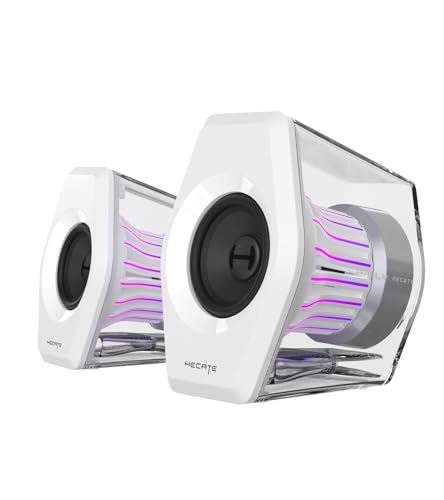
- USB-C/USB powered for easy hookup
- AUX input supports multiple devices
- Compact size suits smaller desks
Best For: People who want a simple, space-saving speaker set for everyday desktop audio.
Best for Easy Setup – Creative Pebble 2.0 USB Desktop Speakers
If you want pc speakers for desktop setup that are simple, compact, and better sounding than most built-in monitor audio, the Creative Pebble 2.0 is an easy pick. It uses a single USB cable for power, angled drivers for better projection, and rear passive radiators to add a little extra bass without taking up much space.
Best For: Anyone who wants a no-fuss speaker upgrade for a small desk, home office, or laptop setup.
Pros:
- Single USB cable keeps the setup clean and easy
- 45° elevated drivers help direct sound toward you
- Passive radiators improve bass for its size
- Compact, modern design fits most desks
Cons:
- No Bluetooth or wireless connectivity
- Sound is good for personal listening, not large-room use
- Best for straightforward desktop listening rather than deep bass
For buyers comparing pc speakers for desktop setup, the Pebble 2.0 stands out because it prioritizes simplicity, desk-friendly size, and clear near-field audio over extras. It is a practical upgrade if you want better everyday sound without adding clutter.
Best for Small Desks – Cyber Acoustics CA-2014 Computer Speakers
If you want simple pc speakers for desktop setup use, the Cyber Acoustics CA-2014 is a compact 2.0 option that keeps your desk uncluttered while still delivering clear stereo sound for everyday music, videos, and calls.
Best For: Small workspaces, basic multimedia listening, and buyers who want an easy wired speaker upgrade without extra bulk.
Pros:
- Compact footprint fits tight desks and small workstation setups.
- Easy 3.5mm wired connection works with many desktops, laptops, and Chromebooks.
- Front controls and headphone jack make volume changes and private listening convenient.
- Included AC adapter and simple setup keep installation straightforward.
Cons:
- No subwoofer, so bass is limited compared with larger speaker systems.
- Best suited to casual listening rather than room-filling audio.
Overall, the CA-2014 is a practical pick if you need pc speakers for desktop setup use and care more about space-saving convenience than big, bass-heavy output.
Best Budget – Amazon Basics USB Computer Speakers
If you want simple pc speakers for desktop setup, this Amazon Basics pair keeps things straightforward: plug it into USB for power, connect the 3.5mm audio cable, and you’re ready to go with no drivers or extra adapters.
Best For: Budget-minded buyers who want a compact, no-fuss speaker set for a laptop or desktop and value easy volume control plus a headphone jack.
Pros:
- USB-powered design makes setup quick and portable
- Single front control handles power and volume adjustment
- 3.5mm headphone jack adds handy private-listening flexibility
- Compact footprint fits small desks well
Cons:
- 2.2 watts RMS is fine for casual use, not room-filling sound
- Sound quality is basic compared with larger speaker systems
For everyday browsing, video calls, and light media, these are a practical pick among pc speakers for desktop setup when you care more about convenience and desk space than big bass or high-end audio.
Best for Wireless Desktop Streaming – OHAYO 60W Bluetooth 2.0 Speakers
If you want pc speakers for desktop setup that can handle everyday listening, gaming, and quick wireless playback, the OHAYO 60W computer speakers are a flexible pick. They combine Bluetooth 5.3 with wired 3.5mm, RCA, and USB inputs, so you can connect a PC, laptop, or other source without much hassle.
Best For: Users who want an easy-to-connect speaker pair for a desk setup with both Bluetooth and wired input options.
Pros:
- Bluetooth 5.3 adds convenient wireless streaming
- Multiple inputs make it easy to pair with different devices
- 60W output is a solid step up from basic monitor speakers
- Stereo 2.0 design keeps the footprint simple for a desktop
Cons:
- Not a substitute for a full 2.1 system if you want heavy bass
- Black, no-frills design may feel plain to some buyers
Overall, this is a practical choice if you want pc speakers for desktop setup that balance wireless convenience with broad compatibility. It’s especially appealing for users who switch between music, gaming, and general PC use on the same desk.
Best for Everyday Use – Upgraded USB Computer Speaker for Desktop PCs
If you want pc speakers for desktop setup that are simple, compact, and don’t add cable clutter, this USB-powered speaker is a practical choice. It connects with a single cable for both audio and power, so it’s especially handy for workstations where desk space is tight.
Best For: Users who want an easy plug-and-play desktop speaker for everyday browsing, meetings, and casual listening.
Pros:
- USB plug-n-play setup keeps installation quick and straightforward
- Single-cable design reduces desk clutter and avoids a separate AUX connection
- Dual 3W drivers with passive radiator deliver fuller sound and better bass than basic monitor audio
- Works with Windows, macOS, ChromeOS, and Linux for broad compatibility
Cons:
- Not a substitute for larger external speakers if you want room-filling volume
- Sound quality is tuned for convenience and clarity, not audiophile detail
For pc speakers for desktop setup, this model stands out for low-fuss use and a clean footprint rather than flashy extras. It’s a smart pick if you mainly need reliable everyday audio and want to keep your desk setup neat.
Best for Comfort – FUNLOGY 14W USB Stereo PC Speakers
If you want pc speakers for desktop setup that sound bigger than they look, the FUNLOGY Speaker is a smart space-saving pick. Its compact body, 30° upward tilt, and simple USB + 3.5mm hookup make it easy to place on a crowded desk without sacrificing clear, punchy audio.
Best For: Users who want an easy-to-install, compact speaker pair for a small desktop, laptop, or monitor setup.
Pros:
- 14W total output with clear mids, crisp highs, and stronger bass than typical mini speakers
- 30° tilted design helps direct sound toward your ears while saving desk space
- USB power and 3.5mm audio keep setup simple with no drivers or Bluetooth pairing
- Clean matte finish and solid build quality with a 1-year warranty
Cons:
- No Bluetooth, so wireless listening is not an option
- Compact size is great for desks, but it won’t match larger speakers for room-filling volume
For pc speakers for desktop setup, this model stands out because it combines straightforward plug-and-play convenience with a smart angled design and surprisingly full sound. It’s an especially practical choice if desk space is tight and you still want better clarity than built-in monitor audio.
Best with Extra Features – LENRUE G11 Computer Speakers
If you want pc speakers for desktop setup that stay compact while still adding a bit of style, the LENRUE G11 is a practical pick. It combines simple USB/3.5mm plug-and-play use with touch-controlled lighting, making it easy to set up on a crowded desk without adding clutter.
Best For: Buyers who want an affordable, space-saving speaker pair for everyday laptop or desktop use, especially in small workstations.
Pros:
- Compact design fits neatly under a monitor and helps reduce desktop clutter.
- USB power plus 3.5mm audio keeps setup simple with no driver installation.
- Touch lighting and a top volume knob make everyday use easy and convenient.
- Clear, distortion-free sound is solid for movies, music, and casual gaming.
Cons:
- No Bluetooth support, so wireless listening is not an option.
- No headphone or mic ports for private listening or headset passthrough.
- Not compatible with TVs, so it is mainly for PC and laptop setups.
The LENRUE G11 makes sense if your priority is tidy, straightforward pc speakers for desktop setup rather than a feature-heavy audio system. It is a good fit for basic everyday listening where compact size and easy plug-and-play use matter most.
Best For RGB Ambience – Redragon GS520 RGB Desktop Speakers
If you want pc speakers for desktop setup that add a little style without complicating your desk, the Redragon GS520 is a simple plug-and-play option. It pairs USB power with a 3.5mm connection, so it works easily with most PCs and laptops while delivering a clean 2.0 stereo sound profile for everyday listening.
Best For: Users who want an affordable desktop speaker set with colorful lighting, easy volume control, and straightforward setup.
Pros:
- 6 touch-controlled RGB lighting modes add visual flair to a desk.
- USB power and 3.5mm audio make setup quick and widely compatible.
- Separate volume up/down buttons are easy to reach and use.
- Compact stereo design fits well on smaller desks and workstations.
Cons:
- No subwoofer, so bass output is limited compared with larger systems.
- Lighting is a nice extra, but not useful if you prefer a plain look.
The GS520 is a solid pick if your priority is style, convenience, and basic stereo clarity rather than room-filling sound. For pc speakers for desktop setup, it makes the most sense for casual listening, gaming ambience, and desks where easy controls matter more than deep bass.
Best for RGB Gaming Setups – Edifier Hecate RGB Gaming Speakers
If you want pc speakers for desktop setup that feel more like part of a gaming rig than a plain audio accessory, the Edifier Hecate set is a strong fit. It combines compact desktop-friendly sizing with Bluetooth, USB, and AUX connectivity, plus gaming-focused sound modes and RGB effects.
Best For: Gamers and desktop users who want a compact speaker set with easy switching between PC, console, and mobile devices.
Pros:
- Compact footprint with a 10° tilt, making it easy to fit on crowded desks.
- Multiple input options: Bluetooth 5.1, USB sound card, and 3.5mm AUX.
- Gaming, Movie, and Music EQ modes add quick sound tuning for different uses.
- 12 RGB lighting effects give the setup a more immersive look.
Cons:
- Peak power is solid for desktops, but it is not meant for filling a large room.
- RGB styling may be unnecessary for users who prefer a simple, minimal look.
For pc speakers for desktop setup, this model stands out if you care about space-saving design, flexible connectivity, and a more playful gaming aesthetic. It is less about studio accuracy and more about easy everyday use with extra visual flair.
Best for Easy Desktop Setup – LENRUE G11 USB-C PC Speakers
If you want pc speakers for desktop setup that keep things simple, the LENRUE G11 is a practical pick with USB-C/USB power, AUX input, and a compact footprint. It is geared toward quick plug-and-play use on a desk, while the touch-light design adds a bit of style without taking up extra space.
Best For: Users who want a low-fuss, space-saving speaker set for everyday computer audio on a desktop, laptop, or small desk.
Pros:
- USB-C/USB powered for straightforward setup
- AUX support works with a wide range of devices
- Compact design fits neatly on crowded desks
- Touch lights add a visual accent for desktop use
Cons:
- Not aimed at bass-heavy listening or big-room sound
- Lighting may be unnecessary for buyers who want a plain look
Overall, the LENRUE G11 makes sense if you want pc speakers for desktop setup that are easy to power, easy to place, and simple to connect. It is a solid everyday option for browsing, streaming, video calls, and general computer use.
How We Picked These PC Speakers for Desktop Setup
We prioritized models that are easy to place on a crowded desk, simple to power, and straightforward to connect to a PC or laptop. The best picks also balance sound quality, volume, and convenience features without pushing the price or footprint too high.
We gave extra attention to plug-and-play setup, USB power, aux support, and practical controls like volume dials, touch buttons, or headphone jacks.
Quick Comparison
For the fastest choice, think in terms of use case: compact stereo speakers for everyday work, bass-leaning options for music and gaming, and RGB or Bluetooth models for a more feature-rich desktop. If your desk is small, slim satellite speakers or mini sound-bar styles usually fit best. If you want broader flexibility, pick a model with both USB power and 3.5mm input.
Key Buying Factors for PC Speakers for Desktop Setup
Size and Desk Layout
Measure your available space before buying. Small satellite speakers work well beside a monitor, while sound-bar designs can sit neatly under a display.
Power and Connectivity
Many PC Speakers for Desktop Setup use USB power for convenience, but some add RCA, Bluetooth, or USB-C support. Match the input options to your PC, laptop, or docking setup so you do not need extra adapters.
Sound Profile
If you mostly watch videos or attend calls, clarity matters more than deep bass. For gaming and music, look for stronger stereo separation, fuller low end, and higher power output.
Controls and Extras
Easy-access volume controls, headphone jacks, lighting effects, and mode switches can be helpful, but only if you will actually use them. Simple controls are often best for a clean, reliable desktop.
Who Should Buy Which PC Speakers for Desktop Setup?
Budget buyers should focus on compact USB-powered speakers that deliver the basics with minimal setup. Gamers and media fans may prefer higher-power models with RGB lighting, Bluetooth, or multiple inputs. Office users and students usually get the best value from small, tidy speakers that improve voice and video clarity without taking over the desk.
If you want the most practical choice overall, choose the model that fits your space first, then confirm the connection type and controls second. That approach usually leads to the best long-term match for a desktop audio upgrade.