A good powered USB hub can turn a crowded desk into a cleaner, more capable workstation. If you connect drives, peripherals, or charging devices every day, the right hub helps keep everything stable and within reach.
Below, we focus on powered USB hubs for pc desk use that balance speed, port mix, and practical desktop features like clamps, switches, and charging support.
Best 10 Powered USB Hubs for PC Desk Picks for 2026
Best for Lots of Peripherals
TP-Link UH720 9-Port USB 3.0 Hub

- 7 data ports for keyboards, drives, printers, and more
- 2 smart charging ports for faster phone/tablet charging
- Powered hub with on/off control and broad OS compatibility
Best For: Desktop users who need a high-port-count powered hub with separate charging ports.
Best for Desk-Mounted Expansion

- 7 USB 3.0 ports for easy desktop expansion
- Removable rails support cleaner mounting options
- 5V/3A USB-C power helps keep devices stable
Best For: PC desk users who want a mounted, organized powered hub with plenty of ports.
Best for Desk Control
ZIUMIER 10-Port RGB Powered USB Hub
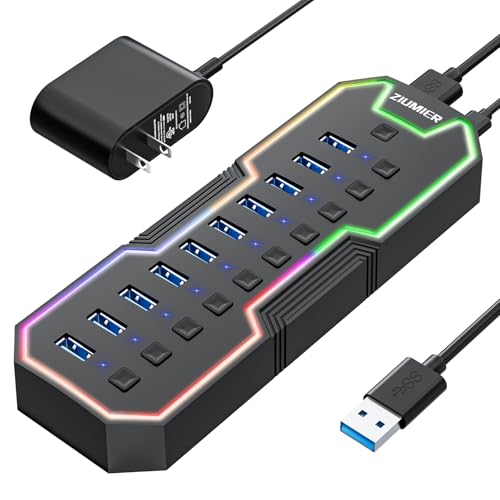
- 10 USB 3.0 ports with 5Gbps transfer
- Individual port switches for easy control
- Powered design for multi-device desk setups
Best For: PC desks and gaming setups that need lots of ports with per-device control.
Best for Tidy Desk Mounting
Clamp USB Hub with 4-Port Expansion

- Clamp-on design keeps the hub secured to desk or monitor edges
- Extra 5V power input helps with more stable multi-device use
- Includes 3 USB-A ports plus 1 USB-C data port
Best For: People who want a mounted, space-saving hub for a cleaner PC desk setup.
Best for Device Control

- Seven ports with six USB 3.0 data connections
- Individual illuminated switches for each device
- 12V/3A power plus a dedicated fast-charging port
Best For: Desk setups with multiple peripherals that need easy per-device control.
Best for Easy Setup
JESWO 7-Port USB 3.0 Powered Hub

- 7 USB 3.0 ports for desktop expansion
- 20W power adapter for multi-device use
- 3.3-foot cable helps reduce desk clutter
Best For: People who want a simple, plug-and-play powered USB hub for a PC desk setup.
Best for Comfort
Wenter 11-Port Powered USB Hub

- 11 ports with 10 data connections and 1 charging port
- Individual switches and LED status lights
- 5Gbps USB 3.0 syncing with included power adapter
Best For: PC desk users who want lots of ports and per-device control.
Best for Clamp-On Desks

- Clamps to desk or monitor edges for a clean, secure mount
- Adds 3 USB-A ports and 1 USB-C port in a compact hub
- Extra power input supports busier peripheral setups
Best For: People who want a space-saving, semi-permanent hub mounted right on the desk or monitor edge.
Best for Fast Transfers

- 10Gbps USB-C and USB-A data ports
- 2x PD 45W charging ports for mobile devices
- 65W adapter supports stable powered use
Best For: Desktop users who need fast data transfer and USB-C charging from one powered hub.
Best for Clamp-On Desk Setups

- Clamp mount keeps your desk surface clear
- Aluminum body adds a sturdier desktop feel
- Long cable makes positioning easier near monitors
Best For: Users who want a tidy, mounted USB hub for an organized PC desk setup.
Best for Lots of Peripherals – TP-Link UH720 9-Port USB 3.0 Hub
If you need one of the more capable powered usb hubs for pc desk setups, the TP-Link UH720 gives you seven USB 3.0 data ports plus two dedicated fast-charging ports in a single powered unit. It’s a practical pick for keeping keyboards, mice, printers, drives, and phone chargers organized without fighting for limited front-panel ports.
Best For: Desktop users who want a high-port-count powered hub with separate charging ports for mixed work and charging needs.
Pros:
- 7 USB 3.0 data ports handle multiple desk accessories and storage devices.
- 2 smart charging ports deliver up to 5V/2.4A for phones and tablets.
- Powered design with on/off switch helps manage bus-powered devices more reliably.
- Plug-and-play support for Windows, Mac, Linux, and Chrome OS.
Cons:
- Charging ports are charge-only and won’t transfer data.
- Wireless 2.4GHz dongles may perform better away from USB 3.0 interference.
- Bulkier than a simple unpowered hub, so it takes more desk space.
For a desk setup that needs both expansion and charging, this TP-Link model hits a strong balance of speed, power, and convenience. Among powered usb hubs for pc desk use, it stands out for users who want lots of ports without giving up fast phone charging.
Best for Desk-Mounted Expansion – atolla 7-Port USB 3.0 Hub
If you want one of the more practical powered usb hubs for pc desk setups, this atolla model stands out for its removable sliding rails and clean, mount-friendly design. It turns a single USB port into seven USB 3.0 connections while helping keep cables tucked away and devices easy to reach.
Best For: Users who want a tidy, desk-mounted USB hub with stable powered expansion for a PC, laptop, or monitor stand setup.
Pros:
- Removable sliding rails make it easier to mount on a desk edge, monitor stand, or wall
- 7 USB 3.0 ports with 5Gbps transfer speeds for everyday peripherals and file transfers
- 5V/3A USB-C power input helps support more demanding devices and steadier connections
- Plug-and-play compatibility with Windows, macOS, Linux, PS4, and more
Cons:
- Requires external power for the most reliable performance with busy setups
- Not ideal if you only need a very small, travel-friendly hub
For buyers comparing powered usb hubs for pc desk organization, this one is a smart pick if you care as much about cable management and placement as you do about extra ports. It’s especially useful when you want a stable, clean-looking desktop layout without sacrificing speed.
Best for Desk Control – ZIUMIER 10-Port RGB Powered USB Hub
If you want one of the more feature-packed powered usb hubs for pc desk setups, this ZIUMIER model gives you 10 USB 3.0 ports, individual power switches, and an RGB light strip for a more gaming-friendly look. It’s a practical pick when you need to connect multiple peripherals at once without constantly unplugging devices.
Best For: PC desks, gaming setups, and users who want easy per-port control for accessories like flash drives, keyboards, mice, and external drives.
Pros:
- 10 USB 3.0 ports with up to 5Gbps transfer speed
- Individual on/off switches make device control simple
- Powered 12V/2A adapter helps support multiple connected devices
- RGB strip adds a clean desktop or gaming aesthetic
Cons:
- Not designed for fast charging devices
- RGB styling may not suit a minimalist workspace
- Bulkier than a basic unpowered hub
This is a strong fit if you want a desktop hub that does more than just add ports; the switches and powered design make it especially useful for organized powered usb hubs for pc desk setups.
Best for Tidy Desk Mounting – Clamp USB Hub with 4-Port Expansion
If you want one of the more desk-friendly powered usb hubs for pc desk setups, this clamp-on USB hub keeps ports within reach while reducing cable clutter. It adds three USB-A data ports and one USB-C data port, and the extra 5V power input helps maintain stable performance with busier peripherals and external drives.
Best For: Users who want a semi-permanent, space-saving hub that mounts to a desk or monitor edge for cleaner everyday use.
Pros:
- Clamp-on design helps keep the hub stable and off the desktop
- Extra 5V power port supports more reliable use with higher-demand devices
- Offers 4 data ports total, including both USB-A and USB-C
- Aluminum build with plug-and-play compatibility across major systems
Cons:
- Power adapter is not included
- Does not support PD charging
This is a smart pick if you want powered usb hubs for pc desk organization rather than a loose desktop dongle. The clamp mount and external power input make it especially appealing for tidy workstations that connect multiple accessories at once.
Best for Device Control – atolla 7-Port USB 3.0 Hub
If you want powered usb hubs for pc desk use that make it easier to manage multiple peripherals, this atolla 7-port hub stands out for its illuminated individual switches, strong external power, and dedicated charging port. It’s a practical fit for desktops with a mic, keyboard, mouse, external drive, and other accessories that need tidy control.
Best For: PC users, streamers, and desk setups that need a powered hub with easy on/off control for each device.
Pros:
- Seven total ports, including six USB 3.0 data ports plus one fast-charging port
- Illuminated icon switches make it simple to toggle devices one by one
- 12V/3A power adapter helps support power-hungry peripherals and external drives
- Includes swappable icons for a more personalized streaming or workstation setup
Cons:
- Bulkier than a simple bus-powered hub because it needs external power
- Fast-charging port is separate, so not every port is optimized for charging
For shoppers comparing powered usb hubs for pc desk setups, this model is especially appealing if device switching matters as much as port count. It’s less about ultra-compact design and more about clear control, stable power, and everyday convenience.
Best for Easy Setup – JESWO 7-Port USB 3.0 Powered Hub
If you want one of the more practical powered usb hubs for pc desk use, this JESWO 7-port USB 3.0 hub is built for simple expansion without adding clutter. The included 20W power adapter helps support multiple devices at once, while the 3.3-foot cable gives you more placement flexibility on a desktop setup.
Best For: Users who want a straightforward, plug-and-play powered hub for keyboards, flash drives, printers, and other everyday desktop peripherals.
Pros:
- 7 USB 3.0 ports for expanding a crowded desk setup
- 20W external power helps with multi-device use
- 3.3-foot cable makes it easier to position on a PC desk
- Aluminum body adds a sturdy, low-profile look
Cons:
- Not a charging-focused hub for power-hungry devices
- No advanced features like individual port switches
- Best suited to simple USB accessories rather than heavy workloads
Overall, this is a sensible pick if you need a dependable desktop expansion hub rather than a feature-heavy dock. For shoppers comparing powered usb hubs for pc desk setups, it stands out for easy setup, broad compatibility, and a tidy cable length.
Best for Comfort – Wenter 11-Port Powered USB Hub
If you need powered usb hubs for pc desk setups with lots of peripherals, this Wenter 11-port model is built for the job. It gives you 10 USB 3.0 data ports plus a dedicated charging port, so you can keep your keyboard, mouse, flash drives, printer, and mobile devices connected without juggling cables.
Best For: PC users who want easy port expansion, individual control, and a dedicated charging spot on a crowded desk.
Pros:
- 11 total ports, including 10 USB 3.0 data ports and 1 smart charging port
- Individual on/off switches with LED indicators for quick device control
- 5Gbps transfer speeds for fast syncing and everyday file movement
- Includes a power adapter and long cables for easier desk placement
Cons:
- Bulkier than a basic travel hub
- Charging port is useful, but it is still a single dedicated charging slot
For a desktop setup that needs both expansion and convenience, this is a practical choice among powered usb hubs for pc desk use. It’s especially appealing if you want to manage multiple accessories from one place and keep power-hungry devices better supported.
Best for Clamp-On Desks – ORICO Clamp USB Hub 3.0
If you want a tidy way to add ports to a workstation, this clamp-style option stands out among powered usb hubs for pc desk setups. It mounts to a desk or monitor edge, keeps cables within easy reach, and adds both USB-A and USB-C expansion without taking up surface space.
Best For: Users who want a semi-permanent, space-saving hub attached to a desk or monitor edge for everyday peripherals.
Pros:
- Clamp mount helps keep the hub stable and off the desktop
- Includes 3 USB-A data ports plus 1 USB-C port for flexible expansion
- Extra power supply port is useful for more demanding devices
- Aluminum housing and silicone contact points help with durability and protection
Cons:
- Requires a suitable desk or monitor edge for clamping
- No included power adapter for the extra power supply port
- More of a mountable hub than a traditional desktop hub
This is a smart pick if you care more about placement and cable control than sheer port count. For powered usb hubs for pc desk setups, the clamp design is the real advantage: it keeps the hub accessible, secure, and neatly integrated into the workspace.
Best for Fast Transfers – intpw 9-Port 10Gbps USB Hub
If you need one of the more capable powered usb hubs for pc desk setups, this intpw hub is built for speed and flexibility. It combines 10Gbps USB-C and USB-A data ports with extra 5Gbps ports, plus dual 45W USB-C charging outputs, so it can handle peripherals, fast file transfers, and phone charging from one desktop-friendly unit.
Best For: Desktop users who want a high-speed powered hub for peripherals, external drives, and USB-C charging without clutter.
Pros:
- 10Gbps USB-C and USB-A ports are great for fast file transfers
- Includes 2 PD 45W charging ports for phones and tablets
- 65W adapter helps keep multiple devices powered more reliably
- Angled aluminum design is easy to access on a desk
Cons:
- No video output support
- Not ideal for charging laptops or other high-power devices
- Some SSD setups may need to avoid simultaneous heavy use
For buyers comparing powered usb hubs for pc desk use, this model stands out for mixing fast data lanes with dedicated charging ports in a compact desktop footprint. It’s a strong fit if you want a tidy hub for everyday peripherals and occasional high-speed transfers.
Best for Clamp-On Desk Setups – ORICO 4-Port Clamp USB Hub
If you want powered usb hubs for pc desk use without adding clutter on top of your workspace, this clamp-on ORICO hub is a practical fit. Its aluminum build, 4-port layout, and long 4.92 ft cable make it easy to mount near a monitor, desk edge, or workstation while keeping peripherals within reach.
Best For: Desk setups that need a tidy, mounted USB hub for frequent plug-ins like keyboards, mice, flash drives, and accessories.
Pros:
- Clamp mount helps save surface space and reduce cable mess
- Aluminum housing feels sturdy and suited to desktop use
- 4.92 ft cable gives flexible placement near monitors or PCs
- Extra power supply port supports more demanding hub setups
Cons:
- Power adapter is not included
- Only four USB ports, so it may be too small for heavy expansion needs
- Clamp design may not fit every desk or monitor edge
For buyers comparing powered usb hubs for pc desk use, this model stands out more for its clamp-on convenience than sheer port count. It’s a good pick if your priority is a cleaner, more organized setup with easy access to everyday peripherals.
How We Picked the Best Powered USB Hubs for PC Desk
We prioritized hubs that make sense for real desk use: dependable external power, enough ports for common peripherals, and layouts that reduce cable clutter. We also looked for models with USB 3.0 or faster data speeds, sturdy housings, and controls that make it easy to manage connected devices.
Quick Comparison
Most Powered USB Hubs for PC Desk setups fall into a few camps: compact 4-port clamp-style models for tight spaces, 7-port all-rounders for mixed peripherals, and higher-capacity 9- to 11-port hubs for users with multiple drives, accessories, and charging needs. If you want the simplest setup, choose a smaller hub with a power adapter. If you need to run several devices at once, step up to a larger hub with individual port control.
Key Buying Factors for Powered USB Hubs for PC Desk
Power Delivery and Stability
External power matters most when you connect drives, audio gear, webcams, or bus-powered accessories. A powered hub is less likely to drop connections than a passive splitter, especially when multiple devices are active at the same time.
Port Type and Speed
Match the hub to your gear. USB-A ports still cover most peripherals, while USB-C can be useful for newer laptops, accessories, and mixed setups. For storage and general desktop expansion, USB 3.0 is usually enough; if you move large files often, a faster 10Gbps hub may be worth it.
Desktop Design
Clamp-mounted and aluminum hubs can free up space and keep ports easier to reach. If your desk is already crowded, look for hubs with long cables, front-facing ports, or mounting options that keep the device accessible.
Controls and Convenience
Individual power switches, charging-only ports, and status LEDs are not mandatory, but they can make a busy desk much easier to manage. They are especially helpful if you frequently unplug devices or want to disable one accessory without affecting the rest.
Who Should Buy Which Powered USB Hubs for PC Desk?
If you need a simple everyday expansion hub, a 4- to 7-port powered model is usually the sweet spot. Creators, power users, and anyone with multiple drives or accessories should lean toward larger 9- or 11-port options. If your workspace is tight, clamp-style Powered USB Hubs for PC Desk setups are the best fit because they save surface space and keep ports close at hand.
Choose the smallest hub that comfortably fits your current devices, then leave a little room for future peripherals. That keeps your desk organized without overpaying for ports you will not use.