If you shoot with modern mirrorless or cinema cameras, the right reader can save real time on every offload. The best CFexpress card readers for PC balance speed, connector flexibility, and broad card support.
Below, we focus on practical options that help you move footage quickly, avoid bottlenecks, and keep your workflow simple.
Best 10 Cfexpress Card Readers for PC Picks for 2026
Best for Dual-Format Shooters
Lexar CFexpress Type A / SD Reader

- Reads CFexpress Type A and SD UHS-II cards
- USB 3.2 Gen 2 with up to 10Gbps transfers
- Includes USB-C to USB-C and USB-C to USB-A cables
Best For: Creators who need a portable reader for CFexpress Type A and SD UHS-II media on a PC.
Best for Fastest Ingest
OWC Atlas USB4 CFexpress 4.0 Reader

- USB4 40Gb/s connection for very fast transfers
- Supports both CFexpress Type B and Type A
- Bus-powered, fanless, and PC-friendly
Best For: PC creators who want top-tier CFexpress transfer speed and dual Type B/Type A support.
Best Dual-Slot Offload Speed
Lexar Professional CFexpress Type B/SD Reader

- CFexpress Type B + SD dual-slot design
- Up to 10Gbps USB 3.2 Gen 2 transfers
- Includes USB-C cable and USB-A adapter
Best For: PC users who want a fast, compact reader for both CFexpress Type B and SD cards.
Best for Small Spaces

- CFexpress Type B plus SD dual-slot design
- 10Gbps USB-C 3.2 Gen 2 transfer speeds
- Aluminum body helps manage heat
Best For: Shooters who need one fast reader for both CFexpress Type B and SD cards on a PC.
Best for Type B Only
Acer CFexpress Type B Card Reader

- 10Gbps USB 3.2 Gen 2 transfer speed
- USB-C and USB-A connectors
- Plug-and-play with no driver install
Best For: Photographers and videographers who only use CFexpress Type B cards and want a simple reader for PC or Mac.
Best USB-C/USB-A Compatibility
BENFEI CFexpress Type B Reader

- 10Gbps USB 3.2 Gen 2 performance
- USB-C and USB-A 2-in-1 connector
- Windows, Mac, Linux, and Android support
Best For: PC users who need a flexible CFexpress Type B reader for mixed port setups.
Best for CFexpress Type A + SD
CFexpress Type A and SD Dual-Slot Reader

- 10Gbps USB 3.2 Gen 2 speeds
- Supports CFexpress Type A and SD cards
- Includes USB-C and USB-A cables
Best For: Creators who want a compact reader for CFexpress Type A cards with SD support and broad PC compatibility.
Best Dual-Slot Pick
CFexpress Type B/SD Dual Slot Reader
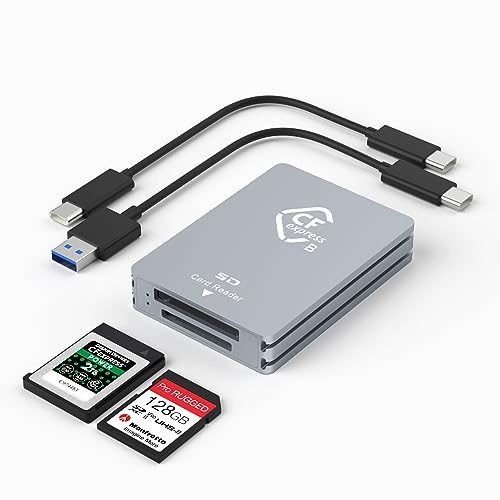
- Supports CFexpress Type B and SD cards
- 10Gbps USB 3.2 Gen 2 transfer speed
- Includes USB-C and USB-A cables
Best For: PC users who need a compact all-in-one reader for CFexpress Type B and SD cards.
Best Type-A Speed Pick
BENFEI CFexpress Type A Reader

- Up to 10Gbps transfer speed
- USB-C and USB-A 2-in-1 cable
- Durable build with wide OS support
Best For: PC and laptop users who need a durable CFexpress Type A reader with flexible connectivity.
Best Simple Pick
BENFEI CFexpress Type B Reader

- 2-in-1 USB-C and USB-A connection
- Up to 10Gbps with USB 3.2 Gen 2
- Durable aluminum and braided cable
Best For: PC users who want a versatile Type B reader for both USB-A and USB-C ports.
Best for Dual-Format Shooters – Lexar CFexpress Type A / SD Reader
If you want one of the more versatile cfexpress card readers for pc, this Lexar model is a smart pick because it handles both CFexpress Type A and SD UHS-II cards in a compact USB-C reader. It’s a practical fit for photographers and videographers who move between camera systems and need fast offloads without carrying multiple readers.
Best For: Creators who need a portable reader for CFexpress Type A and SD UHS-II media on a Windows PC or USB-C laptop.
Pros:
- Supports both CFexpress Type A and SD UHS-II cards in one device
- USB 3.2 Gen 2 transfer speeds up to 10Gbps for quick backups
- Includes both USB-C to USB-C and USB-C to USB-A cables
- Compact design makes it easy to toss into a camera bag
Cons:
- Only works with CFexpress Type A, not Type B cards
- Speed depends on card type, port, and system compatibility
For buyers comparing cfexpress card readers for pc, this Lexar stands out because it combines broad media support with simple portability. It’s especially useful if you regularly switch between CFexpress Type A and SD workflows and want a straightforward, high-speed reader.
Best for Fastest Ingest – OWC Atlas USB4 CFexpress 4.0 Reader
If you want one of the fastest cfexpress card readers for pc, the OWC Atlas USB4 reader is built for high-speed offload on modern Windows systems with USB4 or Thunderbolt 4. It supports CFexpress 4.0 Type B and Type A cards, and its bus-powered, fanless design keeps the setup simple while still pushing serious ingest speeds.
Best For: Photographers and video shooters who need very fast CFexpress Type B transfers on a USB4-equipped PC, with Type A support as a bonus.
Pros:
- USB4 40Gb/s connection with up to 5000MB/s rated throughput
- Supports both CFexpress Type B and Type A cards
- Bus-powered, portable, and includes a USB-C cable plus Type A adapter
- Fanless design and LED status indicator for easy daily use
Cons:
- Top performance depends on a USB4 or Thunderbolt 4 PC
- Pricier than basic CFexpress readers
- Maximum speeds require compatible high-end cards
For PC users who prioritize transfer speed and future-proof connectivity, this is a standout choice among cfexpress card readers for pc. It’s especially appealing if you work with large photo bursts or high-bitrate video and want a reader that won’t bottleneck your workflow.
Best Dual-Slot Offload Speed – Lexar Professional CFexpress Type B/SD Reader
If you want one of the more practical cfexpress card readers for pc, this Lexar model is built for fast offloads from both CFexpress Type B and SD cards. With USB 3.2 Gen 2 support and up to 10Gbps transfer speeds, it is a strong fit for photographers and video creators who need to move large files quickly without juggling multiple readers.
Best For: Creators who regularly offload CFexpress Type B and SD cards from a PC and want a compact, fast, two-slot reader.
Pros:
- Two slots let you handle CFexpress Type B and SD cards with one device
- Up to 10Gbps transfer speeds help speed up 8K video and high-res photo workflows
- Includes both USB Type-C to Type-C cable and Type-C to Type-A adapter
- Compact design is easy to carry for studio or on-location use
Cons:
- Only supports CFexpress Type B, not CFexpress Type A
- Top speed depends on your PC’s USB 3.2 Gen 2 port and card performance
This is a smart pick if you want cfexpress card readers for pc that keep a workflow moving with fewer cable and slot swaps. It is especially appealing for mixed-card shooters who value speed, portability, and simple plug-and-play use.
Best for Small Spaces – CFexpress Type B & SD Reader
If you want one of the more practical cfexpress card readers for pc, this dual-slot model covers both CFexpress Type B and SD cards in a single compact unit. The USB-C 3.2 Gen 2 connection supports fast 10Gbps transfers, making it a solid fit for moving large RAW photo batches and 4K video files without slowing down your workflow.
Best For: Photographers and videographers who need a fast, plug-and-play reader for both CFexpress Type B and SD media on Windows PCs.
Pros:
- Supports CFexpress Type B plus UHS-II/UHS-I SD cards
- USB-C 3.2 Gen 2 interface with up to 10Gbps transfer speed
- Aluminum housing helps with heat dissipation during long transfers
- Works with Windows, macOS, Linux, and Android without drivers
Cons:
- Only supports CFexpress Type B, not Type A
- Requires a USB-C port for best performance
- Speed still depends on the card and host system
For buyers comparing cfexpress card readers for pc, this is a straightforward dual-slot pick that balances speed, compatibility, and convenience. It makes the most sense if you regularly switch between CFexpress and SD cards and want a simple reader that stays cool under heavier transfer loads.
Best for Type B Only – Acer CFexpress Type B Card Reader
If you need a straightforward pick from the many cfexpress card readers for pc, this Acer model is built around one job: moving CFexpress Type B files quickly and reliably. It’s a strong fit for photographers and videographers who work with large 4K/8K clips or burst photo batches and want a plug-and-play reader for USB-C or USB-A systems.
Best For: Users who only need CFexpress Type B support and want a simple, portable reader for Windows PCs, MacBooks, and other OTG-compatible devices.
Pros:
- 10Gbps USB 3.2 Gen 2 transfer speed for fast large-file offloads
- USB-C and USB-A connectors add flexibility across desktop and laptop setups
- No driver installation required for quick plug-and-play use
- Metal shell and spring-loaded card slot help with durability and secure insertion
Cons:
- Only works with CFexpress Type B cards, not Type A or SD cards
- Full speed depends on both the card and the USB 3.2 Gen 2 port
- Requires OTG support on compatible mobile devices
For buyers comparing cfexpress card readers for pc, this is a focused, no-frills option that prioritizes compatibility with Type B media and fast transfers over broad format support. If that matches your workflow, it’s an efficient and portable choice.
Best USB-C/USB-A Compatibility – BENFEI CFexpress Type B Reader
If you want a straightforward option among cfexpress card readers for pc, this BENFEI Type B reader is built around speed and flexibility. Its USB 3.2 Gen 2 interface supports up to 10Gbps, and the included USB-C plus USB-A 2-in-1 design makes it easy to use with newer desktops, laptops, and older PC ports.
Best For: PC users who want a simple CFexpress Type B reader that works across USB-C and USB-A setups.
Pros:
- 10Gbps USB 3.2 Gen 2 transfer support
- 2-in-1 USB-C and USB-A connection for broad compatibility
- Works with Windows, Mac, Linux, and Android
- Compact, travel-friendly design
Cons:
- Not compatible with XQD cards
- Only supports CFexpress Type B, not other card types
For buyers comparing cfexpress card readers for pc, this BENFEI model stands out as a practical plug-and-play choice when you need fast transfers without worrying about whether your machine has USB-C or USB-A.
Best for CFexpress Type A + SD – CFexpress Type A and SD Dual-Slot Reader
If you need one of the more versatile cfexpress card readers for pc, this dual-slot model is a practical choice for creators working with CFexpress Type A and SD cards. It offers 10Gbps USB 3.2 Gen 2 speeds, includes both USB-C and USB-A cables, and works across Windows, Mac, Linux, and Android systems.
Best For: Photographers and videographers who use CFexpress Type A cards but still want SD card support and broad PC compatibility.
Pros:
- 10Gbps transfer speed helps move large photo and video files quickly
- Dual-slot design supports CFexpress Type A and SD cards in one reader
- Includes USB-C to USB-C and USB-C to USB-A cables for flexible PC use
- Plug-and-play setup with wide OS compatibility
Cons:
- Both card slots cannot be used at the same time
- Limited to CFexpress Type A, not Type B
- Best value only if you actually use Type A cards
For buyers comparing cfexpress card readers for pc, this one stands out for its combo of Type A support, SD compatibility, and included cables for both modern and older USB ports. It’s a solid utility pick if you want fewer adapters in your camera bag.
Best Dual-Slot Pick – CFexpress Type B/SD Dual Slot Reader
If you want cfexpress card readers for pc that can handle both high-speed CFexpress Type B cards and everyday SD cards, this dual-slot reader is a practical choice. It’s built for fast offloads over USB 3.2 Gen 2, includes both USB-C and USB-A cables, and keeps the setup simple for desktops and laptops.
Best For: Photographers and videographers who need one compact reader for CFexpress Type B and SD cards on a PC.
Pros:
- Dual-slot design supports both CFexpress Type B and SD cards
- Up to 10Gbps transfer speeds for quicker file offloading
- Includes USB-C to USB-C and USB-C to USB-A cables
- Aluminum body helps with durability and heat dissipation
Cons:
- SD card disconnects when a CFexpress card is inserted
- Top speed depends on your PC’s USB port and card performance
For PC users who want a compact, dual-format reader without extra setup, this model covers the essentials well. It’s a strong fit if you need cfexpress card readers for pc that balance speed, portability, and broad compatibility.
Best Type-A Speed Pick – BENFEI CFexpress Type A Reader
If you need one of the more practical cfexpress card readers for pc, this BENFEI model keeps the focus on Type A transfers without adding a lot of clutter. Its USB 3.2 Gen 2 design is built for up to 10Gbps speeds, and the 2-in-1 USB-C/USB-A cable makes it easy to use with newer desktops or older PCs.
Best For: PC and laptop users who want a simple, durable CFexpress Type A reader with both USB-C and USB-A connectivity.
Pros:
- USB 3.2 Gen 2 support for up to 10Gbps transfer speeds
- 2-in-1 USB-C and USB-A design works across more computers
- Durable aluminum alloy body with braided nylon cable
- Compatible with Windows, Mac, Linux, and Android
Cons:
- Only supports CFexpress Type A, not Type B
- Needs a USB 3.2 Gen 2 port to reach peak speeds
For buyers comparing cfexpress card readers for pc, this is a straightforward pick if you need Type A support and value flexible port compatibility over extra features. It is best suited to users who want a dependable reader that can move between modern and legacy systems easily.
Best Simple Pick – BENFEI CFexpress Type B Reader
If you need one of the more flexible cfexpress card readers for pc use, this BENFEI model is built to work with both USB-A and USB-C systems while supporting CFexpress Type B cards. It aims for up to 10Gbps transfer speeds, so it suits photographers and videographers who want fast offloads on modern desktops, laptops, and mixed-port setups.
Best For: PC users who want a Type B reader that can plug into either USB-A or USB-C without extra adapters.
Pros:
- 2-in-1 USB-C and USB-A cable design adds real flexibility for older and newer PCs.
- USB 3.2 Gen 2 support enables up to 10Gbps transfer speeds with compatible hardware.
- Aluminum alloy housing and braided cable improve durability for frequent travel and desk use.
- Works across Windows, Mac, Linux, and Android for broader device compatibility.
Cons:
- Not compatible with CFexpress Type A, Type C, or XQD cards.
- Top transfer speeds depend on both the card and the computer’s USB port speed.
For buyers comparing cfexpress card readers for pc, this is a practical pick if you value port flexibility and Type B support over extra card-format compatibility. It’s a straightforward reader for fast, dependable downloads on mixed systems.
How We Picked the Best Cfexpress Card Readers for PC
For Cfexpress Card Readers for PC, we prioritized real-world transfer speed, card-format support, port compatibility, and build quality. We also looked for bus-powered designs, clear status indicators, and readers that match common PC setups with USB-C or USB-A connections.
Quick Comparison
The main difference between these readers is card type: CFexpress Type A is smaller and less common, while Type B is widely used in many pro cameras. Dual-slot readers add SD support, which is useful if you also shoot stills or need a backup offload option. If you want the highest headroom, USB4 models are the best fit; if you just need dependable 10Gbps transfers, USB 3.2 Gen 2 is usually enough.
Key Buying Factors for Cfexpress Card Readers for PC
Card Compatibility
Make sure the reader matches your card type exactly. Type A and Type B are not interchangeable, and some readers support both CFexpress and SD cards while others are single-format only.
Connection Speed
USB 3.2 Gen 2 at 10Gbps is a strong baseline for most users. If you regularly move large RAW video files or high-burst image sequences, USB4 can reduce transfer bottlenecks when your PC supports it.
Host Port Support
Check whether your desktop or laptop has USB-C, USB-A, or both. A dual-interface reader is often the most flexible choice for Cfexpress Card Readers for PC, especially if you move between workstations.
Thermals and Build
Metal housings can help with durability and heat management during long transfers. That matters more when copying large files back-to-back or using the reader frequently in the field.
Who Should Buy Which Cfexpress Card Readers for PC?
Choose a Type A reader if your camera uses that format and you want the simplest match. Choose a Type B reader if you need the most common pro solution for fast offloads. Pick a dual-slot CFexpress/SD reader if you want one accessory for both camera cards. If you value maximum performance and future-proofing, a USB4 reader is the strongest premium option. For general PC use, a reliable 10Gbps reader with both USB-C and USB-A support is the safest all-around pick.