If you move photos, video, or files between different memory cards, the right reader saves time and avoids compatibility headaches. The best options for Windows PCs balance speed, format support, and easy plug-and-play use.
Below, we focus on multi card readers for Windows PC that suit everything from casual everyday backups to heavier creative workflows.
Best 10 Multi Card Readers for Windows PC Picks for 2026
Best for Multi-Format Workflows
USB C/USB3.0 7-in-1 Card Reader

- 7-in-1 design supports CF, SD, micro SD/TF, MS, and XD
- USB-C and USB-A compatibility works with many Windows PCs
- Reads and writes multiple cards at once for faster workflows
Best For: Windows users who need one reader for a wide mix of memory card formats.
Best for Legacy Card Coverage
SABRENT 75-in-1 Multi Card Reader/Writer
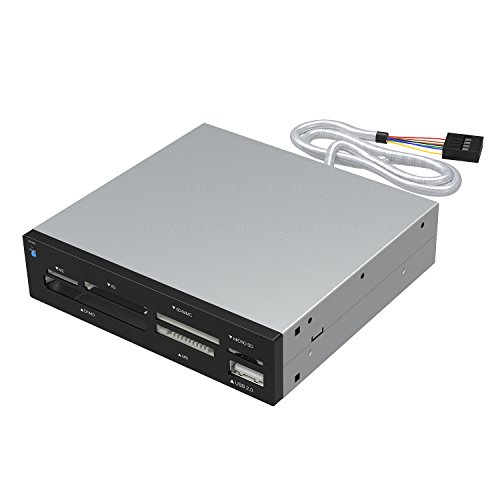
- Supports 74 memory card types
- Windows-compatible with broad OS support
- Includes extra USB 2.0 port and powered connector
Best For: Users who need broad card compatibility, including legacy formats, on a Windows PC.
Best Multi-Format Reader
SmartQ C368 USB 3.0 Card Reader

- Supports SD, Micro SD, MS, and CF cards
- USB 3.0 with plug-and-play setup
- Works with Windows, Mac, and Linux
Best For: Windows PC users who need a simple all-in-one reader for multiple card formats.
Best for Mixed-Format Media
Insignia 4-Slot USB 3.0 Card Reader

- Four slots for SD, microSD, Memory Stick, and CompactFlash
- USB 3.0 speeds up to 312MB/s
- Reads and writes multiple cards at once
Best For: Windows users who need broad card compatibility and fast desktop transfers.
Best for Fast Pro Transfers
Lexar Professional 3-in-1 USB 3.1 Reader

- Supports SD, microSD, and CompactFlash
- Up to 312MB/s for SD and microSD
- USB 3.1 with USB 2.0 backward compatibility
Best For: Photographers and editors who need fast, all-in-one card access on a Windows PC.
Best for Dual-Card Transfers
UGREEN USB 3.0 Dual Slot Card Reader

- Reads and writes two cards at the same time
- USB 3.0 transfer speeds for large files
- Works with SD and microSD formats, including UHS-I
Best For: Users who want a compact, plug-and-play reader for quick dual-card transfers on Windows PCs.
Best for Fast Transfers

- Up to 5Gbps USB 3.0 transfer speeds
- Supports SD, MicroSD/TF, MMC, and more
- Compact, plug-and-play design for easy use
Best For: People who want a fast, portable card reader for PCs, laptops, and OTG devices.
Best for Multi-Format Workstations
StarTech USB 3.0 Internal Card Reader
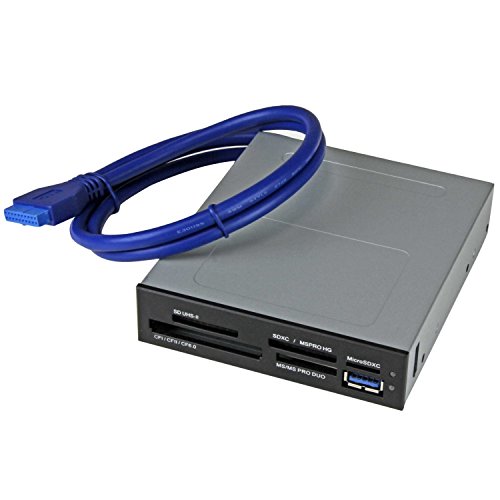
- Wide format support for SD, microSD, CF, Memory Stick, and more
- UHS-II and USB 3.0 speed up large media transfers
- Internal 3.5-inch bay design with front USB port
Best For: Desktop users who need a versatile internal reader for mixed card formats.
Best for Legacy Card Formats
7-in-1 USB-C Memory Stick Reader

- Supports SD, TF, CF, MS, and XD cards
- 5Gbps transfer speed via USB 3.0/USB-C
- Plug-and-play on Windows and other major platforms
Best For: Users who need one reader for both modern SD cards and older legacy formats.
Best for Multi-Format Creators
8-in-1 Multi SD Card Reader Hub

- Reads SD, TF, MS, CF, and XD cards
- USB-C, Lightning, and USB-A connections
- Adds 3 USB 2.0 ports for extra devices
Best For: Photographers and Windows PC users who need broad card and device compatibility.
Best for Multi-Format Workflows – USB C/USB3.0 7-in-1 Card Reader
If you need one reader that handles a wide mix of formats, this is a practical pick among multi card readers for windows pc. It combines USB-C and USB-A support, reads several card types, and is built for quick plug-and-play transfers without extra drivers.
Best For: Windows users, creators, and office workflows that need one adapter for CF, SD, micro SD, MS, and XD cards.
Pros:
- 7-in-1 layout covers CF, SD, micro SD/TF, MS, and XD cards
- USB-C and USB-A connections make it easy to use with newer and older PCs
- Up to 5Gbps transfer speeds help move photos and video files faster
- Can read and write multiple cards at the same time for better productivity
Cons:
- Bulkier than a simple single-slot card reader
- Most useful if you actually work with older formats like CF, MS, or XD
For buyers comparing multi card readers for windows pc, this model stands out for breadth of compatibility rather than minimalist design. It is especially useful if you handle mixed memory cards and want a single reader that works across different devices and setups.
Best for Legacy Card Coverage – SABRENT 75-in-1 Multi Card Reader/Writer
SABRENT 75 in 1 Multi Flash Media Card Reader/Writer(with Power Cord) (CRW-UINB)
Check Price On AmazonIf you need one of the most versatile multi card readers for windows pc, this Sabrent model is built for broad compatibility and older media formats. It supports a wide range of cards, includes a USB 2.0 port, and uses an internal power connector to help keep connected devices stable.
Best For: Users who want a Windows-compatible reader for handling many card types, including older formats and mixed media workflows.
Pros:
- Supports 74 different memory card types for wide-format coverage
- Works with Windows ME through Windows 8, plus Linux and Mac OS X
- Includes 6 reader slots plus a USB 2.0 port for added flexibility
Cons:
- Some cards may require adapters
- Older design may not appeal if you only need modern SD and microSD support
For buyers comparing multi card readers for windows pc, this is a practical pick when format support matters more than sleek design. It is especially useful for anyone who still works with CF, MS, xD, and other legacy media alongside standard SD cards.
Best Multi-Format Reader – SmartQ C368 USB 3.0 Card Reader
If you want one of the most practical multi card readers for windows pc, the SmartQ C368 is a simple plug-and-play option that handles the common card formats without extra drivers. It’s a good fit for transferring photos, video, and files from mixed memory cards on a desktop or laptop.
Best For: Windows PC users who need a straightforward reader for SD, Micro SD, MS, and CF cards.
Pros:
- Four-in-one design supports SD, Micro SD, MS, and CF cards
- USB 3.0 connectivity for faster transfers and backward compatibility with USB 2.0
- No-driver setup works across Windows, Mac, and Linux
- Blue LED indicator makes power/status easy to see
Cons:
- Does not include memory cards
- Bulkier than ultra-compact single-slot readers
- Best suited to standard card workflows rather than advanced pro features
For buyers comparing multi card readers for windows pc, the SmartQ C368 stands out for broad format support and easy setup rather than flashy extras. It’s a solid everyday choice if you need a dependable reader that covers several card types in one device.
Best for Mixed-Format Media – Insignia 4-Slot USB 3.0 Card Reader
If you need one of the more versatile multi card readers for windows pc, this Insignia model stands out for handling a wide mix of formats, from SD and microSD to CompactFlash and Memory Stick variants. It’s a practical pick for photographers, creators, and anyone moving files between older and newer cards without juggling adapters.
Best For: Windows users who want broad card compatibility and fast USB 3.0 transfers in one desktop-friendly reader.
Pros:
- Supports SD, microSD, SDXC, MS PRO, and CompactFlash Type I cards
- Four slots can read and write simultaneously for easier multitasking
- Up to 312MB/s transfer speeds help move large photo and video files quickly
- Includes a 1.2m USB cable for flexible setup on a desk
Cons:
- USB-A connection may require an adapter for newer USB-C-only laptops
- Bulkier than a simple single-slot microSD reader
- Best suited to desk use rather than travel carry
For buyers comparing multi card readers for windows pc, this Insignia unit is appealing because it combines broad legacy support with straightforward plug-and-play operation. It’s not the smallest option, but it does deliver the kind of all-in-one compatibility that makes frequent card swapping much easier.
Best for Fast Pro Transfers – Lexar Professional 3-in-1 USB 3.1 Reader
If you need a reliable option among multi card readers for windows pc, this Lexar reader is built for speed and broad card support. It handles SD, microSD, and CompactFlash in one compact device, making it a practical fit for photographers and video editors who move large files often.
Best For: Users who want a fast, versatile reader for SD, microSD, and CF cards on a Windows PC.
Pros:
- Supports SD, microSD, and CompactFlash cards in one reader
- Up to 312MB/s transfer speeds for SD and microSD cards
- USB 3.1 compatibility plus backward support for USB 2.0 ports
- Good fit for UHS-I and UHS-II media workflows
Cons:
- CompactFlash speed is lower than SD and microSD performance
- No memory cards included
- More than some basic single-slot readers
Overall, this is a strong pick if you want one of the more capable multi card readers for windows pc and care more about transfer speed and card flexibility than the lowest price.
Best for Dual-Card Transfers – UGREEN USB 3.0 Dual Slot Card Reader
If you want a simple, portable option among multi card readers for windows pc, the UGREEN SD Card Reader is a practical pick. It handles a wide range of SD and microSD formats, works with Windows without extra setup, and moves files quickly over USB 3.0.
Best For: Photographers, creators, and everyday users who need a compact reader that can handle two cards at once on a Windows PC.
Pros:
- Reads and writes two cards at the same time
- USB 3.0 speeds help with large photo and video transfers
- Supports SD, microSD, MMC, and UHS-I cards
- Plug-and-play use on Windows, plus broad cross-platform compatibility
Cons:
- USB-A design may not suit newer laptops without an adapter
- Basic compact build, so it lacks extra ports or advanced features
For buyers comparing multi card readers for windows pc, this UGREEN model stands out for its dual-slot convenience and no-fuss setup. It is a strong everyday choice if you mainly need fast, reliable memory card access rather than a full docking solution.
Best for Fast Transfers – USB 3.0 SD/TF Card Reader
USB 3.0 SD/TF Card Reader - High-Speed Multi Memory Card Adapter for PC, Laptop, Phone
Check Price On AmazonIf you want a simple, fast option among multi card readers for windows pc, this USB 3.0 SD/TF card reader is a practical pick. It’s designed for quick file access, broad card support, and easy plug-and-play use with everyday laptops, desktops, and OTG-enabled devices.
Best For: Users who need a compact, no-fuss card reader for photos, videos, and mixed memory cards.
Pros:
- USB 3.0 speeds up to 5Gbps for faster transfers
- Supports SD, MicroSD/TF, MMC, and more
- Plug-and-play setup with no drivers required
- Compact design is easy to carry for travel or work
Cons:
- Single-slot style may be less versatile than larger multi-bay readers
- Performance depends on the speed of your memory card and USB port
For buyers comparing multi card readers for windows pc, this model stands out for speed, simplicity, and broad everyday compatibility rather than advanced features. It’s a smart fit if you mainly want quick transfers and a portable reader that just works.
Best for Multi-Format Workstations – StarTech USB 3.0 Internal Card Reader
If you need one of the most flexible multi card readers for windows pc setups, this StarTech internal reader is built for desktop users who handle lots of formats. It fits a 3.5-inch bay, connects to a 20-pin motherboard header, and supports fast transfers for photos, video, and everyday file offloading.
Best For: Desktop builders, photo/video workflows, and Windows PC users who want broad card support plus a front USB port.
Pros:
- Supports a wide range of formats, including SD, microSD, CompactFlash, Memory Stick, and xD
- UHS-II and USB 3.0 help speed up large file transfers from modern cards
- Can access up to four slots simultaneously for faster multi-card workflows
- Includes a front-facing USB 3.0 port for added convenience
Cons:
- Requires an internal 3.5-inch bay and motherboard header
- Not ideal for laptop users or plug-and-play portable setups
For desktop owners who want broad compatibility and strong transfer performance, this is a very practical pick among multi card readers for windows pc. Its internal design and simultaneous card access make it especially useful when moving media between multiple formats.
Best for Legacy Card Formats – 7-in-1 USB-C Memory Stick Reader
If you need multi card readers for windows pc that can handle more than just SD and microSD, this 7-in-1 USB-C model is a practical pick. It supports a wide mix of formats, including CF, MS/Memory Stick, and XD cards, while also offering dual SD and TF slots for everyday use.
Best For: Photographers, videographers, and Windows users who still work with older memory card types and want one compact reader for multiple devices.
Pros:
- 7-card design covers SD, TF, CF, MS, and XD formats
- 5Gbps USB 3.0/USB-C transfer speeds for faster file moves
- Plug-and-play setup works with Windows, macOS, Linux, Android, and iPhone 15
- Aluminum body and compact build are easy to carry
Cons:
- USB-C connection may require an adapter for older USB-A-only PCs
- Overkill if you only use SD or microSD cards
- Multiple slots add versatility, but not every card format will be relevant to casual users
For buyers comparing multi card readers for windows pc, this model stands out for broad format support rather than minimalism. It makes the most sense if you need one reader that can cover both modern and legacy cards without juggling adapters.
Best for Multi-Format Creators – 8-in-1 Multi SD Card Reader Hub
If you need one of the more versatile multi card readers for windows pc, this 8-in-1 hub stands out for its wide slot support and three-way connectivity. It handles SD, TF, MS, CF, and XD cards, then adds USB-C, Lightning, and USB-A so you can move files between a Windows PC, phone, tablet, or camera workflow without juggling adapters.
Best For: Photographers, vloggers, and PC users who want a single reader for many card types and device connections.
Pros:
- Supports SD, TF, MS, CF, and XD cards in one compact unit
- USB-C, Lightning, and USB-A connectors improve compatibility across devices
- Three USB 2.0 ports add extra flexibility for accessories or flash drives
- Plug-and-play design makes setup simple on Windows PC and other devices
Cons:
- USB 2.0 transfer speeds are not as fast as newer USB 3.x readers
- Feature set is broad, but not as streamlined if you only need SD and microSD
Overall, this is a practical pick if you value format coverage and cross-device convenience over raw speed. Among multi card readers for windows pc, it makes the most sense for users who regularly switch between older memory cards, modern phones, and desktop editing setups.
How We Picked the Best Multi Card Readers for Windows PC
We looked for Multi Card Readers for Windows PC that offer broad card compatibility, dependable USB performance, and practical designs for desktop or laptop use. Priority went to readers that support common formats like SD, microSD, and CF, plus models with useful extras such as UHS-II support, internal bays, or USB-C flexibility.
We also weighed build quality, portability, and whether the reader is truly plug-and-play on Windows without unnecessary setup.
Quick Comparison
Use format support as your first filter. If you mainly use SD and microSD, a compact dual-slot reader is often enough. If you still work with CF, MS, or XD cards, a broader multi-format model is the safer choice. For faster photo and video offloads, look for higher-speed USB 3.x models and, where relevant, UHS-II support.
Key Buying Factors for Multi Card Readers for Windows PC
Card Formats You Actually Use
Not every reader supports every card. Check your most common formats first, especially SD, microSD, CompactFlash, and Memory Stick variants. Buying for future flexibility is smart, but unused slots should not come at the expense of speed or reliability.
USB Connection and Speed
For most users, USB 3.0 is the baseline. If you regularly transfer large RAW photo libraries or video files, a faster reader with better sustained performance can make a noticeable difference. Also confirm whether your PC has USB-A or USB-C ports so you do not need extra adapters.
Desktop Vs Portable Use
Portable readers are best if you travel or switch between laptops. Internal multi card readers are better for fixed desktop setups and can be cleaner if you want a front-bay style installation.
Windows Compatibility and Ease of Use
The best readers should work immediately in Windows with no driver hunt. Plug-and-play support matters most if you want a simple workflow for backups, transfers, and camera ingest.
Who Should Buy Which Multi Card Readers for Windows PC?
If you need a simple everyday option, choose a compact dual-slot or 3-in-1 reader. If you handle mixed legacy media, go for a wider multi-format model. Content creators and photographers should prioritize higher-speed readers with stronger card compatibility, while desktop users may prefer an internal reader for a permanent, tidy setup.
For most buyers, the best Multi Card Readers for Windows PC are the ones that match your actual card collection today and still leave room for the formats you may use next.