Choosing the right VR headset for PC gaming comes down to more than just resolution. Comfort, tracking, display quality, and whether you want wired or wireless play all shape the experience.
Below, we’ve rounded up 10 strong options for different budgets and play styles, so you can quickly find a headset that fits your setup and your games.
Best 10 Vr Headsets for PC Gaming Picks for 2026
Wireless all-rounder
Wireless mixed reality for versatile PC gaming

- No-wire design for freer movement
- Sharp 4K+ Infinite Display and upgraded XR2 Gen 2
- Works for standalone, mixed reality, and PC use
Best For: Gamers who want the most versatile headset in the group
PC-focused classic
Dedicated PC VR with inside-out tracking

- Built for Windows PC VR gaming
- Inside-out tracking needs no external sensors
- Sharper optics and ergonomic Halo headband
Best For: Gamers who want a simple, tethered PC VR setup
Compact premium pick
Compact PC VR with mixed reality

- PC VR support with low-latency connection
- Compact headset with adjustable fit controls
- Full-color passthrough and Deluxe Pack accessories
Best For: Users who want a compact headset that bridges PC VR and mixed reality
Sim-racing specialist
High-clarity PC VR for sim fans
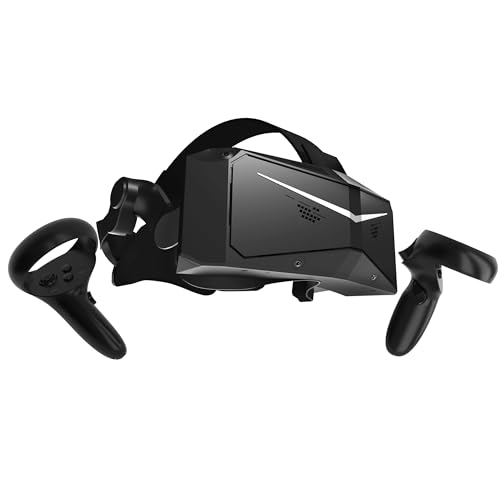
- 2880 x 2880 per eye for sharp visuals
- QLED with local dimming and HDR
- SteamVR-ready for flight sims and iRacing
Best For: Players who want the sharpest visuals for sim racing and flight
Ultra-Clear PCVR Pick

- SteamVR support for 7,000+ titles
- 3664 x 1920 display with up to 120Hz
- Light 285g body with flip-up design
Best For: PC gamers who want a lightweight SteamVR headset with strong clarity
Simple Standalone Starter

- All-in-one headset with mobile app setup
- Inside-out tracking with Touch controllers
- 90Hz OLED display at 1440 x 1600 per eye
Best For: Players who want a simple standalone headset that can also fit into PC gaming
Premium Mixed Reality Option

- 2448 x 2448 per-eye display with 120° FOV
- DisplayPort mode for lossless PC VR visuals
- Eye, hand, and face/body tracker support
Best For: PC VR and mixed reality users who want high resolution and advanced tracking
Portable Wireless Value Pick

- Wireless VR with no cords to manage
- Snapdragon XR2 Gen 2 and 8GB RAM
- Includes 3-month trial for 40+ games
Best For: Players who want a flexible wireless headset with easy everyday VR use
Ultra-Wide High-Clarity Sim Pick
Pimax Crystal Super CS-ultrawide

- 3840x3840 resolution per eye
- 140-degree ultrawide field of view
- Eye-tracking and wired PC connection
Best For: Flight and racing sim players who want top-tier clarity and immersion
Premium PCVR Clarity Pick
- 50 PPD lenses reduce the screen-door effect
- 3840x3840 per eye with local dimming
- Dynamic FOV optimization for PC hardware
Best For: PCVR enthusiasts who want premium sharpness and wide-field immersion
Wireless all-rounder – Wireless mixed reality for versatile PC gaming
If you want one of the most flexible vr headsets for pc gaming, the Meta Quest 3 stands out for its wireless design, upgraded Snapdragon XR2 Gen 2 performance, and sharp 4K+ Infinite Display. It also works with a PC, but the appeal is that you can move between standalone VR, mixed reality, and PC-connected play without being tied down by cables.
Best For: Players who want a wireless headset that can handle PC gaming, mixed reality, and standalone use in one device.
Pros:
- Wireless setup with no cords to limit movement
- Nearly 30% leap in resolution for sharper visuals
- Snapdragon XR2 Gen 2 delivers faster load times and smoother graphics
- Dual RGB color cameras support full-color passthrough mixed reality
Cons:
- Battery life is listed at about 2.2 hours
- PC gaming support is not the only focus, so pure PC-VR buyers may want a dedicated tethered option
- Best experience depends on choosing games and apps that support Meta Horizon OS or PC use
Overall, the Quest 3 is the most adaptable choice here if you want a modern headset that can cover a lot of ground. It is especially attractive for buyers who value freedom of movement and the option to mix PC gaming with standalone VR and mixed reality.
PC-focused classic – Dedicated PC VR with inside-out tracking
The Oculus Rift S is a straightforward pick if your priority is pc gaming on a Windows machine and you want a headset built around PC VR. It uses inside-out Oculus Insight tracking with no external sensors, and its sharper optics and 2560 x 1440 display are aimed at keeping games clear and immersive.
Best For: PC gamers who want a tethered, easy-to-set-up VR headset focused on Windows VR titles.
Pros:
- PC-only design keeps the focus on VR gaming on Windows
- Inside-out tracking works without external sensors
- Improved optics reduce screen-door effect and improve color clarity
- Ergonomic Halo headband is built for secure, comfortable wear
Cons:
- Lower display resolution than newer premium headsets
- Requires a PC connection and is not a standalone headset
- Older product design may not match the latest mixed reality features
If you want a no-frills PC VR headset and do not need standalone or mixed reality extras, the Rift S still makes sense. Its value is in its focused PC experience, simple tracking setup, and a broad VR gaming library.
Compact premium pick – Compact PC VR with mixed reality
HTC Vive XR Elite with Deluxe Pack — Mixed Reality and PC VR Headset + Controllers
Check Price On AmazonThe HTC Vive XR Elite is a strong choice for vr headsets for pc gaming if you want a compact headset that can also do mixed reality. It connects to a VR-ready PC for low-latency PC-VR gaming, while still offering standalone use, full-color passthrough, and a lightweight design with adjustable fit options.
Best For: PC gamers who want a compact mixed-reality headset with flexible fit and standalone support.
Pros:
- Connects to a VR-ready PC for low-latency PC-VR gaming
- Compact design with stepless IPD and diopter adjustments
- Full-color passthrough and depth sensor support mixed reality
- Includes Deluxe Pack accessories for added comfort and fit
Cons:
- Battery life is listed at up to 2 hours
- Higher-end features may be more than needed for basic PC-only use
- Resolution and field of view are strong, but not class-leading versus the highest-end sim-focused headsets
This headset makes sense if you want a premium-feeling all-in-one device that still works well with PC VR. It is especially appealing when comfort, adjustability, and mixed reality matter alongside gaming performance.
Sim-racing specialist – High-clarity PC VR for sim fans
The Pimax Crystal Light is built for pc gaming buyers who care most about image clarity, especially in flight sims and racing titles. Its 2880 x 2880 per-eye resolution, QLED panel with local dimming, and up to 120Hz refresh rate are all aimed at delivering a highly detailed and fluid VR experience.
Best For: Sim racers and flight sim players who want maximum visual clarity in PC VR.
Pros:
- Very high 2880 x 2880 per-eye resolution for sharp detail
- QLED display with local dimming and HDR for richer contrast
- Up to 120Hz refresh rate for smooth motion
- SteamVR compatibility supports existing PC VR setups
Cons:
- Requires PC VR/SteamVR setup rather than standalone play
- Heavier at about 815 g, so long sessions may be more demanding
- Focused more on visual performance than portability
If your priority is seeing as much detail as possible in sim-heavy games, the Crystal Light is the most specialized option here. It is less about convenience and more about chasing a crisp, high-end PC VR image.
Ultra-Clear PCVR Pick – DPVR E4 PCVR Headset
If you want vr headsets for pc gaming with a strong focus on clarity and SteamVR support, the DPVR E4 is built around high-resolution PCVR play. It pairs a 3664 x 1920 Fast LCD display with adjustable refresh rates up to 120Hz, plus a 116° field of view for a more immersive view of supported games.
Best For: PC gamers who want a lightweight, SteamVR-compatible headset with high refresh options and a flip-up design.
Pros:
- Compatible with over 7,000 SteamVR titles.
- 3664 x 1920 Fast LCD display with 72Hz/90Hz/120Hz refresh options.
- Light 285g design with adjustable IPD for longer sessions.
- Flip-up visor makes it easy to switch between VR and the real world.
Cons:
- Requires a capable PC, including a GTX 1060-class GPU or better.
- Uses DisplayPort and USB 3.0, so setup is more involved than standalone headsets.
The DPVR E4 makes sense if your priority is PCVR performance and wide game compatibility rather than standalone convenience. Its light build and high refresh-rate support are especially appealing for players planning longer sessions.
Simple Standalone Starter – Oculus Quest 64GB
The Oculus Quest is a straightforward option for vr headsets for pc gaming if you want an all-in-one setup with minimal fuss. It uses inside-out Insight tracking, Touch controllers, and works in spaces big or small, so it is easy to jump into VR without extra accessories.
Best For: Players who want a simple standalone headset that can also fit into a PC gaming setup.
Pros:
- All-in-one design with setup through the Oculus mobile app.
- Inside-out tracking removes the need for external sensors.
- 90Hz OLED display with 1440 x 1600 resolution per eye.
- Works standing or sitting in small or large play areas.
Cons:
- 64GB storage is limited compared with newer headsets.
- Requires a Facebook account to log in.
This is a practical pick for buyers who value simplicity and portability over the highest-end PCVR specs. It is best viewed as an easy entry point rather than a feature-heavy enthusiast headset.
Premium Mixed Reality Option – HTC Vive Focus Vision
HTC Vive Focus Vision — Mixed Reality and PC VR Headset + Controllers — Consumer Edition
Check Price On AmazonThe HTC Vive Focus Vision is a premium choice for vr headsets for pc gaming if you want both standalone flexibility and PC VR support. It offers DisplayPort mode for lossless visuals from your PC, a 2448 x 2448-per-eye display, and eye and hand tracking for more natural interaction.
Best For: PC VR and mixed reality users who want high resolution, tracking features, and longer play sessions.
Pros:
- PC VR support with DisplayPort mode and SteamVR compatibility.
- High-resolution 2448 x 2448 per-eye display with a 120° field of view.
- Eye tracking, hand tracking, and support for face/body trackers.
- Hot-swappable battery helps extend gaming sessions.
Cons:
- Heavier and more complex than a basic PC-only headset.
- To get the most out of PC VR streaming, setup may involve router and Ethernet connections.
For buyers who want a headset that can move between standalone use, PC VR, and mixed reality, this one is the most feature-rich option in the group. It stands out for resolution, tracking, and battery flexibility.
Portable Wireless Value Pick – Meta Quest 3S 128GB
If you want vr headsets for pc gaming flexibility without dealing with cables, the Meta Quest 3S 128GB is an easy entry point. It runs wirelessly, adds 8GB of RAM, and uses the Snapdragon XR2 Gen 2 processor for faster load times and smoother gameplay. The full-color passthrough and backward compatibility also make it a practical option for mixed VR use beyond a single play style.
Best For: Gamers who want a wireless VR headset with simple setup, strong standalone features, and room to explore PC-connected use cases.
Pros:
- Wireless design keeps play untethered and easier to move around in
- Snapdragon XR2 Gen 2 chipset and 8GB RAM support faster, more responsive performance
- Full-color passthrough helps blend virtual objects with your physical space
- Includes a 3-month trial for access to 40+ games
Cons:
- Battery life is listed at roughly 2+ hours, so longer sessions may need planning
- Display and refresh specs are more modest than high-end dedicated PCVR headsets
- Standout value is strongest for wireless use, not pure simulator-grade PC visual detail
As a budget-friendly wireless headset, this model makes the most sense when convenience matters as much as gaming. It is not the most specialized PC simulation headset here, but it offers a strong mix of mobility, memory, and quick access to content.
Ultra-Wide High-Clarity Sim Pick – Pimax Crystal Super CS-ultrawide
For vr headsets for pc gaming where image quality and immersion come first, the Pimax Crystal Super CS-ultrawide is built to impress. Its 3840×3840-per-eye display, 140-degree field of view, and eye-tracking support are aimed squarely at demanding PCVR sessions. Wired connectivity keeps it tied to your gaming rig for the kind of consistent performance serious sim players usually want.
Best For: Flight and racing sim fans who want a wide FOV, extremely sharp visuals, and a high-end PCVR setup.
Pros:
- 3840×3840 resolution per eye for very sharp visual detail
- 140-degree ultrawide field of view boosts immersion and peripheral awareness
- Eye-tracking and automatic IPD adjustment add precision and comfort
- Wired PC connection is suited to serious PCVR gaming sessions
Cons:
- Requires a connected gaming PC and wired setup
- 72Hz and 90Hz refresh options are solid, but not the fastest on the market
- Best value is concentrated in sim and premium PCVR use rather than casual play
This headset stands out when clarity, field of view, and PCVR performance matter more than convenience. If your priority is a premium simulator experience, it has the specs to justify the focus.
Premium PCVR Clarity Pick – Pimax Crystal Super Ultrawide
If you are comparing vr headsets for pc gaming and want a premium PCVR option with a strong focus on clarity, this Pimax Crystal Super model is built around that goal. It pairs 3840×3840-per-eye resolution with 50 PPD aspherical lenses, plus a 140-degree field of view for a broad, sharp image. Dynamic FOV performance optimization is also useful when you want to balance visual quality against GPU limits.
Best For: Enthusiasts and sim players who want very sharp visuals, wide immersion, and hardware-friendly performance tuning.
Pros:
- 50 PPD aspherical lenses are designed to reduce the screen-door effect
- 3840×3840 per eye with local dimming supports deep contrast and brightness
- 140-degree field of view expands peripheral vision for immersion
- Dynamic FOV optimization helps adapt performance to your GPU
Cons:
- Wired PC connection means less freedom than standalone headsets
- Display refresh is listed up to 90Hz, which may not suit every competitive player
- Most appealing to users with a strong PC and a clear visual-first priority
This is the kind of headset that makes sense when you care more about visual fidelity than simplicity. It looks especially well matched to sim racing, flight, and other sessions where sharpness and immersion matter most.
How We Picked These Vr Headsets for PC Gaming
We focused on models that offer strong PC compatibility, dependable tracking, and a clear value proposition for different types of players. Priority went to headsets with good display specs, practical controller support, and enough flexibility for seated sim use, room-scale games, or a more casual wireless setup.
We also considered ease of setup, comfort for longer sessions, and whether each headset is better suited to general gaming or demanding PCVR use.
Quick Comparison
If you want the simplest path into PCVR, standalone headsets with PC connectivity are often the easiest to live with. If you care most about image sharpness for cockpit or racing games, higher-resolution options with wider fields of view deserve a closer look. For players who prefer classic PC-first setups, dedicated PCVR models can still be a smart choice.
Key Buying Factors for Vr Headsets for PC Gaming
Resolution and Clarity
Higher resolution helps reduce the screen-door effect and makes text, gauges, and distant objects easier to read. This matters most in flight sims, racing games, and productivity-style VR.
Tracking Type
Inside-out tracking is convenient because it doesn’t require external base stations. External tracking can still be excellent, but it usually adds cost and setup complexity. For most buyers, inside-out is the more practical option.
Comfort and Weight
A headset that feels fine for 20 minutes may become tiring after an hour. Look for balanced weight distribution, adjustable straps, and padding that works with your head shape and glasses if needed.
Wired Vs. Wireless
Wireless freedom is great for active games and simple room setup, while wired PCVR often delivers more consistent performance and fewer battery concerns. Your preferred game genre should guide this choice.
Compatibility and Ecosystem
Make sure the headset works smoothly with your PC, GPU, and launchers such as SteamVR. Some Vr Headsets for PC Gaming are highly versatile, while others are more specialized for certain apps or play styles.
Who Should Buy Which Vr Headsets for PC Gaming?
Choose a wireless standalone-plus-PC model if you want flexibility and the easiest everyday use. Pick a PC-focused headset if you mainly play on SteamVR and want a more traditional gaming setup. If your priority is ultrasharp visuals for racing or flight sim immersion, consider a premium high-resolution option. Budget-conscious buyers should look for a headset that covers the basics well without paying for extras they won’t use.
In short, the best choice is the one that matches your room, your PC, and the games you play most often.