Touch-enabled second screens can make a Windows laptop feel far more capable, whether you need more room for spreadsheets, quick edits, or on-the-go multitasking.
This roundup focuses on the best touchscreen portable monitors for Windows, with an eye on display quality, touch performance, portability, and simple single-cable compatibility.
Best 10 Touchscreen Portable Monitors for Windows Picks for 2026
Touch-first 15.6-inch option
cocopar 15.6" FHD touchscreen portable monitor

- Native touch gestures on Windows and macOS
- 15.6-inch FHD IPS panel with 90% sRGB
- USB-C single-cable support on compatible systems
Best For: Windows users wanting a straightforward touch second screen
High-brightness travel pick
INNOCN 15.6" touchscreen portable monitor
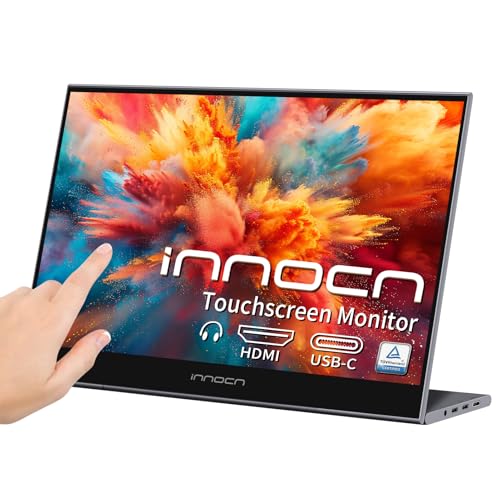
- 15.6-inch Full HD IPS touchscreen
- About 400 nits brightness with anti-glare
- USB-C and mini HDMI plug-and-play support
Best For: Windows travelers who want a brighter, flexible second screen
Value-friendly touch travel screen
CAPERAVE 15.6" portable touchscreen monitor

- 10-point touch on Windows and macOS via USB-C
- 15.6-inch 1080p IPS panel with built-in speakers
- HDMI and USB-C inputs with kickstand included
Best For: Windows laptop users wanting a simple portable touch display
Tempered Glass Touch Pick
IBW 15.6" FHD Touch Travel Monitor

- 10-point touch for Windows over USB-C
- Tempered glass with 1080p IPS display
- Kickstand, sleeve, and dual speakers
Best For: Windows users wanting a durable travel touchscreen with simple setup
Balanced Everyday Pick
InnoView 15.6" 10-Point Touch Portable Monitor

- 10-point touch for Windows via USB-C
- 1080p IPS with 1200:1 contrast and HDR
- Protective sleeve plus built-in stand
Best For: Windows buyers wanting a practical touch monitor for daily carry
Windows-ready travel pick
15.6" FHD Touchscreen Portable Monitor
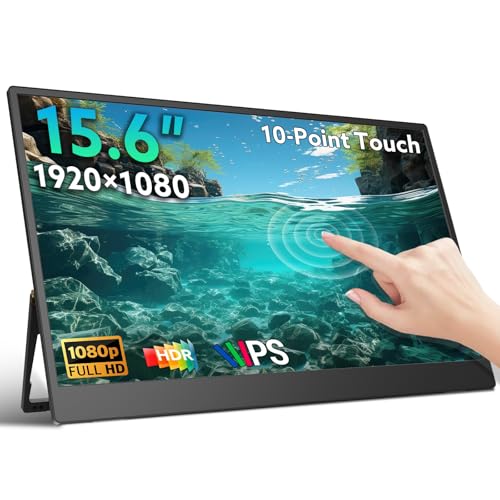
- 10-point touch on Windows and macOS
- FHD IPS panel with HDR and 178° viewing
- Ultra-slim 1.3 lb design with kickstand
Best For: Portable Windows users who need a lightweight touch display
Slim aluminum travel option
CUNPU 15.6" Portable Touch Monitor

- 10-point touch on Windows only
- Lightweight 820g aluminum alloy body
- Protective sleeve doubles as a stand
Best For: Traveling Windows users who want a slim, sturdy touch monitor
Touch-first 15.6-inch option – cocopar 15.6" FHD touchscreen portable monitor
If you want touchscreen portable monitors for windows that feel like a true laptop extension, this cocopar 15.6-inch model is built around everyday convenience. It combines 1080p IPS visuals, native touch support, and USB-C single-cable operation for supported Windows systems, making it a straightforward choice for mobile work or a compact second display.
Best For: Windows users who want a full-size portable touchscreen for productivity, travel, and simple single-cable setups.
Pros:
- Native touch gestures work on Windows and macOS, including slide, pinch-to-zoom, and drag-and-drop.
- Single USB-C cable can handle power, video, and touch on compatible USB-C DP Alt Mode or Thunderbolt systems.
- 15.6-inch FHD IPS panel with 90% sRGB, 270 nits brightness, and 178° viewing angles.
- Metal frame, adjustable kickstand, protective sleeve, and included cables make it ready to use.
Cons:
- Single-cable touch function depends on compatible USB-C/Thunderbolt support.
- Gaming over HDMI is listed as non-touch.
- Brightness is solid for indoor use, but not the highest in this group.
Overall, this cocopar display is a practical pick if you value touch control, easy setup, and a standard 15.6-inch form factor. It fits well as a portable Windows second screen without adding much friction to your bag or desk.
Compact system-monitor bar – Prechen 12.3" touchscreen travel monitor
For touchscreen portable monitors for windows in a smaller, dashboard-style format, this Prechen 12.3-inch stretched bar display stands out. Its 1920×720 IPS panel, touch support over USB-C, and AIDA64-friendly layout make it a useful companion for monitoring stats or adding a slim secondary screen to a compact Windows setup.
Best For: Windows users who want a narrow touch display for system monitoring, utility dashboards, or desk-side status panels.
Pros:
- 12.3-inch IPS panel with 1920×720 resolution, 178° viewing angles, and 60Hz refresh.
- Touch works through USB-C, and a single full-function Type-C connection can handle video and touch.
- Designed for Windows monitoring use, including AIDA64 integration for CPU, GPU, and system stats.
- Includes stereo speakers and wall-mount compatibility with 75x75mm mounts.
Cons:
- HDMI input may require a USB-to-USB-C cable for touch functionality.
- Resolution is stretched and lower than a standard 1080p monitor.
- Touch is not supported on iOS and iPadOS, and Mac support is limited.
This is more of a utility screen than a general-purpose portable monitor, which is exactly the appeal if you want glanceable information on Windows. If your priority is compact monitoring over full-size media use, the format makes sense.
High-brightness travel pick – INNOCN 15.6" touchscreen portable monitor
If you need touchscreen portable monitors for windows that prioritize brightness and broad compatibility, the INNOCN 15.6-inch model is an easy contender. It pairs a 1080p IPS panel with USB-C and mini HDMI connectivity, making it a flexible portable second screen for work, travel, and mixed-device setups.
Best For: Windows users who want a bright, versatile touchscreen monitor for business travel, office work, or mixed-device use.
Pros:
- 15.6-inch Full HD IPS touchscreen with wide 178° viewing angles.
- High brightness rated around 400 nits, with anti-glare and eye-care features.
- USB-C and mini HDMI inputs support plug-and-play use with no driver needed.
- Includes a kickstand, speakers, and accessories such as cables and a 30W adapter.
Cons:
- Touch depends on the right USB-C setup, so not every connection path is equally simple.
- It is heavier than some other portable monitors in this size class.
- Mini HDMI is the only listed HDMI-style input, so portability depends on your cable kit.
For Windows users who want a brighter screen that can handle travel, office tasks, and general media well, this INNOCN model is well rounded. It balances touch convenience with strong display specs and a practical accessory bundle.
Value-friendly touch travel screen – CAPERAVE 15.6" portable touchscreen monitor
Among touchscreen portable monitors for windows, this CAPERAVE 15.6-inch display focuses on simple touch-enabled expansion without making setup complicated. It offers a Full HD IPS panel, 10-point capacitive touch, and standard HDMI plus USB-C inputs, so it works well as a travel-friendly second display for everyday Windows use.
Best For: Windows laptop owners who want a portable touch monitor with easy connectivity and a lightweight travel-friendly design.
Pros:
- 10-point capacitive touch is supported on Windows and macOS through the full-featured USB-C connection.
- 15.6-inch 1080p IPS display with 178° viewing angles and 100% color gamut listing.
- Standard HDMI and USB-C ports make it easy to connect laptops, desktops, phones, and consoles.
- Built-in kickstand and speakers add convenience for desk or travel use.
Cons:
- Touch over HDMI requires extra power and a USB-A to USB-C cable.
- Brightness is rated at 300 nits, so it is not the brightest option here.
- Weight is listed near 1.93 kg, which may be noticeable in a lighter bag.
This CAPERAVE model is a practical all-rounder if you want a touch-capable portable display with minimal setup steps on Windows. It leans toward convenience and portability rather than premium brightness or ultra-light construction.
Precision Touch Travel Pick – UPERFECT 15.6" 125% sRGB Portable Touch Monitor
If you want a touchscreen portable monitor for windows that feels ready for work straight out of the box, this UPERFECT 15.6-inch model is built around easy USB-C touch use and a slim travel-friendly frame. It adds a 1080p IPS panel, 125% sRGB color, and a protective case, making it a practical second screen for laptops, remote work, and on-the-go productivity.
Best For: Windows users who want a lightweight touch second screen with strong color and easy portability.
Pros:
- 10-point multi-touch works on Windows devices with plug-and-play simplicity over USB-C.
- Ultra-slim 0.23-inch profile and 1.4-pound weight make it easy to carry.
- 125% sRGB, HDR, and 300-nit brightness support richer-looking visuals for work or media.
- Includes an adjustable stand, VESA mounting support, speakers, and a protective case.
Cons:
- Touch over Mini HDMI requires extra power and USB-A to USB-C for touch data.
- Best touch experience depends on a compatible USB-C connection from the host device.
Overall, this is a strong pick if you value color, mobility, and broad connectivity in a portable touch display. It leans more toward an all-around travel monitor than a bare-bones budget option, which can be a plus for Windows multitaskers.
Tempered Glass Touch Pick – IBW 15.6" FHD Touch Travel Monitor
For shoppers comparing touchscreen portable monitors for windows, this IBW 15.6-inch model focuses on straightforward touch input, solid 1080p visuals, and travel-ready convenience. It supports up to 10-point touch on Windows devices through a full-featured USB-C connection, while HDMI remains available for display output when touch is not needed.
Best For: Windows users who want a touch portable monitor with tempered glass, easy carry, and built-in kickstand use.
Pros:
- 10-point touchscreen support on Windows devices through compatible USB-C connections.
- Tempered glass, 1080p IPS panel, and 178-degree viewing angles offer a durable everyday setup.
- Built-in kickstand and included nylon sleeve make it convenient for travel and desk use.
- Dual speakers and multiple ports, including USB-C, HDMI, and USB-A, improve flexibility.
Cons:
- Touch does not work over HDMI-only connections.
- macOS touch support is limited to single-point touch.
- Power adapter is not included.
This model is a balanced choice if you want a practical portable touch display without overcomplicating the setup. It stands out for its tempered-glass build and all-purpose connection options, especially for Windows laptops that can pass video, power, and touch over USB-C.
Balanced Everyday Pick – InnoView 15.6" 10-Point Touch Portable Monitor
If your priority is a reliable touchscreen portable monitor for windows that covers the basics well, this InnoView 15.6-inch display is designed for easy extension of a laptop workspace. It pairs 10-point touch support with a 1080p IPS panel, a protective sleeve, and a built-in stand, making it a sensible option for commuting, study, and home office use.
Best For: Windows users who want a well-rounded portable touch monitor with a protective sleeve and sturdy everyday features.
Pros:
- 10-point touch support is available for Windows and macOS through a compatible full-featured USB-C connection.
- 15.6-inch 1080p IPS panel with 1200:1 contrast and HDR offers a step up over basic 1000:1 models.
- Includes a protective sleeve and built-in 90-degree adjustable stand for portability and flexible viewing.
- Two USB-C ports and HDMI broaden compatibility with laptops, phones, and game systems.
Cons:
- Some devices do not support touch, including several consoles and Apple mobile devices.
- Brightness or volume may need a 15W-or-higher power adapter for best results.
InnoView’s approach is less about flashy extras and more about useful everyday features that matter in a portable monitor. For Windows buyers, it offers dependable touch input, decent contrast, and carry-friendly protection in one package.
Windows-ready travel pick – 15.6" FHD Touchscreen Portable Monitor
If you want touchscreen portable monitors for windows that are simple to set up and flexible for travel, this 15.6-inch model is a practical pick. It supports 10-point touch on Windows, offers 1080p IPS visuals, and gives you multiple connection paths depending on whether your laptop has full-featured USB-C or needs HDMI plus power.
Best For: Windows users who want a lightweight touch monitor for productivity, travel, and everyday dual-screen use.
Pros:
- 10-point capacitive touch works with Windows and macOS.
- 15.6″ FHD IPS panel with HDR, 178° viewing, and 60Hz refresh.
- Very portable at 1.3 lbs with an ultra-thin 0.22-inch profile.
- Includes dual speakers, built-in kickstand, and multiple USB-C/HDMI options.
Cons:
- Touch on some devices may not work due to system protection.
- Non-USB-C setups need extra cables for both power and touch.
- Best performance depends on using the included power adapter.
This is a strong all-around choice if you need a Windows-compatible touch screen that travels easily and can handle work, media, or light gaming. The connection flexibility is the main advantage, but buyers should check their port support before ordering.
Slim aluminum travel option – CUNPU 15.6" Portable Touch Monitor
Among touchscreen portable monitors for windows, this CUNPU 15.6-inch model stands out for its 10-point touch support and slim aluminum build. It pairs 1080p IPS visuals with a protective sleeve, making it a solid option if you want a portable second screen for work, presentations, or casual entertainment.
Best For: Windows laptop users who want a slim, durable touch monitor with a protective sleeve for travel.
Pros:
- 10-point touch is supported on Windows for smoother tapping, swiping, and gestures.
- 15.6″ FHD IPS panel with 178° viewing angle and 60Hz refresh.
- Lightweight 820g aluminum alloy body with a 9mm-thick design.
- Includes a magnetic protective sleeve that doubles as a folding stand.
Cons:
- MacOS only supports single-point touch.
- Touch may not work on some protected devices, including certain consoles and iOS devices.
- Brightness is lower than some competitors at 220 nits.
This is a good fit if durability and portability matter as much as touch control. It is especially appealing for Windows users who want an easy travel monitor, though buyers should confirm their device supports the required touch connection setup.
High-contrast Windows option – InnoView 15.6" Touchscreen Portable Monitor
If you are comparing touchscreen portable monitors for windows and want a model with a bit more contrast, this InnoView 15.6-inch display is worth a look. It supports 10-point touch on Windows, includes a protective sleeve, and offers a 1200:1 contrast ratio with HDR for richer image quality than many basic portable panels.
Best For: Windows users who want a portable touch monitor with stronger contrast and a travel-friendly sleeve.
Pros:
- 10-point touch works with Windows through the proper full-featured USB-C connection.
- 15.6″ IPS FHD panel with 1200:1 contrast ratio, HDR, and 178° viewing.
- Protective sleeve and built-in 90° adjustable stand make it easy to carry and position.
- Two full-function USB-C ports plus a standard HDMI port add flexibility.
Cons:
- All connections require a separate power cord.
- Some devices, including consoles and iPhone/iPad, do not support touch.
- Power adapter is not included.
For Windows buyers who care about picture quality as well as touch input, this model hits a useful balance. The extra contrast and included sleeve make it a practical choice for commuting or desk setups, as long as you plan for the external power requirement.
How We Picked the Best Touchscreen Portable Monitors for Windows
We focused on Touchscreen Portable Monitors for Windows that balance practical everyday use with dependable hardware. Priority went to models with Full HD resolution, responsive multi-touch support, USB-C connectivity, and enough brightness and color coverage for work and light creative tasks. We also considered travel-friendly designs, built-in stands or kickstands, and features like speakers and tempered glass that improve convenience.
Quick Comparison
Most buyers will choose between a compact, easy-to-carry 15.6-inch panel for general productivity and a wider or more color-rich option for better multitasking and media work. If you want the simplest setup, look for USB-C video and touch over a single cable. If you plan to use it with older laptops or game consoles, HDMI support can be just as important.
Key Buying Factors for Touchscreen Portable Monitors for Windows
Touch Support and Compatibility
Confirm that touch input works properly with Windows without extra drivers or complicated setup. Some monitors support 10-point touch, which is ideal for gestures, scrolling, and multi-user tasks. For best results, make sure your laptop supports USB-C DisplayPort Alt Mode or use the included HDMI and USB data connections when needed.
Resolution, Size, and Color
For most shoppers, 1080p on a 15.6-inch display is the sweet spot: sharp enough for documents, light photo work, and streaming, while still affordable and portable. If you need more horizontal workspace, a stretched or ultra-wide format can help with timelines and side-by-side windows. Higher color coverage is useful for creators, while standard office users can prioritize clarity and comfort.
Portability and Daily Usability
Weight, thickness, and included accessories matter more than many buyers expect. A protective sleeve, built-in stand, or VESA mounting option can make a portable monitor easier to pack and use in different environments. Speakers are a convenience feature, but not a substitute for good headphones or external audio.
Who Should Buy Which Touchscreen Portable Monitors for Windows?
If you need a flexible travel companion for work, a 15.6-inch Full HD touchscreen is the safest all-around choice. If you want a lighter setup for meetings, note-taking, or document review, a smaller panel may be easier to carry. Creators and power users should look for stronger color performance, sturdier stands, and better adjustability. For casual users, the best value is usually the model that offers reliable touch, USB-C simplicity, and the accessories you will actually use.
In short, the right choice depends on how you plan to use it: maximum portability, better productivity, or a more polished mobile workstation.