If you are tuning a PC build for lower temperatures or quieter fans, a good airflow meter can help you measure what your case fans are actually doing.
This roundup of digital anemometers for computer case airflow focuses on accuracy, ease of use, and practical features that matter for desktop airflow testing.
Best 10 Digital Anemometers for Computer Case Airflow Picks for 2026
Budget-Friendly Multi-Use Meter
BTMETER BT-100 Handheld Anemometer

- Measures speed, temperature, and wind chill
- 5 wind-speed units with backlit LCD
- Tripod thread and carry bag included
Best For: Affordable handheld airflow checks with basic extras
App-Connected Pro Probe
testo 405i Bluetooth Anemometer

- Hot-wire probe with temperature and flow readings
- Extends up to 15 inches for tight access
- Bluetooth app stores data and creates reports
Best For: Detailed airflow testing with smartphone reporting
Easy-Read LCD Pick
TopTes TS-301 Digital Anemometer
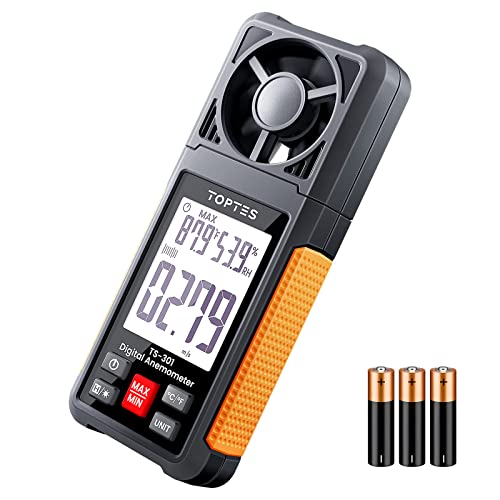
- Large 2.26-inch backlit LCD
- Six wind-speed units plus temp and humidity
- Lightweight with pouch and auto shutoff
Best For: Easy handheld airflow readings with a big display
Bluetooth Logging Choice

- Bluetooth app support for phones and tablets
- Logs and exports data in Excel or TXT
- Tripod hole for continuous testing
Best For: App-based airflow logging and continuous measurements
Bluetooth Pro Pick
Elitech ANE-200W Bluetooth HVAC Airflow Meter
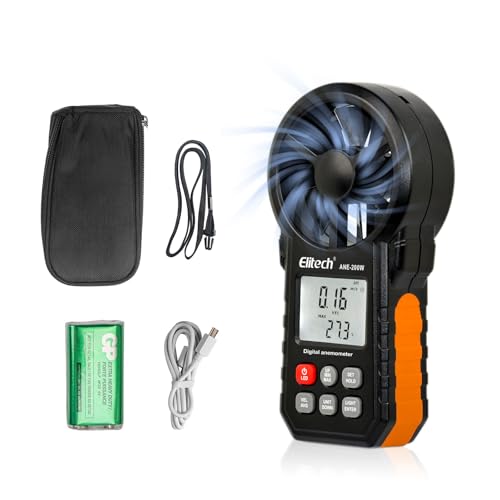
- Measures airflow, wind velocity, and temperature
- Bluetooth app plus USB export to PC/Excel
- Real-time, AVG, MAX, and MIN measurement modes
Best For: Detailed airflow testing with logging and reporting
Portable Color Screen Pick
FAM-02 Portable Color Display Anemometer

- Measures wind speed, temperature, and humidity
- 2.0" IPS color display with light/dark themes
- Rechargeable battery and alert-based monitoring
Best For: Portable airflow checks with an easy-to-read screen
Data Logging Value Pick
AP-856A Pro HVAC CFM Airflow Meter
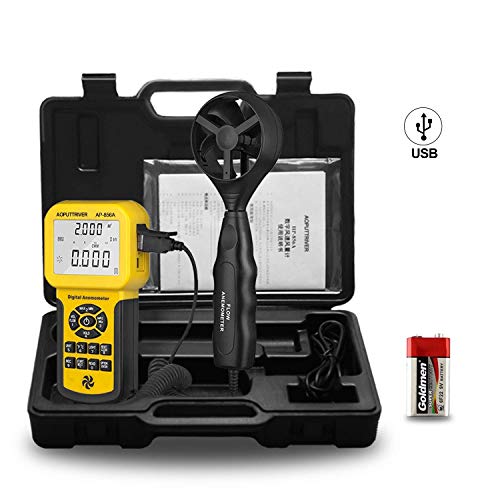
- Measures wind speed, temperature, and CFM/CMM airflow
- Stores 600 records and exports data over USB
- Includes area setting, backlight, and MAX/MIN/AVG modes
Best For: Straightforward airflow testing with record storage
Compact HVAC Airflow Checker
Digital Anemometer HVAC,Air Flow & Wind Speed Meter

- Measures low airflow from 0.3 m/s
- Shows real-time, MAX, and AVG modes
- Includes backlit LCD and temperature readout
Best For: Quick low-speed airflow checks without software
Data-Logging Pro Meter
BTMETER Por CFM Anemometer Wind Gauge

- Stores 600 groups of airflow data
- Exports readings to PC for analysis
- Shows CFM/CMM plus max, min, and average
Best For: Detailed airflow tracking with PC export
PC-Connected Airflow Monitor

- Connects to PC via USB for recording
- Stores 600 sets of airflow data
- Measures speed, temperature, and air volume
Best For: Computer-based airflow monitoring and records
Budget-Friendly Multi-Use Meter – BTMETER BT-100 Handheld Anemometer
If you need digital anemometers for computer case airflow and also want something useful beyond the desk, the BTMETER BT-100 is a practical handheld option. It measures wind speed, temperature, and wind chill, and its sensitive vane design is suited to low airflow readings for HVAC ducts and vents.
Best For: Buyers who want an affordable, portable airflow meter with basic temperature readout and tripod mounting support.
Pros:
- Measures wind speed in 5 units, including m/s, km/h, ft/min, knots, and mph.
- Designed for low airflow measurement with 2 temp sensors and 8 vanes.
- Includes a tripod thread for continuous testing.
- Comes with batteries, carry bag, neck strap, and backlit LCD.
Cons:
- Auto/manual power-off and manual operation may be less convenient than app-based models.
- Less feature-rich than Bluetooth-connected options.
Overall, this is a straightforward choice if you want a compact meter for airflow checks without paying for app connectivity. It covers the core readings most buyers need and adds useful accessories right in the box.
App-Connected Pro Probe – testo 405i Bluetooth Anemometer
For digital anemometers for computer case airflow, the testo 405i stands out when you want a more professional probe-style tool. Its hot-wire sensor, telescopic shaft, and Bluetooth app workflow make it well suited to in-duct airflow checks, especially in tight or hard-to-reach spaces.
Best For: Users who want a compact, app-connected airflow meter for detailed HVAC-style testing and reporting.
Pros:
- Hot-wire sensor provides precise air velocity, temperature, and volume flow readings.
- Telescopic shaft extends up to 15 inches for tighter access.
- Bluetooth 4.0 connects to smartphones and tablets.
- Smart Probe App can store data and generate tables, graphs, and reports.
Cons:
- More specialized and likely more than casual users need.
- Requires app use to get the most from its smart features.
This model makes sense if your airflow testing needs are frequent, detailed, or documentation-heavy. It is built more like a professional inspection tool than a simple handheld gauge.
Easy-Read LCD Pick – TopTes TS-301 Digital Anemometer
The TopTes TS-301 is a practical choice if you want digital anemometers for computer case airflow with a large, easy-to-read screen. It measures wind speed in six units and also adds temperature and humidity sensing, which can be helpful when checking indoor airflow conditions.
Best For: Buyers who want a simple handheld meter with a large display and environmental readings.
Pros:
- 2.26-inch backlit LCD makes readings easy to see.
- Measures wind speed in 6 units, including ft/m, ft/s, mph, knots, km/h, and m/s.
- Includes temperature and humidity sensing.
- Lightweight design with carry pouch and auto shutoff after 10 minutes.
Cons:
- Temperature and humidity sensors need time to adjust to a new environment.
- Less specialized for reporting than Bluetooth models.
For straightforward airflow checks, the TS-301 gives you the essentials in a very readable format. It is a balanced pick for users who value ease of use over advanced connectivity.
Bluetooth Logging Choice – BTMETER BT-100APP Anemometer
If you want digital anemometers for computer case airflow with app support, the BTMETER BT-100APP adds wireless Bluetooth to the familiar handheld vane design. It measures wind speed, temperature, wind chill, and battery power, and it can log and export data for more organized airflow testing.
Best For: Users who want Bluetooth airflow measurements, logging, and easy tripod-mounted testing.
Pros:
- Bluetooth pairing with iPhone, iPad, Android phones, and tablets.
- Logs data and exports files in Excel or TXT format.
- Tripod hole supports continuous testing.
- Measures low airflow with 2 temp sensors and 8 vanes.
Cons:
- Accuracy is listed at +/- 5% of readings, which is less tight than some alternatives.
- App-based workflow may be more than needed for quick spot checks.
This version is the best fit when you care about collecting and exporting airflow readings instead of only taking a one-off measurement. It keeps the same portable format while adding more useful workflow features.
Bluetooth Pro Pick – Elitech ANE-200W Bluetooth HVAC Airflow Meter
If you want one of the more feature-rich digital anemometers for computer case airflow, the Elitech ANE-200W gives you airflow, wind velocity, and temperature readings in one handheld tool. It is built for HVAC-style balancing and airflow verification, but the same airflow and temp data can also help you compare fan performance and check how well air moves through a PC case or ducted enclosure.
Best For: Users who want Bluetooth logging, PC export, and multiple airflow readout modes for more detailed testing.
Pros:
- Measures wind velocity, airflow in CFM/CMM, and temperature.
- Bluetooth app support plus USB PC software for logging and Excel export.
- Real-time, AVG, MAX, and MIN modes with data hold.
- Backlit LCD and integrated LED work light for dark spaces.
Cons:
- Designed mainly for HVAC and professional airflow work, so some features may be more than casual users need.
- Requires area setup for airflow calculations.
Overall, this is the most data-focused option in the group if you care about tracking airflow over time rather than just taking a quick reading. Its Bluetooth and USB reporting tools make it especially useful when you want repeatable, documented tests.
Portable Color Screen Pick – FAM-02 Portable Color Display Anemometer
Among digital anemometers for computer case airflow, the FAM-02 stands out for being simple to carry and easy to read. It measures wind speed, temperature, and humidity, and its fast response plus live curve display can help you watch airflow changes while you test fans, vents, or other small airflow paths.
Best For: Buyers who want a portable handheld meter with a color screen, rechargeable battery, and alert functions.
Pros:
- 2.0″ IPS color display with light and dark themes.
- Rechargeable 1500mAh battery with Type-C charging.
- 0.5s response and 30-second live curve display.
- High/low alerts with visual, audible, and vibration warnings.
Cons:
- Does not list USB export or PC analysis features.
- Best for quick monitoring rather than deep data reporting.
This is a practical pick if you value convenience, readability, and portability more than advanced logging. It keeps the core airflow-testing features you need while staying straightforward for on-the-spot checks.
Data Logging Value Pick – AP-856A Pro HVAC CFM Airflow Meter
If you’re comparing digital anemometers for computer case airflow and want a more traditional meter with strong measurement range, the AP-856A is a solid option. It measures wind speed, temperature, and air flow in CFM/CMM, and it includes area setting support for airflow calculations, which is useful when you want to estimate movement through vents, ducts, or case openings.
Best For: Users who want a straightforward airflow meter with data records, USB export, and manual area entry.
Pros:
- Supports CFM and CMM airflow measurement with area input.
- Stores 600 data records and exports to PC via USB.
- High-resolution wind speed readout with MAX/MIN/AVG modes.
- Backlight, data hold, and auto/manual power-off help usability.
Cons:
- Uses a 9V battery rather than a built-in rechargeable pack.
- More utilitarian display and controls than color-screen alternatives.
For buyers who care more about consistent measurements and recordkeeping than extra smart features, this model covers the essentials well. The combination of airflow calculation, USB data transfer, and long storage capacity makes it a practical testing tool.
Compact HVAC Airflow Checker – Digital Anemometer HVAC,Air Flow & Wind Speed Meter
If you’re comparing digital anemometers for computer case airflow, this model is a practical pick for basic airflow checks because it measures low speeds down to 0.3 m/s and shows both airflow and temperature at the same time. It’s designed more like an HVAC diagnostic tool than a lab meter, but the backlit display, multiple wind-speed units, and MAX/AVG modes make it easy to use for quick vent-style testing.
Best For: Users who want a straightforward, pocketable meter for low-speed airflow checks and general ventilation diagnostics.
Pros:
- Detects weak airflow starting at 0.3 m/s, which helps with low-speed ventilation testing.
- Shows real-time, MAX, and 4-second AVG readings for faster comparisons.
- Supports multiple units including ft/min, m/s, mph, knots, and km/h.
- Includes temperature readout, backlit LCD, and AAA batteries in the box.
Cons:
- It’s oriented toward HVAC and outdoor use, so it’s not specifically tailored to PC cooling work.
- Lacks PC export or onboard logging features.
This is a simple, ready-to-use airflow meter that makes sense if you mainly need quick checks without extra software or data-management features. For basic fan and vent-style airflow comparisons, it covers the essentials well.
Data-Logging Pro Meter – BTMETER Por CFM Anemometer Wind Gauge
For buyers looking at digital anemometers for computer case airflow, this BTMETER model stands out because it can store readings and export data to a PC. It also measures airflow volume in CFM/CMM along with wind speed and temperature, making it a more analysis-friendly option if you want to compare readings over time instead of just taking a single snapshot.
Best For: Users who want stored readings and PC export for more detailed airflow tracking.
Pros:
- Stores up to 600 groups of data and exports to PC for review.
- Measures airflow in CFM/CMM plus wind speed in five units.
- Includes Current, Max, Min, 2/3 Max, and Average readings.
- Uses a separated extendable sensor and a large backlit LCD for easier reading.
Cons:
- It’s a larger, more specialized tool than a simple handheld airflow checker.
- Requires you to set the cross-sectional area for airflow volume calculations.
This is the most feature-rich option here if logging and export matter more than simplicity. It’s a strong fit for users who want repeatable measurements and side-by-side airflow comparisons.
PC-Connected Airflow Monitor – BTMETER Por HVAC Anemometer
If you want digital anemometers for computer case airflow with a direct PC connection, this BTMETER meter is the clearest fit. It supports USB data export to a computer and records 600 sets of readings, so you can monitor airflow, temperature, and air volume with more structure than a basic handheld gauge.
Best For: Users who want USB-connected airflow readings and easy computer-based record keeping.
Pros:
- USB connects to a PC for monitoring and recording airflow data.
- Stores 600 sets of readings for longer-term tracking.
- Measures wind speed, temperature, and airflow volume with multiple units.
- Backlit display and Beaufort scale indicator make readings easy to see.
Cons:
- It is still a split-type HVAC meter, so it’s more specialized than a simple consumer tool.
- Airflow volume tops out at 9999 ft3/min in the listed specs, which may be more than most PC users need.
This model is a good match if you care about logging airflow to a computer rather than just taking spot readings. The USB workflow makes it more convenient for organized testing and comparison.
How We Picked the Best Digital Anemometers for Computer Case Airflow
For Digital Anemometers for Computer Case Airflow, we looked for models that are easy to position near intake and exhaust vents, offer readable measurements, and provide enough precision for comparing fan settings. We also favored units with backlit displays, temperature readouts, data logging, USB export, Bluetooth, and telescopic or compact designs that make desktop testing less awkward.
Because PC airflow checks often happen in tight spaces, we gave extra credit to handheld tools with stable readings, simple controls, and sensible measurement modes such as speed, temperature, and average/max capture.
Quick Comparison
Simple handheld meters are usually best if you only want fast spot checks of case intake and exhaust. Bluetooth and PC-export models are better when you want to track changes across fan curves, filters, or panel configurations. If you plan to test deep inside a chassis, a slim probe or extendable shaft can make measurements easier and more consistent.
Key Buying Factors for Digital Anemometers for Computer Case Airflow
Measurement Range and Accuracy
Look for a meter that can read low airflow reliably, since many PC cases and fans produce modest speeds. Accuracy matters more than a huge maximum range; small differences can help you judge whether a filter, mesh panel, or fan curve is helping.
Probe Design and Ease of Access
A compact body, extendable probe, or narrow sensor head is useful when measuring front intakes, rear exhausts, or radiator exhaust paths. If the meter is hard to hold steady, your readings may vary more than the airflow itself.
Display and Readout Features
A backlit screen, large digits, and min/max or average functions make testing easier in dim rooms and help smooth out brief fluctuations. For airflow work, stable readings are often more useful than a flashy feature set.
Logging and Connectivity
Bluetooth, USB export, and onboard data storage are helpful if you want to compare results over time or document case changes. These features are especially useful for reviewers, builders, and anyone tuning multiple systems.
Units and Measurement Modes
Make sure the meter can show the units you need, such as CFM, CMM, or m/s, and that it includes temperature if you want a fuller thermal picture. Consistent unit support makes side-by-side comparisons much easier.
Who Should Buy Which Digital Anemometers for Computer Case Airflow?
If you want a basic, affordable tool for occasional PC airflow checks, a standard handheld meter is usually enough. If you build or tune systems often, choose a model with data storage, export, or Bluetooth. If your case has tight clearances or deep fan mounts, prioritize a slim probe or telescopic design. For the most practical use, the best choice is the one that gives repeatable readings and fits comfortably into your testing routine.