Choosing the right workstation can make content creation faster, cleaner, and far more comfortable. Whether you stream, record, edit, or manage a hybrid desk setup, the best option should support your gear without crowding your workspace.
This roundup of keyboard workstations for content creators focuses on practical layout, usable storage, durable construction, and workflow-friendly features that help you stay organized while working long hours.
Best 10 Keyboard Workstations for Content Creators Picks for 2026
Studio-Ready Desk
61-Key Music Studio Desk with Sliding Tray
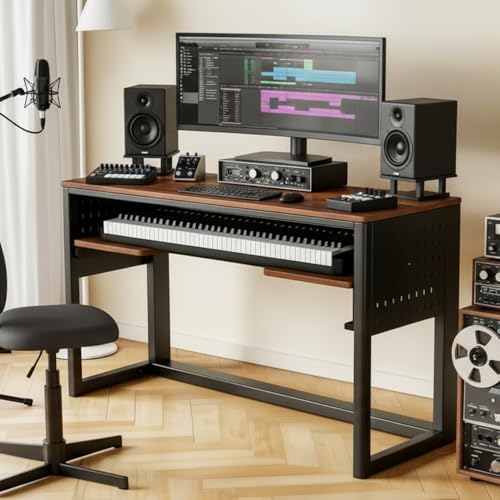
- Sliding tray fits 61-key MIDI keyboards
- Pegboard and headphone hook aid organization
- Steel frame supports a full studio setup
Best For: Creators building a tidy home music workstation
Macro Control Board
Mechanical Stream Deck Keyboard with LCD Keys

- 6 LCD macro keys plus 3 control dials
- Hot-swappable mechanical switches
- Adjustable tilt angles for longer sessions
Best For: Streamers and editors who need shortcut control
Spacious Studio Desk
71-Inch Keyboard Tray Workstation

- 71-inch desktop suits larger creator setups
- Pull-out tray and speaker stands add function
- Caster wheels help reposition the desk
Best For: Big home studios needing room for gear and workflow
FL Studio Controller
Novation FLkey 61 MIDI Keyboard
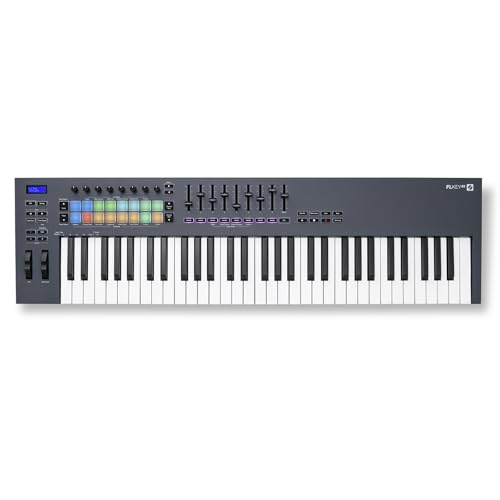
- 61 semi-weighted keys for music input
- Pads, faders, and encoders streamline workflow
- FL Studio integration minimizes manual mapping
Best For: FL Studio producers who want hands-on control
Compact Studio Desk
Monoprice Recording Studio Desk with Tray

- Small-footprint desk for tight spaces
- Raised platform for monitor speakers
- Pullout tray fits a 49-key MIDI controller
Best For: Compact home studios and smaller creator setups
Portable MIDI Controller
Akai MPK Mini MK3 25-Key Controller

- USB-powered controller with 25 mini keys
- Includes 8 pads, 8 knobs, and arpeggiator
- Compact, lightweight, and easy to move
Best For: Portable beat making and desktop music production
Large Production Desk
63-Inch Music Studio Workstation

- Wide 63-inch surface for larger setups
- Sliding tray for keyboards and MIDI gear
- Two stands add space for speakers and accessories
Best For: Creators needing a spacious all-in-one studio desk
Macro Stream Deck Keyboard
VSD K1 Pro 87-Key Macro Mechanical Keyboard

- Full-key programmable with macro recording
- LCD key pages and knobs for workflow control
- Hot-swappable switches with built-in display
Best For: Creators who want typing, macros, and stream control in one keyboard
Studio Desk Workstation
Armocity Music Studio Desk Production Workstation

- Built-in USB ports and outlet plugs
- Raised monitor shelf and pull-out keyboard tray
- LED lighting adds a creator-focused look
Best For: Creators who want a powered desk setup with room for keyboard and gear
Compact Stream Controller
AJAZZ AKP153 Stream Studio Controller Keypad
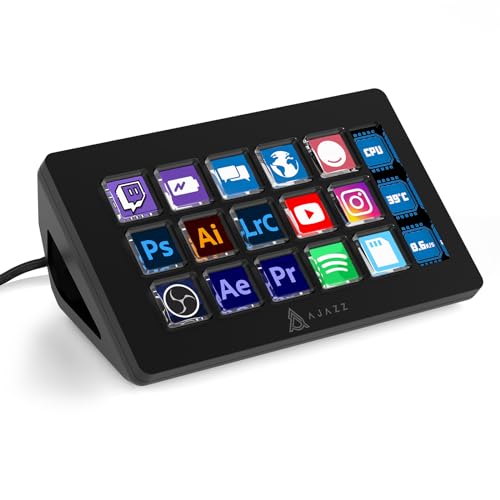
- 15 programmable keys plus a side display
- Supports multi-action macros and custom icons
- Compact design with detachable stand
Best For: Streamers and creators who need a portable visual shortcut keypad
Studio-Ready Desk – 61-Key Music Studio Desk with Sliding Tray
If you want keyboard workstations for content creators that also support audio gear, this music studio desk is built around production workflows. The sliding tray keeps a 61-key MIDI keyboard close at hand while leaving the main surface open for monitors, laptops, mixers, and streaming gear.
Best For: Content creators who want a dedicated music production desk with built-in organization.
Pros:
- Sliding keyboard tray fits 61-key MIDI keyboards and saves desktop space
- Pegboard side panel and headphone hook help organize cables and accessories
- Wide desktop supports studio monitors, audio interfaces, microphones, and laptops
- Reinforced steel frame adds stability for heavier studio setups
Cons:
- Designed specifically around music production, so it is less flexible than a basic desk
- Best suited to 61-key keyboards rather than larger controller formats
This is a strong pick if your workflow mixes recording, mixing, podcasting, and streaming in one station. The layout prioritizes access and organization, which makes it easier to keep a creative space tidy and efficient.
Macro Control Board – Mechanical Stream Deck Keyboard with LCD Keys
Among keyboard workstations for content creators, this mechanical keyboard stands out for combining typing, macro control, and system shortcuts in one device. It is aimed at streaming, editing, and productivity tasks with six programmable LCD macro keys, three rotary dials, and a standard QWERTY layout.
Best For: Streamers and editors who want typing and shortcut control in a single keyboard.
Pros:
- Six programmable LCD macro keys support configurable Stream Deck-style actions
- Three multifunction dials handle volume, brightness, track switching, and more
- Hot-swappable mechanical switches provide a responsive typing feel
- Two adjustable tilt angles and silicone pads help with comfort during long sessions
Cons:
- Wired-only design may not suit cleaner cable-free desk setups
- Compatibility is limited to Windows and macOS versions listed in the specs
For creators who want faster access to OBS, Discord, Photoshop, Spotify, and other tools, this keyboard focuses on workflow control. It is a practical choice when your desk setup needs to do more than just type.
Spacious Studio Desk – 71-Inch Keyboard Tray Workstation
If you need keyboard workstations for content creators with lots of surface area, this 71-inch desk is built for bigger studio layouts. It combines a pull-out keyboard tray, speaker stands, and a bottom shelf with a wide desktop that can hold monitors, documents, and other production essentials.
Best For: Creators who want a large all-in-one desk for music production, work, or gaming.
Pros:
- Large 71-inch desktop gives plenty of room for monitors and studio gear
- Pull-out keyboard tray keeps your controller accessible while freeing the main surface
- Built-in speaker stands and bottom shelf add useful storage and placement options
- Caster wheels make it easier to move the workstation when needed
Cons:
- Large footprint may be too big for compact rooms
- Assembly arrives in two boxes, so setup may take more time
This desk is a good fit if your setup keeps expanding and you want one station to handle multiple uses. The mix of keyboard tray, storage, and open workspace makes it versatile for home studios and creator offices.
FL Studio Controller – Novation FLkey 61 MIDI Keyboard
For keyboard workstations for content creators focused on music, this MIDI controller is designed to put FL Studio controls directly under your hands. It combines 61 semi-weighted keys, pads, faders, encoders, and dedicated transport tools so you can work faster without relying on the mouse.
Best For: FL Studio users who want hands-on control for composing and beat making.
Pros:
- Deep FL Studio integration reduces the need for manual control mapping
- 61 semi-weighted keys offer a full-size playing surface
- Eight pots, nine faders, and pads support mixing and sequencing
- Scale mode and chord modes help with melody and harmony creation
Cons:
- Built around FL Studio, so it is less universal than a general-purpose MIDI controller
- Requires software-specific workflow to get the most value
This controller is especially compelling if your creator work happens inside FL Studio and you want quicker access to mixer, step sequencer, and instrument controls. It is a focused production tool rather than a broad all-purpose keyboard.
Compact Studio Desk – Monoprice Recording Studio Desk with Tray
Monoprice Recording Studio Desk - with Raised Platform and Keyboard Tray, Black - Stage Right
Check Price On AmazonIf you want keyboard workstations for content creators that fit into a smaller room without giving up the studio look, this Monoprice desk is built around that use case. It combines a raised monitor platform with a pullout keyboard tray, so you can keep your controller tucked away when it is not needed and still have a dedicated production setup.
Best For: Creators building a compact home studio around a 49-key MIDI controller and basic monitor-speaker placement.
Pros:
- 31.5-inch width and 24-inch depth keep the footprint small for apartments and tight rooms.
- Raised offset platform supports monitor speakers without separate stands.
- Pullout keyboard tray adds flexibility for a controller-based workflow.
- Lightweight design and included hardware make assembly quick and simple.
Cons:
- Best suited to smaller setups rather than larger multi-device studios.
- Keyboard tray and shelf dimensions may be limiting for oversized gear.
- Only supports up to 175 lbs., so heavy rigs need to be planned carefully.
Overall, this is a practical choice if you need a space-saving workstation that still feels like a proper recording desk. It is especially appealing for creators who want a clean, all-in-one setup with a MIDI keyboard nearby but not always exposed.
Portable MIDI Controller – Akai MPK Mini MK3 25-Key Controller
For creators who need keyboard workstations for content creators in the form of a compact controller rather than a full desk, the Akai MPK Mini MK3 is a strong fit. It is a USB-powered 25-key MIDI keyboard with pads, knobs, and arpeggiator features that support beat making, virtual instruments, and DAW control.
Best For: Beat makers, producers, and content creators who need a portable MIDI controller for desktop music work.
Pros:
- 25 velocity-sensitive mini keys keep it small and easy to place on a desk.
- 8 MPC-style pads and 8 knobs support drumming, sample triggering, and plugin control.
- Built-in arpeggiator and 4-way thumbstick expand performance and modulation control.
- USB-powered design and lightweight build make it easy to move between setups.
Cons:
- Mini keys are less suited to players who want a full-size keyboard feel.
- It is a controller, not a workstation desk, so it needs a separate surface.
- Best value depends on whether you will use the bundled software and features.
This is the most flexible option if your workflow centers on software instruments, drum programming, and portable production. It is less about furniture and more about giving you a compact, hands-on control surface for content creation.
Large Production Desk – 63-Inch Music Studio Workstation
If you need keyboard workstations for content creators with more room to spread out, this 63-inch music studio desk offers a bigger, more traditional production layout. It pairs a sliding piano keyboard tray with two upper stands, giving you space for a controller, monitor, and other studio gear in one fixed workstation.
Best For: Creators who want a wider studio desk with dedicated tray storage and room for multiple pieces of gear.
Pros:
- 63-inch width provides generous surface area for production gear.
- Sliding keyboard tray is designed for digital pianos, MIDI devices, and controllers.
- Two stands can hold speakers, microphones, books, or audio interfaces.
- Solid wood composite top and thick carbon steel frame are built for stability.
Cons:
- At 99 pounds, it is much less portable than smaller desks.
- Assembly is required and the desk is not ideal for quick rearranging.
- The height is fixed, so users may need risers if the stock height is not comfortable.
Compared with more compact options, this workstation is better suited to creators who want a dedicated production centerpiece. It brings together keyboard support, shelving, and a larger desk surface for a more complete home studio setup.
Macro Stream Deck Keyboard – VSD K1 Pro 87-Key Macro Mechanical Keyboard
If you want one of the more flexible keyboard workstations for content creators, the VSD K1 Pro mixes a full mechanical keyboard with a built-in streaming deck. It’s built around on-board macro programming, switchable LCD pages, and a smart display, so you can map editing, streaming, media, and shortcut-heavy workflows into one compact desk setup.
Best For: Creators who want a programmable keyboard and integrated control deck in one device.
Pros:
- Full-key programmable design with macro recording and free key assignment
- Streaming-deck pages with 6 LCD keys and 3 knobs per page for customizable workflows
- Built-in TFT color display plus multi-function knobs for quick adjustments
- Hot-swappable PCB with 3-pin/5-pin switch support and included puller tools
Cons:
- Screen images, GIFs, and date/time setup require software on Windows or macOS
- USB-C to USB-C cable is not included
- Some display features need a wired connection to work
This is a strong pick if your setup needs both typing and macro control without adding a separate stream deck. The ergonomic stand angles, dampened build, and RGB customization make it especially useful for long creator sessions at the desk.
Studio Desk Workstation – Armocity Music Studio Desk Production Workstation
For creators building out keyboard workstations for content creators, this Armocity desk focuses on keeping gear organized and powered in one place. It combines a raised monitor shelf, a pull-out keyboard tray, built-in outlets and USB ports, and LED lighting, making it a practical all-in-one workstation for editing, recording, and streaming setups.
Best For: Creators who want a studio-style desk with built-in power, storage, and lighting.
Pros:
- Built-in power with 3 USB ports and 2 outlet plugs for charging gear
- Raised monitor shelf helps keep screens at eye level
- Pull-out keyboard tray adds a dedicated typing and control area
- RGB-style LED lighting can sync with music and is adjustable by remote or Bluetooth
Cons:
- More of a desk solution than a dedicated control surface
- Assembly is required
- LED styling may be unnecessary for users who want a minimal workspace
If you need a workspace that can handle a monitor, keyboard, and creator gear without extra clutter, this desk is built around convenience. The combination of cable management help, power access, and a roomy layout makes it a solid foundation for a content creation setup.
Compact Stream Controller – AJAZZ AKP153 Stream Studio Controller Keypad
The AJAZZ AKP153 is a compact option for keyboard workstations for content creators who need quick visual shortcuts instead of a full-size deck. With 15 programmable LCD-style keys and a side screen, it’s designed for scene switching, app launching, audio adjustments, and other repeated actions that benefit from one-tap control.
Best For: Streamers and creators who want a portable shortcut keypad with visual controls.
Pros:
- 15 visual keys plus a side screen for instant status and shortcut feedback
- Supports multi-action commands on a single key for faster workflows
- Drag-and-drop software makes it easy to set up custom icons and hotkeys
- Compact, lightweight design with detachable stand and non-slip base
Cons:
- Requires software setup to unlock customization
- Compatibility depends on supported OS versions
- Not a full keyboard, so it works best as a companion device
This keypad makes sense when your workflow is shortcut-heavy and you want something smaller than a full stream deck. It’s especially appealing for creators who move between apps like OBS, Spotify, Discord, and editing tools and want those actions visible at a glance.
How We Picked the Best Keyboard Workstations for Content Creators
We focused on Keyboard Workstations for Content Creators that balance desk space, keyboard tray usability, storage, and overall workflow efficiency. The best options in this category should support a monitor, audio gear, controller, and accessories without forcing awkward reach or clutter.
We also prioritized sturdy frames, sensible dimensions, and features that matter for real-world use, such as sliding trays, raised platforms, cable management, and room for peripherals.
Quick Comparison
Some models are built primarily as studio desks, while others are better suited to MIDI control, streaming, or compact desktop editing. Larger desks are ideal for multi-device setups and dedicated rooms, while smaller controllers work best as focused add-ons for creators who need transportability or tighter desk space.
Key Buying Factors for Keyboard Workstations for Content Creators
Workspace Layout
Look for enough surface area for your monitor, interface, microphone arm, and any secondary screens. A well-designed layout keeps your main tools within reach and leaves room for note-taking or editing.
Keyboard Tray and Control Placement
If you use a MIDI keyboard, stream deck, or typing keyboard, the tray should sit at a comfortable height and slide smoothly. For production-heavy workflows, easy access to dials, pads, and macro keys can speed up edits and live actions.
Storage and Cable Management
Storage shelves, side compartments, and rear routing cut down on visual clutter and make it easier to keep power bricks, adapters, and USB hubs organized. This matters even more in small rooms or shared spaces.
Build Quality and Stability
Stability is essential when you’re typing, performing, or triggering macros quickly. A wobble-free desk improves accuracy and makes the setup feel more professional over time.
Who Should Buy Which Keyboard Workstations for Content Creators?
If you mainly stream or manage live production, choose a workstation with macro support, control dials, or an integrated deck. If you produce music, look for a desk or controller that gives your keyboard comfortable placement and enough clearance for monitors and audio gear.
Creators with limited space should favor compact, multiuse designs that combine a tray with storage. If you want a full studio centerpiece, larger recording desks offer the best blend of surface area, organization, and long-term flexibility for Keyboard Workstations for Content Creators.