The best gaming desktop computers for home offices need to handle more than games. They should support video calls, productivity apps, storage-heavy workflows, and entertainment without creating a cluttered or underpowered setup.
We selected 10 desktops spanning budget gaming towers, refurbished business PCs, monitor bundles, and newer Ryzen systems. Use the guide below to match processor power, graphics capability, upgrade potential, and included accessories to your daily workload.
Best 10 Gaming Desktop Computers for Home Offices Picks for 2026
Versatile Gaming Value

- 16GB RAM and 1TB SSD
- Dedicated RX 580 8GB graphics
- Wi-Fi 6, Bluetooth, keyboard, and mouse included
Best For: Home-office users who also game, stream, and edit
Modern 1080p Performance

- Eight-core, 16-thread Ryzen 7 processor
- RTX 3050 with 8GB GDDR6 and ray tracing
- 512GB NVMe SSD and Wi-Fi 6
Best For: Multitasking, content creation, and 1080p gaming
Office Productivity Pick

- 32GB RAM and 1TB PCIe SSD
- Eight-core Intel Core i7 processor
- Wi-Fi 6, Ethernet, HDMI, and eight USB ports
Best For: Productivity-first home offices with casual gaming needs
Integrated Graphics Starter

- Six-core Ryzen 5 with up to 4.6GHz boost
- 16GB DDR4 and 1TB NVMe SSD
- Integrated Vega graphics for mainstream 1080p gaming
Best For: Everyday office work and entry-level gaming
RGB Starter Tower
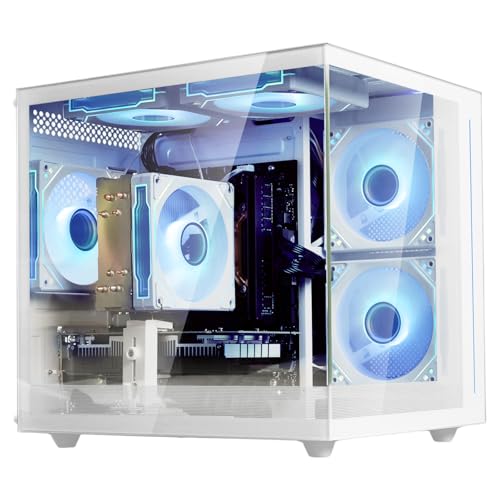
- Ryzen 5 5500 with 16GB DDR4 RAM
- 512GB M.2 SSD for quick startup
- RX 6500 XT graphics and RGB fans
Best For: Home offices needing a ready-to-use casual gaming tower
Integrated Power Pick

- Ryzen 7 8700G with eight cores
- 32GB DDR5 RAM and 1TB NVMe SSD
- Wi-Fi 6, Bluetooth 5.4, keyboard, and mouse
Best For: Multitasking home offices with moderate gaming needs
Complete Desk Bundle
Renewed Dell OptiPlex with Monitor

- Includes a 22-inch 1080p 75Hz monitor
- 16GB RAM and 2TB hard-drive storage
- RGB keyboard, mouse, and speaker included
Best For: Budget home offices needing a full desktop setup
High-RAM Home Office Workhorse

- Six-core i5-8500 processor
- 32GB RAM and 1TB SSD
- Wi-Fi, Bluetooth, HDMI, and DisplayPort
Best For: Multitasking home offices and light gaming
Complete Desk Setup
HP EliteDesk 800 G3 Monitor Bundle

- 21.5-inch Full HD monitor included
- Keyboard and mouse included
- 256GB SSD and Windows 11 Pro
Best For: Simple home-office setup with basic gaming
Entry-Level Gaming Bundle

- Dedicated GeForce GT 1030 graphics
- 24-inch monitor and peripherals included
- 16GB RAM with a 512GB SSD
Best For: Esports, older games, and home-office multitasking
Versatile Gaming Value – STGAubron i7/RX 580 Gaming PC
For shoppers comparing gaming desktop computers for home offices, this STGAubron tower combines dedicated graphics with practical storage and wireless connectivity. Its Intel Core i7 processor, 16GB of RAM, 1TB SSD, and Radeon RX 580 8GB graphics are suited to gaming, streaming, business tasks, studying, and editing.
Best For: Home-office users who also want a capable gaming and entertainment desktop.
Pros:
- Dedicated Radeon RX 580 8GB graphics with support for HDMI, DisplayPort, and DVI.
- 1TB SSD provides generous space for applications, games, and files.
- Includes Wi-Fi 6, Bluetooth 5.0, RGB keyboard and mouse, and six RGB fans.
- Comes with Windows 11 Home, a one-year parts-and-labor warranty, and lifetime tech support.
Cons:
- The listed fourth-generation Core i7 platform is older than newer desktop platforms.
- Uses DDR3 memory and lists a maximum supported capacity of 32GB.
This is a flexible all-in-one tower for buyers who want home-office functionality without giving up dedicated gaming graphics. Its older platform is worth considering when comparing long-term upgrade needs.
Modern 1080p Performance – Pebuilt Ryzen 7 RTX 3050 PC
This Pebuilt desktop is a strong option among gaming desktop computers for home offices when multitasking and 1080p gaming are both priorities. The eight-core, 16-thread Ryzen 7 processor, RTX 3050 graphics, Wi-Fi 6, and NVMe storage support work, streaming, content creation, and everyday use.
Best For: Home-office users who want a ready-to-use PC for multitasking, content creation, and 1080p gaming.
Pros:
- Ryzen 7 4700LE provides eight cores and 16 threads with boost speeds up to 4.2GHz.
- GeForce RTX 3050 includes 8GB of GDDR6 dedicated graphics memory and ray-tracing support.
- 512GB NVMe SSD and DDR4 memory are designed for responsive boots, loading, and multitasking.
- Prebuilt Windows desktop with Wi-Fi 6 and HDMI/DisplayPort outputs.
Cons:
- 512GB of storage may be limiting for a large game library or extensive media collection.
- The supplied specifications list conflicting RAM details, so buyers should verify the exact configuration.
With a newer-feeling graphics feature set and an eight-core processor, this tower is well matched to mixed office and gaming workloads. Confirm the memory configuration before ordering if RAM capacity is important to your workflow.
Office Productivity Pick – HP Pavilion i7 Desktop
For home-office shoppers considering gaming desktop computers for home offices, this HP Pavilion emphasizes productivity, storage, and connectivity over high-end gaming. Its Intel Core i7-11700F, 32GB of DDR4 RAM, 1TB PCIe SSD, Windows 11 Home, and eight USB ports are well suited to demanding office workflows.
Best For: Professionals, students, and families prioritizing multitasking, video conferencing, documents, and everyday media use.
Pros:
- Eight-core Intel Core i7 processor and 32GB DDR4 RAM support demanding multitasking.
- 1TB PCIe SSD offers fast startup and substantial space for documents, applications, and media.
- Wi-Fi 6, Bluetooth, Ethernet, HDMI, and eight USB ports provide flexible connectivity.
- Includes Windows 11 Home plus a USB keyboard and mouse.
Cons:
- GeForce GT 610 graphics are positioned for casual gaming and multimedia rather than modern demanding games.
- The supplied specifications contain an inconsistent graphics-memory listing, so verify the exact configuration.
This HP is primarily a dependable office tower with enough graphics capability for casual gaming and streaming. It makes more sense for productivity-first buyers than for users seeking a gaming-focused graphics card.
Integrated Graphics Starter – YAWYORE Ryzen 5 5600GT PC
This YAWYORE tower offers a balanced starting point for gaming desktop computers for home offices, with a six-core Ryzen 5 processor, 16GB of DDR4 RAM, and a 1TB NVMe SSD. Its integrated Radeon Vega graphics are intended for mainstream 1080p gaming, while Wi-Fi, Bluetooth, and multiple USB ports support everyday office setups.
Best For: Budget-conscious home-office users who want fast storage and entry-level gaming without a separate graphics card.
Pros:
- Ryzen 5 5600GT has six cores, 12 threads, and boost speeds up to 4.6GHz.
- 16GB DDR4-3200 memory and a 1TB M.2 NVMe SSD support responsive everyday use.
- Integrated Radeon Vega graphics are specified for mainstream 1080p gaming.
- Includes Wi-Fi, Bluetooth, a 550W 80 PLUS Bronze power supply, and five ARGB fans.
Cons:
- Integrated graphics are less suitable for demanding modern games than a dedicated GPU.
- The listed display outputs are limited to HDMI and DVI.
This is a sensible choice when office responsiveness and storage matter more than maximum gaming performance. Its integrated graphics keep the system straightforward, while the power supply and motherboard leave room for future expansion.
RGB Starter Tower – suevery Ryzen 5 Gaming PC
The suevery Prebuilt Gaming PC is a practical entry-level option among gaming desktop computers for home offices. Its Ryzen 5 5500 processor, 16GB of RAM, and 512GB M.2 SSD support everyday multitasking, gaming, and general video-editing work, while the included Wi-Fi and six USB ports make setup straightforward.
Best For: Home-office users who want an attractive, ready-to-use desktop for everyday work and casual gaming.
Pros:
- Ryzen 5 5500 provides six cores and 12 threads for everyday multitasking.
- 16GB DDR4 memory and a 512GB M.2 SSD offer responsive system performance.
- Includes an RX 6500 XT 4GB graphics card, Wi-Fi, and customizable RGB lighting.
Cons:
- The RX 6500 XT is a modest graphics card and is not intended for top-tier gaming or professional graphic design.
- The 512GB SSD may require external or additional storage for large game libraries and media files.
This tower balances an approachable gaming setup with office-friendly hardware. Choose it if you value a simple Windows desktop with RGB styling; users needing demanding graphics performance should consider a stronger graphics card.
Integrated Power Pick – HP OmniDesk Ryzen 7 Desktop
The HP OmniDesk is one of the more office-friendly gaming desktop computers for home offices, pairing a Ryzen 7 8700G with 32GB of DDR5 memory and a 1TB PCIe Gen4 NVMe SSD. It includes Windows 11 Home, Wi-Fi 6, Bluetooth 5.4, and a wireless keyboard and mouse for a convenient start.
Best For: Professionals and home users who want strong multitasking hardware with integrated Radeon graphics for gaming and everyday use.
Pros:
- Ryzen 7 8700G offers eight cores and a 4.2GHz processor speed.
- 32GB DDR5-5200 memory and a 1TB Gen4 NVMe SSD provide ample capacity and responsive performance.
- Includes Wi-Fi 6, Bluetooth 5.4, nine USB ports, and a wireless keyboard and mouse.
Cons:
- Radeon 780M graphics are integrated rather than supplied by a separate graphics card.
- The listed configuration includes only one HDMI output.
With abundant memory and fast storage, the OmniDesk is well suited to a busy home office that also needs gaming capability. Its integrated graphics simplify the system, though dedicated-graphics buyers may want a different configuration for more demanding games.
Complete Desk Bundle – Renewed Dell OptiPlex with Monitor
This renewed Dell OptiPlex bundle takes an all-in-one approach to gaming desktop computers for home offices by including a 22-inch Full HD monitor, RGB keyboard, mouse, and speaker. Its 16GB of RAM and 2TB hard drive provide useful capacity for documents, media, and applications, while Windows 11 Pro supports a familiar office setup.
Best For: Budget-conscious home-office users who need a complete desktop workstation with a monitor and accessories included.
Pros:
- Includes a new 22-inch 1080p monitor with a 75Hz refresh rate.
- 16GB of RAM supports multiple applications and browser tabs.
- 2TB of storage, Windows 11 Pro, and included RGB accessories create a complete setup.
Cons:
- The third-generation Core i5 processor and integrated graphics are dated compared with newer gaming desktops.
- The 2TB hard drive is slower than an SSD.
- Integrated graphics use shared memory and are better suited to lighter gaming than demanding titles.
This package is convenient when you need a monitor and peripherals without assembling a workstation separately. Its generous hard-drive capacity favors everyday storage, but shoppers prioritizing fast loading or modern gaming performance should look toward a newer SSD-based system.
High-RAM Home Office Workhorse – Dell OptiPlex 3060 i5 Desktop
For gaming desktop computers for home offices, this renewed Dell OptiPlex 3060 is better suited to productivity, media, and light gaming than demanding modern titles. Its six-core Intel processor, 32GB RAM, 1TB SSD, and Windows 11 Pro make it a practical multitasking system.
Best For: Home-office users who need generous memory, fast storage, web browsing, media streaming, and occasional light gaming.
Pros:
- Six-core Intel Core i5-8500 processor with up to 4.1GHz turbo speed.
- 32GB DDR4 RAM supports substantial multitasking.
- Fast 1TB SSD, built-in Wi-Fi and Bluetooth, and Windows 11 Pro.
- Includes HDMI, DisplayPort, USB 3.0, and USB 2.0 connectivity.
Cons:
- Integrated Intel UHD 630 graphics are not designed for demanding modern gaming.
- Renewed product includes a 90-day warranty.
This Dell is a strong home-office choice when productivity and storage matter more than dedicated gaming performance. Buyers seeking a gaming-focused setup should consider a system with a discrete graphics card.
Complete Desk Setup – HP EliteDesk 800 G3 Monitor Bundle
This HP bundle offers a ready-to-use approach to gaming desktop computers for home offices, including the renewed desktop, a 21.5-inch Full HD monitor, keyboard, and mouse. It is designed primarily for office work, browsing, and multimedia rather than intensive gaming.
Best For: Buyers who want an affordable, complete home-office workstation with a monitor and peripherals included.
Pros:
- Includes a 21.5-inch 1920×1080 Full HD monitor.
- Quad-core Intel Core i5-6500 handles office productivity and web browsing.
- 256GB SSD provides fast boot times and file access.
- Includes keyboard, mouse, Wi-Fi, Bluetooth, and Windows 11 Pro.
Cons:
- 8GB RAM and 256GB storage are more limited than the other listed systems.
- Integrated Intel HD Graphics 530 is intended for basic graphics workloads, not demanding gaming.
- Renewed product includes a 90-day warranty.
The included monitor and accessories make this HP especially convenient for setting up a home office quickly. Its integrated graphics and modest memory mean it is best considered an office computer with basic gaming capability.
Entry-Level Gaming Bundle – Dell OptiPlex GT 1030 RGB PC
Among these gaming desktop computers for home offices, this renewed Dell bundle is the most gaming-oriented option. It combines a Core i7 processor with a dedicated GeForce GT 1030 graphics card, 16GB RAM, a 512GB SSD, RGB lighting, and a 24-inch monitor.
Best For: Home-office users who want a complete PC bundle for esports and older games at medium settings.
Pros:
- Dedicated GeForce GT 1030 2GB GDDR5 graphics support games such as CS:GO, DOTA 2, and GTA V at medium settings.
- Includes a 24-inch 1920×1080 monitor, keyboard, mouse, and headset.
- 16GB RAM and a 512GB SSD balance multitasking and storage.
- RGB front-panel lighting can be adjusted with the included remote.
Cons:
- GT 1030 graphics are entry-level and not suited to demanding modern games.
- The listed Core i7-4770 platform uses older DDR3 memory.
- Renewed product includes a 90-day warranty.
This is the clearest match for buyers who want gaming features alongside home-office functionality. Its included display and dedicated graphics card add value, but expectations should remain focused on lighter gaming at moderate settings.
How We Picked the Best Gaming Desktop Computers for Home Offices
We compared the selected systems by balancing office performance and gaming capability rather than judging them on graphics hardware alone. Key considerations included processor generation, memory capacity, SSD storage, dedicated versus integrated graphics, wireless connectivity, upgrade potential, included peripherals, and overall value.
Because these desktops cover several categories, expectations should vary. A modern Ryzen system may deliver better efficiency and multitasking, while a refurbished business desktop can provide strong everyday performance at a lower cost. Dedicated graphics cards are generally preferable for modern games, but integrated graphics may be sufficient for office work and lighter gaming.
Quick Comparison
- Best for modern multitasking: Choose a newer Ryzen 7 system with DDR5 memory and fast NVMe storage.
- Best for dedicated graphics on a budget: Look for an RTX 3050, RX 580, or similar discrete GPU.
- Best for office-first buyers: HP Pavilion, Dell OptiPlex, and HP EliteDesk configurations emphasize productivity and reliability.
- Best all-in-one value: Monitor bundles can simplify setup, but verify display quality and included accessory specifications.
- Best for compact workspaces: Small-form-factor business desktops take less room, though their graphics and upgrade options may be limited.
Key Buying Factors for Gaming Desktop Computers for Home Offices
Processor and Memory
For video meetings, browser tabs, office software, and light content creation, prioritize at least a modern quad-core processor and 16GB of RAM. Thirty-two gigabytes is a better choice for heavy multitasking, large spreadsheets, development tools, or creative applications.
Graphics Performance
Dedicated GPUs such as the RTX 3050 or Radeon RX 580 are more suitable for current 1080p gaming than basic integrated graphics. Integrated Radeon graphics can still work well for productivity, media playback, and casual or esports titles, provided expectations remain modest.
Storage, Connectivity, and Noise
An SSD makes Windows and applications feel substantially more responsive than a hard drive. Prefer NVMe storage when available, and consider whether the listed capacity will accommodate games and work files. Wi-Fi 6, Bluetooth, and multiple display outputs can also reduce desk clutter. For a home office, fan noise and airflow matter as much as peak speed.
Upgradeability and Condition
Check the tower’s available RAM slots, drive bays, power supply, and GPU clearance before planning upgrades. Refurbished systems can offer excellent value, but confirm the seller’s warranty, cosmetic condition, operating-system license, and included cables or accessories.
Who Should Buy Which Gaming Desktop Computers for Home Offices?
Buy a newer Ryzen 7 desktop if you want a versatile primary computer for demanding multitasking and longer-term use. Choose an RTX 3050 or RX 580 configuration if gaming performance is the priority. A 16GB Ryzen 5 or Core i7 tower is a sensible middle ground for office work, streaming, and mainstream gaming.
Refurbished Dell OptiPlex and HP EliteDesk systems suit buyers who mainly need dependable office performance and occasional light gaming. Monitor bundles are particularly useful for first-time desktop buyers, students, or anyone building a complete workstation quickly. Before ordering, confirm dimensions, ports, upgrade limits, and whether the listed monitor and peripherals meet your ergonomic needs.