The right camera cage handle can make a remote-work video setup easier to position, carry, and control. Whether you use a DSLR, mirrorless camera, or smartphone cage, a well-matched handle adds stability without forcing you to reach awkwardly for the camera body.
We selected 10 handles with different mounting standards, control options, and grip styles so you can find a practical fit for your camera cage, desk setup, and shooting routine.
Best 10 Camera Cage Handles for Remote Work Picks for 2026
Lightweight Top-Mount Pick

- 124 g aluminum construction
- Five built-in cold shoes
- 1/4"-20 and 3/8"-16 mounting points
Best For: Lightweight camera-cage accessory setups
Compact Side-Grip Pick

- 139 g portable design
- Reversible left- or right-hand use
- Built-in cold shoe and dual screws
Best For: Small mirrorless and digital camera cages
Full-Rig Versatility Pick
Universal Cage with Top Handle

- Cage, top handle, and dual grips
- ARRI locating holes and cold shoes
- Arca-type base for tripod transitions
Best For: Complete handheld and tripod video rigs
Phone-Cage Control Pick

- Remote photo and recording control
- Converts between side and top handle
- Built-in cold shoe for mobile accessories
Best For: Smartphone cage filming and remote capture
Best Wooden Left-Hand Grip

- Ergonomic left-hand wood grip
- 1/4"-20 mounting thumbscrew
- Designed for compatible 15mm rigs
Best For: Left-handed operators using compatible DSLR cage rigs
Best Remote Recording Control
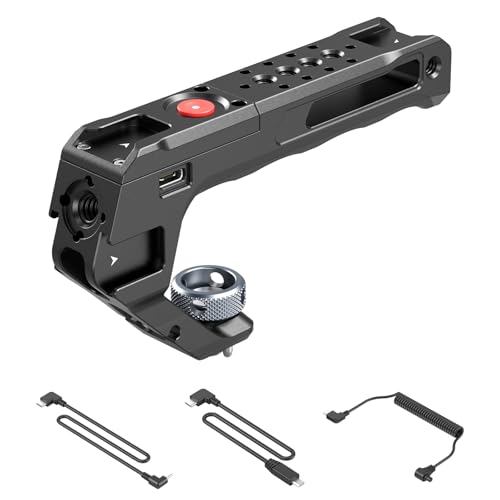
- Built-in start/stop recording button
- Three camera control cables included
- Multiple accessory mounting points
Best For: Supported cameras used in mounted or desk-based setups
Best Lightweight Accessory Handle

- Lightweight 129 g construction
- Five built-in cold shoes
- 1/4"-20 and 3/8"-16 mounting points
Best For: Compact rigs carrying microphones, lights, or monitors
Best Trigger Control

- Built-in start/stop recording trigger
- Three cables for selected camera systems
- Adjustable, ambidextrous silicone grip
Best For: Compatible camera rigs needing wired recording control
Best Accessory Capacity

- Quick-slide 50mm NATO rail
- Five cold shoe accessory mounts
- Multiple 1/4-inch and 3/8-inch threads
Best For: Accessory-heavy camera cage and desk video rigs
Best Smartphone Control
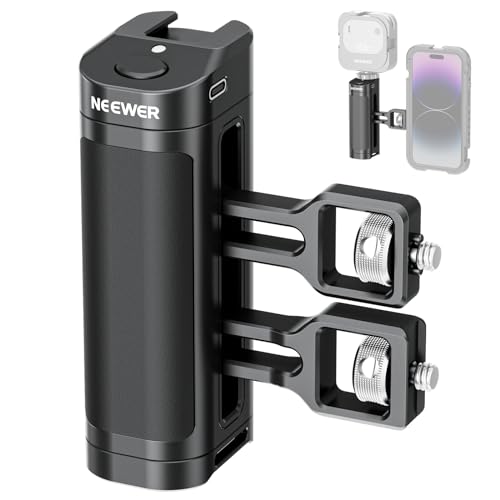
- Bluetooth shutter control for iOS and Android
- Two cage-specific mounting adapters
- Rechargeable USB-C battery and cold shoe
Best For: Compatible smartphone cage video setups
Lightweight Top-Mount Pick – ARRI-Style Top Handle
For shoppers comparing camera cage handles for remote work, this SmallRig top handle is a lightweight way to improve low-angle shooting and carry a compact camera rig. Its ARRI-style locating holes, multiple cold shoes, and aluminum construction suit webcam, product-demo, and mobile studio setups that need accessory flexibility.
Best For: Creators who want a lightweight top handle for a camera cage with several accessory mounting points.
Pros:
- Lightweight 124 g hollowed-out aluminum design.
- Three front and two rear cold shoes for microphones, lights, or monitors.
- Multiple 1/4″-20 and 3/8″-16 mounting points.
- ARRI-style locating holes and included Allen wrench support secure installation.
Cons:
- It is a top handle rather than a side grip.
- Not water resistant.
Choose this model when minimizing handle weight and maximizing mounting options matter more than adding a full cage or integrated controls. It supports equipment loads up to 10 kg according to the supplied specifications.
Compact Side-Grip Pick – Mini Adjustable Side Handle
For camera cage handles for remote work, the SmallRig Mini Side Handle offers a compact grip for mirrorless, digital, and other small cameras. Its adjustable position, reversible left- or right-hand use, and built-in cold shoe make it practical for a small desk or handheld production rig.
Best For: Small-camera users who need a lightweight, adjustable side grip with a microphone or flash mounting option.
Pros:
- Supports left- or right-hand use and up-and-down adjustment.
- Dual 1/4″-20 screws fit compatible cage mounting holes spaced 18 mm apart.
- Built-in cold shoe supports a microphone or flash.
- Lightweight 139 g design with an ergonomic grip.
Cons:
- Maximum bearing capacity is 3.5 kg.
- The compact size may not suit users seeking a larger handle.
- Compatibility depends on the cage having the specified dual-hole spacing.
This is a focused choice for smaller camera cages rather than heavy cinema builds. Check your cage’s side-hole spacing and total rig weight before buying.
Full-Rig Versatility Pick – Universal Cage with Top Handle
For a more complete camera-cage handles for remote work setup, the NEEWER CA016T combines a universal camera cage, top handle, and dual handgrips. It is designed for stable handheld shooting while also supporting tripod transitions, microphones, lights, monitors, and other cage accessories.
Best For: Video creators who want a full cage-and-handle rig for handheld recording, studio work, and tripod use.
Pros:
- Includes a top handle, cage, and dual ergonomic handgrips.
- Top handle provides three cold shoes, four 1/4″ threads, and two 3/8″ ARRI locating holes.
- Arca-type base and bottom 1/4″ screw holes support tripod mounting.
- Top handle supports up to 10 kg; cage supports equipment up to 15 kg.
Cons:
- The complete setup weighs about 2.2 pounds.
- Camera compatibility should be checked carefully, and lenses with a tripod collar mount ring are not suitable unless the ring is removed.
- It may be more equipment than needed for a simple webcam setup.
This is the strongest option here for building a substantial video rig, especially if you switch between handheld and tripod shooting. Its broad camera compatibility list is useful, but the larger size and weight favor dedicated filming setups over minimalist desk use.
Phone-Cage Control Pick – Wireless Rotating Side Handle
Among camera cage handles for remote work, the SmallRig 4402B is the specialized choice for smartphone cages. Its wireless remote can start and stop photos or recording on most native Android and iOS camera apps within 10 meters, while the rotating grip can be used as either a side or top handle.
Best For: Smartphone creators who want remote capture control, flexible handle positioning, and a cold shoe for mobile lighting or audio.
Pros:
- Wireless control module supports photo and recording commands within 10 meters on most native Android and iOS cameras.
- Quick-release adapter works with compatible SmallRig H11 universal and dedicated phone cages.
- Infinite-rotation design locks at different angles and can convert from side to top handle.
- Built-in cold shoe can hold an external microphone or LED light after removing the remote module.
Cons:
- Designed for smartphone cages rather than conventional camera cages.
- Remote functionality depends on compatible native camera apps and phone systems.
- It is not water resistant.
This handle makes the most sense for phone-based remote work content, tutorials, and mobile video where hands-free start/stop control is valuable. Confirm that your cage is compatible with the SmallRig H11 quick-release system before purchasing.
Best Wooden Left-Hand Grip – CAMVATE Rosewood Handle
CAMVATE DSLR Wood Wooden Handle Grip Mount Support for DV Video Cage Rig | Left Hand
Check Price On AmazonIf you want a more traditional feel from your camera cage handles for remote work, this CAMVATE wooden grip adds an ergonomic left-hand contact point to a compatible 15mm DSLR cage rig. Its 1/4″-20 threaded thumbscrew supports installation on compatible rigs, including RED camera setups.
Best For: Left-handed operators who prefer a natural wood grip for a compatible 15mm cage or DSLR rig.
Pros:
- Ergonomic rosewood handgrip designed for the left hand.
- Compatible with DV video cage rigs and other compatible 15mm DSLR rigs.
- Uses a 1/4″-20 threaded thumbscrew for mounting.
Cons:
- This listing includes one left-hand handle, not a pair.
- Natural wood may show color variation.
- It is not water resistant.
This is a straightforward choice if comfort and wood styling matter more than accessory expansion. Confirm your cage’s mounting standard and plan for a separate right-hand grip if you want a matched pair.
Best Remote Recording Control – SMALLRIG Trigger Top Handle
For camera cage handles for remote work that also simplify recording control, this SMALLRIG top handle combines a built-in start/stop button with a comfortable silicone grip. It includes control cables for selected Sony, Canon, Fujifilm, and Panasonic cameras, making it useful when the camera is mounted or positioned out of easy reach.
Best For: Operators who want handle-based start/stop recording on supported camera models while leaving room for accessories.
Pros:
- Built-in button can start and stop recording without pressing the camera body.
- Includes three control cables for selected Sony, Canon, Fujifilm, and Panasonic cameras.
- Lightweight 180 g silicone-grip design with three cold shoes and additional 1/4″-20 and 3/8″-16 mounting points.
Cons:
- Compatibility is limited to the listed camera models and cable-supported functions.
- The trigger controls recording only, not still photography or focusing.
- It is not water resistant.
This is the most workflow-focused option in the group, especially for desk, presentation, or mounted-camera setups. Check both your camera model and the required cable before buying.
Best Lightweight Accessory Handle – SMALLRIG 3764 Top Handle
This SMALLRIG 3764 is a practical option among camera cage handles for remote work when you need a light top handle with space for a microphone, light, or monitor. Its hollowed aluminum-alloy construction weighs 129 g and uses a universal cold shoe base for compatible camera cages.
Best For: Lightweight camera-cage setups that need several accessory mounts without adding much handle weight.
Pros:
- 129 g hollowed design helps reduce added weight.
- Five built-in cold shoes can hold microphones, LED lights, and monitors.
- Includes 1/4″-20 and 3/8″-16 mounting points plus an Allen wrench.
Cons:
- It has no built-in recording remote.
- Accessory and cage compatibility still depends on the relevant cold shoe and threaded mounts.
- It is not water resistant.
Choose this handle if expandability and low weight are your priorities. It offers more mounting flexibility than a basic grip, but it does not provide the dedicated recording control found on the SMALLRIG trigger handle.
Best Trigger Control – Threaded Remote Side Handle
For camera cage handles for remote work, the SmallRig Threaded Side Handle stands out when you want to start or stop recording without reaching for the camera. Its included cables support selected Sony, Canon, Fujifilm, and Panasonic models, while the adjustable grip helps improve comfort during longer sessions.
Best For: Camera operators who want wired record control and an adjustable side grip for compatible mirrorless cameras.
Pros:
- Built-in recording trigger helps start and stop capture from the handle.
- Includes three control cables for selected Sony, Canon, Fujifilm, and Panasonic cameras.
- Adjustable vertical position, left- or right-handed use, and ergonomic silicone grip.
- Includes a cold shoe and additional mounting points for accessories.
Cons:
- Requires a cage with 18mm-spaced 1/4-inch-20 mounting holes.
- Not compatible with the Sony A6700.
- Record control depends on using the correct included cable and supported camera model.
This is the most specialized option here: choose it when remote recording control matters more than a universal top-mounted accessory platform. Verify both cage spacing and camera compatibility before buying.
Best Accessory Capacity – Lightweight NATO Top Handle
For camera cage handles for remote work, the SmallRig 4345 is a practical top-handle choice for building a compact setup with a microphone, light, monitor, or transmitter. Its NATO rail enables quick attachment to compatible cages, while the lightweight aluminum design helps keep the rig manageable.
Best For: Camera users who need multiple accessory mounts and an easy-slide NATO top handle for low-angle shooting.
Pros:
- 50mm NATO rail slides onto compatible cages and secures with a built-in knob.
- Five cold shoe mounts support several external accessories simultaneously.
- Multiple 1/4-inch and 3/8-inch threaded holes expand mounting options.
- Ergonomic silicone grip and lightweight aluminum construction.
Cons:
- Requires a compatible NATO rail or cage mounting arrangement.
- Top-handle placement may be less convenient than a side handle for some desk setups.
- Accessory capacity can add bulk and weight as more devices are attached.
The 4345 is the strongest fit for a remote-work rig centered on accessory expansion. It offers more mounting flexibility than the other options, but confirm your cage setup and plan the added equipment weight.
Best Smartphone Control – Wireless Side Handle Grip
For camera cage handles for remote work with a smartphone, the NEEWER PA005E adds Bluetooth shutter control without requiring a cable to the phone. It is designed for compatible SmallRig and NEEWER smartphone cages, with adjustable mounting, a cold shoe, and a rechargeable battery for hands-on video operation.
Best For: Smartphone creators who want wireless photo and video triggering from a cage-mounted side handle.
Pros:
- Bluetooth shutter button pairs with iOS and Android phones.
- Built-in rechargeable battery can be used while charging through USB-C.
- Includes two mounting adapters for selected SmallRig and NEEWER cages.
- Adjustable for either side, with a cold shoe and wrist-strap slot.
Cons:
- Compatibility is limited to supported smartphone cage and adapter combinations.
- Bluetooth pairing is required for wireless shutter operation.
- Designed for smartphone cages rather than conventional mirrorless-camera cages.
This is the most convenient choice for smartphone-based remote work and content creation when wireless triggering is useful. Check the included adapter compatibility against your exact cage before ordering.
How We Picked the Best Camera Cage Handles for Remote Work
We focused on handles that can improve control during video calls, livestreams, tutorials, interviews, and other desk-based recording. Our selections cover top and side mounting positions, NATO and 1/4-inch attachment systems, ARRI-style locating pins, wireless controls, record triggers, and simple grip-only designs.
Compatibility was a major consideration. A handle is only useful if its mounting hardware matches your cage and leaves enough clearance for cables, screens, microphones, and other accessories. We also considered grip comfort, portability, control placement, and whether each design suits a fixed workstation or a more mobile setup.
Quick Comparison
- Best for general cage control: A standard top or side handle with a secure threaded mount.
- Best for fast camera operation: A handle with a record start/stop trigger and the correct cable.
- Best for compact workspaces: A mini side handle or lightweight top handle.
- Best for smartphone rigs: A phone-cage handle with wireless shutter or recording control.
- Best for a traditional feel: A wooden grip-style handle, provided its mounting plate fits your cage.
- Best for modular rigs: A NATO handle that supports quick attachment and removal.
Key Buying Factors for Camera Cage Handles for Remote Work
Mounting Compatibility
Check whether your cage uses 1/4-inch threads, 3/8-inch ARRI-style mounts, NATO rails, or a dedicated side-handle interface. Locating pins can help prevent twisting, while NATO systems make it faster to remove a handle between sessions.
Position and Ergonomics
Top handles are useful for low-angle positioning, carrying, and adjusting a camera on a small desk. Side handles can provide a steadier two-handed grip and may be more comfortable when the camera stays at face height. Look for a grip that does not block your monitor, microphone, or access to the camera controls.
Remote Controls and Cables
Record triggers and wireless buttons can save time during solo recording, but they are not universally compatible. Confirm the connector, camera or phone support, and required cable before buying. A basic handle may be preferable if you do not need electronic controls.
Weight and Workspace Limits
For a permanent desk setup, extra mounting points may matter more than minimum weight. For travel or frequent repositioning, choose a lighter handle and avoid adding unnecessary bulk to the cage.
Who Should Buy Which Camera Cage Handles for Remote Work?
Choose a top handle if you regularly adjust camera height, carry the rig, or shoot from a desk with limited room. Choose a side handle if you want a more secure two-handed grip or easier access to a camera-side control. A wireless handle is most useful for smartphone creators and solo operators who need remote shutter or recording access.
For the simplest setup, select a threaded handle that matches your cage. If you record frequently, a compatible start/stop trigger can improve your workflow. NATO handles suit users who often switch between handheld and desk-mounted configurations, while a wooden grip is a good choice for buyers who prioritize traditional feel and appearance over compactness.