Managing a group of tablets, Chromebooks, or laptops is easier when every device has a designated charging space. The best budget device charging cabinets help reduce cable clutter, protect equipment, and simplify daily check-in and checkout without requiring a premium deployment.
This roundup compares 10 affordable charging cabinets across different capacities, layouts, mounting options, and security features. Use the guide below to narrow your choices based on device size, available space, charging workflow, and the level of protection your organization needs.
Best 10 Budget Device Charging Cabinets Picks for 2026
Best Compact Pick
8-Device Tablet & Laptop Cabinet

- Stores and charges up to 8 devices
- Lockable, ventilated steel construction
- Fully assembled with desktop or wall installation
Best For: Smaller classrooms, offices, and shared-device areas
Best Portable 12-Slot Value
Wall-Mount 12-Device Charging Cabinet

- 12 rotating-layout charging slots
- Lockable steel cabinet with ventilation
- Wheels and wall-mount capability
Best For: Flexible classroom and office device storage
Best High-Capacity Choice
16-Device Combination-Lock Cabinet
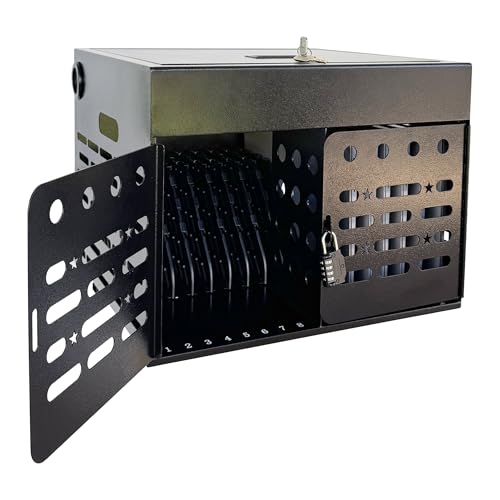
- Stores up to 16 devices
- Fits devices up to 15.6 inches
- Fully assembled with cable management
Best For: Larger classrooms and shared technology programs
Best 12-Bay Ready-to-Use Pick
Fully Assembled 12-Bay Charging Cabinet

- Charges and stores 12 devices
- Fully assembled for quick deployment
- Key lock, ventilation, and cable clips
Best For: Schools and offices wanting simple 12-device management
Best Open-Frame Pick

- Charges up to 10 devices
- Includes a 10-outlet power strip
- Open steel frame promotes airflow
Best For: Classrooms and shared spaces needing accessible, high-capacity charging
Best Secure Compact Pick
POCHAR 8-Unit Charging Cabinet

- Stores and charges eight devices
- Key and combination lock security
- Fully assembled with mounting hardware
Best For: Shared spaces requiring compact, lockable device storage
Best Large-Capacity Cabinet
Pearington 16-Device Charging Cabinet

- Charges up to 16 devices
- Fits screens up to 17 inches
- Locking door with handles and casters
Best For: High-capacity indoor device storage with mobility and security
Best with Extra Features
20-Device Ventilated Charging Cabinet

- Charges up to 20 phones or tablets under 8 inches
- Lockable steel cabinet with tempered glass window
- Tabletop or wall-mount installation
Best For: Smaller shared-device collections in schools, offices, and public spaces
Best High-Capacity Value
40-Device Charging Storage Cabinet

- Charges and stores up to 40 devices
- Clear window and cable-management dividers
- Multiple built-in electrical safety protections
Best For: Large classrooms and public spaces managing many small devices
Best for Chromebooks
12-Device Laptop Charging Cabinet

- Stores and charges 12 laptops, Chromebooks, or tablets
- Spacious compartments with cable-management clips
- Lockable wall-mount design with 65-pound capacity
Best For: Classrooms and offices with larger devices
Best Compact Pick – 8-Device Tablet & Laptop Cabinet
For shoppers comparing budget device charging cabinets, this fully assembled 8-device model is a compact option for smaller shared-device collections. It stores and charges laptops, Chromebooks, tablets, iPads, and notebooks up to 14 inches in a lockable, ventilated steel cabinet.
Best For: Classrooms, offices, libraries, reception areas, and other spaces managing up to eight devices.
Pros:
- Stores and charges up to eight devices up to 14 inches.
- Includes a lockable steel door with two keys.
- Ventilated design and integrated UL-listed eight-outlet power strip.
- Ships fully assembled and supports optional wall or desktop installation.
Cons:
- Capacity is limited to eight devices.
- Not designed for devices larger than 14 inches.
Its compact dimensions and ready-to-use construction make it practical when space and setup time matter more than maximum capacity.
Best Portable 12-Slot Value – Wall-Mount 12-Device Charging Cabinet
This 12-slot model is worth considering among budget device charging cabinets when organized storage and flexible placement are priorities. Its steel cabinet includes a rotating 12-outlet layout, cable-management features, ventilation, and a lock for shared environments.
Best For: Classrooms, offices, libraries, hospitals, nursing homes, and other locations needing 12-device storage with wall-mount flexibility.
Pros:
- Provides 12 slots for simultaneous device storage and charging.
- Includes cable-management openings and a single-point security lock.
- Steel construction with powder coating and ventilation holes.
- Portable design includes four wheels and supports wall mounting.
Cons:
- Installation hardware is sold separately.
- Assembly is listed as an included feature, so setup may be required.
The combination of wheels, wall-mount capability, and cable organization gives this cabinet useful placement flexibility, though buyers should budget for separate mounting hardware.
Best High-Capacity Choice – 16-Device Combination-Lock Cabinet
For larger device pools, this 16-device cabinet stands out in the budget device charging cabinets category with space for laptops, Chromebooks, iPads, tablets, and notebooks up to 15.6 inches. It combines enclosed steel storage, a built-in combination lock, cable routing, ventilation, and fully assembled delivery.
Best For: Schools, offices, libraries, training centers, healthcare facilities, and businesses managing up to 16 devices.
Pros:
- Highest listed capacity, holding up to 16 devices.
- Accommodates devices up to 15.6 inches.
- Built-in combination lock avoids reliance on a key for access.
- Includes cable-management slots, an upper adapter compartment, and ventilation.
Cons:
- Its 16-inch depth may require more placement space.
- Combination-lock access may be less suitable for users who prefer keyed entry.
Choose this model when capacity and larger-device compatibility are more important than the smallest footprint. Handles and wall-mount support also make relocation or installation more manageable.
Best 12-Bay Ready-to-Use Pick – Fully Assembled 12-Bay Charging Cabinet
This 12-bay cabinet offers a straightforward option for buyers seeking budget device charging cabinets with minimal setup. It is fully assembled, uses a steel construction, and provides key-locked storage, cable clips, a 12-outlet power strip, and ventilation for devices up to 14 inches.
Best For: Classrooms, schools, offices, libraries, clinics, hospitals, training centers, and other indoor shared-device settings.
Pros:
- Stores and charges 12 Chromebooks, laptops, iPads, tablets, or ultrabooks.
- Fits devices up to 1.2 inches thick and 14 inches in screen size.
- Ships fully assembled for plug-and-play setup.
- Includes key locks, cable clips, ventilation, and a 12-outlet power strip.
Cons:
- French-cleat mounting hardware is sold separately.
- Red finish may not suit every office or classroom décor.
This is a practical middle-capacity choice for organizations that want organized, lockable charging without spending time assembling the cabinet.
Best Open-Frame Pick – 10-Device Charging Station
This open charging station is a practical budget device charging cabinets option for classrooms, offices, libraries, and shared workspaces. It stores and charges up to 10 devices while keeping the setup accessible and relatively compact.
Best For: Teachers and shared spaces that prioritize capacity, quick access, and airflow over lockable storage.
Pros:
- Charges and organizes up to 10 laptops or tablets in one station.
- Includes a built-in 10-outlet power strip for using original AC adapters.
- Fits devices up to 14 inches and 1.5 inches thick, including many protected devices.
- Open steel construction supports easy access and airflow.
Cons:
- Open-frame design does not provide theft protection or a locking door.
- It is designed for indoor use and shared work areas rather than portable transport.
Choose this model when straightforward organization and charging capacity matter most. Its open layout is convenient for frequent check-in and check-out, but buyers needing security should consider a locking cabinet instead.
Best Secure Compact Pick – POCHAR 8-Unit Charging Cabinet
For buyers seeking budget device charging cabinets with physical security, this fully assembled POCHAR cabinet stores and charges up to eight devices in a compact footprint. Its locking steel enclosure and adjustable dividers suit shared environments where devices need controlled access.
Best For: Classrooms, libraries, offices, IT departments, and healthcare settings that need a compact lockable cabinet.
Pros:
- Stores and charges up to eight laptops, tablets, Chromebooks, or iPads up to 14 inches.
- Uses a key lock plus a separate combination lock for added security.
- Arrives fully assembled and includes wall-mounting hardware.
- Ventilated steel construction and internal cable management help organize charging.
Cons:
- Capacity is limited to eight devices, fewer than some larger stations.
- The locking enclosure may be less convenient than an open rack for very frequent access.
This is a strong choice when security and organization are more important than maximum capacity. Its desktop or wall-mount installation options also make it adaptable to space-constrained rooms.
Best Large-Capacity Cabinet – Pearington 16-Device Charging Cabinet
The Pearington is a budget device charging cabinets option for organizations that need to store and charge many devices in one portable tabletop unit. It accommodates up to 16 devices, including laptops with screens up to 17 inches, and adds features for moving and securing the cabinet.
Best For: Classrooms, offices, and shared indoor spaces needing high capacity, lockable storage, and occasional repositioning.
Pros:
- Stores and charges up to 16 devices at once.
- Fits iPads, Chromebooks, and laptops with screens up to 17 inches.
- Locking front door helps secure stored devices.
- Side handles, four swivel casters, and cord-management space support portability and organization.
Cons:
- At 28 pounds and 17 by 17 by 20 inches, it is less compact than smaller cabinets.
- The supplied notes do not specify a wall-mount option.
Consider this cabinet when capacity is the priority and the storage area can accommodate a larger tabletop unit. Its locking door and mobility features make it more versatile than a basic open charging rack.
Best with Extra Features – 20-Device Ventilated Charging Cabinet
If you need budget device charging cabinets for a classroom, office, or shared facility, this 20-device model offers a practical balance of capacity, security, and flexible placement. It charges up to 20 phones or tablets under 8 inches and can sit on a table or mount to a wall.
Best For: Schools, offices, churches, gyms, and hotel lobbies needing secure charging for up to 20 smaller devices.
Pros:
- Charges up to 20 devices simultaneously with a 200W integrated power supply.
- Cold-rolled steel construction, tempered glass, and a key lock support secure shared use.
- Ventilation holes and an anti-collision magnetic door help with heat dissipation and daily handling.
- Supports both tabletop placement and wall mounting.
Cons:
- Designed for phones and tablets smaller than 8 inches, limiting compatibility with larger devices.
- Charging output is listed at 5V/2A per port, with a maximum of 3A.
This cabinet is a solid budget-conscious choice when 20-device capacity is sufficient and you want a visible, lockable unit with straightforward mounting options.
Best High-Capacity Value – 40-Device Charging Storage Cabinet
For buyers comparing budget device charging cabinets with higher capacity, this lockable 40-slot station stores and charges phones or tablets under 8 inches at the same time. Its clear window, cable-management slots, and dual-use installation make it practical for busy shared environments.
Best For: Classrooms, offices, gyms, hotels, and other public spaces that need organized charging for up to 40 smaller devices.
Pros:
- Supports simultaneous charging for up to 40 phones or tablets under 8 inches.
- Clear tempered-glass window makes stored devices easy to identify.
- Built-in overvoltage, overcurrent, short-circuit, and overheat protection are included.
- ABS dividers with cable slots, side ventilation, tabletop placement, and wall mounting improve organization and flexibility.
Cons:
- Compatibility is limited to phones and tablets smaller than 8 inches.
- The supplied details list Mini USB connectors, which may require checking cable compatibility with your devices.
- Its larger 40-device capacity may be more than needed for smaller groups.
This is the strongest capacity-focused option in the group, especially if keeping many small devices visible, separated, and secured matters more than compact size.
Best for Chromebooks – 12-Device Laptop Charging Cabinet
Among budget device charging cabinets, the Learniture Structure Series stands out for storing larger classroom technology. It has 12 spacious compartments for Chromebooks, laptops, and tablets, plus an interior 12-outlet strip and cable clips to keep charging equipment organized.
Best For: Classrooms and offices charging and securing up to 12 Chromebooks, laptops, or tablets.
Pros:
- Spacious 1.25-inch-wide compartments accommodate Chromebooks, laptops, and tablets.
- Rotated 12-outlet strip allows all outlets to be used for simultaneous charging.
- One-point key locking, cable grommets, and 12 cable-management clips support secure, tidy storage.
- French-cleat wall mounting and a 65-pound capacity suit permanent installations.
Cons:
- Mounting hardware is not included.
- With 12 compartments, it holds fewer devices than the 20- and 40-device cabinets.
- Its listed dimensions and 23.5-pound weight may require more wall space and installation planning.
This cabinet is the better fit when device size and organized laptop storage are priorities. Its five-year limited manufacturer warranty is also longer than the warranty details listed for the other options.
How We Picked These Budget Device Charging Cabinets
We focused on cabinets and charging stations that offer practical value for schools, offices, libraries, training centers, and other shared-device environments. The selection includes compact units for smaller fleets, larger cabinets for classroom or workplace deployments, and both open and lockable designs. We considered stated device capacity, compatibility with tablets and laptops, portability, mounting style, cable organization, ventilation, assembly requirements, and the convenience of included power-management hardware.
Because “budget” does not mean the same thing for every buyer, we also looked beyond the lowest price. A cabinet that costs slightly more may provide better security, easier access, stronger organization, or enough capacity to avoid buying a second unit later.
Quick Comparison
- Small deployments: Eight- and 10-device models suit home offices, small classrooms, and departments with limited shared equipment.
- Medium deployments: Twelve- and 16-device cabinets balance capacity with manageable size and are often the most versatile choice.
- Larger fleets: Twenty- and 40-device stations reduce the need for multiple cabinets but require more floor or wall space.
- Security-focused setups: Lockable cabinets help control access and keep devices stored between uses.
- Flexible placement: Portable or tabletop designs can work well where permanent installation is not practical.
Key Buying Factors for Budget Device Charging Cabinets
Capacity and Device Fit
Check the number of bays as well as the maximum supported device dimensions. A cabinet advertised for tablets may not accommodate thicker laptops, bulky protective cases, or larger power adapters. Leave enough room for users to insert and remove devices without forcing connectors or cables.
Charging and Cable Management
Confirm whether the unit includes a power strip, charging cables, or only storage slots. Built-in cable routing can make a major difference in daily use, especially when multiple device types share the cabinet. Also verify that your existing chargers physically fit inside the compartments.
Security, Ventilation, and Installation
Choose a lockable design when devices need to remain unattended or accessible only to authorized users. Ventilation holes or other airflow features are important during extended charging sessions. For wall-mounted cabinets, verify the wall structure, mounting hardware, and loaded weight before installation. Fully assembled models may save time, while flat-packed units can be easier to transport.
Who Should Buy Which Budget Device Charging Cabinets?
Choose a compact eight- or 10-device station for a small team or limited classroom set. A 12- or 16-device cabinet is a strong general-purpose option for organizations that need room to grow without using excessive space. Buyers managing a larger Chromebook or tablet fleet should consider a 20-device model, while a 40-device station makes more sense for high-volume storage in a dedicated room. If access control is a priority, select a lockable cabinet; if the cabinet will move between rooms, prioritize a portable tabletop or freestanding design.