Smart home energy monitors make it easier to see where electricity goes, identify energy-hungry appliances, and track usage beyond a monthly utility bill. The right model can provide whole-home data, circuit-level detail, solar insights, or local smart-home control.
This roundup compares 10 options with different sensor capacities, connectivity features, installation approaches, and software support so you can choose a monitor that fits your electrical panel and energy-management goals.
Best 10 Smart Home Energy Monitors Picks for 2026
Best Whole-Home Coverage

- 16 branch sensors for detailed circuit monitoring
- Tracks solar, net metering, and whole-home usage
- UL and CE listed with ±2% sensor accuracy
Best For: Detailed household and appliance-level energy tracking
Best for Local Smart-Home Control

- Local web UI, Open API, and MQTT access
- Native Home Assistant integration
- Circuit-level monitoring with solar automation
Best For: Privacy-focused users building an integrated smart home
Best Established-Brand Option

- Whole-home and up to 16-circuit monitoring
- Mobile app with real-time and historical data
- Supports solar, peak-demand, and time-of-use features
Best For: U.S. and Canadian households wanting branded panel monitoring
Best Local-Control Pick
Refoss Smart Home Energy Monitor
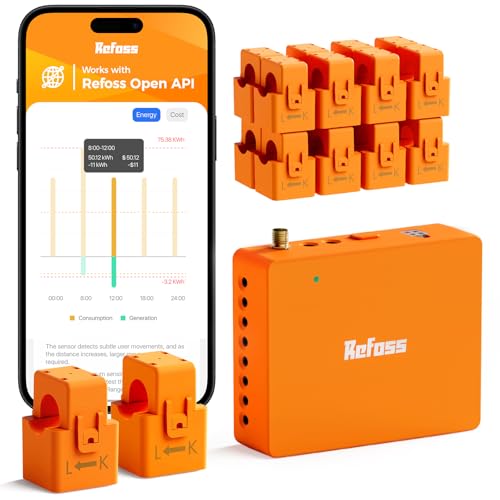
- Tracks up to 18 circuits with stated ±1% precision
- Local APIs, MQTT, WebSocket, and Home Assistant support
- Five-year daily storage with CSV export and no subscription
Best For: Privacy-focused homes, detailed circuit monitoring, and solar automation
Best UL-Certified Option
Emporia Vue 3 Home Energy Monitor

- UL and CE listed for supported installations
- Tracks whole-home use, solar, and net metering
- App automation for time-of-use and peak-demand management
Best For: App-based household energy monitoring and supported solar setups
Best Simple Solar Monitor
Eyedro Smart Home Energy Monitor

- Includes two 200A directional current sensors
- Works with 2.4 GHz Wi-Fi or wired Ethernet
- Monitors grid, solar, or net metering without a subscription
Best For: Simple whole-home, solar, or off-grid energy tracking
Best for Multi-Room Tracking

- Tracks up to 16 branch circuits with included sensors
- Calculates costs using custom time-of-use rates
- Supports local MQTT and Home Assistant operation
Best For: Landlords, shared apartments, and detailed circuit-level monitoring
Best for Solar Automation

- Monitors two main and 16 branch circuits
- Detects solar surplus through Home Assistant
- Provides local data, alerts, and no subscriptions
Best For: Solar homes and privacy-focused Home Assistant users
Best for Whole-Home Monitoring

- Includes two 200A sensors for main-circuit tracking
- Expandable with up to eight additional sensors
- Offers app history, alerts, exports, and MQTT support
Best For: Homeowners starting with whole-home monitoring
Best Whole-Home Coverage – Emporia Vue 3
The Emporia Vue 3 is a strong choice among smart home energy monitors for homeowners who want whole-home tracking plus detailed circuit-level data. Its 16 included branch sensors can monitor major loads, while the app supports solar, net metering, time-of-use management, and energy alerts.
Best For: Homeowners seeking comprehensive circuit-level monitoring, solar tracking, and a UL-listed system.
Pros:
- Includes 16 branch sensors for monitoring major appliances and circuits.
- Supports whole-home usage, solar, and net-metering monitoring.
- UL and CE listed, with sensor accuracy specified at ±2%.
- Offers app-based automation, notifications, and cloud data exports.
Cons:
- Requires 2.4 GHz Wi-Fi and an internet connection.
- Installation is performed inside the electrical panel.
- Some three-phase configurations require an additional sensor.
With broad circuit coverage and practical energy-management features, the Vue 3 is well suited to households that want more than basic whole-home consumption estimates.
Best for Local Smart-Home Control – Refoss EM16P
The Refoss EM16P stands out among smart home energy monitors for local data access and open integration. Its built-in web interface, Open API, MQTT support, and native Home Assistant compatibility let users manage energy data without depending on cloud services.
Best For: Privacy-conscious smart-home users, Home Assistant setups, and solar homes seeking local automation.
Pros:
- Provides local access through a web UI, Open API, and MQTT.
- Offers native Home Assistant integration without firmware flashing.
- Supports solar self-consumption and zero-feed-in automation.
- Includes 16 branch sensors, two main sensors, and a two-year warranty.
Cons:
- Requires electrical-panel installation.
- Low-current measurements are specified at ±2% accuracy.
- Its advanced integrations may be more than basic users need.
The EM16P is an appealing option when local control, long-term data access, and open smart-home integration matter as much as energy measurement.
Best for Solar Power Tracking – Blindsmart WiFi Monitor
This Blindsmart monitor is a practical pick among smart home energy monitors for single-phase homes with solar or battery storage. Its two 120A split-core CTs measure household consumption and grid export, while Smart Life integration adds alerts and automation scenes.
Best For: Single-phase homes that need bidirectional solar and grid-export monitoring.
Pros:
- Measures both household consumption and power exported to the grid.
- Includes two 120A split-core current transformers.
- Works with the Smart Life app for live analysis, alerts, and automation.
- Supports dynamic load balancing and zero-grid-export modes.
Cons:
- Designed for single-phase, three-wire systems.
- Uses 2.4 GHz Wi-Fi.
- Its supplied notes do not specify circuit-level branch sensors.
For solar owners focused on import-versus-export visibility and straightforward app-based energy management, this monitor offers a focused feature set without the added complexity of branch-circuit monitoring.
Best Established-Brand Option – Siemens Inhab
The Siemens Inhab combines whole-home and circuit-level measurement in a panel-mounted system. As smart home energy monitors go, it is designed for users who want real-time and historical data, personalized alerts, solar and net-metering features, and support for selected load-management functions.
Best For: U.S. and Canadian homeowners wanting a branded monitor with whole-home and 16-circuit tracking.
Pros:
- Monitors main usage and up to 16 individual branch circuits.
- Provides real-time and historical data through a mobile app.
- Supports time-of-use, peak-demand, excess-solar, and net-metering functions.
- UL listed and CE marked for installation in new or existing panels.
Cons:
- Mobile-app availability is limited to the USA and Canada.
- Installation requires access to the electrical panel.
- Advanced load-shedding functions apply to compatible devices.
The Inhab is a capable choice for buyers who value Siemens branding, broad circuit coverage, and energy-management features in addition to basic consumption monitoring.
Best Local-Control Pick – Refoss Smart Home Energy Monitor
For homeowners comparing smart home energy monitors, the Refoss EM16P stands out for detailed circuit-level tracking and local data control. It monitors up to 18 circuits, supports single-phase, split-phase, and 3-phase 4-wire Wye systems, and stores daily data for up to five years without a subscription.
Best For: Privacy-focused households, Home Assistant users, and homes with solar or multiple circuits to track.
Pros:
- Monitors two main circuits and up to 16 branch circuits with stated ±1% precision.
- Offers local web access, Open API, MQTT, WebSocket, and Home Assistant integration.
- Includes five-year daily data storage, CSV export, and configurable fault alerts.
- Supports solar self-consumption and time-of-use energy management.
Cons:
- Installation involves working with a circuit panel and may require a qualified installer.
- Its extensive circuit coverage may be more than a smaller home needs.
The Refoss is a strong choice when granular monitoring, local automation, and long-term analytics matter more than a simple whole-home overview. Its two-year warranty and ETL certification add useful reassurance.
Best UL-Certified Option – Emporia Vue 3 Home Energy Monitor
The Emporia Vue 3 is a practical smart home energy monitor for households that want real-time consumption, solar, and net-metering information through a familiar app. Its clamp-on sensors install in the circuit panel, while UL and CE listings provide added confidence for supported installations.
Best For: Homeowners who want app-based monitoring, energy automation, and a UL-listed system for supported electrical setups.
Pros:
- UL and CE listed for supported use in the U.S. and Canada.
- Monitors whole-home energy, solar, and net metering through the Emporia app.
- Supports time-of-use, peak-demand, excess-solar, and rewards-program settings.
- Provides notifications, cloud data export, and stated ±2% sensor accuracy.
Cons:
- Requires 2.4 GHz Wi-Fi and an internet connection.
- One-second data is available only while the app is open and retained for three hours.
- Three-phase, four-wire Wye installations require an additional 200A sensor sold separately.
The Vue 3 fits buyers who prefer cloud-connected monitoring and automation over local-only operation. Review the electrical-system requirements and data-retention details before installation.
Best Simple Solar Monitor – Eyedro Smart Home Energy Monitor
The Eyedro Home is a straightforward smart home energy monitor for viewing whole-home electricity use or solar production in real time. It works over 2.4 GHz Wi-Fi or wired Ethernet and displays consumption in dollars, watts, amps, and volts through the MyEyedro cloud without a subscription.
Best For: Homeowners, DIY users, and solar or off-grid users who want simple whole-home or single-source monitoring.
Pros:
- Includes two 200A directional current sensors for broad electrical monitoring.
- Supports Wi-Fi and wired Ethernet connections.
- Tracks grid, solar, or net-metering data through the MyEyedro cloud with no subscription.
- Displays usage in dollars, watts, amps, and volts.
Cons:
- A single unit monitors grid energy, solar, or net metering—not all simultaneously.
- Separate grid-versus-solar net metering requires two EYEDRO-HOME meters.
- It is designed for whole-home or source-level tracking rather than multiple branch circuits.
The Eyedro keeps setup and monitoring relatively focused, making it appealing when you need visibility into one energy source rather than detailed appliance-level data. Buyers with combined grid-and-solar tracking should budget for a second meter.
Best for Multi-Room Tracking – 16-Circuit Energy Monitor
This smart home energy monitor is designed for detailed circuit-level tracking, making it useful when you want to see how individual appliances, rooms, or shared areas affect electricity costs. Its 16 clamp-on sensors, real-time data, rate templates, and Home Assistant MQTT support make it especially practical for rental homes and shared apartments.
Best For: Landlords, shared apartments, and homeowners who need detailed circuit-by-circuit usage and cost allocation.
Pros:
- Includes 16 50A sensors for monitoring appliances and branch circuits.
- Supports customizable peak, off-peak, and holiday pricing calculations.
- Offers real-time data, historical statistics, exports, and approximately 1% accuracy.
- Can operate locally through MQTT without the manufacturer’s cloud or app when used with Home Assistant.
Cons:
- Does not support Delta electrical systems.
- Panels accessible only through busbars may require separate flexible sensors.
- Only a 1-year warranty is listed.
Choose this model when circuit-level detail and fair electricity allocation matter more than a simple whole-home overview. Its broad sensor package is particularly well suited to multi-room properties.
Best for Solar Automation – Meross 18-Circuit Monitor
The Meross smart home energy monitor combines whole-home and circuit-level measurement with local data storage and Home Assistant support. It is a strong option for solar households that want to detect surplus production, trigger energy automations, and receive alerts about unusual usage without paying for a subscription.
Best For: Solar-equipped homes and privacy-focused users who want advanced Home Assistant energy automation.
Pros:
- Monitors two main circuits plus up to 16 branch circuits.
- Supports solar surplus detection for automating EV chargers, water heaters, and other loads through Home Assistant.
- Stores up to five years of data and supports hourly report exports.
- Includes ETL certification, UL 61010 compliance, and a 2-year warranty.
Cons:
- Does not support Delta systems.
- Its stated accuracy is within ±2%, less precise than some competing options in this roundup.
- Advanced solar automation depends on Home Assistant integration.
This is the most automation-focused choice of the three. Its local data handling, long history, alerts, and solar surplus features make it appealing for users building a broader energy-management system.
Best for Whole-Home Monitoring – Expandable SEM-Meter
This smart home energy monitor is a streamlined choice for measuring household power in real time and reviewing usage history through an app. It includes two 200A sensors for main-circuit monitoring and can accept up to eight additional sensors, giving homeowners room to expand into appliance-level tracking later.
Best For: Homeowners who want whole-home monitoring first and optional circuit-level expansion.
Pros:
- Includes two 200A sensors for monitoring major household circuits.
- Supports expansion with up to eight additional sensors.
- Provides real-time app data, historical views, notifications, and exports.
- Offers a stated accuracy range of approximately 1% and local MQTT operation with Home Assistant.
Cons:
- Additional sensors are needed for more detailed circuit monitoring.
- Does not support Delta systems.
- Hourly exported data is retained for 90 days, while longer-period exports are permanent.
Consider this model if you primarily need an overview of household consumption but want the flexibility to add appliance monitoring over time. It delivers the core features of the larger SEM-Meter package with fewer included sensors.
How We Picked the Best Smart Home Energy Monitors
We evaluated these monitors by comparing the information they can collect, how many circuits they can cover, and how easily that data can be accessed. Important differences include whole-home versus circuit-level monitoring, support for solar or net metering, app-based reporting, open APIs, Home Assistant compatibility, and local versus cloud-dependent operation.
We also considered practical installation requirements. Current-transformer capacity, sensor count, panel space, Wi-Fi or Ethernet connectivity, and electrical-system compatibility can matter as much as headline features. Always confirm the product’s specifications and consult a qualified electrician when installation involves opening an electrical panel.
Quick Comparison
- Best for broad automation and solar tracking: Emporia Vue 3.
- Best for local integrations: Refoss models with open API or local control.
- Best for detailed circuit coverage: Siemens Inhab, Meross, and 16-circuit monitors.
- Best for straightforward whole-home monitoring: Eyedro and dual-CT Wi-Fi models.
- Best for flexible smart-home projects: Monitors supporting Home Assistant, APIs, or local data access.
Key Buying Factors for Smart Home Energy Monitors
Whole-Home or Circuit-Level Data
Whole-home monitoring shows total consumption and is often simpler to install. Circuit-level monitoring can reveal the precise demand from HVAC equipment, water heaters, appliances, EV chargers, or solar systems, but it typically requires more sensors and panel space.
Sensor Capacity and Electrical Compatibility
Check the number and rating of included current transformers. Main sensors may support higher amperage than circuit sensors, and the monitor must suit your service configuration. Some systems are designed for two main service conductors, while others offer expanded circuit coverage.
Connectivity, Privacy, and Integrations
Cloud apps can provide convenient dashboards, alerts, and historical reports. Local control and open APIs are better suited to users who want data independence or custom automations. Home Assistant support is especially useful for combining energy data with schedules, occupancy sensors, batteries, and smart plugs.
Solar and Cost Tracking
If you have solar panels, look for explicit solar, surplus, or net-metering support rather than assuming every monitor can distinguish production from consumption. Cost estimates also depend on accurate utility rates and may require manual configuration.
Who Should Buy Which Smart Home Energy Monitors?
Choose a whole-home Wi-Fi monitor if you mainly want consumption trends, alerts, and a quick way to understand your electricity bill. Select a circuit-level system if you need to identify specific loads or measure several high-demand appliances separately. Solar owners should prioritize models that support production and net-metering workflows.
For Home Assistant users, open API or local-control models offer the most flexibility and reduce dependence on a vendor’s cloud service. Renters or users who cannot modify a panel should verify whether professional installation is required before buying. Finally, compare sensor count and expansion options carefully: paying for unused capacity is unnecessary, but an undersized monitor may not provide the detail you want later.