A thoughtful home office gift can make everyday work more comfortable, organized, or adaptable. Consider how the recipient works, what equipment they already use, and how much desk space they have.
19 Christmas Gifts for a Home Office
1. GOLDENMATE 1000VA/600W Lithium UPS Battery Backup
For Keeping Work Devices Powered
GOLDENMATE 1000VA/600W Lithium UPS Battery Backup

- Provides battery backup and surge protection for a PC, router, or other office electronics.
- Has eight outlets and a color LCD for viewing power and battery conditions.
- Designed for standard 110V household power; check the recipient’s outlet voltage and connected load.
Best For: A desktop user who wants backup power for essential office electronics.
2. KOORUI 34-Inch Curved Ultrawide Monitor
For a Roomier Work View
KOORUI 34-Inch Curved Ultrawide Monitor

- The 34-inch, 3440 × 1440 ultrawide screen supports Picture-in-Picture and Picture-by-Picture modes.
- The stand offers tilt, swivel, and height adjustment.
- Connects via DisplayPort or HDMI; check the recipient’s computer ports.
Best For: A multitasker who keeps several documents or apps open.
3. SOLAKAKA KI99 Pro Quiet Mechanical Keyboard
For a More Personal Typing Setup
SOLAKAKA KI99 Pro Quiet Mechanical Keyboard

- Connects through Bluetooth, 2.4 GHz wireless, or USB-C.
- The compact 96% layout includes a knob for volume, media, and lighting controls.
- Hot-swappable switches and customizable RGB lighting let the recipient tailor the setup.
Best For: A typist who wants a customizable keyboard with quiet switches.
4. EMEET Luna Plus Conference Speakerphone Kit
For Clearer Group Calls
EMEET Luna Plus Conference Speakerphone Kit

- Includes an eight-microphone speakerphone and a satellite microphone for a 360° pickup area.
- Connects by USB or Bluetooth and is compatible with Windows, Mac OS, iOS, and Android.
- The kit is described for meetings with up to 14 people; expansion to 25 requires a separate daisy-chain cable.
Best For: A remote worker who hosts calls with several participants.
5. TRALT Mesh Office Chair with Adjustable Lumbar Support
For a Desk-Sitting Upgrade
TRALT Mesh Office Chair with Adjustable Lumbar Support

- Adjustable lumbar support lets the user change the support depth.
- A breathable mesh backrest and molded foam seat provide the chair’s seating materials.
- The listing gives a 17.7–21.7-inch seat-height range; check fit and workspace dimensions.
Best For: Someone who spends long stretches working at a desk.
6. Adjustable LED Desk Lamp with Swing Arm
For Flexible Task Lighting
Adjustable LED Desk Lamp with Swing Arm

- A 360° flexible gooseneck directs light toward books, a keyboard, or crafts.
- Brightness dims from 1% to 100%, with color temperature from 2700K to 6500K.
- Three light bars and a weighted base suit a desk with room for a freestanding lamp.
Best For: A home worker who reads or needs adjustable desk lighting.
7. ErGear 48 × 24-Inch Electric Standing Desk
For Sitting and Standing Options
ErGear 48 × 24-Inch Electric Standing Desk

- Electric height adjustment ranges from 28.35 to 46.46 inches.
- Four memory presets let the user save preferred desk heights.
- The 48 × 24-inch top needs enough room in the recipient’s workspace.
Best For: Someone who wants to alternate between sitting and standing.
8. JLab JBuds Lux ANC Wireless Over-Ear Headphones
For a Quieter Workday
JLab JBuds Lux ANC Wireless Over-Ear Headphones

- Hybrid active noise cancellation and Be Aware Mode offer different listening options.
- Bluetooth Multipoint connects to two devices, with a USB-C cable included for wired listening.
- The listing states 40+ hours of battery life with ANC mode.
Best For: A home worker who wants to focus around household noise.
9. EMEET S600 4K Webcam with Autofocus
For Video Calls and Streaming
EMEET S600 4K Webcam with Autofocus

- Supports 4K at 30 frames per second or 1080p at 60 frames per second, depending on software or app.
- Includes PDAF autofocus, automatic light adjustment, and a built-in privacy cover.
- Connects by USB and is described as plug-and-play with popular operating systems.
Best For: Someone who joins video meetings or creates camera-based content.
10. Univivi 36-Inch Under-Desk Cable Tray
For Taming Desk Cables
Univivi 36-Inch Under-Desk Cable Tray

- The 36-inch tray organizes adapters, sockets, and cords beneath a desk.
- Can be installed with clamps or screws, depending on the desk and preference.
- Check for at least 5.3 inches of clear edge space if the desk has drawers or a back rod.
Best For: Someone whose desk has charging cables and power adapters to organize.
11. 36 × 24-Inch Magnetic Glass Whiteboard
For Visible Plans and Notes
36 × 24-Inch Magnetic Glass Whiteboard

- The frameless tempered-glass surface can be mounted vertically or horizontally.
- Includes strong magnets, a marker, a tray, and an eraser.
- The listing says standard refrigerator magnets will not work; use the included strong magnets.
Best For: A visual planner who likes to keep tasks or ideas in sight.
12. ComfiLife Adjustable Memory Foam Footrest
For a More Supported Seat
ComfiLife Adjustable Memory Foam Footrest

- Adjustable-height memory foam offers a place to rest feet under a desk.
- The removable cover is machine washable, according to the listing.
- Can also be flipped to use as a rocker beneath a chair.
Best For: A desk worker who wants a footrest while seated.
13. LYMAX Dimmable Monitor Light Bar
For Lighting a Screen-Side Desk
LYMAX Dimmable Monitor Light Bar

- The light bar directs illumination down toward the keyboard and desktop to reduce screen reflection.
- Color temperature adjusts from 2900K to 6000K, with touch and wireless remote controls.
- The bracket fits monitors from 0.2 to 1.8 inches thick; check screen thickness before gifting.
Best For: Someone who works at a screen in a dim room.
14. Yodoit 15.6-Inch Portable USB-C Monitor
For a Second Screen on the Move
Yodoit 15.6-Inch Portable USB-C Monitor

- The 15.6-inch display has 1920 × 1080 resolution and a matte finish.
- Connectivity options include USB-C and mini HDMI with USB-C-to-USB-A power for compatible devices.
- The listing describes compatibility with PC, Mac, some phones, and game consoles; confirm the recipient’s device supports the required connection.
Best For: A laptop user who sometimes works away from their main desk.
15. RIWUCT Foldable Aluminum Laptop Stand
For Raising a Laptop Screen
RIWUCT Foldable Aluminum Laptop Stand
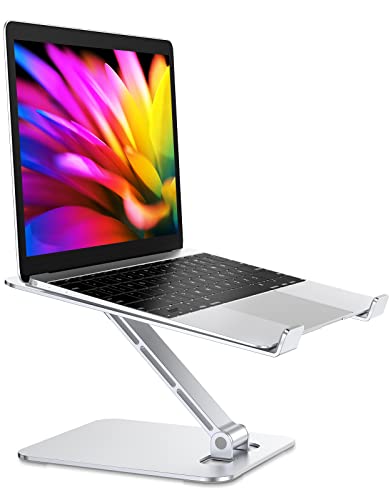
- Adjustable height raises a laptop by up to 7.48 inches and folds for storage.
- Designed for laptops from 10 to 16 inches, with non-slip straps and pads.
- The listing recommends using an external keyboard during intensive typing.
Best For: A laptop-first worker who wants to raise their screen.
16. ProtoArc EM11 NL Wireless Vertical Mouse
For a Different Mouse Grip
ProtoArc EM11 NL Wireless Vertical Mouse

- The vertical shape is designed for small to medium hands; the listing recommends hand lengths under 7.5 inches.
- Pairs with up to three devices through Bluetooth or a USB-A receiver.
- Rechargeable by USB-C; the included cable is for charging only.
Best For: A computer user interested in trying a vertical mouse.
17. SOULION R50 Bluetooth Desktop Speakers
For Desk Audio Without Headphones
SOULION R50 Bluetooth Desktop Speakers

- Connects through Bluetooth or a 3.5 mm audio input, with USB used for power.
- The compact soundbar has a volume knob and four LED lighting modes.
- Designed for computers, laptops, tablets, and smartphones.
Best For: Someone who listens to calls, music, or videos at a desk.
18. Nelko P21 Bluetooth Label Maker
For a More Organized Workspace
Nelko P21 Bluetooth Label Maker
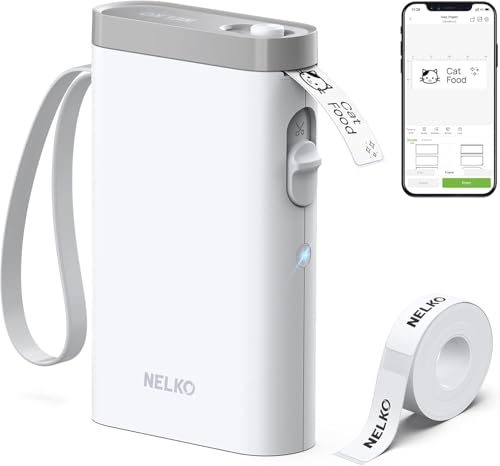
- Pairs with iOS and Android phones through Bluetooth and the Nelko app.
- Prints monochrome labels using direct thermal technology, without ink or toner.
- The listing says it does not work with computers or Google Pixel phones running Android 14.
Best For: Someone who labels files, bins, cables, or office supplies.
19. ASUS ProArt PA279CV 27-Inch 4K USB-C Monitor
For Color-Focused Desk Work
ASUS ProArt PA279CV 27-Inch 4K USB-C Monitor

- The 27-inch monitor has a 3840 × 2160 resolution and a matte screen.
- USB-C supports DisplayPort and 65W Power Delivery; it also has HDMI, DisplayPort, and USB ports.
- The listing describes factory calibration and 100% sRGB and Rec. 709 color gamut; confirm laptop connectivity.
Best For: A home office user who edits images or wants a high-resolution display.
Choosing a Gift for a Home Office Worker
Start with the recipient’s daily routine. Someone who spends hours on video calls may value the EMEET speakerphone or S600 webcam, while a worker who needs fewer distractions may get more use from the JLab headphones. For desk comfort, consider the chair, footrest, or adjustable standing desk. These are larger gifts, so measure the available space and ask about seating or working preferences before choosing.
Think about what the recipient already owns. A second monitor can be useful for someone who works from a laptop, but it matters whether they need a portable screen for travel or a full-size display for a permanent setup. The KOORUI ultrawide and ASUS ProArt have different strengths: the former offers a broad workspace, while the latter is described for color-focused work. A laptop stand, monitor light bar, desk lamp, or cable tray can make a smaller addition to an existing workstation.
Match the Gift to Your Budget
For a modest, useful gift, consider a laptop stand, footrest, label maker, or cable tray. These accessories address specific everyday needs and usually take less planning than replacing a desk or chair. A mechanical keyboard, vertical mouse, desktop speakers, or task light can be a more personal choice when you know what the recipient likes and what their setup supports.
Larger purchases such as a chair, electric standing desk, or monitor can be meaningful Christmas gifts, but confirm size and workspace fit first. Prices and availability change, so check current details when you are ready to buy. A gift card is not needed to make a practical item thoughtful: a simple note explaining why you chose it can connect the gift to the recipient’s routine.
Check Compatibility and Personalization
Before choosing electronics, check the recipient’s devices and ports. The speakerphone offers USB and Bluetooth connections; the portable monitor and webcam use USB connections, while the monitors list USB-C, DisplayPort, or HDMI options. A computer’s available ports, operating system, and support for video over USB-C can affect whether a device works as expected. The label maker relies on a phone app and Bluetooth, and its listing names operating-system limitations, so check those details if you are considering it.
Personalization can mean matching the way someone works. A quiet keyboard may suit a shared home, while a configurable keyboard may appeal to someone who enjoys adjusting switches and lighting. For a person who prefers a tidy desk, a cable tray or label maker helps with organization. If you are unsure about preferences, choose an accessory that complements the existing setup rather than a replacement item that depends on fit or taste.
Timing and Last-Minute Decisions
For a Christmas gift, leave time to confirm dimensions, connections, and the recipient’s schedule. Furniture may require assembly and a clear place to set it up. Monitors and computer accessories may need a compatible cable or port. Check the product listing for current delivery estimates and included components before relying on it for a particular date; delivery timing can change.
If time is short, choose from items that need little setup, such as the footrest, foldable laptop stand, or label maker, while still checking compatibility where relevant. For a larger desk upgrade, a printed card describing the intended gift can make the plan feel complete if the item arrives later. The best home office Christmas gift ideas fit the person’s work habits, equipment, and available space, whether the choice is a major workstation upgrade or a small tool they will use every day.