The best budget computer trackballs make precise cursor control more comfortable without requiring a large desk or premium price. This roundup compares thumb- and finger-controlled designs, wired and wireless connectivity, and features such as multi-device pairing and adjustable DPI.
Whether you want to reduce wrist movement, improve control in a compact workspace, or find an affordable alternative to a traditional mouse, these options cover a range of hand sizes and working styles.
Best 10 Budget Computer Trackballs Picks for 2026
Best Wireless Value

- Wireless Bluetooth or Logi Bolt connectivity
- Compact thumb control for small desks
- Three customizable buttons and Smart Actions
Best For: Small desks and everyday wireless use
Best Ambidextrous Wired Pick

- Ambidextrous design for either hand
- Optical tracking with a dedicated scroll ring
- Detachable wrist rest included
Best For: Shared desks and simple wired setups
Best for Long Battery Life
Logitech Ergo M575 for Business

- Up to 18 months from one battery
- Wireless control for tight workspaces
- Programmable shortcuts and Logi Tune support
Best For: Office work and business deployments
Best Wired Feature Set

- Five adjustable DPI levels
- 34 mm thumb-controlled trackball
- RGB lighting and USB-A/USB-C connectivity
Best For: Right-handed users wanting wired features and DPI control
Reliable Wired Value

- Precise 40mm optical tracking
- Ambidextrous, compact design
- Wired USB operation needs no batteries
Best For: Simple everyday desktop use
Flexible Wireless Choice
SABLUTE Rechargeable Trackball

- Connects to three devices
- Five adjustable DPI settings
- Rechargeable thumb-control design
Best For: Multi-device home and office setups
Ergonomic Wireless Comfort
TECKNET Wireless Trackball Mouse

- 16° angled ergonomic design
- Triple-device Bluetooth and 2.4GHz support
- 500mAh rechargeable battery
Best For: Long work sessions with medium to large hands
Best Wired Pick for Large Hands
Ergonomic 44mm Trackball Mouse

- Large 44mm finger-operated ball
- Five adjustable DPI levels
- Plug-and-play wired USB connection
Best For: Large-handed office, browsing, and design users
Best Multi-Device Value
Wireless 3-Device Trackball Mouse
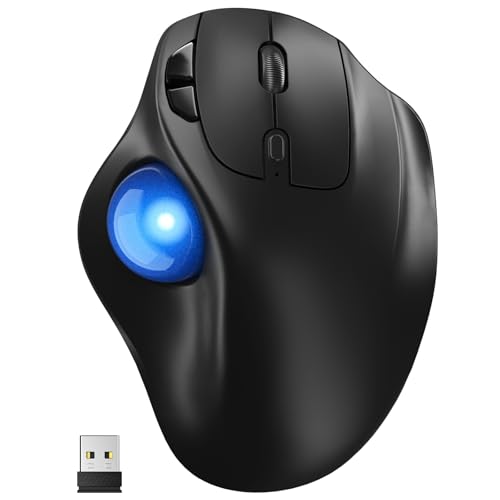
- Connects to three devices
- Quiet thumb-controlled operation
- Five DPI levels from 100 to 1200
Best For: Medium-to-large hands and multi-device setups
Best Silent Ergonomic Option
Nulea 21.7° Wireless Trackball
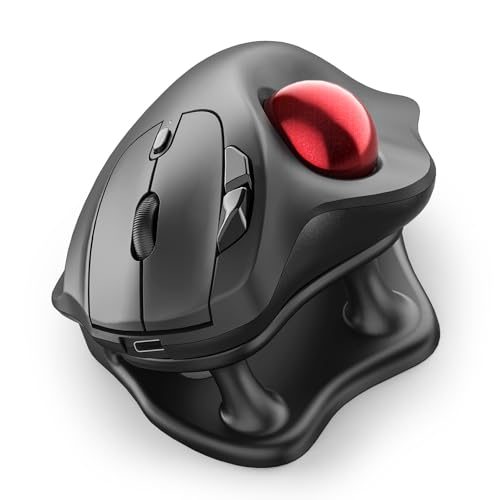
- 21.7° ergonomic tilt stand
- Silent buttons, wheel, and trackball
- Rechargeable three-device wireless design
Best For: Quiet shared spaces and long office sessions
Best Wireless Value – Logitech Ergo M575S
Logitech Ergo M575S Wireless Ergonomic Trackball Mouse, Black/Blue (910-007026)
Check Price On AmazonFor shoppers comparing budget computer trackballs, the Logitech Ergo M575S is a versatile wireless option that combines thumb control, customizable shortcuts, and a compact footprint. It connects through Bluetooth or the included Logi Bolt receiver and uses one included AA battery.
Best For: Small desks, flexible wireless setups, and users seeking an ergonomic everyday trackball.
Pros:
- Thumb-operated cursor control works without moving the mouse across the desk.
- Bluetooth and Logi Bolt connectivity support laptops, tablets, smartphones, and PCs.
- Three customizable buttons and Smart Actions can streamline repetitive tasks.
- Ergonomic shape supports the hand and forearm, with recycled plastic used in the housing.
Cons:
- Uses a right-thumb trackball layout, which may not suit left-handed users.
- Its maximum sensitivity is 2000 DPI, so it may offer less adjustment than some alternatives.
The M575S is a strong budget computer trackball pick when wireless convenience and space savings matter more than extensive button customization.
Best Ambidextrous Wired Pick – Kensington Orbit Scroll Ring
The Kensington Orbit is a practical choice for budget computer trackballs if you prefer a reliable wired connection and simple controls. Its optical tracking, scroll ring, and ambidextrous design make it suitable for shared workstations and users who switch hands.
Best For: Left- or right-handed users who want a straightforward USB trackball with comfortable wrist support.
Pros:
- Ambidextrous design accommodates both right- and left-handed use.
- Dedicated scroll ring makes navigating documents and web pages convenient.
- Detachable wrist rest helps cushion the hand during extended computer use.
- Optical tracking and downloadable software support cursor-speed and button adjustments.
Cons:
- USB wired connectivity limits cable-free flexibility.
- Only two programmable buttons are provided.
- Compatibility details list Mac OS 13 Ventura and Windows 11 as the minimum supported versions.
Choose the Orbit when dependable USB operation, ambidextrous handling, and a built-in scroll ring are more important than wireless freedom or numerous buttons.
Best for Long Battery Life – Logitech Ergo M575 for Business
The Logitech Ergo M575 for Business is a sensible budget computer trackball for workstations that favor wireless convenience and low maintenance. Its sculpted shape, thumb control, programmable shortcuts, and claimed battery life of up to 18 months suit routine office use and tight desks.
Best For: Office users and business deployments needing comfortable wireless control with extended battery life.
Pros:
- Up to 18 months of use from a single included battery.
- Wireless Bluetooth and radio-frequency connectivity support a clean desk setup.
- Ergonomic right-handed design keeps the hand and arm relaxed during extended work.
- Logi Tune and Logi Options+ support cursor adjustment and personalized shortcuts.
Cons:
- Right-handed design is not ambidextrous.
- Its business-focused features may be unnecessary for occasional home users.
- Button customization depends on Logitech software.
This M575 model is particularly appealing for office environments where long battery life, reduced desk movement, and centralized management support are useful.
Best Wired Feature Set – PORLEI RGB Trackball Mouse
For budget computer trackballs with a wired connection and extra controls, the PORLEI model offers thumb operation, adjustable DPI levels, RGB lighting, and forward/back buttons. Its USB-A and USB-C connectivity makes it a flexible fit for Windows and macOS computers.
Best For: Right-handed desktop users who want adjustable tracking, RGB lighting, and a cable-stable connection.
Pros:
- Five DPI settings from 100 to 1200 allow slower or faster cursor movement.
- 34 mm trackball supports control without moving the mouse across the surface.
- USB-A and USB-C wired connectivity works with Windows and macOS computers.
- Includes a scroll wheel, forward/back buttons, and removable trackball for cleaning.
Cons:
- All buttons are non-programmable.
- Forward/back buttons are not compatible with macOS.
- Wired operation limits portability compared with wireless models.
The PORLEI stands out among budget computer trackballs for shoppers who value DPI flexibility and visual extras, provided they are comfortable with a right-handed wired design.
Reliable Wired Value – Kensington Orbit Trackball
The Kensington Orbit is a practical pick for shoppers comparing budget computer trackballs and looking for dependable wired operation. Its 40mm optical ball, ambidextrous shape, and compact footprint suit everyday desktop work without requiring batteries.
Best For: Home and office users who want a simple, compact, ambidextrous wired trackball.
Pros:
- Optical tracking provides precise cursor control.
- Ambidextrous design works for left- and right-handed users.
- Wired USB setup needs no batteries and saves desk space.
- Kensington Konnect software supports button assignments and cursor-speed adjustments.
Cons:
- It has only two buttons.
- There is no scroll ring.
- It does not offer wireless connectivity.
This model keeps the feature set straightforward, making it a sensible budget computer trackball for users who prioritize reliable USB connectivity and easy placement over extra controls.
Flexible Wireless Choice – SABLUTE Rechargeable Trackball
For shoppers seeking budget computer trackballs with wireless flexibility, this SABLUTE model connects through Bluetooth or 2.4GHz wireless and can switch among three devices. Its thumb-controlled design, adjustable DPI, and rechargeable battery target comfortable everyday multitasking.
Best For: Right-handed users who move between up to three computers or tablets and want rechargeable wireless convenience.
Pros:
- Supports Bluetooth and 2.4GHz connections for up to three devices.
- Five DPI settings allow users to adjust cursor sensitivity.
- Rechargeable battery avoids disposable batteries.
- Forward and back buttons help with browsing and document navigation.
Cons:
- The right-handed design is not ambidextrous.
- New users may need one to two weeks to adapt to trackball control.
- Its thumb-operated layout may not suit users who prefer finger-operated trackballs.
With seven buttons and three-device connectivity, the SABLUTE offers more flexibility than a basic wired model while remaining focused on office, home-office, and remote-work tasks.
Ergonomic Wireless Comfort – TECKNET Wireless Trackball Mouse
The TECKNET trackball is a strong contender among budget computer trackballs for users who want a rechargeable wireless model with an angled ergonomic shape. It combines Bluetooth and 2.4GHz connectivity, adjustable DPI, and a thumb-controlled ball for precise movement in limited spaces.
Best For: Medium- to large-handed right-handed users seeking an angled trackball for extended computer work.
Pros:
- 16° vertical angle is designed to encourage a more natural forearm position.
- Connects with up to three devices through two Bluetooth channels and 2.4GHz wireless.
- 500mAh rechargeable battery supports quick charging, with 15 minutes claimed to power a full day.
- Five DPI settings and silent operation support controlled everyday navigation.
Cons:
- Its right-handed shape is designed for medium to large hands.
- Maximum sensitivity is 1200 DPI.
- Users may need one to two weeks to become familiar with the design.
The TECKNET stands out for its ergonomic angle and multi-device wireless setup. It is a practical option when comfort, rechargeable power, and confined-space control matter more than a compact size.
Best Wired Pick for Large Hands – Ergonomic 44mm Trackball Mouse
If you want a budget computer trackball with a roomy shape and dependable wired connection, this PORLEI model is designed for larger right hands. Its 44mm finger-operated ball, five DPI levels, and USB plug-and-play setup suit office work, browsing, and design tasks.
Best For: Large-handed users who want precise, low-movement control without batteries or wireless pairing.
Pros:
- Hand-conforming design aims to reduce wrist and muscle strain.
- Large 44mm trackball works across virtually any surface.
- Five adjustable DPI levels support slower precision or faster cursor movement.
- USB-A/USB-C wired setup requires no drivers and includes an 18-month limited warranty.
Cons:
- Wired design limits portability and desk flexibility.
- Not recommended for gaming based on its tracking profile and response characteristics.
- Forward/back buttons are not supported on Mac systems.
This is a practical choice when comfort, a large control ball, and consistent wired performance matter more than wireless convenience or gaming responsiveness.
Best Multi-Device Value – Wireless 3-Device Trackball Mouse
Among budget computer trackballs, this Yadkbo model stands out for flexible wireless connectivity and quiet operation. It can connect to two Bluetooth devices plus a 2.4G receiver, while thumb control and five DPI settings make it useful for shared workspaces and changing tasks.
Best For: Users who switch between computers or tablets and want a quiet, battery-powered trackball for a compact workspace.
Pros:
- Connects with BT1, BT2, or the included 2.4G receiver across up to three devices.
- Thumb-operated control helps reduce wrist and arm movement.
- Five DPI levels range from 100 to 1200 for adjustable cursor speed.
- Designed for medium-to-large hands and works on varied surfaces.
Cons:
- Requires two AAA batteries, which are not included.
- The larger 30-degree-tilt design may take one to two weeks to adjust to.
- Maximum sensitivity is 1200 DPI, lower than some alternatives.
Choose this model if multi-device switching and quiet use are priorities. The replaceable batteries avoid built-in battery replacement concerns, but add an ongoing supply requirement.
Best Silent Ergonomic Option – Nulea 21.7° Wireless Trackball
This Nulea model is a strong budget computer trackball option for quiet offices, shared rooms, and late-night work. Its 21.7-degree tilt stand, thumb-operated ball, rechargeable power, and Bluetooth or USB connectivity focus on comfort and convenient everyday control.
Best For: Right-handed users who want a silent, rechargeable trackball with multi-device switching and an elevated wrist position.
Pros:
- 21.7-degree tilt stand supports a more natural wrist position.
- Trackball, buttons, and scroll wheel are designed for noise-free operation.
- Pairs with up to three devices through Bluetooth or the included USB receiver.
- Four DPI levels reach 1600 DPI for precision work or faster navigation.
Cons:
- All six buttons are not programmable.
- Designed for right-handed use only.
- Listed minimum requirements include macOS 14 Sonoma and Windows 11.
The Nulea is a comfort-first pick for focused office work. Its silent controls and rechargeable design are appealing, while the fixed button functions may matter to users who rely on extensive customization.
How We Picked the Best Budget Computer Trackballs
We focused on practical value rather than headline features alone. Each pick was evaluated for its control layout, tracking approach, connection options, comfort features, portability, and likely suitability for everyday computing. The list includes established models from Logitech and Kensington alongside lower-cost wired and wireless alternatives.
Because comfort is highly personal, we considered both thumb-ball and finger-ball designs, different ball sizes, angled bodies, scroll-ring layouts, and options intended for larger hands. We also looked for useful details such as rechargeable batteries, multi-device support, DPI adjustment, and wired reliability.
Quick Comparison
- Best-known ergonomic options: Logitech Ergo M575S and M575 for Business.
- Best for a scroll ring: Kensington Orbit Trackball Mouse with Scroll Ring.
- Best for simple wired use: The wired ergonomic models, which avoid batteries and wireless pairing.
- Best for multiple devices: Trackballs offering Bluetooth or connections for up to three devices.
- Best for larger hands: The 44mm index-finger model and roomier ergonomic designs.
Key Buying Factors for Budget Computer Trackballs
Ball Placement and Hand Position
Thumb-controlled trackballs feel familiar to most mouse users and keep the hand relatively stable, but they may not suit everyone with thumb strain. Finger-controlled models can offer broader, more deliberate movement and may be preferable for precision work. Check the stated ball size and control position before buying.
Wired Versus Wireless Connectivity
Wired models are usually the simplest and most dependable choice for a fixed desk. Wireless trackballs provide a cleaner setup and easier portability, while Bluetooth and multi-device support can be valuable if you switch between a computer, tablet, and laptop. Rechargeable models reduce disposable-battery costs, but require occasional charging.
Shape, Tilt, and Hand Size
Look for a body that supports your palm without forcing your wrist into an awkward angle. A tilt stand may improve comfort, while larger designs can better support broad hands. If possible, compare the product dimensions with a mouse you already find comfortable.
Tracking and Control Features
Adjustable DPI is useful when you move between detailed tasks and large displays. A scroll ring can be convenient for documents and webpages, while extra buttons may help with browser navigation or productivity shortcuts. RGB lighting is mostly cosmetic and should not outweigh comfort or tracking quality.
Who Should Buy Which Budget Computer Trackballs?
Choose a Logitech M575-series model if you want a familiar thumb-controlled design from a widely recognized brand. Pick a Kensington Orbit if scrolling convenience or a finger-operated layout matters most. A wired model is a sensible budget choice for a permanent workstation, especially when you want to avoid charging or pairing issues.
For laptop users and people who move between devices, prioritize wireless models with Bluetooth or three-device connectivity. If you have large hands, focus on the roomier designs and larger finger-control ball. Ultimately, the best budget computer trackball is the one whose control layout, size, and connection method match your daily workflow.