When it comes to finding the right disc duplicator for your PC in 2025, you want reliable options that cater to your specific copying needs. With various models available, from portable drives to powerful duplicator towers, there’s a lot to ponder. Understanding the features that matter most can make all the difference in your workflow. Let’s explore the top choices that promise both quality and convenience for your projects.
Disk Duplicator External DVD Drive USB 3.0 Type C Portable CD/DVD +/-RW Optical Drive

If you’re looking for a reliable and portable solution to duplicate discs, the Disk Duplicator External DVD Drive is a top contender for 2025. Weighing just 11.7 ounces and measuring 5.79 x 5.71 x 0.71 inches, it’s easy to carry around. Compatible with various systems, including Windows, Linux, and Mac, it functions as a burner, reader, and writer. With a solid 4.1-star rating from over 450 users, it’s well-regarded for quality playback and fast loading. However, be mindful of potential compatibility issues with MacBooks and the need for a perfectly flat surface for recognition.
Best For: Users seeking a portable and versatile external DVD drive for various operating systems, particularly those who need reliable disc duplication.
Pros:
- Excellent quality playback and fast loading times.
- Compatible with multiple systems including Windows, Linux, and Mac.
- Lightweight and portable design for easy transport.
Cons:
- Compatibility issues reported with MacBooks, particularly during CD burning.
- Device recognition problems unless placed on a perfectly flat surface.
- User manual criticized for size and grammatical errors.
24X CD DVD Duplicator Copier Tower

The X CD DVD Duplicator Copier Tower stands out as an ideal choice for those who need a reliable, standalone solution for duplicating CDs and DVDs without the hassle of a PC. It supports 24X write speeds for DVDs and 52X for CDs, ensuring quick and efficient duplication. With features like free copy protection for DVD Video copies and support for the M-Disc format, you can create durable backups. Built with top-grade components and certified power supplies, it guarantees quality and reliability. Plus, you’ll benefit from lifetime tech support and a 1-year warranty for peace of mind.
Best For: Those seeking a standalone, efficient solution for duplicating CDs and DVDs without needing a computer.
Pros:
- High-speed duplication with write speeds of up to 24X for DVDs and 52X for CDs.
- Durable media support with M-Disc compatibility, providing 1000-year archival capabilities.
- Lifetime tech support and a 1-year warranty for added peace of mind.
Cons:
- Limited to standalone operation, which may not suit users who prefer PC integration.
- Copy protection features may restrict the ability to duplicate encrypted discs.
- Initial cost may be higher compared to basic CD/DVD duplicators.
24X SATA CD DVD Duplicator Writer Copier Tower

Designed for those who need efficient and high-quality duplication, the 24X SATA CD/DVD Duplicator Writer Copier Tower stands out with its ability to operate independently from a PC. It supports M-Disc, ensuring your data lasts for up to 1,000 years. With a maximum write speed of 24x for DVDs and 52x for CD-Rs, you’ll enjoy quick and reliable results. This duplicator includes a free DVD video copy protection feature, allowing you to create protected copies easily. Just keep in mind, it can’t copy encrypted discs with copy protection. Overall, it’s a solid choice for your duplication needs.
Best For: Individuals or businesses looking for a reliable and efficient standalone solution for high-quality CD/DVD duplication.
Pros:
- Complete standalone operation allows for easy use without needing a PC.
- Supports M-Disc for long-lasting data storage of up to 1,000 years.
- Fast writing speeds of up to 24x for DVDs and 52x for CD-Rs ensure quick duplication.
Cons:
- Cannot copy encrypted discs with existing copy protection, limiting some duplication capabilities.
- Limited to specified media types, which may restrict flexibility in media choices.
- No PC integration, which may be a drawback for users who prefer software control and advanced features.
Copystars DVD Duplicator Sata CD-DVD Burner
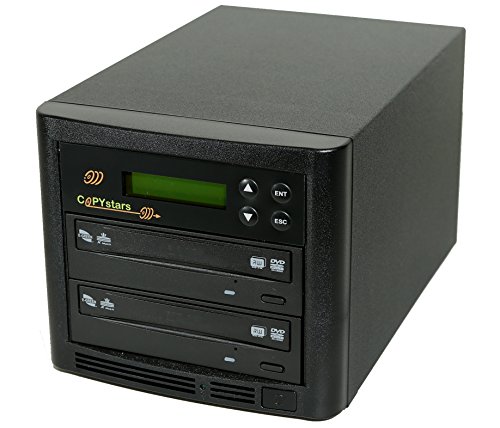
Looking for a reliable and efficient disc duplicator? The Copystars DVD Duplicator SATA CD-DVD Burner is an excellent choice. This stand-alone device doesn’t require a PC or extra software, making it user-friendly. With heavy-duty SATA drives, it supports various disc formats and boasts impressive writing speeds—24X for DVDs and 52X for CDs. You can duplicate a full DVD in about 6 minutes! Advanced features, like multi-language support and dual-level security, enhance its functionality. Plus, with a 3-year labor warranty and unlimited support, you’ll feel confident in your investment. It’s perfect for quick, high-quality copies of your important media.
Best For: Individuals and small businesses looking for a reliable and efficient solution for duplicating DVDs and CDs without the need for a computer.
Pros:
- Easy to use stand-alone device with no need for a PC or software.
- High-speed duplication, with the ability to copy DVDs in about 6 minutes.
- Includes advanced features like multi-language support and dual-level security.
Cons:
- Limited to the specific disc formats it supports, which may not cover all user needs.
- Initial investment may be higher compared to basic computer-based solutions.
- Some users may require a learning curve to fully utilize advanced features.
24X 1 to 3 CD DVD Duplicator Copier Tower

If you need a reliable and efficient solution for duplicating discs, the PlexCopier 24X 1 to 3 CD DVD Duplicator Copier Tower stands out as an excellent choice. This standalone duplicator lets you copy one to three discs simultaneously without needing a PC. With a max write speed of 24x for DVDs and 52x for CDs, you’ll appreciate its speed. It supports the M-Disc format for long-lasting archival storage and features a user-friendly control panel, making it suitable for everyone. Plus, it’s lightweight and compact, perfect for any workspace. Enjoy positive feedback and a solid warranty for peace of mind.
Best For: Individuals and small businesses seeking a reliable and user-friendly solution for duplicating CDs and DVDs quickly and efficiently.
Pros:
- Supports M-Disc format for long-term archival recording, ensuring data longevity.
- No PC required, allowing for easy standalone operation and greater portability.
- Positive user feedback highlights its speed and reliability, making it a trusted choice for duplication needs.
Cons:
- Cannot copy encrypted discs, which may limit its usability for certain types of media.
- Limited to duplicating a maximum of three discs at a time, which may not meet the needs of high-volume users.
- Weight of 14 pounds might be cumbersome for some users who prefer lighter equipment.
AutoDupe 24X CD DVD Burner Writer Drive Duplicator Tower

The AutoDupe 24X CD DVD Burner Writer Drive Duplicator Tower stands out for its impressive standalone operation, making it an ideal choice for users who need a reliable and efficient disc duplication solution without the hassle of a PC. With its auto-duplication feature, it starts copying as soon as it detects the master and blank discs. You can enjoy maximum write speeds of 24x for DVDs and 52x for CDs. Plus, it supports M-Disc media for long-lasting archival storage. The simplified operation means you won’t waste time programming buttons, making your duplication process quick and effortless.
Best For: Users looking for a standalone and efficient solution for disc duplication without the need for a PC.
Pros:
- Complete standalone operation allows for easy use without a computer.
- Auto-duplication feature simplifies the duplication process by starting automatically.
- High write speeds of up to 24x for DVDs and 52x for CDs enhance efficiency.
Cons:
- Limited to non-encrypted discs, as it cannot copy discs with copy protection.
- No advanced programming options may limit customization for experienced users.
- Requires physical media for duplication, which may not suit those who prefer digital formats.
StarTech.com Standalone Hard Drive Duplicator and Cloning Station (SDOCK2U33RE)

For professionals and tech enthusiasts needing a reliable solution for duplicating hard drives, the StarTech.com Standalone Hard Drive Duplicator and Cloning Station (SDOCK2U33RE) stands out with its impressive sector-by-sector cloning capabilities. It supports both 2.5 and 3.5 SATA HDDs and SSDs, making it versatile for any project. With speeds up to 22 GB/min, you’ll enjoy efficient duplication. The toolless design guarantees easy operation, and its dual functionality as a docking station enhances usability. Users appreciate the 24/5 technical support, although some noted clarity issues in instructions. Overall, it’s a solid choice for serious duplication needs.
Best For: Professionals and tech enthusiasts seeking a reliable and efficient solution for duplicating hard drives and SSDs.
Pros:
- Toolless design allows for easy operation and quick drive swaps.
- Impressive duplication speed of up to 22 GB/min for efficient workflows.
- Dual functionality as both a docking station and a standalone duplicator.
Cons:
- Some users reported clarity issues in the instructional materials.
- Mixed reviews on cloning success, especially with bootable drives and EFI partitions.
- Drives may get warm during use, requiring additional cooling measures.
Acumen Disc 1 to 5 DVD CD Duplicator

Looking for a reliable solution to duplicate your audio and video discs quickly? The Acumen Disc 1 to 5 DVD CD Duplicator is your answer. This standalone device features 24x writers that allow for fast, disc-to-disc duplication without needing a PC or complicated software. With its one-touch Smart Key and intuitive LCD display, you’ll find it easy to operate. You can copy a DVD in about five minutes, making it perfect for users needing multiple copies. Just be aware it can’t duplicate copyrighted material, and some users have noted noise during operation. Overall, it’s a solid choice for efficient duplication.
Best For: Users who need to quickly duplicate audio and video discs without the hassle of a PC or complex software.
Pros:
- High-speed 24x duplication capabilities for efficient copying.
- User-friendly operation with one-touch Smart Key and intuitive LCD display.
- Standalone design eliminates the need for software or a computer.
Cons:
- Cannot duplicate encrypted or copyright-protected discs.
- Some users report noise during operation.
- Limited manual provided; users may need to access a PDF for detailed instructions.
Produplicator 1 to 5 24X Burner CD DVD Duplicator

If you’re in need of a reliable solution for duplicating CDs and DVDs without the hassle of a computer, the Produplicator 1 to 5 24X Burner CD DVD Duplicator stands out as an ideal choice. This standalone copier requires no software, making duplication effortless. It automatically recognizes the format of your master disc, so you don’t have to worry about compatibility. You can even create custom mix CDs by compiling tracks from multiple sources. It supports various formats, from standard DVDs to mini CDs. With a one-year parts warranty and lifetime technical support, you’re covered for any issues that may arise.
Best For: Individuals or businesses looking for a hassle-free solution to duplicate CDs and DVDs without needing a computer.
Pros:
- Complete standalone operation eliminates the need for additional software or computers.
- Automatic master disc recognition ensures compatibility with various formats.
- Lifetime technical support provides peace of mind for users facing any issues.
Cons:
- Limited to 5 copies at a time, which may not be efficient for large duplication needs.
- No advanced editing features beyond creating mix CDs, which might limit some users.
- No support for Blu-ray formats, potentially limiting its use for some media types.
Vinpower Digital 1 to 1 DVD CD Disc Duplicator Tower

The Vinpower Digital 1 to 1 DVD CD Disc Duplicator Tower stands out as an excellent choice for those who need a reliable and efficient standalone duplicator. With a compact design measuring just 11 x 7 x 8 inches and weighing 14 pounds, it’s easy to fit into your workspace. This duplicator allows you to create copies at impressive speeds of up to 24x for DVDs and 52x for CDs. Users appreciate its ease of use and high-quality copies for home videos or mixed CDs. Plus, it supports M-Disc for long-term storage, making it a great asset for your copying needs.
Best For: The Vinpower Digital 1 to 1 DVD CD Disc Duplicator Tower is best for individuals and small businesses looking for a reliable and efficient way to create high-quality copies of CDs and DVDs without the need for a PC.
Pros:
- High copy speeds of up to 24x for DVDs and 52x for CDs, ensuring quick duplication.
- Compact design makes it easy to integrate into various workspaces without taking up much room.
- Supports M-Disc for long-term archival storage, enhancing the durability of your backups.
Cons:
- Some users report that the duplicator can be noisy during operation.
- Lacks a power selector switch, which may require the use of a power converter for certain setups.
- May not copy encrypted discs, limiting its use for certain types of media.
Factors to Consider When Choosing Disc Duplicators for PC
When choosing a disc duplicator for your PC, you’ll want to evaluate several key factors. Think about compatibility with your operating system, the speed and efficiency of duplication, and the formats it supports. Additionally, weigh the benefits of standalone units versus those that require a PC, and don’t forget to check the warranty and technical support options available.
Compatibility With Operating Systems
Choosing a disc duplicator that’s compatible with your operating system is essential to avoid functionality issues. Whether you’re using Windows, Linux, or macOS, ensuring compatibility can save you from headaches down the line. Some duplicators may struggle with specific systems, like MacBook users encountering errors when burning CDs. Verify that the duplicator supports your required file formats and burning capabilities for peak performance. Also, check for the availability of drivers or software updates necessary for seamless integration with your OS. User feedback can offer valuable insights into real-world experiences, particularly regarding device recognition and operation across different systems. Taking these factors into account will help you select a reliable disc duplicator tailored to your needs.
Duplication Speed and Efficiency
Selecting a disc duplicator goes beyond just compatibility with your operating system; duplication speed and efficiency are key factors that can make a significant difference in your workflow. Many duplicators offer impressive maximum write speeds, reaching up to 24x for DVDs and 52x for CDs, which can drastically reduce your copying time. For instance, duplicating a 700MB CD can take as little as 3 minutes, while a 4.7GB DVD may only take about 6 minutes. Standalone duplicators enhance productivity by allowing automatic and simultaneous duplication of multiple discs. Features like automatic master disc recognition and the ability to compile mix CDs can further streamline your process. Investing in high-quality duplication towers guarantees consistent performance during these high-speed operations.
Supported Disc Formats
Understanding the supported disc formats is essential for maximizing the functionality of your disc duplicator. When selecting a duplicator, make sure it supports a variety of formats like DVD-R, DVD-RW, DVD+R, DVD+RW, CD-R, and CD-RW for maximum versatility. Consider models that support Dual Layer formats, allowing for higher capacity discs such as 8.5GB DVD-R DL and DVD+R DL. Compatibility with M-Disc technology is vital for archival-grade media with a lifespan of up to 1000 years. Additionally, check if the duplicator handles special formats like Mini DVDs and CD-TEXT for specific applications. Finally, be aware that not all duplicators can copy encrypted discs, so verify any copy protection features if you need to duplicate protected content.
Standalone vs. PC Dependency
When it comes to disc duplicators, you’ll find that deciding between standalone and PC-dependent models can greatly influence your workflow. Standalone duplicators operate independently, giving you the flexibility to use them in various environments without needing a computer. They often feature user-friendly controls, so you can initiate duplication with just a button press. On the other hand, PC-dependent duplicators require a software connection, which can complicate the process and limit portability. Additionally, standalone models can be optimized for specific media types, enhancing duplication speed without being constrained by computer performance. Ultimately, your choice will impact the efficiency and convenience of your duplication tasks, especially in professional settings where time and reliability matter.
Warranty and Technical Support
While evaluating disc duplicators, warranty and technical support can greatly affect your long-term satisfaction with your purchase. Look for models that offer at least a 1-year warranty on parts and labor, giving you peace of mind if repairs or replacements are needed. Lifetime technical support is another valuable feature, ensuring you have help throughout the product’s lifespan for troubleshooting and guidance. Extensive support options, like toll-free customer service, enhance your experience and satisfaction. A clear return policy, typically allowing full refunds within 30 days for defective units, helps mitigate risks. Finally, check the manufacturer’s reputation for customer service responsiveness; positive feedback can indicate a more reliable, user-friendly experience, making your decision easier.