If you’re looking to enhance your sound production in 2025, choosing the right studio monitors is essential. With so many options available, it can be overwhelming to find the perfect fit for your needs. From casual listening to professional audio work, the right monitors can make all the difference. Let’s explore the top contenders that could elevate your audio experience and help you make an informed decision.
Mackie CR3.5BT Powered Studio Monitors with Bluetooth

If you’re looking for versatile studio monitors that excel in both music production and casual listening, the Mackie CR3.5BT Powered Studio Monitors with Bluetooth are an excellent choice. These monitors feature 3.5″ speakers and Bluetooth connectivity, making them perfect for gaming and HiFi experiences. You can easily connect them using TRS or RCA connectors, and they’re compatible with PCs and gaming consoles. Adjust the sound with the built-in tone knob to enhance bass and treble for any occasion. Plus, the location switch optimizes sound quality whether you’re using them on your desk or as bookshelf speakers.
Best For: The Mackie CR3.5BT Powered Studio Monitors are best for musicians, gamers, and casual listeners looking for high-quality sound and versatile connectivity options.
Pros:
- Bluetooth connectivity allows for wireless streaming from smartphones and other devices.
- Built-in tone knob provides customizable sound shaping for enhanced bass and treble.
- Placement modes optimize sound quality whether used as desktop or bookshelf speakers.
Cons:
- Limited size of the 3.5″ woofer may not produce deep bass without an additional subwoofer.
- May require additional cables for certain connections, as not all are included.
- Bluetooth connectivity can sometimes introduce latency, which may affect gaming audio.
PreSonus Eris 4.5BT Bluetooth Studio Monitors (Pair)

The PreSonus Eris 4.5BT Bluetooth Studio Monitors are an excellent choice for aspiring musicians, gamers, and multimedia enthusiasts who demand studio-quality sound without the hassle of complicated setups. With 50W Class A/B power, they provide loud, clear audio thanks to 4.5-inch woven-composite drivers and 1-inch silk-dome tweeters. You’ll enjoy rich bass and articulate highs, perfect for any environment. Bluetooth 5.0 connectivity makes streaming easy, while multiple input options guarantee versatility. Plus, High and Low Acoustic Tuning controls let you customize the sound to fit your space. Weighing just 12.6 pounds, these monitors combine elegance with performance.
Best For: Aspiring musicians, gamers, and multimedia enthusiasts seeking studio-quality sound in a user-friendly package.
Pros:
- Powerful audio performance with 50W Class A/B power and 4.5-inch woven-composite drivers for clear and loud sound.
- Versatile connectivity options including Bluetooth 5.0, ¼-inch TRS, unbalanced RCA, and a front-panel ⅛-inch aux input.
- Customizable sound with High and Low Acoustic Tuning controls to optimize performance for different environments.
Cons:
- Limited bass response compared to larger studio monitors without a companion subwoofer.
- Weighty design at 12.6 pounds may not be ideal for portable setups.
- Bluetooth range is only effective up to 100 meters, which may limit placement options in larger spaces.
M-AUDIO BX4 Studio Monitors

For those looking to elevate their audio experience at home or in a small studio, the M-AUDIO BX4 Studio Monitors are an exceptional choice. With a compact design and 120 watts of power, these monitors deliver rich sound and precise imaging. The 4.5” Kevlar low-frequency drivers and 1” silk dome tweeters guarantee extended bass response. You’ll appreciate the versatile connectivity options, including 1/4”, 1/8”, and RCA inputs, plus easy access to the headphone jack. Whether you’re gaming, podcasting, or producing music, the BX4s offer customizable sound with EQ options, making them a must-have for any audio enthusiast.
Best For: The M-AUDIO BX4 Studio Monitors are best for audio enthusiasts looking for high-quality sound in gaming, podcasting, streaming, and music production.
Pros:
- Compact design makes them easy to fit in small spaces without sacrificing sound quality.
- Versatile connectivity options allow for compatibility with various devices, including smartphones and audio interfaces.
- Customizable sound with high and low EQ options for tailored audio experience.
Cons:
- The passive speaker requires connection to an active speaker, which might not be ideal for those seeking standalone units.
- Some users may find the bass response not sufficient for larger rooms or professional studio settings.
- Limited warranty may not provide enough coverage for long-term use.
PreSonus Eris Sub 8BT Powered Subwoofer

Looking to elevate your audio experience? The PreSonus Eris Sub 8BT powered subwoofer is your ideal companion. This compact, front-firing subwoofer features an 8-inch woven-composite woofer that delivers tight bass down to 30 Hz. With 100 watts of power, it guarantees studio-quality sound for music production and gaming. Its Bluetooth 5.0 connectivity allows seamless wireless integration, while flexible wired options enhance compatibility with your favorite monitors. Plus, the customizable highpass and lowpass filters help you achieve precise sound tailored to your space. With a 4.6-star rating, it’s a favorite for those seeking deep bass and accurate audio reproduction.
Best For: The PreSonus Eris Sub 8BT is best for music producers, gamers, and home audio enthusiasts seeking an affordable subwoofer that delivers deep bass and accurate sound reproduction.
Pros:
- High-quality sound with tight bass response down to 30 Hz.
- Bluetooth 5.0 connectivity for easy wireless integration with devices.
- Customizable audio settings for tailored sound experience.
Cons:
- Physical controls and power switch can be cumbersome, requiring two hands to operate.
- Some users may find the compact design limits low-end sound projection in larger spaces.
- Limited aesthetic options may not suit all home decor styles.
PreSonus Eris 5BT Bluetooth Studio Monitors (Pair)

If you’re seeking studio monitors that combine professional sound quality with modern connectivity, the PreSonus Eris 5BT Bluetooth Studio Monitors are an excellent choice. These compact 5.25″ powered speakers deliver studio-quality sound, making them perfect for music production and multimedia. With 100 Watts of Class AB amplification, you’ll enjoy distortion-free volume. Their Bluetooth 5.0 capability guarantees seamless integration with your devices, while flexible input options accommodate various setups. Plus, with customizable high- and low-frequency tuning controls, you can tailor the audio to your environment. Weighing just 16.06 lbs, they’re ideal for desktops or small spaces.
Best For: Audio professionals, music producers, and multimedia enthusiasts looking for compact studio monitors with high-quality sound and modern connectivity options.
Pros:
- Studio-quality sound: Delivers accurate audio reproduction for precise mixing and production.
- Bluetooth 5.0 connectivity: Easily connects to a variety of devices for wireless audio streaming.
- Customizable audio settings: High- and low-frequency tuning controls allow for personalized sound adjustments.
Cons:
- Limited bass response: May not satisfy those seeking deep bass for genres like EDM or hip-hop.
- Compact size: While great for small spaces, larger studios may require bigger monitors for optimal performance.
- Weight: At 16.06 lbs, they may be less portable for users needing to transport them frequently.
PreSonus Eris Studio 5 Active Studio Monitors

The PreSonus Eris Studio 5 Active Studio Monitors are an ideal choice for music producers and audio engineers seeking accurate sound reproduction in a compact design. With a 5.25-inch woven-composite low-frequency driver and a 1-inch silk-dome tweeter, these monitors deliver a frequency response of 48 Hz to 20 kHz, guaranteeing powerful bass and crystal-clear highs. The Class AB biamplification provides 80W of total power, reaching up to 102 dB SPL. You’ll appreciate the versatile connectivity options and acoustic tuning controls, allowing for room compensation. Plus, built-in protection features guarantee reliable performance, making them a smart addition to your studio setup.
Best For: Music producers and audio engineers seeking accurate sound reproduction in a compact design.
Pros:
- High-frequency reproduction with a 1-inch silk-dome tweeter for crystal-clear sound.
- Versatile connectivity options including balanced XLR and unbalanced RCA.
- Built-in protection features ensure reliable performance and longevity.
Cons:
- May require acoustic treatment in smaller rooms for optimal performance.
- Limited bass extension compared to larger studio monitors.
- Some users may find the tuning controls complex to adjust.
KRK GoAux 3 3″ Portable Monitors, 3 inches (GOAUX3-NA)

For those seeking high-quality audio on the go, the KRK GoAux 3 Portable Monitors (GOAUX3-NA) stand out with their impressive Bluetooth capability and automatic room correction features. These compact 3-inch monitors deliver powerful sound from their bi-amplified design, boasting a surprising bass response thanks to rear-ported cabinets. Weighing just over 10 pounds, they’re travel-ready, complete with a soft case and adjustable stands for ideal positioning. With a 95 dB signal-to-noise ratio and multiple connectivity options, including headphone output, these monitors guarantee you can achieve pro-level sound anywhere you choose. Your audio experience is about to be elevated!
Best For: Audio professionals and enthusiasts looking for portable, high-quality sound solutions for their devices.
Pros:
- Bluetooth capability allows for easy wireless connectivity with smartphones, tablets, and laptops.
- Compact and lightweight design makes them ideal for travel, with a soft carrying case included.
- Built-in EQ adjustments for low and high frequencies provide customization for different room acoustics and personal preferences.
Cons:
- Limited to a 3-inch woofer, which may not satisfy bass-heavy music preferences for all users.
- Rear-ported cabinets might not be suitable for all room setups, potentially affecting sound quality in certain environments.
- The reliance on a single AC outlet for power may limit placement options in certain situations.
Behringer Truth 4.5″ Studio Monitors

Behringer Truth 4.5″ Studio Monitors are an excellent choice for home studio enthusiasts and gamers seeking high-quality sound without breaking the bank. With advanced waveguide technology, you’ll enjoy ultimate acoustic dispersion and a large sweet spot. The ultra-high-resolution 1″ silk dome tweeters deliver superior sound reproduction, while the 4.5″ woofers provide deep bass with deformation-resistant glass fiber cones. They’re compatible with your laptop or desktop and feature handy controls, including a front panel volume and headphone connector. Weighing just 13.8 pounds, these monitors are compact, making them perfect for any workspace. Enjoy your audio experience like never before!
Best For: Home studio enthusiasts and gamers seeking high-quality sound without breaking the bank.
Pros:
- Excellent sound reproduction with ultra-high-resolution tweeters and advanced waveguide technology.
- Compact design makes them suitable for small workspaces.
- Versatile connectivity options, including stereo analog inputs and headphone connector.
Cons:
- Limited bass response due to the smaller 4.5″ woofers compared to larger studio monitors.
- Touch control method may not be as intuitive as traditional knobs for some users.
- Relatively low customer ratings compared to other premium studio monitor brands.
Mackie CR-X Series 3.5-Inch Multimedia Monitors (CR3-X)
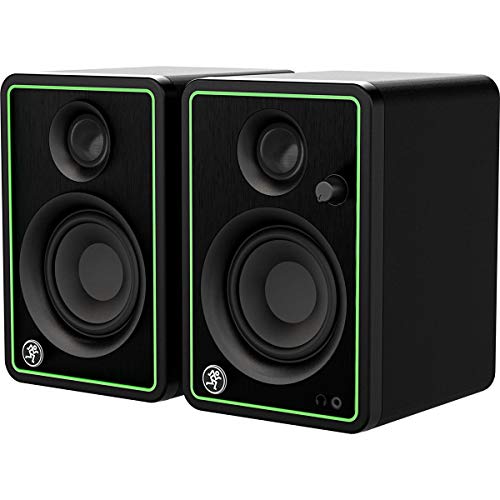
If you’re looking for professional studio-quality sound in a compact design, the Mackie CR-X Series 3.5-Inch Multimedia Monitors (CR3-X) are an excellent choice. These monitors deliver 50 watts of clean, articulate stereo sound, perfect for music production or casual listening. The sleek design features a brushed-metal panel, adding a modern touch to your workspace. With flexible inputs like balanced 1/4”, 1/8”, and RCA, setup is a breeze, thanks to the included high-quality hookup cables. Plus, the front-facing headphone jack auto-defeats speaker output for added convenience. Enjoy impressive sound quality in a compact package with the CR3-X.
Best For: The Mackie CR-X Series 3.5-Inch Multimedia Monitors (CR3-X) are best for musicians, content creators, and anyone seeking high-quality audio in a compact format.
Pros:
- High-quality sound with 50 watts of clean stereo output.
- Versatile input options including balanced 1/4”, 1/8”, and RCA connections.
- Convenient front-facing headphone jack that auto-defeats speaker output.
Cons:
- Limited to a tabletop mounting type, which may not suit all setups.
- Weighs 9.19 pounds, potentially making them less portable.
- The woofer size of 5 inches may not provide deep bass for some users.
PreSonus Eris Accent Powered Bookshelf Speakers
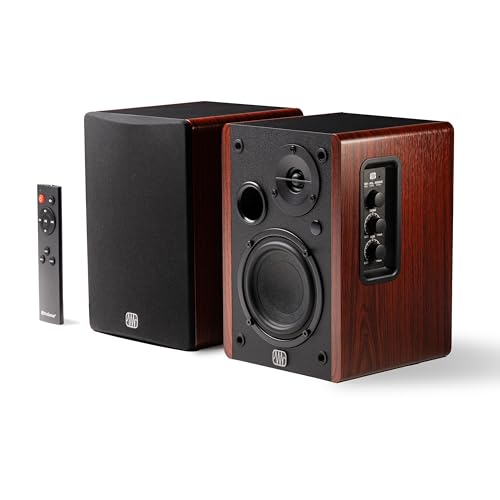
The PreSonus Eris Accent Powered Bookshelf Speakers are an excellent choice for those seeking a compact yet powerful audio solution for their home setup. With a 50W output, these speakers deliver balanced audio, clear highs, rich mids, and punchy bass, making them ideal for any music genre. Their 4” woofer and ½” silk dome tweeter guarantee impressive sound quality across a frequency range of 55Hz–20kHz. You’ll appreciate the onboard controls for volume, treble, and bass, plus multiple input options like USB-C and RCA. Weighing just under 6 kg, they fit perfectly into any space without sacrificing performance.
Best For: Those seeking a compact and powerful audio solution for home audio setups, including record players and desks.
Pros:
- Excellent sound quality with balanced audio, clear highs, rich mids, and punchy bass.
- Multiple connectivity options, including USB-C and RCA inputs, for versatile use.
- Compact design with onboard sound controls and included remote for easy adjustments.
Cons:
- Limited frequency range may not satisfy audiophiles looking for deeper bass.
- Wired connectivity may not appeal to users preferring wireless options.
- Weight may be slightly heavy for very portable use or small spaces.
Factors to Consider When Choosing Reference Studio Monitors for PC
When you’re choosing reference studio monitors for your PC, consider factors like sound quality performance and connectivity options. You’ll also want to think about size and space requirements, as well as customization features and power output specifications. Each of these elements plays an essential role in ensuring you get the best sound experience for your setup.
Sound Quality Performance
Sound quality performance plays a pivotal role in choosing reference studio monitors for your PC. You’ll want monitors with a frequency response range that covers at least 48 Hz to 20 kHz, ensuring accurate reproduction of both low and high frequencies. Look for a balanced sound profile; this often involves woven-composite drivers for deep bass and silk-dome tweeters for crisp highs. Consider the power output—around 50W per speaker is ideal for distortion-free performance at higher volumes. Acoustic tuning controls are a bonus, allowing you to adjust frequencies based on your environment. Finally, pay attention to the signal-to-noise ratio (SNR); a higher SNR means less background noise, enhancing your overall listening experience during music production or multimedia use.
Connectivity Options Available
Choosing the right connectivity options is essential for maximizing the performance of your reference studio monitors for PC. Look for a variety of input options like balanced TRS, unbalanced RCA, and 1/8-inch aux inputs to guarantee compatibility with different devices. Bluetooth connectivity can also enhance convenience, allowing you to stream audio wirelessly from smartphones and other Bluetooth-enabled devices. A headphone output is valuable for private listening sessions, typically found on the front panel for easy access. Additionally, some monitors offer customizable sound controls, including high and low EQ options, so you can tailor the audio to your preferences and room acoustics. Finally, verify the monitors have sufficient power output to deliver clear, distortion-free sound at your desired volume levels.
Size and Space Requirements
Selecting the right size for your studio monitors is vital to achieving the best audio experience in your setup. If you’re working in a compact space, smaller monitors are ideal, while larger monitors can fill spacious environments with deeper bass and fuller sound. Consider the dimensions of the monitors to guarantee they fit comfortably on your desk or stands without overwhelming your workspace. Keep in mind that listening distance matters; larger monitors often require more space to deliver peak sound quality. Additionally, proper placement is important for acoustic treatment, as being too close to walls or corners can negatively affect sound fidelity. Choose wisely to maximize your audio production environment!
Customization Features Offered
After settling on the right size for your studio monitors, it’s time to explore the customization features they offer. Many monitors come with high and low-frequency tuning controls, letting you adjust the audio output to fit your unique listening environment and preferences. Some models even include built-in EQ settings, allowing you to shape the sound profile based on your taste or room acoustics. Features like highpass and lowpass filter controls enable precise crossover frequency adjustments for improved audio clarity. Additionally, certain monitors offer acoustic tuning options to compensate for room size and speaker orientation, optimizing sound quality in any setup. These customizable sound controls can greatly enhance your listening experience in music production, gaming, and multimedia applications.
Power Output Specifications
When evaluating studio monitors for your PC setup, power output specifications play an essential role in ensuring ideal sound quality. Typically measured in watts, higher wattage correlates with louder and clearer sound reproduction without distortion. Most monitors suitable for home or small studio environments range from 50 to 100 watts. Understanding power output is vital, as it impacts the monitor’s ability to handle dynamic audio ranges, accurately representing both soft and loud sounds. Monitors with Class A/B amplification often provide better sound quality and efficiency, especially at higher volumes. Additionally, consider your room size; larger spaces may require monitors with higher wattage to effectively fill the area without compromising audio fidelity.
Design and Aesthetics
Design and aesthetics are essential factors to take into account for your studio monitors, as they can greatly influence both your workspace’s look and your overall listening experience. You’ll want a design that complements your setup, often opting for sleek, modern finishes that enhance your desktop environment. If space is tight, consider compact monitors that maximize desk real estate without sacrificing sound quality. Many models come with appealing wood grain finishes or brushed-metal panels, which can also improve acoustic performance. Additionally, guarantee that controls such as volume and tuning knobs are intuitively placed for easy access. A visually appealing design can motivate you to engage more with your equipment, fostering a more enjoyable and productive creative process.
Price and Budget Considerations
Choosing the right studio monitors for your PC hinges greatly on your budget, especially since prices can vary dramatically from around $100 to over $1,000 for high-end models. Establishing a budget is essential because higher-priced monitors often deliver superior sound quality and durability, making them a solid investment for serious audio work. Balance cost with features; options with Bluetooth connectivity and customizable sound controls may justify a slightly higher price. Don’t forget to check warranties and customer support, as these reflect the manufacturer’s confidence in their product. Finally, explore user reviews and ratings to gain insights into performance and reliability within your budget range, ensuring you make an informed decision.