A 10Gb switch can make large transfers between a PC and NAS much faster, but the right choice depends on how many devices actually need 10Gb connections. Some setups benefit from all-10Gb ports; others need only two, alongside several 2.5Gb ports.
These 10 switches cover compact desktop layouts, larger RJ45 networks, and options with SFP+ ports. Use the buying guide below to match the port mix and cabling to your existing equipment.
Best 10 10gb Switches for PC Network Picks for 2026
Best for All-RJ45 Expansion
TP-Link TL-SX1008 8-Port 10G Switch

- Eight 10G RJ45 ports
- 100Mbps-to-10G auto-negotiation
- Desktop or rack mounting
Best For: Multi-device, all-RJ45 networks
Best for Mixed Cabling
UGREEN 8-Port RJ45/SFP+ 10G Switch

- Four 10G RJ45 plus four 10G SFP+ ports
- DAC and transceiver options
- Compact plug-and-play design
Best For: Mixed copper and SFP+ connections
Best Fanless Pick
TP-Link TL-SX105 5-Port 10G Switch

- Five 10G RJ45 ports
- Fanless metal enclosure
- Desktop or wall mounting
Best For: Quiet, smaller all-RJ45 networks
Best for Two 10G Devices
NICGIGA 6-Port Mixed-Speed Switch

- Two 10G RJ45 ports
- Four 2.5G RJ45 ports
- Fanless desktop or wall design
Best For: Two 10G links plus 2.5G devices
Best for Flexible Placement
VunLink 8-Port 10G RJ45 Switch

- Eight 10G RJ45 ports
- 100M–10G auto-negotiation
- Desktop or 19-inch rackmount
Best For: All-copper PC and NAS networks needing flexible placement
Best for Mixed-Speed Copper Devices

- Eight 10G-capable RJ45 ports
- Negotiates from 100M to 10G
- Desktop or rackmount setup
Best For: Mixed-speed RJ45 networks with a PC, NAS, and router
Best for SFP+ Uplinks
6-Port RJ45 and 2-Port SFP+ 10G Switch
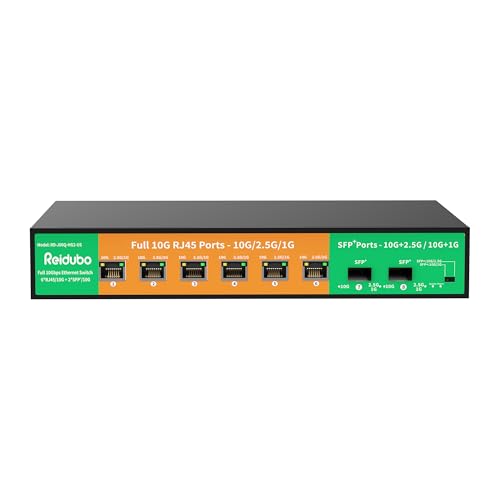
- Six 10G RJ45 ports
- Two 10G SFP+ ports
- Plug-and-play, rackmount capable
Best For: PC and NAS setups that also need SFP+ links
Quiet Home Lab Pick
NICGIGA 10-Port Multi-Gig Switch

- 2 × 10Gb RJ45 ports
- 8 × 2.5Gb ports
- Fanless, desktop or wall mount
Best For: Two 10Gb devices plus several 2.5Gb connections
Multi-Device Desk Pick
GigaPlus 10-Port Unmanaged Switch
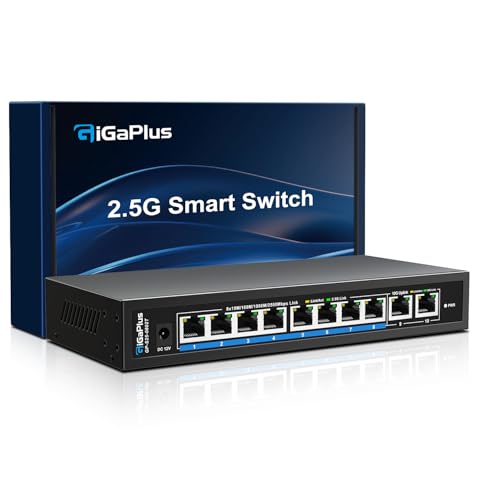
- 2 × 10Gb RJ45 ports
- 8 × 2.5Gb ports
- Fanless plug-and-play design
Best For: Two 10Gb links alongside a larger 2.5Gb network
Compact Setup Pick
VunLink 6-Port Multi-Gig Switch

- Listed as 2 × 10Gb plus 4 × 2.5Gb
- Fanless, unmanaged operation
- Port count conflicts in listing
Best For: Compact PC-and-NAS setups; verify port layout first
Best for All-RJ45 Expansion – TP-Link TL-SX1008 8-Port 10G Switch
For buyers comparing 10gb switches for pc network upgrades, the TP-Link TL-SX1008 offers eight RJ45 ports that each support up to 10Gbps. It is a practical fit when PCs, a NAS, and other wired devices all need multi-gig connections.
Best For: Expanding an all-RJ45 desktop or rack network with several 10G-capable devices.
Pros:
- Eight 10G RJ45 ports with up to 160Gbps switching capacity.
- Auto-negotiates at 100Mbps, 1G, 2.5G, 5G, and 10G.
- Plug-and-play metal design supports desktop or rack mounting.
Cons:
- Unmanaged design does not offer configuration controls.
- Uses a smart fan rather than a fanless design.
Choose this model when port count and straightforward RJ45 cabling matter more than management features. Its speed-adjusting fan is intended to limit noise, but buyers seeking a fanless switch should look elsewhere.
Best for Mixed Cabling – UGREEN 8-Port RJ45/SFP+ 10G Switch
Among 10gb switches for pc network setups, this UGREEN model stands out for its mix of four 10G RJ45 ports and four 10G SFP+ ports. It suits a PC and NAS connected over Ethernet while leaving SFP+ options for DAC cables or compatible transceivers.
Best For: Networks that need both conventional RJ45 connections and flexible SFP+ links.
Pros:
- All eight ports support 10G connectivity: four RJ45 and four SFP+.
- SFP+ ports accommodate DAC cables, fiber transceivers, or SFP+-to-RJ45 modules.
- Plug-and-play operation in a compact metal case with a smart fan and multiple cooling features.
Cons:
- Only four ports are built-in RJ45; using the others requires suitable SFP+ accessories.
- Unmanaged design is not intended for users who need switch configuration.
This is the flexible pick if your cabling plans extend beyond copper Ethernet. If every device needs a direct RJ45 socket, an eight-RJ45-port model is simpler.
Best Fanless Pick – TP-Link TL-SX105 5-Port 10G Switch
If you are shopping for 10gb switches for pc network connections near a workspace, the TP-Link TL-SX105 combines five 10G-capable RJ45 ports with a fanless design. Its unmanaged setup keeps installation simple.
Best For: A small, quiet wired network connecting a PC, NAS, and a few other devices.
Pros:
- Five 10G RJ45 ports and up to 100Gbps switching capacity.
- Auto-negotiates from 100Mbps through 1G, 2.5G, 5G, and 10G.
- Fanless metal enclosure supports desktop or wall mounting.
Cons:
- Five ports leave less room to expand than eight-port alternatives.
- Unmanaged operation offers no configuration interface.
The TL-SX105 makes sense when quiet operation is a priority and five ports cover your connections. Count your planned devices first, including the uplink, to avoid running out of ports.
Best for Two 10G Devices – NICGIGA 6-Port Mixed-Speed Switch
For 10gb switches for pc network upgrades that only need two full-speed links, this NICGIGA switch pairs two 10G RJ45 ports with four 2.5G RJ45 ports. That layout can connect a 10G PC and NAS while serving additional multi-gig devices.
Best For: Networks with two 10G endpoints and several devices that need no more than 2.5G.
Pros:
- Two ports negotiate up to 10G; four additional ports support up to 2.5G.
- Plug-and-play, fanless metal design supports desktop or wall mounting.
- Rated for up to 60Gbps switching capacity.
Cons:
- Only two ports support 10G; the other four top out at 2.5G.
- Unmanaged design does not provide configuration controls.
The port split is the deciding factor here. It avoids dedicating six 10G ports to slower devices, but choose a switch with more 10G ports if you expect to add another full-speed connection.
Best for Flexible Placement – VunLink 8-Port 10G RJ45 Switch
For shoppers comparing 10gb switches for pc network setups, this VunLink model provides eight RJ45 ports for connecting 10G PCs, workstations, and NAS devices. Each port auto-negotiates from 100Mbps through 10Gbps, so slower equipment can stay connected during an upgrade.
Best For: An all-copper home lab or workstation network that may move from a desk to a 19-inch rack.
Pros:
- Eight 10G RJ45 ports and a stated 160Gbps switching capacity.
- Unmanaged plug-and-play setup with per-port speed negotiation.
- Metal enclosure, link LEDs, and desktop or rackmount placement.
Cons:
- No SFP+ ports for fiber or direct-attach links.
- Unmanaged design does not offer switch configuration.
Choose this one when eight copper 10G connections and installation flexibility matter more than management features. It uses a cooling fan, so consider its placement if desk noise is a concern.
Best for Mixed-Speed Copper Devices – NICGIGA 8-Port 10G Switch
If your shortlist of 10gb switches for pc network upgrades needs room for both 10G and older copper devices, this NICGIGA switch offers eight RJ45 ports that negotiate at 100Mbps, 1G, 2.5G, 5G, or 10G. It is unmanaged, with no software setup required.
Best For: Connecting a gaming PC, NAS, and multi-gig router alongside slower RJ45 equipment.
Pros:
- Eight multi-gig RJ45 ports with a stated 160Gbps switching capacity.
- Plug-and-play operation and automatic MDI/MDIX.
- Metal case, status LEDs, and desktop or 19-inch rackmount options.
Cons:
- No SFP+ ports for fiber or direct-attach connections.
- Its 5000 RPM cooling fan may matter in a quiet workspace.
This is a straightforward choice when every connection uses RJ45 and you want mixed link speeds without configuration. The fan and lack of SFP+ make port type and placement worth checking before purchase.
Best for SFP+ Uplinks – 6-Port RJ45 and 2-Port SFP+ 10G Switch
Among 10gb switches for pc network builds, this unmanaged model stands out by combining six 10G RJ45 ports with two 10G SFP+ ports. That layout lets you connect copper-equipped PCs and NAS devices while reserving SFP+ connections for compatible uplinks.
Best For: A PC and NAS network that needs both multi-gig RJ45 connections and 10G SFP+ ports.
Pros:
- Six 10G RJ45 ports plus two 10G SFP+ ports.
- RJ45 speed adaptation across 1G, 2.5G, 5G, and 10G.
- Plug-and-play setup, metal casing, and desktop or rackmount support.
Cons:
- Only six ports are RJ45; the other two require SFP+ connectivity.
- Unmanaged operation offers no configuration options.
Pick this layout if SFP+ is part of your network plan; otherwise, an eight-RJ45 model gives you more copper connections. The supplied notes describe a low-noise fan, but it is still a fan-cooled switch.
Quiet Home Lab Pick – NICGIGA 10-Port Multi-Gig Switch
For shoppers comparing 10gb switches for pc network upgrades, this NICGIGA model combines two 10Gb RJ45 ports with eight 2.5Gb ports. It is a practical fit when a PC and NAS need faster links alongside several other wired devices.
Best For: A home lab or small network with two 10Gb devices and multiple 2.5Gb connections.
Pros:
- Two 10Gb ports support 10G, 5G, 2.5G, 1G, and 100Mbps links.
- Eight additional ports support 2.5G, 1G, and 100Mbps devices.
- Fanless metal housing supports quiet desktop or wall-mounted use.
Cons:
- Only two ports can connect at 10Gb speeds.
- Unmanaged design offers no configuration controls.
Choose it for straightforward plug-and-play expansion, not for a network that needs more than two 10Gb connections.
Multi-Device Desk Pick – GigaPlus 10-Port Unmanaged Switch
This GigaPlus switch gives buyers researching 10gb switches for pc network setups two 10Gb RJ45 links and eight 2.5Gb ports. Its unmanaged, plug-and-play design suits a desk or small office with a fast PC or NAS and several other wired devices.
Best For: Connecting up to two 10Gb devices while expanding a wider 2.5Gb wired network.
Pros:
- Two 10Gb RJ45 ports provide high-speed connections for compatible devices.
- Eight auto-sensing ports support 100Mbps, 1Gb, and 2.5Gb links.
- Fanless metal case supports quiet desktop or wall-mounted installation.
Cons:
- 10Gb connectivity is limited to two ports.
- Unmanaged operation does not provide configuration options.
It is a sensible choice when easy setup and port count matter more than network management features.
Compact Setup Pick – VunLink 6-Port Multi-Gig Switch
If you are comparing 10gb switches for pc network use but do not need ten ports, this VunLink model is listed as a six-port option with two 10Gb RJ45 ports and four 2.5Gb ports. Its fanless metal housing and desktop or wall-mount placement suit a smaller setup.
Best For: A compact PC-and-NAS network that needs two 10Gb connections and a few additional multi-gig ports.
Pros:
- Two 10Gb RJ45 ports support 10G, 5G, 2.5G, 1G, and 100Mbps speeds.
- Unmanaged setup requires no configuration.
- Fanless design and LED status indicators suit a quiet workspace.
Cons:
- Fewer ports than the ten-port options in this roundup.
- The supplied listing conflicts: its title and model specify six ports, while one bullet describes ten; verify the port layout before buying.
Its stated six-port configuration makes sense for a smaller network, but the contradictory listing detail is worth checking first.
How We Picked the Best 10gb Switches for PC Network
We focused on the listed port configurations and the decisions they create for a PC network: how many 10Gb links are available, whether the remaining ports run at 2.5Gb, and whether SFP+ is included. All ten selections are presented as unmanaged switches, so this roundup is aimed at buyers who want straightforward connectivity rather than configuration-heavy features. Listed specifications are a starting point, not a substitute for checking the current product listing and manual before purchase.
Quick Comparison: Which Port Layout Fits?
Five to eight 10Gb RJ45 ports: Consider these when several PCs, a NAS, and an uplink each need a full-speed copper connection. An eight-port model also leaves more room to expand than a five-port model.
Two 10Gb RJ45 ports plus 2.5Gb ports: A practical layout for one 10Gb PC-to-NAS path, with additional ports for 2.5Gb-capable devices. Count carefully: an uplink may use one of the two 10Gb ports.
RJ45 plus SFP+: Useful when some equipment already has SFP+ connectivity or you want flexibility in how you connect devices. SFP+ ports do not accept an ordinary Ethernet cable without a compatible module.
Key Buying Factors for 10gb Switches for PC Network Setups
Count Connections, Not Just Devices
Sketch your network before shopping. Include the PC, NAS, router or upstream switch, and any second workstation. If three devices require 10Gb ports but the switch has only two, something will need a slower connection or a different path. Check whether each RJ45 port supports the speeds your devices use; do not assume every port on a mixed-speed switch is 10Gb.
Match Ports, Adapters, and Cables
For RJ45 connections, confirm that your PC and NAS have compatible 10Gb Ethernet interfaces. Cat6a is a sensible choice for longer 10GBASE-T runs; whether existing Cat6 works depends on run length and installation quality. For SFP+, budget for compatible modules or direct-attach cables and verify support at both ends. A switch alone cannot upgrade a 1Gb network adapter to 10Gb.
Check Placement and Real-World Limits
Look at physical size, mounting options, fan design, power draw, and noise if the switch will sit near your desk. Also check the supported speeds on the router uplink. A 10Gb switch can speed up traffic between local devices without making a slower internet connection faster. Transfer rates may still be limited by storage, adapters, cabling, or protocol overhead.
Who Should Buy Which 10gb Switches for PC Network?
Choose an all-10Gb RJ45 switch if multiple PCs and storage devices need 10Gb now or soon. Pick a two-10Gb, multi-2.5Gb model if only a PC and NAS need top speed and the rest of your network is 2.5Gb. Choose a mixed RJ45/SFP+ model if you already own SFP+ hardware or have a clear plan for those ports. For a small network with no immediate expansion plans, prioritize the right connections over the highest advertised port count.