A 32-inch 4K monitor gives you room to keep documents, spreadsheets, and browser windows visible without juggling displays. The right choice also needs comfortable text, useful ports, and a setup that fits your desk.
These 10 options span straightforward 60Hz screens and smoother 120Hz models. Use the guide below to match display features to the way you work.
Best 10 32 Inch 4K Monitors for Office Productivity Picks for 2026
Best for USB-C Laptops

- 31.5-inch 4K IPS display
- USB-C with up to 60W charging
- Height, tilt, and pivot adjustment
Best For: Laptop-centered desks needing one-cable connectivity
Best for Split-Screen Work

- 32-inch 4K VA panel
- Display Manager split-screen tools
- 3000:1 listed contrast ratio
Best For: Multiwindow office work with HDMI or DisplayPort
Best for Smooth Scrolling

- 32-inch 4K VA display
- Up to 120Hz with FreeSync Premium
- Height adjustment and ComfortView Plus
Best For: Smooth office use and mixed work-and-play setups
Best for Simple Desktop Setups

- 31.5-inch 4K VA display
- OnScreen Control workspace splitting
- Two HDMI ports and built-in speakers
Best For: Fixed desktop setups needing straightforward 4K space
Best Ergonomic Pick
Dell 32-Inch 4K IPS 120Hz Monitor

- Adjustable height, tilt, swivel, and pivot
- 4K IPS display with 120Hz refresh rate
- DisplayPort, dual HDMI, and built-in speakers
Best For: All-day office work with flexible screen positioning
Best Straightforward 4K Pick
Samsung ViewFinity S7 32-Inch IPS Monitor

- 32-inch 4K IPS workspace
- HDR10 and Eye Saver Mode
- HDMI and DisplayPort; 60Hz refresh
Best For: Detailed office and visual work without a 120Hz requirement
Best High-Contrast Pick
Dell S32 Series 4K 120Hz Monitor

- 4K VA panel with listed 1500:1 contrast
- 120Hz refresh rate and 99% sRGB
- Built-in 2 x 5W speakers and dual HDMI
Best For: Office work plus media on a high-contrast display
Best for Multiple Devices
- Two HDMI and two DisplayPort inputs
- Matte IPS panel with 97% sRGB
- 75 × 75 mm VESA mounting
Best For: Desks with multiple HDMI or DisplayPort devices
Best for Color-Focused Work
LG 32-Inch UltraFine 4K IPS Monitor

- 95% DCI-P3 color coverage
- Height- and tilt-adjustable stand
- Built-in speakers and slim bezels
Best For: Office work with image editing and presentations
Best for Flexible Screen Layouts
LG 32-Inch UltraFine 4K Monitor

- LG Switch window-layout tools
- Height, tilt, and pivot adjustments
- Matte finish and built-in speakers
Best For: Custom window layouts and adjustable positioning
Best for USB-C Laptops – LG 32UP83AK-W
Among 32 inch 4k monitors for office productivity, the LG 32UP83AK-W is a practical choice if you want a sharp IPS workspace and a single USB-C connection for video, data, and up to 60W laptop charging.
Best For: Laptop users who want USB-C connectivity and flexible screen positioning.
Pros:
- 31.5-inch 4K IPS panel with wide viewing angles.
- USB-C supports display, data transfer, and up to 60W power delivery.
- Stand adjusts for height, tilt, and pivot; built-in speakers save desk space.
Cons:
- 60Hz refresh rate is less suited to shoppers seeking a higher-refresh display.
- 60W charging may not meet every laptop’s power needs.
The adjustable stand and USB-C port make this the most convenient fit here for a laptop-centered desk, provided its charging output suits your computer.
Best for Split-Screen Work – Samsung ViewFinity S7 S70H
The Samsung ViewFinity S7 S70H brings a 32-inch 4K VA display and software-based workspace tools to a search for 32 inch 4k monitors for office productivity. Samsung Display Manager provides access to split-screen setup, PIP/PBP, and brightness controls.
Best For: Office users who organize multiple windows and want strong native contrast.
Pros:
- 4K resolution provides room for detailed documents and side-by-side windows.
- 3000:1 listed contrast ratio and matte VA screen.
- Display Manager offers split-screen and PIP/PBP controls; Eye Saver Mode and flicker prevention support extended use.
Cons:
- HDMI and DisplayPort are listed, but no USB-C connection is specified.
- Limited to 60Hz.
This is a sensible pick when window management and contrast matter more than one-cable laptop docking. Check the listed connections against your setup before buying.
Best for Smooth Scrolling – Dell S3225QS
The Dell S3225QS stands out among 32 inch 4k monitors for office productivity with a 120Hz refresh rate, which can make scrolling and cursor movement feel smoother than on the 60Hz models in this group. Its 32-inch 4K VA screen also includes built-in speakers.
Best For: Users who want a higher-refresh work display that also suits after-hours entertainment.
Pros:
- 120Hz refresh rate and FreeSync Premium support smoother motion.
- 4K VA panel lists 99% sRGB and 95% DCI-P3 coverage.
- ComfortView Plus reduces blue-light emissions; the stand supports height and tilt adjustment.
Cons:
- Listed connections are HDMI and DisplayPort, with no USB-C specified.
- No pivot adjustment is listed.
Choose this Dell if smooth everyday motion is a priority, but plan on a separate solution if your laptop setup depends on USB-C charging through the monitor.
Best for Simple Desktop Setups – LG 32UR500K-B
For shoppers comparing 32 inch 4k monitors for office productivity, the LG 32UR500K-B offers a straightforward 31.5-inch 4K screen with two HDMI inputs, DisplayPort, and built-in speakers. LG’s OnScreen Control lets you split the workspace and adjust basic settings with a mouse.
Best For: Desktop users who want 4K workspace and simple window controls without relying on USB-C.
Pros:
- 31.5-inch 4K VA display gives documents and windows ample space.
- OnScreen Control supports workspace splitting and monitor adjustments.
- Two HDMI ports, DisplayPort, and built-in stereo speakers.
Cons:
- Stand adjusts for tilt only.
- 250-nit listed brightness and 60Hz refresh rate.
This LG covers the essentials for a fixed desktop position, but consider a more adjustable model if you need to raise or rotate the screen regularly.
Best Ergonomic Pick – Dell 32-Inch 4K IPS 120Hz Monitor
Among 32 inch 4k monitors for office productivity, this Dell is a practical choice if you want sharp 4K workspace, smoother 120Hz scrolling, and a stand that adjusts to your desk setup. Its IPS panel and matte finish suit everyday document work and multitasking.
Best For: Long office days where flexible positioning and smooth on-screen movement matter.
Pros:
- Height, tilt, swivel, and pivot adjustments make positioning flexible.
- 4K resolution and 120Hz refresh rate support detailed work and smooth scrolling.
- DisplayPort, two HDMI ports, built-in speakers, and Dell’s layout-management software add office convenience.
Cons:
- No USB-C connection is listed, so a compatible laptop may need a dock or adapter.
- The supplied warranty description lists one year.
The ergonomic stand is the main reason to choose this model over a basic 4K display. Check your laptop’s video outputs before buying if you want a simple one-cable desk setup.
Best Straightforward 4K Pick – Samsung ViewFinity S7 32-Inch IPS Monitor
If your search for 32 inch 4k monitors for office productivity centers on screen space and clear detail, the Samsung ViewFinity S7 keeps things straightforward. Its 32-inch 4K IPS display provides room for documents, diagrams, and creative work, with a matte finish for a typical office setup.
Best For: Desk-based professionals who prioritize 4K detail over a high refresh rate.
Pros:
- 3840 x 2160 IPS display offers a detailed workspace with wide viewing angles.
- HDR10 support and the listed 99% color gamut suit visual work.
- Eye Saver Mode, HDMI, and DisplayPort cover common office needs.
Cons:
- 60Hz refresh rate is less fluid than the 120Hz Dell options here.
- Only one HDMI port is listed; the supplied notes do not specify ergonomic stand adjustments.
This is the simpler choice for users who mainly need a large, sharp screen. If stand adjustability or extra HDMI inputs are priorities, compare the listed connections and setup details before ordering.
Best High-Contrast Pick – Dell S32 Series 4K 120Hz Monitor
For shoppers comparing 32 inch 4k monitors for office productivity who also want richer-looking media after work, the Dell S32 Series pairs 4K resolution with a VA panel, a listed 1500:1 contrast ratio, and 120Hz refresh rate. Its ash-white finish and thin bezel also suit a clean desk setup.
Best For: Office users who want smooth scrolling, strong listed contrast, and built-in audio in one display.
Pros:
- 4K resolution and 120Hz refresh rate support detailed work and fluid movement.
- VA panel has a listed 1500:1 contrast ratio, plus 99% sRGB coverage.
- Built-in 2 x 5W speakers and two HDMI ports add everyday convenience.
Cons:
- No USB-C connection is listed for a direct one-cable laptop setup.
- The supplied notes describe stand adjustments in the title but do not detail them in the specifications.
The S32 is a good fit when contrast, refresh rate, and onboard sound all matter. If stand movement is essential to your workspace, verify the exact adjustment range for the listing before purchase.
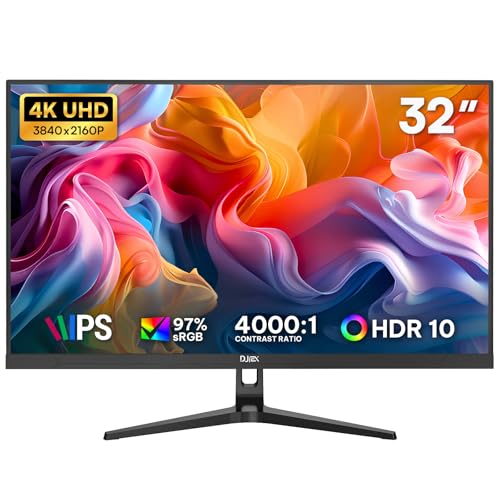
Best for Multiple Devices – DJiEX 32-Inch 4K IPS Monitor
Among 32 inch 4k monitors for office productivity, this DJiEX model offers a spacious 3840 × 2160 IPS screen for spreadsheets, reports, and side-by-side windows. Its matte finish and low-blue-light mode are useful considerations for long desk sessions.
Best For: Office setups that keep several HDMI and DisplayPort devices connected.
Pros:
- Two HDMI and two DisplayPort inputs accommodate multiple devices.
- IPS panel supports 97% sRGB and wide viewing angles.
- 75 × 75 mm VESA mounting offers an alternative to the included stand.
Cons:
- USB-C laptops need a compatible adapter, sold separately.
- The 60Hz refresh rate is geared toward everyday work rather than high-refresh use.
The main draw is straightforward: ample 4K workspace and plenty of conventional video inputs. Check your laptop’s output and mounting needs before buying.
Best for Color-Focused Work – LG 32-Inch UltraFine 4K IPS Monitor
If your search for 32 inch 4k monitors for office productivity also includes image-heavy work, this LG UltraFine combines a 3840 × 2160 IPS panel with stated 95% DCI-P3 coverage. Its three-sided slim bezel helps it fit into a multi-monitor desk setup.
Best For: Office users who also edit images or presentations and want height adjustment.
Pros:
- 95% DCI-P3 coverage suits color-focused tasks.
- Stand adjusts for height and tilt.
- Built-in speakers can handle everyday audio and calls.
Cons:
- Glossy screen finish may be less suitable for desks facing bright light.
- 60Hz refresh rate does not prioritize high-refresh gaming.
This is a strong fit when color coverage and an adjustable stand matter as much as screen space. Consider the glossy finish against your office lighting before choosing it.
Best for Flexible Screen Layouts – LG 32-Inch UltraFine 4K Monitor
This LG UltraFine is worth considering among 32 inch 4k monitors for office productivity if you want to organize windows with the LG Switch app. Its 3840 × 2160 display, matte finish, and height-, tilt-, and pivot-adjustable stand give you several ways to set up a workday.
Best For: Users who want customizable window layouts and flexible monitor positioning.
Pros:
- LG Switch app supports screen splitting and layout customization.
- Stand adjusts for height, tilt, and pivot.
- Matte screen and built-in speakers support an everyday desk setup.
Cons:
- 250-nit stated brightness is lower than the other two listed monitors.
- 60Hz refresh rate is best suited to standard office use.
Choose this one for its workflow tools and stand flexibility rather than maximum stated brightness. The pivot option is particularly handy if a vertical view suits your documents.
How We Picked the Best 32 Inch 4K Monitors for Office Productivity
We focused on 32-inch 4K displays with features relevant to daily office work: panel type, refresh rate, stand adjustments, connectivity, and extras such as speakers or eye-comfort modes. We also looked for meaningful differences between similarly named models. Specifications can vary by exact model and region, so confirm the listing before ordering.
Quick Comparison: Which Type Fits Your Desk?
- For text-heavy work and shared screens: An IPS model is a sensible starting point because its wide viewing angles help keep the image consistent when you move or collaborate.
- For deeper blacks: Consider a VA option if you often work in a dim room or prefer stronger perceived contrast.
- For smoother motion: A 120Hz Dell model may feel more fluid when scrolling long documents or moving windows. It is a comfort upgrade, not a requirement for office tasks.
- For a simpler setup: A 60Hz LG or Samsung option may cover everyday productivity without paying for a faster refresh rate you will rarely notice.
Key Buying Factors for 32-Inch 4K Monitors for Office Productivity
Text Size and Workspace
At 32 inches, 3840 × 2160 resolution provides ample room for side-by-side windows. You may still want operating-system scaling for comfortably sized text; the goal is usable space, not the smallest possible interface. If you sit close to the screen, check that your desk has enough depth to view the full display comfortably.
Ergonomics and Mounting
Prioritize height, tilt, swivel, and pivot adjustments if you spend long hours at your desk. A basic stand can work, but you may need a compatible VESA arm to position the screen at eye level. Check mount compatibility and the monitor’s weight before buying an arm.
Ports and Everyday Extras
Check that the exact model has the HDMI or DisplayPort inputs your computer needs. Do not assume USB-C video, laptop charging, or a USB hub is included: verify each feature in the specifications. Built-in speakers are convenient for calls and alerts, while reader or flicker-reduction modes may make long sessions more comfortable. HDR10 support alone does not guarantee a dramatic HDR image.
Who Should Buy Which 32 Inch 4K Monitors for Office Productivity?
Choose an adjustable IPS model if you mainly edit documents, build spreadsheets, or work with multiple windows all day. Pick a 120Hz option if noticeably smoother scrolling matters to you or your work computer also handles after-hours entertainment. A VA display suits buyers who value contrast and usually view the screen straight on. If price is your priority, start with a 60Hz 4K model, then compare its stand and ports with the cost of any accessories you would need to add.