If your scenes are getting heavier, your renders are taking longer, or your multitasking is bottlenecked by memory, the right workstation can make a measurable difference.
These 3D rendering workstations with 256GB RAM are built for serious production work, with options that balance CPU power, GPU acceleration, storage speed, and upgrade headroom.
Best 10 3d Rendering Workstations with 256gb RAM Picks for 2026
Best for Heavy 3D Loads
Sentinel Threadripper PRO 9985WX Workstation

- 64-core Threadripper PRO CPU for demanding rendering jobs
- 256GB ECC DDR5 RAM for large scenes and multitasking
- 4TB Gen5 SSD plus 12TB HDD for fast access and big storage
Best For: 3D artists and power users who need a workstation for complex rendering, CAD, and AI-heavy projects.
Best Storage-Heavy Workhorse
Dell Precision 7910 256GB Workstation

- 256GB ECC RAM for large scene and multitasking loads
- Dual Xeon CPUs for multi-core rendering work
- 24.96TB of mixed SSD/SAS storage included
Best For: Artists and studios that prioritize RAM capacity and huge local storage over a modern graphics card.
Best for Heavy 3D Scenes

- 256GB ECC memory for huge scenes and multitasking
- Threadripper 9960X and RTX 5080 for fast rendering
- 4TB NVMe SSD plus 10Gbps networking for pro workflows
Best For: 3D artists and studios handling memory-heavy rendering, simulation, and editing jobs.
Best for Dense Expandability
MINISFORUM MS-02 Ultra Mini Workstation

- Supports up to 256GB RAM across 4 DDR5 slots.
- Four M.2 SSD slots with RAID options.
- 2x 25G SFP+ plus 10G and 2.5G Ethernet for fast networking.
Best For: Builders who want a compact workstation they can equip with 256GB RAM, fast storage, and pro-grade networking.
Best for Heavy-Duty 3D Production
CLX Horus Threadripper 9970X Workstation
- 32-core Threadripper for demanding multi-threaded rendering
- 256GB DDR5 ECC RAM for massive scenes and multitasking
- RTX 5080 plus 4TB NVMe SSD for fast creative workflows
Best For: Professional 3D creators who need top-tier CPU power, lots of RAM, and fast storage.
Best for Dual Xeon Value
PCSP T7820 Dual Xeon Workstation

- Dual Xeon Gold 6140 CPUs for multicore workloads
- 2TB SSD and tower design support workstation use
- Good starting point for future RAM upgrades
Best For: Creators who want a scalable dual-CPU workstation base for rendering and multitasking.
Best Ultra-Compact Starter PC

- Tiny VESA-mount mini PC for space-saving setups
- Dual 4K display support for simple productivity
- Good for basic office, streaming, and light multitasking
Best For: Budget buyers who want a compact desktop for everyday tasks, not heavy rendering.
Best for Dual-Xeon Rendering
PCSP Pro T7820 RTX 3080 Workstation

- Dual Xeon Gold 6244 CPUs for heavy rendering loads
- RTX 3080 for strong GPU-accelerated creative work
- 256GB DDR4 RAM configuration for larger projects
Best For: Artists and CAD professionals who need a renewed dual-CPU tower with high-memory capacity.
Best Expandable Workstation
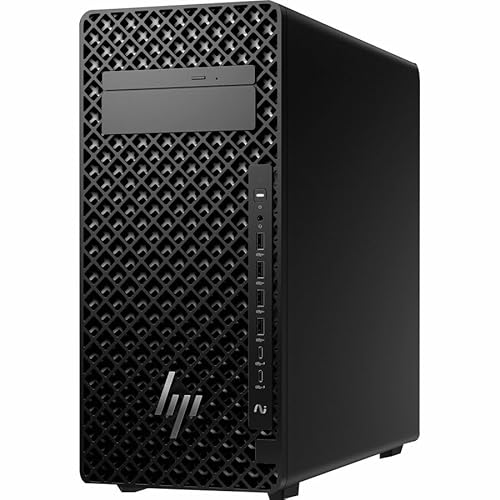
- Upgradeable to 256 GB DDR5 RAM
- 24-core Core Ultra 9 CPU for heavy workloads
- 20 GB NVIDIA graphics for rendering tasks
Best For: 3D creators and technical professionals who want a strong workstation with room to expand.
Best for Heavy 3D Loads – Sentinel Threadripper PRO 9985WX Workstation
If you need one of the most powerful 3d rendering workstations with 256gb ram, this Sentinel build is aimed at creators who push large scenes, multitask across demanding apps, and want workstation-class stability. The 64-core Threadripper PRO CPU, RTX 5080 graphics, and fast Gen5 storage make it a strong fit for professional modeling, rendering, and AI-assisted workflows.
Best For: 3D artists, CAD users, and creators who need a high-core workstation with plenty of memory for complex projects and long render sessions.
Pros:
- 64-core Threadripper PRO processor is built for heavy rendering and simulation workloads
- 256GB ECC DDR5 RAM supports large scenes, large datasets, and serious multitasking
- 4TB Gen5 SSD plus 12TB HDD gives you both speed and generous project storage
- RTX 5080 accelerates GPU rendering, previews, and creative applications
Cons:
- Price will be well beyond casual creator budgets
- Overkill if your workflow is mostly light editing or occasional design work
- Storage and memory are strong, but the GPU has 16GB VRAM rather than pro-card levels
For buyers comparing 3d rendering workstations with 256gb ram, this machine stands out as a serious high-end option that prioritizes CPU throughput, memory capacity, and fast storage over flashy extras. It is the kind of tower that makes sense when uptime, speed, and headroom matter more than cost.
Best Storage-Heavy Workhorse – Dell Precision 7910 256GB Workstation
If you want one of the more capable 3d rendering workstations with 256gb ram and also need lots of local storage for large scene files, this renewed Dell Precision 7910 is built for that kind of workload. It pairs dual Xeon processors with 256GB of ECC DDR4 memory, a 960GB SSD, and three new 8TB SAS drives for a very roomy, workstation-first setup.
Best For: 3D artists, studios, and technical users who need high RAM capacity and plenty of fast, reliable storage more than a top-tier GPU.
Pros:
- 256GB ECC DDR4 RAM supports heavy multitasking and large project loads
- Dual Xeon E5-2670 v3 CPUs offer strong multi-core performance for rendering
- Massive 24.96TB storage array is ideal for assets, caches, and archives
- 1300W PSU leaves room for future workstation upgrades
Cons:
- Quadro K2000 2GB is dated for GPU-accelerated rendering and viewport work
- Older platform may be less efficient than newer workstations
- Renewed unit and 90-day warranty may not suit buyers wanting maximum long-term peace of mind
As a value-oriented tower, this Dell makes sense for buyers who care most about memory headroom and storage capacity in 3d rendering workstations with 256gb ram. Just plan on a GPU upgrade if your workflow depends heavily on modern viewport performance or CUDA rendering.
Best for Heavy 3D Scenes – CLX Horus Creator Workstation
If you want one of the most capable 3d rendering workstations with 256gb ram, the CLX Horus Creator Workstation is built for large projects, long timelines, and demanding multitasking. The Threadripper 9960X, RTX 5080, and ECC memory give it the kind of headroom creators need for complex scenes, fast previews, and smoother production workflows.
Best For: 3D artists, motion designers, and editors who need a high-memory workstation for heavy rendering, simulation, and asset-heavy projects.
Pros:
- 256GB DDR5 ECC memory is excellent for large scene files and memory-hungry creative apps
- Threadripper CPU plus RTX 5080 delivers strong performance for rendering and real-time playback
- 4TB NVMe SSD provides generous fast storage for project files and caches
- 10Gbps and 2.5Gbps LAN improve network transfer speed on studio workflows
Cons:
- High-spec build will be expensive for many independent creators
- Large tower design may be more PC than some home studios need
For buyers comparing 3d rendering workstations with 256gb ram, this CLX system stands out for balancing CPU muscle, modern GPU acceleration, and workstation-grade memory capacity. It is a serious pick if your priority is keeping heavy creative projects responsive from first draft to final render.
Best for Dense Expandability – MINISFORUM MS-02 Ultra Mini Workstation
If you want one of the more expandable 3d rendering workstations with 256gb ram support in a compact footprint, the MINISFORUM MS-02 Ultra is built for serious customization. The Core Ultra 9 285HX gives it strong CPU headroom, while the four DDR5 slots, four SSD slots, and multiple high-speed network ports make it a practical base for a renderer, content creator, or small studio NAS-style workstation.
Best For: Builders who want a compact workstation they can equip with 256GB RAM, fast storage, and multi-monitor support for rendering and production work.
Pros:
- Four DDR5 slots support up to 256GB RAM with ECC compatibility.
- Four M.2 SSD slots plus RAID support for large project libraries.
- Core Ultra 9 285HX offers strong multi-core performance for demanding workloads.
- 2x 25G SFP+, 10G RJ45, and 2x USB4 V2 add unusual connectivity for pro setups.
Cons:
- Barebone design means you must supply RAM, SSDs, and operating system.
- Integrated graphics are fine for acceleration, but not a substitute for a high-end discrete GPU.
- Expansion is powerful, but the layout may be overkill if you only need a simple desktop.
For buyers comparing 3d rendering workstations with 256gb ram, this model stands out more for flexibility and connectivity than plug-and-play simplicity. It makes the most sense if you want to build a dense, high-memory workstation around a compact chassis.
Best for Heavy-Duty 3D Production – CLX Horus Threadripper 9970X Workstation
If you’re comparing 3d rendering workstations with 256gb ram, this CLX Horus build stands out for its mix of Threadripper CPU muscle, RTX 5080 graphics, and massive ECC memory. It’s aimed at creators who need to keep complex scenes, large texture sets, and multitasking workflows responsive without constantly clearing caches or closing apps.
Best For: 3D artists, VFX teams, and technical creators who need high-core-count processing, serious GPU acceleration, and plenty of memory headroom for production work.
Pros:
- 32-core Threadripper CPU is built for heavy multi-threaded rendering and simulation work.
- 256GB DDR5 ECC memory helps handle huge project files and demanding multitasking.
- RTX 5080 adds strong acceleration for real-time previews, AI tools, and GPU rendering.
- 4TB NVMe SSD gives you fast storage for active projects and scratch-heavy workflows.
Cons:
- High-end specs make it a serious investment rather than a general-purpose workstation.
- RTX 5080’s 16GB VRAM may be limiting for some extremely large scenes or texture-heavy pipelines.
This is a strong fit if you want one of the more capable 3d rendering workstations with 256gb ram for professional content creation. It leans toward speed, stability, and workflow flexibility, especially for users who value ECC memory and Threadripper-class compute over a lower-cost build.
Best for Dual Xeon Value – PCSP T7820 Dual Xeon Workstation
If you want a capable entry point into 3d rendering workstations with 256gb ram, this renewed Dell T7820 stands out for its dual Xeon Gold 6140 setup and roomy expandability. It ships with 32GB of DDR4 and a 2TB SSD, so it’s ready for large project files, multitasking, and general production work right away.
Best For: Studios and creators who want a dual-CPU workstation platform they can grow over time for rendering, CAD, and heavy multitasking.
Pros:
- Dual Xeon Gold 6140 CPUs provide strong multicore throughput for rendering jobs
- 2TB SSD offers fast storage and plenty of room for active projects
- Quadro M2000 graphics adds pro-oriented display support for creative workflows
- Renewed tower design can be a practical value pick for workstation buyers
Cons:
- Only 32GB of RAM included, so it is far from a 256GB-ready configuration out of the box
- Quadro M2000 is entry-level for modern 3D workloads and GPU rendering
- Older platform may not suit users wanting the latest efficiency or features
As a result, this machine makes sense if you want a solid Xeon foundation and plan to upgrade memory toward the needs of 3d rendering workstations with 256gb ram. It is more of a scalable workstation base than a fully loaded render box.
Best Ultra-Compact Starter PC – GMKtec Mini PC N95 8GB/256GB
If you need a tiny, affordable desktop for light creative work, office apps, or a compact media setup, the GMKtec G3 S is a practical entry point. It is not a full-scale option for demanding 3d rendering workstations with 256gb ram, but it can handle everyday workloads, dual-monitor productivity, and basic preview tasks in a small footprint.
Best For: Budget-conscious buyers who want a space-saving mini PC for general work, streaming, and light multitasking.
Pros:
- Very compact design with VESA mount support for clean desk setups
- Dual HDMI 2.0 outputs support two 4K displays at 60Hz
- WiFi 5, Bluetooth 5.0, and Gigabit Ethernet cover basic connectivity needs
Cons:
- 8GB RAM is far below what serious rendering workflows typically require
- N95 integrated graphics are only suitable for light graphics tasks
- 256GB storage may feel limited once projects and assets start growing
This is a good value mini PC for everyday use, but buyers comparing it against 3d rendering workstations with 256gb ram should treat it as an inexpensive companion machine rather than a primary production desktop.
Best for Dual-Xeon Rendering – PCSP Pro T7820 RTX 3080 Workstation
If you want one of the more capable 3d rendering workstations with 256gb ram support, this renewed PCSP Pro T7820 stands out for its dual Xeon Gold 6244 CPUs, RTX 3080 graphics, and roomy workstation-class platform. It is aimed at heavier CAD, modeling, and rendering workloads where CPU cores, GPU acceleration, and expandability matter more than compact size or flashy extras.
Best For: Artists, CAD users, and studios that need a dual-CPU tower for rendering and 3D modeling with high memory headroom.
Pros:
- Dual Xeon Gold 6244 processors provide strong multi-threaded performance for rendering tasks.
- RTX 3080 adds serious GPU power for viewport work and accelerated creative apps.
- 256GB DDR4 configuration gives it the memory capacity many heavy projects demand.
- 2TB SSD and Windows 11 Pro make it ready for workstation use out of the box.
Cons:
- Renewed status may not suit buyers who want brand-new hardware only.
- SATA SSD storage is fine, but not as fast as NVMe-based alternatives.
- Large dual-socket towers can be overkill for lighter 3D projects.
Overall, this is a practical pick if you need a proven workstation formula rather than a consumer desktop, especially when comparing 3d rendering workstations with 256gb ram for demanding CAD and rendering pipelines.
Best Expandable Workstation – HP Z2 G1i Tower Workstation
If you want one of the more future-ready 3d rendering workstations with 256gb ram support, this HP Z2 G1i is built to grow with demanding creative and technical workflows. It pairs a Core Ultra 9 285K CPU, NVIDIA graphics with 20 GB of VRAM, and a 1 TB PCIe 4.0 SSD for responsive scene loading, simulation work, and GPU-accelerated rendering.
Best For: 3D artists, VFX users, and CAD professionals who want a tower workstation that starts strong and can be upgraded toward heavy RAM workloads later.
Pros:
- Upgradeable memory supports up to 256 GB DDR5 for larger projects and multitasking
- 24-core Core Ultra 9 processor is well suited to parallel rendering and compute-heavy tasks
- 20 GB NVIDIA graphics memory helps with viewport performance and GPU rendering
- 1 TB SSD keeps assets, project files, and software loading quickly
Cons:
- Ships with 32 GB RAM, so max-capacity users will need an upgrade
- May be more workstation than casual creators need
For buyers comparing 3d rendering workstations with 256gb ram, this HP stands out for its strong base specs and clear upgrade path rather than arriving fully maxed out. It is a practical pick if you want a serious tower now and the flexibility to scale memory as your scenes get bigger.
Best Simple Pick – Adamant Threadripper PRO RTX 6000 Workstation
If you want one of the most capable 3d rendering workstations with 256gb ram, this Adamant custom build is aimed squarely at demanding production work. The 64-core Threadripper PRO 9985WX, 256GB of ECC DDR5, and RTX 6000 Blackwell 96GB give it the kind of headroom that can handle large scenes, simulation-heavy timelines, and serious GPU rendering without feeling cramped.
Best For: Artists, studios, and technical users who need a top-tier workstation for CPU-heavy rendering, large assets, and pro-grade GPU acceleration.
Pros:
- 64-core Threadripper PRO CPU is built for fast multi-threaded rendering and simulation.
- 256GB ECC DDR5 memory helps with large projects and stability under heavy loads.
- RTX 6000 Blackwell 96GB is excellent for GPU rendering and massive VRAM needs.
- Includes 4TB NVMe SSD plus 10TB HDD for a strong mix of speed and storage.
Cons:
- Expensive for users who only need moderate 3D or motion graphics performance.
- Large, power-hungry build may be overkill for smaller desks or home studios.
- Windows 11 Pro and workstation-class parts can be more than casual creators need.
This is a true high-end option among 3d rendering workstations with 256gb ram, especially if your workflow benefits from both CPU core count and huge GPU memory. It makes the most sense when render times, scene complexity, and reliability matter more than price.
How We Picked the Best 3d Rendering Workstations with 256gb RAM
For this roundup, we focused on workstation-class systems that make sense for 3D artists, CAD teams, and render-heavy studios. Priority went to CPU throughput, GPU capability, memory capacity and type, fast SSD storage, and the overall platform’s suitability for long sessions under load. We also considered whether each system feels practical for production use, not just impressive on paper.
Quick Comparison
Among 3d Rendering Workstations with 256gb RAM, the best choice depends on your workflow. Threadripper PRO systems are the strongest fit for large scenes and CPU rendering, RTX 5080 builds favor fast viewport work and GPU-accelerated rendering, and dual-Xeon towers can still be attractive for buyers who want lots of cores on a tighter budget.
Key Buying Factors for 3d Rendering Workstations with 256gb RAM
CPU Core Count and Threading
Rendering, simulation, and heavy exporting benefit from more cores and strong sustained clocks. High-core-count Threadripper and Xeon platforms usually lead here, especially for CPU-based render engines.
GPU Capability
If your software leans on CUDA, OptiX, or other GPU acceleration, the graphics card matters as much as the processor. For many artists, a stronger GPU improves viewport responsiveness and can dramatically speed up final-frame rendering.
Memory Configuration
256GB RAM is ideal for complex assemblies, large textures, high-resolution caches, and multitasking across DCC tools. ECC memory is a plus for stability in long projects, especially in professional environments.
Storage and Scratch Performance
Fast NVMe storage helps with project loading, cache writes, simulation files, and intermediate renders. A larger secondary drive can be useful for asset libraries, backups, and archived scenes.
Platform Longevity
Check expansion slots, cooling design, and PSU capacity. A workstation should support your next GPU, more storage, or a future software stack without becoming obsolete too quickly.
Who Should Buy Which 3d Rendering Workstations with 256gb RAM?
Choose a high-end Threadripper PRO build if you want the most balanced option for demanding professional pipelines. Pick an RTX 5080-based workstation if GPU rendering and interactive performance are your priorities. Consider dual-Xeon systems if you need a large-memory tower and want to maximize core count for the money. For small studios or mixed-office environments, a compact workstation can work well, but it should still offer enough sustained performance for your real render workload.
In short, the best 3d Rendering Workstations with 256gb RAM are the ones that match your software, your scene complexity, and the kind of renders you do most often.