When it comes to maximizing your PC’s storage potential, choosing the right 5.25 inch drive bay adapter is essential. These adapters offer an efficient way to integrate additional drives into your system, enhancing both capacity and performance. With various options available, from hot-swappable designs to cooling features, you might wonder which one suits your needs best. Let’s explore the top contenders that could transform your setup.
ICY DOCK Full Metal 8 x 2.5 HDD/SSD Mobile Rack Enclosure (ToughArmor MB998SP-B)

If you’re looking to maximize your PC’s storage capabilities, the ICY DOCK Full Metal 8 x 2.5 HDD/SSD Mobile Rack Enclosure (ToughArmor MB998SP-B) is an ideal choice. This robust enclosure fits eight 2.5” SATA drives in a single 5.25” bay, supporting SATA 6Gbps for high-performance RAID setups. Its dual 40mm fans keep your drives cool, preventing overheating during intense usage. You only need two 15-pin power connectors to power all eight bays, making setup a breeze. Plus, the removable tray system allows for easy maintenance, while hot swap functionality guarantees seamless drive management whenever you need it.
Best For: Users looking to expand their storage options with a high-capacity and efficient mobile rack solution for 2.5” SATA drives.
Pros:
- High Capacity: Accommodates up to 8 x 2.5” SATA drives in a single 5.25” bay.
- Efficient Cooling: Equipped with dual 40mm fans to maintain optimal operating temperatures.
- Convenient Maintenance: Features a removable tray system and supports hot swap functionality for easy drive management.
Cons:
- Limited to 2.5” Drives: Only compatible with 2.5” SATA drives, which may not suit all users.
- Power Connector Requirement: Requires two 15-pin power connectors, which may be a limitation for some setups.
- Size Restriction: Needs a 5.25” bay, which may not be available in all cases, especially in compact systems.
5.25 Blu-Ray/CD/DVD SATA Drive Enclosure

The 5.25 Blu-Ray/CD/DVD SATA Drive Enclosure is perfect for anyone needing a reliable external optical drive solution. Made from durable aluminum alloy, it minimizes heat and noise while protecting your drive. With USB 3.0 connectivity, you can transfer files at impressive speeds up to 5Gbps, making it ideal for quick access to legacy media. Installation’s a breeze—just slide your drive in, and you’re set! Users love its compact design and solid performance, consistently rating it 4.5 out of 5 stars. If you’re looking to archive or access older disc-based content, this enclosure is a fantastic choice.
Best For: Those looking for a reliable and efficient external solution to access and archive legacy Blu-Ray, CD, and DVD media.
Pros:
- Excellent file transfer speeds up to 5Gbps with USB 3.0 connectivity.
- Durable aluminum alloy construction minimizes heat and noise for a better user experience.
- Easy installation process with included accessories, making it user-friendly.
Cons:
- Only compatible with SATA drives, not IDE drives.
- Optical drive not included, requiring an additional purchase.
- Limited to external use, which may not suit users preferring internal drives.
StarTech.com 3.5 to 5.25 Front Bay Mounting Bracket
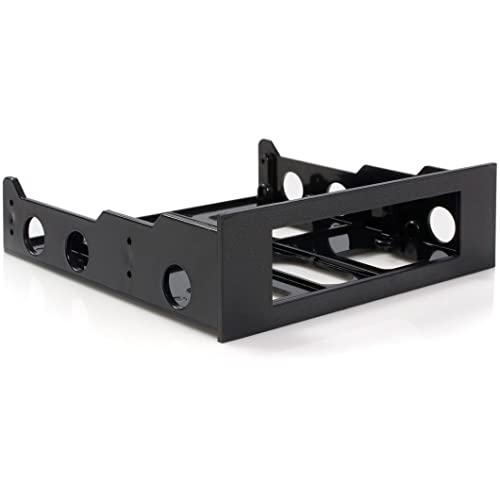
For tech enthusiasts and IT professionals looking to maximize their PC’s potential, the StarTech.com 3.5 to 5.25 Front Bay Mounting Bracket is an essential accessory. This versatile bracket lets you install one 3.5-inch device into a 5.25-inch front bay, perfect for floppy drives, USB hubs, media card readers, or fan controllers. Weighing just 2.39 ounces, it includes a mounting screw kit for easy installation. With a sleek black finish, it fits seamlessly into both retro and modern setups. Backed by a 2-year warranty and free lifetime technical support, it’s a reliable choice for any configuration challenge.
Best For: Tech enthusiasts and IT professionals seeking to install 3.5-inch devices in 5.25-inch front bays for enhanced system functionality.
Pros:
- Affordable and durable design, making it a cost-effective solution for mounting needs.
- Easy installation with included mounting screw kit, ideal for quick setups.
- Versatile compatibility with various devices such as floppy drives and USB hubs.
Cons:
- Some users report gaps around devices, which may affect aesthetics.
- Longer screws might be required for certain installations, potentially complicating setup.
- Not compatible with 3.5-inch hard drives, limiting device options.
EverCool Dual 5.25 in. Drive Bay to Triple 3.5 in. HDD Cooling Box

Transforming dual 5.25-inch drive bays into three 3.5-inch HDD slots makes the EverCool Dual 5.25 in. Drive Bay to Triple 3.5 in. HDD Cooling Box a smart choice for your PC. Weighing just 1.85 pounds and measuring 7 x 4 x 5 inches, it fits seamlessly into various setups. Its 8cm fan guarantees ideal cooling while minimizing noise, thanks to rubber dampers. Plus, demountable filters keep dust at bay. Installation is tool-less, making it easy to integrate into low-profile media cases. With solid reviews and a 4.4-star rating, this adapter enhances both storage and cooling for your system.
Best For: Users looking to maximize storage and cooling efficiency in their PC setups with limited drive bays.
Pros:
- Efficient Cooling: Equipped with an 8cm fan that ensures effective airflow while maintaining quiet operation.
- Easy Installation: Tool-less design allows for quick and straightforward integration into various media cases.
- Dust Management: Features demountable filters that effectively trap dust, enhancing longevity and performance of hard drives.
Cons:
- Limited Maximum Devices: Supports only up to three 3.5-inch drives, which may not be sufficient for users with extensive storage needs.
- Compatibility Concerns: While designed for low-profile media cases, it may not fit all case types, limiting usability.
- Warranty Information: Lack of detailed warranty information might leave customers uncertain about long-term support.
PASOW SSD HDD Mounting Bracket Adapter for PC
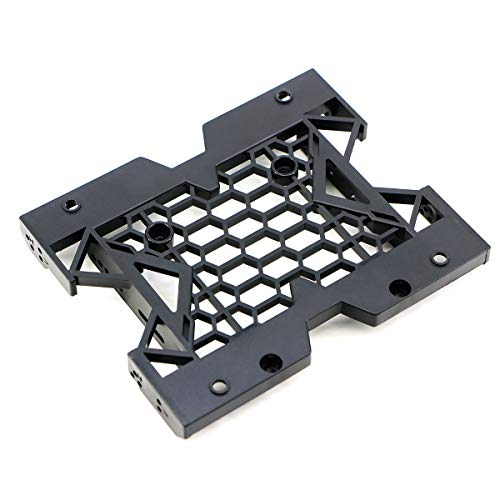
Need a reliable solution for mounting your 2.5-inch SSD or 3.5-inch HDD in a 5.25-inch drive bay? The PASOW SSD HDD Mounting Bracket Adapter is your answer. It easily converts your drive bay to accommodate either drive type, supporting IDE, SATA, or SAS drives. Made of durable ABS plastic, it installs quickly and allows you to mount a fan for enhanced cooling. Although you can’t install both drive types simultaneously, customer feedback praises its seamless installation and stable performance. With a compact design and lightweight build, this adapter is a fantastic choice for boosting your PC’s storage capabilities.
Best For: Users looking to effectively mount a 2.5-inch SSD or 3.5-inch HDD in a 5.25-inch drive bay for enhanced storage options.
Pros:
- Seamless installation: Quick and easy setup with stable fit for drives.
- Versatile compatibility: Supports both 2.5-inch and 3.5-inch drives, accommodating various connection types (IDE, SATA, SAS).
- Cooling enhancement: Allows for fan installation to improve machine speed and extend drive life.
Cons:
- Simultaneous mounting limitation: Cannot mount both a 2.5 SSD and a 3.5 HDD at the same time without modifications.
- Screw alignment issues: Some users report difficulties with screw alignment and fit during installation.
- Cooling space constraint: Mounting a fan occupies two 5.25-inch spaces, reducing available drive bay options.
ORICO 5.25 Trayless Hot Swap Mobile Rack for 3.5 inch SATA Drives

The ORICO 5.25 Trayless Hot Swap Mobile Rack is an ideal solution for anyone looking to easily manage and access 3.5 inch SATA drives in their PC. It fits snugly into a 5.25 inch drive bay and supports SATA III, delivering data transfer speeds up to 6 Gbps. With tool-free mounting, you can install your drives quickly and enjoy hot swapping without shutting down your system. The sturdy stainless steel design guarantees durability, while LED indicators keep you informed of activity. Overall, it’s a reliable choice for enhancing your storage capabilities with ease and efficiency.
Best For: Users who need a convenient and efficient way to manage multiple 3.5 inch SATA drives in a desktop PC.
Pros:
- Tool-Free Installation: Quick and easy drive installation without the need for additional tools.
- Hot Swappable: Allows users to swap drives without shutting down the computer, minimizing downtime.
- Durable Design: Made from stainless steel, providing superior heat dissipation and long-lasting use.
Cons:
- Flimsy Door Latch: Some users have reported issues with the door latch being less sturdy than expected.
- Untapped Screw Holes: There may be concerns regarding untapped screw holes that can affect ease of installation.
- Excessive Pressure from Leaf Springs: Some users find that the leaf springs can create excessive pressure, making drive removal difficult.
5.25 to 3.5/2.5 Bay Adapter for Computer Mounting

If you’re looking to expand your older PC’s storage without a complete upgrade, the 5.25 to 3.5/2.5 Bay Adapter is an excellent choice. This Tosuny adapter mounts easily into a standard 5.25-inch slot, accommodating up to seven drives, including 2.5-inch SSDs and 3.5-inch HDDs. Weighing just 5 ounces, it’s lightweight but made from brittle plastic, so handle it carefully. Users appreciate its affordability and capacity but note installation challenges and limited airflow. With some modifications, you can even add fans for better cooling. Overall, it’s a practical solution for enhancing your system’s storage capabilities.
Best For: Users looking to upgrade their older PCs with additional storage options without a complete system overhaul.
Pros:
- Affordable solution for adding multiple drives to older PCs.
- Can accommodate a mix of 2.5-inch SSDs and 3.5-inch HDDs.
- Lightweight design allows for easy installation in standard 5.25-inch slots.
Cons:
- Made from brittle plastic, requiring careful handling during installation.
- Limited airflow design may lead to overheating issues without modifications.
- Installation can be challenging due to screw types and mounting placements.
Hard Disk Drive Mounting Kit for 2.5/3.5 HDD/SSD to 5.25 Floppy Drive Bay

For users looking to maximize their PC’s storage potential, the Hard Disk Drive Mounting Kit for 2.5/3.5 HDD/SSD to 5.25 Floppy Drive Bay is an excellent choice. This versatile bracket supports up to six 2.5-inch drives or a combination of two 2.5-inch and one 3.5-inch drives, easily fitting into a standard 5.25 bay. Crafted from durable engineering plastics, it guarantees high-speed performance while resisting deformation. Installation is a breeze with included screws and a user manual. With an impressive rating of 4.7 out of 5 stars, it’s a reliable solution for expanding your system’s storage capabilities.
Best For: Users looking to expand their PC’s storage capabilities with a versatile and easy-to-install mounting solution for HDDs and SSDs.
Pros:
- Supports multiple drive configurations, accommodating up to six 2.5-inch drives or a combination of two 2.5-inch and one 3.5-inch drive.
- Made from durable engineering plastics, ensuring resistance to deformation and damage.
- Easy installation with included mounting screws and user manual.
Cons:
- Some users have expressed concerns about the sturdiness of the plastic material.
- Potential airflow issues reported for spinning hard drives due to the mounting design.
- Limited to standard 5.25 bays, which may not fit all PC cases.
StarTech.com 3.5in Universal Hard Drive Mounting Bracket Adapter

Looking to maximize your PC’s storage capabilities? The StarTech.com 3.5in Universal Hard Drive Mounting Bracket Adapter is the perfect solution. Designed to mount any 3.5-inch device into a 5.25-inch bay, this durable, all-metal bracket comes with four mounting screws for easy installation. Weighing just 2.36 ounces, it’s lightweight yet sturdy. Users appreciate its affordability and compatibility with various devices, although some note slight gaps that could let dust in. With a 4.5-star rating from over 5,200 customers, you can trust its performance. Plus, it includes a two-year warranty and lifetime technical support for peace of mind.
Best For: Users looking to install a 3.5-inch hard drive into a 5.25-inch bay in their desktop or personal computer.
Pros:
- Affordable and well-built with durable all-metal construction.
- Includes all necessary mounting screws for easy installation.
- Compatible with a variety of devices, making it a versatile option.
Cons:
- Some users report slight gaps that may allow dust ingress.
- Issues with screw length for certain drives, potentially affecting stability.
- Self-tapping screws may not withstand frequent removal and installation.
5.25 to 3.5/2.5 Bay Adapter for HDD/SSD
The 5.25 to 3.5/2.5 Bay Adapter is an ideal solution for users seeking to upgrade older PCs with additional storage options. Designed by Tosuny, it fits into a standard 5.25-inch slot and supports up to seven drives, accommodating both 7mm and 15mm 2.5-inch HDDs. While it’s praised for adding SSDs at a reasonable price, some users note its flimsy plastic construction and installation challenges. Enhancing airflow with modifications can improve performance. If you’re looking to maximize your storage without overhauling your system, this adapter offers a practical, albeit imperfect, solution for your needs.
Best For: Users looking to upgrade older PCs with additional storage options without a complete system overhaul.
Pros:
- Effective for adding multiple SSDs to older PCs at a reasonable price.
- Can accommodate both 7mm and 15mm 2.5-inch drives, offering flexibility.
- Users can modify the design for better airflow with careful adjustments.
Cons:
- Flimsy plastic construction may feel brittle and requires careful handling.
- Installation can be challenging due to unclear mounting placements and screw types.
- Lack of airflow vents in the design could hinder drive performance without modifications.
Factors to Consider When Choosing 5.25 Inch Drive Bay Adapters for PC
When you’re choosing a 5.25 inch drive bay adapter, you’ll want to take into account several key factors. Think about compatibility with your devices, how easy it is to install, and the quality of the materials used. Don’t forget to check for cooling features and the maximum number of drives it can support to make sure it meets your needs.
Compatibility With Devices
To guarantee your 5.25 inch drive bay adapter meets your needs, it’s important to check its compatibility with the devices you plan to install. Make sure the adapter explicitly states compatibility with your specific device types, like 3.5-inch hard drives or 2.5-inch SSDs. Don’t overlook the maximum supported drive thickness, as some adapters only accommodate certain ranges, such as 7mm to 15mm for 2.5-inch drives. Also, verify how many devices the adapter can support simultaneously; some can fit multiple drives, while others limit you to one or two. Finally, consider the connection interface, ensuring it matches your existing hardware, whether that’s SATA, IDE, or SAS drives.
Installation Ease
Choosing a 5.25-inch drive bay adapter that’s easy to install can save you time and frustration during setup. Look for adapters that come with all necessary mounting screws and tools, as this can streamline the process markedly. Tool-free mounting features are a great option, allowing you to secure your drives quickly without needing extra tools. Make sure the adapter is compatible with the drive sizes you plan to use, since some models only support specific form factors. User reviews can provide valuable insights into installation ease and highlight potential challenges. Finally, opt for adapters with clear instructions and diagrams, which can greatly enhance your installation experience, especially if you’re not very experienced.
Material Quality
Installation ease plays a considerable role in your overall experience with 5.25-inch drive bay adapters, but material quality shouldn’t be overlooked. The durability of your adapter can vary considerably depending on the materials used. Sturdy metal constructions, like aluminum alloy, not only enhance longevity but also improve heat dissipation, protecting your drives from overheating. In contrast, lightweight plastics may bend or crack under stress, compromising their effectiveness. Engineering plastics are lightweight and resistant to deformation, but they require careful handling. Additionally, consider the aesthetic appeal of the material finish, as it can influence how well the adapter complements your existing hardware. The right choice will enhance not just performance but also the overall look of your PC setup.
Cooling Features
Cooling features play an essential role in ensuring your 5.25-inch drive bay adapters perform at their best. They help maintain ideal operating temperatures, preventing overheating and extending the lifespan of your drives. Look for adapters with built-in fans, like dual 40mm fans, to enhance airflow and effectively dissipate heat. Some models even come with dust filters for easy cleaning, ensuring unobstructed airflow and improved cooling performance. Effective designs may feature separate compartments to minimize noise and vibrations while maximizing airflow around the drives. Additionally, consider the material of the adapter—aluminum alloy options generally provide better heat dissipation than plastic alternatives, so you can keep your drives running smoothly and efficiently.
Maximum Supported Drives
When it comes to 5.25-inch drive bay adapters, the maximum number of supported drives can greatly influence your decision. Some adapters can hold up to six SSDs, while others may accommodate a mix of SSDs and a 3.5-inch HDD. You’ll find configurations that support anywhere from one to eight 2.5-inch drives, depending on the design. Keep in mind that the thickness of the drives matters; some adapters only support specific thicknesses like 7mm or 15mm. Installation type is also essential—tool-less designs often simplify adding multiple drives. Always check product specifications to verify compatibility with your desired number and types of drives, whether they’re SATA, IDE, or SAS. Make your choice wisely to maximize your storage potential.
Design and Aesthetics
The design and aesthetics of a 5.25-inch drive bay adapter play an essential role in how your PC looks and feels. When choosing one, consider materials like aluminum or plastic, as they can enhance or detract from your computer’s overall appeal. You’ll want an adapter that matches the sleek, modern appearance of your case, paying attention to color and finish. Features such as LED indicators can add a functional flair, making your setup more visually engaging. Make sure the adapter’s form factor aligns with your case design for seamless integration. Finally, look for customization options that allow you to modify the adapter for better airflow or to match specific color schemes, personalizing your build beautifully.
Price and Value
Choosing the right 5.25-inch drive bay adapter involves balancing price and value to guarantee you get the best fit for your needs. Basic models start at around $10, while advanced options can exceed $50. Consider how many drives you want to install; many adapters maximize storage in compact spaces, offering excellent value. Look for products rated above 4 stars, as high customer satisfaction typically indicates a good balance between cost and performance. If convenience is key, adapters with features like hot swapping and tool-free installation might cost more, but they save you time and effort. Ultimately, weigh the features you need against your budget to find the perfect adapter for your setup.
Warranty and Support
Selecting a 5.25-inch drive bay adapter isn’t just about features and price; warranty and support play crucial roles in your decision. Many adapters come with warranties ranging from 1 to 2 years, protecting you against defects or malfunctions. Be sure to check the warranty details in the product description for complete coverage information.
Additionally, some manufacturers offer free lifetime technical support, which can be invaluable if you’re facing installation or troubleshooting issues. Extended return policies are also worth considering, as they often allow full refunds for damaged or defective products. Finally, having access to online resources and responsive customer service can greatly enhance your experience, especially if you’re not familiar with installation processes.