When it comes to color accuracy, having the right monitor can make all the difference in your work. You might find that the best Adobe RGB coverage monitors help you achieve vibrant, true-to-life visuals. With options like the ASUS ProArt PA24US and the BenQ SW272Q, there’s a lot to evaluate. Each model offers distinct features tailored to professionals, but which one truly meets your needs? Let’s explore the top contenders.
ASUS ProArt Display 24” 4K Professional Monitor (PA24US)

The ASUS ProArt Display 24” 4K Professional Monitor (PA24US) is an exceptional choice for creative professionals who demand precise color accuracy in their work. With a stunning 4K UHD resolution and 99% Adobe RGB coverage, you’ll see your projects in vivid detail. The IPS panel technology guarantees wide viewing angles and impressive color consistency. Plus, it features a built-in motorized colorimeter for self-calibration, so you can maintain accuracy effortlessly. You’ll appreciate the connectivity options, including USB-C and 12G-SDI input. With a peak brightness of 600 nits and TÜV Flicker-free technology, it’s designed to elevate your creative experience.
Best For: Creative professionals seeking precise color accuracy and high-resolution displays for graphic design, video editing, and photography.
Pros:
- Excellent color coverage with 99% Adobe RGB and 95% DCI-P3, ensuring vibrant and accurate color reproduction.
- Built-in motorized colorimeter for easy self-calibration to maintain color accuracy over time.
- Multiple connectivity options including USB-C and 12G-SDI input, catering to various professional setups.
Cons:
- Customer reviews indicate a mixed performance with an average rating of only 3.1 out of 5 stars.
- Limited contrast ratio of 300:1 may not meet the expectations for deeper blacks in some viewing conditions.
- The refresh rate of 60 Hz may not be sufficient for fast-paced gaming or high-frame-rate video content.
BenQ SW272Q 27-inch 2K Photographer Monitor

For photographers seeking unparalleled color accuracy, the BenQ SW272Q 27-inch 2K Photographer Monitor stands out with its impressive 99% Adobe RGB coverage. With a 2K QHD resolution of 2560 x 1440 pixels, you’ll experience breathtaking visuals enhanced by a Nano Matte Panel that mimics paper texture. This monitor supports 1.07 billion colors, ensuring your images look vibrant and true to life. Its ergonomic design allows for height, pivot, and swivel adjustments, making it comfortable for long editing sessions. Plus, with a three-year warranty, you can trust this reliable tool to elevate your creative work.
Best For: Photographers and creative professionals seeking a high-quality monitor with exceptional color accuracy and immersive visual performance.
Pros:
- Exceptional color accuracy with 99% Adobe RGB and support for 1.07 billion colors.
- Ergonomic design with adjustable height, pivot, and swivel for comfortable viewing.
- 3-year manufacturer warranty provides peace of mind for long-term use.
Cons:
- 27-inch screen size may be limiting for those who prefer larger displays.
- 300 nits brightness may not be sufficient for bright environments.
- Higher price point compared to standard monitors without specialized features.
BenQ SW242Q 24-inch 2K Photographer Monitor

With its impressive 99% Adobe RGB coverage, the BenQ SW242Q 24-inch 2K Photographer Monitor stands out as an exceptional choice for photographers and graphic designers who demand precise color accuracy. Featuring a QHD resolution of 2560 x 1440 pixels, this LCD display delivers stunning visuals with a 10-bit color depth and a Delta E of ≤ 1.5. You’ll appreciate the 178-degree viewing angle and 300 nits brightness, ensuring vibrant colors from any position. Connectivity options like USB-C and Thunderbolt 3 make it versatile, while BenQ’s AQCOLOR technology guarantees true-to-life hues, enhancing your creative workflow.
Best For: Photographers and graphic designers seeking precise color accuracy and high-resolution displays for their creative work.
Pros:
- 99% Adobe RGB coverage ensures vibrant and true-to-life colors for professional editing.
- Versatile connectivity options including USB-C and Thunderbolt 3 enhance compatibility with various devices.
- Hardware calibration support with Palette Master Ultimate software allows for easy and accurate color adjustments.
Cons:
- Weight of 7.8 kg may make it less portable for users needing a monitor on the go.
- Shading hood sold separately could add to the overall cost for those wanting to minimize glare.
- Limited refresh rate of 60 Hz may not satisfy gamers or those needing high frame rates.
INNOCN 32″ RGB-OLED 4K Monitor
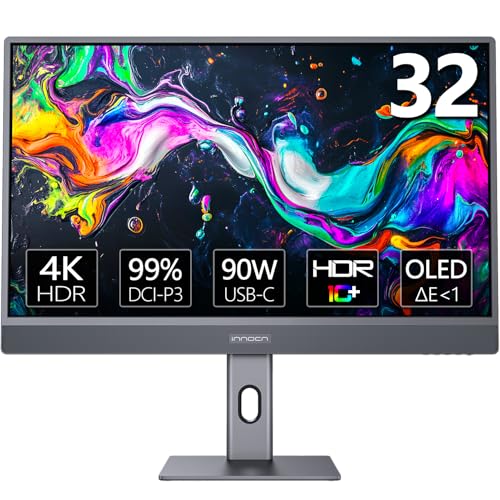
Designed for professionals who demand exceptional color accuracy, the INNOCN 32″ RGB-OLED 4K Monitor stands out with its stunning 99% DCI-P3 and sRGB color gamut coverage. With a true 4K resolution of 3840×2160 and 10-bit color depth, you’ll experience breathtaking image quality. Its ergonomic design allows for height adjustments and pivoting, ensuring comfort during long editing sessions. Plus, with USB Type-C connectivity and HDR10 support, you can seamlessly connect your MacBook or PC while enjoying enhanced color management. Ideal for photo/video editing and gaming, this monitor is a powerhouse for any creative workspace.
Best For: Professionals in photo and video editing, as well as gamers seeking exceptional color accuracy and image quality.
Pros:
- True 4K OLED display with 10-bit color depth for stunning image quality.
- Ergonomic design featuring height and pivot adjustments for comfort during long usage.
- Robust connectivity options including USB Type-C and HDMI for seamless device integration.
Cons:
- Limited refresh rate of 60 Hz may not meet the demands of high-end gaming.
- Relatively high price point compared to standard monitors.
- Customer reviews indicate mixed satisfaction, with an average rating of 3.9 out of 5 stars.
Factors to Consider When Choosing Adobe RGB Coverage Monitors for Pros
When choosing an Adobe RGB coverage monitor, you need to take into account several key factors. Think about your color accuracy requirements, screen size, and the type of panel technology that suits your work. Also, don’t forget to evaluate connectivity options and ergonomic design features for a comfortable setup.
Color Accuracy Requirements
To achieve the best results in color-critical work, it’s crucial to contemplate several key factors when selecting a monitor with Adobe RGB coverage. First, look for monitors with a color accuracy rating of ΔE < 1. This rating guarantees exceptional precision in color reproduction, essential for tasks requiring accurate color matching. Aim for monitors that cover at least 99% of the Adobe RGB spectrum, which provides a broader color gamut for vibrant and saturated colors. A 16-bit 3D LUT enhances consistency across displays, ensuring on-screen colors match printed outputs. Additionally, choose monitors with hardware calibration and specialized software to maintain color fidelity over time. Finally, consider those supporting HDR formats to improve color depth and contrast for an enhanced visual experience.
Screen Size Considerations
Choosing the right screen size for your Adobe RGB coverage monitor can greatly impact your workflow and overall experience. Larger monitors, like 27 inches, often provide an immersive viewing experience, enhancing detail visibility vital for color-critical work. However, if you’re tight on space, a 24-inch monitor can still deliver excellent color accuracy and sufficient detail for professional use. A bigger screen also makes multitasking easier, allowing you to view multiple applications side-by-side without straining your eyes. Keep in mind that larger screens may require higher resolutions, like 4K, to maintain sharpness. Also, consider ergonomics; guarantee you have enough desk space and the right sitting distance to avoid neck strain and guarantee comfortable viewing angles.
Panel Technology Types
Panel technology plays an essential role in determining the performance of your Adobe RGB coverage monitor. If you prioritize color accuracy, consider IPS (In-Plane Switching) panels for their wide viewing angles and superior color reproduction, perfect for graphic design and photography. Alternatively, OLED (Organic Light Emitting Diode) panels deliver vibrant colors and deep blacks, enhancing your visual experience for creative work. LCD (Liquid Crystal Display) panels can vary, so look for models featuring advanced backlighting technologies like Nano Matte for reduced glare. Additionally, keep an eye on color depth; a 10-bit panel offers over a billion color variations, vital for displaying the full Adobe RGB gamut. Finally, balance refresh rates and response times based on your specific needs.
Connectivity Options Available
Connectivity options are vital when selecting an Adobe RGB coverage monitor for professional use. You’ll want to take into account the number and types of ports available, including HDMI, USB-C, and DisplayPort, to guarantee compatibility with your devices and peripherals. Monitors with USB-C can provide both data transfer and power delivery, making them ideal for laptop users. Additionally, having multiple USB ports, like USB 2.0 and USB 3.0, can streamline your workflow by connecting various peripherals at once. If you’re working with professional video equipment, look for component outputs. For high-resolution video transmission, support for high-bandwidth connections, such as 12G-SDI input, is essential, especially for demanding editing and content creation tasks.
Ergonomic Design Features
When working long hours on color-critical projects, the ergonomic design of your monitor can greatly impact your comfort and productivity. Look for features like height, pivot, and swivel adjustments, which help you find the perfect viewing angle and reduce neck and eye strain. Tilt options are also essential, allowing you to adapt the screen to your seating position and preferences. A monitor with a built-in stand that promotes proper posture can alleviate back pain during extended sessions. Consider models with anti-glare coatings and low blue light technology to enhance eye comfort and minimize fatigue. Finally, adjustable stands and VESA mount compatibility give you the flexibility to create a personalized, comfortable workspace setup that suits your needs.