Choosing an AI workstation PC for local LLM workloads is mostly about memory capacity, sustained performance, and software compatibility. The right system can keep models responsive without leaning on the cloud.
Below, we focus on compact desktops, higher-memory mini PCs, and GPU-ready workstations that make sense for serious local inference in 2026.
Best 7 AI Workstation PC for Local LLM Picks for 2026
Best for Local AI Labs
ASUS Ascent GX10 Personal AI Supercomputer

- GB10 Grace Blackwell chip for local AI prototyping
- 128GB unified memory for LLM and RAG workflows
- 2TB NVMe storage for models, datasets, and containers
Best For: AI developers and small labs needing a compact local LLM and RAG workstation.
Best for Local LLMs
OneXPlayer Super X Ryzen AI Max+395

- Up to 128GB unified memory for larger local models
- Ryzen AI Max+395 and Radeon 8060S for strong AI performance
- Dual SSD slots add storage flexibility for model workflows
Best For: Developers and power users running local LLMs who want a portable workstation-class machine.
Best Linux Mini PC
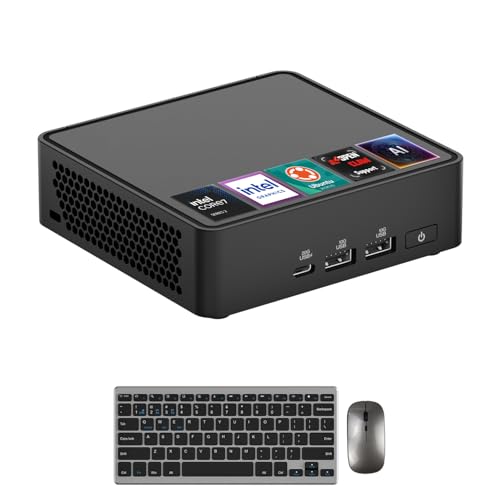
- 64GB DDR5 and 2TB SSD for multitasking and local project storage
- Ubuntu 24.04 with OpenClaw support for developer-friendly AI workflows
- Thunderbolt 4, WiFi 7, and dual HDMI 2.1 for flexible connectivity
Best For: Linux-first developers and researchers who want a compact workstation for local AI experimentation and daily productivity.
Best for Local 70B Inference

- Full-size GPU support for local 70B LLM inference
- 132TB hybrid ZFS storage with ECC integrity
- Dual 10GbE and USB4 for fast collaboration
Best For: Developers and small teams building a private on-prem AI workstation for local LLMs.
Best Compact AI Workstation
Corsair AI Workstation 300 Desktop PC

- 4.4L compact chassis fits tight desks and studios
- Unified LPDDR5X memory is well suited to local LLMs
- Ryzen AI Max platform adds on-device AI acceleration
Best For: Developers and creators who want a compact desktop for local LLMs and AI workflows.
Best for Dense Local AI Workloads
MINISFORUM AI X1 Pro-370 Mini PC

- Ryzen AI 9 HX 370 with 12 cores, 24 threads, and up to 50 TOPS NPU
- 64GB DDR5 RAM plus 1TB PCIe 4.0 SSD for strong local AI readiness
- OCuLink, dual 2.5G LAN, Wi-Fi 7, and four display outputs
Best For: Power users who want a compact desktop for local LLMs, multitasking, and future GPU expansion.
Best for Local LLM Power Users

- 128GB unified memory and 96GB VRAM allocation for larger local models
- Ryzen AI Max+ 395 with 126 TOPS total AI compute
- Compact 2L chassis with USB4, Wi-Fi 7, and 8K display support
Best For: Developers and AI power users who want a compact workstation for local LLMs and creative workloads.
Best for Local AI Labs – ASUS Ascent GX10 Personal AI Supercomputer
If you want an ai workstation pc for local llm development rather than a basic mini PC, the ASUS Ascent GX10 is built for serious on-device AI work. Its compact desktop design, big unified memory, and NVIDIA software stack make it a practical choice for local inference, RAG prototyping, and model testing in a lab or workstation setup.
Best For: AI developers, researchers, and small labs that need a compact local platform for LLM workflows, RAG experiments, and AI prototyping.
Pros:
- GB10 Grace Blackwell Superchip targets demanding local AI workloads with up to 1 PFLOP FP4 performance
- 128GB unified memory is well suited for large-model testing, multimodal workflows, and local inference
- 2TB NVMe SSD gives plenty of room for models, datasets, containers, checkpoints, and vector databases
- DGX OS plus Wi-Fi 7, 10GbE, and ConnectX-7 support modern AI lab workflows and fast connectivity
Cons:
- Premium platform likely overkill if you only need a general-purpose desktop
- Storage is strong, but power users may still want external or networked capacity for larger project libraries
As an ai workstation pc for local llm work, the GX10 stands out for developers who care more about AI-ready hardware and software integration than traditional PC features. It is a focused machine for experimentation, iteration, and local model development.
Best for Local LLMs – OneXPlayer Super X Ryzen AI Max+395
If you want an ai workstation pc for local llm use in a highly portable form, the OneXPlayer Super X is built around unusually large unified memory, a capable Ryzen AI Max+395 processor, and Radeon 8060S graphics. It aims to bridge gaming-laptop mobility and desktop-like AI headroom, so you can run bigger models locally without immediately hitting VRAM limits.
Best For: Developers, creators, and power users who need a compact machine for local LLM inference, AI experimentation, and heavy multitasking.
Pros:
- Up to 128GB LPDDR5X unified memory and dynamic VRAM allocation make it well suited to large local models.
- Ryzen AI Max+395 plus Radeon 8060S delivers strong all-around performance for AI, rendering, and gaming.
- Dual SSD slots and broad I/O give it more flexibility for model storage and workflow expansion.
- 14-inch AMOLED display and battery make it more portable than a traditional desktop workstation.
Cons:
- Premium pricing is likely, especially for the 64GB/1TB configuration.
- Still a laptop-format system, so sustained thermals and upgrade flexibility trail a full desktop tower.
- Overkill if you only need light chatbot use or occasional AI tasks.
For buyers who want an ai workstation pc for local llm work without committing to a full desktop, this is one of the most compelling portable options thanks to its memory capacity and on-device AI focus.
Best Linux Mini PC – ASUS NUC 15 Pro Core 7 240H
If you want an ai workstation pc for local llm work in a compact, Linux-first form factor, the ASUS NUC 15 Pro is a strong fit. It pairs an Intel Core 7 240H, 64GB of DDR5 memory, and a 2TB SSD with Ubuntu 24.04, so it’s ready for coding, containers, virtualization, and lighter local AI workflows right out of the box.
Best For: Developers, researchers, and power users who want a small Ubuntu mini PC for local AI experimentation, dev tooling, and everyday workstation tasks.
Pros:
- 64GB DDR5 and a 2TB SSD provide a solid base for multitasking and local model files.
- Ubuntu Linux 24.04 and OpenClaw support make it appealing for developer-focused workflows.
- Thunderbolt 4, WiFi 7, and dual HDMI 2.1 add fast I/O and flexible multi-display support.
- Tool-free access makes future RAM and storage upgrades easier.
Cons:
- Integrated Intel graphics limit it for heavy GPU-based LLM inference.
- Small chassis cooling is good for a mini PC, but it’s not built for sustained high-end AI acceleration.
For buyers who mainly need a compact Linux workstation rather than a discrete-GPU monster, this is a practical ai workstation pc for local llm prototyping, development, and general productivity. It’s more about fast CPU work, memory capacity, and connectivity than raw model throughput.
Best for Local 70B Inference – NIMO Nexus Edge AI Server
If you want an ai workstation pc for local llm work that prioritizes privacy, expansion, and storage over compact size, the NIMO Nexus Edge AI Server is built for exactly that job. Its Ryzen 7 PRO 8845HS platform, full-size GPU support, and offline-ready design make it a strong fit for developers testing models locally and creators managing large datasets.
Best For: Developers, power users, and small teams who want a private on-prem AI node for local LLM inference, large-file storage, and fast collaboration.
Pros:
- Supports a full-size GPU for serious local AI workloads, including 70B-class inference.
- Massive 132TB hybrid storage with ZFS and ECC support for data integrity.
- Dual 10GbE plus USB4 deliver fast networking and workflow flexibility.
- Open-source HarborOS and offline automation emphasize privacy and control.
Cons:
- Diskless configuration means you must budget for your own drives and GPU.
- More server-like than desktop-like, so it is not a plug-and-play consumer PC.
- Its size, power, and feature set may be overkill for lighter AI tasks.
Overall, this is a purpose-built ai workstation pc for local llm users who care about model size, storage integrity, and keeping data fully on-premises. If your workflow depends on privacy and expansion rather than portability, it stands out as a highly capable local AI node.
Best Compact AI Workstation – Corsair AI Workstation 300 Desktop PC
The Corsair AI Workstation 300 is a strong fit if you want an ai workstation pc for local llm use in a very small footprint. Its unified LPDDR5X memory and Ryzen AI Max platform are aimed at AI workloads that benefit from high bandwidth and shared memory, while the 4.4L chassis makes it easier to place on a desk or in a tight studio.
Best For: Developers, creators, and power users who want a compact desktop for local LLMs, AI prototyping, and mixed creative work.
Pros:
- Compact 4.4L design saves a lot of desk space
- Unified memory architecture is well suited to local LLM and AI workflows
- Ryzen AI Max platform includes strong NPU acceleration for on-device tasks
- Fast LPDDR5X memory and SSD help keep the system responsive
Cons:
- Integrated graphics and shared memory are not a substitute for a discrete GPU workstation
- High-end configuration choices may push the price up quickly
- Compact cooling and upgrade flexibility are more limited than in a full tower
This is a practical choice if you want an ai workstation pc for local llm work without committing to a large tower. It leans more toward efficient, high-bandwidth AI processing than raw expandability, which makes it especially appealing for developers who value portability and a cleaner setup.
Best for Dense Local AI Workloads – MINISFORUM AI X1 Pro-370 Mini PC
If you want an ai workstation pc for local llm use that still fits on a desk, the MINISFORUM AI X1 Pro-370 is a compact but unusually capable option. Its Ryzen AI 9 HX 370 combines a 12-core/24-thread CPU, a strong NPU, and Radeon 890M graphics, making it a practical choice for running local models, multitasking, and light content creation without jumping to a full tower.
Best For: Developers, power users, and creators who want a small desktop with serious CPU, NPU, and memory headroom for local AI tasks.
Pros:
- Ryzen AI 9 HX 370 offers 12 cores, 24 threads, and up to 50 TOPS NPU performance.
- 64GB DDR5 RAM and a 1TB PCIe 4.0 SSD provide a strong starting point for local models and large projects.
- Dual 2.5G LAN, Wi-Fi 7, and OCuLink make it flexible for fast networking and GPU expansion.
- Four display outputs support multi-monitor productivity setups.
Cons:
- Not a true desktop-class workstation, so very large LLMs will still benefit from an external GPU.
- Expandable, but memory and storage still trail bigger tower systems at the high end.
- OCuLink adds flexibility, though it is not hot-swappable.
For buyers prioritizing a compact ai workstation pc for local llm work, this model stands out because it pairs a modern AI-focused processor with generous RAM and expansion options. It is a smart fit when you want a small system that can handle local inference, everyday productivity, and future GPU scaling.
Best for Local LLM Power Users – GEEKOM A9 Mega AI Workstation
If you want an ai workstation pc for local llm inference in a tiny footprint, the GEEKOM A9 Mega is one of the most aggressive specs-on-paper options available. Its Ryzen AI Max+ 395 platform, 128GB of unified memory, and Radeon 8060S graphics make it a serious fit for large model testing, multitasking, and creator workloads without moving to a full tower.
Best For: Developers, AI builders, and power users who want compact local LLM capacity, high memory headroom, and workstation-level performance.
Pros:
- 128GB LPDDR5X with a large 96GB VRAM allocation is well suited to heavier local models.
- Ryzen AI Max+ 395 and 126 TOPS total AI compute give it strong on-device acceleration.
- Compact 2L design with dual USB4, dual 2.5GbE, Wi-Fi 7, and 8K multi-display support.
- Includes 2TB Gen4 SSD and a 3-year warranty for longer-term use.
Cons:
- Premium pricing and limited-supply positioning may push it beyond casual buyers.
- Not the easiest choice if you want a simple, mainstream desktop upgrade path.
- Performance is excellent for a mini PC, but still depends on thermal and memory constraints versus full-size workstations.
For buyers prioritizing a compact ai workstation pc for local llm tasks, this model stands out for memory capacity and integrated AI hardware more than raw expandability. It makes the most sense if you value dense performance in a small chassis and are comfortable paying for cutting-edge silicon.
How We Picked the Best AI Workstation PC for Local LLM
For an AI Workstation PC for Local LLM use, we prioritized unified or system memory capacity, GPU availability, storage speed, and cooling designed for long inference sessions. We also looked at port selection, OS flexibility, and whether the system can handle larger models without constant swapping or throttling.
Quick Comparison
As you compare the seven picks, think in three tiers: compact systems for smaller models and general experimentation, higher-memory machines for smoother multitasking, and full workstation-class options for heavier local inference. The best choice depends on whether you value portability, silence, expandability, or raw throughput.
Key Buying Factors for an AI Workstation PC for Local LLM
Memory First
Local LLM performance is often limited by memory before CPU speed. If you plan to run larger quantized models or keep multiple tools open at once, aim for 64GB as a practical baseline and 128GB when you want more headroom.
GPU and Unified Memory
Some systems rely on integrated graphics with large shared memory, while others support discrete GPUs or high-bandwidth unified memory. For local LLM inference, the best option depends on your software stack: some users benefit more from a strong iGPU and large memory pool, while others need discrete GPU acceleration for compatible frameworks.
Storage and Thermals
A fast NVMe SSD helps with model loading, caching, and dataset work. Just as important is cooling. Sustained inference can expose weak thermal designs, so look for systems built to hold performance under load rather than peak only.
OS and Connectivity
Linux support is a major advantage for many local AI workflows, but Windows compatibility may matter if you also game or use creator apps. Multiple high-speed USB4 ports, fast networking, and dual display outputs are useful if the workstation doubles as a daily driver.
Who Should Buy Which AI Workstation PC for Local LLM?
If you want the most straightforward local model experience, choose a high-memory desktop or supercomputer-style system with generous unified memory. If portability matters, a powerful AI laptop can be a flexible compromise, though it usually trades some sustained performance for mobility.
For users building a dedicated home lab or always-on inference box, a mini PC with good Linux support can be ideal. If you expect to experiment with larger models, storage-heavy workflows, or future GPU upgrades, prioritize an expandable workstation with stronger cooling and room to grow. The best AI Workstation PC for Local LLM is the one that matches your model size, software stack, and upgrade plans—not just the highest headline specs.