When it comes to streaming on PC, sound quality can make or break your content. Choosing the right audio mixer is essential for creating a professional sound that keeps your audience engaged. With numerous options available, you might wonder which mixers stand out regarding features and performance. Let’s explore the top ten audio mixers that can elevate your streaming experience and help you connect more effectively with your viewers.
FIFINE Gaming Audio Mixer with XLR Microphone Interface

If you’re a budding streamer or podcaster looking for an affordable yet feature-rich audio mixer, the FIFINE Gaming Audio Mixer (Model: AmpliGame SC3) might be your ideal choice. Weighing just 1.1 pounds and powered by USB-C, it offers a single XLR mic input with 48V phantom power for crystal-clear audio. With four independent channels, you can easily control your microphone, line in, and headphones. Plus, customizable sound effects and RGB lighting add flair to your broadcasts. Users appreciate its straightforward setup and sound quality, making it a solid budget-friendly option for anyone starting in the streaming world.
Best For: Streamers and podcasters seeking an affordable, user-friendly audio mixer with versatile features.
Pros:
- Supports one XLR microphone with 48V phantom power for enhanced audio quality.
- Four independent channels allow for precise audio adjustments and control.
- Customizable sound effects and vibrant RGB lighting to enhance live streaming aesthetics.
Cons:
- Some users reported static during playback, affecting audio clarity.
- Non-linear volume control can be challenging to manage for precise adjustments.
- Quality of customizable sound effects may not meet everyone’s expectations.
Elgato Stream Deck + Audio Mixer and Production Console for Content Creators

The Elgato Stream Deck + stands out as an essential tool for content creators, streamers, and gamers who need seamless control over their audio and production settings. With eight customizable LCD keys and four multifunction dials, you can tailor your setup to your exact needs. The LCD touch panel allows for easy navigation, while smart profiles automatically switch configurations for different applications. You’ll love the powerful plugins compatible with popular platforms like OBS, Twitch, and Discord. Despite occasional software glitches, its compact design and solid build quality make it a worthwhile investment for enhancing your streaming experience.
Best For: The Elgato Stream Deck + is best for content creators, streamers, and gamers seeking an intuitive and customizable audio mixing and production console.
Pros:
- Ease of use and setup.
- Customization options with icons and GIFs.
- Solid build quality and compact size suitable for small setups.
Cons:
- Occasional software glitches.
- Price may be high for beginners.
- Limited flexibility in knob functions.
Fifine Gaming Audio Mixer for Surround Sound Headphones

Gamers seeking to enhance their audio experience will find the Fifine Gaming Audio Mixer (Ampligame SC8) an excellent choice. This 7.1 surround sound headphone amp delivers immersive audio with three customizable EQ modes and a voice changer for added fun. You’ll love the mic clarity provided by the 48V phantom power XLR port, ensuring your voice is crystal clear. With USB plug-and-play setup, it’s easy to connect to your PC, PS4, or Switch. Plus, the RGB lighting syncs with audio peaks, adding a cool visual element. Enjoy a seamless gaming experience with this compact, user-friendly mixer.
Best For: Gamers looking for an immersive audio experience with customizable features and a fun voice changer.
Pros:
- High mic clarity with 48V phantom power and low distortion for clear communication.
- Easy USB plug-and-play setup compatible with multiple platforms (PC, PS4, Switch).
- RGB lighting that syncs with audio peaks enhances the visual appeal during streaming.
Cons:
- No companion app available for creating custom EQ profiles.
- Some voice changer settings may not be effective or appealing to all users.
- Limited compatibility with certain microphones due to non-standard USB ports.
PUPGSIS Gaming Audio Mixer for PC/Podcast/Streaming

For streamers and podcasters seeking exceptional audio quality, the PUPGSIS Gaming Audio Mixer stands out with its professional preamplifier and 48V phantom power. You’ll enjoy clear audio output that enhances your streaming experience, making you more popular among your audience. Adjust volume levels easily during intense gaming thanks to its flexible controls. Experiment with six voice-changing modes and trigger favorite sound effects using four customizable soundpads. Plus, the simple interface allows independent control over multiple channels. With zero latency monitoring and seamless compatibility with various platforms, this mixer is perfect for elevating your audio game effortlessly.
Best For: Streamers and podcasters looking for high-quality audio solutions with versatile features to enhance their content.
Pros:
- Professional audio quality with preamplifier and phantom power ensures clear sound output.
- User-friendly interface provides independent control over multiple channels for seamless operation.
- Versatile voice customization options and sound effects enhance creativity during streams and recordings.
Cons:
- Limited portability due to design, making it less ideal for on-the-go content creation.
- Learning curve may be required for users unfamiliar with audio mixing equipment.
- Price point could be higher compared to basic mixers, potentially deterring budget-conscious buyers.
MAONO Gaming Audio Mixer (MaonoCaster G1 NEO)

Designed with streamers and content creators in mind, the MAONO Gaming Audio Mixer (MaonoCaster G1 NEO) stands out for its exceptional sound performance and user-friendly features. Its built-in Pro-preamp and 48V phantom power optimize your XLR microphone, ensuring clear audio for gaming and streaming. With customizable voice effects and sound pads, you can engage your audience like never before. The intuitive interface keeps distractions at bay, while Bluetooth connectivity enhances your live interactions. Plus, it’s compatible with various platforms, making it a versatile choice. Just plug it in, and you’re set to elevate your audio experience!
Best For: Streamers, gamers, and content creators seeking high-quality audio enhancement and customizable sound effects for their live interactions.
Pros:
- Pro-preamp and 48V phantom power optimize XLR microphone performance for clear audio.
- Customizable voice effects and sound pads enhance audience engagement and creativity.
- User-friendly interface and Bluetooth connectivity streamline the streaming experience.
Cons:
- Not compatible with USB microphones or Xbox.
- Limited to specific platforms like OBS, Discord, and Twitch.
- Requires reading the manual for optimal setup and usage.
Podcast Microphone Bundle with Live Sound Card Audio Mixer
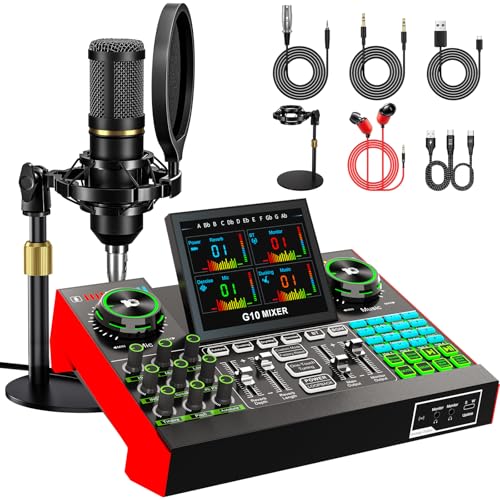
Podcasters and content creators seeking an all-encompassing audio solution will find the Podcast Microphone Bundle with Live Sound Card Audio Mixer to be the perfect fit. This bundle includes a 3.5mm condenser microphone, stand, and G10 Sound Board, making it ideal for mixing, recording, and streaming. Its simple plug-and-play setup works seamlessly with PCs, smartphones, and more. With advanced noise reduction and customizable sound settings, you’ll enjoy crystal-clear audio. Plus, the built-in effects and voice changer add a fun twist to your content. Enjoy an improved audio experience with this versatile, user-friendly bundle that has garnered positive reviews from users.
Best For: Podcasters, gamers, streamers, and content creators looking for a comprehensive and user-friendly audio solution.
Pros:
- Easy plug-and-play setup compatible with various devices including PCs, smartphones, and laptops.
- Advanced noise reduction technology ensures clear audio quality for recordings and live streaming.
- Customizable sound settings and built-in effects add creativity and engagement to content.
Cons:
- Some users have reported technical issues and concerns about the durability of the equipment.
- Limited reviews indicate potential challenges for advanced users seeking higher-end features.
- The microphone’s 3.5mm connection may not be ideal for all recording setups, limiting versatility.
BEACN Mix Create Audio Mixer for PC & Mac

Whether you’re a content creator, gamer, or streamer, the BEACN Mix Create audio mixer streamlines your audio management like never before. This mixer works seamlessly with PC and Mac, offering advanced control over multiple audio sources. With its knob paging feature and smooth encoders, you can easily manage volume and mute options. The 5” full-color display makes maneuvering audio settings intuitive, while the dedicated submix button allows quick adjustments for peak streaming. Plus, it supports unlimited audio sources, ensuring your setup remains versatile and high-quality, enhancing your overall streaming experience. Get ready to elevate your sound game!
Best For: Content creators, gamers, and podcasters looking for an efficient audio management solution.
Pros:
- Seamless integration with both PC and Mac systems enhances compatibility.
- Advanced audio routing allows for precise control of multiple audio sources.
- Intuitive display and customizable settings improve user experience during streaming.
Cons:
- Price point may be higher compared to basic audio mixers.
- Learning curve for new users unfamiliar with advanced audio management.
- Limited portability due to its size, making it less ideal for on-the-go setups.
FIFINE PC Audio Mixer for Recording Music and Streaming

For anyone looking to elevate their audio game, the FIFINE PC Audio Mixer stands out with its XLR microphone interface and USB connectivity, making it an excellent choice for musicians and streamers alike. This mixer delivers studio-level sound quality, capturing every nuance for your recordings. With features like 48V phantom power and an intuitive gain knob, you can customize your sound effortlessly. It’s compatible with both Mac and PC, ensuring a plug-and-play experience. Users appreciate its affordability and ease of use, although some note limitations with low-output microphones. Overall, it’s a fantastic investment for enhancing your audio setup.
Best For: The FIFINE PC Audio Mixer is best for podcasters, live streamers, and musicians seeking high-quality audio recording and streaming solutions.
Pros:
- Studio-level sound quality with excellent original sound reproduction.
- Easy plug-and-play compatibility with both Mac and PC.
- Affordable pricing makes it accessible for beginners and experienced audio enthusiasts alike.
Cons:
- Some users report insufficient gain for low-output microphones.
- Potential noise issues due to plastic construction.
- May not meet the needs of professional audio engineers looking for advanced features.
MAONO Audio Interface and Podcast Mixer (AME2)

The MAONO Audio Interface and Podcast Mixer (AME2) stands out as an excellent choice for content creators who demand high-quality sound and versatility. With built-in preamps and 48V phantom power, it supports XLR microphones for professional audio. You’ll appreciate the three-level mic gain adjustment and ultra-low noise gain up to 60dB. Its 32-bit chipset guarantees clear sound, while customizable sound pads add flair to your content. Compatible with various analog microphones and equipped with USB-C connectivity, it’s perfect for podcasting, streaming, and recording instruments. Users rave about its functionality and customer support, making it a top pick for creators.
Best For: Content creators, podcasters, and streamers looking for a versatile audio interface with professional sound quality.
Pros:
- High-quality sound with built-in preamps and 48V phantom power for XLR microphones.
- Customizable sound pads allow for creative audio enhancements.
- Positive user feedback highlights ease of use and excellent customer support.
Cons:
- Not compatible with USB microphones, limiting some users’ options.
- Some users may face challenges during setup and software integration, particularly with OBS.
- Slightly heavier than other audio interfaces, which may affect portability.
Podcast Equipment Bundle with Audio Mixer and Condenser Microphone

Looking to step up your podcasting or streaming game? The Podcast Equipment Bundle with the P15 Microphone and tenlamp G10 audio mixer is your all-in-one solution. It includes everything you need: a microphone stand, monitoring headphones, and essential cables. With dual microphone inputs, headphone monitoring, and instrument connectivity, it’s user-friendly for both PCs and mobile devices. The G10 mixer enhances your audio experience with noise reduction, adjustable tone controls, and fun sound effects. Plus, the P15 microphone’s cardioid pattern guarantees your voice shines while minimizing background noise. Elevate your content creation effortlessly!
Best For: Aspiring podcasters, live streamers, and content creators looking for a comprehensive audio solution.
Pros:
- All-in-one bundle includes essential equipment for podcasting and streaming, making it convenient for users.
- G10 audio mixer offers advanced features like noise reduction and sound effects, enhancing the audio experience.
- P15 microphone’s cardioid pattern effectively isolates voice, reducing background noise for clearer recordings.
Cons:
- Initial charging is required for the condenser microphone, which may delay setup.
- Some users may find the range of features overwhelming without prior experience.
- Limited customer support availability may pose challenges for troubleshooting outside of business hours.
Factors to Consider When Choosing Audio Mixers for Streaming PC
When you’re choosing an audio mixer for streaming on your PC, several key factors can make a big difference. You’ll want to think about audio quality, compatibility with your devices, and the control features available. Plus, ease of setup and customization options can enhance your overall streaming experience.
Audio Quality and Clarity
Audio quality plays an essential role in the success of your streams, directly impacting viewer engagement and satisfaction. To achieve crystal-clear sound, look for mixers that provide 48V phantom power, which enhances the clarity and sensitivity of your condenser microphones. Aim for a signal-to-noise ratio (SNR) of 75dB or higher to minimize background noise, ensuring your primary audio source shines through. Additionally, consider mixers with built-in noise reduction features to eliminate unwanted interference, delivering a cleaner audio output for your streams. Finally, choose high-quality audio interfaces that support standard digital audio modes with sample rates up to 48kHz and bit rates of 16-bit—these specifications guarantee professional-level audio fidelity, elevating your streaming experience.
Compatibility With Devices
Selecting the right audio mixer for your streaming setup is essential, especially since compatibility with your devices can make or break your experience. First, make sure the mixer supports USB connectivity, making it easy to plug into both Mac and PC systems. You’ll want a mixer that accommodates various microphone types, especially XLR mics for superior audio quality. Look for multiple input options like AUX, USB, and microphone inputs to connect devices like smartphones, tablets, and gaming consoles. Verify compatibility with popular streaming software such as OBS, Discord, and Twitch for seamless integration during your live streams. Finally, consider the power source—whether the mixer runs on USB power or needs an external supply—to fit your existing setup.
Control Channels and Features
While choosing the right audio mixer for your streaming setup, you’ll want to prioritize control channels and features that enhance your performance. Look for mixers with multiple independent channels, allowing you to adjust microphones, line inputs, and headphone outputs separately for precise audio control. Incorporate mixers that offer mute and monitor functionalities for quick access to eliminate background noise and provide real-time feedback on audio levels. Additionally, consider models with customizable sound effects and voice-changing modes to keep your audience engaged. Evaluate ease of setup and guarantee compatibility with both Mac and Windows systems, focusing on plug-and-play features. Finally, don’t overlook quality specifications like phantom power support for condenser microphones and low noise levels for ideal audio output.
Customization Options Available
When you’re choosing an audio mixer for your streaming setup, customization options can make a notable difference in your overall experience. Look for mixers with customizable sound pads or buttons that let you trigger your favorite sound effects or voice changes, keeping your audience engaged. Select models with multiple EQ presets or adjustable tone controls to tailor audio for gaming, music, or podcasting. Consider mixers with smart profiles that automatically switch configurations, making changes seamless. Voice-changing features can also add a fun twist to your streams, enhancing interaction. Finally, verify the mixer is compatible with software that allows for further customization through plugins, boosting your audio experience and functionality remarkably.
Ease of Setup
As you explore audio mixers for streaming, ease of setup is a key factor that can considerably influence your experience. Look for mixers with plug-and-play compatibility for both Mac and Windows systems, ensuring a hassle-free connection. Opt for models featuring USB-C connectivity, as this offers faster data transfer and simpler connections compared to older USB types. It’s also wise to choose mixers that come with clear user manuals and online support resources to help with installation and troubleshooting. Intuitive control layouts are essential, allowing you to make quick adjustments without needing extensive technical knowledge. Finally, consider mixers with built-in sound effects or customizable options to streamline your mixing process during live sessions.
Portability and Size
Portability and size play an essential role in choosing the right audio mixer for your PC streaming setup. Compact mixers typically measure between 4.44 x 6.45 x 1.6 inches to about 9.65 x 6.22 x 2.87 inches, making them easy to transport. Look for lightweight options that weigh under 2 pounds, so you can easily carry them to live streaming events or gaming sessions. Mixers with USB-C connectivity offer quick plug-and-play setups without needing extra power sources. Smaller designs help reduce desk clutter, perfect for tight spaces. The higher portability factor allows you to switch locations effortlessly, whether you’re at home, in a gaming area, or at an event venue—ensuring your streaming experience remains seamless.
Price and Value
Finding the right audio mixer for streaming can feel overwhelming, especially with prices ranging from $50 to over $300. Before you start shopping, set a budget to guide your choices. Look closely at the features included at each price point; built-in effects, customizable sound pads, and phantom power can greatly enhance your content. Customer ratings and reviews are invaluable, as they reflect real user experiences and satisfaction. Don’t overlook warranties and support options, which can add value by ensuring you have help if something goes wrong. Finally, consider the cost of necessary accessories like XLR cables and microphones, as these can impact your total investment in a quality mixer for streaming.