A webcam that keeps your face sharp when you lean in or move back can make everyday meetings look more polished. But autofocus alone is not enough: framing, lighting, microphone quality, and software compatibility all matter at a work desk.
These seven picks cover straightforward 1080p cameras, several 4K options, and a tracking PTZ model. The right choice depends on your setup and how you use video calls—not just the largest resolution number.
Best 7 Autofocus Webcams for PC Work Picks for 2026
Best for Straightforward Meetings

- 4K at 30fps with PDAF autofocus
- Dual microphones and privacy cover
- Fixed 73° field of view
Best For: Desk-based calls and online classes
Best for Streaming and Work Calls

- 4K/30fps or 1080p/60fps
- PDAF autofocus and auto light adjustment
- Adjustable FOV at 1080p only
Best For: Work calls plus streaming or recording
Best for Cross-Platform Calls

- PDAF autofocus with auto light correction
- Dual microphones and privacy cover
- Windows, macOS, Linux, and Android TV support
Best For: Meetings across different operating systems
4K Detail Pick

- 4K UHD video at 30 fps
- Dual noise-reduction microphones
- Flip-open privacy cover
Best For: Remote workers seeking 4K detail
Focus Control Pick
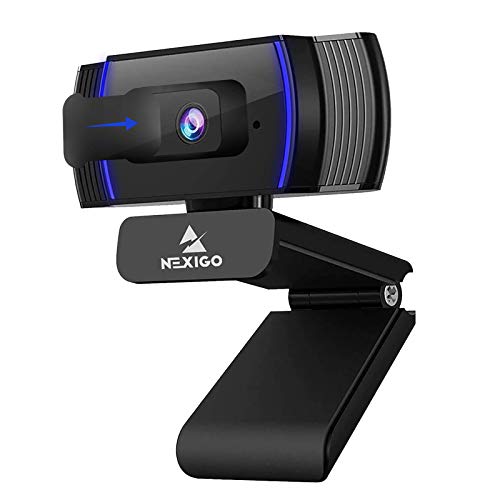
- 1080p video at 30 fps
- Autofocus or manual focus
- Privacy cover and 6.5-foot cord
Best For: Callers who want adjustable focus control
Best for Moving Presenters – EMEET PIXY Dual-Camera 4K PTZ
Among autofocus webcams for pc work, the EMEET PIXY is the specialist for people who move during presentations. Its 4K main camera combines PDAF with an auxiliary AI camera that helps adjust focus and exposure, while motorized pan and tilt keep a moving presenter framed.
Best For: Remote instructors, demonstrators, and presenters who move around on camera.
Pros:
- Dual-camera autofocus system is designed to respond quickly as subjects move.
- AI tracking and 310° pan/180° tilt support demonstrations away from a desk.
- Three microphones offer selectable modes for noise reduction or ambient sound.
Cons:
- Field-of-view adjustment is unavailable at 4K 30fps and 1080p 60fps.
- Tripod and optional remote are sold separately.
Choose PIXY when staying in frame matters as much as staying in focus; its PTZ and software controls are more than a stationary meeting setup typically needs.
Best for Straightforward Meetings – EMEET NOVA 4K
The EMEET NOVA is a practical choice among autofocus webcams for pc work if your priority is a simple, sharp desk setup. It pairs 4K at 30fps with PDAF autofocus, automatic light adjustment, and dual microphones, and connects through a fixed USB-A cable.
Best For: Desk-based video meetings and online classes where easy setup matters more than tracking.
Pros:
- PDAF autofocus operates across a stated 7.9–118-inch range.
- Dual microphones and a privacy cover cover common meeting needs.
- Swiveling mount and tripod thread offer positioning options.
Cons:
- Defaults to 1080p; 4K must be selected in compatible software.
- Fixed 73° field of view, with no facial tracking or manual focus.
NOVA makes sense for a fixed workstation, especially if you want a physical privacy cover. Check that its fixed framing and USB-A connection suit your setup.
Best for Streaming and Work Calls – EMEET S600 4K
For buyers comparing autofocus webcams for pc work that can also handle content creation, the EMEET S600 offers 4K at 30fps or 1080p at 60fps. Its 1/2.55-inch Sony sensor, PDAF autofocus, and automatic light adjustment make it a versatile option for a desk setup.
Best For: People who split camera time between work calls, streaming, and recorded content.
Pros:
- Choice of detailed 4K video or smoother 1080p at 60fps.
- Adjustable 40°–73° field of view at 1080p.
- Built-in privacy cover and microphones with configurable noise cancellation.
Cons:
- Field of view is fixed at 73° in 4K.
- Changing image and audio settings requires EMEETLINK software.
The S600 is the more flexible pick if frame rate and framing matter beyond ordinary calls. At 4K, however, you give up its adjustable field of view.
Best for Cross-Platform Calls – EMEET C960 4K
The EMEET C960 4K keeps the essentials in focus for shoppers seeking autofocus webcams for pc work: PDAF autofocus, automatic light correction, and dual omnidirectional microphones. Its USB-A plug-and-play design and listed Windows, macOS, Linux, and Android TV support suit varied calling setups.
Best For: Video meetings and remote teaching across different computer platforms.
Pros:
- Native 4K sensor with PDAF autofocus and automatic light correction.
- Dual microphones, privacy cover, and no required drivers.
- Adjustable mount with a 1/4-inch tripod thread.
Cons:
- Defaults to 1080p until 4K is selected in camera software.
- Fixed 73° field of view may not fit every desk arrangement.
Pick the C960 for conventional calls where compatibility and straightforward mounting count most. Its fixed framing makes it better suited to a seated speaker than a moving demonstration.
4K Detail Pick – Elelink EC1 Ultra
For shoppers comparing autofocus webcams for pc work, the Elelink EC1 Ultra pairs 4K video at 30 fps with autofocus and automatic light adjustment. It is a practical choice when your workspace lighting varies or you also record content.
Best For: Remote workers who want 4K detail and built-in microphones for calls.
Pros:
- 4K UHD video at 30 fps with a wide-angle lens.
- Dual noise-reduction microphones and automatic light adjustment.
- Flip-open privacy cover and 6.6-foot USB cable.
Cons:
- Video capture tops out at 30 fps.
- The supplied notes do not describe manual focus controls.
If resolution is your priority, this model offers the strongest stated pixel count of the three. Its plug-and-play USB setup and privacy cover add everyday convenience without changing its focus on 4K video.
Flexible Angle Pick – Gritto 1080P HD Webcam
Among autofocus webcams for pc work, the Gritto stands out for positioning flexibility: its mount rotates 360 degrees horizontally and tilts 60 degrees vertically. It delivers 1080p video at 30 fps and includes a Type-C adapter alongside its USB connection.
Best For: Laptop or desktop users who frequently adjust their camera angle or need a Type-C connection.
Pros:
- Autofocus with 1080p video at 30 fps.
- 360-degree horizontal rotation and 60-degree vertical tilt.
- Included USB Type-A-to-C adapter and driver-free setup.
Cons:
- Limited to 1080p rather than 4K video.
- No privacy cover is listed in the supplied notes.
This is the positioning-first option: the adjustable view makes it easier to frame a meeting shot, while the included adapter accommodates different computer ports. Its 1080p resolution is suited to buyers who do not need 4K.
Focus Control Pick – NexiGo N930AF
The NexiGo N930AF is a useful option among autofocus webcams for pc work if you occasionally need to choose your own focal point. Its 1080p, 30 fps autofocus can be switched off for manual focus, and the stated autofocus range starts at 7 cm.
Best For: Video-call users who want the option to switch between autofocus and manual focus.
Pros:
- 1080p video at 30 fps with autofocus and a manual-focus option.
- Built-in noise-canceling microphone and privacy cover.
- 6.5-foot USB cord, flexible mounting clip, and optional settings software.
Cons:
- Maximum stated video resolution is 1080p, not 4K.
- Optional webcam software has narrower system support than the webcam’s stated compatibility.
Choose this model when focus control matters more than extra resolution. Its privacy cover and mounting options are practical for a shared desk or a laptop setup that moves between locations.
How We Picked the Best Autofocus Webcams for PC Work
We focused on cameras marketed with autofocus and compared the features most relevant to PC work: resolution, framing flexibility, microphones, mounting convenience, and whether extras such as tracking add practical value. The product details alone do not establish real-world focus speed, low-light quality, or microphone clarity, so treat those as points to verify in current sample footage and owner feedback before buying.
Quick Comparison: Which Type Fits Your Desk?
- Simple 1080p calls: The NexiGo N930AF and Gritto 1080p are the clearest starting points if you want autofocus without prioritizing 4K. The Gritto listing also specifies a Type-C adapter and rotating design.
- Conventional 4K desk setup: The EMEET NOVA, C960 4K, and the unbranded 4K USB webcam offer higher-resolution options with built-in microphones. Check the exact listing and seller for the unbranded model.
- More specialized video: Consider the EMEET S600 if streaming features appeal to you, or the EMEET PIXY if you specifically want motorized PTZ framing and AI tracking.
Key Buying Factors for Autofocus Webcams for PC Work
Focus and Framing
Autofocus is useful if you shift position, hold an object up to the camera, or vary your distance from the monitor. Look for sample video showing whether focus changes smoothly or visibly hunts. Field of view matters too: a tighter frame can keep attention on your face, while a wider one may include more of the room. The C960 4K listing specifies a 73° field of view; check the other models’ current specifications rather than assuming they frame alike.
Resolution and Lighting
4K can provide a sharper source image and more room to crop, but it will not fix poor lighting. Your meeting app, connection, and settings may also limit the resolution others see. For routine calls, a well-lit 1080p setup may be the more sensible purchase. If you choose 4K, check the supported frame rates at the resolution you intend to use.
Audio, Connection, and Controls
Built-in microphones are convenient, but a headset or dedicated microphone may be easier for colleagues to hear in a noisy room. Confirm your PC has the required USB connection, and check compatibility with your meeting software. If you need control over framing, exposure, or tracking, verify which features require companion software. A stable mount and an easy way to cover or disconnect the camera are useful for shared workspaces.
Who Should Buy Which Autofocus Webcams for PC Work?
Choose a 1080p option for straightforward meetings and a 4K model if you want higher-resolution capture or cropping flexibility. The PIXY makes the most sense when you move around while presenting; otherwise, a fixed webcam keeps the setup simpler. Among similar choices, prioritize dependable focus in sample footage, a frame that suits your desk, and a return policy that lets you test the camera in your own lighting.