If you’re looking to streamline your scanning and copying tasks, automatic document feeder printers can be a game changer. These devices not only save you time but also enhance productivity with features like wireless connectivity and automatic duplex printing. With numerous options available, including models from HP, Canon, and Brother, you’ll want to contemplate which features matter most for your needs. Let’s explore the top contenders that combine efficiency and reliability.
HP DeskJet 4255e Wireless All-in-One Printer
The HP DeskJet 4255e Wireless All-in-One Printer is perfect for home users who need a reliable, compact solution for everyday printing tasks like to-do lists and recipes. With print speeds of up to 5.5 ppm in color and 8.5 ppm in black, you won’t have to wait long for your documents. Its built-in automatic document feeder and 60-sheet input tray streamline your scanning and copying tasks, making multitasking a breeze. Plus, you can print wirelessly using the HP App, ensuring you stay connected from any device. This printer truly combines convenience, efficiency, and versatility for your home office needs.
Best For: Home users seeking a reliable and compact all-in-one printer for everyday tasks like printing to-do lists, letters, and recipes.
Pros:
- Compact design makes it easy to fit in any home workspace.
- Wireless printing capabilities allow for printing from smartphones, tablets, and PCs with ease.
- Includes 3 months of Instant Ink with HP+ activation, ensuring you’ll have ink when you need it.
Cons:
- Print speeds may be slower compared to higher-end printers, particularly for color documents.
- Designed to work only with HP cartridges, limiting options for third-party ink.
- Customer rating of 3.8 out of 5 stars indicates mixed feedback from users.
HP Smart Tank Plus 651 Wireless All-in-One Printer

For families needing efficient and high-volume printing, the HP Smart Tank Plus 651 Wireless All-in-One Printer shines with its impressive 35-page automatic document feeder. This all-in-one device allows you to print, copy, scan, and fax effortlessly. You’ll enjoy fast printing at 11 pages per minute for black and 5 for color, making it perfect for your busy household. Plus, with two years of HP Ink included, you can produce up to 8,000 color pages or 6,000 black pages, ensuring cost-effective, high-quality results. The intuitive app and reliable Wi-Fi make operation a breeze, enhancing your printing experience.
Best For: Families needing efficient, high-volume printing solutions for both color and black-and-white documents.
Pros:
- All-in-one functionality allows for printing, copying, scanning, and faxing in one device.
- Cost-effective with two years of included HP Ink, producing high volumes of pages at low cost.
- User-friendly app and reliable Wi-Fi enhance ease of operation and convenience.
Cons:
- Print speed may be slower for color documents compared to black and white.
- Initial setup could be complex for users unfamiliar with wireless printers.
- Physical footprint may be larger than standard printers, requiring more space.
Brother Work Smart 1360 Wireless Color Inkjet All-in-One Printer (MFC-J1360DW)

Looking for a reliable printer that seamlessly combines functionality and convenience? The Brother Work Smart 1360 Wireless Color Inkjet All-in-One Printer (MFC-J1360DW) is your perfect match. It offers automatic duplex printing and a handy 20-sheet Automatic Document Feeder, making your scanning and copying tasks effortless. With fast print speeds of up to 16 pages per minute in black and 9 in color, you won’t waste time waiting. Plus, its wireless connectivity lets you print from popular cloud apps using the Brother Mobile Connect app. The 1.8” color display makes navigation easy, ensuring you stay productive at home or in your office.
Best For: Those seeking a multifunctional home or home office printer that excels in printing, copying, and scanning tasks.
Pros:
- Automatic duplex printing saves paper and reduces costs.
- Fast printing speeds of up to 16 ppm in black and 9 ppm in color enhance productivity.
- Wireless connectivity allows easy printing from cloud apps and mobile devices.
Cons:
- Limited paper capacity with a 150-sheet tray may require frequent refilling for large jobs.
- The 1.8” color display may feel small for users needing advanced navigation features.
- Ink usage tracking relies on the Page Gauge, which may not be as precise as expected.
Canon Color imageCLASS MF751Cdw II Multifunction Wireless Laser Printer

With its impressive 50-sheet automatic document feeder, the Canon Color imageCLASS MF751Cdw II is perfect for busy offices that need efficient scanning and copying capabilities. It prints up to 35 pages per minute in both color and monochrome, so you won’t be waiting long for your documents. The 5-inch color touchscreen provides intuitive access to features, making it easy to navigate your tasks. Plus, with wireless and mobile printing options, you can print directly from your smartphone. The printer’s auto duplex feature helps save paper, while its high-capacity toner reduces the need for frequent replacements.
Best For: The Canon Color imageCLASS MF751Cdw II is best for busy offices that require efficient printing, scanning, and copying capabilities with high-quality output.
Pros:
- Fast Print Speed: Prints up to 35 pages per minute in both color and monochrome.
- User-Friendly Interface: Features a 5-inch color touchscreen for easy navigation and access to frequently used features.
- Wireless Convenience: Allows mobile printing from devices using Canon PRINT app, Apple AirPrint, and Mopria Print Service.
Cons:
- Initial Cost: Higher upfront cost compared to basic printers.
- Size: May take up more space than compact printers, making it less suitable for small workspaces.
- Toner Replacement: While high-capacity, toner replacements may still be costly over time.
Canon imageCLASS MF465dw II Wireless Duplex Laser Printer

The Canon imageCLASS MF465dw II Wireless Duplex Laser Printer stands out as an exceptional choice for small businesses or home offices that demand efficiency and versatility. With its fast print speeds of up to 42 pages per minute and a first print time of just 5 seconds, you won’t waste time waiting. The 5-inch color touchscreen simplifies navigation, while mobile printing options like Apple AirPrint and the Canon PRINT app keep you connected. The 50-sheet automatic document feeder makes scanning and copying a breeze, and with high-capacity toner, you’ll enjoy quality prints without frequent replacements. Plus, it’s ENERGY STAR certified!
Best For: The Canon imageCLASS MF465dw II Wireless Duplex Laser Printer is best for small businesses or home offices that require efficient, high-quality printing and multifunction capabilities.
Pros:
- Fast print speeds of up to 42 pages per minute, ensuring quick output for high-volume tasks.
- Versatile functionality with 4-in-1 capabilities: print, scan, copy, and fax.
- User-friendly interface with a 5-inch color touchscreen for easy navigation and access to customizable applications.
Cons:
- Monochrome printing only, which may not suit users needing color printing capabilities.
- Initial cost may be higher compared to basic printers, which could be a consideration for budget-conscious buyers.
- Large footprint, requiring adequate space for setup and operation, which might be a concern in smaller offices.
HP Smart Tank 7301 Wireless All-in-One Ink Tank Printer

For home offices and small businesses seeking efficiency, the HP Smart Tank 7301 Wireless All-in-One Ink Tank Printer stands out with its impressive 35-page automatic document feeder. You can print, copy, and scan seamlessly, all while enjoying automatic 2-sided printing. With print speeds of up to 15 pages per minute for black and 9 for color, you won’t waste time. Its cartridge-free, refillable ink tank system offers a mess-free refill process, producing up to 8,000 color pages or 6,000 black pages. Plus, with secure Wi-Fi and the HP app, managing tasks from your smartphone is a breeze.
Best For: Home offices and small businesses looking for an efficient, all-in-one printing solution with high-volume ink capabilities.
Pros:
- Cartridge-free ink tank system allows for easy and mess-free refills, reducing overall printing costs.
- Fast print speeds of up to 15 pages per minute for black and 9 pages per minute for color, enhancing productivity.
- Built-in security features like HP Wolf Essential Security ensure data protection during printing tasks.
Cons:
- Initial setup may require some technical knowledge, particularly for network configurations.
- The physical size of the printer may be cumbersome for smaller workspaces.
- Limited to HP ink, which may be more expensive compared to third-party alternatives.
Epson Workforce WF-2960 Wireless All-in-One Printer

If you’re seeking a reliable all-in-one printer for your home office, the Epson Workforce WF-2960 stands out with its PrecisionCore technology that guarantees sharp text and vibrant graphics. This fast printer offers automatic 2-sided printing, helping you save paper effortlessly. Its 150-sheet paper tray handles your printing needs conveniently. With a 2.4″ color touchscreen and the Epson Smart Panel app, accessing features is a breeze. Plus, you can enjoy hands-free printing through Alexa or Siri. The individual ink cartridges optimize cost efficiency, ensuring you only replace what you need while benefiting from the included Epson ScanSmart software for easy document management.
Best For: Home office users seeking a reliable, efficient all-in-one printer that delivers quality and convenience.
Pros:
- Fast printing with automatic 2-sided capability, reducing paper waste.
- User-friendly features like a 2.4″ color touchscreen and voice-activated printing.
- Cost-efficient ink management with individual cartridges and easy document management software.
Cons:
- May require proprietary Epson ink cartridges, limiting options for cost savings.
- The 150-sheet paper tray may not be sufficient for high-volume printing needs.
- Some users may experience connectivity issues with wireless networks.
Canon MegaTank MAXIFY GX2020 All-in-One Wireless Color Printer

With its impressive capacity to print up to 3,000 pages in both black and white and color using a single set of inks, the Canon MegaTank MAXIFY GX2020 is perfect for busy home offices or small businesses that require high-volume document handling. This all-in-one printer offers print, copy, scan, and fax capabilities, ensuring you have everything you need in one compact design. The 2.7” LCD color touchscreen makes navigation a breeze, while the 35-sheet Automatic Document Feeder simplifies multi-page tasks. Plus, with wireless connectivity, you can easily print and scan from anywhere in your home or office.
Best For: The Canon MegaTank MAXIFY GX2020 is best for busy home offices or small businesses that need a reliable, high-volume all-in-one printing solution.
Pros:
- High printing capacity of up to 3,000 pages in both black & white and color with a single set of inks.
- Compact design with a user-friendly 2.7” LCD color touchscreen for easy navigation.
- Wireless connectivity allows for convenient printing, scanning, and copying from anywhere in your home or office.
Cons:
- Initial cost may be higher compared to standard inkjet printers.
- Limited to a maximum of 35 sheets for the Automatic Document Feeder (ADF), which may not suffice for larger jobs.
- Bulkiness may not be suitable for very small workspaces.
Canon PIXMA TR4720 All-in-One Wireless Printer
The Canon PIXMA TR4720 All-in-One Wireless Printer stands out as an excellent choice for busy home offices, thanks to its efficient automatic document feeder (ADF) that simplifies multitasking. This 4-in-1 printer lets you print, copy, scan, and fax with ease. With a print speed of 8.8 ipm for black and 4.4 ipm for color, you won’t waste time waiting. The 100-sheet capacity and auto two-sided printing enhance productivity. Plus, mobile printing and Alexa compatibility keep you connected. Enjoy energy efficiency with its ENERGY STAR certification and never worry about running low on ink with the smart reorder feature.
Best For: Busy home offices that require a reliable all-in-one printer for printing, copying, scanning, and faxing tasks.
Pros:
- Easy to use with mobile printing capabilities and Alexa connectivity for added convenience.
- Fast print speeds of 8.8 ipm for black and 4.4 ipm for color, reducing wait times for documents.
- ENERGY STAR certified, ensuring energy efficiency and lower electricity costs.
Cons:
- Limited paper capacity with a 100-sheet tray, which may require frequent refilling for high-volume printing.
- No advanced features like high-resolution photo printing, which may be a drawback for photo enthusiasts.
- Potential dependency on smart reorder feature for ink, which may not suit all users’ preferences.
Brother Work Smart 1410 Wireless Color Inkjet All-in-One Printer (MFC-J1410DW)
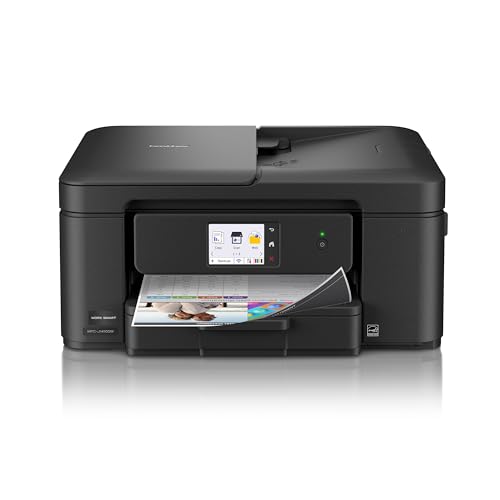
For those in need of a reliable and efficient all-in-one solution, the Brother Work Smart 1410 Wireless Color Inkjet Printer (MFC-J1410DW) stands out as a top choice. This compact device lets you print, copy, and scan effortlessly. With a 2.7” color touchscreen, maneuvering through features is a breeze. Its 20-sheet Automatic Document Feeder (ADF) and automatic duplex printing save you time and effort. You can print up to 16 pages per minute in black and 9 in color. Plus, integrate seamlessly with popular cloud apps and manage everything from your mobile device using the Brother Mobile Connect app.
Best For: The Brother Work Smart 1410 Wireless Color Inkjet All-in-One Printer (MFC-J1410DW) is best for home office and small office users seeking a multifunction printer that combines efficiency and convenience.
Pros:
- Compact design makes it easy to fit in any workspace.
- Seamless cloud integration allows for easy printing and scanning from popular apps.
- Mobile device management through the Brother Mobile Connect app enhances convenience.
Cons:
- Print speeds may be slower compared to some higher-end models.
- Limited paper tray capacity of 150 sheets may require frequent refills for heavy printing.
- Ink cartridges need to be replaced regularly, potentially increasing long-term costs.
Factors to Consider When Choosing Automatic Document Feeder Printers
When choosing an automatic document feeder printer, you need to think about several key factors. Consider your print speed requirements, paper capacity, and connectivity options that suit your needs. Additionally, don’t overlook print quality and the size and design of the printer to guarantee it fits your workspace.
Print Speed Requirements
Choosing the right print speed for an automatic document feeder (ADF) printer is vital, especially if you frequently handle high-volume tasks. Print speed is measured in pages per minute (ppm), and higher speeds are advantageous in busy environments. Look for models that can print up to 16 ppm for black and 9 ppm for color. ADF functionality enhances efficiency by allowing multiple pages to be scanned or copied without manual intervention, which is essential for larger documents. However, it’s important to balance print speed and quality; faster printers might compromise output if they’re not designed for high performance. Ultimately, the print speed of your ADF printer can greatly impact your workflow, particularly in time-sensitive office settings.
Paper Capacity Considerations
A key factor to evaluate in selecting an automatic document feeder (ADF) printer is its paper capacity, which can range from 20 to 150 sheets depending on the model. If you often handle high-volume printing tasks, opt for higher-capacity ADFs to reduce the frequency of manual reloading. This is especially beneficial in busy environments where efficiency is essential. Also, consider whether the ADF supports automatic duplex printing, allowing you to scan or print double-sided documents without flipping pages manually. Additionally, check the maximum media size the ADF can handle, as this affects the types of documents you can process. Choosing between single-sided and duplex capabilities can greatly influence your workflow, particularly with large multi-page documents.
Connectivity Options Available
While evaluating automatic document feeder (ADF) printers, connectivity options play an essential role in ensuring seamless integration into your workflow. Many ADF printers offer wireless connectivity, so you can print, scan, and copy from devices like smartphones, tablets, and computers without cords. Look for common wireless protocols such as Wi-Fi, Bluetooth, and Wi-Fi Direct, which allow for easy printing across multiple devices within your network. If you’re in an office setting, consider printers with Ethernet connectivity for a stable wired connection. Mobile printing capabilities like Apple AirPrint and Google Cloud Print make it even easier to print directly from your favorite apps. Plus, ADF printers often connect to cloud services like Google Drive and Dropbox for convenient document access.
Print Quality Expectations
When selecting an automatic document feeder (ADF) printer, print quality can considerably impact your overall satisfaction and productivity. Look for printers capable of high resolutions, like 4800 x 1200 optimized dpi for color and 1200 x 1200 rendered dpi for black prints. High-quality ADF printers produce sharp text and vibrant colors, essential for professional documents and presentations. Speed matters too; some ADF models can print up to 35 pages per minute, streamlining your workflow. Features like automatic duplex printing not only save paper but also maintain a polished look for double-sided documents. Additionally, advanced ADF printers may use AI technology to enhance print quality, ensuring precision and clarity in every print job.
Size and Design Factors
Choosing the right size and design for your automatic document feeder (ADF) printer is essential for optimizing your workspace. Look for compact models, ideally around 13.07D x 16.85W x 7.87H inches, that fit comfortably in your home or office. A printer with a 20-sheet ADF will efficiently handle multipage documents, saving you time. Consider the weight, too; lighter options, like those around 10.6 pounds, are easier to move when needed. Make sure it supports standard media sizes, such as 8.5 x 11.69 inches, for versatile printing. Finally, check the accessibility of the ADF and controls. Intuitive designs with features like a color touchscreen can greatly enhance your user experience and make navigation a breeze.