Need a compact PC with 64GB of memory for demanding multitasking, development, or creative work? These five listings center on Beelink’s SER9 MAX, with one MINISFORUM alternative for comparison.
Several SER9 MAX listings appear to describe closely related configurations. The key is to verify the exact processor, memory, ports, and seller terms—not assume five listings mean five distinct machines.
Best 5 Beelink Mini PCs with 64gb RAM Support Picks for 2026
Versatile Workstation
Beelink SER9 MAX Ryzen 7 H 255

- 64GB DDR5 RAM installed
- Ryzen 7 H 255 with Radeon 780M
- Triple-display outputs and dual M.2 slots
Best For: Compact multitasking workstations
Intel Alternative
MINISFORUM M1 Pro Core Ultra 9 285H

- 64GB DDR5 RAM; up to 128GB supported
- Four display outputs via HDMI, DP, and USB4
- OCuLink uses an M.2 SSD slot
Best For: Intel-based multi-display setups
Faster-Clocked Ryzen Option
- 64GB DDR5 RAM installed
- Ryzen 7 260 rated up to 5.1GHz
- Triple-display support and dual M.2 slots
Best For: 64GB Beelink setups with triple displays
Quiet Workspace Pick
Beelink SER9 MAX Ryzen 7 H 255
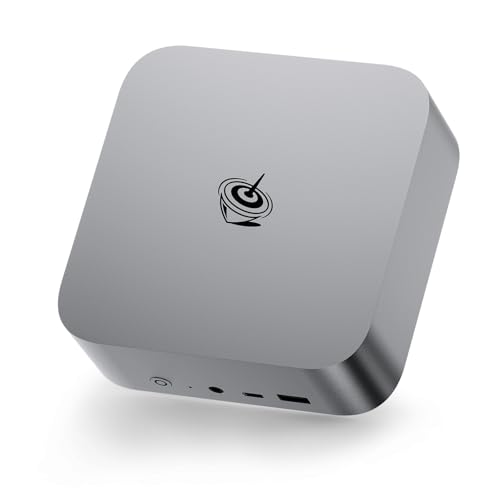
- 64GB DDR5 installed; stated 256GB maximum
- Dual PCIe 4.0 M.2 slots; up to 8TB total
- Bottom-intake cooling; stated noise as low as 32dB
Best For: Quiet, memory-heavy multitasking
Triple-Display Pick

- HDMI, DisplayPort, and USB4 display outputs
- 64GB DDR5 installed; stated 256GB maximum
- Second PCIe 4.0 M.2 slot for storage expansion
Best For: Three-monitor workstations with expandable storage
Versatile Workstation – Beelink SER9 MAX Ryzen 7 H 255
For shoppers comparing beelink mini pcs with 64gb ram support, this SER9 MAX arrives with 64GB of DDR5 memory and a 1TB PCIe 4.0 SSD. Its eight-core Ryzen 7 H 255 and Radeon 780M graphics make it a compact choice for editing, office work, and multiple displays.
Best For: A compact workstation for multitasking and triple-monitor setups.
Pros:
- 64GB DDR5 RAM installed; specifications list support for up to 128GB.
- Two M.2 PCIe 4.0 slots, with up to 4TB supported per slot.
- HDMI 2.1, DisplayPort 2.1, and USB4 support three displays; a 10Gbps LAN port is also listed.
Cons:
- Only 1TB of storage is included; reaching the stated 8TB capacity requires additional SSDs.
- The listing describes the graphics as Radeon 780M integrated graphics, not a separate GPU.
Choose this configuration if you want ample RAM out of the box and room to expand storage without giving up a small desktop footprint.
Intel Alternative – MINISFORUM M1 Pro Core Ultra 9 285H
Although it is not a Beelink, the MINISFORUM M1 Pro belongs in a comparison of beelink mini pcs with 64gb ram support if you are open to another brand. It includes 64GB of DDR5 RAM, a 1TB SSD, and a 16-core Intel Core Ultra 9 285H for demanding desktop tasks.
Best For: Buyers who want an Intel-based alternative with four display outputs and an external-GPU connection.
Pros:
- 64GB DDR5-5600 memory installed, with a stated upgrade ceiling of 128GB.
- HDMI, DisplayPort, and two USB4 ports allow up to four connected displays.
- Includes 2.5Gbps Ethernet, Wi-Fi 7, and an OCuLink interface for an external GPU.
Cons:
- It is a MINISFORUM PC, not a Beelink model.
- Using OCuLink requires one of the two M.2 SSD slots, and the connection is not hot-swappable.
The M1 Pro offers broader display connectivity than the two SER9 MAX configurations here, but its OCuLink option comes with a storage-slot trade-off.
Faster-Clocked Ryzen Option – Beelink SER9 MAX Ryzen 7 260
Among beelink mini pcs with 64gb ram support, this SER9 MAX pairs its installed 64GB of DDR5 memory with a Ryzen 7 260 rated up to 5.1GHz. It also includes a 1TB PCIe 4.0 SSD and Radeon 780M graphics for everyday productivity, editing, and 4K viewing.
Best For: Buyers who want a 64GB Beelink desktop with triple-display support and a Ryzen 7 260.
Pros:
- 64GB DDR5 RAM installed; listed maximum is 128GB.
- Two M.2 PCIe 4.0 slots support up to 4TB of storage each.
- HDMI, DisplayPort, and USB4 support three displays, alongside Wi-Fi 6 and 10G LAN.
Cons:
- Expanding beyond the included 1TB SSD requires additional storage.
- Radeon 780M is integrated graphics rather than a discrete graphics card.
Compared with the Ryzen 7 H 255 listing above, this model has a higher stated maximum CPU clock, though the supplied specifications alone do not establish a real-world performance difference.
Quiet Workspace Pick – Beelink SER9 MAX Ryzen 7 H 255
Among beelink mini pcs with 64gb ram support, this SER9 MAX is a practical choice if you want substantial memory out of the box and a quieter workspace. It pairs a Ryzen 7 H 255 with 64GB DDR5 RAM and a 1TB SSD.
Best For: Memory-heavy multitasking, multi-display work, and users who value quiet operation.
Pros:
- 64GB DDR5 installed; the listing states support for up to 256GB.
- Two PCIe 4.0 M.2 slots support up to 8TB of total internal storage.
- HDMI, DisplayPort, and USB4 support three displays; 10Gbps Ethernet adds fast wired networking.
Cons:
- Radeon 780M graphics are integrated, so buyers seeking a dedicated GPU should look elsewhere.
- The listing does not specify a preinstalled operating system beyond “OS.”
The stated bottom-intake cooling design and noise level as low as 32dB make this the more compelling of the two listings when a quiet desk setup is the priority. Verify the operating system before ordering.
Triple-Display Pick – Beelink SER9 MAX 64GB DDR5
If you are comparing beelink mini pcs with 64gb ram support for a three-screen desk, this SER9 MAX listing puts its display connections front and center. It includes a Ryzen 7 H 255, 64GB DDR5 memory, and a 1TB PCIe 4.0 SSD.
Best For: Multi-monitor productivity and users planning to add a second internal SSD.
Pros:
- HDMI, DisplayPort, and USB4 video outputs provide connections for three displays.
- 64GB DDR5 comes installed, with a stated maximum of 256GB.
- A second PCIe 4.0 M.2 slot allows storage expansion; the listing states up to 8TB across both slots.
- Includes 10Gbps Ethernet, Wi-Fi 6, and Bluetooth 5.2.
Cons:
- The stated 4K at 120Hz triple-display capability should be checked against your monitors and cables.
- The operating system is identified only as “OS” in the supplied details.
This listing offers a clear set of display and expansion specifications, but it describes a very similar CPU, memory, and storage configuration to the other SER9 MAX. Compare current pricing and confirm your required display setup before choosing between them.
How We Picked the Best Beelink Mini PCs with 64gb RAM Support
We focused on the listed memory capacity, processor, storage, connectivity, and practical differences a buyer can verify before checkout. Four selections are Beelink SER9 MAX listings, while the MINISFORUM M1 Pro is a non-Beelink alternative. The listings alone do not establish hands-on performance, upgrade limits, or whether similarly named SER9 MAX units have identical internal components.
Quick Comparison
The SER9 MAX listings pair 64GB of DDR5 memory with a 1TB SSD. Three name a Ryzen 7 H 255 or H255; one lists a Ryzen R7 260. Treat processor naming as a specification to confirm on the seller page, especially where listings use slightly different formatting. Compare the Beelink offers on the exact CPU, ports, included accessories, warranty, return window, and delivered price.
The MINISFORUM M1 Pro lists an Intel Core Ultra 9 285H, 64GB DDR5, a 1TB SSD, dual USB4, HDMI, DisplayPort, and 2.5Gb Ethernet. It is worth considering if those stated connections fit your setup, but it is not a Beelink model.
Key Buying Factors for Beelink Mini PCs with 64gb RAM Support
Installed Memory Versus Maximum Capacity
These selections advertise 64GB installed. If future upgrades matter, check the manufacturer’s specifications for memory slots, supported capacity and speed, and whether the RAM is replaceable. Do not infer upgradeability from an advertised 64GB configuration.
CPU and Workload Fit
For large spreadsheets, many browser tabs, coding tools, and virtual machines, 64GB can provide useful headroom. Processor choice still matters for sustained workloads. Verify the exact CPU on the unit you receive; similar product titles can mask differences.
Ports, Displays, and Storage
Match the listing’s USB ports and video outputs to your monitors and peripherals before ordering. Check whether a claimed display setup requires specific cables or USB-C video support. A 1TB SSD is a useful starting point, but buyers with large project files should confirm available storage expansion and the drive format.
Seller Terms and Total Cost
When several listings look alike, compare the final price alongside seller reputation, shipping, return policy, and warranty support. Confirm the operating system and power adapter included with the exact listing.
Who Should Buy Which Beelink Mini PCs with 64gb RAM Support?
Choose a SER9 MAX listing if you specifically want a Beelink mini PC with 64GB already installed; among the H 255 listings, favor the offer with the clearest specifications and best overall seller terms. Consider the R7 260 listing if its confirmed processor and price better suit your needs. Choose the MINISFORUM M1 Pro if you are open to another brand and its listed USB4, display outputs, and Ethernet connectivity are priorities. If you need an upgrade path rather than simply 64GB out of the box, verify that path with the manufacturer before buying.