When it comes to boosting your connectivity, choosing the right USB-C hub can make all the difference. Belkin offers a range of hubs that cater to various needs, whether you’re a professional on the go or a gamer seeking high-speed performance. With options that support 4K output and rapid data transfer, these hubs are designed to enhance your setup. But which ones stand out the most? Let’s explore the top contenders.
Belkin 11-in-1 USB C Hub Multi-Port Laptop Dock

If you’re a MacBook Pro or Air user needing versatile connectivity, the Belkin 11-in-1 USB C Hub Multi-Port Laptop Dock is your ideal solution. With its 11 ports, including 4K HDMI, DisplayPort, and Gigabit Ethernet, you can easily connect multiple devices. You’ll enjoy high-definition resolutions and up to 5 Gbps data transfer speeds. Plus, it provides 100W pass-through power, ensuring your laptop stays charged while you work. The hub also doubles as a laptop stand, optimizing your workspace without clutter. Elevate your connectivity experience with this essential dock, transforming how you interact with your tech.
Best For: Users of MacBook Pro and Air looking for a versatile and multifunctional docking solution to enhance connectivity and workspace organization.
Pros:
- Offers 11 diverse ports for extensive connectivity options.
- Supports high-definition resolutions up to 4K for multiple displays.
- Provides 100W pass-through power to keep your laptop charged.
Cons:
- May be more expensive than simpler USB hubs.
- Limited compatibility with non-USB-C devices.
- The design may take up additional desk space despite its stand functionality.
Belkin Connect 8-Port USB C Hub

The Belkin Connect 8-Port USB C Hub is an ideal choice for professionals and creatives who need to maximize their laptop’s connectivity. With eight ports, including HDMI, Ethernet, and USB, you can easily connect multiple peripherals through one USB-C connection. It delivers up to 100W Power Delivery, ensuring your devices stay charged, like your MacBook Pro M4 and iPhone 16 Pro. Enjoy Ultra HD displays at 4K @ 60Hz and experience high-speed data transfers up to 10Gbps. Plus, the 2.5-Gigabit Ethernet connection offers a reliable internet experience, all while maintaining safety and sustainability standards.
Best For: Professionals and creatives who require extensive connectivity options for their laptops.
Pros:
- Versatile Connectivity: Eight ports including HDMI, Ethernet, and USB allow for multiple peripheral connections.
- High-Speed Data Transfer: Achieves data transfer speeds up to 10Gbps for efficient file movement.
- Power Delivery: Provides up to 100W Power Delivery to keep devices charged while in use.
Cons:
- Limited Port Variety: May not support certain legacy ports, requiring additional adapters for older devices.
- Size and Portability: The hub may be bulkier compared to smaller USB-C hubs, making it less portable.
- Price Point: Higher price compared to simpler USB-C hubs with fewer features.
Belkin USB C Hub, 5-Port Multiport Adapter with 4K HDMI

For professionals and creatives who need to connect multiple devices seamlessly, the Belkin USB C Hub, 5-Port Multiport Adapter with 4K HDMI stands out as an essential tool. It supports stunning 4K resolution at 60Hz, allowing you to connect external displays and up to four additional devices effortlessly. With 100W power delivery, it fast charges your MacBook Pro M4 or iPhone 16 Pro while transferring data at speeds up to 5Gbps. Plus, its compact design makes it travel-friendly. You’ll appreciate the safety features, including over-voltage and short circuit protection, ensuring your devices stay safe while you work.
Best For: Professionals and creatives who need to connect multiple devices while maintaining high-resolution displays and fast charging capabilities.
Pros:
- Supports stunning 4K resolution at 60Hz for high-quality visuals.
- Fast data transfer speeds of up to 5Gbps, enabling efficient multitasking.
- Compact and lightweight design makes it ideal for travel.
Cons:
- Limited to five ports, which may not be sufficient for users with many devices.
- May require additional adapters for certain legacy devices.
- USB-C connectivity may not be compatible with all older models of laptops or devices.
Belkin USB C Hub, 4-in-1 Multi-Port Laptop Dock

Designed for professionals on the go, the Belkin USB C Hub, 4-in-1 Multi-Port Laptop Dock offers seamless connectivity for your MacBook Pro, MacBook Air, or Chromebook. This compact dock features an HDMI 1.4 port, two USB-A 3.0 BC1.2 ports, and a USB-C PD port, allowing you to connect multiple devices effortlessly. With a powerful 100W pass-through charging, you can keep your laptop powered without sacrificing port expansion. Enjoy stunning visuals with 4K HDMI support at 30Hz and speedy data transfer rates of up to 5 Gbps. Its sleek aluminum finish further enhances your modern workspace.
Best For: Professionals who need a portable and versatile docking solution for their USB-C laptops.
Pros:
- Compact design makes it easy to carry and reduces desktop clutter.
- Supports 4K HDMI output at 30Hz for high-quality visuals.
- 100W pass-through power delivery ensures your laptop stays charged while using multiple ports.
Cons:
- Limited to only one HDMI port, which may not be sufficient for some users.
- Data transfer speed is capped at 5 Gbps, which may be slower than some newer standards.
- Aluminum finish may be prone to scratches and fingerprints over time.
Belkin USB C Hub, 7-Port Multiport Adapter

Looking to expand your device’s capabilities effortlessly? The Belkin USB C Hub, 7-Port Multiport Adapter is your perfect solution. With a single USB-C connection, you can connect an external display via HDMI, plus up to six other devices. Enjoy 4K video at 60Hz and fast data transfer speeds up to 5Gbps. It also includes built-in SD and microSD card readers for easy media management. Plus, it delivers up to 100W for fast charging, powering your MacBook Pro or iPhone 16 Pro with ease. With its compact design and robust safety features, this hub is a must-have for any tech enthusiast.
Best For: Tech enthusiasts and professionals seeking to expand their device connectivity and charging capabilities seamlessly.
Pros:
- Supports 4K HDMI video at 60Hz for high-quality display output.
- Fast data transfer speeds of up to 5Gbps, enabling quick file transfers.
- Compact and lightweight design makes it ideal for portability.
Cons:
- Limited to USB-C compatible devices, which may exclude some older models.
- May require additional power for optimal performance when multiple devices are connected.
- Some users may find the price point higher compared to basic hubs.
Belkin USB-C Hub, 7-in-1 MultiPort Docking Station

The Belkin USB-C Hub, 7-in-1 MultiPort Docking Station is an ideal solution for professionals who need versatile connectivity on the go. With two USB-A 3.0 ports, an 85W USB-C Power Delivery port, and both SD and MicroSD card readers, you’ll easily connect all your essential devices. The 3.5mm audio jack and 4K HDMI port enhance your multimedia experience, letting you enjoy stunning visuals. Plus, it operates on just 15W and offers 5Gbps data transfer speeds for quick file sharing. This hub is plug-and-play ready, making it a hassle-free addition to your tech arsenal.
Best For: Professionals and students who require versatile connectivity options for their laptops and devices while on the go.
Pros:
- Plug-and-play functionality allows for easy setup without the need for additional drivers.
- Multiple ports including USB-A, USB-C, SD, MicroSD, and HDMI provide extensive connectivity options.
- High-speed data transfer of up to 5Gbps ensures efficient file sharing and device communication.
Cons:
- Limited display support at 4K resolution only up to 30Hz, which may not meet the needs of all users.
- Requires a power source for full functionality, which may limit portability.
- No additional USB-C ports, potentially restricting future expansion for users with multiple USB-C devices.
Belkin USB C Hub, 5-Port Multiport Adapter
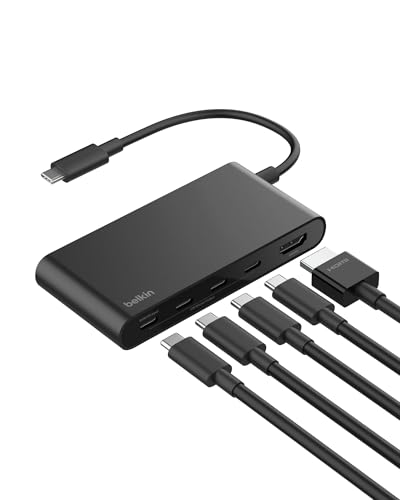
For professionals on the go, the Belkin USB-C Hub, 5-Port Multiport Adapter stands out with its robust 100W Power Delivery feature, making it an ideal choice for charging laptops like the MacBook Pro while simultaneously transferring data. With three USB-C ports and a 4K HDMI output at 60Hz, you’ll enjoy fast data transfer up to 10Gbps—twice as fast as USB 3.0. Its compact design is perfect for travel, while the 5-point safety system guarantees reliable protection. Plus, it’s made from 75% post-consumer recycled materials. You can count on a 2-year warranty for extra peace of mind.
Best For: Professionals on the go who need a reliable multiport adapter for charging and data transfer.
Pros:
- Fast data transfer speeds of up to 10Gbps, enabling quick file transfers.
- 4K HDMI output at 60Hz for high-definition displays, perfect for presentations.
- Compact and lightweight design making it easy to carry during travel.
Cons:
- Limited to USB-C devices, which may not be compatible with older hardware.
- Only one HDMI port may limit connectivity options for multiple displays.
- Some users may find the price point higher compared to basic adapters.
Belkin USB C Splitter Dual Port Hub

Designed for Apple enthusiasts and gamers alike, the Belkin USB C Splitter Dual Port Hub stands out with its high-speed USB 3.2 Gen2 capabilities. You’ll enjoy data transfer speeds of up to 10 Gbps while charging your devices, thanks to the 100W power delivery port. This hub is compatible with all Apple devices, ensuring a seamless connection that’s both backward and future-proof. Plus, you can connect USB-C audio devices for enhanced sound quality. Its compact design makes it perfect for work, school, or travel, providing ideal data transfer and safe charging wherever you go. Enhance your connectivity experience today!
Best For: Apple enthusiasts and gamers seeking high-speed data transfer and efficient charging capabilities.
Pros:
- High-speed data transfer with USB 3.2 Gen2, reaching up to 10 Gbps.
- 100W power delivery allows simultaneous charging and data transfer for connected devices.
- Compact and portable design makes it easy to carry for work, school, or travel.
Cons:
- Limited to USB-C compatible devices, which may exclude older devices with different ports.
- Audio passthrough may not support all USB-C audio devices, potentially limiting options.
- The compact design may lead to increased wear and tear if frequently moved or plugged in/out.
Belkin Connect Universal USB-C 8-in-1 Dual Display Hub

Release the full potential of your laptop with the Belkin Connect Universal USB-C 8-in-1 Dual Display Hub, ideal for professionals who need versatile connectivity. This multifunctional hub features two USB-C, two USB-A, two HDMI, one Ethernet, and one Type-C 100W port, maximizing your USB-C utilization. Enjoy high-speed data transfers up to 10Gbps and dual-monitor setups with resolutions up to 4K at 60Hz for one monitor. Plus, benefit from fast charging with 100W Power Delivery and 1-Gigabit Ethernet for reliable internet access. Constructed with 75% recycled plastic, it also includes a 2-year warranty for peace of mind.
Best For: Professionals and creatives who require versatile and high-speed connectivity for their laptops.
Pros:
- Supports dual-monitor setups with resolutions up to 4K, enhancing productivity and multitasking capabilities.
- High-speed data transfer up to 10Gbps ensures quick and efficient file transfers.
- Constructed with 75% recycled plastic, promoting sustainability while maintaining quality.
Cons:
- Limited to USB-C compatible devices, which may not suit users with older technology.
- Dual-monitor setup performance can vary based on the specifications of the connected monitors.
- May require additional drivers for certain functionalities on non-Mac devices, complicating plug-and-play use.
Belkin Connect Thunderbolt 4 Docking Station (5-in-1 USB-C Multiport Hub)

The Belkin Connect Thunderbolt 4 Docking Station is perfect for professionals who need seamless connectivity on the go. This compact 5-in-1 hub features three upstream and one downstream Thunderbolt 4 USB-C ports, allowing you to connect up to six daisy-chained devices with data transfer speeds of up to 40G. You can easily support dual monitors at 4K 60Hz or a single 8K display at 30Hz. Plus, with 96W power delivery, you’ll charge your devices quickly while using other ports. Belkin’s commitment to innovative design guarantees that you stay connected and powered up wherever you are.
Best For: Professionals who require seamless connectivity and high-performance multitasking on the go.
Pros:
- High-speed data transfer: Supports data transfer rates of up to 40G, allowing for efficient file transfers.
- Dual monitor support: Capable of driving dual monitors at 4K 60Hz or a single 8K display, enhancing productivity.
- Fast charging capability: Offers 96W power delivery for quick charging while using other ports, ensuring devices remain powered.
Cons:
- Limited number of downstream ports: Only one downstream Thunderbolt 4 USB-C port may restrict connectivity options.
- Compact design may limit cooling: The small form factor could lead to potential overheating during extended use.
- Price point: May be considered expensive compared to other docking stations with fewer features.
Factors to Consider When Choosing Belkin USB C Hubs
When you’re choosing a Belkin USB-C hub, you need to evaluate several important factors. Think about the variety of ports and their functionalities, as well as the power delivery capacity and data transfer speeds you require. Don’t forget to check the display support options and how easily the hub fits into your lifestyle with its design and portability.
Port Variety and Functionality
Choosing the right Belkin USB-C hub hinges on understanding port variety and functionality. Start by considering the number of ports; options range from 4 to 11, allowing you to connect multiple devices seamlessly. Look for hubs that support various display outputs like HDMI, DisplayPort, and VGA, enabling connections to multiple screens with up to 4K resolution. High-speed USB-A and USB-C ports are essential for fast data transfers, typically between 5 Gbps and 10 Gbps, boosting your productivity. Don’t overlook additional features like SD and microSD card readers, which simplify media management. By evaluating these aspects, you’ll guarantee your hub meets your connectivity needs effectively.
Power Delivery Capacity
Understanding the Power Delivery capacity of Belkin USB-C hubs is just as important as evaluating their port variety. The Power Delivery capacity indicates the maximum wattage a hub can provide for charging devices, essential for laptops and high-powered peripherals. A hub with 100W Power Delivery can charge most laptops, like the MacBook Pro, while supporting other connections. However, be aware that some hubs may deliver less power for operation; for instance, a 100W hub might provide only 85W to your laptop after accounting for its needs. Higher ratings allow for faster charging, enabling you to charge a device from 0% to 50% in about 30 minutes. Always verify the hub’s capacity meets your devices’ power requirements to prevent insufficient charging.
Data Transfer Speed
While evaluating Belkin USB-C hubs, data transfer speed is an essential factor that can greatly impact your efficiency. Some hubs offer speeds up to 10Gbps, effectively doubling the speed of standard USB 3.0 connections. If you’re transferring large files, especially media or backups, high-speed data transfer is vital. Many USB-C hubs let you transfer data and charge your devices simultaneously, so you won’t lose power while working. Choosing the right hub can markedly enhance your productivity, as faster transfer rates mean less waiting time and a smoother workflow. Always check the specifications of a USB-C hub to verify it meets the necessary speed requirements for your devices and specific tasks.
Display Support Options
Data transfer speed is just one aspect of what makes a Belkin USB-C hub valuable; display support options play a significant role too. When selecting your hub, check the maximum resolution it supports, ranging from 1080p to 4K at 30Hz or 60Hz for the best display performance. If you’re multitasking, consider hubs that support dual monitor setups, with one 4K display and a second at a lower resolution. Confirm compatibility with high-definition displays by looking for HDMI and DisplayPort certifications. Evaluate the number of display outputs available—some hubs offer multiple ports like HDMI, DisplayPort, and VGA. Finally, check the power delivery capabilities, as some hubs let you charge your laptop while outputting video, perfect for intensive tasks.
Design and Portability
When choosing a Belkin USB-C hub, design and portability are essential factors to take into account. Many models boast a compact and lightweight design, making them perfect for travel, work, or school. The aluminum finish not only enhances aesthetics but also complements modern laptops while minimizing desktop clutter. You’ll appreciate that the dimensions are crafted to fit comfortably in your laptop bag or backpack. Additionally, some hubs prioritize sustainability, utilizing at least 75% post-consumer recycled materials, contributing to their lightweight structure. A well-designed hub allows easy access to ports without sacrificing size or portability, ensuring you have the convenience you need while on the go. Choose wisely for a seamless connectivity experience!