When you’re looking for broadcast headphones for your PC, comfort and sound clarity can make all the difference. You want gear that feels good during long hours of use and delivers sharp audio for meetings or gaming. With so many options out there, narrowing down your choices might feel overwhelming. Let’s explore some of the best picks that blend quality and comfort seamlessly, ensuring you find the right fit for your needs.
Logitech H390 Wired Headphones with Microphone

If you’re looking for a reliable headset for video meetings or gaming, the Logitech H390 Wired Headphones with Microphone are an excellent choice. These headphones offer enhanced digital stereo sound, making them perfect for music, calls, and meetings. The noise-cancelling microphone effectively minimizes background noise, ensuring your conversations remain crystal clear. With an adjustable headband and leatherette ear cushions, you’ll enjoy comfort during extended use. Plus, the simple in-line controls let you adjust volume and mute calls effortlessly. The plug-and-play USB-A connection means you can start using them immediately, without any software hassles.
Best For: Those seeking a comfortable and reliable headset for video meetings, gaming, or extended calls.
Pros:
- Enhanced digital stereo sound provides high-quality audio for music, calls, and meetings.
- Noise-cancelling microphone effectively reduces background noise for clear conversations.
- Comfortable design with adjustable headband and leatherette ear cushions suitable for prolonged use.
Cons:
- Wired connection may limit mobility compared to wireless headsets.
- USB-A connection may not be compatible with some devices without an adapter.
- Microphone positioning may require adjustment for optimal performance.
OneOdio Wired Over Ear Headphones

The OneOdio Wired Over Ear Headphones are an excellent choice for DJs and audio professionals seeking reliable performance without breaking the bank. With 50mm dynamic drivers and a frequency response of 20 Hz to 40 kHz, you’ll enjoy clear sound with powerful bass and crisp highs. Their adjustable headband and soft, padded ear cushions guarantee comfort during long sessions. Plus, the 90° swiveling ear cups allow for single-side monitoring, making them perfect for mixing. Weighing just 0.66 pounds, they’re lightweight and portable, and the shared audio port lets you connect another pair of headphones easily.
Best For: DJs and audio professionals looking for affordable, high-quality headphones for mixing and monitoring.
Pros:
- Clear sound with powerful bass and crisp highs, ideal for music and movie enjoyment.
- Comfortable design with soft padded ear cushions and adjustable headband for extended use.
- Lightweight and portable, with a shared audio port for easy connection of another pair of headphones.
Cons:
- Some users have reported initial discomfort that may take time to adjust to.
- Build quality may feel cheaper compared to more expensive brands.
- Wired connectivity limits mobility and does not support wireless functionality.
Razer BlackShark V2 X Gaming Headset

For gamers seeking an immersive audio experience, the Razer BlackShark V2 X Gaming Headset stands out with its software-enabled 7.1 surround sound. Featuring custom-tuned 50mm Triforce Titanium drivers, you’ll enjoy crystal-clear audio and powerful bass. Weighing just 240g, its lightweight design and soft memory foam cushions guarantee comfort during long gaming sessions. The Razer HyperClear Cardioid microphone delivers crisp voice quality while minimizing background noise. Compatible with PC, PS4, PS5, and Switch, this headset is versatile for all your gaming needs. With a solid 4.4 out of 5-star rating, it’s a great choice for gamers looking for quality and value.
Best For: Gamers seeking a reliable, comfortable headset with strong audio performance at an affordable price.
Pros:
- Excellent sound quality with 7.1 surround sound and custom-tuned 50mm drivers.
- Lightweight design and memory foam cushions provide exceptional comfort for long gaming sessions.
- Versatile compatibility across multiple platforms, including PC, PS4, PS5, and Switch.
Cons:
- Some users report concerns about cable length being insufficient for certain setups.
- Microphone performance may vary across different devices, leading to inconsistent voice quality.
- Software-enabled features like 7.1 surround sound are limited to Windows 10 64-bit users.
Corsair HS80 RGB USB Premium Gaming Headset
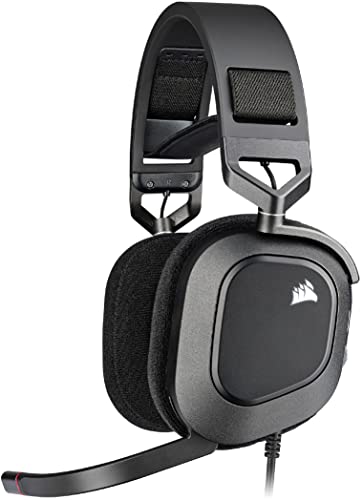
Engineered for gamers who crave immersive audio experiences, the Corsair HS80 RGB USB Premium Gaming Headset delivers stunning Dolby Audio 7.1 surround sound. You’ll appreciate the custom-tuned 50mm neodymium drivers, providing exceptional clarity across a frequency range of 20Hz to 40,000Hz. The headset features a comfortable design with memory foam earpads and an adjustable headband, perfect for long gaming sessions. The broadcast-grade microphone enhances your communication with a flip-up mute function. Customize your audio settings and RGB lighting using CORSAIR iCUE software. While it excels in gaming, some users mention it’s not ideal for music listening.
Best For: Gamers seeking an immersive audio experience with high-quality sound and comfortable long-term wear.
Pros:
- Excellent sound quality with Dolby Audio 7.1 surround sound and custom-tuned 50mm drivers.
- Comfortable design featuring memory foam earpads and an adjustable headband for extended gaming sessions.
- Customizable audio settings and RGB lighting through CORSAIR iCUE software.
Cons:
- Limited compatibility, as it only works with PC, PS5, and PS4, excluding Xbox, phones, and Switch.
- Some users report durability concerns, particularly with ear pad longevity.
- Occasional audio quality issues that may require unplugging and replugging the headset.
USB Headset with Microphone for PC, Noise Cancelling Gaming Headset
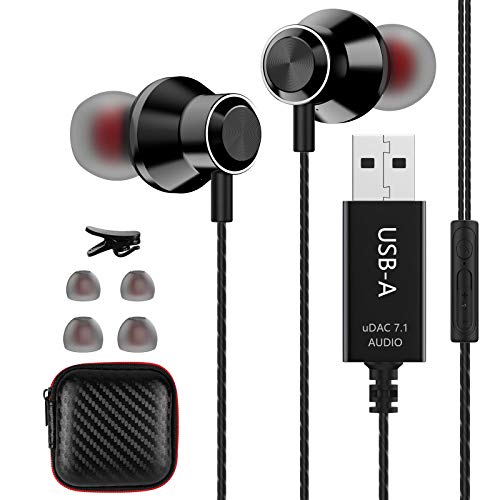
Designed with gamers and professionals in mind, this USB headset with a microphone for PC offers exceptional noise-cancelling capabilities that enhance your communication experience. Its lightweight design guarantees comfort during long sessions, while the built-in microphone captures your voice clearly when positioned correctly. With adjustable volume control and a mute function, you can easily manage your audio. This multi-purpose headset is compatible with most computers and laptops, requiring no drivers. Despite some durability concerns, users appreciate the sound quality and ease of use, making it a solid choice for chatting, music, and gaming.
Best For: This USB headset is best for gamers and professionals seeking clear communication and comfort during long sessions.
Pros:
- Clear noise-cancelling technology enhances call and video meeting quality.
- Lightweight design provides comfort for extended wear.
- Adjustable volume control and mute function offer user privacy and convenience.
Cons:
- Some users report microphone quality issues requiring close placement for clarity.
- Durability concerns have been noted by several users.
- Occasional problems with volume controls and detection on PCs.
Logitech H390 Gaming Headphones with Microphone

If you’re looking for a reliable headset that balances comfort and performance, the Logitech H390 Gaming Headphones with Microphone stand out as an excellent choice for gamers and professionals alike. With a plug-and-play USB connection, you can easily set it up without any software hassles. The rotating noise-cancelling microphone guarantees clear communication, while the adjustable headband and leatherette ear cushions provide comfort during long sessions. Enjoy rich digital stereo sound, and easily control volume and mute functions with the in-line controls. Lightweight and stylish in rose pink, these headphones deliver quality audio for gaming, calls, and meetings.
Best For: Gamers and professionals seeking a comfortable, high-quality headset for extended use during gaming, calls, and meetings.
Pros:
- Plug-and-play USB connection for easy setup without software installation.
- Noise-cancelling microphone for clear communication and enhanced audio quality.
- Comfortable design with adjustable headband and leatherette ear cushions suitable for long sessions.
Cons:
- Some users find the headphones uncomfortable after extended use, preferring over-ear styles.
- Concerns about the durability of the headband over time.
- Lightweight design may not provide the robust feel some users prefer in gaming headsets.
OneOdio A70 Bluetooth Over Ear Headphones

For anyone seeking high-quality audio and comfort during long hours of use, the OneOdio A70 Bluetooth Over Ear Headphones are an exceptional choice. With their professional-grade 40mm neodymium drivers, you’ll enjoy powerful bass and dynamic sound that brings every detail to life. You can enjoy up to 72 hours of wireless playtime or switch to wired mode with included cables whenever needed. Their ergonomic design, featuring soft memory cotton and protein leather, guarantees lasting comfort. Plus, the unique audio sharing feature lets you connect multiple users, while the built-in HD microphone guarantees clear hands-free calls.
Best For: Audiophiles and casual listeners seeking high-quality sound and comfort during extended use.
Pros:
- High-resolution sound quality with powerful bass from 40mm neodymium drivers.
- Up to 72 hours of wireless playtime and an option for wired mode to ensure continuous use.
- Ergonomic design with soft materials for enhanced comfort during long listening sessions.
Cons:
- Bulky design may not be suitable for those looking for a more compact headphone option.
- Audio sharing feature might require additional cables for connecting multiple users.
- Limited customization options for sound profiles compared to some premium headphones.
Logitech G432 Wired Gaming Headset

The Logitech G432 Wired Gaming Headset is the perfect choice for gamers seeking an immersive audio experience. With 7.1 surround sound and DTS Headphone:X 2.0, you’ll enjoy precise positional audio and enhanced sound immersion. The large 50 mm drivers deliver solid sound quality with clear tones and decent bass. Designed for comfort, the lightweight structure and premium leatherette ear pads make long gaming sessions enjoyable. The flip-to-mute mic and volume control add convenience. Compatible with multiple platforms, it’s a versatile option. While some users report minor discomfort after several hours, overall, it’s a durable headset that delivers on performance.
Best For: Gamers looking for an immersive audio experience with comfort and multi-platform compatibility.
Pros:
- 7.1 surround sound and DTS Headphone:X 2.0 for precise positional audio.
- Comfortable design with premium leatherette ear pads suitable for long gaming sessions.
- Versatile connectivity options including 3.5 mm jack and USB DAC for multiple platforms.
Cons:
- Minor discomfort reported after extended use (5-6 hours).
- Occasional sound issues with one ear stopping, though generally reliable.
- Background noise may be picked up by the microphone despite solid quality.
USB Headset with Microphone for PC
Designed with professionals and gamers in mind, the USB headset with a microphone for PC offers exceptional sound quality and comfort. Its noise-canceling technology blocks background distractions, ensuring clear calls and immersive audio. You’ll appreciate the plug-and-play USB A connection, making setup a breeze with your PC, laptop, or tablet. Weighing just 5 ounces, the lightweight design features soft, breathable protein memory foam ear cushions for all-day wear. With a frequency range of 20Hz to 20,000Hz, you’ll enjoy crystal-clear audio for calls, music, and gaming. Highly rated for reliability, it’s perfect for remote work or online classes.
Best For: Professionals, gamers, and students looking for a comfortable and high-quality headset for remote work, online classes, or gaming sessions.
Pros:
- Noise-canceling technology enhances call clarity by blocking background distractions.
- Plug-and-play USB A connection allows for easy setup with various devices.
- Lightweight and comfortable design features soft ear cushions for extended wear without discomfort.
Cons:
- Wired connection may limit mobility compared to wireless options.
- Some users may prefer a detachable microphone for portability.
- Compatibility issues could arise with certain devices or software not listed.
Logitech G435 Wireless Gaming Headset
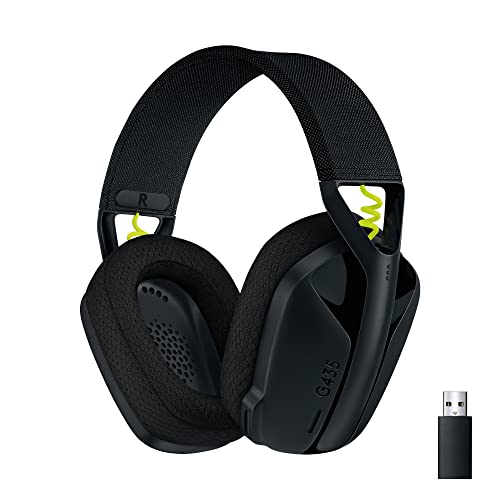
Lightweight and versatile, the Logitech G435 Wireless Gaming Headset is perfect for gamers who crave comfort during long sessions. Weighing just 5.8 oz, it features memory foam ear cushions that fit a variety of head sizes. With 18 hours of battery life and both LIGHTSPEED and Bluetooth 5.2 connectivity, you can enjoy high-fidelity audio and a surround sound experience. The built-in microphones effectively reduce background noise, making your gaming calls clearer. Plus, its durable design includes eco-friendly materials, ensuring you’re making a responsible choice. Overall, it’s a top pick for immersive gaming and seamless connectivity.
Best For: Gamers seeking a lightweight and comfortable headset for extended play sessions with versatile connectivity options.
Pros:
- High-fidelity audio with compatibility for surround sound technologies enhances the gaming experience.
- Lightweight design with memory foam ear cushions provides comfort for long durations.
- Dual connectivity options (LIGHTSPEED wireless and Bluetooth 5.2) allow for seamless use across multiple devices.
Cons:
- Some users report issues with microphone quality, particularly in noisy environments.
- Random disconnections have been noted, which can disrupt gameplay.
- Battery longevity may diminish over time, affecting overall performance.
Factors to Consider When Choosing Broadcast Headphones for PC
When you’re choosing broadcast headphones for your PC, you’ll want to take into account several key factors. Comfort for extended use is essential, especially if you plan to wear them for long sessions. Additionally, pay attention to audio quality, microphone performance, connectivity options, and noise cancellation capabilities to guarantee you get the best experience.
Comfort for Extended Use
Comfort is essential for anyone spending long hours in front of a PC, especially for those using broadcast headphones. Look for headphones with soft, padded ear cushions and memory foam materials to enhance comfort and minimize ear fatigue. An adjustable headband is vital for a customized fit, improving comfort over extended wear. Lightweight designs are preferable, as heavier headphones can strain your head and neck. Opt for over-ear styles, which generally offer better noise isolation and comfort for longer use. Additionally, check for breathable materials to prevent overheating and sweating, ensuring your comfort remains intact during those marathon sessions. Prioritize these features, and you’ll enjoy a more pleasant listening experience.
Audio Quality and Clarity
Audio quality is a critical factor to contemplate when choosing broadcast headphones for your PC. The drivers play an important role; larger drivers, like 50mm, usually offer superior sound clarity and bass response. Pay attention to the frequency response range, too—headphones that cover 20 Hz to 20 kHz can effectively capture both deep lows and soaring highs, enhancing your listening experience. Sensitivity ratings, measured in decibels (dB), indicate how well headphones convert electrical signals into sound. A higher sensitivity around 100 dB guarantees clearer audio at lower volumes. Additionally, noise-cancelling technology helps eliminate background distractions, allowing you to focus on your audio without interference. Prioritizing these factors will elevate your broadcast experience considerably.
Microphone Performance and Quality
While selecting broadcast headphones for your PC, microphone performance and quality are essential for ensuring clear communication. Look for noise-cancelling technology to minimize background distractions during your calls or broadcasts. The placement and design of the microphone, especially if it features a boom arm, will considerably affect voice clarity, so make sure it’s positioned close to your mouth for best sound capture. Pay attention to sensitivity ratings; higher dB ratings typically indicate better sound pickup, leading to clearer audio. Directional microphones, such as cardioid or hypercardioid types, are ideal as they focus on your voice while reducing noise from other directions. Additionally, features like flip-to-mute functionality can enhance your experience by allowing quick silencing of the mic.
Connectivity Options Available
When choosing broadcast headphones for your PC, connectivity options play an important role in guaranteeing seamless integration with your setup. Look for headphones with USB connections, as they provide plug-and-play functionality and often enhance audio quality through built-in sound cards. A 3.5mm audio jack is also essential for compatibility with a variety of devices. Many models offer dual connectivity options, letting you switch between wired and wireless modes, which adds flexibility. Additionally, some headphones come with extra ports for audio sharing, allowing multiple users to connect and enjoy audio simultaneously. If you opt for wireless headphones, consider the range and compatibility of Bluetooth connectivity to make sure they work well across different devices and environments.
Noise Cancellation Capabilities
Choosing the right noise cancellation capabilities for your broadcast headphones can greatly enhance your listening experience. Active noise cancellation (ANC) technology uses microphones and sound waves to block external sounds, making it perfect for noisy environments. If you’re often in bustling spaces, ANC can markedly improve audio clarity during calls or gaming sessions. On the other hand, passive noise cancellation relies on cushioned ear pads to physically block sound, which also provides an immersive experience. Look for headphones that cover a frequency response range of 20 Hz to 20 kHz, ensuring you hear a wide array of sounds without disruptions. Effective noise cancellation not only boosts focus but also reduces listener fatigue during long hours, making it essential for professionals and gamers alike.
Durability and Build Quality
Durability and build quality are essential factors in selecting broadcast headphones for PC use. Prioritize models made from sturdy materials like aluminum or reinforced plastic, as they enhance longevity. Look for headphones with replaceable ear pads or cables, which considerably extend their lifespan and maintain comfort during long sessions. Also, consider the weight; lighter designs reduce fatigue, while heavier models may suggest a more robust build. Check user reviews for long-term performance, focusing on feedback about durability for heavy broadcasting use. Finally, verify the headphones come with a reliable warranty or support system, as this indicates the manufacturer’s confidence in their product’s durability and build quality. Investing in these aspects pays off in the long run.
Price and Value Assessment
Evaluating price and value in broadcast headphones is essential for making a wise investment. You’ll find prices ranging from about $30 for entry-level models to over $300 for high-end options. Focus on the cost-to-performance ratio; headphones with features like noise cancellation or surround sound can offer better value, especially for professional use. Check customer ratings too—models with 4.0 stars and above typically indicate higher satisfaction and reliability. Don’t overlook warranties and customer support; longer warranties often show a manufacturer’s confidence in durability. In conclusion, consider features like comfort, sound quality, and compatibility with various devices. These factors can justify a higher price, ensuring you get the best overall value for your broadcasting needs.
Compatibility With Software
When investing in broadcast headphones for PC, compatibility with software should be a top priority. Make certain your headphones work seamlessly with popular communication tools like Zoom, Skype, and Teams, so you can focus on your calls without hassle. Look for plug-and-play USB connections to skip complex installation processes and enjoy immediate functionality. Advanced audio features, such as noise cancellation, can greatly enhance clarity and minimize background distractions during broadcasts. Additionally, consider headphones with built-in audio sound cards for superior sound quality, especially for audio editing and live streams. Finally, adjustable volume controls and mute functions should be easily accessible, allowing you to manage audio conveniently during your sessions.