Finding the right setup can make a cramped workspace feel far more usable. The best budget keyboard workstations balance comfort, storage, and fit without pushing the price too high.
Below, you’ll find practical options for small home offices, gaming corners, and everyday productivity, along with a quick guide to choosing the right style for your space.
Best 10 Budget Keyboard Workstations Picks for 2026
Compact Ergonomic Standing Desk
Claiks 48x24 White with Keyboard Tray

- Full-size slide-out keyboard tray
- Electric height adjustment with 3 presets
- Sturdy steel frame, 176-lb capacity
Best For: Affordable sit-stand typing setup for a small home office
Storage-Heavy Desk Setup
SEDETA 63" Desk with Keyboard Tray

- Keyboard tray fits 108-key or 87-key setups
- Drawers, shelves, CPU stand, and printer space
- Built-in outlets and USB charging ports
Best For: Busy home offices that need storage, charging, and typing space
Quiet Wireless Desk Combo
seenda COE200 Keyboard and Mouse

- Full-size keyboard with numpad
- Bluetooth and 2.4G dual connectivity
- Built-in wrist rest with quiet clicking
Best For: Quiet, comfortable typing across a laptop and desktop
Simple Wired Essentials
Logitech MK200 Full Size Wired Keyboard and Mouse Combo
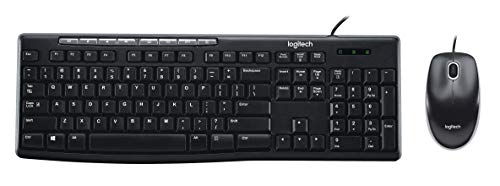
- Full-size 104-key keyboard with number pad
- One-touch media controls and plug-and-play USB
- Includes a matching optical mouse
Best For: Basic home office and student desktops
Corner Desk Pick
OffiGo 59 Inch L Shaped Electric Standing Desk

- Electric height range from 28.4" to 45.7"
- 25.6-inch pull-out keyboard tray
- Built-in outlets, USB ports, and storage
Best For: Corner home offices and study setups
Compact Workspace Saver
Macally Small USB Wired Keyboard for Mac and Windows
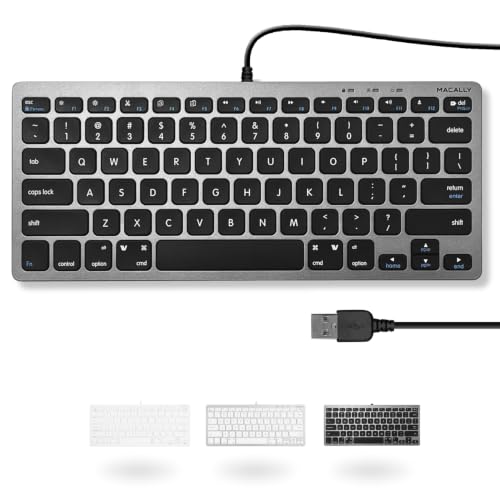
- Space-saving 78-key compact layout
- 13 shortcut keys for common actions
- Plug-and-play USB for Mac and Windows
Best For: Small desks, travel setups, and Mac users
Ergonomic Space Saver
Mount-It! Under Desk Keyboard Tray

- Slides keyboard and mouse off the desk.
- Three height settings up to 1.25".
- Mouse platform mounts left or right.
Best For: Home offices and gaming setups that need more desk space
Quiet Office Pick
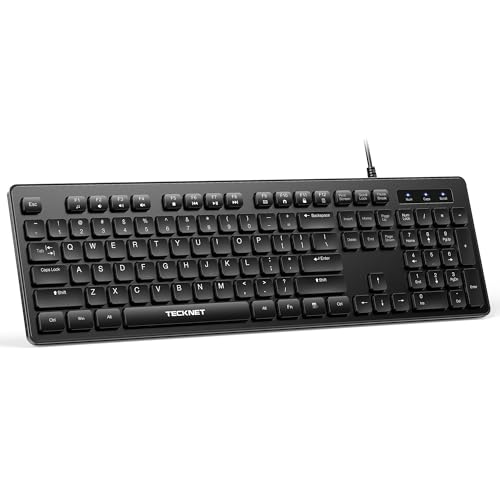
- Quiet low-profile membrane keys.
- Full-size 104-key layout with tilt feet.
- USB plug-and-play, no batteries needed.
Best For: Shared offices and home workstations
RGB Value Upgrade
TECKNET Wired RGB Backlit Keyboard

- 7 RGB colors with multiple brightness levels.
- Quiet full-size 104-key layout.
- Spill-resistant, USB plug-and-play design.
Best For: Low-light desks that need a quiet full-size keyboard
Compact Ergonomic Standing Desk – Claiks 48×24 White with Keyboard Tray
For budget keyboard workstations, this Claiks standing desk is a practical pick if you want a cleaner layout without giving up typing space. The slide-out keyboard tray is sized for a full-size keyboard, while the electric lift and memory presets make it easy to switch between sitting and standing during the workday.
Best For: Home office users who want an affordable sit-stand desk with a dedicated keyboard tray and simple cable management.
Pros:
- Large 23.6″ x 11.8″ keyboard tray fits a full-size keyboard with room to work.
- Electric height adjustment with 3 programmable presets for quick position changes.
- Sturdy steel frame supports up to 176 lbs and stays quiet at low noise levels.
- Includes a wire collector and two hooks to help keep the workspace organized.
Cons:
- Smaller 48 x 24-inch surface may feel tight for multi-monitor setups.
- Limited storage options beyond the tray, hooks, and wire collector.
This is a strong value option if your priority is a keyboard-friendly standing desk rather than lots of built-in storage. It focuses on the essentials: adjustability, stability, and a usable tray that actually supports everyday typing.
Storage-Heavy Desk Setup – SEDETA 63" Desk with Keyboard Tray
This SEDETA desk is built for budget keyboard workstations that need storage as much as surface space. The keyboard tray helps free up the desktop, while the monitor stand, drawers, shelves, and CPU stand create a more organized home office layout.
Best For: Users who want a feature-packed computer desk with keyboard storage, file organization, and charging built in.
Pros:
- Keyboard tray supports a 108-key or 87-key keyboard plus mouse.
- Includes a file drawer, lockable drawer, printer space, shelves, and CPU stand.
- Built-in power outlet and USB ports can charge up to 6 devices.
- Monitor stand can help raise screens and reduce neck strain.
Cons:
- LED lights and multiple storage pieces add complexity if you prefer a minimal desk.
- May be more desk than needed for users who only want a simple typing surface.
If you need a workstation that does more than hold a keyboard, this desk packs a lot into one unit. It’s a good fit for buyers who want storage, device charging, and a dedicated tray without adding extra furniture.
Quiet Wireless Desk Combo – seenda COE200 Keyboard and Mouse
While this isn’t a desk, it belongs in budget keyboard workstations because the right input set can make a compact setup feel far more comfortable. The seenda COE200 gives you a full-size keyboard with a wrist rest, quiet keys, and easy switching between two devices, which is especially useful if you work across a laptop and desktop.
Best For: Budget-minded users who need a quiet, ergonomic keyboard-and-mouse combo for shared or multi-device workspaces.
Pros:
- Full-size keyboard includes a numpad for data entry and productivity.
- Wrist rest and quiet-click mouse support more comfortable all-day use.
- Switches between two devices via Bluetooth or the USB receiver.
- Low-noise design works well in offices, libraries, or shared spaces.
Cons:
- USB receiver mode is for Windows only.
- Batteries are required but not included.
This combo is a smart add-on if you already have a desk but want a more comfortable typing station on a budget. It emphasizes quiet use, broad compatibility, and the kind of features that reduce clutter and fatigue.
Portable Standing Workstation – COMHOMA Rolling Desk with Drawer
For budget keyboard workstations in small spaces, this COMHOMA rolling desk is a flexible option that moves where you need it. It offers four height settings, a compact top that fits a laptop and keyboard, and a pull-out drawer to keep accessories from taking over the surface.
Best For: Small-apartment users, dorm setups, or treadmill workstation buyers who need a movable desk with basic keyboard storage.
Pros:
- Four height positions let you switch between sitting and standing.
- Lockable wheels make it easy to move and then secure in place.
- Built-in drawer helps keep small items and accessories organized.
- Compact footprint suits bedrooms, dorms, and narrow work areas.
Cons:
- Smaller tabletop is better for laptops and compact setups than large multi-monitor systems.
- At 15.75 inches deep, it may feel limited for users who want lots of typing room.
This desk is best viewed as a space-saving workstation rather than a full-size office table. If you need mobility, height adjustment, and a tidy spot for a keyboard in a tight room, it makes a lot of sense.
Simple Wired Essentials – Logitech MK200 Full Size Wired Keyboard and Mouse Combo
If you want one of the more straightforward budget keyboard workstations for everyday PC use, the Logitech MK200 keeps things simple: a full-size keyboard, a matching mouse, and plug-and-play USB setup. The familiar layout includes a number pad and media controls, making it a practical choice when you need an affordable desktop starter kit without extra setup hassle.
Best For: Basic home office and student setups that need a full-size wired keyboard and mouse combo.
Pros:
- Full-size 104-key layout with number pad for everyday typing and data entry.
- One-touch media keys for play/pause, volume, mute, and internet access.
- Spill-resistant, low-profile design with durable keys and adjustable tilt legs.
- Includes a wired optical mouse for a complete desktop setup.
Cons:
- Windows-focused compatibility may limit flexibility for non-supported setups.
- Wired design is less convenient if you want a clutter-free wireless desk.
- Basic feature set may feel limited for users wanting premium extras.
Overall, this combo is a solid pick if your priority is dependable everyday typing at a low cost. It covers the essentials well and fits neatly into a simple workstation without adding complexity.
Corner Desk Pick – OffiGo 59 Inch L Shaped Electric Standing Desk
For budget keyboard workstations that need more than just a surface, the OffiGo 59-inch L-shaped electric standing desk adds height adjustment, storage, and a pull-out keyboard tray. It is designed to help organize a corner setup with defined zones for monitors, peripherals, and daily work items, while the monitor stand and built-in power access make it easier to keep essentials within reach.
Best For: Corner home offices and study setups that need a standing desk with a keyboard tray.
Pros:
- Electric height adjustment from 28.4″ to 45.7″ with 3 memory presets.
- 25.6-inch pull-out keyboard tray helps free up desktop space.
- L-shaped layout creates separate work zones for multitasking.
- Built-in monitor stand, drawer, AC outlets, and USB ports add useful organization.
Cons:
- Large footprint may be too big for very tight rooms.
- Assembly and moving the 78.9-pound desk may take effort.
- Designed around a corner mount, so placement options are more specific.
This desk stands out if you want an affordable workstation layout that supports both keyboard use and ergonomic flexibility. The tray, storage, and power access make it especially practical for keeping a busy desk under control.
Compact Workspace Saver – Macally Small USB Wired Keyboard for Mac and Windows
If your budget keyboard workstation is short on space, the Macally Small USB Wired Keyboard is built to keep things compact without sacrificing everyday usability. Its 78 scissor keys and shortcut support make it a practical fit for smaller desks, travel setups, or any workspace where a full-size keyboard would feel oversized.
Best For: Compact desks, Mac users, and anyone who wants a space-saving wired keyboard.
Pros:
- Compact design saves desk space and is easy to take on the go.
- 78 scissor keys offer a familiar typing feel in a smaller footprint.
- 13 shortcut keys help with common actions like cut, copy, and paste.
- USB plug-and-play setup works with both Mac and Windows.
Cons:
- Smaller layout may not suit users who prefer a full-size keyboard.
- Fewer keys can make it less ideal for heavy data entry.
- Wired connection means it is not a wireless desktop option.
This is a smart fit when desk space matters more than having a large keyboard layout. It focuses on portability, shortcut access, and easy setup, which makes it useful for streamlined everyday work.
Ergonomic Space Saver – Mount-It! Under Desk Keyboard Tray
If you’re comparing budget keyboard workstations, this under-desk tray is a practical way to free up desktop space without changing your whole setup. It slides in and out on steel ball-bearing tracks, adds a mouse platform that can mount left or right, and offers three height settings for a more comfortable typing position.
Best For: Home offices, gamers, and multi-taskers who want a cleaner, more ergonomic desk layout.
Pros:
- Moves keyboard and mouse off the desktop to reduce clutter.
- Smooth sliding mechanism with steel ball-bearing glide tracks.
- Three height adjustment levels up to 1.25″ for comfort.
- Mouse platform can be mounted on either the left or right side.
Cons:
- Only the keyboard tray is included; it doesn’t replace a full desk.
- 21-inch width may feel tight for larger layouts.
Overall, this is a straightforward pick if your priority is reclaiming desk surface while improving typing ergonomics. The adjustable tray and sliding design make it useful for everyday workstations that need a low-cost organization upgrade.
Quiet Office Pick – TECKNET Wired Silent Keyboard
For budget keyboard workstations that need a dependable everyday typing solution, this full-size wired model keeps things simple. Its low-profile membrane keys are designed for quieter typing, while the 104-key layout, tilt feet, and anti-slip pads support long work sessions at a basic office desk.
Best For: Offices, home workstations, and shared spaces where quiet typing and a standard full-size layout matter.
Pros:
- Low-profile membrane keys help reduce typing noise.
- Full-size 104-key layout supports data entry and multitasking.
- Adjustable tilt feet and anti-slip pads improve comfort and stability.
- USB plug-and-play setup with no drivers or batteries required.
Cons:
- Wired-only design may not suit users who want a wireless desk.
- Basic feature set focuses on function rather than extras.
This is a solid no-fuss choice if you want a dependable keyboard for daily work without paying for premium features. It fits well in practical workstation builds where quiet operation and compatibility are more important than customization.
RGB Value Upgrade – TECKNET Wired RGB Backlit Keyboard
If you want budget keyboard workstations with a little more visual personality, this full-size wired keyboard adds 7-color RGB lighting without changing the core typing experience. It keeps the same quiet membrane feel, 104-key layout, and spill-resistant build, while adding brightness and lighting modes for darker rooms.
Best For: Users who want a full-size, quiet keyboard with backlighting for workspaces used at night or in low light.
Pros:
- 7 RGB colors with 4 brightness levels and 2 lighting modes.
- Quiet low-profile membrane keys for comfortable typing.
- Full-size 104-key layout with handy FN multimedia shortcuts.
- Spill-resistant design and plug-and-play USB setup.
Cons:
- Lighting features add flair more than productivity functions.
- Still a wired keyboard, so cable management matters.
As a budget-friendly workstation upgrade, this model balances everyday practicality with a more customizable look. It makes the most sense if you work in dim lighting and want a standard full-size keyboard that still feels simple and reliable.
How We Picked These Budget Keyboard Workstations
We focused on setups that improve typing comfort, reduce clutter, and work well in real homes and offices. That means checking for useful extras like keyboard trays, drawers, height adjustability, compact footprints, and compatibility with both wired and wireless peripherals.
Since Budget Keyboard Workstations vary widely, we also looked for options that solve different problems: limited desk space, posture support, multi-device use, and all-in-one convenience.
Quick Comparison: Which Type Fits Your Space?
If you need the simplest upgrade, a keyboard tray or compact desk accessory may be enough. If you want a full workspace reset, a standing desk or larger desk with storage will offer more flexibility. Keyboard-and-mouse combos are best when you’re building a minimalist, affordable setup from scratch.
Key Buying Factors for Budget Keyboard Workstations
Size and Footprint
Measure your available width, depth, and leg clearance before buying. A compact desk can be a better value than a larger model if it actually fits your room and leaves enough space for comfortable typing.
Ergonomics
Look for a neutral wrist angle, adjustable height, or a tray that lets the keyboard sit at a more natural level. Even low-cost choices can improve daily comfort if they help reduce shoulder and wrist strain.
Storage and Cable Management
Drawers, shelves, and tidy cable routing are especially useful in Budget Keyboard Workstations because they help keep small spaces functional. Storage also matters if you need room for documents, accessories, or a mouse pad.
Input Style
Choose wired keyboards for reliability and plug-and-play simplicity, or wireless combos if you want a cleaner desktop. Quiet keys, shortcut support, and full-size layouts can all make long sessions easier.
Who Should Buy Which Budget Keyboard Workstations?
Choose a standing desk if you want flexibility between sitting and standing. Pick a desk with drawers if organization is your top priority. Go with a keyboard tray if you already like your desk but need better ergonomics. If you’re building an affordable setup fast, a dependable keyboard and mouse combo may be the smartest place to start.
In short, the best Budget Keyboard Workstations are the ones that match your room, your posture needs, and your daily workflow—not just the lowest price.