A good ceiling mount can make an affordable projector look and perform better by keeping it stable, aligned, and safely out of the way. The challenge is finding a low-cost model that still fits your projector and offers enough adjustment for your room.
We compared 10 budget projector ceiling mounts across compatibility, weight capacity, mounting flexibility, height adjustment, and installation practicality to help you choose with confidence.
Best 10 Budget Projector Ceiling Mounts Picks for 2026
Best Overall Value
VIVO Adjustable Ceiling Projector Mount

- 30-pound steel capacity
- Tilt, swivel, and 360-degree rotation
- 6-inch low-profile design
Best For: Compact home and office projector installations
Best Low-Profile Pick
XINLEI PR14W Universal Projector Mount

- 5-inch ceiling profile
- 30-pound cold-rolled steel capacity
- Supports flat or sloped ceilings
Best For: Low-profile installations with flexible ceiling positioning
Best Heavy-Duty Option
PEGZONE 3-in-1 Projector Mount

- Supports up to 44 pounds
- Ceiling, extension, or wall mounting
- Built-in cable management
Best For: Heavier projectors and flexible mounting layouts
Mini Projector Pick

- Supports many popular mini-projector brands
- Metal, adjustable ceiling-mount design
- 5 kg maximum weight capacity
Best For: Lightweight mini-projector installations
Flexible Setup Pick
Aurzen Adjustable Ceiling Mount

- 360° rotation and 90° tilt adjustment
- Telescopes from 9 to 15 inches
- Includes mounting hardware and manual
Best For: Ceiling-mounted home theater and office projectors
Best for Comfort

- Supports up to 33 pounds
- Adjustable arms extend 3.7 to 19 inches
- 4.72-inch low-profile design with quick release
Best For: Heavier projectors in home theater or office setups
Best Long-Reach Option
Full-Motion Extendable Projector Mount
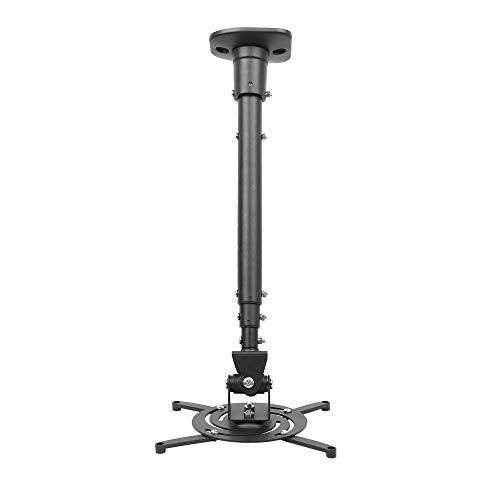
- 43.6-inch maximum extension
- 30-pound steel weight capacity
- Tilt, swivel, and 360-degree rotation
Best For: Home or office setups needing extended reach and flexible positioning
Best Versatile Design
3-in-1 Universal Projector Mount

- Flush, telescoping, or wall installation
- Supports projectors up to 40 pounds
- Built-in cable management and lifetime warranty
Best For: Flexible home, classroom, or office mounting configurations
Best White Finish
Adjustable 3-in-1 Projector Mount
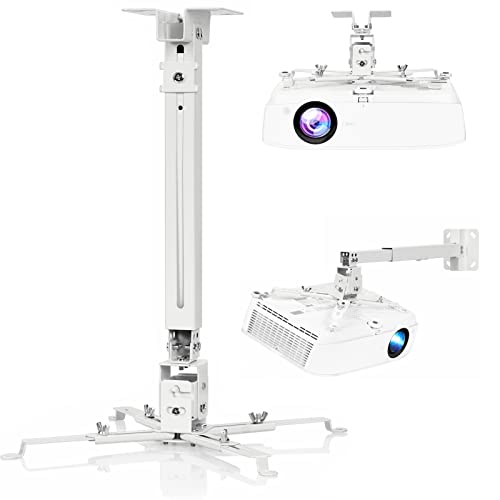
- White powder-coated steel finish
- Flush, telescoping, or wall mounting
- Supports up to 40 pounds
Best For: Light-colored rooms needing a versatile, space-saving mount
Best Overall Value – VIVO Adjustable Ceiling Projector Mount
For shoppers comparing budget projector ceiling mounts, the VIVO MOUNT-VP01W offers a sturdy steel design, broad adjustment, and a low-profile installation at a practical price point. It supports projectors up to 30 pounds and sits 6 inches from the ceiling.
Best For: Home theaters and offices needing a compact, adjustable universal mount.
Pros:
- Supports up to 30 pounds with a sturdy steel construction.
- Offers tilt, swivel, and 360-degree rotation adjustments.
- Includes quick-release hooks, hardware, and installation instructions.
Cons:
- Projector mounting-hole spacing must match the specified compatibility ranges.
- Extension arms need to be removed for mini projectors.
- Not compatible with several listed Epson, Mitsubishi, and LG models.
Its combination of low-profile positioning, flexible alignment, and 30-pound capacity makes this a well-rounded choice, provided your projector matches the mounting specifications.
Best Low-Profile Pick – XINLEI PR14W Universal Projector Mount
The XINLEI PR14W is a strong contender among budget projector ceiling mounts for buyers who want a short 5-inch ceiling profile. Its cold-rolled steel construction, adjustable positioning, and compatibility with flat or sloped ceilings provide useful installation flexibility.
Best For: Users seeking a low-profile mount with broad adjustment and support for projectors under 30 pounds.
Pros:
- Supports projectors weighing up to 30 pounds.
- Provides tilt, swivel, and 360-degree rotation adjustments.
- Works with regular concrete, brick, or wooden-stud-supported ceilings.
- Includes quick-release hardware and installation instructions.
Cons:
- Mounting-hole spacing must be between 2.83 and 11.42 inches.
- The projector must have four mounting holes.
- Compatibility should be checked before purchase.
With its 5-inch profile and sloped-ceiling compatibility, the PR14W is a practical option when keeping the projector close to the ceiling matters.
Best Heavy-Duty Option – PEGZONE 3-in-1 Projector Mount
Among budget projector ceiling mounts, the PEGZONE 3-in-1 bracket stands out for its higher 44-pound capacity and flexible installation formats. It can function as a flush ceiling mount, an extendable ceiling mount, or a wall bracket, making it suitable for more demanding setups.
Best For: Larger projectors and installations that may require ceiling extension or wall mounting.
Pros:
- Supports projectors up to 44 pounds.
- Offers flush ceiling, extendable ceiling, and wall-mount configurations.
- Provides a 16.9- to 25.6-inch ceiling extension range.
- Includes cable management, hardware, a drilling template, and instructions.
Cons:
- Its compatible mounting-hole range is narrower at 8.85 to 12.44 inches.
- Swivel adjustment is limited to plus or minus 8 degrees.
- Its larger design may be less suitable for compact, low-profile installations.
This is the most versatile and highest-capacity option in the group, but buyers should carefully verify mounting-hole spacing and available installation space.
Best Warranty Coverage – WALI PM-002-W Projector Mount
The WALI PM-002-W is a practical choice among budget projector ceiling mounts, combining a 30-pound load rating with a low-profile design and multiple adjustment functions. Its 10-year warranty and included mounting kit add reassurance for long-term installations.
Best For: Buyers who want a universal white mount with broad ceiling-surface support and extended warranty coverage.
Pros:
- Fits mounting-hole distances from 2 to 12.5 inches.
- Supports up to 30 pounds and offers tilt, swivel, and 360-degree rotation.
- Mounts to wood studs, concrete, wall surfaces, and several ceiling types.
- Includes hardware, a user manual, and a 10-year warranty.
Cons:
- Does not support vaulted ceilings or regular drywall.
- Not compatible with several listed Epson and BenQ models.
- Projector compatibility still depends on mounting-hole spacing.
The WALI is appealing for buyers prioritizing warranty coverage and broad installation support, as long as the ceiling surface and projector model meet its stated requirements.
Mini Projector Pick – Compact 175mm Ceiling Mount
For shoppers comparing budget projector ceiling mounts, this compact black holder is designed for mini projectors from brands including QKK, DR.J, DBPOWER, Anker, VANKYO, AAXA, Jinhoo, PVO, TMY, and AuKing. Its metal construction and adjustable design suit lightweight home setups.
Best For: Mini-projector owners who need a compact ceiling mount with a 5 kg maximum capacity.
Pros:
- Compatible with many popular mini-projector brands.
- Metal enclosure with a lightweight 2.56-ounce design.
- Adjustable ceiling-mount construction.
Cons:
- Compatibility is focused on mini projectors rather than universal full-size models.
- No water resistance.
Choose this mount when a small footprint and broad mini-projector compatibility matter most. Confirm your projector’s mounting interface and weight before ordering.
Flexible Setup Pick – Aurzen Adjustable Ceiling Mount
Among budget projector ceiling mounts, this Aurzen model stands out for flexible positioning. It offers 360-degree rotation, 90-degree tilt, and a telescoping length from 9 to 15 inches, provided your projector uses a centered 1/4-inch thread and weighs no more than 2.5 kg.
Best For: Home theater or office users who need adjustable viewing angles and ceiling height.
Pros:
- 360-degree rotation and 90-degree vertical tilt.
- Telescoping pole adjusts from 9 to 15 inches.
- Includes the ceiling base, pole, screw kit, anchors, and manual.
- Supports up to 2.5 kg on the ceiling.
Cons:
- Not compatible with the Aurzen D1 MAX.
- Requires a centered 1/4-inch thread; off-center, M6/M8, and non-threaded interfaces are unsupported.
- Wall installation capacity is limited to 1 kg.
This is a practical choice when angle and height adjustment are priorities. Check the projector thread specification and install only on solid wood, brick, or concrete surfaces.
Best for Comfort – Low-Profile Universal Mount
For budget projector ceiling mounts that need more capacity, this low-profile SCREEN PRO model supports projectors up to 33 pounds. Its adjustable arms extend from 3.7 to 19 inches, while tilt, swivel, and rotation controls help position compatible projectors in home theaters or offices.
Best For: Users mounting heavier projectors who want a slim 4.72-inch ceiling profile.
Pros:
- Supports projectors up to 33 pounds.
- Adjustable arms accommodate a broad range of projector sizes.
- Offers ±10-degree tilt, ±30-degree swivel, and 360-degree rotation.
- Quick-release design and included installation tools and instructions.
Cons:
- Cannot fit projectors with only one mounting hole.
- Compatibility depends on threaded holes, spacing, weight, and mounting interface.
- White finish may not suit every ceiling or room design.
This mount is the strongest option of the three for larger equipment and a low-profile installation. Review the supplied compatibility specifications carefully, since brand name alone does not confirm fit.
Best Long-Reach Option – Full-Motion Extendable Projector Mount
For shoppers comparing budget projector ceiling mounts, this DYNAVISTA model stands out when you need substantial reach and broad positioning control. Its extendable arm reaches up to 43.6 inches, while the steel construction supports projectors weighing up to 30 pounds.
Best For: Home or office setups requiring long extension and extensive viewing-angle adjustment.
Pros:
- Supports most projectors with mounting-hole spacing up to 12.1 inches.
- Offers 25-degree tilt, 90-degree swivel, and 360-degree rotation.
- Includes a pre-assembled design, quick-release hooks, hardware, and instructions.
- Collapses to 23 inches with the arm or 8.9 inches without it.
Cons:
- Its 30-pound capacity is lower than some competing models.
- The long extension may require careful tightening to prevent shaking.
- Notes specify installation on a flat ceiling.
This is a practical pick if alignment flexibility matters more than a minimalist profile. Verify your projector’s mounting-hole pattern and plan for secure tightening during installation.
Best Versatile Design – 3-in-1 Universal Projector Mount
Among budget projector ceiling mounts, the Mount-It! model is useful if you want more than one installation format. It supports flush ceiling, telescoping-arm ceiling, and wall mounting, with cable management and a 40-pound capacity for compatible projectors.
Best For: Home, classroom, or office installations that may require ceiling or wall mounting flexibility.
Pros:
- Works as a flush ceiling, telescoping ceiling, or wall mount.
- Fits mounting-hole patterns between 8.85 and 12.44 inches.
- Provides tilt, swivel, 360-degree rotation, and height adjustment.
- Includes built-in cable management and a lifetime warranty.
Cons:
- Requires a solid ceiling or wall and is not intended for vaulted ceilings or drywall.
- Projector compatibility depends on having three or four mounting holes within the stated range.
- Its adjustment range varies by installation type.
The combination of mounting configurations and cable management makes this a strong all-purpose choice. Check the mounting surface and projector specifications carefully before ordering.
Best White Finish – Adjustable 3-in-1 Projector Mount
If you prefer budget projector ceiling mounts that blend into a light-colored room, the DAWASAPAT PM01 offers a white powder-coated finish and three installation approaches. Its steel frame supports projectors up to 40 pounds and accommodates mounting-hole spacing from 8.85 to 12.44 inches.
Best For: Home or office users who want a white, space-saving mount with ceiling or wall installation options.
Pros:
- Supports flush ceiling, telescoping ceiling, and wall installation.
- Fits projectors with mounting holes between 8.85 and 12.44 inches.
- Supports up to 40 pounds with high-grade steel construction.
- Includes quick-release hooks, hardware, and installation instructions.
Cons:
- Does not support vaulted ceilings or regular drywall.
- Adjustment is limited to plus or minus 8 degrees of tilt and 15 degrees of swivel.
- The white finish may be less suitable for dark-ceiling installations.
This mount balances installation versatility with a clean appearance and a higher stated load capacity. Confirm both the mounting-hole dimensions and the ceiling or wall structure before installation.
How We Picked the Best Budget Projector Ceiling Mounts
We focused on the features that matter most when mounting a projector without overspending: universal compatibility, published weight limits, adjustment range, mounting style, and overall practicality for home theaters, bedrooms, offices, and classrooms. Models with retractable arms can fit a wider range of projectors, while low-profile designs are better for rooms with limited ceiling height. We also considered whether each mount supports ceiling installation, wall installation, or both.
Before buying, verify your projector’s mounting-hole pattern, weight, ventilation clearance, and the type of ceiling or wall where the bracket will be installed. Hardware included with a mount may not be suitable for every surface.
Quick Comparison
| Feature | What to look for | Why it matters |
|---|---|---|
| Compatibility | Universal arms or a matching hole pattern | Helps ensure a secure fit |
| Weight capacity | Higher than your projector’s actual weight | Adds a safety margin |
| Adjustment | Tilt, swivel, rotation, or extension | Makes image alignment easier |
| Profile and height | Low-profile or adjustable-length design | Controls viewing height and cable routing |
| Mounting options | Ceiling, wall, or 3-in-1 installation | Provides more placement flexibility |
Key Buying Factors for Budget Projector Ceiling Mounts
Check the Fit and Weight Rating
Universal mounts are convenient, but not every arm layout fits every projector. Measure the distance between mounting holes and compare it with the bracket’s adjustment range. Choose a mount rated comfortably above your projector’s weight rather than relying on the exact maximum.
Prioritize Useful Adjustment
Tilt and swivel controls help center the image when the mount cannot be installed perfectly. Extension poles or adjustable arms are useful for high ceilings, while low-profile brackets keep the projector closer to the ceiling and can look cleaner.
Plan Installation and Cable Access
Confirm that the ceiling can support the load and locate a suitable joist or use properly rated anchors. Leave room for ventilation, power connections, HDMI cables, and future adjustments. A mount that is easy to install but blocks ports can become inconvenient quickly.
Who Should Buy Which Budget Projector Ceiling Mounts?
Choose a low-profile model for a standard-height room where a discreet installation is the priority. A full-motion or retractable-arm mount is better when precise alignment and broad projector compatibility matter most. Pick an adjustable-height or extension-pole design for vaulted or unusually high ceilings. If you may relocate the projector or cannot mount directly overhead, a wall-compatible or 3-in-1 bracket offers added flexibility.
For the safest choice, match the mount to your projector’s specifications first, then select the profile and adjustment range that suit your room. Spending slightly more on secure hardware and easier alignment can be worthwhile, even when keeping the overall setup budget-friendly.