The best budget smart dimmer switches make it easier to control brightness, schedules, and scenes without spending premium prices. This lineup includes affordable single-pole, three-way, Matter-ready, and no-neutral options.
Before buying, confirm your wiring, bulb compatibility, control platform, and installation requirements. The right switch should fit both your electrical setup and the way you use your smart home.
Best 10 Budget Smart Dimmer Switches Picks for 2026
Best Budget Wi-Fi Pick

- App-guided setup and remote control
- Alexa and Google Assistant compatible
- Requires neutral wire and 2.4 GHz Wi-Fi
Best For: Budget-friendly single-pole smart lighting
Best for Smooth LED Dimming
- Flicker-free LED dimming design
- Adjustable fade and brightness settings
- Remote control through a smartphone
Best For: Customizable LED lighting control
Best Matter-Compatible Value

- Matter-certified for broad compatibility
- Works with Alexa, Apple Home, Google, and SmartThings
- Requires neutral wire and 2.4 GHz Wi-Fi
Best For: Multi-platform smart-home setups
Best No-Neutral Upgrade

- Works without a neutral wire
- Requires Lutron Smart Hub
- Supports major platforms and advanced automation
Best For: Retrofit installations without neutral wiring
Best 3-Way Pick

- 3-way dimmer kit with satellite switch
- 1%–100% dimming and scheduling
- Alexa and Google Assistant control
Best For: Upgrading a 3-way lighting circuit
Best Single-Pole Value
- Smooth touch-slider dimming
- No hub required for voice control
- Schedules and family sharing included
Best For: Single-pole rooms with compatible dimmable bulbs
Best Multi-Room Pack

- Four single-pole smart dimmers
- 1%–100% app and voice dimming
- Timers, schedules, and away mode
Best For: Upgrading four single-pole locations
Best Alexa Budget Pick

- Works exclusively with Alexa
- Needs no separate smart home hub
- Supports voice control, schedules, and remote access
Best For: Simple single-pole dimming in Alexa-based homes
Best Smart Home Compatibility

- Supports Alexa, Google Assistant, Apple Siri, and Matter
- Offers wired or wireless 3-way control
- Includes fade, preset, and LED adjustment features
Best For: Connected homes needing flexible platform support and refined dimming
Best Budget Wi-Fi Pick – Kasa HS220 Dimmer
The Kasa HS220 is a practical choice for shoppers comparing budget smart dimmer switches. It offers app and voice control, scheduling, and gentle fade-off features, but installation requires a neutral wire and a 2.4 GHz Wi-Fi connection.
Best For: Budget-conscious homeowners who want straightforward app, Alexa, or Google Assistant control in a single-pole circuit.
Pros:
- App-guided setup with remote control from Android and iOS devices
- Works with Amazon Alexa and Google Assistant for voice control
- Includes scheduling, countdown timers, Away Mode, and gentle fade-off
Cons:
- Requires neutral wiring and 2.4 GHz Wi-Fi
- Designed for single-pole installations
- Installation may require an electrician if you are unfamiliar with electrical wiring
With its accessible feature set and modest 300-watt rating, the HS220 is a solid entry-level option when your existing wiring meets its requirements.
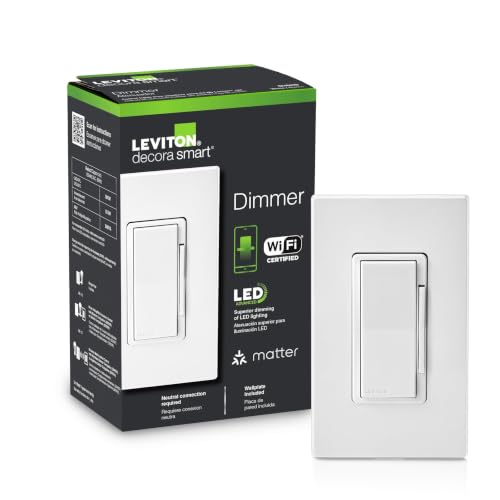
Best for Smooth LED Dimming – Leviton Decora Smart Dimmer
The Leviton Decora Smart Dimmer is worth considering among budget smart dimmer switches if smooth LED performance matters most. Its adjustable settings help tailor fade rates, minimum dimming, maximum brightness, and preset light levels.
Best For: Users seeking customizable, flicker-free dimming for compatible LED bulbs and fixtures.
Pros:
- Designed for flicker-free dimming with dimmable LEDs
- Offers adjustable bulb type, minimum dim, and maximum brightness settings
- Supports remote control and customizable fade rates
Cons:
- The supplied notes do not specify neutral-wire or hub requirements
- Night Settings and other controls depend on the My Leviton system
Its strongest appeal is lighting refinement: adjustable transitions and LED-focused controls make it a sensible pick when basic dimming quality is more important than a long list of documented integrations.
Best Matter-Compatible Value – Tapo S505D Dimmer
The Tapo S505D brings Matter compatibility to the budget smart dimmer switches category. It combines app and voice control with scheduling, fade transitions, and support for major platforms, while requiring neutral wiring and 2.4 GHz Wi-Fi for setup.
Best For: Smart-home users who want flexible platform compatibility across Alexa, Apple HomeKit, Google Home, or Samsung SmartThings.
Pros:
- Matter-certified for broader smart-home platform compatibility
- Supports app and voice commands through several major assistants
- Includes schedules, Away Mode, and fade-on/fade-off transitions
Cons:
- Requires neutral wiring and 2.4 GHz Wi-Fi
- Limited to single-pole installations
- The listed rating is 150 watts
The S505D is a compelling value when interoperability is a priority, especially for households that may change or combine smart-home platforms over time.
Best No-Neutral Upgrade – Lutron Caseta Smart Dimmer
The Lutron Caseta is a standout among budget smart dimmer switches for homes without a neutral wire. It uses a required Lutron Smart Hub for reliable control and supports scheduling, scenes, geofencing, voice assistants, and optional Pico remotes.
Best For: Older homes or retrofit projects where neutral wiring is unavailable and dependable smart-lighting control is important.
Pros:
- Does not require a neutral wire
- Works with Alexa, Apple HomeKit, Google Home, Ring, Sonos, and more through the hub
- Supports scenes, schedules, geofencing, Smart Away, and timers
- Can support wireless three-way-style control with an optional Pico remote
Cons:
- Lutron Smart Hub is required
- Coordinating wall plate and Pico remote are sold separately
- Supports up to 150 watts of LED lighting
The additional hub cost makes this less of a bare-minimum purchase, but its no-neutral installation and proprietary connection can simplify upgrades where standard Wi-Fi dimmers are unsuitable.
Best 3-Way Pick – Kasa KS230 Smart Dimmer Kit
The Kasa KS230 kit is a practical choice among budget smart dimmer switches when you need to replace a traditional 3-way setup in a hallway, stairway, or living room. It supports 1%–100% dimming, app and voice control, scheduling, and requires a neutral wire plus 2.4 GHz Wi-Fi.
Best For: Households upgrading a 3-way lighting circuit with Alexa, Google Assistant, or app control.
Pros:
- Designed for 3-way circuits and includes a satellite dimmer.
- Offers 1%–100% dimming, schedules, remote control, and voice control.
- ETL certified, supports dimmable LEDs up to 150W, and includes a 2-year warranty.
Cons:
- Requires neutral wiring and a 2.4 GHz Wi-Fi network.
- Limited to compatible dimmable bulbs and specified wattage ratings.
Choose this kit when multi-location control matters more than the lowest possible upfront cost. The app-guided installation may help, but unfamiliar users should consider consulting an electrician.
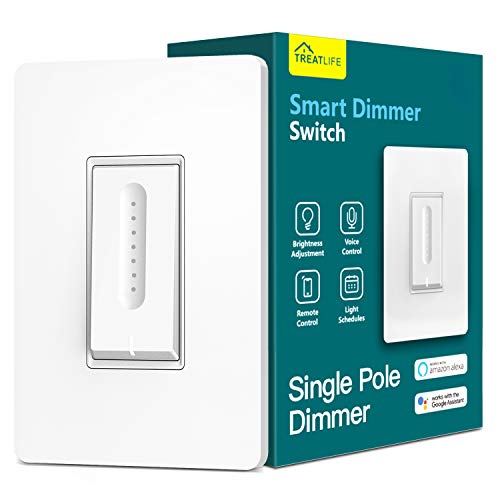
Best Single-Pole Value – Treatlife Smart Dimmer Switch
The Treatlife Smart Dimmer is a budget-friendly option for a single-pole light circuit. Its touch slider, app, and voice controls provide smooth brightness adjustment, while schedules and family sharing add useful everyday automation. A neutral wire and 2.4 GHz Wi-Fi are required.
Best For: Single-pole installations using compatible dimmable LED, CFL, halogen, or incandescent bulbs.
Pros:
- Supports touch-slider, app, and Alexa or Google Assistant control.
- Remembers the last brightness setting after power is restored.
- Offers schedules, customized brightness levels, groups, and family sharing without a hub.
Cons:
- Works only with single-pole circuits, not 3-way setups.
- Requires a neutral wire and 2.4 GHz Wi-Fi; it does not support 5 GHz.
- Not compatible with non-dimmable bulbs, smart bulbs, or bulbs with built-in remotes.
This is a sensible pick for straightforward room-by-room upgrades, provided your wiring and bulbs meet the compatibility requirements. It does not support Apple HomeKit.
Best Multi-Room Pack – Tapo S500D 4-Pack
The Tapo S500D 4-pack can make budget smart dimmer switches more economical when several rooms need the same upgrade. Each single-pole switch offers 1%–100% dimming, app and voice control, scheduling, timers, and away mode, but requires neutral wiring and 2.4 GHz Wi-Fi.
Best For: Multi-room projects involving four single-pole lighting locations.
Pros:
- Includes four switches, wall plates, wire nuts, and screws.
- Provides 1%–100% dimming through touch, app, or voice commands.
- Supports remote control, timers, schedules, and away mode through the Tapo app.
Cons:
- Designed for single-pole circuits rather than 3-way installations.
- Requires neutral wiring and a 2.4 GHz Wi-Fi connection.
- Installation may require an electrician if you are unfamiliar with electrical wiring.
The four-pack is most compelling when you are replacing multiple switches at once. Its automation features add convenience, while the neutral-wire requirement should be confirmed before ordering.
Best Value Versatility – Feit Electric Smart Dimmer
For shoppers comparing budget smart dimmer switches, the Feit Electric model is a flexible option when your electrical box has a neutral wire. It works over 2.4GHz Wi-Fi, supports single-pole, 3-way, and 4-way setups, and adds app, voice, scheduling, and timer controls.
Best For: Homes needing Alexa or Google Assistant compatibility and support for multiple wiring configurations.
Pros:
- Works with Amazon Alexa and Google Assistant.
- Supports single-pole, 3-way, and 4-way installations.
- Handles dimmable LED and CFL loads up to 150W, or incandescent and halogen loads up to 450W.
- Includes a mounting frame and decorative wall plate.
Cons:
- Requires a neutral wire and a 2.4GHz Wi-Fi network.
- A licensed electrician is recommended for installation.
- Only one-gang decorative wall plate is included.
This is a strong budget pick if you want broad wiring compatibility and both Alexa and Google control. Verify the neutral wire and bulb load requirements before buying.
Best Alexa Budget Pick – Amazon Basics Smart Dimmer
The Amazon Basics Smart Dimmer keeps a budget smart dimmer switch setup simple for Alexa households. It connects directly to 2.4GHz Wi-Fi without a hub, supports voice control and routines, and includes guided installation resources.
Best For: Alexa users who want a straightforward single-pole smart dimmer without adding a separate hub.
Pros:
- Works with Alexa for voice control and routines.
- Requires no additional smart home hub.
- Allows scheduling and remote control through the Alexa app.
- Provides a guided installation video, manual, and troubleshooting guide.
Cons:
- Works exclusively with Alexa.
- Requires a neutral wire and 2.4GHz Wi-Fi.
- Designed for single-pole use rather than multi-way configurations.
This is a practical choice when your home already uses Alexa and you only need a single-pole installation. It is less suitable for Google Assistant, Apple Home, or multi-way switch requirements.
Best Smart Home Compatibility – Leviton Decora Smart Dimmer
The Leviton Decora Smart Dimmer is a well-connected option among budget smart dimmer switches, with support for Alexa, Google Assistant, Apple Siri, SmartThings, Sonos, Resideo, and Matter through a firmware update. It also offers adjustable fade rates, preset levels, and settings designed to reduce LED flicker.
Best For: Users who want broad smart-home platform support and more control over dimming behavior.
Pros:
- Works with Alexa, Google Assistant, Apple Siri, and multiple smart-home platforms.
- Matter support can be enabled through a My Leviton firmware update.
- Supports wired or wireless 3-way configurations.
- Offers customizable fade rates, preset levels, and LED performance settings.
Cons:
- Requires a neutral wire for installation.
- Matter support requires a firmware update through the My Leviton app.
- Its broader feature set may be more than needed for a basic dimming installation.
This model stands out when compatibility and lighting customization matter more than the simplest possible setup. Confirm the neutral-wire requirement and your preferred platform before installation.
How We Picked the Best Budget Smart Dimmer Switches
We selected these switches based on upfront value, installation requirements, dimming functionality, smart-home compatibility, and the range of use cases they cover. The lineup includes standard single-pole models, a three-way kit, multi-packs, Matter-compatible options, and a no-neutral solution for older wiring.
We also considered practical ownership factors such as whether a hub is required, which wireless band each switch uses, voice-assistant support, and compatibility with dimmable LED bulbs. A low purchase price is useful only when the switch works with your existing wiring and lighting.
Quick Comparison
| Best For | Recommended Type | Important Requirement |
|---|---|---|
| Basic affordable automation | Kasa or Amazon Basics single-pole switch | Usually requires a neutral wire |
| Matter smart homes | Tapo Matter or Leviton Matter model | Check platform and neutral-wire needs |
| No-neutral installations | Lutron Caseta | Smart hub required |
| Three-way lighting | Kasa KS230 kit | Use the included compatible setup |
| Multiple rooms | Tapo four-pack | Confirm each circuit and bulb load |
Key Buying Factors for Budget Smart Dimmer Switches
Wiring and Circuit Type
Most affordable smart dimmers require a neutral wire, which is typically found in newer homes. If your electrical box lacks one, choose a specifically compatible no-neutral model and verify whether it needs a hub. Also confirm whether the light is single-pole or three-way; a standard single-pole switch is not a substitute for a three-way kit.
Bulb and Load Compatibility
Use dimmable LED, incandescent, or compatible CFL bulbs as specified by the manufacturer. Non-dimmable bulbs can flicker, buzz, or fail to respond correctly. Check minimum and maximum load ratings, especially when controlling several LED fixtures from one switch.
Smart-Home Support
Wi-Fi models connect directly to your network, while hub-based systems can provide more consistent local control but add hardware cost. Matter support can simplify cross-platform use, yet you still need a compatible controller and may need to confirm which features work through your chosen ecosystem.
Installation and Network Requirements
Many budget switches use 2.4GHz Wi-Fi rather than 5GHz. Make sure your router can connect during setup, and turn off power at the breaker before installation. If you are unsure about wiring, hire a qualified electrician.
Who Should Buy Which Budget Smart Dimmer Switches?
Choose a Kasa, Amazon Basics, or TREATLIFE model if you want inexpensive app and voice control for a straightforward single-pole circuit. Pick Tapo or Leviton if Matter compatibility is important for a broader smart-home platform. The Lutron Caseta is the strongest fit for homes without neutral wires, provided you are comfortable adding its hub.
For hallway, stairway, or room lighting controlled from two locations, use the Kasa three-way kit rather than adapting a standard dimmer. If you are outfitting several rooms at once, the Tapo four-pack can lower the per-switch cost. Whatever you choose, verify wiring, bulb compatibility, and platform support before installation.