A good USB desk fan can make a warm office, dorm room, bedroom, or workstation more comfortable without taking up much space. These compact models offer convenient plug-in power, adjustable airflow, and portable designs at approachable prices.
We selected 10 budget USB desk fans with useful differences in size, speed settings, rotation, noise control, and portability so you can match your choice to your desk and daily routine.
Best 10 Budget USB Desk Fans Picks for 2026
Best Compact Quiet Pick
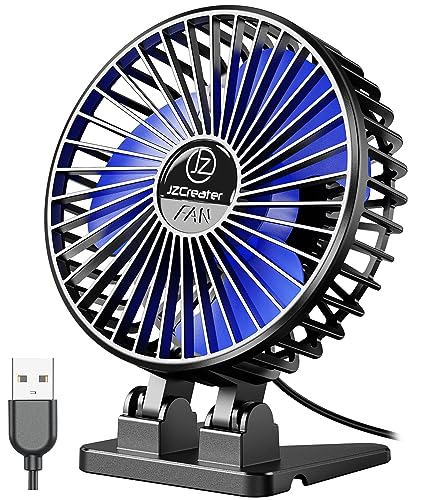
- Lightweight 4.1-inch design
- Three speed settings
- Removable front cover
Best For: Small desks, bedrooms, and travel
Best Metal Value
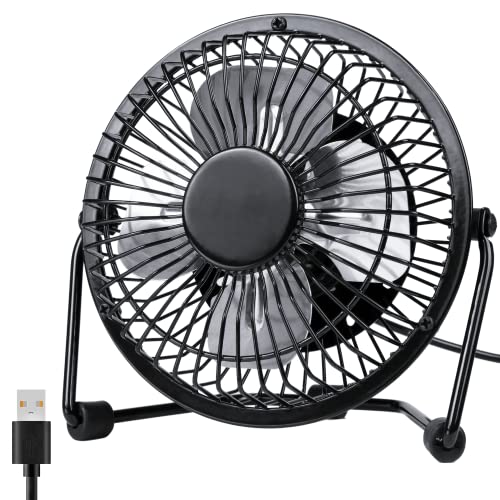
- Metal frame and aluminum blades
- 360-degree adjustable head
- Quiet two-speed operation
Best For: Desks and bedside tables
Best Strong Airflow Pick
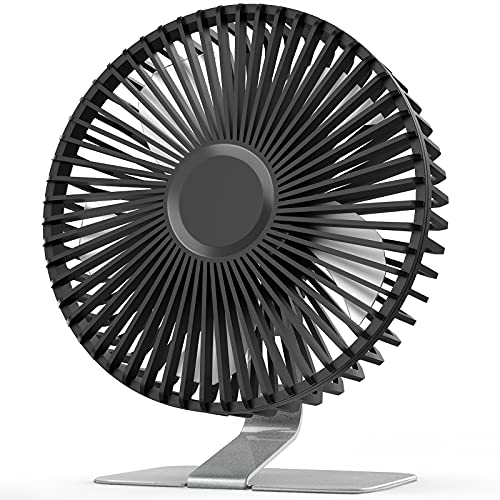
- Four adjustable speed levels
- 5.5-inch blade for stronger airflow
- Stable heavy-duty metal base
Best For: Personal cooling when airflow matters most
Best Adjustable Mini Pick

- 360-degree adjustable head
- Three speed modes
- Stable base with silicone pads
Best For: Dorms, nightstands, desks, and travel
Quiet Power Pick

- Three speeds with airflow up to 5.3 m/s
- Detachable cover and nonslip base
- USB-powered with a 5-foot cord
Best For: Compact desk, bedside, and travel cooling
Quietest Option
- Stated noise level as low as 25 dB
- Four speeds with airflow up to 5.2 m/s
- 360° adjustable head and detachable cover
Best For: Quiet bedroom, study, and office cooling
Lightweight Value

- Weighs about 6.5 ounces
- Three speeds with airflow up to 4.8 m/s
- 90° tilt and rubber-padded stable base
Best For: Portable cooling for desks, dorms, and travel
Portable Value Pick

- Lightweight 4-ounce design
- Three speeds with 0–30° adjustment
- Compatible with common USB power sources
Best For: Travel, cars, and portable desk cooling
Easy-Clean Pick

- 360° adjustable airflow
- Three speeds with under-30dB operation
- Removable front cover for cleaning
Best For: Quiet, maintainable home-office cooling
Best Compact Quiet Pick – JZCreater Mini USB Desk Fan
If you want budget USB desk fans for a small workspace, nightstand, or travel bag, the JZCreater is a lightweight option with three speeds and a compact footprint. Its brushless motor is rated below 50 dB at high speed, and the fan connects to USB power rather than using a built-in battery.
Best For: Small desks, bedrooms, travel, and users who want simple three-speed control.
Pros:
- Compact 4.1-inch design weighs about 4.8 ounces.
- Three adjustable speed settings provide flexible airflow.
- Front cover can be removed for cleaning.
- Includes a 3.7-foot USB cable and works with common USB ports.
Cons:
- No built-in battery, so it must remain connected to USB power.
- Its small size may suit personal cooling better than broad-room airflow.
The JZCreater is a practical budget choice when portability, low operating noise, and basic speed control matter more than cordless use or large-area circulation.
Best Metal Value – Zuvas 4-Inch USB Desk Fan
Among budget USB desk fans, the Zuvas stands out for its metal frame and aluminum blades. It offers two speed settings, a 360-degree adjustable head, and USB connectivity for a desk, laptop, power bank, or wall adapter.
Best For: Buyers who want a compact fan with a more substantial metal appearance and adjustable positioning.
Pros:
- Metal exterior frame gives it a textured, modern look.
- 360-degree rotation helps direct airflow where needed.
- Runs below 40 dB on the strongest setting according to the supplied notes.
- Silicone rings under the base help keep it stable.
Cons:
- Only two speed settings are available.
- It is USB-powered and does not include a stated battery.
- The metal construction is heavier than a lightweight plastic mini fan.
The Zuvas makes sense for a bedside table or office desk where appearance, stability, and flexible aiming are useful, while two-speed control is sufficient.
Best Strong Airflow Pick – SLENPET 6-Inch USB Desk Fan
For shoppers comparing budget USB desk fans with stronger airflow, the SLENPET offers a larger 5.5-inch blade and four speed levels. Its metal base is designed for stability, while the 0-to-90-degree tilt lets you aim the breeze toward a desk or bedside area.
Best For: Users who prioritize stronger personal airflow and more speed control in a USB-powered fan.
Pros:
- Four speed settings include a super-wind mode.
- Larger 5.5-inch blade is designed to deliver stronger airflow.
- Heavy-duty metal base helps keep the fan steady.
- Front cover is removable for cleaning.
Cons:
- The highest speed requires an output current of up to 2A.
- No battery; it operates through the included 4.9-foot USB cable.
- Its larger footprint takes more desk space than mini models.
The SLENPET is the better fit when a compact fan still needs noticeable airflow and multiple intensity choices, provided your USB power source supports the top setting.
Best Adjustable Mini Pick – TriPole Portable USB Desk Fan
The TriPole is a space-saving choice among budget USB desk fans, combining three speeds with a 360-degree adjustable head. Its wide base, silicone pads, and 4.9-foot cable make it convenient for a desk, nightstand, dorm room, or travel setup.
Best For: Portable personal cooling where quiet operation, angle adjustment, and a stable base are priorities.
Pros:
- 360-degree adjustment helps direct airflow precisely.
- Three speed modes offer straightforward control.
- Silicone base pads help reduce vibration and slipping.
- Detachable cover supports regular cleaning.
Cons:
- It requires USB power and has no stated built-in battery.
- The third speed may require a 5V/1A USB charger.
- The mini size is intended for personal cooling rather than broad circulation.
The TriPole is a well-rounded option for compact spaces, especially if you want quiet operation and easy airflow positioning without carrying a larger fan.
Quiet Power Pick – Compact 3-Speed USB Desk Fan
If you want budget USB desk fans with a stronger top setting, this compact Gaiatop model offers three airflow speeds and a maximum wind speed of 5.3 m/s. Its USB connection works with common power sources such as laptops, power banks, and USB wall or car chargers; no wall charger is included.
Best For: Workspaces, bedside tables, travel, and anyone who wants a compact fan with a powerful high setting.
Pros:
- Three speeds range from a gentle breeze to stronger cooling airflow.
- Upgraded motor is rated for 30–50 dB operation.
- Detachable cover makes cleaning easier.
- Stable base with silicone pads helps reduce slipping and tipping.
Cons:
- Requires a 5 V/2 A power supply for operation.
- Wall charger is not included.
- Only 90° of adjustment is specified.
This is a practical budget USB desk fan for buyers who value compact size, flexible USB power, and strong airflow more than advanced controls or built-in battery operation.
Quietest Option – 4-Speed Mini USB Desk Fan
Among these budget USB desk fans, the SWEETFULL mini fan stands out for its stated 25 dB noise level and four-speed control. It is USB powered, lightweight, and has a 360° adjustable head for directing airflow while working, studying, resting, or traveling.
Best For: Bedrooms, study areas, offices, and users who prioritize quiet operation and flexible positioning.
Pros:
- Four speed settings provide more airflow control than the three-speed models.
- Brushless motor and seven curved blades are rated as low as 25 dB.
- 360° adjustable head helps aim airflow from different positions.
- Detachable rear cover supports easier cleaning.
Cons:
- No built-in battery is included.
- Requires a separate USB power source.
- Its compact size favors personal cooling rather than broad-room circulation.
Choose this model if quiet airflow and precise adjustment matter most. Its extra speed setting and 360° head make it especially versatile for a desk or nightstand.
Lightweight Value – Portable 3-Speed USB Desk Fan
For shoppers comparing budget USB desk fans, this lightweight Gaiatop model keeps the design simple: three speeds, USB power, a 90° tilt range, and a wide rubber-padded base. At about 6.5 ounces, it is easy to carry between a desk, dorm room, library, or travel bag.
Best For: Portable personal cooling in offices, dorms, libraries, bedrooms, and travel settings.
Pros:
- Lightweight 6.5-ounce design is easy to transport.
- Three speeds reach up to 4.8 m/s for adjustable cooling.
- USB power works with computers, power banks, adapters, and car chargers.
- Rubber-padded base helps limit vibration and slipping.
Cons:
- It has three speeds rather than four.
- Maximum airflow is lower than the other Gaiatop model listed here.
- No wall charger or built-in battery is specified.
This is a sensible value choice when portability and stable placement are priorities. It offers the core features needed for personal desk cooling without adding much weight to a bag.
Quiet Airflow Pick – Koonie 5-Inch USB Desk Fan
If you want budget USB desk fans for a crowded workspace, the Koonie combines a compact footprint with three speeds and a stated 35dB noise level. Its USB-C connection makes it convenient for use with compatible USB power sources, though it requires a wired connection.
Best For: Quiet office, bedroom, or home-office cooling where desk space is limited.
Pros:
- Seven-blade design provides airflow rated up to 15.4 ft/s.
- Three speeds offer stronger or softer cooling.
- 180-degree adjustment helps direct airflow, while the triangle base supports stability.
- Compact 5-inch design weighs 8 ounces.
Cons:
- No built-in battery; it must remain connected to USB power.
- USB-C connector may require a compatible cable or power source.
The Koonie is a practical choice when quiet operation, adjustable airflow, and a small footprint matter more than cordless use.
Portable Value Pick – Gaiatop Small USB Desk Fan
Among budget USB desk fans, the Gaiatop stands out for its very light, portable design and broad USB compatibility. It offers three speeds and a vertically adjustable head, making it easy to position at a desk, in a car, or while traveling.
Best For: Portable personal cooling from laptops, power banks, car chargers, or USB adapters.
Pros:
- Compact design weighs about 4 ounces and takes up little space.
- Three speed settings provide low, medium, and high airflow.
- Fan head adjusts vertically from 0 to 30 degrees.
- Works with multiple 5V USB power sources.
Cons:
- Noise is rated below 50dB, so it may be less quiet than the lowest-noise options.
- The high-speed setting requires a 5V/1A power source.
- Adjustment is limited to a 30-degree vertical range.
The Gaiatop is a straightforward budget option for users who value minimal weight and flexible USB-powered placement.
Easy-Clean Pick – SWEETFULL Small USB Desk Fan
For shoppers comparing budget USB desk fans, the SWEETFULL offers broad airflow coverage, flexible positioning, and a removable front cover for easier cleaning. It runs from a USB cable and includes three speeds, making it suited to everyday office or home use.
Best For: Office and study spaces where quiet operation, wide airflow, and simple maintenance are priorities.
Pros:
- Wide 5.8-inch airflow area is designed to provide broader cooling.
- 360-degree tilt lets you direct airflow in virtually any direction.
- Three speeds are controlled with one button.
- Removable front cover helps simplify cleaning.
Cons:
- No battery is included, so the fan needs USB power while operating.
- Its 5.8-inch width and 7-inch height may take more desk space than ultra-mini models.
The SWEETFULL is a strong fit if you want adjustable, quiet personal cooling with a design that is easier to keep clean.
How We Picked the Best Budget USB Desk Fans
We focused on practical features that matter in everyday use: USB power, compact footprints, adjustable speed settings, directional control, portability, and noise-conscious designs. The selection includes smaller personal fans for close-range cooling as well as larger 5- and 6-inch models intended to move more air across a desk.
Because product names and listings can vary, check the current specifications before ordering, especially included cables, power requirements, dimensions, and whether an adapter is supplied. USB power does not always mean that a wall adapter is included.
Quick Comparison
| Best For | What to Look For |
|---|---|
| Small workspaces | Mini housing, stable base, and front-facing airflow |
| More noticeable cooling | Larger 5- or 6-inch blades and multiple speed levels |
| Flexible positioning | Tilting or 360-degree rotation |
| Shared rooms or offices | Quiet operation and lower speed settings |
| Travel and portability | Lightweight construction and standard USB compatibility |
Key Buying Factors for Budget USB Desk Fans
Airflow and Speed Control
More speed settings give you finer control over comfort and noise. A two-speed fan can be simple and efficient, while a three- or four-speed model may be better if you want a gentle breeze for close use and stronger airflow when the room feels hotter.
Size and Placement
Measure the available desk space before buying. A compact fan fits beside a monitor or laptop, but a larger model may provide broader airflow. A stable base is important if the fan will sit near paperwork, electronics, or the edge of a desk.
USB Power and Cable Setup
USB power makes these fans convenient for laptops, power banks, USB hubs, and wall chargers. However, cable length and adapter compatibility affect placement. If you plan to use a power bank, confirm that its output can support the fan reliably.
Noise and Adjustability
For calls, studying, and sleeping, prioritize quiet operation and a low-speed setting. Adjustable tilt or rotation lets you direct air toward your face or upper body instead of cooling an empty area.
Who Should Buy Which Budget USB Desk Fans?
Choose a mini two- or three-speed model if you need personal airflow in a crowded workstation or want something easy to carry. Pick a 5.5- or 6-inch option if stronger circulation is more important than the smallest possible footprint. Models advertising quiet operation are better suited to offices, bedrooms, and shared spaces, while fans with 360-degree rotation offer the most flexible positioning.
Overall, the best Budget USB Desk Fans balance airflow, stability, noise, and convenient power rather than simply offering the highest speed count. Compare the listed dimensions and controls, then choose the model that fits your space and how close you will sit to it.