If you’re paying Xfinity for internet service, the right cable modem can help you cut monthly rental fees and get a setup built for your speed tier.
Below, we focus on compatible models that balance performance, value, and the features most buyers actually need in 2026.
Best 10 Cable Modems for Xfinity Internet Picks for 2026
Mid-Split Speed Pick
NETGEAR CM3000 for 2.5Gbps Xfinity Plans

- Up to 2.5Gbps download and 1Gbps upload support
- Built for mid/high-split DOCSIS 3.1 service
- 2.5Gig port plus broad provider compatibility
Best For: Xfinity users on faster plans who want higher upload speeds
Budget-Friendly DOCSIS 3.1

- Supports DOCSIS 3.1 plans up to 2Gbps
- Two 1Gbps Ethernet ports for a separate router
- Tested and qualified for Xfinity
Best For: Buyers who want a modem-only Xfinity setup with broad compatibility
Future-Ready Upgrade
NETGEAR CM3000-1AZNAS for Fast Xfinity Speeds
- Supports up to 2.5Gbps download and 1Gbps upload
- Built for Xfinity mid/high-split speed tiers
- Connects to your own router with 2.5Gig or link aggregation
Best For: Fast-plan Xfinity users who want a future-ready modem
All-in-One Voice Pick
ARRIS SVG2482AC for Xfinity Internet and Voice

- Modem, Wi-Fi router, and voice support in one unit
- Compatible with Xfinity Internet and Voice service
- Four Ethernet ports plus two telephony ports
Best For: Xfinity households that want an all-in-one gateway with voice
Budget-Friendly DOCSIS 3.0 Pick
NETGEAR CM500 for Xfinity and Cox
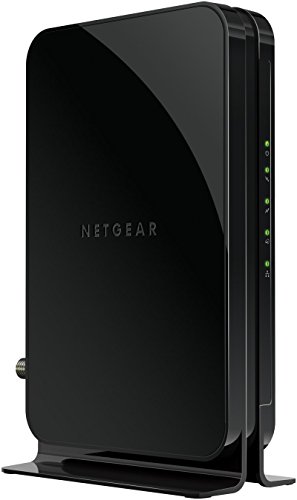
- DOCSIS 3.0 modem with 16x4 channel bonding
- Works with Xfinity up to 200 Mbps
- Single Gigabit Ethernet port for your router
Best For: Basic cable internet users who want to replace a rental modem
Multi-Gig Speed Upgrade
Hitron CODA56 for Xfinity and Cox

- DOCSIS 3.1 modem with 2.5 Gbps Ethernet
- Certified for Xfinity, Spectrum, and Cox
- Modem-only design needs a separate WiFi router
Best For: Users with fast cable plans who want a modem-only upgrade
Compact Multi-Gig Choice

- DOCSIS 3.1 modem with 2.5 Gbps port
- Approved for Comcast Xfinity and other cable providers
- Compact modem-only design with 2-year warranty
Best For: Residential users who want a small high-speed modem
Multi-Gig Cable Modem Pick
Hitron CODA56 2.5Gbps Cable Modem

- Supports DOCSIS 3.1 with a 2.5 Gbps Ethernet port
- Works with Xfinity, Spectrum, and Cox cable service
- No WiFi included; router required
Best For: Xfinity or other cable users on multi-gig plans who already own a router
Data-Only Cable Modem Choice

- DOCSIS 3.1 modem with a 2.5 Gbps Ethernet port
- No WiFi, voice, or router features included
- Compatible with Xfinity, Spectrum, and Cox
Best For: Users who want a modem-only cable upgrade and do not need phone service
Budget 1Gbps Cable Modem Option
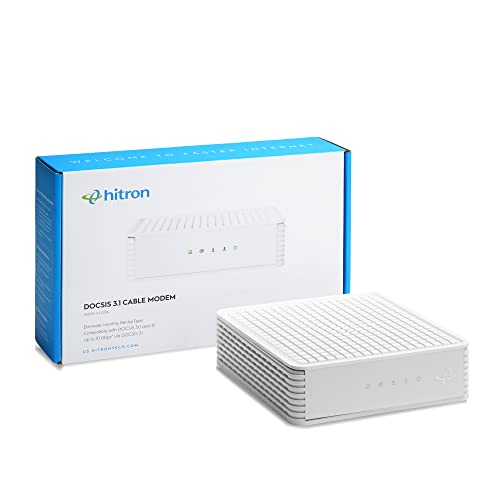
- DOCSIS 3.1 cable modem rated up to 1 Gbps
- No WiFi, voice, or router features
- Certified for Xfinity, Spectrum, and Cox cable service
Best For: Cable internet users on up to 1 Gbps plans who want a basic modem-only setup
Mid-Split Speed Pick – NETGEAR CM3000 for 2.5Gbps Xfinity Plans
If you’re comparing cable modems for xfinity internet and want a model built for newer multi-gig tiers, the NETGEAR CM3000 is aimed at exactly that use case. It supports DOCSIS 3.1 mid/high-split service, with up to 2.5Gbps downloads and 1Gbps uploads, so it suits users who want stronger upstream performance for gaming, video calls, and large file uploads.
Best For: Xfinity customers on faster multi-gig plans who want a modem designed for improved upload speeds.
Pros:
- Supports up to 2.5Gbps download speeds and 1Gbps upload speeds
- Engineered for mid/high-split DOCSIS 3.1 service, including Xfinity’s faster tiers
- Includes a 2.5Gig port for multi-gig router connections
- Works with major US providers including Xfinity, Spectrum, and Cox
Cons:
- Modem only, so you still need a separate Wi-Fi router
- Made for use in the U.S. only
This is a strong pick if your plan can actually use mid/high-split capabilities and you want a modem that is more future-ready than basic DOCSIS 3.1 hardware. It makes the most sense for buyers pairing it with a capable multi-gig router.
Budget-Friendly DOCSIS 3.1 – ARRIS SB8200 for Up to 2 Gbps
For shoppers looking at cable modems for xfinity internet, the ARRIS SB8200 is a straightforward DOCSIS 3.1 modem that covers the essentials well. It is tested and qualified for Xfinity, supports plans up to 2Gbps, and gives you two 1Gbps Ethernet ports for connecting a separate router.
Best For: Xfinity customers who want a simple modem-only setup for high-speed cable internet.
Pros:
- DOCSIS 3.1 support with plans up to 2Gbps
- Two 1Gbps Ethernet ports for router connections
- Tested and qualified for Xfinity, Cox, and Spectrum
- Compact design with clear status LEDs
Cons:
- Modem only, so you need a separate Wi-Fi router or mesh system
- Not compatible with fiber, DSL, or satellite service
The SB8200 is a practical choice if you want to own your modem, keep the setup simple, and avoid rental fees. It is best suited to households that already have a good router and just need reliable modem performance.
Future-Ready Upgrade – NETGEAR CM3000-1AZNAS for Fast Xfinity Speeds
If you want cable modems for xfinity internet that are aimed at the newest speed tiers, this NETGEAR CM3000-1AZNAS is built for that job. It supports DOCSIS 3.1 mid/high-split service with up to 2.5Gbps downloads and 1Gbps uploads, and it is designed to work with your existing Wi-Fi router as a separate unit.
Best For: Xfinity subscribers who want a modem built for the fastest current cable tiers and stronger uploads.
Pros:
- Mid/high-split DOCSIS 3.1 support up to 2.5Gbps down and 1Gbps up
- Designed for today’s fastest Xfinity cable internet speeds
- Works with your existing Wi-Fi router
- Can connect via a 2.5Gig port or link aggregation for up to 2Gbps
Cons:
- Modem only, so you still need a separate router
- Made for use in the U.S. only
This model makes sense if you are planning around faster Xfinity service and want a modem that won’t feel outdated quickly. It’s especially appealing for users who care about upload-heavy tasks like video conferencing and cloud backups.
All-in-One Voice Pick – ARRIS SVG2482AC for Xfinity Internet and Voice
Among cable modems for xfinity internet, this ARRIS SURFboard stands out because it combines a DOCSIS 3.0 modem, AC2350 Wi-Fi router, and voice support in one unit. It is approved for Xfinity Internet and Voice service and is rated for cable plans up to 800Mbps, which makes it a convenient choice if you want fewer boxes on your shelf.
Best For: Xfinity Internet and Voice customers who want an all-in-one modem-router combo.
Pros:
- Combines modem, Wi-Fi router, and voice support in one device
- Compatible with Xfinity Internet and Voice service
- Includes four 1Gbps Ethernet ports and two telephony ports
- Simple app-based setup and network management
Cons:
- DOCSIS 3.0 design, not DOCSIS 3.1
- Approved for plans up to 800Mbps, which is lower than newer high-speed modems
- Best fit only if you need the built-in voice features
This is a practical option if you want an integrated setup and Xfinity voice compatibility, but it is not the right pick for users chasing the newest multi-gig cable speeds. It works best for households prioritizing convenience over top-end performance.
Budget-Friendly DOCSIS 3.0 Pick – NETGEAR CM500 for Xfinity and Cox
If you want cable modems for xfinity internet without paying for extras you may not need, the NETGEAR CM500 is a straightforward DOCSIS 3.0 option for lower-speed cable plans. It is designed for Xfinity plans up to 200 Mbps and connects to your own WiFi router through a single Gigabit Ethernet port.
Best For: Shoppers on basic to mid-tier Xfinity or Cox cable plans who want a simple modem-only setup.
Pros:
- Compatible with Xfinity plans up to 200 Mbps and Cox plans up to 150 Mbps
- DOCSIS 3.0 with 16×4 channel bonding for cable internet service
- Lets you use your own WiFi router instead of a combo unit
- May help save on monthly equipment rental fees
Cons:
- Only has one Ethernet port
- No built-in WiFi
- Not intended for higher-speed gigabit plans
For households that just need a reliable, no-frills modem, the CM500 keeps the setup simple and the price focus on the essentials. It is best matched to cable plans within its stated speed limits rather than users who need multi-gig performance.
Multi-Gig Speed Upgrade – Hitron CODA56 for Xfinity and Cox
Among cable modems for xfinity internet, the Hitron CODA56 is built for users with faster plans who want DOCSIS 3.1 performance and a 2.5 Gbps Ethernet port. It is certified with Xfinity, Spectrum, and Cox, and it is designed to work with cable internet service only, alongside a separate WiFi router or mesh system.
Best For: Cable subscribers on multi-gig or 1 Gbps+ plans who already have, or plan to buy, a separate WiFi router.
Pros:
- Supports plans up to 2.5 Gbps with a 2.5 Gbps Ethernet port
- Certified with Xfinity, Spectrum, and Cox
- DOCSIS 3.1 with backward compatibility for DOCSIS 3.0 networks
- Built for low-latency use like streaming, gaming, and video calls
Cons:
- No built-in WiFi
- Requires a separate WiFi router for wireless use
- Will not work with fiber, DSL, satellite, or fixed wireless internet
The CODA56 makes the most sense when your internet plan is fast enough to justify multi-gig hardware. If you are upgrading from an older modem and want room to grow, this is a strong modem-only option as long as you already have the rest of the network gear.
Compact Multi-Gig Choice – Motorola B12 for Xfinity
If you’re comparing cable modems for xfinity internet and want a compact DOCSIS 3.1 model, the Motorola B12 is aimed at fast residential cable plans. It pairs with any WiFi router, includes a 2.5 Gbps Ethernet port, and is approved for Comcast Xfinity, Cox, Spectrum, RCN, and Astound.
Best For: Residential cable customers who want a small modem with multi-gig support and a separate router.
Pros:
- DOCSIS 3.1 modem with a 2.5 Gbps Ethernet port
- Approved for Comcast Xfinity and several other major cable providers
- Compact design with a small footprint
- Includes 2-year warranty and US technical support
Cons:
- No built-in WiFi
- Requires a compatible router to create a wireless network
- Residential use only
The B12 is a practical pick if you want a modem that can keep up with faster plans while staying simple and compact. It is a better fit for households that already have a router and want to reduce rental fees without giving up speed headroom.
Multi-Gig Cable Modem Pick – Hitron CODA56 2.5Gbps Cable Modem
If you need cable modems for xfinity internet and want a future-ready upgrade, the Hitron CODA56 is a strong modem-only option for cable service. It supports DOCSIS 3.1 with a 2.5 Gbps Ethernet port, but it does not include WiFi, so you’ll need a separate router to build your home network.
Best For: Xfinity, Spectrum, or Cox customers on 1 Gbps-and-up cable plans who already have a WiFi router.
Pros:
- DOCSIS 3.1 with up to 2.5 Gbps downstream support
- Compatible with cable providers like Xfinity, Spectrum, and Cox
- No monthly modem rental fees if your ISP allows customer-owned modems
- Low-latency design for streaming, gaming, and video calls
Cons:
- No WiFi included, so a separate router is required
- Not compatible with fiber, DSL, satellite, or fixed wireless
- Only one Ethernet port is built in
For households on fast cable internet, this modem is a clean way to get multi-gig support without paying for extra features you may not need. Just make sure your service is coax-based cable internet and that your router can handle the speed you’re paying for.
Data-Only Cable Modem Choice – Hitron CODA56 2.5Gbps White
Among cable modems for xfinity internet, the Hitron CODA56 stands out if you want a modem-only setup with multi-gig support. It uses DOCSIS 3.1 and a single 2.5 Gbps Ethernet port, but it does not provide WiFi, voice, or router features, so it fits best as the cable connection point in a separate modem-router setup.
Best For: Internet-only households on Xfinity, Spectrum, or Cox who do not need phone service and already have a router.
Pros:
- DOCSIS 3.1 cable modem with up to 2.5 Gbps support
- Modem-only design keeps the setup simple
- Compatible with cable providers including Xfinity, Spectrum, and Cox
- Potential to reduce monthly modem rental fees
Cons:
- No WiFi included
- No voice or phone service support
- Won’t work with fiber internet services
This is a practical pick if you only need a reliable internet modem and already have networking gear in place. Be sure your service is coaxial cable, not fiber, and confirm your provider supports customer-owned modems before buying.
Budget 1Gbps Cable Modem Option – Hitron CODA DOCSIS 3.1
If your needs are more modest, this Hitron CODA is a simpler choice in cable modems for xfinity internet. It is a DOCSIS 3.1 cable modem with support up to 1 Gbps, and it requires a separate WiFi router because it does not include wireless, voice, or router functions.
Best For: Xfinity, Spectrum, or Cox customers on cable plans up to 1 Gbps who want a straightforward modem-only setup.
Pros:
- DOCSIS 3.1 support up to 1 Gbps
- Compatible with coaxial cable internet from Xfinity, Spectrum, and Cox
- Can help reduce modem rental costs
- Simple setup with a single Ethernet connection to your router
Cons:
- No WiFi built in
- No voice or phone service support
- Not compatible with fiber, DSL, satellite, or 5G home internet
This modem makes sense if you want a reliable cable modem without paying for extra speed headroom you may not use. It’s important to confirm you have coaxial cable service and that your ISP supports customer-owned equipment before ordering.
How We Picked the Best Cable Modems for Xfinity Internet
For Cable Modems for Xfinity Internet, we prioritized Xfinity compatibility, DOCSIS version, advertised speed support, and whether a model makes sense for common home setups. We also looked at practical factors like whether the modem includes Wi-Fi, whether it needs a separate router, and whether it supports faster multi-gig ports for higher-tier plans.
Quick Comparison
DOCSIS 3.1 models are the safest choice if you want more future-proofing or have a faster Xfinity plan. DOCSIS 3.0 models can still be a good value for lower-speed plans, especially if you already have a capable router. Gateway models combine modem and Wi-Fi in one unit, while modem-only picks are usually better if you want stronger wireless performance from a separate router.
Key Buying Factors for Cable Modems for Xfinity Internet
Compatibility and Approval
Always confirm the modem is listed as compatible with your exact Xfinity service level. A modem can work on Xfinity in general but still be a poor fit for the speed you’re paying for.
DOCSIS Version
DOCSIS 3.1 is the best long-term choice for most shoppers, especially if you want faster speeds or a longer upgrade path. DOCSIS 3.0 is still fine for modest plans, but it offers less headroom.
Speed and Port Support
Look at both the modem’s advertised maximum speed and the Ethernet port speed. A multi-gig port can matter if your plan exceeds 1 Gbps or you want better performance with newer networking gear.
Modem Only Vs. Gateway
If you already own a good Wi-Fi router, a modem-only device is usually the better buy. If you want a simpler all-in-one setup, a gateway can be more convenient, though it may be less flexible for future upgrades.
Voice and Special Features
If you use Xfinity Voice, choose a model that supports telephony. If not, skip voice features and focus on speed, stability, and value.
Who Should Buy Which Cable Modems for Xfinity Internet?
Choose a DOCSIS 3.1 modem if you want the most future-ready option, especially for faster Xfinity plans or a longer ownership cycle. Choose a DOCSIS 3.0 model if you’re on a lower-tier plan and want to keep costs down. Pick a modem-router gateway if you prefer fewer boxes and simpler setup. If you already have a strong Wi-Fi router, a modem-only model is usually the smartest value.
In short, the best Cable Modems for Xfinity Internet are the ones that match your plan today while leaving room for faster service tomorrow.