Need a scanner that can keep up with a busy office, front desk, or hybrid workflow? The best commercial-grade desktop document scanners deliver speed, dependable paper handling, and workflow features that save time every day.
In this roundup, we focus on models built for high-volume document capture, with an eye on duplex scanning, ADF capacity, connectivity, and ease of use so you can choose the right fit faster.
Best 10 Commercial-Grade Desktop Document Scanners Picks for 2026
High-Speed TWAIN Pick
Epson DS-530X Color Duplex Desktop Document Scanner

- Up to 45 ppm/90 ipm single-pass duplex scanning
- 100-page ADF with up to 7,000-sheet daily duty cycle
- TWAIN and ISIS drivers for broad integration
Best For: Offices needing fast, reliable batch scanning with software compatibility
Wired Workgroup Choice
Brother ADS-4300N Professional Desktop Scanner

- Up to 40 ppm with single-pass duplex scanning
- Built-in Ethernet for easy network sharing
- TWAIN, WIA, ISIS, and SANE driver support
Best For: Workgroups that need a fast wired scanner with flexible destinations
Touchscreen Cloud Scanner
ScanSnap iX2500 Wireless or USB High-Speed Document Scanner

- 45 ppm double-sided scanning with 100-sheet feeder
- Wi-Fi 6 plus USB-C for flexible connectivity
- Large touchscreen with profiles and automatic file sorting
Best For: Users who want fast scanning with wireless flexibility and easy organization
Max-Throughput Wireless Pro
Brother ADS-4900W Professional Desktop Scanner

- Up to 60 ppm with 100-page ADF
- Dual-band wireless, Ethernet, and USB 3.0
- 4.3-inch touchscreen with customizable shortcuts
Best For: Busy workgroups that need top speed and flexible connectivity
High-Volume Office Pick
Epson Workforce ES-865 High Speed Color Duplex Document Scanner
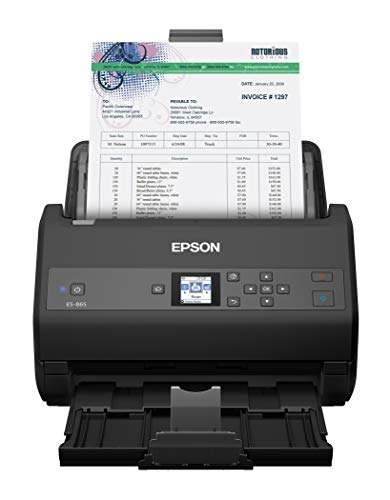
- Up to 65 ppm/130 ipm duplex scanning
- 100-page ADF for larger office jobs
- OCR, cloud scanning, and TWAIN support
Best For: Busy offices that need fast, dependable document scanning
Photo Digitizing Hybrid
Epson FastFoto FF-680W High-Speed Duplex Photo and Document Scanner

- Scans photos up to 1 per second at 300 dpi
- Batch-scan up to 36 photos with duplex capture
- USB, wireless, OCR, and cloud backup support
Best For: People archiving photo collections who also scan documents
Wireless Office Favorite
Epson Workforce ES-580W Wireless Color Duplex Desktop Document Scanner

- Wireless scanning with touchscreen controls
- 100-sheet ADF and duplex scanning
- OCR with editable Word/Excel conversion
Best For: Small offices and home users who value wireless convenience
Large-Format Network Pick
Epson DS-790WN Wireless Network Color Document Scanner
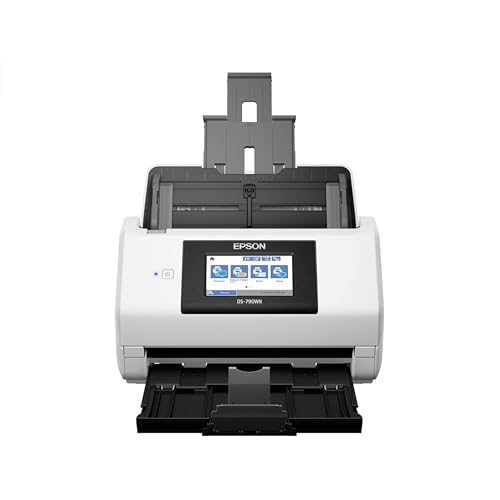
- Large-format scanner for managing bigger files
- Wireless network model for shared office access
- 32-bit color depth for detailed color scans
Best For: Shared offices needing network access and large-file handling
Speed-Focused Duplex Value
Epson Workforce ES-400 II High-Speed Color Duplex Desktop Document Scanner

- 50-sheet ADF for faster batch scanning
- Duplex scanning plus OCR and editable file conversion
- ScanSmart software with TWAIN integration
Best For: Busy offices that want fast scanning and simple workflow tools
Wireless Batch-Scan Favorite
Epson Workforce ES-500W II Wireless Color Duplex Desktop Document Scanner

- Wi-Fi and mobile app scanning to cloud and devices
- 35 ppm/70 ipm with single-step duplex capture
- 50-sheet ADF plus OCR and TWAIN support
Best For: Teams that need wireless batch scanning and easy sharing
High-Speed TWAIN Pick – Epson DS-530X Color Duplex Desktop Document Scanner
The Epson DS-530X is built for commercial-grade desktop document scanners use cases where speed, feeder capacity, and workflow compatibility matter most. With up to 45 ppm/90 ipm, a 100-page ADF, and TWAIN/ISIS drivers, it fits busy offices that need fast duplex capture and straightforward integration.
Best For: Offices that need high-speed scanning with strong TWAIN/ISIS compatibility and a large feeder.
Pros:
- Scans single-pass duplex pages at up to 45 ppm/90 ipm
- 100-page automatic document feeder supports longer scan runs
- TWAIN and ISIS drivers help it fit into many document systems
- Built for reliability with ultrasonic double-feed detection and blank page removal
Cons:
- No networking feature is listed in the supplied notes
- Focused on document capture rather than broad cloud or mobile workflows
If your priority is fast, dependable batch scanning with broad software compatibility, the DS-530X is a strong fit. It emphasizes throughput and media protection over extra convenience features.
Wired Workgroup Choice – Brother ADS-4300N Professional Desktop Scanner
Brother ADS-4300N Professional Desktop Scanner with Fast Scan Speeds, Duplex, and Networking,White
Check Price On AmazonThe Brother ADS-4300N is a practical choice among commercial-grade desktop document scanners for offices that want fast duplex capture and simple network sharing. It scans up to 40 ppm, includes an 80-page ADF, and offers built-in Ethernet plus wide driver support for easy workflow integration.
Best For: Workgroups that want a fast wired scanner with flexible scan-to destinations and security features.
Pros:
- Scans single- and double-sided pages in one pass at up to 40 ppm
- 80-page ADF and continuous scanning mode support heavier workloads
- Built-in Ethernet makes it easy to share on a network
- TWAIN, WIA, ISIS, and SANE driver support plus many scan-to destinations
Cons:
- No wireless connectivity is listed in the supplied notes
- Lower ADF capacity than some higher-end office models
For offices that value networked sharing, security, and broad software compatibility, the ADS-4300N is a well-rounded desktop option. It balances speed with practical deployment features.
Touchscreen Cloud Scanner – ScanSnap iX2500 Wireless or USB High-Speed Document Scanner
The ScanSnap iX2500 stands out in commercial-grade desktop document scanners for teams that want fast scanning plus easy organization. It delivers 45 ppm double-sided scanning, a 100-sheet feeder, Wi-Fi 6 or USB-C connectivity, and automatic optimizations for documents, receipts, photos, and business cards.
Best For: Users who want a fast, modern scanner with wireless flexibility and simple file organization.
Pros:
- 45 ppm double-sided scanning with a 100-sheet document feeder
- Wi-Fi 6 and USB-C connectivity for wireless or local use
- Large touchscreen with customizable profiles and Quick Menu
- Automatic optimization, naming, and sorting for scanned files
Cons:
- Not as explicitly workflow-centric as TWAIN/ISIS-heavy office scanners
- Best suited to ScanSnap-style use cases rather than broad enterprise integration
If you want a scanner that makes capture and organization feel streamlined, the iX2500 is a compelling choice. It leans into speed, usability, and cloud-friendly convenience.
Max-Throughput Wireless Pro – Brother ADS-4900W Professional Desktop Scanner
The Brother ADS-4900W is aimed at demanding offices that need commercial-grade desktop document scanners with higher throughput and broader connectivity. It scans up to 60 ppm, uses a 100-page ADF, and includes dual-band wireless, Ethernet, and USB 3.0 for flexible deployment.
Best For: Busy workgroups that want the fastest scan speed here plus wireless, wired, and USB connections.
Pros:
- Up to 60 ppm single-pass duplex scanning for high-volume jobs
- 100-page ADF supports larger batch scanning sessions
- Dual-band wireless, Ethernet, and USB 3.0 cover multiple setup options
- 4.3-inch touchscreen with customizable shortcuts and scan job preview
Cons:
- Heavier and larger than the more compact options listed
- Advanced connectivity may be more than small offices need
Among the scanners listed, the ADS-4900W is the strongest fit for high-volume environments that want speed and flexibility together. It combines fast capture with easy access to common cloud and network destinations.
High-Volume Office Pick – Epson Workforce ES-865 High Speed Color Duplex Document Scanner
If you need one of the more capable commercial-grade desktop document scanners for a busy office, the Epson Workforce ES-865 is built for speed and throughput. It scans both sides in a single pass, reaches up to 65 ppm/130 ipm, and includes a 100-page ADF for larger jobs. It also adds OCR, cloud scan destinations, and paper-handling features that help keep everyday document workflows moving.
Best For: High-volume teams that want fast duplex scanning, strong paper handling, and flexible software support.
Pros:
- Up to 65 ppm/130 ipm with single-pass duplex scanning.
- 100-page automatic document feeder supports bigger scan batches.
- ScanSmart software, TWAIN driver, and OCR support broader office workflows.
- Double-feed detection, skew correction, and Slow Speed Mode help reduce misfeeds.
Cons:
- USB connection only, so it lacks built-in wireless convenience.
- Best suited to document scanning rather than mixed media versatility.
- At 7.9 pounds, it is still a desktop device that needs dedicated space.
This is a practical choice when speed and reliability matter more than extras. For offices that scan stacks of paperwork every day, the ES-865 offers a balanced mix of performance, software compatibility, and handling features.
Photo Digitizing Hybrid – Epson FastFoto FF-680W High-Speed Duplex Photo and Document Scanner
The Epson FastFoto FF-680W stands out in the commercial-grade desktop document scanners space if your workflow includes both paperwork and photo archiving. It can scan up to 1 photo per second at 300 dpi, batch up to 36 photos at once, and capture both sides of a photo in a single pass. It also includes document scanning with OCR, wireless and USB connectivity, and cloud backup options.
Best For: Users who need a fast scanner for photo archives but also want solid document-scanning capability.
Pros:
- Very fast photo scanning, with batch scanning up to 36 photos at a time.
- Single-step duplex capture preserves front and back content.
- Includes OCR for documents and scan speeds up to 45 ppm/90 ipm.
- USB and wireless connectivity make placement more flexible.
Cons:
- Its biggest strengths are photos, not pure office document throughput.
- Features like restoration and photo cleanup are more specialized than standard business scanning tools.
- Some buyers may not need the photo-specific workflow at all.
For mixed home-office or archive use, this model is unusually versatile. If photos are a major part of the job, the FastFoto FF-680W is more compelling than a typical document-only scanner.
Wireless Office Favorite – Epson Workforce ES-580W Wireless Color Duplex Desktop Document Scanner
The Epson Workforce ES-580W is a strong fit if you want commercial-grade desktop document scanners with wireless convenience and straightforward day-to-day operation. It scans at up to 35 ppm, handles both sides in one pass, and uses a 100-sheet ADF for multi-page jobs. The 4.3-inch touchscreen, direct-to-cloud options, and OCR support make it especially convenient for home offices and small teams.
Best For: Office users who want wireless scanning, touchscreen control, and easy document organization.
Pros:
- Wireless scanning with direct output to phone, tablet, computer, or cloud.
- 4.3-inch touchscreen and no-computer-needed workflow add convenience.
- 100-sheet ADF and single-step duplex scanning support daily office use.
- OCR, editable Word/Excel conversion, and image cleanup tools improve usability.
Cons:
- Top speed of 35 ppm is lower than some faster office-focused scanners.
- Resolution is listed at 300 dpi, which may be modest for detail-heavy capture needs.
- Wireless setup and cloud features may be more than some users need.
As a balanced desktop scanner, the ES-580W prioritizes convenience without giving up core office features. It is a sensible pick for users who want efficient scanning and fewer cables on the desk.
Large-Format Network Pick – Epson DS-790WN Wireless Network Color Document Scanner
If you need commercial-grade desktop document scanners that can handle larger files and fit into a networked office workflow, the Epson DS-790WN is built around access, management, and color capture. Its large-format design helps you work with all your large files, while the 32-bit color depth supports detailed scans for office use.
Best For: Offices that need a network-connected desktop scanner for larger documents and better file management.
Pros:
- Large-format scanner helps improve access to and management of large files.
- Wireless network connection suits shared office environments.
- 32-bit color depth supports richer color capture.
Cons:
- The supplied notes focus on file handling and color depth, not speed specs.
- More specialized than a basic desktop scanner if you only scan standard pages.
This is a practical fit when your priority is networked scanning and handling oversized documents rather than maximizing scan speed or portability.
Speed-Focused Duplex Value – Epson Workforce ES-400 II High-Speed Color Duplex Desktop Document Scanner
Among commercial-grade desktop document scanners, the Epson Workforce ES-400 II stands out for fast batch handling and straightforward software support. Its 50-sheet Auto Document Feeder, duplex scanning, and included ScanSmart software make it a solid fit for busy desks that need to move stacks of paper into digital files quickly.
Best For: Busy home offices and small workgroups that need fast duplex scanning with simple file management.
Pros:
- 50-sheet Auto Document Feeder helps speed through stacks of paper.
- Duplex scanning captures both sides for more efficient document handling.
- ScanSmart software supports previewing, emailing, cloud uploads, and automatic file naming.
- TWAIN driver supports integration with most document management software.
Cons:
- Uses a wired desktop setup rather than wireless scanning.
- Designed for office document scanning, so it is less specialized for larger-format files.
If you want a dependable desktop scanner that emphasizes speed, OCR tools, and workflow integration, the ES-400 II is the most streamlined option here.
Wireless Batch-Scan Favorite – Epson Workforce ES-500W II Wireless Color Duplex Desktop Document Scanner
For commercial-grade desktop document scanners that need wireless convenience and strong batch capability, the Epson Workforce ES-500W II is a versatile choice. It scans to phones, tablets, computers, and cloud accounts through the Epson Smart Panel app, while the 50-sheet ADF and single-step duplex capture help keep office scanning moving.
Best For: Teams that want wireless scanning, batch feeding, and flexible document sharing from a desktop scanner.
Pros:
- Wi-Fi and mobile app support let you scan to smartphones, tablets, computers, and cloud storage.
- Scans up to 35 ppm/70 ipm with single-step duplex capture.
- 50-sheet Auto Document Feeder handles multiple paper types and sizes in one batch.
- Includes OCR, ScanSmart software, and TWAIN integration for office workflows.
Cons:
- Wireless convenience may be unnecessary if you only need a simple wired scanner.
- The supplied notes emphasize everyday documents rather than large-format scanning.
This model is a strong all-around pick when you want wireless flexibility, batch scanning, and broad document support in one desktop unit.
How We Picked the Best Commercial-Grade Desktop Document Scanners
We prioritized Commercial-Grade Desktop Document Scanners that balance speed, durability, and everyday usability. The best picks offer duplex scanning, practical ADF capacity, strong software support, and connectivity options that match real business environments. We also favored models that are easy to deploy in shared offices and reliable for repeated use.
Quick Comparison: What Matters Most
When comparing models, look first at pages per minute, single-pass duplex performance, and document feeder size. Then compare USB, wireless, and network connectivity, since these determine how easily the scanner fits into a workgroup. If you scan stacks of mixed paperwork, software features such as OCR, cloud destinations, and profile buttons can be just as important as raw speed.
Key Buying Factors for Commercial-Grade Desktop Document Scanners
Speed and Duty Cycle
Fast scan speeds matter, but so does how well the scanner holds up over time. For offices with daily intake, choose a model designed for regular high-volume use rather than occasional home scanning.
ADF Capacity and Paper Handling
A larger automatic document feeder reduces interruptions. Also check supported paper sizes, mixed-size handling, and whether the scanner can reliably process receipts, business cards, and long documents without frequent jams.
Duplex and Image Quality
Duplex scanning is essential for double-sided paperwork. Image enhancement features, blank-page removal, and text clarity improve downstream OCR accuracy and make archived files easier to search.
Connectivity and Workflow
USB is fine for a single workstation, while Wi-Fi and Ethernet are better for shared offices. If multiple people need access, Commercial-Grade Desktop Document Scanners with network support or easy wireless setup can simplify deployment.
Who Should Buy Which Commercial-Grade Desktop Document Scanners?
Choose a high-speed, feeder-equipped model if your team scans invoices, forms, or contracts in volume. Pick wireless or networked options if the scanner will be shared across departments. If your priority is simple everyday digitizing at one desk, a compact USB model may be the most practical choice. For mixed media or photo-heavy workflows, consider whether you need document-first performance or a more flexible scanner that can handle both photos and paperwork.
For most businesses, the best choice is the scanner that matches your real workflow, not just the highest speed on paper. Focus on reliability, connectivity, and paper handling first, then narrow down by software and budget.