Compact laser engravers make it easier to personalize gifts, prototype parts, and create detailed craft projects without dedicating an entire workshop to a large machine. The 10 models in this roundup span enclosed desktop systems, foldable designs, entry-level diode engravers, and faster dual-laser machines.
Before choosing, compare working area, laser type, enclosure, camera features, material support, and ventilation needs. The right machine depends as much on your projects and workspace as on raw laser power.
Best 10 Compact Laser Engravers Picks for 2026
Best All-in-One Kit

- Smart camera helps position designs accurately
- Includes enclosure, honeycomb bed, tools, and materials
- Supports engraving and light cutting on varied materials
Best For: Beginners wanting a complete, guided desktop setup
Best Foldable Design
Artilume T1-P 7W Foldable Engraver

- Folds for easier storage in small workspaces
- Supports mobile app, LightBurn, and LaserGRBL control
- Includes a protective case and height extension base
Best For: Portable engraving at home, school, or in a small studio
Best Lightweight Mini
LaserVii L1 Mini Class 1 Engraver

- Lightweight snap-fit design assembles quickly
- 150 x 150mm work area suits small projects
- Offers Bluetooth, TF card, and Type-C connections
Best For: Small-format engraving with easy setup and storage
Best for Light Cutting

- Cuts thin basswood up to 4mm with multiple passes
- Supports detailed engraving on varied craft materials
- Foldable design and up to 10,000mm/min speed
Best For: Desktop DIY projects needing engraving plus light cutting
Best Ultra-Compact Pick

- Lightweight 2kg design with a 130 x 130 mm work area
- 10,000 mm/min speed and 0.01 mm repeatable accuracy
- Preassembled and compatible with LightBurn and LaserGRBL
Best For: Portable home crafting and small personalized projects
Best Enclosed Smart Pick

- Class 1 enclosed design with automatic safety features
- Smart camera and auto focus simplify alignment and setup
- Engraves at up to 15,000 mm/min and supports modular laser heads
Best For: Guided desktop engraving with enhanced enclosure safety
Best Large-Work-Area Value

- Large 300 x 300 mm work area in a 2.13 kg machine
- Up to 10,000 mm/min speed and 0.01 mm engraving accuracy
- Supports LightBurn, LaserGRBL, and major desktop operating systems
Best For: Portable projects needing more working space
Best for Versatile Metal Marking
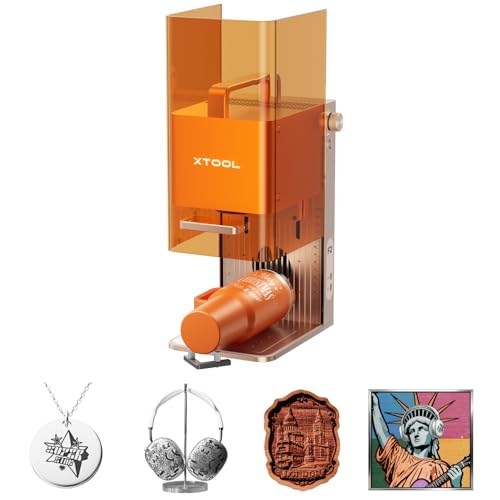
- 15W diode and 5W IR lasers
- 50MP camera with precise alignment
- Portable enclosed design for batch work
Best For: On-site personalization and small-batch makers
Best Beginner Value

- Preassembled, compact one-piece frame
- 0.04 mm spot for detailed craft work
- Supports wood, acrylic, leather, and more
Best For: First-time makers and small-format DIY projects
Best for Enclosed Home Crafting

- Class 1 fully enclosed design
- Dual cameras for guided placement
- Optional color and IR expansion modules
Best For: Home DIY makers prioritizing safety and ease of use
Best All-in-One Kit – BlazeX M3 10W Laser Engraver
The BlazeX M3 is one of the more complete compact laser engravers for beginners who want cutting, engraving, camera positioning, and safety features in one package. Its 10W laser is designed for detailed work on materials such as wood, acrylic, leather, metal, and glass, while the included enclosure and honeycomb bed help create a more ready-to-use desktop setup.
Best For: Beginners and hobbyists who want a versatile, guided setup for engraving and light cutting.
Pros:
- Smart camera previews design placement to help reduce material waste.
- Includes an enclosure, honeycomb bed, tools, and 13 engraving materials.
- Supports LightBurn, LaserGRBL, and CutLabX across several operating systems.
- Class 1 safety design includes lid and tilt protection, smoke exhaust, and reduced noise.
Cons:
- Additional accessories such as a rotary roller, air assist, and purifier are separate upgrades.
- The included feature set may be more than needed for users seeking a basic engraver.
The M3 stands out when convenience and versatility matter more than the simplest possible setup. The camera-guided workflow and bundled accessories make it a practical choice for home studios, classrooms, and first-time makers.
Best Foldable Design – Artilume T1-P 7W Foldable Engraver
The Artilume T1-P is a compact laser engraver built around portability and flexible control. Its foldable frame is suited to small workspaces, and users can operate it from a mobile app or connect through LightBurn and LaserGRBL for more advanced desktop workflows.
Best For: Makers, classrooms, and small businesses that need a portable engraver with phone and computer control.
Pros:
- Foldable structure is easy to store, move, and set up on a desk or craft table.
- Mobile app enables computer-free operation, with LightBurn and LaserGRBL also supported.
- 7000mW laser handles detailed engraving and light cutting on compatible craft materials.
- Includes a protective case that can also serve as a height extension base.
Cons:
- The 7W output is intended for light cutting rather than heavier cutting workloads.
- Working with taller materials depends on the supported range and added clearance.
With its pre-assembled design, emergency stop, tilt protection, warranty, and lifetime technical support, the T1-P is approachable for new users. Its main advantage is the combination of foldable storage and flexible app-based operation.
Best Lightweight Mini – LaserVii L1 Mini Class 1 Engraver
The LaserVii L1 Mini is a lightweight option for shoppers comparing compact laser engravers for small desks and workstations. It offers a 150 x 150mm work area, fast operating speed, snap-fit assembly, and several connection methods, making it suitable for small signs, keychains, labels, and detailed craft projects.
Best For: Beginners and makers who prioritize a lightweight machine, quick assembly, and flexible file transfer.
Pros:
- Weighs about 1.5 kilograms and uses a snap-fit design for quick assembly.
- 150 x 150mm work area accommodates larger designs or multiple small items.
- Supports Bluetooth, TF card, and Type-C connections, plus LightBurn and LaserGRBL.
- Includes safety goggles and multiple listed safety certifications.
Cons:
- The listed 3W laser module is more suited to engraving and lighter tasks than demanding cutting.
- The compact work area limits the size of single-piece projects.
The L1 Mini makes a strong case for convenience: it is light, quick to assemble, and usable with or without a computer. Choose it when portability and straightforward small-format engraving are more important than maximum cutting power.
Best for Light Cutting – 7W Foldable Laser Engraver
This 7W model is a practical choice among compact laser engravers for users who want both detailed engraving and light cutting. Its diode laser can cut thin basswood up to 4mm with multiple passes, while the foldable design and compact work area keep it suitable for desktop DIY projects.
Best For: Hobbyists making coasters, ornaments, tags, leather patches, and other small projects that require occasional light cutting.
Pros:
- 7W laser supports engraving and thin wood cutting with multiple passes.
- Claimed 0.01mm engraving accuracy suits fine text, photos, and intricate patterns.
- Works with wood, leather, bamboo, kraft paper, dark acrylic, coated metal, and other craft materials.
- Up to 10,000mm/min speed can shorten project times.
Cons:
- Bare metal requires marking spray for best results.
- Cutting performance depends on material thickness and may require multiple passes.
- The compact work area is better suited to small projects than large signs.
The main appeal here is balanced capability: it offers useful engraving detail without giving up basic cutting functionality. It is a sensible fit for desktop makers who understand that material testing and multiple passes may be necessary.
Best Ultra-Compact Pick – ACMER S1 24W Laser Engraver
For shoppers comparing compact laser engravers, the ACMER S1 stands out for its lightweight, portable design and fast setup. Its 130 x 130 mm work area, 10,000 mm/min maximum speed, and 0.01 mm repeatable positioning accuracy suit detailed home crafting and small projects.
Best For: Beginners, hobbyists, and home users who want a portable engraver for wood, acrylic, leather, bamboo, and similar materials.
Pros:
- 99% preassembled, with a quick laser-head installation.
- Supports engraving and cutting across a broad range of materials.
- Works with macOS, Windows, Linux, LightBurn, and LaserGRBL.
- Includes free Acmerstudio software, a 12-month warranty, and 24/7 support.
Cons:
- The 130 x 130 mm working area is smaller than many desktop machines.
- The Class 4 laser certification means users should follow appropriate laser-safety procedures.
The ACMER S1 is a practical choice when portability and straightforward setup matter most. Its compact footprint limits project size, but the precise diode laser and wide software support make it versatile for small crafts and personalized items.
Best Enclosed Smart Pick – Creality Falcon A1C 10W Mini
The Creality Falcon A1C is one of the more feature-rich compact laser engravers for users who value guided setup and built-in safety features. Its enclosed Class 1 design combines a smart camera, auto focus, visual positioning, and engraving speeds up to 15,000 mm/min.
Best For: Beginners and makers who want an enclosed desktop machine with camera alignment, automatic focusing, and upgradeable laser modules.
Pros:
- Class 1 enclosed design with flame detection, tilt protection, and a USB safety lock.
- Smart camera enables real-time previews and visual positioning.
- 15-second quick-swap design supports compatible 5W, 10W, and optional 1.2W IR modules.
- Falcon Design Space includes material recognition, a material library, and AI-assisted tools.
Cons:
- At 31.2 pounds, it is substantially heavier than the other listed compact models.
- The 1.2W IR laser module is sold separately.
The Falcon A1C is a strong fit for users who prefer convenience and safety features over the smallest possible footprint. The camera and auto focus can reduce setup friction, while the modular system leaves room to expand material capabilities later.
Best Large-Work-Area Value – ELIDOR Class 1 Laser Engraver
The ELIDOR offers an appealing balance for shoppers seeking compact laser engravers without giving up much working space. Its 300 x 300 mm work area, 2.13 kg weight, 10,000 mm/min speed, and 0.01 mm engraving accuracy make it suitable for larger craft layouts while remaining portable.
Best For: Mobile makers, classrooms, hobbyists, and small businesses working on personalized crafts, décor, gifts, and larger flat designs.
Pros:
- 300 x 300 mm working area is generous for a lightweight machine.
- Fine 0.04 x 0.14 mm laser spot and up to 0.01 mm engraving accuracy.
- Supports wood, leather, acrylic, cardboard, ceramic, glass, metal, and more.
- Compatible with LightBurn, LaserGRBL, Windows, macOS, and Linux.
Cons:
- The listed product dimensions are incomplete, making its physical footprint difficult to assess.
- The Class 1 setup requires pairing the engraver with a compatible protective enclosure.
The ELIDOR is compelling when a larger work area matters more than ultra-small storage dimensions. It offers broad material and software compatibility, though buyers should plan for the compatible enclosure if they want a Class 1 enclosed workspace.
Best for Versatile Metal Marking – xTool F2 Dual-Laser Engraver
For shoppers comparing compact laser engravers, the xTool F2 stands out for combining a 15W diode laser with a 5W infrared laser in a portable, enclosed design. Its built-in 50MP camera, fast 6,000mm/s operation, and support for more than 300 materials make it particularly capable for detailed personalization and small-batch work.
Best For: Makers, pop-up sellers, and small businesses that need portable engraving, vivid metal marking, or efficient batch personalization.
Pros:
- Dual lasers handle metal color marking, 3D embossing, and thicker materials.
- Built-in 50MP camera supports alignment accuracy up to 0.1 mm.
- Fully enclosed design, built-in fan, and optional purifier support indoor use.
- Lightweight 4.6 kg body and optional slide extension suit on-site and batch work.
Cons:
- Optional accessories such as the rotary attachment, slide extension, and purifier add to the setup cost.
- Its Class 4 laser classification requires careful attention to safety procedures.
The xTool F2 is a strong premium choice when speed, camera-assisted precision, and material flexibility matter more than the simplest possible setup. It is especially compelling for sellers who want one compact machine for both personal projects and customer orders.
Best Beginner Value – WIZMAKER WAND MINI 2.5W
The WIZMAKER WAND MINI is a practical entry point for anyone seeking compact laser engravers for a desk, classroom, craft booth, or small workshop. It arrives preassembled, uses a 0.04 mm spot for fine detail, and offers a 135 × 145 mm working area for common wood, leather, acrylic, and craft-material projects.
Best For: Beginners, students, homeschool families, hobbyists, and small sellers making gifts, ornaments, décor, and personalized craft items.
Pros:
- Zero-assembly design lets users start after unboxing and plugging in.
- Fine 0.04 × 0.04 mm spot supports detailed engravings.
- Works with more than 300 materials, including wood, leather, cork, felt, and dark acrylic.
- Supports Windows, Mac, iOS, and Android control with USB, Wi-Fi, or hotspot connections.
Cons:
- The 2.5W model cannot engrave metal, including coated metal.
- Rollers, chuck accessories, and the IR module are sold separately.
- The 135 × 145 mm work area limits larger projects.
Choose the WAND MINI if ease of setup, affordability, and small-format craft work are your priorities. Its low power makes it less versatile than higher-powered machines, but the beginner-focused workflow and upgrade path are useful for learning and growing into new projects.
Best for Enclosed Home Crafting – xTool M2 10W
Among compact laser engravers for home crafting, the xTool M2 emphasizes convenience and safety with a fully enclosed Class 1 design and dual built-in cameras. Its 10W diode laser works with materials such as wood, leather, felt, fabric, paper, and cardstock, while optional modules expand its printing and metal-engraving capabilities.
Best For: Home crafters and DIY makers who want camera-assisted placement, guided software, and a safer enclosed workspace.
Pros:
- Class 1 enclosed design includes real-time safety monitoring.
- Dual cameras provide workspace preview and support the “Place & Go” workflow.
- xTool Studio offers templates and an integrated AI image generator.
- Optional CMYK and 3W IR modules add color printing and fine metal or plastic engraving.
Cons:
- The CMYK inkjet module and RA3 Lite rotary are not included.
- The 3W IR laser module is also sold separately for metal and plastic work.
- At 36.2 pounds, it is less portable than smaller desktop engravers.
The M2 is a sensible choice for users who value an enclosed home setup and streamlined software over maximum portability. Keep the add-on costs in mind, especially if you expect to use color printing, rotary work, or enhanced metal-marking functions.
How We Picked These Compact Laser Engravers
We focused on desktop-friendly machines with practical features for hobbyists, makers, home businesses, and small workshops. The selection covers several power classes and price tiers, including enclosed Class 1 designs, open-frame options, compact mini engravers, and dual-laser systems. We considered advertised work areas, focusing and alignment tools, camera assistance, supported materials, portability, and ease of use.
Because specifications and included accessories can vary by seller, verify the current listing before purchase—especially the laser module, enclosure rating, software compatibility, and ventilation requirements.
Quick Comparison
| Best For | What to Prioritize | Recommended Type |
|---|---|---|
| Small crafts and gifts | Simple setup and safe enclosure | Compact Class 1 diode model |
| Detailed wood and leather work | Higher diode power and camera alignment | 10W enclosed or camera-equipped engraver |
| Metal marking | IR laser capability | Dual-laser system such as an IR and diode model |
| Portable or occasional use | Foldable frame and low storage footprint | Foldable desktop engraver |
| Small commercial production | Speed, repeatability, and larger work area | Faster enclosed machine with smart positioning |
Key Buying Factors for Compact Laser Engravers
Laser Power and Material Compatibility
Higher diode power generally improves cutting performance on materials such as thin wood, leather, cardboard, and some acrylic. It does not automatically make a machine suitable for every material. Many diode lasers struggle with clear acrylic and bare metal, while an IR module is better suited to marking certain metals and plastics. Always check the manufacturer’s approved-material list.
Work Area and Machine Footprint
A small work area saves space but limits signs, panels, and batch production. Measure both the engraving bed and the complete machine, including cable clearance and ventilation space. Foldable designs can be useful when the machine must be stored between projects.
Safety, Enclosure, and Ventilation
Class 1 enclosed designs are generally easier to use in shared home spaces, but they still require responsible operation. Use the supplied safety equipment, keep the lid closed, supervise every job, and provide appropriate exhaust or filtration. Never engrave unknown plastics or materials that may release toxic fumes.
Camera Alignment, Focusing, and Software
Built-in cameras can simplify positioning, previewing, and batch layouts. Automatic focus is convenient, while manual focus can be perfectly adequate for occasional use. Confirm operating-system support, file formats, application quality, and whether the camera features require a particular software ecosystem.
Who Should Buy Which Compact Laser Engravers?
Choose a small entry-level or mini model if you mainly want names, logos, ornaments, and occasional gifts. A 10W diode machine is a better all-around choice for frequent wood, leather, and thin-material projects. If you need to mark metal or want broader material flexibility, prioritize a dual-laser model with an IR source rather than simply choosing the highest diode wattage.
For homes with children, pets, or limited ventilation, an enclosed Class 1 machine is usually the more practical choice. Buyers running a small personalization business should prioritize camera-assisted alignment, reliable autofocus, higher operating speed, and a work area large enough for repeat orders. Whichever model you select, budget for ventilation, replacement parts, and suitable material blanks.