A curved 49-inch monitor can put a game or several work windows across one continuous screen. But models with the same 32:9 shape can feel very different in use, especially when it comes to motion clarity, text work, and connectivity.
These 10 picks span high-refresh gaming displays, OLED options, and productivity-focused monitors. Start with what you do most, then check whether your desk, computer, and preferred connections can support the screen.
Best 10 Curved 49 Inch PC Monitors Picks for 2026
Adjustable Gaming Pick

- 5120 × 1440 VA panel with 1500R curve
- 120Hz via DisplayPort 1.4
- PIP/PBP and adjustable stand
Best For: Gaming with occasional multi-device work
Connectivity Pick

- 5120 × 1440 display at up to 120Hz via DP
- USB-C with up to 65W power delivery
- RJ45, speakers, and PIP/PBP
Best For: Laptop-based desks needing varied ports
Dual-Device Desk Pick

- 5120 × 1440, 1500R VA display
- Built-in KVM and PIP/PBP
- 65W USB-C PD; no built-in speakers
Best For: PC-and-laptop workstations
Built-In Audio Pick

- 5120 × 1440 display with 120Hz via DP
- Built-in speakers and KVM
- USB-C with 65W power delivery
Best For: Multi-device desks needing integrated audio
High-Refresh LCD Pick
CRUA 49-Inch 165Hz DQHD Curved Monitor

- 5120 × 1440, 32:9 VA panel
- Up to 165Hz with FreeSync
- Adjustable stand; no built-in speakers
Best For: High-refresh ultrawide gaming and multitasking
QD-OLED Gaming Pick
Samsung 49-Inch Odyssey OLED G9 G91SD

- 5120 × 1440 QD-OLED screen
- 144Hz and stated 0.03ms response
- Picture-in-Picture and adjustable stand
Best For: Immersive gaming with deep OLED blacks
White Setup Pick
CRUA 49-Inch 120Hz DQHD Curved Monitor
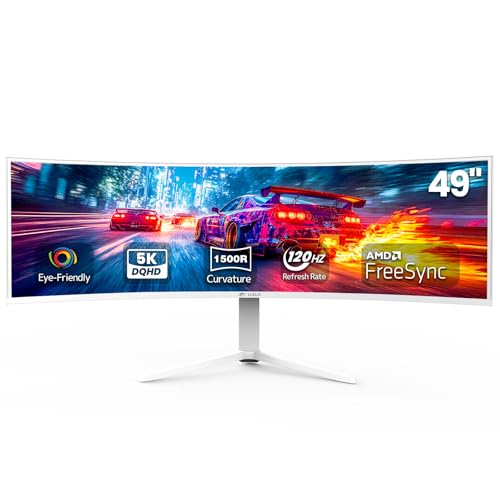
- White 5120 × 1440 ultrawide
- 120Hz with AMD FreeSync
- Adjustable stand; external audio needed
Best For: White-themed work and gaming setups
Best for High-Speed Gaming

- 5120 x 1440 QD-OLED panel
- 240Hz refresh; 0.03ms response
- G-Sync compatible; two-input Picture-by-Picture
Best For: High-refresh ultrawide PC gaming
Best for Desk Productivity
Samsung S95UA Business Ultrawide

- 5120 x 1440, 1000R curved display
- USB-C with up to 90W charging
- 120Hz refresh and built-in speakers
Best For: Laptop-centered multitasking and cleaner desks
Best for Immersive VA Gaming

- 5120 x 1440 VA panel with 1000R curve
- 144Hz refresh and 1ms response
- DisplayHDR 600; FreeSync Premium Pro
Best For: Immersive ultrawide gaming with flexible screen layouts
Adjustable Gaming Pick – Amzfast AMZG49C7U
Among curved 49 inch pc monitors, the Amzfast AMZG49C7U is a practical choice if you want a 5120 × 1440 gaming display with an adjustable stand. Its 1500R VA panel and 32:9 layout provide a wide view without a center bezel.
Best For: Gamers who also want split-screen space for work or multiple devices.
Pros:
- 120Hz refresh rate via DisplayPort 1.4, plus Adaptive Sync and a stated 1ms MPRT.
- PIP/PBP can show two input sources at once.
- Height, swivel, and tilt adjustments offer flexibility for desk placement.
Cons:
- The stated 120Hz refresh rate requires DisplayPort 1.4.
- No USB-C connection is listed.
The combination of DQHD resolution, split-screen modes, and stand adjustments makes this a versatile gaming-and-work option. Check that its listed HDMI and DisplayPort connections suit your devices.
Connectivity Pick – INNOCN 49C1R
The INNOCN 49C1R stands out among curved 49 inch pc monitors for its range of connections. Alongside its 5120 × 1440, 120Hz VA display, it offers USB-C with up to 65W power delivery, DisplayPort, HDMI, USB ports, and RJ45.
Best For: Laptop users who want a wide workspace and several connection options.
Pros:
- USB-C supports video connection and up to 65W power delivery for compatible devices.
- PIP/PBP displays content from two sources.
- Includes built-in speakers and height, tilt, and swivel adjustments.
Cons:
- The stated 120Hz refresh rate is specified for DisplayPort 1.4.
- 65W charging may not meet the needs of every laptop.
Its ports and screen-sharing modes make the 49C1R particularly useful for switching between desk tasks. If high-refresh gaming is the priority, plan to use DisplayPort 1.4.
Dual-Device Desk Pick – Deco Gear DGVIEW495K
For shoppers comparing curved 49 inch pc monitors for work and gaming, the Deco Gear DGVIEW495K pairs a 5120 × 1440, 1500R screen with a built-in KVM switch. USB-C with up to 65W power delivery can help simplify a compatible laptop setup.
Best For: Shared PC-and-laptop desks that need one wide display and keyboard-and-mouse setup.
Pros:
- KVM and PIP/PBP support multi-device workflows.
- 120Hz refresh rate and Adaptive Sync suit gaming as well as daily work.
- Adjustable height, tilt, and swivel improve positioning options.
Cons:
- No built-in speakers; audio out is provided for external audio.
- 65W USB-C power delivery may be insufficient for some laptops.
This model is most compelling if you will use its KVM and USB-C features, not just its screen width. Factor external speakers or headphones into the setup if you need audio.
Built-In Audio Pick – Deco Gear VIEW495K
The Deco Gear VIEW495K is an option among curved 49 inch pc monitors if you want built-in speakers alongside a KVM switch. Its 5120 × 1440, 32:9 screen provides a continuous workspace, while the listed 120Hz refresh rate supports smoother motion over DisplayPort.
Best For: Multi-device setups that benefit from integrated speakers and USB-C laptop connectivity.
Pros:
- Built-in speakers reduce the need for separate desk speakers.
- KVM, USB-C with 65W power delivery, and PIP/PBP support two-device workflows.
- Height, tilt, and swivel adjustments help position the large screen.
Cons:
- The stated Adaptive Sync range tops out at 60Hz over HDMI 2.0, versus 120Hz over DisplayPort 1.4.
- The supplied specifications list 250 nits of brightness.
Choose this version if integrated audio matters to your desk setup. For its highest listed refresh rate, use DisplayPort rather than HDMI.
High-Refresh LCD Pick – CRUA 49-Inch 165Hz DQHD Curved Monitor
Among curved 49 inch pc monitors, this black CRUA model offers a 5120 × 1440, 32:9 workspace with a 1500R curve and up to 165Hz refresh rate. It suits buyers who want one wide screen for gaming and multitasking without moving to OLED.
Best For: Gamers and multitaskers who prioritize a high refresh rate and an adjustable ultrawide setup.
Pros:
- 165Hz refresh rate and AMD FreeSync support smooth gaming.
- 5120 × 1440 resolution provides room for side-by-side windows.
- Height adjustment, HDMI 2.1, DisplayPort 1.4, and wall-mount compatibility offer setup flexibility.
Cons:
- No built-in speakers; audio requires an external device.
- The 46-inch-wide display needs substantial desk space.
Choose this one if the faster refresh rate matters more to you than the white finish of CRUA’s 120Hz version. Check that your PC can drive 5120 × 1440 at your preferred refresh rate.
QD-OLED Gaming Pick – Samsung 49-Inch Odyssey OLED G9 G91SD
If you are comparing curved 49 inch pc monitors for picture quality, the Samsung Odyssey OLED G9 G91SD brings QD-OLED contrast and color to a 5120 × 1440, 32:9 screen. Its 144Hz refresh rate and stated 0.03ms response time also make it a strong gaming-focused option.
Best For: Gamers who value OLED black levels, fast response, and a wide desktop for occasional multitasking.
Pros:
- QD-OLED delivers true blacks without pixel light bleed.
- 144Hz, G-Sync compatibility, and FreeSync Premium Pro support fluid gameplay.
- Picture-in-Picture and an adjustable stand add everyday flexibility.
Cons:
- Static desktop elements warrant attention on an OLED panel, despite the included detection and dimming features.
- Its approximately 47-inch width requires a roomy desk.
This is the image-quality choice of the three, especially for games with dark scenes. If your day is dominated by stationary toolbars, consider whether its OLED care features fit your routine.
White Setup Pick – CRUA 49-Inch 120Hz DQHD Curved Monitor
For buyers seeking curved 49 inch pc monitors in a white finish, this CRUA pairs a 1500R curve with a 5120 × 1440, 32:9 display. Its 120Hz refresh rate and AMD FreeSync serve both everyday work and gaming.
Best For: White-themed desks that need an expansive screen for work and casual-to-frequent gaming.
Pros:
- DQHD resolution gives you ample space for multiple windows.
- 120Hz refresh rate and FreeSync provide smoother motion than a standard 60Hz display.
- Height adjustment, HDMI 2.1, DisplayPort 1.4, and wall-mount compatibility support flexible placement.
Cons:
- No built-in speakers, so plan on separate audio.
- Its 120Hz ceiling is lower than the listed black CRUA model’s 165Hz.
Pick this version when its white finish and wide workspace matter more than maximum refresh rate. Its 46-inch width is worth measuring against your desk before ordering.
Best for High-Speed Gaming – Samsung Odyssey G93SC QD-OLED
Among curved 49 inch pc monitors, the Samsung Odyssey G93SC prioritizes fast gaming and OLED contrast. Its 5120 x 1440 QD-OLED panel pairs a 240Hz refresh rate with a 0.03ms gray-to-gray response time.
Best For: PC gamers who want a 32:9 ultrawide with high refresh rates and deep blacks.
Pros:
- 240Hz refresh rate and G-Sync compatibility support smooth gameplay.
- QD-OLED panel and DisplayHDR True Black 400 deliver rich dark-scene contrast.
- Picture-by-Picture displays two inputs side by side.
Cons:
- Its 1800R curve is less pronounced than the 1000R curves on the other two models.
- The listed connections do not include USB-C.
Choose this model when motion clarity and OLED image quality matter more than laptop docking features. Its adjustable stand and HDMI 2.1 and DisplayPort inputs round out a gaming-focused setup.
Best for Desk Productivity – Samsung S95UA Business Ultrawide
For shoppers comparing curved 49 inch pc monitors for work, the Samsung S95UA combines a 5120 x 1440 desktop with docking-friendly connectivity. Its 1000R curve, 32:9 layout and 120Hz refresh rate suit wide workflows and smoother scrolling.
Best For: Laptop users who want a spacious work display with USB-C charging and fewer desk connections.
Pros:
- USB-C supports up to 90W charging alongside DisplayPort, two HDMI inputs and USB connections.
- Built-in speakers and an adjustable stand simplify a desktop setup.
- 120Hz refresh rate and DisplayHDR 400 support add versatility beyond office work.
Cons:
- Its 5ms response time and 120Hz refresh rate are less gaming-focused than the other models here.
- Its listed 32.2-pound weight calls for a sturdy desk or compatible mount.
This is the practical pick if one screen needs to handle multiple work devices while charging a compatible laptop. Its gaming capabilities are a bonus rather than the main reason to buy it.
Best for Immersive VA Gaming – Samsung Odyssey G9 G91F
The Samsung Odyssey G9 G91F is a gaming-focused option among curved 49 inch pc monitors, with a 1000R VA panel and 5120 x 1440 resolution. Its 144Hz refresh rate and 1ms response time offer a middle ground between everyday ultrawide use and faster-paced play.
Best For: Gamers seeking a strongly curved 32:9 display with HDR support and flexible on-screen layouts.
Pros:
- 1000R curvature and Dual QHD resolution create an expansive gaming view.
- 144Hz refresh rate, 1ms response time and FreeSync Premium Pro support fluid action.
- DisplayHDR 600, Picture-in-Picture and split-screen features add versatility.
Cons:
- Its 144Hz maximum refresh rate trails the G93SC’s 240Hz.
- The listed connections do not include USB-C charging.
Pick the G91F if you want pronounced curvature and gaming extras without making QD-OLED or 240Hz a requirement. Height and tilt adjustment help position its wide screen comfortably.
How We Picked the Best Curved 49 Inch PC Monitors
We compared the listed specifications that matter most in daily use: resolution, panel type, refresh rate, curve, adaptive-sync support, and connectivity. We also looked for practical extras such as USB-C power delivery, height adjustment, picture-by-picture mode, and built-in speakers. These are specification-based comparisons, not hands-on measurements; advertised response times, HDR labels, and color claims do not tell the whole story.
Quick Comparison: Where to Start
All 10 selections offer a 49-inch, 32:9-style workspace with a listed 5120 × 1440 resolution. For the fastest gaming option, the Samsung Odyssey G93SC lists 240Hz, followed by the 165Hz CRUA. The Samsung OLED G9 G91SD and Odyssey G9 G91F list 144Hz; the remaining models list 120Hz. The G91SD and G93SC use QD-OLED panels, while the two Deco Gear models specify VA panels.
For a desk that also needs laptop connectivity, compare the two Deco Gear models’ listed 65W USB-C power delivery with the USB-C-equipped INNOCN and Samsung Business models. Confirm the exact ports and charging capability before buying; USB-C alone does not guarantee one-cable charging.
Key Buying Factors for Curved 49 Inch PC Monitors
Resolution and Computer Compatibility
At 5120 × 1440, these screens provide the pixel layout of two 2560 × 1440 displays side by side, without a center bezel. Check that your computer and chosen cable can drive that resolution at the monitor’s full refresh rate. Some games also need manual settings changes to use 32:9 well, and not every title displays it correctly.
Panel Type and Refresh Rate
QD-OLED is compelling for deep blacks and fast pixel response in games, but buyers who leave static toolbars on screen for long periods should consider image-retention risk and the manufacturer’s warranty terms. A VA model may be a more comfortable choice for a predominantly static work setup. A higher refresh rate makes motion smoother only if your system can deliver enough frames; a 240Hz label is less useful if your games run far below it.
Curve, Desk Space, and Connections
A 1500R curve is tighter than 1800R. Preference depends on viewing distance and how much of the wide screen you want angled toward you. Measure desk width and depth, allow room for the stand, and check VESA-mount compatibility if you plan to use an arm. For two computers, look for confirmed picture-by-picture support rather than assuming every ultrawide includes it.
Who Should Buy Which Curved 49 Inch PC Monitors?
Competitive players should start with the 240Hz Odyssey G93SC or 165Hz CRUA, then verify their PC can make use of that speed. Buyers prioritizing OLED contrast can compare the G93SC with the 144Hz G91SD. For mixed work and play, the 120Hz models offer plenty of refresh-rate headroom without making speed the sole priority. Laptop users should focus on verified USB-C video and charging support; office users should weigh adjustability, ports, and static-screen habits ahead of gaming response-time claims.