A good desk boom arm keeps your microphone, camera, phone, or light positioned exactly where you need it without cluttering your workspace. The right model can also reduce cable mess, improve framing, and make frequent recording sessions more comfortable.
This roundup compares 10 desk boom arms for content creators, from dedicated microphone arms to overhead mounts and multipurpose options. Use the guide below to match clamp strength, reach, compatibility, and adjustment style to your setup.
Best 10 Desk Boom Arms for Content Creators Picks for 2026
Best Value Adjustable Arm
InnoGear Boom Arm Microphone Mic Stand

- Supports microphones up to 3.3 lb
- Wide positioning range with fold-away design
- Clamp fits flat desk edges up to 2 in
Best For: Budget-minded streamers and podcasters
Best Multi-Device Mount
K&F CONCEPT 22-inch Magic Arm Clamp Kit
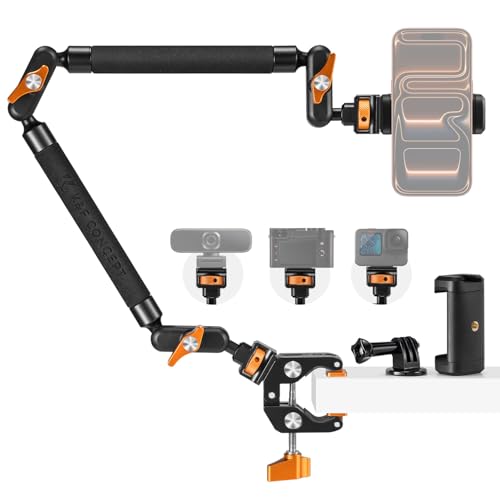
- Supports phones, cameras, lights, and microphones
- Three 360-degree ball heads for angle control
- Clamp fits flat and cylindrical surfaces
Best For: Overhead and tabletop content creators
Best Premium Microphone Arm
RØDE PSA1+ Professional Studio Boom Arm

- Smooth, dampened movement for precise placement
- Cable management supports USB and XLR
- Clamp and surface-mount installation options
Best For: Broadcast, streaming, and studio setups
Best Low-Profile Design
Elgato Wave Mic Arm Low Profile

- Stays below the shoulder line
- 29.1-inch reach for large desks
- Magnetic channels conceal USB or XLR cables
Best For: Camera-facing streaming and video desks
Professional Pick

- Quiet spring-damped movement
- Supports up to 1.2 kg
- 360° rotation with cable management
Best For: Podcasters and streamers seeking a quiet, polished studio arm
Low-Profile Choice

- Extends beneath the monitor
- 29-inch reach with wide adjustment
- Metal arm with cable management
Best For: Creators who need monitor clearance and flexible positioning
Lighting Bundle
TONOR TRL-20 Pro Ring Light Kit

- 10-inch dimmable ring light
- Three color modes and 10 brightness levels
- Overhead phone holder with cable ties
Best For: Smartphone video creators needing integrated lighting and positioning
Best Heavy-Duty Cable Management

- 3.5-pound load capacity for heavier microphones
- Up to 37.4 inches of vertical reach with riser
- Built-in cable channels and 360-degree base
Best For: Podcasters and streamers using heavier microphones
Best Heavy-Duty Pick
Foldable Mic Arm for Lightweight Mics

- Folds away and extends to 27.1 inches
- Supports lightweight equipment up to 2.8 pounds
- Includes three thread adapters and a mic clip
Best For: Streamers and gamers with compact, lightweight setups
Best Simple Pick

- Works with phones, lights, webcams, and microphones
- 22-inch articulating arm with independent joint controls
- 600-gram capacity and clamp for 0.78–1.96-inch surfaces
Best For: Overhead filming and multi-device livestream setups
Best Value Adjustable Arm – InnoGear Boom Arm Microphone Mic Stand
For creators seeking desk boom arms for content creators on a budget, the InnoGear MU01 offers broad adjustment, a compact fold-away design, and support for microphones up to 3.3 pounds. Its squared-edge clamp is best suited to conventional flat desks.
Best For: Streamers and podcasters who want flexible positioning for compatible microphones without taking up permanent desk space.
Pros:
- 360-degree base rotation plus adjustable arm and adapter movement.
- Supports up to 3.3 pounds, with steel construction and strong springs.
- Folds away for compact storage and includes 3/8-inch and 5/8-inch compatibility.
Cons:
- The clamp is designed for flat, squared desk edges up to 2 inches thick.
- A shock mount is not included.
The MU01 is a practical, versatile choice when adjustability and weight capacity matter more than premium cable-management features. Confirm your desk edge and microphone mounting requirements before buying.
Best Multi-Device Mount – K&F CONCEPT 22-inch Magic Arm Clamp Kit
The K&F CONCEPT Magic Arm Clamp Kit expands the idea of desk boom arms for content creators beyond microphones. Its 22-inch arm, three 360-degree ball heads, and included phone and action-camera accessories support overhead and multi-angle setups for static scenes.
Best For: Creators mounting phones, action cameras, lights, or microphones for overhead demonstrations, live streams, and tabletop content.
Pros:
- Three 360-degree ball heads allow flexible camera and accessory angles.
- Super clamp grips flat surfaces up to 50 mm and cylindrical objects from 20–60 mm.
- All-metal construction, anti-twist pins, and silicone pads improve stability.
Cons:
- Maximum supported weight is 1 kg, less than some dedicated microphone arms.
- Designed for static scenes and not recommended for dynamic outdoor activities.
This is a flexible content-rigging option rather than a traditional microphone-only boom arm. It makes the most sense when one clamp needs to support several types of creator gear.
Best Premium Microphone Arm – RØDE PSA1+ Professional Studio Boom Arm
RØDE PSA1+ Professional Studio Boom Arm with Spring Damping, White | Management (White)
Check Price On AmazonThe RØDE PSA1+ is a refined option among desk boom arms for content creators, combining smooth positioning with internally dampened springs, neoprene sleeves, and rubber mounting points. It supports end- and side-address microphones from 94 grams to 1.2 kilograms.
Best For: Streamers, broadcasters, and studio users who want quiet repositioning, integrated cable management, and a choice of clamp or surface mounting.
Pros:
- Parallelogram spring design enables smooth, precise microphone placement.
- Dampening and rubber contact points help reduce repositioning and desk-impact noise.
- Integrated cable management supports both USB and XLR cables.
- Includes desk-clamp and surface-mount installation options.
Cons:
- Maximum microphone weight is 1.2 kilograms.
- Its 1,520-gram weight may be more than basic arms require.
The PSA1+ is a strong fit for polished recording setups where quiet movement and tidy cable routing justify choosing a more feature-focused arm. Its mounting flexibility is useful for both temporary and low-profile installations.
Best Low-Profile Design – Elgato Wave Mic Arm Low Profile
The Elgato Wave Mic Arm Low Profile is designed for creators who want desk boom arms for content creators that stay below the shoulder line. Its all-metal construction, 29.1-inch horizontal reach, magnetic cable channels, and broad microphone-thread adapter support suit clean, unobstructed workspaces.
Best For: Streamers and video creators who want a long-reach microphone arm that keeps the microphone setup out of their main line of sight.
Pros:
- Low-profile design sits below the shoulder line for a clearer view.
- 29.1-inch horizontal reach covers large desks.
- Magnetic cable-channel covers keep cables hidden while remaining accessible.
- All-metal anti-torsion construction supports microphones up to 2 kg.
Cons:
- The low-profile format may not suit users who prefer a higher overhead microphone position.
- It is supplied as a microphone arm rather than a multi-device creator mount.
The Wave Mic Arm LP is especially appealing for camera-facing setups where visual clearance matters. Its reach and 2-kilogram capacity provide flexibility, while the magnetic channels help maintain a cleaner desktop.
Professional Pick – RØDE PSA1+
For content creators comparing desk boom arms for content creators, the RØDE PSA1+ is a polished studio option built for quiet, smooth microphone positioning. Its internal spring damping, 360-degree rotation, and integrated cable management suit podcasting and streaming desks.
Best For: Podcasters and streamers who want quiet adjustment, broad reach, and a clean cable-managed setup.
Pros:
- Internal spring damping helps reduce creaks and handling noise during repositioning.
- Supports microphones and shock mounts from 0.25 to 1.2 kg.
- Offers 360-degree rotation, full extension, and hidden cable routing.
- Includes 3/8-inch and 5/8-inch thread adaptors.
Cons:
- Its 1.2 kg maximum load may not suit heavier microphone setups.
- The clamp is designed for desks up to 70 mm thick.
The PSA1+ is a strong fit when quiet operation and a tidy studio appearance matter more than accommodating exceptionally heavy microphones.
Low-Profile Choice – FIFINE BM88
The FIFINE BM88 is a practical choice among desk boom arms for content creators who need to preserve monitor visibility and desktop space. Its low-profile design extends beneath a screen while offering metal construction, cable management, and broad adjustment.
Best For: Gamers, streamers, and video creators working at long desks who want a sturdy arm below monitor level.
Pros:
- Low-profile configuration helps avoid obstructing the monitor view.
- Metal construction and a reinforced C-clamp are designed for stability.
- Extends up to 29 inches with 220-degree vertical and 360-degree horizontal adjustment.
- Includes 1/4-inch, 3/8-inch, and 5/8-inch thread compatibility.
Cons:
- The section nearest the C-clamp cannot be adjusted vertically.
- The clamp fits desktops from 0.8 to 2.4 inches thick.
- The microphone is not included.
Choose the BM88 when screen clearance is a priority. Its extensive angle adjustment and included adapters make setup flexible, provided your desk falls within the clamp range.
Lighting Bundle – TONOR TRL-20 Pro Ring Light Kit
The TONOR TRL-20 Pro takes a different approach to desk boom arms for content creators by combining an overhead boom arm with a 10-inch ring light and phone holder. It is designed for video recording, live streaming, drawing, and other phone-focused content where lighting and positioning are equally important.
Best For: Smartphone creators, live streamers, makeup demonstrators, and artists who need overhead lighting with adjustable phone placement.
Pros:
- 10-inch ring light provides three color modes and 10 brightness levels.
- Reinforced desktop clamp is designed for increased fixing force.
- Phone holder and extended pole support flexible shooting angles.
- Includes four cable ties for tidier cable routing.
Cons:
- This is a lighting and phone-holder kit rather than a dedicated microphone boom arm.
- USB connectivity means it requires a USB power source.
- The supplied notes do not specify a microphone mount or microphone load capacity.
The TRL-20 Pro makes the most sense for creators who need an overhead light and smartphone holder in one package. For microphone-only recording, a dedicated mic arm will be a better match.
Best Heavy-Duty Cable Management – InnoGear Mic Boom Arm
For content creators comparing desk boom arms for content creators, the InnoGear MU-PSA28 emphasizes reach, stability, and a cleaner setup. Its built-in cable channels, extension riser, and 3.5-pound capacity make it a practical option for heavier microphones and larger desktop layouts.
Best For: Podcasters, streamers, and creators using microphones such as the Blue Yeti or Shure SM7B.
Pros:
- Built-in cable channels help keep recording and streaming setups tidy.
- Reaches up to 32.3 inches horizontally and 37.4 inches vertically with the included riser.
- Supports up to 3.5 pounds and includes a sturdy alloy-steel construction.
- Offers adjustable movement, a 360-degree rotating base, and a clamp for desks up to 2 inches thick.
Cons:
- The shock mount is not included.
- Its 1.6 kg weight may be more than needed for lightweight microphones.
This is a strong fit when microphone weight, monitor clearance, and cable organization matter more than having the smallest possible arm. The 12-month warranty adds useful support for a long-term recording setup.
Best Heavy-Duty Pick – Foldable Mic Arm for Lightweight Mics
If you want desk boom arms for content creators that preserve desk space, this low-profile model combines a foldable design with smooth positioning. It is designed for lightweight equipment and includes several adapters for microphones, lights, webcams, and other creator accessories.
Best For: Streamers, gamers, and multi-device creators using lightweight microphones or small accessories.
Pros:
- Low-profile arm extends up to 27.1 inches and folds away when not in use.
- Stepless joints and 360-degree rotation support quiet, precise adjustments.
- Metal ball head securely supports equipment up to 2.8 pounds.
- Includes 1/4-inch, 3/8-inch, and 5/8-inch adapters plus a universal mic clip.
Cons:
- Not recommended for setups weighing more than 2.8 pounds.
- Its shorter reach may not suit large desks or setups requiring extensive monitor clearance.
This arm is best when a compact footprint and flexible accessory compatibility are priorities. The silicone-padded clamp also helps protect wooden or glass desks from scratches.
Best Simple Pick – 22-Inch Magic Arm with Clamp
For creators who need more than a microphone stand, this 22-inch magic arm works as a flexible desk mount for phones, lights, webcams, action cameras, and microphones. Its articulating joints and adjustable super clamp make it useful for overhead shooting, livestreaming, and tabletop content.
Best For: Content creators building multi-device filming, overhead video, or livestreaming setups.
Pros:
- Supports phones, webcams, microphones, LED lights, action cameras, and other compatible accessories.
- Two-point ball heads and separate T-type knobs allow independent angle adjustments.
- Super clamp fits surfaces from 0.78 to 1.96 inches and uses non-slip pads for added grip.
- Includes phone holder and 1/4-inch-to-3/8-inch and 1/4-inch-to-5/8-inch adapters.
Cons:
- Maximum weight capacity is 600 grams, so it is not intended for heavier microphones or cameras.
- The clamp’s black knobs are not detachable and should not be forcibly removed.
- Unlike a dedicated mic arm, it does not provide built-in cable management.
This is a versatile choice for creators who regularly switch between cameras, phones, lighting, and microphones. Its 600-gram limit makes checking your equipment weight especially important before purchase.
How We Picked the Best Desk Boom Arms for Content Creators
We focused on the practical requirements of streaming, podcasting, video calls, tutorials, and desk-based filming. The selection covers microphone boom arms, low-profile designs, overhead camera and phone mounts, and ring-light kits. We considered adjustability, mounting hardware, supported equipment, cable management, workspace clearance, and the stability needed for repeated repositioning.
Because creator setups vary, no single arm is ideal for everyone. A lightweight phone mount has different requirements from a heavy studio microphone arm, so compatibility and stated load capacity should take priority over appearance alone.
Quick Comparison
| Best For | Recommended Type | What to Prioritize |
|---|---|---|
| Podcasting and voice recording | Full-size microphone boom arm | Load capacity, smooth movement, spring or friction damping |
| Gaming and streaming | Low-profile mic arm | Desk clearance, compact reach, cable routing |
| Overhead videos | Magic arm or camera mount | Rigid joints, secure clamp, compatible thread adapter |
| Phone or light placement | Multipurpose overhead arm | Attachment options, angle adjustment, clamp stability |
| Small desks | Low-profile or foldable arm | Compact footprint and unobstructed screen space |
Key Buying Factors for Desk Boom Arms for Content Creators
Compatibility and Load Capacity
Check the arm’s attachment type before buying. Microphone arms may include clips or adapters for common 3/8-inch and 5/8-inch threads, while camera and light mounts often use 1/4-inch hardware. Confirm that the arm can safely support your microphone, shock mount, camera, phone holder, or light—not just the bare device.
Reach, Height, and Positioning
Measure your desk depth and the distance from the clamp to your preferred recording position. Longer arms provide more framing flexibility, but they can flex more under load. Low-profile arms are useful when you want the microphone below a monitor or out of the camera frame.
Clamp and Desk Protection
A strong clamp is essential for heavy microphones and overhead equipment. Verify the maximum desk thickness and look for broad contact surfaces or padding to protect the desktop. Avoid placing a high-load arm on a thin, unstable, or glass surface unless the manufacturer specifically supports it.
Movement, Damping, and Cable Management
Spring damping, friction joints, or tension adjustments can help an arm stay in place while reducing unwanted movement. Integrated cable channels create a cleaner setup, particularly for microphones that remain connected during recording. For camera mounts, prioritize rigid locking joints over effortless movement.
Who Should Buy Which Desk Boom Arms for Content Creators?
Choose a full-size studio microphone arm if you record with a heavier USB or XLR microphone and need broad positioning range. Select a low-profile arm for gaming, streaming, or compact desks where the microphone must stay close without blocking the monitor. A magic arm is the better fit for overhead product shots, tutorials, phone recording, or mounting a small light, provided its joints can support your equipment securely.
If you switch between audio and video accessories, choose a model with standard threaded adapters and a dependable desk clamp. For frequent on-camera filming, a ring-light kit or phone-oriented overhead arm may be more convenient than a microphone-only design. Finally, leave some weight and reach margin rather than operating an arm at its maximum capacity; that usually produces a steadier, longer-lasting setup.