If you’re looking to enhance your workspace with superior connectivity, docking stations featuring dual 2.5GbE Ethernet can make a significant difference. These devices not only offer lightning-fast internet but also support multiple displays and various peripherals. As you explore your options, consider factors like power delivery and compatibility with your devices. Discovering which models stand out can help you elevate your setup and boost productivity in ways you might not expect.
WAVLINK Dual Monitor Docking Station

If you’re a Windows user looking to enhance your workspace, the WAVLINK Dual Monitor Docking Station is an excellent choice. With its 12-in-1 design, you’ll enjoy multiple ports, including two DisplayPort, HDMI, and high-speed USB 3.1 options. This dock supports stunning dual displays at 4K@60Hz, perfect for gaming or presentations. Plus, the 100W power delivery guarantees your laptop stays charged. The 2.5 Gigabit Ethernet port delivers lightning-fast connectivity, making it ideal for stock monitoring or heavy data tasks. Just remember, it’s not compatible with Mac OS, so check your laptop’s specifications before diving in!
Best For: Windows users seeking to optimize their workspace with dual monitor support and high-speed connectivity.
Pros:
- Supports stunning dual displays at 4K@60Hz, ideal for gaming and presentations.
- 100W power delivery ensures your laptop remains charged while in use.
- 2.5 Gigabit Ethernet port provides fast internet speeds for heavy data tasks.
Cons:
- Not compatible with Mac OS, limiting its usability for Mac users.
- Requires laptop compatibility with DP1.4+DSC1.2 for optimal resolution.
- Charger requirements may necessitate specific power adapters for proper functionality.
Dell Pro Dock WD25 Docking Station – USB-C with 100W Charging

The Dell Pro Dock WD25 Docking Station with USB-C and 100W charging is an ideal choice for modern professionals who rely on multiple high-resolution displays and seamless connectivity. It supports up to four WQHD displays using HDMI 2.1 and dual DP1.4 ports, enhancing your productivity. With 6 USB 3.2 Gen 2 ports and 2.5GbE RJ45 Ethernet, connecting peripherals is effortless. Plus, its compact design includes 65% post-consumer recycled plastic, promoting sustainability. Weighing just 550 grams, it’s easy to transport. Enjoy peace of mind with a three-year warranty and a solid 4.3-star customer rating.
Best For: Professionals who need to connect multiple high-resolution displays and require efficient charging and connectivity options.
Pros:
- Supports up to four WQHD displays for enhanced multitasking.
- Compact and portable design made from 65% post-consumer recycled plastic.
- Offers a three-year warranty and a strong customer rating of 4.3 out of 5 stars.
Cons:
- Limited to 130 watts total wattage, which may not be sufficient for high-power devices.
- The weight of 550 grams may be considered bulky for some users seeking ultra-light options.
- May require additional adapters for certain peripherals not compatible with USB-C or HDMI.
Anker Laptop Docking Station Dual Monitor (8-in-1 USB C Hub)

For creative professionals or multitaskers who need to maximize their workspace, the Anker Laptop Docking Station Dual Monitor (8-in-1 USB C Hub) stands out with its ability to support 4K dual monitors. Featuring two HDMI ports, you can easily connect multiple displays and enjoy seamless streaming. The 1 Gbps Ethernet hub guarantees stable internet connectivity, while the 85W Power Delivery keeps your devices charged. With additional USB-A ports and an SD/microSD card reader, this hub offers extensive functionality from a single USB-C connection. It’s compatible with most laptops, making it an ideal choice for enhancing your productivity.
Best For: Creative professionals and multitaskers looking to enhance their workspace with dual 4K monitor support and versatile connectivity options.
Pros:
- Supports dual 4K displays for enhanced productivity and seamless multitasking.
- Includes multiple ports such as USB-A, HDMI, and SD/microSD card readers for extensive functionality.
- 85W Power Delivery ensures efficient charging of devices while in use.
Cons:
- Not compatible with Linux, limiting its use for some users.
- Requires a 100W PD wall charger, which is not included in the package.
- macOS users may experience identical displays on external monitors, limiting display flexibility.
WD25 Dell Pro Dock USB-C Docking Station

Designed for professionals who demand high performance, the WD25 Dell Pro Dock USB-C Docking Station stands out with its impressive 100W Power Delivery and built-in 2.5GbE Ethernet port. With 10 ports, including dual 4K display support via HDMI and DisplayPort, you can easily connect multiple devices. The USB-A and USB-C ports offer fast data transfer, making it perfect for any workspace. Compatible with various Dell laptops and other devices, it runs smoothly on Windows, Ubuntu, and ChromeOS. Plus, you’ll enjoy peace of mind with a 3-year warranty and a 30-day return guarantee through Amazon.
Best For: Professionals who require high-performance connectivity and multi-device support in their workspace.
Pros:
- Supports dual 4K displays, enhancing productivity with multiple screens.
- 100W Power Delivery ensures sufficient power for Dell laptops and other USB-C devices.
- Built-in 2.5GbE Ethernet port provides faster and more reliable wired connections.
Cons:
- Limited compatibility with non-Dell devices may restrict usage for some users.
- Higher price point compared to some basic docking stations on the market.
- Requires USB-C connection, which may not be available on older devices.
UGREEN Thunderbolt 4 Dock 13-in-1 Docking Station

Offering exceptional connectivity, the UGREEN Thunderbolt 4 Dock 13-in-1 is perfect for professionals who need to expand their workspace efficiently. With dual 4K@60Hz or single 8K display capabilities, it supports various devices, including MacBook and Surface Pro. You’ll enjoy 13 ports, featuring 2 Thunderbolt 4 ports, a 2.5Gb Ethernet, and multiple USB options for ultra-fast data transfer at 40Gbps. The included 180W GaN power adapter delivers up to 90W charging. Just remember, it requires a power source to function fully, and compatibility is limited for some older devices. Enjoy seamless multitasking and enhanced productivity!
Best For: Professionals and creatives looking to expand their workspace with versatile connectivity options and high-resolution display capabilities.
Pros:
- Supports dual 4K@60Hz or single 8K display, enhancing multitasking and productivity.
- Ultra-fast data transfer speeds of up to 40Gbps, allowing for quick file transfers and efficient workflow.
- Includes a powerful 180W GaN power adapter, providing up to 90W charging for laptops while docked.
Cons:
- Requires a constant power source to function, limiting portability.
- Compatibility issues with some older devices, particularly Intel Mac mini 2018.
- Full-function USB-C laptops and tablets support only single display, restricting display options.
Acer Premium 13-in-1 Docking Station

The Acer Premium 13-in-1 Docking Station stands out as an ideal choice for professionals who need robust connectivity and multitasking capabilities. With 13 ports, including dual 4K HDMI and DisplayPort, you can effortlessly connect multiple displays. It supports triple display setups on Windows, making multitasking a breeze. Plus, the 110W power delivery keeps your laptop charged while you work. The sleek aluminum design guarantees efficient heat dissipation, and the integrated security lock adds peace of mind. Compatible with major brands like Dell and HP, this docking station is a reliable hub for all your connectivity needs.
Best For: Professionals who require extensive connectivity and multitasking capabilities with multiple displays.
Pros:
- Supports triple display setups on Windows, enhancing productivity for multitasking.
- Sleek aluminum design ensures efficient heat dissipation and durability.
- Integrated security lock provides added peace of mind for securing devices.
Cons:
- MacOS users can only mirror displays, limiting functionality compared to Windows.
- Requires compatible laptops/GPU for optimal triple 4K output.
- Power delivery is limited to charging the host laptop, not powering additional devices.
Dell Pro Dock WD25 USB-C Docking Station

If you’re a professional who relies on high-speed internet and multiple displays, the Dell Pro Dock WD25 USB-C Docking Station is an ideal choice. This powerful dock supports dual 4K displays, ensuring you can expand your workspace seamlessly. With a robust 100W power delivery, your laptop stays charged while connected. You’ll benefit from various connectivity options, including a 2.5GbE Ethernet port for stable networking and multiple USB ports for fast data transfers. Plus, its 3-year warranty provides peace of mind, making it a reliable addition to your setup. Elevate your productivity with the Dell Pro Dock WD25 today!
Best For: Professionals who need high-speed internet connectivity and support for multiple displays to enhance their productivity.
Pros:
- Supports dual 4K displays, allowing for an expanded and versatile workspace.
- 100W power delivery ensures your laptop remains charged while in use.
- 2.5GbE Ethernet port provides stable and fast network connectivity.
Cons:
- May be overkill for casual users who do not require multiple displays or high-speed connections.
- Price point might be higher compared to basic docking stations.
- Limited compatibility with some older laptops that do not support USB-C.
Dell Pro Smart Dock SD25 Bundle – USB C Docking Station
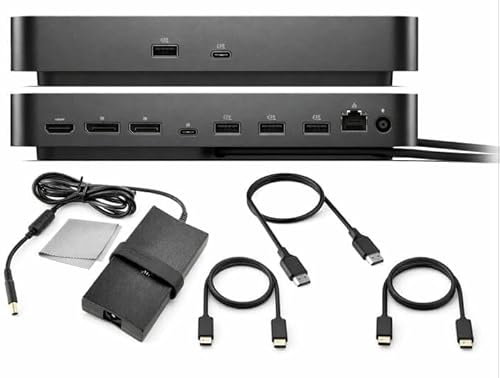
For professionals and multitaskers who need to maximize their workspace, the Dell Pro Smart Dock SD25 Bundle stands out with its impressive ability to support up to four displays simultaneously. You can connect a single 6K or dual WQHD setup via HDMI 2.1 and Dual DisplayPort 1.4. With multiple USB-A and USB-C ports, 2.5GbE Ethernet, and audio output, it guarantees lightning-fast connectivity for all your devices. Plus, the bundle includes essential accessories like an HDMI cable, USB-C cable, and DisplayPort cable, giving you everything you need right out of the box. Enjoy a 30-day return guarantee for added peace of mind.
Best For: Professionals and multitaskers who require an efficient and versatile docking solution for multiple displays.
Pros:
- Supports up to four displays simultaneously, enhancing productivity and multitasking capabilities.
- Includes essential connectivity accessories like HDMI, USB-C, and DisplayPort cables for immediate use.
- Offers a 30-day return guarantee, providing peace of mind for customers.
Cons:
- May be overkill for casual users who don’t need multiple display support.
- Requires a compatible device with USB-C for full functionality.
- The 130W charging capability may not be sufficient for some high-powered laptops.
StarTech.com USB-C Docking Station (10-in-1)

Ideal for professionals who need high-speed connectivity and versatile display options, the StarTech.com USB-C Docking Station (10-in-1) delivers up to 100W charging for laptops while providing a robust 2.5GbE Ethernet connection. With a remarkable data transfer speed of 40Gbps, you can seamlessly transfer large files. Plus, it supports dual 4K displays or a single 8K display, ensuring stunning visual performance. Equipped with six USB ports, including multiple high-speed options, it caters to all your peripheral needs. Its driverless deployment makes it easy to use on Windows and ChromeOS, making it a reliable choice for any workspace.
Best For: Professionals seeking high-speed connectivity and versatile display options for their workspace.
Pros:
- Supports dual 4K displays or a single 8K display for enhanced visual performance.
- Offers up to 100W charging for laptops, ensuring your device stays powered throughout the day.
- Driverless deployment on Windows and ChromeOS allows for easy plug-and-play setup.
Cons:
- Not compatible with macOS, limiting usability for Apple users.
- Some users may find the weight and dimensions less portable for on-the-go use.
- Limited customer reviews may indicate a lack of long-term user feedback.
USB C Docking Station Dual Monitor, 9-in-1 USB Hub
The USB C Docking Station Dual Monitor, a versatile 9-in-1 USB hub, is perfect for professionals who need seamless multitasking capabilities. With two HDMI outputs supporting 4K@60Hz, you can enhance your dual-monitor setup for tasks like coding and video conferencing. You’ll enjoy lightning-fast connectivity through three USB 3.0 ports, a Gigabit Ethernet port, and a USB-C Power Delivery port. The durable aluminum design guarantees efficient heat dissipation, while compatibility with various operating systems makes it a flexible choice for any user. Plus, a 24-month warranty and responsive customer support offer peace of mind with your purchase.
Best For: Professionals and students who require a robust dual-monitor setup for multitasking, such as coding, data analysis, and video conferencing.
Pros:
- Versatile Connectivity: Offers multiple ports including dual HDMI, USB 3.0, Gigabit Ethernet, and USB-C Power Delivery for extensive device compatibility.
- High-Quality Display: Supports dual 4K@60Hz outputs for clear visuals and synchronized audio, enhancing productivity.
- Durable Design: Constructed with a sturdy aluminum enclosure, ensuring efficient heat dissipation and long-term use.
Cons:
- Limited macOS Functionality: macOS supports only mirror mode for dual displays, which may not suit all users.
- Power Delivery Limitations: The USB-C Power Delivery port outputs up to 90W, which may not be sufficient for all high-power devices.
- Size Constraints: With dimensions of 4.72L x 2.36W x 0.59H inches, it may take up more space than smaller hubs.
Factors to Consider When Choosing Docking Stations With 2 5gbe Ethernet
When you’re choosing a docking station with dual 2.5gbe Ethernet, consider the connectivity options available to guarantee compatibility with your devices. You’ll also want to look at power delivery specifications and display capabilities to meet your needs. Finally, assess the port variety and design quality to make certain it fits your workspace and usage style.
Connectivity Options Available
Choosing a docking station with dual 2.5GbE Ethernet means considering various connectivity options to confirm it meets your needs. Look for multiple ports, like USB-A and USB-C, to connect different peripherals. Dual display support through HDMI or DisplayPort is essential for multitasking with high-resolution outputs. Additionally, verify it features high-speed data transfer ports such as USB 3.1 or USB 3.2 for quick file transfers alongside your network connectivity. Don’t forget to check compatibility with your operating system and specific requirements for video output and charging. This way, you’ll guarantee seamless integration with your setup, enhancing both productivity and performance. Keep these factors in mind to make the best choice for your needs.
Power Delivery Specifications
Power delivery specifications play a significant role in guaranteeing your docking station with dual 2.5GbE Ethernet meets your charging needs. When selecting a docking station, consider models that offer up to 100W of power to efficiently charge your devices. Check that the wattage supports your laptop’s requirements; some docks provide up to 85W while maintaining a stable Ethernet connection. It’s important to verify the total wattage can support both your laptop and any additional peripherals you connect via USB. Also, confirm that power delivery comes through USB-C, as it’s the standard for modern charging and data transfer. Compatibility with your laptop’s power needs is vital, as some docks may only deliver full power with compatible devices.
Display Capabilities Supported
Display capabilities are essential to maximizing your productivity with docking stations featuring dual 2.5GbE Ethernet ports. Look for models that support dual 4K displays at 60Hz or higher, which can greatly enhance your visual experience, especially for tasks like graphic design or video editing. Some docking stations even handle single 8K displays, offering exceptional detail.
Consider options with Multi-Stream Transport (MST) technology, allowing multiple independent displays through a single output, streamlining your workspace. Confirm the display output standards, such as HDMI 2.1 or DisplayPort 1.4, match your monitors for best refresh rates and resolutions. Finally, check for advanced features like Display Stream Compression (DSC) to maintain image quality at higher resolutions.
Port Variety Offered
When considering a docking station with dual 2.5GbE Ethernet, the variety of ports it offers can greatly enhance your productivity and flexibility. Look for options like USB-A, USB-C, HDMI, and DisplayPort, which expand your device compatibility. These ports are essential for connecting peripherals such as monitors, external drives, and audio devices, helping you create a streamlined workspace. High-speed USB ports, like 10Gbps USB 3.1, enable rapid data transfers alongside your network connectivity. Additionally, features like SD/TF card slots and audio ports cater to diverse tasks. The number of external displays supported also varies; some docking stations allow for dual or even triple monitor setups, making your multitasking efforts seamless.
Design and Build Quality
Choosing a docking station with dual 2.5GbE Ethernet requires careful consideration of its design and build quality. A sturdy aluminum enclosure often offers better heat dissipation than plastic, ensuring durability during extended use. Opt for a compact design to keep your workspace organized, reducing cable clutter. Integrated security features like lock slots can enhance safety in shared environments, protecting both the station and your devices. Additionally, ports should be strategically placed for easy access, minimizing cable tangling and promoting an efficient setup. A well-constructed docking station provides stability, reducing the risk of disconnection from your host device, which is essential for maintaining a reliable connection during work or gaming sessions.
Compatibility With Devices
Compatibility is vital in selecting a docking station with dual 2.5GbE Ethernet. First, verify the docking station works with your laptop’s operating system, as some models only support Windows or certain Linux distributions. Check if your device’s USB-C port supports Power Delivery (PD) and DisplayPort Alt Mode for peak use. It’s also important to confirm that the docking station meets your display output needs, like supporting 4K resolution or multi-monitor setups. Additionally, verify that your device can handle the 2.5 GbE Ethernet‘s bandwidth, which may require specific hardware and drivers. Finally, review any system requirements related to USB or Thunderbolt standards to maximize the docking station’s capabilities.
Warranty and Support Services
After confirming your docking station is compatible with your devices, it’s important to evaluate warranty and support services. Look for warranties that range from one to three years, providing peace of mind about reliability. A clear return policy, often with a 30-day satisfaction guarantee, allows you to return the device if it doesn’t meet your needs. Customer support can vary greatly; some brands offer responsive teams, while others may be harder to reach, affecting your experience if issues arise. Check user reviews to gauge overall satisfaction with warranty and support services. Finally, verify the warranty covers manufacturing defects and consider whether it includes additional support for software or driver issues, which are crucial for ideal performance.
Price and Value Comparison
When evaluating docking stations with dual 2.5GbE Ethernet ports, it’s essential to weigh factors like price and value. You’ll find prices typically range from $100 to $300, influenced by features and brand reputation. Consider the value by looking at the number of ports available; more USB and video outputs can enhance your multitasking capabilities. Warranty length and customer support are vital for long-term reliability, so don’t overlook these aspects. Performance specifications, such as power delivery and data transfer speeds, often justify higher price points. Finally, take time to assess user reviews and ratings, as they provide real-world insights into performance and durability, ultimately influencing your decision on value.