The best drawing display tablets for professionals make detailed illustration, photo editing, animation, and design work feel more direct by putting the canvas beneath your pen. The right model can improve precision, reduce hand-eye disconnect, and fit your existing workstation without unnecessary compromises.
This roundup compares 10 professional-focused pen displays and standalone drawing tablets across screen size, resolution, color coverage, portability, pressure sensitivity, and workflow features. Use the guide below to narrow the list by the way you actually create.
Best 10 Drawing Display Tablets for Professionals Picks for 2026
Color-Accurate Flagship

- 18.4-inch 4K UHD display
- Calman-verified wide-gamut color
- Dual 16,384-pressure styluses
Best For: Color-critical professional studio work
Balanced QHD Workhorse

- 15.8-inch 2.5K QHD display
- Accurate wide-gamut color coverage
- Dual dials and six shortcut keys
Best For: Versatile desktop creative workflows
Standalone Mobile Studio

- Standalone Android 14 operation
- Lightweight 1.3-pound design
- Paper-like matte display and Pro Pen 3
Best For: Portable sketching without a computer
Portable Pen Display Value
- 13.3-inch full-laminated display
- Factory-calibrated ΔE<1.5 color accuracy
- Dual dials and 16,384-pressure pen
Best For: Portable professional computer-connected drawing
Best Compact Professional Pick

- 16K pressure-sensitive battery-free stylus
- 14-inch laminated anti-glare display
- Includes stand, remote, and wrist rest
Best For: Portable professional illustration and design setups
Best Workflow-Focused Value

- 15.6-inch laminated 1080p display
- Six keys plus touch bar for shortcuts
- Includes adjustable 20°–60° stand
Best For: Designers wanting convenient physical workflow controls
Best Large-Format Color Accuracy
- Calman verified with Delta E<1
- 21.5-inch 2.5K display with broad color coverage
- Wireless Keydial with 40 customizable keys
Best For: Color-critical professional art and design work
Wide-Gamut Workhorse
UGEE UE16 15.4-Inch Drawing Display

- 143% sRGB with four selectable color modes
- 16K pressure-sensitive, battery-free stylus
- Eight keys and multifunction scroll wheel
Best For: Artists needing a large, color-flexible Full HD display
Precision Control Pick

- 16K X3 Pro stylus for nuanced strokes
- Fully laminated 15.4-inch anti-glare display
- Red dial and eight customizable keys
Best For: Illustrators and designers seeking efficient physical controls
Portable Creator Choice

- 16K stylus with low activation force and eraser
- USB-C connectivity and pen-tablet dual modes
- 95% P3 gamut with laminated Full HD display
Best For: Mobile creators wanting a compact, flexible pen display
Color-Accurate Flagship – XPPen Artist Pro 19 Gen2
For professionals who need expansive drawing display tablets for professionals, the XPPen Artist Pro 19 Gen2 combines a large 18.4-inch 4K UHD screen with broad color coverage and a paper-like drawing surface. Its display is well suited to detailed illustration, photo work, web design, and color-sensitive production.
Best For: Illustrators, photographers, web designers, and film-oriented creatives who prioritize resolution and color accuracy.
Pros:
- 4K UHD resolution provides detailed views and room for working across multiple layers.
- Calman verification and coverage of 99.8% sRGB, 96% Adobe RGB, and 98% Display P3 support color-critical workflows.
- Full lamination, etched anti-glare glass, and dual 16,384-pressure styluses create a precise, paper-like experience.
- Included wireless keydial, reversible USB-C connections, HDMI support, and VESA compatibility add flexibility.
Cons:
- The large 18.4-inch format is less portable than smaller pen displays.
- It requires a compatible computer or device rather than operating as a standalone tablet.
This is the strongest fit when screen real estate, color fidelity, and high-resolution detail matter more than portability. The included accessories also make it a capable workstation centerpiece for demanding creative setups.
Balanced QHD Workhorse – HUION Kamvas 16 Gen 3
The HUION Kamvas 16 Gen 3 is a practical choice among drawing display tablets for professionals who want sharp QHD detail without moving to a larger flagship screen. Its 15.8-inch display, accurate color, dual dials, and PenTech 4.0 support a broad range of creative software.
Best For: Digital artists, designers, and animators seeking a versatile desktop pen display with strong control features.
Pros:
- 2.5K QHD resolution and 186 PPI deliver a sharp view on the 15.8-inch screen.
- 99% sRGB and Rec.709 coverage, 90% Adobe RGB, and ΔE<1.5 support dependable color work.
- PenTech 4.0 offers 16,384 pressure levels, 2g activation force, and tilt support.
- Two dials, six customizable keys, dual-interface connectivity, and Android compatibility improve workflow flexibility.
Cons:
- It is not a standalone device and must connect to a computer, laptop, or compatible Android device.
- Compatibility depends on the required USB 3.1 Gen 1 and DisplayPort 1.2 support when using USB-C.
With its combination of QHD clarity, reliable color coverage, and built-in controls, the Kamvas 16 Gen 3 offers a well-rounded professional setup. It is especially appealing for creators who want a comfortable middle ground between portability and workspace.
Standalone Mobile Studio – Wacom MovinkPad 11
The Wacom MovinkPad 11 stands apart from conventional drawing display tablets for professionals because it is an all-in-one Android drawing tablet. With no computer required, 8GB of memory, 128GB of storage, and a lightweight design, it is built for sketching and note-taking away from the studio.
Best For: Mobile artists, illustrators, and designers who want a self-contained digital sketchbook.
Pros:
- Android 14, 8GB memory, and 128GB storage allow drawing without a connected computer.
- The 11.45-inch 2200 × 1440 display uses matte etched glass for a paper-like, low-glare surface.
- The included battery-free Pro Pen 3 provides 8,192 pressure levels, three buttons, and replaceable nibs.
- At approximately 1.3 pounds, it is easy to carry in a bag or backpack.
Cons:
- The smaller screen and 9.6 × 6.3-inch active area provide less workspace than larger studio pen displays.
- Its Android app and storage-based workflow may be less suited to demanding desktop production than a connected display.
The MovinkPad 11 is the most convenient option here for capturing ideas wherever they occur. Choose it when independence and portability are more important than a large canvas or desktop-oriented color workflow.
Portable Pen Display Value – HUION Kamvas 13 Gen 3
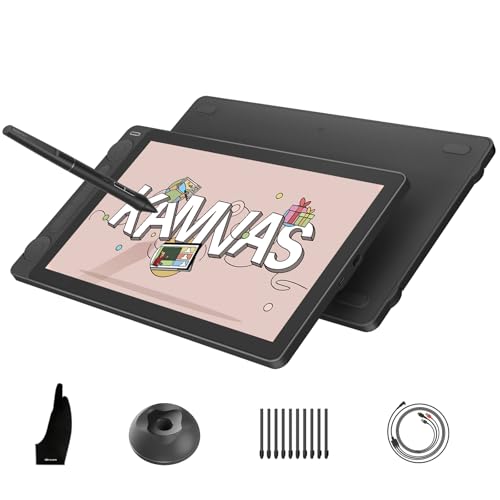
For creators comparing drawing display tablets for professionals in a compact format, the HUION Kamvas 13 Gen 3 offers a 13.3-inch full-laminated screen, accurate color, and high-resolution pen input. Its slim, symmetrical design works well for mobile or space-conscious setups while retaining useful shortcut controls.
Best For: Artists, designers, editors, and animators who need a portable computer-connected pen display.
Pros:
- Canvas Glass 2.0 with nano-etching reduces glare and sparkle while adding a paper-textured feel.
- 99% sRGB and Rec.709, 90% Adobe RGB, and factory-calibrated ΔE<1.5 support accurate color presentation.
- PenTech 4.0 delivers 16,384 pressure levels, 2g activation force, tilt support, and reduced parallax.
- Two dials, five shortcut keys, dual-interface connectivity, and left- or right-handed use add flexibility.
Cons:
- It is not standalone and requires a compatible computer, laptop, or Android device.
- The 13.3-inch screen offers less working space than larger professional displays.
The Kamvas 13 Gen 3 is a strong fit when portability and professional pen performance need to coexist. Its color capabilities and customizable controls make it more capable than a basic compact pen display, though users working on large compositions may prefer a bigger model.
Best Compact Professional Pick – XPPen Artist Pro 14 Gen2
For professionals seeking drawing display tablets for professionals in a compact format, the XPPen Artist Pro 14 Gen2 combines a 14-inch fully laminated anti-glare display with high color coverage and a pressure-sensitive, battery-free stylus. It is a pen display, not a standalone tablet, so it must connect to a computer or laptop.
Best For: Digital artists, illustrators, animators, and 3D creators who want a portable, color-focused display with flexible shortcut controls.
Pros:
- 16,384 pressure levels, 60° tilt support, and X3 Pro stylus technology support precise, nuanced strokes.
- Full lamination and etched anti-glare glass help reduce parallax, while the 14-inch 16:10 screen offers a wide working view.
- Includes a foldable stand, wireless shortcut remote, and ergonomic wrist rest.
- Supports Windows, macOS, Android, ChromeOS, Linux, and numerous creative applications.
Cons:
- Requires a connected computer or laptop; it is not standalone.
- The supplied 3-in-1 cable may require additional cable management in a busy workspace.
The Artist Pro 14 Gen2 is a strong choice when desk space and portability matter without giving up advanced pen response or broad software compatibility. Its built-in stand and remote also make extended sessions easier to organize.
Best Workflow-Focused Value – HUION Kamvas Pro 16
The HUION Kamvas Pro 16 is a practical option among drawing display tablets for professionals who want a larger 15.6-inch workspace, strong color volume, and physical workflow controls. Like other pen displays, it must connect to a computer or laptop to operate.
Best For: Designers, painters, and illustrators who prioritize a comfortable screen, dedicated shortcut keys, and an adjustable working angle.
Pros:
- Full-laminated 15.6-inch 1920×1080 display with anti-glare glass and a lightly textured drawing surface.
- 120% sRGB color gamut volume, 92% AdobeRGB, and a 1000:1 contrast ratio support vivid, detailed images.
- Six programmable express keys and a touch bar provide quick access to shortcuts, zoom, and brush controls.
- Includes an adjustable ST200 stand with viewing angles from 20° to 60°.
Cons:
- Not a standalone tablet; it requires a connected Windows, macOS, or Linux computer.
- Its 8,192 pressure levels are lower than the 16K levels offered by the XPPen models in this roundup.
Choose the Kamvas Pro 16 if efficient shortcut access and a generous, adjustable workspace are more important than maximum pressure-level specifications. Its included stand and pen accessories make it a well-equipped working setup.
Best Large-Format Color Accuracy – XPPen Artist Pro 22 Gen 2
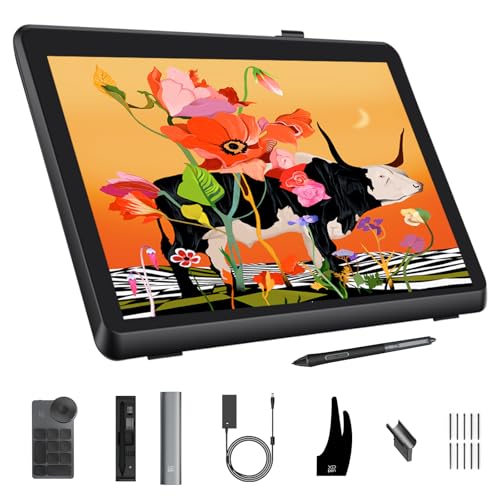
For color-critical professionals comparing drawing display tablets for professionals, the XPPen Artist Pro 22 Gen 2 offers a large 21.5-inch 2.5K workspace, Calman verification, and broad color coverage. It connects to a compatible computer and is designed for detailed creative work rather than standalone use.
Best For: Professional illustrators, photographers, graphic designers, and creators who need a spacious display with strong color consistency and high-detail resolution.
Pros:
- Calman-verified color with Delta E<1, plus 99% AdobeRGB, 99% sRGB, and 94% Display P3 coverage.
- 2560×1440 resolution, 137 PPI, 178° viewing angle, and a 21.5-inch screen provide a detailed, spacious canvas.
- 16K pressure sensitivity, 60° tilt, felt nibs, digital eraser, and ±0.4 mm accuracy support precise drawing.
- Includes a wireless ACK05 Keydial with 40 customizable keys and a physical dial.
Cons:
- Its large format requires more desk space than the 14-inch and 15.6-inch options.
- The optional ACS15 height-adjustable stand is not included.
- As a display tablet, it requires connection to a compatible computer.
The Artist Pro 22 Gen 2 is the most compelling choice here for creators who need a roomy canvas and reliable color control. Its high-resolution screen, professional gamut coverage, and wireless Keydial are particularly useful for detail-heavy production work.
Wide-Gamut Workhorse – UGEE UE16 15.4-Inch Drawing Display
For professionals comparing drawing display tablets for professionals, the UGEE UE16 stands out with a large 15.4-inch Full HD canvas, broad color coverage, and a highly responsive battery-free stylus. Its shortcut controls and multiple color modes make it a practical choice for illustration, design, and other screen-based creative work.
Best For: Artists and designers who want a spacious display, vivid color reproduction, and extensive operating-system compatibility.
Pros:
- 143% sRGB gamut with sRGB, Adobe RGB, DCI-P3, and Black & White modes
- 16,384 pressure levels, 60-degree tilt support, and a pressure-sensitive eraser
- Eight shortcut keys plus a multifunction scroll wheel
- Works with Windows, macOS, Chrome OS, Android, and Linux
Cons:
- Requires a computer or compatible device connection rather than operating independently
- 1920×1080 resolution may feel limited for highly detailed professional workflows
- The 3-in-1 cable is packed separately, so the parcel should be checked carefully
The UE16 is a strong value-oriented option when color flexibility and a generous working area matter more than a higher-resolution panel. Its tactile controls and broad compatibility further suit varied creative setups.
Precision Control Pick – XPPen Artist 15.6 Pro V2
The XPPen Artist 15.6 Pro V2 is designed for professionals who prioritize precise on-screen placement and efficient controls. Its fully laminated anti-glare display, 16K stylus, red dial, and customizable shortcut keys create a focused workspace for detailed illustration and design.
Best For: Illustrators and designers who want accurate pen positioning, strong color coverage, and hands-on workflow controls.
Pros:
- 16,384 pressure levels from the X3 Pro smart chip stylus
- Full lamination and anti-glare etched glass help reduce parallax
- Red dial and eight customizable express keys streamline common commands
- 99% sRGB, 96% Adobe RGB, and 96% Display P3 coverage
Cons:
- Must be connected to a computer or laptop to use
- 250 cd/m² brightness may not suit brightly lit workspaces
- The included stand adjusts up to a 90-degree angle but adds another component to carry
With its dial-based controls and broad color specifications, the Artist 15.6 Pro V2 is especially appealing for long editing sessions. The included foldable stand can also support a more ergonomic working position.
Portable Creator Choice – XP-PEN Artist 13.3 Pro V2
For creators seeking drawing display tablets for professionals in a more portable format, the XP-PEN Artist 13.3 Pro V2 combines a compact Full HD screen with a 16K stylus and flexible connectivity. Its dual operating modes and included stand make it adaptable for desk work, travel, and extended sketching sessions.
Best For: Mobile artists, animators, students, and designers who value USB-C convenience and a compact professional pen display.
Pros:
- 16,384 pressure levels, low activation force, and built-in pen eraser
- Fully laminated 13.3-inch display with 99% sRGB, 89% Adobe RGB, and 95% P3 coverage
- Full-featured USB-C connection plus a legacy HDMI setup
- Eight shortcut keys, red dial, pen-tablet mode, and included foldable stand
Cons:
- It is not standalone and requires a computer or laptop
- The 13.3-inch canvas is smaller than the 15.4- and 15.6-inch alternatives
- A 3-in-1 HDMI cable is sold separately for legacy HDMI setups
The Artist 13.3 Pro V2 is a versatile fit when portability and connection flexibility are priorities. Its included accessories and pen-tablet mode add practical value, while the color coverage and pressure response support detailed creative work.
How We Picked the Best Drawing Display Tablets for Professionals
We focused on models with built-in displays, pressure-sensitive pens, and features suited to sustained creative work. The selection spans compact 13-inch designs, mid-size 15- to 16-inch displays, large 19- to 22-inch studio tablets, and the standalone Wacom MovinkPad 11. We considered display resolution, color gamut, lamination, anti-glare treatment, pen technology, shortcut controls, compatibility, and portability.
Specifications such as 2.5K resolution, 16K pressure levels, wide-gamut color, and Calman-related calibration can indicate strong potential, but they do not replace practical considerations such as desk space, software support, viewing angle, and connection requirements.
Quick Comparison
- Best for a large studio canvas: Choose a 19- or 22-inch model when detail, timeline space, and comfortable arm movement matter most.
- Best all-around size: A 15- or 16-inch pen display offers a useful balance between working area and desk footprint.
- Best for portability: Compact 13- or 14-inch tablets are easier to transport and work well with laptops.
- Best standalone option: The Wacom MovinkPad 11 is designed for mobile drawing without requiring a separate computer.
- Best for color-focused work: Prioritize wide color coverage, factory calibration, and dependable brightness consistency.
Key Buying Factors for Drawing Display Tablets for Professionals
Screen Size and Resolution
Larger screens provide more room for full-resolution artwork, reference images, panels, and animation timelines. A 2.5K display can produce a noticeably sharper workspace than a standard Full HD panel, particularly on 15 inches or larger. Smaller screens are often preferable when portability or a limited desk is the priority.
Color Accuracy and Surface Finish
Illustrators, photographers, and designers should check color-gamut claims, calibration information, and the intended color workflow. Anti-glare and fully laminated screens can reduce reflections and make the cursor feel closer to the pen tip. Matte surfaces may also be more comfortable during long sessions, though they can affect perceived sharpness and contrast.
Pen Feel, Pressure, and Controls
High pressure-level counts are useful, but pen tracking, tilt support, initial activation force, and nib consistency matter just as much. Look for customizable express keys, touch bars, or a streamlined interface if you rely on shortcuts. Confirm whether the pen is battery-free and whether replacement nibs are readily available.
Compatibility and Connectivity
Before buying, verify support for Windows, macOS, ChromeOS, Android, and your preferred creative applications. Many display tablets need HDMI, USB-C, or multiple cables for power and video. A compatible USB-C port may simplify a laptop setup, while a desktop may benefit from included adapters and a stable stand.
Who Should Buy Which Drawing Display Tablets for Professionals?
Professional illustrators and concept artists should prioritize a comfortable mid-size or large display, accurate color, strong pen tracking, and adjustable positioning. Animation and 3D artists may prefer a larger 19- or 22-inch workspace for timelines, palettes, and detailed control. Traveling creators and students should consider a compact 13- or 14-inch model, or a standalone tablet when working away from a desk. Photo editors and graphic designers should focus on color coverage, calibration, screen clarity, and shortcut access. If you are upgrading from a small tablet, choose the largest display your desk, computer, and budget can comfortably support; if this is your first pen display, a balanced 15- or 16-inch model is usually the safest starting point.