A dual-bay enclosure can turn spare SSDs into portable storage, make drive upgrades easier, or keep two drives together on your desk. But the right choice depends first on the drives you own: M.2 NVMe, M.2 SATA, and 2.5-inch SATA are not interchangeable.
These 10 options cover fast USB connections, offline cloning, RAID modes, and straightforward two-drive access. Use the guide below to narrow your choice before comparing the individual models.
Best 10 Dual Bay SSD Enclosures Picks for 2026
Best for Flexible RAID

- RAID 0, RAID 1, JBOD, and clone modes
- Tool-free M.2 2280 drive access
- 20Gbps interface; auxiliary USB-C power input
Best For: RAID flexibility and offline cloning
Best for Faster Transfers
UGREEN 40Gbps Dual-Bay NVMe Cloner
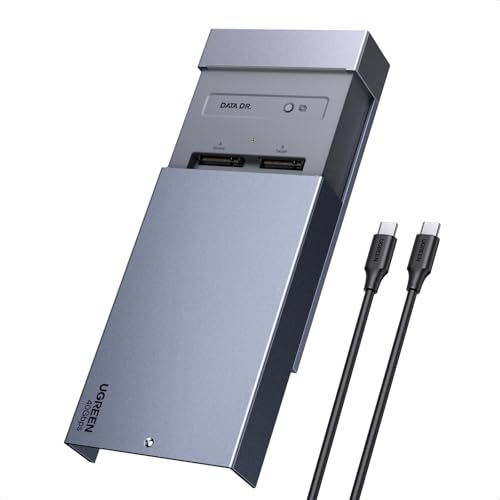
- 40Gbps-rated USB-C connection
- One-button offline cloning
- Fan cooling and software RAID options
Best For: Fast transfers and standalone SSD upgrades
Best for Simple Cloning

- One-button offline cloning
- 20Gbps-rated USB-C interface
- USB-C and USB-A cables included
Best For: Straightforward NVMe drive duplication
Best for Mixed SSD Interfaces

- Supports M.2 NVMe PCIe and SATA
- Tool-free push-to-open design
- 20Gbps-rated USB-C connection
Best For: Mixed M.2 drive compatibility on the go
Portable Pick
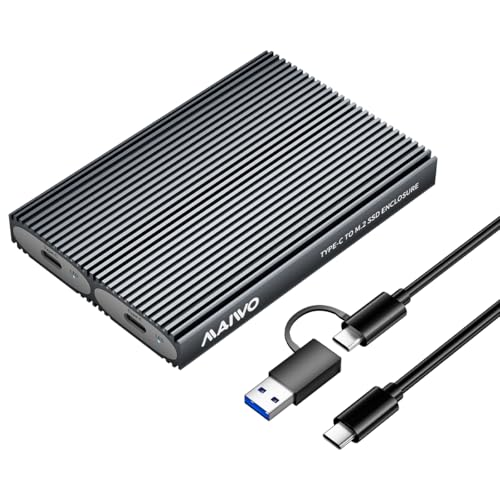
- Tool-free NVMe slots
- Up to 8TB per slot
- Two cables needed for simultaneous access
Best For: Portable access to two separate NVMe drives
Cloning Pick
Rosewill NVMe Cloner and Eraser
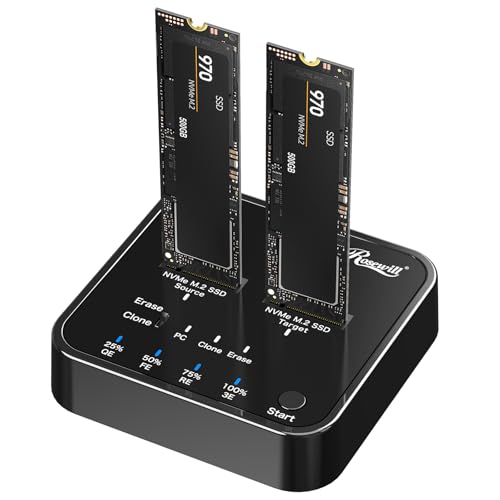
- Offline SSD cloning
- Four erasure modes
- Tool-free, up to 20Gbps USB
Best For: NVMe drive duplication and erasure
Cooling Pick
WAVLINK 20Gbps Dual NVMe Enclosure

- Adaptive cooling fan
- Up to 8TB per slot
- Two drives share 20Gbps bandwidth
Best For: Extended NVMe transfers with active cooling
Best for Offline Cloning

- One-button cloning without a computer
- Up to 20Gbps USB interface
- Fits NVMe drives through 22110
Best For: Standalone NVMe drive duplication
Best for SATA RAID
MAIWO Dual-Bay 2.5-Inch Enclosure
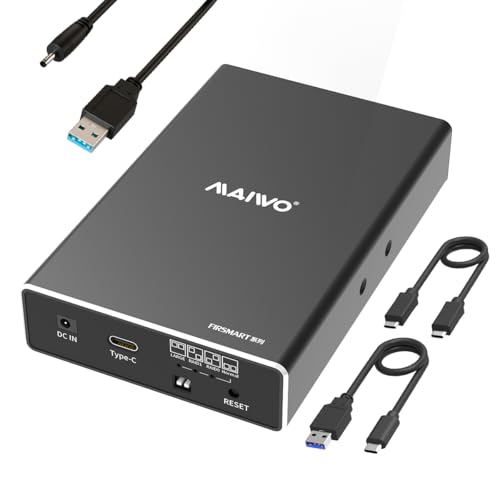
- Four selectable drive modes
- Holds two 2.5-inch SATA drives
- Supports up to 16TB total
Best For: Configurable dual-drive SATA storage
Best for Flexible RAID – NEWQ Dual-Bay NVMe Enclosure
Among dual bay ssd enclosures, the NEWQ stands out for offering RAID 0, RAID 1, JBOD, and offline clone modes in one compact aluminum unit. Its tool-free cover makes swapping M.2 2280 NVMe drives easier.
Best For: Buyers who want RAID options and drive cloning in the same enclosure.
Pros:
- RAID 0, RAID 1, JBOD, and clone modes offer flexible drive management.
- Tool-free access simplifies SSD changes.
- 20Gbps connection and auxiliary USB-C power input suit demanding dual-drive setups.
Cons:
- Specified for M.2 2280 NVMe SSDs, not other drive lengths or SATA SSDs.
- 20Gbps rated interface is slower than the 40Gbps-rated UGREEN option.
Choose this model if you expect to switch between performance, mirroring, and duplication. RAID 1 provides redundancy, but it should not replace a separate backup.
Best for Faster Transfers – UGREEN 40Gbps Dual-Bay NVMe Cloner
If transfer bandwidth tops your list for dual bay ssd enclosures, this UGREEN model offers a rated 40Gbps USB-C connection alongside one-button offline cloning. It accepts two NVMe SSDs in 2230, 2242, 2260, or 2280 sizes.
Best For: Users moving large files who also need standalone SSD duplication.
Pros:
- 40Gbps-rated connection and support for up to 8TB per drive.
- Offline cloning works without a computer.
- Aluminum top shell and 40mm fan provide active cooling.
- Software RAID 0, RAID 1, PM, and Union modes add configuration options.
Cons:
- RAID modes require software rather than being described as hardware RAID.
- Cloning requires a target disk larger than the source data disk, according to the supplied notes.
This is the speed-focused pick if your computer supports a suitable fast USB-C connection. The fan and included power adapter make it a more involved setup than a simple portable enclosure.
Best for Simple Cloning – Rosewill RS-N2-CL NVMe Dock
The Rosewill RS-N2-CL takes a straightforward docking-station approach to dual bay ssd enclosures: insert two compatible NVMe drives and use its one-button offline clone function. Its USB 3.2 Gen 2×2 interface is rated for up to 20Gbps.
Best For: Users who want a ready-to-connect NVMe duplication dock.
Pros:
- Standalone, one-button cloning does not require a computer.
- Supports M-key and B+M-key NVMe SSDs.
- Includes a 20Gbps USB-C cable, 10Gbps USB-A cable, and 12V/2A power adapter.
- Lists S.M.A.R.T. monitoring and TRIM support.
Cons:
- USB-A cable is rated for 10Gbps rather than the dock’s 20Gbps maximum.
- No RAID modes are specified in the supplied notes.
Pick the Rosewill if offline duplication and included connections matter more than RAID features. Check your SSD’s keying and NVMe interface before buying.
Best for Mixed SSD Interfaces – ASUS ROG Strix Aiolos
The ASUS ROG Strix Aiolos is worth a look among dual bay ssd enclosures if you have both M.2 NVMe PCIe and SATA drives. Its dual M.2 interface supports 2242, 2260, and 2280 SSDs, with a USB-C 3.2 Gen 2×2 connection rated up to 20Gbps.
Best For: Users with a mix of compatible M.2 NVMe and SATA SSDs who value portable, tool-free access.
Pros:
- Supports both M.2 NVMe PCIe and SATA SSD interfaces.
- Push-to-open, tool-free design speeds up installation and removal.
- Thermal pad and heat-resistant coating address heat during use.
- Includes an SSD monitoring dashboard and a carry hook with fabric tag.
Cons:
- No offline cloning or RAID modes are specified.
- Listed OS support starts at Windows 10 or macOS 14.4.
Its main appeal is interface flexibility in a compact enclosure, not standalone duplication. Verify your operating system and drive type against the stated compatibility before ordering.
Portable Pick – MAIWO Dual-Bay NVMe Enclosure
Among dual bay ssd enclosures, the MAIWO is a compact option for keeping two NVMe drives available as separate storage. Its tool-free slots accept 2230, 2242, 2260, and 2280 drives, with up to 8TB supported per slot.
Best For: Portable access to two separate NVMe SSDs when you can provide a cable for each drive.
Pros:
- Tool-free installation and a compact aluminum-alloy body.
- USB 3.1 Gen 2 Type-C connection rated up to 10Gbps.
- Includes thermal pads and supports up to 16TB across both slots.
Cons:
- Accessing both SSDs at once requires two data cables; only one is included.
- Does not support cloning.
The key buying distinction is its independent drive access: it suits straightforward portable storage, but not a one-cable, two-drive setup or offline duplication.
Cloning Pick – Rosewill NVMe Cloner and Eraser
If you are comparing dual bay ssd enclosures for drive maintenance rather than storage alone, the Rosewill adds offline NVMe cloning and four erasure modes. It also works as a tool-free M-Key SSD docking station with a USB 3.2 Gen 2×2 connection rated up to 20Gbps.
Best For: Duplicating or erasing NVMe drives without using a host computer for cloning.
Pros:
- Clones SSDs offline.
- Offers four drive-erasure modes.
- Tool-free dual-bay design and up to 20Gbps USB connectivity.
Cons:
- Its cloning and erasure functions may be unnecessary if you only need basic external storage.
- The supplied notes specify M-Key NVMe support, not SATA SSD support.
Choose this model when duplication and data removal are regular tasks; those functions distinguish it from a simpler two-slot enclosure.
Cooling Pick – WAVLINK 20Gbps Dual NVMe Enclosure
The WAVLINK stands out among dual bay ssd enclosures for its aluminum body and automatically adjusting cooling fan. It accepts one or two 2230, 2242, 2260, or 2280 PCIe NVMe SSDs, with up to 8TB supported in each slot.
Best For: Longer NVMe transfers where active cooling and a single USB-C connection are priorities.
Pros:
- USB 3.2 Gen 2×2 connection rated up to 20Gbps.
- Fan automatically adjusts speed as the enclosure warms.
- Supports up to 16TB total and includes a USB-C cable with a detachable USB-A connector.
Cons:
- Does not support SATA M.2 SSDs.
- Two installed SSDs share the 20Gbps connection; USB-A connections support up to 10Gbps.
This is a practical fit when cooling matters during extended use. The 20Gbps rating applies to the shared connection, so do not expect each installed drive to receive that full bandwidth simultaneously.
Best for Offline Cloning – ULXUUUN Dual-Bay NVMe Dock
Among dual bay ssd enclosures, this ULXUUUN dock stands out if you need to copy one NVMe drive to another without a computer. It also lets you access two drives over USB, with a rated interface speed of up to 20Gbps.
Best For: NVMe users who want standalone cloning and support for M.2 drives up to 22110.
Pros:
- One-button offline cloning works without a computer.
- Supports NVMe sizes 2230, 2242, 2260, 2280, and 22110.
- Includes USB-C and USB-A cables, a power adapter, and an open-frame design for airflow.
Cons:
- Does not support SATA M.2 drives.
- Cloning erases the target drive; it must be at least as large as the source, and the data cable must be unplugged.
Choose this dock when cloning is the priority. Check drive type and capacity carefully before pressing the clone button.
Best for Simple Dual-Drive Access – ICY BOX 20Gbps NVMe Enclosure
If you want dual bay ssd enclosures for everyday access to two M.2 NVMe drives, this ICY BOX model connects both through one USB-C cable. Its tool-free design makes drive changes straightforward, while its USB 3.2 Gen 2×2 interface is rated for up to 20Gbps.
Best For: Managing two NVMe drives from a single USB-C connection without tools.
Pros:
- Reads two NVMe SSDs simultaneously over one cable.
- Tool-free rubber fasteners accommodate 2230, 2242, 2260, and 2280 drives.
- Includes a thermal pad and supports Windows and macOS.
Cons:
- Maximum rated speed requires a host with USB 3.2 Gen 2×2 support.
- Does not list support for 22110 drives.
This is a practical pick for dual-drive access rather than a dedicated cloning workflow. Match your host port to the enclosure’s interface if speed matters most.
Best for SATA RAID – MAIWO Dual-Bay 2.5-Inch Enclosure
Most dual bay ssd enclosures here focus on M.2 NVMe, but this MAIWO model is for two 2.5-inch SATA SSDs or HDDs. It offers selectable RAID 0, RAID 1, NORMAL (PM), and LARGE (JBOD) modes, making drive configuration its main draw.
Best For: Using or combining two 7mm or 9.5mm 2.5-inch SATA drives in a compact external enclosure.
Pros:
- Offers RAID 0, RAID 1, NORMAL (PM), and LARGE (JBOD) modes.
- Supports up to 8TB per bay, or 16TB total.
- Tool-free installation, hot swapping, and an aluminum-alloy case.
Cons:
- Built for 2.5-inch SATA drives, not M.2 NVMe SSDs.
- Requires additional power through the included power cable.
Pick this one when SATA drive compatibility and RAID options matter more than an NVMe dock’s interface speed. Its USB 3.1 Gen 2 connection is rated up to 10Gbps in RAID 0 mode.
How We Picked the Best Dual Bay SSD Enclosures
We focused on the differences that matter when shopping for Dual Bay SSD Enclosures: supported drive types and lengths, stated USB bandwidth, cloning or RAID functions, installation method, and power requirements. The selection spans portable M.2 cases, desktop-style clone docks, and a 2.5-inch SATA RAID enclosure. Listed speeds are interface ceilings, not guaranteed file-transfer rates; your SSDs, computer port, cable, and operating conditions all affect performance.
Quick Comparison: Start with the Job
For the fastest listed connection, the UGREEN model advertises 40Gbps, while several Rosewill, WAVLINK, ICY BOX, and other M.2 options advertise 20Gbps. The 10Gbps MAIWO M.2 enclosure may be sufficient for backups or general access. If you need a drive-to-drive copy without a computer, look specifically at models advertising offline cloning rather than assuming every dual-bay case can do it. For mirrored or combined storage, compare the RAID-capable models and check whether RAID is handled by the enclosure or by software. Owners of 2.5-inch SATA drives should start with the MAIWO 2.5-inch model, not an M.2 enclosure.
Key Buying Factors for Dual-Bay SSD Enclosures
Drive Compatibility Comes First
Check both the physical format and electrical interface. An M.2 NVMe drive is not automatically compatible with an M.2 SATA slot, even if it fits. Likewise, a 2.5-inch SATA SSD needs a different bay. Confirm supported M.2 lengths, such as 2230 or 2280, and check whether both bays accept your particular drives.
Match the Connection to Your Computer
A 20Gbps USB 3.2 Gen 2×2 enclosure needs a compatible host port to reach that connection speed; plugging it into a 10Gbps port limits it accordingly. Check the exact port specifications on your computer rather than relying on the USB-C connector shape. For 40Gbps models, verify the required host standard, cable, and any stated operating-system requirements. Sustained transfers may also slow if drives or the enclosure get hot.
Know What Cloning and RAID Actually Do
Offline cloning is useful for migration, but it commonly overwrites the destination drive. Check the manual for capacity rules, button sequences, and whether cloning works without a host computer. RAID 0 combines drives for a single volume but offers no fault tolerance; RAID 1 mirrors data but is not a backup against deletion, corruption, or theft. JBOD and individual-drive modes can mean different things across products, so verify how each enclosure presents disks to your system.
Who Should Buy Which Dual Bay SSD Enclosures?
Choose an offline-clone dock if your main task is replacing or duplicating an NVMe SSD. Choose a RAID-capable enclosure if you want one combined or mirrored volume and are comfortable managing its limitations. Pick a compact, tool-free M.2 model for frequent travel or drive swaps, paying attention to heat management and whether external power is needed. If you already own 2.5-inch SATA SSDs or HDDs, buy the matching 2.5-inch enclosure rather than paying for NVMe bandwidth you cannot use. For simple backups, prioritize compatibility and dependable connections over the highest advertised speed.